
Cisco Catalyst 9000 Series Comparison: Buying Map by Port and Role
This Cisco Catalyst 9000 Series comparison should start with the requirement, not the highest series number. Choose Catalyst 9200 for compact or standard access, Catalyst 9300 for high-power or high-density enterprise access, Catalyst 9400 for modular access, Catalyst 9500 for fixed fiber distribution and core, and Catalyst 9600 for modular campus core.
If the project asks for 48 access ports with high endpoint power and 10G uplinks, begin with Catalyst 9300 or C9300X and validate the exact PoE class, power supplies, and uplink module. Do not jump to Catalyst 9400 unless the site also needs chassis access, multiple line cards, supervisor planning, or a building-level modular standard. If the project asks for 24 x 10G fiber ports for distribution or collapsed core, begin with Catalyst 9500. If the project asks for a modular core with staged 100G or 400G growth, begin with Catalyst 9600.
The practical rule is simple: endpoint power usually belongs in the access path, while dense fiber and routing scale usually belong in the distribution or core path. A correct shortlist should identify the network role first, then confirm port speed, PoE class, uplinks, stacking or chassis format, software, optics, and delivery risk.
This comparison stays inside the Catalyst 9000 portfolio. For broader campus architecture choices, use the Cisco switch selection guide for enterprise campus networks. For Catalyst families outside the 9000 Series, use the Cisco Catalyst switch comparison.
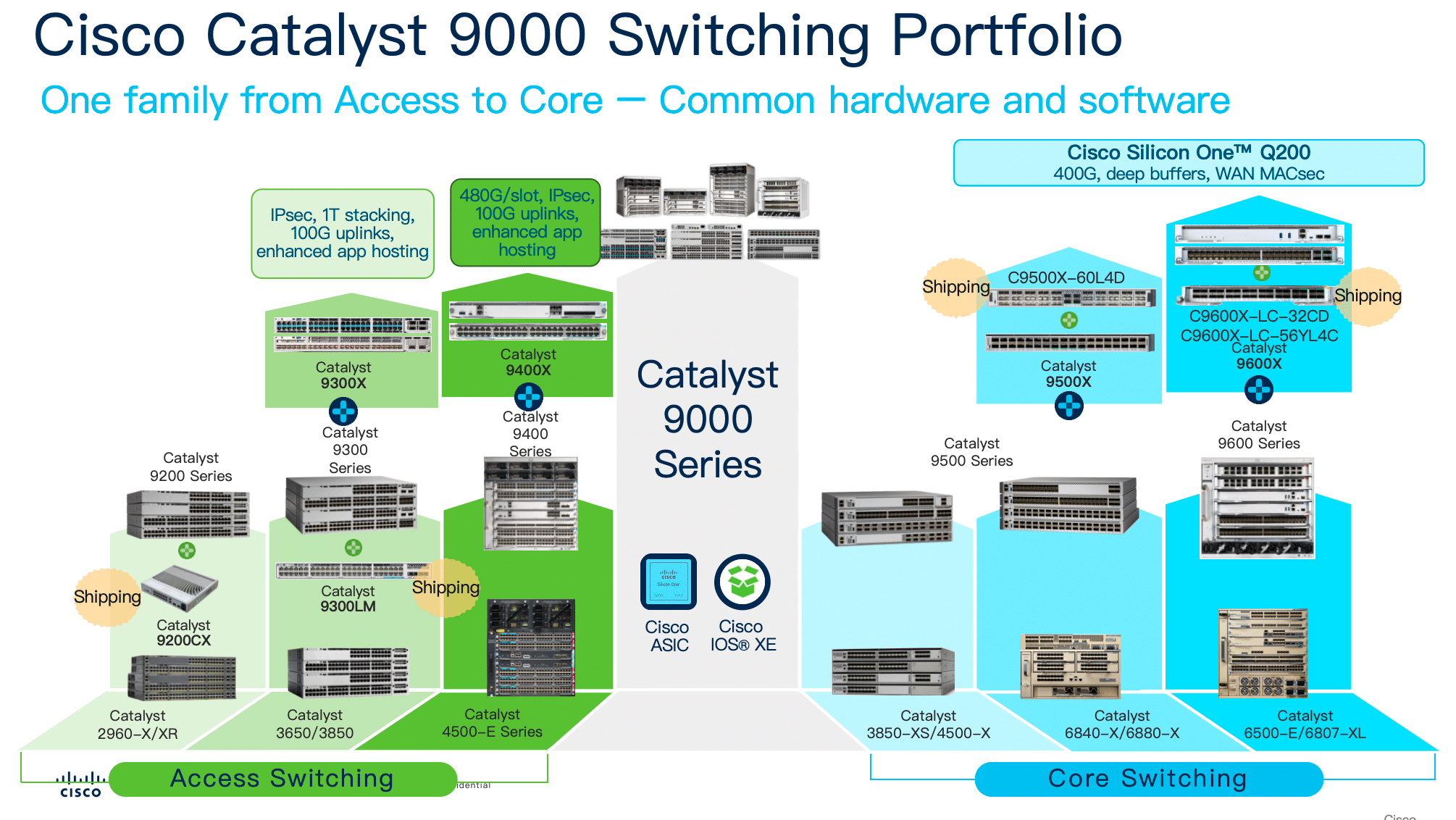
Which Cisco Catalyst 9000 Series Should You Choose?
Use this table as the first-pass shortlist before comparing individual SKUs.
| Requirement starts with | Start with | Move up when | Do not start with |
|---|---|---|---|
| 8 or 12 compact access ports in a branch, quiet room, wall cabinet, or local edge | Catalyst 9200CX | The site needs a full 24/48-port access closet | C9500 or C9600 |
| 24 or 48 standard copper access ports with moderate PoE+ requirements | Catalyst 9200L or Catalyst 9200 | The closet needs stronger uplinks, mGig, higher PoE headroom, or larger stacking design | C9400 without a chassis requirement |
| 48 access ports with many APs, cameras, thin clients, or smart-building endpoints | Catalyst 9300 or C9300X | The design needs multiple high-density access line cards in one chassis | C9500 or C9600 |
| 48 ports near 60W or 90W endpoint class with 10G uplinks | Catalyst 9300 UPOE/UPOE+ or C9300X UPOE+ direction | The site standard requires modular access or centralized line-card growth | C9400 without line-card or chassis growth |
| Large access closet with several 48-port PoE or mGig line cards | Catalyst 9400 | The design also needs core-class modular fiber scale | C9600 for endpoint PoE |
| 24 x 10G fiber ports for access aggregation or collapsed core | Catalyst 9500 | The future port roadmap needs line-card expansion instead of fixed switches | C9300 for distribution or core roles |
| 48 x 10G or 25G fiber aggregation with 40G/100G uplinks | Catalyst 9500 | The growth plan needs a modular core chassis | C9400 for fixed fiber core |
| Fixed 100G distribution or campus core | Catalyst 9500 | The core needs chassis slots, supervisor redundancy, or phased line-card expansion | C9200, C9300, or C9400 |
| Modular campus core with 100G or 400G growth | Catalyst 9600 | Fixed high-speed switches are not enough for the lifecycle plan | C9400 as a core substitute |
The most useful buying split is endpoint-facing access versus fiber-facing aggregation or core. Endpoint-facing designs usually stay in the C9200, C9300, or C9400 path. Fiber aggregation and campus backbone designs usually move to C9500 or C9600.
Catalyst 9000 Port and Power Selection Matrix
Port count alone does not identify the correct series. A 48-port requirement may mean a standard access switch, a high-power access switch, or a modular chassis. A 24-port fiber requirement may mean access, distribution, or core depending on where the switch sits in the topology.
| Port or power requirement | Best starting series | Why this series fits | Quote checks |
|---|---|---|---|
| 8 or 12 compact ports for a small office, cabinet, AP edge, camera edge, or quiet space | C9200CX | Compact access avoids a full wiring-closet switch where rack depth, noise, or mounting is constrained | Mounting, power adapter or power input, PoE need, uplink type |
| 24 or 48 1G copper access ports with moderate PoE+ | C9200L or C9200 | Keeps the access BOM simple for predictable branch and IDF closets | Fixed vs modular uplinks, stack kit, PSU wattage, license tier |
| 24 or 48 access ports with stronger growth headroom than C9200 | C9300L, C9300, or C9300X | Better fit when the closet is more important, uplinks are faster, or endpoint power is less predictable | Stack member rules, uplink module, power supply, software release |
| 48 ports with high-power endpoints and 10G uplinks | C9300 UPOE/UPOE+ or C9300X UPOE+ direction | A single high-power access closet is normally a stackable access decision before it becomes a chassis decision | Exact PID, per-port PoE class, total PoE budget, power redundancy |
| Dense mGig access for Wi-Fi, smart buildings, or mixed-speed endpoints | C9300, C9300X, or C9400 | These families provide the stronger mGig and power directions needed for modern access closets | Port-speed mix, AP power class, uplink oversubscription, cooling |
| Several 48-port PoE or mGig access blocks in one building chassis | C9400 | Chassis access makes sense when line-card growth and centralized power are part of the standard | Chassis size, supervisors, line cards, power supplies, fan tray, blanks |
| 24 x 10G fiber ports for access layer devices | C9300 fiber direction if still access; C9500 if distribution/core | The role decides the family more than the optical port count | Routing scale, uplink target, StackWise vs StackWise Virtual, optics |
| 24 or 48 x 10G/25G fiber aggregation | C9500 | Fixed fiber aggregation is cleaner on a distribution/core platform | Port speed, breakout plan, redundant power and fans, support term |
| 100G fixed campus core | C9500 | Fixed core is efficient when port count and growth are known | 100G optics, StackWise Virtual links, route scale, rack power |
| Modular 100G or 400G campus core | C9600 | Chassis core fits phased line-card growth and supervisor-based operations | Chassis, supervisors, line cards, power supplies, fan tray, optics, service plan |
This matrix is intentionally series-level. Once the project narrows to two possible series, use the detailed comparison page for that boundary before choosing a SKU.
Catalyst 9000 Series Characteristics by Port Type
The Catalyst 9000 families have different port profiles. That distinction is more useful in procurement than a generic access, distribution, and core label because the wrong port class can force a redesign after the quote is already approved.
| Series | Port profile | Power profile | Uplink or backbone profile | Best procurement fit |
|---|---|---|---|---|
| C9200CX | Compact 8/12-port access | Compact PoE options by SKU | Compact access uplink direction, including SFP+ on selected models | Small branches, wall cabinets, quiet rooms, local edge access |
| C9200L / C9200 | 24/48-port standard access | PoE and PoE+ direction by SKU | 1G/10G access uplinks by model; C9200 has modular uplink direction | Standard IDF closets, repeatable access refreshes, controlled budgets |
| C9300L / C9300 / C9300X | Enterprise access, mGig access, and access fiber by model | PoE, UPOE, and UPOE+ directions by SKU | Stronger uplink paths, including high-speed modular uplink direction on selected models | High-density access, Wi-Fi-heavy closets, smart buildings, larger access stacks |
| C9400 | Modular access line cards for copper, mGig, and fiber | High-density PoE, UPOE, and UPOE+ line-card direction | Access aggregation and selected distribution use | Buildings that standardize on chassis access and line-card growth |
| C9500 | Fixed fiber aggregation and core ports | No endpoint PoE role | 10G/25G/40G/100G fixed distribution and core direction | Fixed campus distribution, collapsed core, known fiber roadmap |
| C9600 | Modular fiber and high-speed core line cards | Not an endpoint PoE platform | Modular 100G/400G core direction by supervisor and line-card plan | Large campus core, chassis growth, supervisor-based resiliency |
Do not select by series number alone. A C9400 can sit below a C9500 in many campus designs because it serves access endpoints. A C9500 can be a better fit than a C9400 for fixed fiber distribution even though it has no endpoint PoE. A C9600 can be correct at the core while being completely wrong for PoE access.
C9200 and C9200CX: Compact and Standard Access Selection
Catalyst 9200CX fits compact access sites where a full rack switch is too large, noisy, or unnecessary. C9200L and C9200 fit standard 24/48-port access closets where the buyer needs a repeatable branch or IDF platform with a simpler BOM than C9300.
Choose C9200CX when the site has a small port count, wall-cabinet constraints, a quiet-room requirement, or a local edge use case near cameras, APs, phones, or building systems. Validate the exact compact SKU because power input, PoE behavior, and uplinks differ across the compact family.
Choose C9200L or C9200 when the access closet needs a normal rack switch with 24 or 48 ports. C9200L keeps the order simpler with fixed uplinks. C9200 gives more uplink flexibility through modular uplink direction. Move to C9300 when the closet needs higher PoE headroom, stronger mGig support, more demanding stacking, or a longer growth runway.
For the compact-access boundary, use the Cisco C9200L vs C9200CX comparison.
Download: Cisco Catalyst 9200 Series comparison deck (PDF) — C9200 vs C9200L vs C9200CX across port count, PoE, and uplink options.
C9300 and C9300X: High-Power, mGig, and Enterprise Access
Catalyst 9300 is the main enterprise access family when the access layer matters enough to require stronger PoE, mGig options, modular uplinks, StackWise growth, and a wider SKU range. It is the correct place to start for many Wi-Fi, camera, smart-building, and high-density endpoint designs.
C9300X is the stronger 9300 path for high-speed access, high-power endpoint designs, and access closets that need more uplink headroom. It should be reviewed before C9400 when the project still looks like a fixed stackable access closet rather than a modular access chassis.
| Requirement | Why C9300 or C9300X belongs in the shortlist | Before quoting |
|---|---|---|
| 48 access ports with 10G uplinks | Stackable access keeps the BOM repeatable across closets | Confirm uplink module or fixed uplink path, optics, and stack plan |
| 60W or 90W endpoint class | C9300 UPOE/UPOE+ and C9300X UPOE+ directions address high-power access without defaulting to a chassis | Confirm exact PID, endpoint power class, total PoE budget, and PSU sizing |
| mGig AP access | C9300 and C9300X provide stronger mGig access directions than standard C9200 designs | Confirm port-speed mix and AP power requirements |
| Access fiber that still behaves like access | C9300 fiber direction can make sense where fiber endpoints are still in an access stack | Confirm whether the role is access, not distribution or core |
The common purchasing error is treating any 48-port PoE model as equivalent. A 48-port PoE+ switch is not a substitute for a UPOE or UPOE+ requirement. If the project includes high-power wireless, smart lighting, badge readers, cameras, or medical/industrial endpoints, check the exact port class and power budget before comparing price.
For the access-layer boundary between 9200 and 9300, use the Cisco 9200 vs 9300 comparison. For the boundary between stackable access and fixed core, use the Cisco 9300 vs 9500 comparison.
Download: Cisco Catalyst 9300 Series comparison deck (PDF) — C9300 vs C9300X vs C9300L/9300LM across UPOE, mGig, StackWise, and uplink modules.
C9400: Modular Access for Large PoE and Line-Card Designs
Catalyst 9400 should be treated as a modular access decision. It belongs in projects where the buyer needs chassis access, multiple access line cards, centralized power design, supervisor planning, and a longer building lifecycle. It is not automatically required because a single closet needs 48 high-power access ports.
Choose C9400 when a building standard calls for line-card growth, large access port counts, high-density PoE, mGig access, fiber access, and a modular maintenance model. A C9400 order also needs more BOM discipline than a fixed switch order: chassis, supervisors, line cards, power supplies, fan tray, blanks, optics, licenses, and support must match the design.
Do not choose C9400 only because the project says “large PoE.” If one IDF needs 48 copper ports with high power and 10G uplinks, C9300 or C9300X may be the more practical first quote. If the building needs several 48-port PoE/mGig access blocks under one modular platform, C9400 becomes the stronger conversation.
For the stackable access versus chassis access boundary, use the Cisco C9300 vs C9400 comparison.
Download: Cisco Catalyst 9400 Series comparison deck (PDF) — C9400 vs C9400X supervisors and line cards for modular, high-PoE access.
C9500: Fixed Fiber Distribution and Core
Catalyst 9500 is the fixed fiber distribution and core family in the Catalyst 9000 portfolio. It fits projects driven by 10G, 25G, 40G, or 100G fiber aggregation, StackWise Virtual designs, collapsed core, and a simpler fixed-switch BOM than a modular chassis.
Choose C9500 when the port plan is known and a fixed pair can carry the distribution or core role cleanly. It is usually a better starting point than an access switch for 24 x 10G fiber distribution, 48 x 10G/25G aggregation, or 100G fixed core designs.
Do not use C9500 as an endpoint PoE platform. It has no access PoE role for APs, phones, cameras, lighting, or smart-building devices. If the requirement starts with powered endpoints, return to C9200, C9300, or C9400. If the requirement starts with high-speed fiber and routing, C9500 belongs in the shortlist.
Download: Cisco Catalyst 9500 Series comparison deck (PDF) — C9500 vs C9500H vs C9500X for fixed fiber distribution and core.
C9600: Modular Campus Core
Catalyst 9600 is the modular campus core family. It belongs in designs where fixed C9500 switches do not provide enough lifecycle flexibility, line-card expansion, supervisor redundancy, staged high-speed growth, or chassis-based operations.
A C9600 purchase should be quoted as a complete system, not as a chassis line item. The BOM must include the chassis, supervisors, compatible line cards, power supplies, fan tray, blanks where required, optics, software, support, rack requirements, and service plan. This is the highest-complexity Catalyst 9000 buying path.
Do not choose C9600 for endpoint PoE. Even where copper data line cards exist in the broader family, the purchasing logic is core switching, not access power. If the need is modular PoE access, C9400 is the correct family to review.
For the fixed core versus modular core boundary, use the Cisco C9500 vs C9600 comparison. For modular access versus modular core, use the Cisco C9400 vs C9600 comparison.
Download: Cisco Catalyst 9600 Series comparison deck (PDF) — C9600 vs C9600X supervisor engines for the modular campus core.
Common Wrong Catalyst 9000 Shortlists to Avoid
Many Catalyst 9000 ordering mistakes come from matching only the port count. The correct method is to match the endpoint type, power requirement, network role, and growth model first.
| Wrong shortcut | Better interpretation | Buying risk |
|---|---|---|
| “48 ports with 60W endpoints means C9400” | Start with C9300/C9300X unless the site also needs chassis access | Overbuying a chassis when a stackable access switch may satisfy the requirement |
| “24 x 10G fiber means C9300 fiber” | Use C9300 only if the role is still access; use C9500 for distribution/core | Building a backbone role on an access-family decision |
| “C9600 is the larger C9400” | C9400 is modular access; C9600 is modular core | Wrong line-card, power, and operational model |
| “C9500 can replace an access switch if fiber is needed” | C9500 is fixed distribution/core, not endpoint PoE access | Missing copper access ports, PoE, and access stack behavior |
| “A license upgrade can fix the wrong series” | Hardware format, port type, power class, and chassis model cannot be changed by license alone | Buying the wrong physical platform |
| “C9200, C9300, and C9400 are just good/better/best access” | They map to compact/standard access, enterprise access, and modular access | Incorrect cost and lifecycle assumptions |
The strongest shortlist usually has two layers: the likely series and the fallback series. For example, a high-power 48-port closet may shortlist C9300X first and C9400 only if the site standard or port roadmap requires a chassis.
Catalyst 9000 BOM Complexity by Series
The more modular the platform, the more the quote depends on supporting parts. A correct series selection can still fail if the BOM is incomplete.
| Series | BOM complexity | Items buyers commonly miss | Commercial risk |
|---|---|---|---|
| C9200CX | Low to medium | Mounting, power input, power adapter, compact uplink optics | Wrong compact SKU for room, power, or mounting constraint |
| C9200L / C9200 | Medium | Stack kit, uplink choice, power supply, license tier, spare optics | Treating fixed uplink and modular uplink models as interchangeable |
| C9300 / C9300X | Medium to high | Uplink module, StackWise cable, StackPower plan, PSU wattage, PoE budget, license | Buying the right port count but the wrong power class or uplink path |
| C9400 | High | Chassis, supervisors, line cards, power supplies, fan tray, blanks, optics, rack plan | Quoting a partial chassis system that cannot be deployed |
| C9500 | Medium to high | Optics, redundant power and fans, StackWise Virtual links, route scale, support term | Choosing fixed core without enough port or growth headroom |
| C9600 | Highest | Chassis, supervisors, line cards, power supplies, fan tray, blanks, optics, software release, service plan | Treating a modular core as a single-SKU purchase |
Layer23-Switch can review Catalyst 9000 BOMs when the order includes high-power access, mixed stack members, C9400 chassis parts, C9500 high-speed optics, C9600 supervisors and line cards, or a migration from older Catalyst platforms. This is most useful before pricing and delivery dates are committed.
Legacy Catalyst Replacement Direction
Replacement planning should not be done by old model number alone. The same legacy switch can map to different Catalyst 9000 series depending on whether the new design keeps the old topology or corrects it.
| Existing environment | Common Catalyst 9000 direction | What to verify |
|---|---|---|
| Compact 2960-CX-style edge | C9200CX | Mounting, fanless or acoustic requirement, compact power, uplink type |
| 2960-X or 2960-XR access closets | C9200L, C9200, or C9300 | PoE load, uplink speed, stack plan, license tier |
| 3650 or 3850 access stacks | C9300L, C9300, or C9300X | StackWise expectations, uplink modules, power sharing, mGig need |
| Large 4500 access chassis | C9400 or fixed-access redesign with C9300X | Whether the site still needs modular access |
| Fixed 10G fiber aggregation | C9500 | Fiber density, routing role, 40G/100G growth, optics |
| Modular 6500 or 6800 campus core | C9600, with C9500 reviewed if fixed core is enough | Whether modular core growth still justifies a chassis |
A refresh project is often the right moment to remove a historical mismatch. Some old chassis deployments can move to fixed stacks. Some old fixed aggregation designs need a stronger fixed core. Some old modular cores still need a modular replacement.
Where to Go Next for Detailed Catalyst Comparisons
Use this comparison to choose the likely series. Use the detailed comparison pages only after the shortlist has narrowed to a real boundary.
Download the Catalyst 9000 comparison decks (PDF)
Each deck compares the models within one series side by side — these are multi-model comparison guides, not single-product datasheets.
- Catalyst 9200 Series comparison (PDF) — C9200 / C9200L / C9200CX
- Catalyst 9300 Series comparison (PDF) — C9300 / C9300X / C9300L / C9300LM
- Catalyst 9350 Series comparison (PDF) — new-generation access
- Catalyst 9400 Series comparison (PDF) — C9400 / C9400X, Sup & line cards
- Catalyst 9500 Series comparison (PDF) — C9500 / C9500H / C9500X
- Catalyst 9600 Series comparison (PDF) — C9600 / C9600X, Sup engines
| Remaining decision | Read next |
|---|---|
| Catalyst portfolio beyond the 9000 Series | Cisco Catalyst switch comparison |
| Compact C9200CX vs rack access C9200L | Cisco C9200L vs C9200CX |
| C9200 / C9200L vs C9300 / C9300L | Cisco 9200 vs 9300 |
| C9300X stackable access vs C9400 chassis access | Cisco C9300 vs C9400 |
| C9300X access or compact aggregation vs C9500 fixed core | Cisco 9300 vs 9500 |
| C9400 modular access/distribution vs C9600 modular core | Cisco C9400 vs C9600 |
| C9500 fixed core vs C9600 modular core | Cisco C9500 vs C9600 |
This routing keeps the buying map from becoming a model-by-model catalog. The goal is to select the correct series and avoid wrong-family quotes before moving into SKU-level comparison.
Catalyst 9000 Quote Checklist
Before requesting price and lead time, confirm the following items against the project BOM.
| Check | Why it matters |
|---|---|
| Network role | Access, distribution, and core roles point to different Catalyst 9000 families |
| Endpoint type | APs, cameras, phones, lighting, sensors, fiber endpoints, and backbone links create different port requirements |
| Port count and speed | 1G copper, mGig, 10G fiber, 25G fiber, 40G, 100G, and 400G should not be mixed casually |
| Per-port PoE and total PoE | High-power endpoints require exact PID, PSU, and power budget validation |
| Uplink count and speed | Access uplinks and core backbone links are different design decisions |
| Stack, virtual pair, or chassis | StackWise, StackWise Virtual, and supervisor redundancy are different operating models |
| Power and cooling | PSU wattage, redundancy, airflow, rack power, and room constraints affect the final order |
| Optics and cables | Transceiver type, fiber distance, breakout, DAC/AOC, and spares can change delivery timing |
| Software and license | License tier, subscription term, and IOS XE release must support the required features |
| Stock and substitution | Similar-looking SKUs may differ in PoE class, uplinks, license suffix, or chassis compatibility |
The safest buying sequence is role, port type, power class, uplink direction, hardware format, series, SKU, license, optics, power, and support. If the role is wrong, a better SKU will not fix the design.
FAQ: Cisco Catalyst 9000 Series
How should buyers choose a Cisco Catalyst 9000 Series switch?
Start with the network role, port type, endpoint power, uplink speed, and hardware format. C9200 fits compact and standard access, C9300 fits enterprise access that needs higher PoE, mGig, stacking, and uplink headroom, C9400 fits modular access, C9500 fits fixed distribution and core, and C9600 fits modular campus core.
Which Catalyst 9000 series fits a 48-port high-power access closet?
Start with Catalyst 9300 or C9300X when the requirement is a single 48-port access closet with high-power endpoints and 10G uplinks. Move to Catalyst 9400 only when the site also needs chassis access, multiple line cards, centralized power planning, or a modular building standard.
Is Catalyst 9400 always better than Catalyst 9300?
No. Catalyst 9400 is better when the project requires a modular access chassis. Catalyst 9300 or C9300X is usually the more practical starting point for fixed stackable access closets that need mGig, UPOE, UPOE+, modular uplinks, or repeatable spare units.
Which Cisco Catalyst 9000 series supports endpoint PoE?
C9200, C9300, and C9400 families include endpoint PoE options, depending on the exact model, line card, and power configuration. C9500 and C9600 should be treated as distribution and core platforms, not endpoint PoE access switches.
Which Catalyst 9000 series should be used for 24 x 10G fiber ports?
Use the network role to decide. If the 24 x 10G fiber requirement is access-layer fiber, a C9300 fiber direction may fit. If the requirement is distribution, aggregation, or collapsed core, Catalyst 9500 is usually the better starting series.
What is the series-level difference between Catalyst 9500 and Catalyst 9600?
Catalyst 9500 is a fixed high-speed distribution and core family. Catalyst 9600 is a modular campus core family built around chassis slots, supervisors, line cards, power supplies, and fan tray. Choose C9500 when fixed ports fit; choose C9600 when modular core growth is required.
Can Catalyst 9600 be used as a PoE access switch?
No. Catalyst 9600 should not be selected for endpoint PoE access. It is a modular campus core platform. If the project needs modular PoE, UPOE, UPOE+, or mGig access, Catalyst 9400 is the correct modular access family to review.
What should be checked before ordering Catalyst 9000 switches?
Confirm the exact series, SKU, license tier, IOS XE release, port type, PoE budget, uplink speed, optics, power supplies, fan or airflow requirement, stacking accessories, chassis components, support term, stock, lead time, and acceptable substitutes.
Final Buying Position
Choose C9200CX for compact access, C9200L or C9200 for standard access, C9300 or C9300X for stronger enterprise access, C9400 for modular access, C9500 for fixed fiber distribution and core, and C9600 for modular campus core. The decisive inputs are endpoint type, PoE class, port speed, uplink requirement, growth model, and BOM complexity.
For procurement teams, the most important rule is simple: endpoint power usually belongs in the access path, and high-speed fiber aggregation usually belongs in the distribution or core path. Once that boundary is clear, the Catalyst 9000 Series becomes a practical shortlist instead of a crowded catalog.





