What is Cisco DNA Center (Catalyst Center)? Core Features & Supported Switches List
Quick Answer Cisco DNA Center (now officially renamed Cisco Catalyst Center) is a powerful centralized network controller and management dashboard. It provides a single pane of glass to automate hardware provisioning, optimize network policies, and leverage AI for troubleshooting. Core capabilities include automated device discovery, Plug and Play (PnP) deployment, Software Image Management (SWIM), and deep telemetry analytics, allowing IT teams to manage complex campus networks from one unified interface.
Overcoming the Complexities of Campus Network Management
As enterprise networks expand, relying on the traditional Command Line Interface (CLI) to manually manage hundreds of Catalyst switches across different floors and remote sites is highly inefficient and prone to human error. Routine tasks like firmware upgrades, tracking configuration drift, or isolating complex routing loops consume hundreds of engineering hours.
This guide strips away the marketing jargon to break down the core architecture of the platform. We will provide a definitive list of Cisco DNA Center supported switches and detail the hardcore operational features—from automated OS upgrades to visual packet tracing—that you can deploy in your production environment.
If your organization is evaluating or currently operating Cisco Catalyst 9000 series switches, read on to discover how Cisco Catalyst Center can maximize your hardware investment and eliminate repetitive troubleshooting.
What is Cisco DNA Center? (The 5 Core Pillars)
While historically known as Cisco DNA Center, Cisco has officially rebranded the platform to Cisco Catalyst Center. Regardless of the name, the underlying architecture acts as a Software-Defined Networking (SDN) controller for your enterprise LAN.
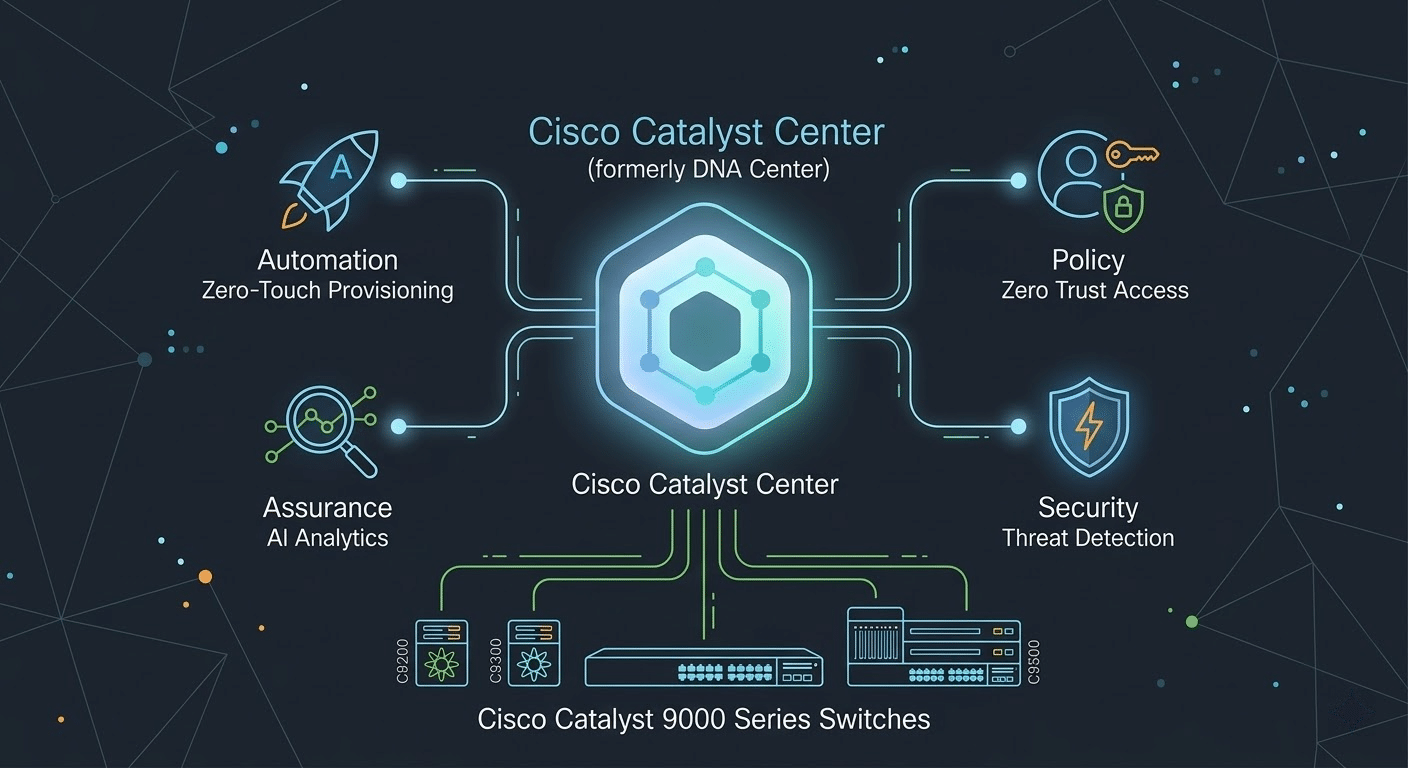
Instead of treating every switch as an isolated island, Catalyst Center manages the entire network through an intent-based model built on five foundational pillars:
- Design: Use intuitive workflows on spatial maps to define sites, buildings, and floors. Create universal network profiles (DHCP, DNS, IP address pools, and syslog servers) that apply globally.
- Policy: Define user and device profiles based on business intent. This enables highly secure access, micro-segmentation, and the automated mapping of QoS (Quality of Service) priorities for critical applications.
- Provision: Utilize policy-based automation to simplify device onboarding. This includes zero-touch provisioning and centralized OS patching.
- Assurance: Transform every switch on the network into a telemetry sensor. The platform streams data in real-time, using AI to intercept and flag anomalies before they impact end-users.
- Platform: Leverage open, extensible APIs (REST APIs, Webhooks) to integrate the controller with third-party IT Service Management (ITSM) tools like ServiceNow or external IPAM systems.
Cisco DNA Center Supported Switches (Catalyst Center Compatibility)
A common question during procurement is which hardware can actually be managed by the controller. Catalyst Center offers extensive device compatibility, spanning from the enterprise campus edge to the data center and rugged industrial environments.
Here is the primary breakdown of Cisco DNA Center supported switches:
- Catalyst 9000 Core Series (Deep Native Support):
- Access Layer: Catalyst 9200, 9200-L, and 9200CX series.
- Aggregation/Advanced Access: Catalyst 9300, 9300-L, and 9300X series.
- Core Layer: Catalyst 9400, 9400X, 9500, 9500X, 9500H, 9600, and 9600X series.
- Note: For the 9400 and 9500 series, the platform natively supports the configuration and monitoring of StackWise Virtual (SVL) switching architectures.
- Legacy Enterprise Switches: Full support for classic Cisco Catalyst 6500 series and 6800 series chassis.
- Data Center Switches: Support for the Cisco Nexus 7000 series.
- Industrial (Rugged) Switches: Support for Cisco Catalyst IE3300 and IE3400 series, including the ability to push application QoS policies directly to the industrial edge.
- Cisco Meraki Hardware: Through API-driven dashboard integration, you can discover and monitor existing Meraki hardware states within the Catalyst Center single pane of glass without requiring additional licensing.
Core Cisco DNA Center Features: How to Manage Your Switches
In real-world IT operations, Catalyst Center is not just an SNMP monitoring screen; it is a full-lifecycle controller. Below is a deep dive into the specific Cisco DNA Center features that network engineers use daily.
1. Automated Discovery and Inventory Management
Maintaining manual spreadsheets of network assets is obsolete. Catalyst Center automatically scans your network using protocols like CDP (Cisco Discovery Protocol), LLDP, SNMP (v2/v3), and IPDT. It accurately retrieves switch IP addresses, MAC addresses, serial numbers, and connection states to draw a dynamic physical topology map.
- Engineering Value: This establishes a highly accurate “single source of truth” database, ensuring that all subsequent operations (like pushing configs or upgrading firmware) are executed against the exact current state of the hardware.
2. Cisco DNA Center PnP (Plug and Play Zero-Touch Provisioning)
Deploying switches at new branch sites no longer requires flying a senior engineer out to console into the hardware. Through the Cisco DNA Center PnP feature, on-site personnel simply rack the new Catalyst switch, connect the uplinks, and power it on.
- Engineering Value: The switch automatically calls home to the Catalyst Center. The controller then securely and seamlessly pushes the pre-defined network configuration (hostnames, IP pools, routing protocols). This eliminates the staging phase entirely, reducing branch deployment time from hours to a matter of minutes.
3. SWIM (Software Image Management)
Firmware upgrades are historically the most high-risk operations in network engineering. Catalyst Center provides the SWIM feature to build a centralized repository. You can tag a specific, vetted IOS-XE version as the “Golden Image” for a specific hardware family (e.g., the 9300 series).
- Automated Safety Checks: Before initiating an upgrade, SWIM automatically runs pre-checks (capturing routing tables, CPU states, and interface statuses). After the upgrade, it runs post-checks to compare the states. If the routing table drops drastically, you know immediately.
- Bulk Distribution: Distribute and activate base firmware or security patches across hundreds of switches simultaneously with a single click, ensuring strict version compliance across the enterprise.
4. Advanced Assurance and AI Troubleshooting
Assurance is the operational heart of the platform, separating Catalyst Center from legacy NMS software.
- Device 360 View: Click on any switch to instantly view a comprehensive health score, historical CPU/memory utilization, thermal data, and module statuses. The system doesn’t just report a fault; it correlates it with Cisco TAC databases to provide actionable remediation steps.
- Path Trace & True Trace: When users report an application drop, input the source and destination IP addresses. Path Trace visually maps the hop-by-hop traffic path from the client to the server. It identifies exactly which switch the traffic passed through and pinpoints if a specific ACL (Access Control List) blocked the packets. True Trace can even trigger real-time packet captures along that path.
- AI Machine Reasoning Engine (MRE): The AI learns your specific network baseline to ignore harmless daily fluctuations. When a complex issue arises, like a routing loop, the MRE simulates the logical steps a CCIE engineer would take to perform root-cause analysis, and then suggests the exact CLI commands to fix it.
- ThousandEyes Integration: You can deploy ThousandEyes enterprise agents directly onto the flash storage of supported Catalyst switches via the dashboard. This provides deep visibility into application performance passing through that node, helping you rapidly isolate whether an issue is on your LAN or the ISP’s WAN.
5. Continuous Compliance and Automated RMA
- Configuration Drift Visibility: The controller continuously archives switch configurations. It compares the running configuration of any switch against your approved enterprise standard. If a local admin makes an unauthorized CLI change, Catalyst Center highlights the deviation and allows you to sync and remediate the drift with one click.
- Automated RMA Workflow: When a hardware switch fails and requires replacement, use the RMA workflow. The system automatically provisions the replacement hardware with the exact IOS-XE version, the previous configuration, and the necessary Smart Licenses, preserving historical KPI data and drastically reducing MTTR (Mean Time to Repair).
6. Cisco SD-Access and Network Micro-Segmentation
Under modern zero-trust security requirements, Catalyst switches act as Edge Nodes or Control Plane Nodes within the Cisco SD-Access architecture.
- Engineering Value: Through the Catalyst Center GUI, engineers can automatically provision VRFs (Virtual Routing and Forwarding) to create VXLAN-based virtual overlay networks. This allows for both macro and micro-segmentation. Instead of relying on massive, unmanageable ACLs or routing all traffic through a centralized firewall, you can enforce Security Group Tags (SGTs) directly at the switch port level. This automatically isolates untrusted IoT endpoints or guest traffic from critical business assets the moment they connect.
FAQ
Is Cisco DNA Center (Catalyst Center) a physical appliance or just software?
Originally, Cisco Catalyst Center was only available as a purpose-built physical hardware appliance. However, Cisco has now officially released a Virtual Appliance version. This allows enterprises to deploy the SDN controller as a virtual machine (VM) within VMware ESXi environments or public clouds like AWS, providing much greater deployment flexibility and scalability.
What is the difference between Cisco DNA Center and Cisco Prime Infrastructure?
Catalyst Center is the official next-generation replacement for Cisco Prime Infrastructure (PI). While Prime was primarily a traditional, passive network monitoring and NMS tool, Catalyst Center is an active intent-based controller that introduces AI-driven Assurance, automated Plug and Play (PnP), and SD-Access. Since Cisco Prime has reached its End-of-Life (EOL), Cisco highly recommends that all enterprise customers migrate to Catalyst Center.
Can Cisco DNA Center manage wireless controllers and routers?
Yes. Beyond enterprise switches, Catalyst Center is designed to act as the single pane of glass for your entire campus network. It provides deep native support for Cisco Catalyst 9800 series Wireless LAN Controllers (WLC), modern Catalyst/Aironet Access Points, as well as ISR 4000 and Catalyst 8000 series enterprise edge routers. This enables IT teams to enforce unified security policies across both wired and wireless domains.
What are the license requirements for Cisco DNA Center?
To onboard devices into the platform, purchasing the network hardware alone is not enough; the underlying devices must have an active Cisco Smart License. Basic device discovery, inventory management, and basic automation require a Cisco DNA Essentials license. To unlock the platform’s full potential—including the AI Machine Reasoning Engine (MRE), visual Path Trace, and SD-Access micro-segmentation—you must upgrade your devices to a Cisco DNA Advantage or higher-tier license.
Conclusion
Cisco DNA Center (Catalyst Center) is far more than an updated monitoring screen; it is a deep automation controller designed to unlock the full potential of modern hardware like the Cisco Catalyst 9000 series. By translating tedious CLI configurations into Intent-Based Networking (IBN) policies, and backing those policies with AI-driven Assurance telemetry, IT teams can finally break free from reactive firefighting. Whether you are utilizing PnP for rapid site rollouts, SWIM for compliance, or SD-Access for zero-trust security, Catalyst Center provides the definitive framework to scale your enterprise network reliably.