How to Read Cisco Switch Port Numbers: Interface Numbering Explained
A Cisco switch port name like GigabitEthernet1/0/1 reads as an interface type followed by three numbers — stack member / module / port. So Gi1/0/1 is the first built-in port on the first switch in the stack: GigabitEthernet (1 Gbps), stack member 1, module 0 (the built-in ports), port 1. Uplink ports live on module 1.
That three-part pattern holds across fixed Catalyst switches, but the meaning of the first number changes on modular chassis and on Nexus — which is where most confusion (and a few wrong answers online) comes from. Here is exactly how to decode any Cisco switch port number and confirm it on real hardware.

What Does GigabitEthernet1/0/1 Mean?
Read it left to right. The letters are the interface type and speed; the three numbers locate the physical port.
Part of GigabitEthernet1/0/1 | Field | Meaning |
|---|---|---|
| GigabitEthernet | Type | The port speed/family (1 Gbps here) |
| 1 | Stack member | Which switch in the stack (1–8) |
| 0 | Module | 0 = built-in (downlink) ports; 1 = uplinks |
| 1 | Port | The physical port, counted from the far left |
So Gi1/0/1 and Gi1/0/24 are the first and 24th built-in ports on switch 1. Te1/1/1 is the first 10-Gigabit uplink port on switch 1 (module 1). Gi2/0/5 is the fifth built-in port on the second switch in a stack. The format is officially defined in Cisco’s Catalyst interface configuration guides as type, switch (stack member) number, module number, and port number.
Cisco Interface Type Abbreviations: Fa, Gi, Te, and Beyond
The leading word — and its short form — tells you the port’s speed family. You can type the full name or the abbreviation; GigabitEthernet1/0/1, gigabitethernet1/0/1, gi 1/0/1, and gi1/0/1 all refer to the same port.
| Interface type | Short form | Speed |
|---|---|---|
| FastEthernet | fa | 10/100 Mbps |
| GigabitEthernet | gi | 10/100/1000 Mbps |
| TwoGigabitEthernet | tw | 2.5 Gbps |
| FiveGigabitEthernet | fi | 5 Gbps |
| TenGigabitEthernet | te | 10 Gbps |
| TwentyFiveGigE | twe | 25 Gbps |
| FortyGigabitEthernet | fo | 40 Gbps |
| HundredGigE | hu | 100 Gbps |
A quick read of the type tells you what optic the port expects, too: Gi ports take 1G SFP, Te ports take 10G SFP+, Twe ports take 25G SFP28, and Fo/Hu ports use QSFP-family modules.
How the Stack Member, Module, and Port Numbers Work
The three digits are not arbitrary. Each one answers a specific question: which switch, which part of that switch, and which port.
Why the Stack Member Starts at 1, Not 0
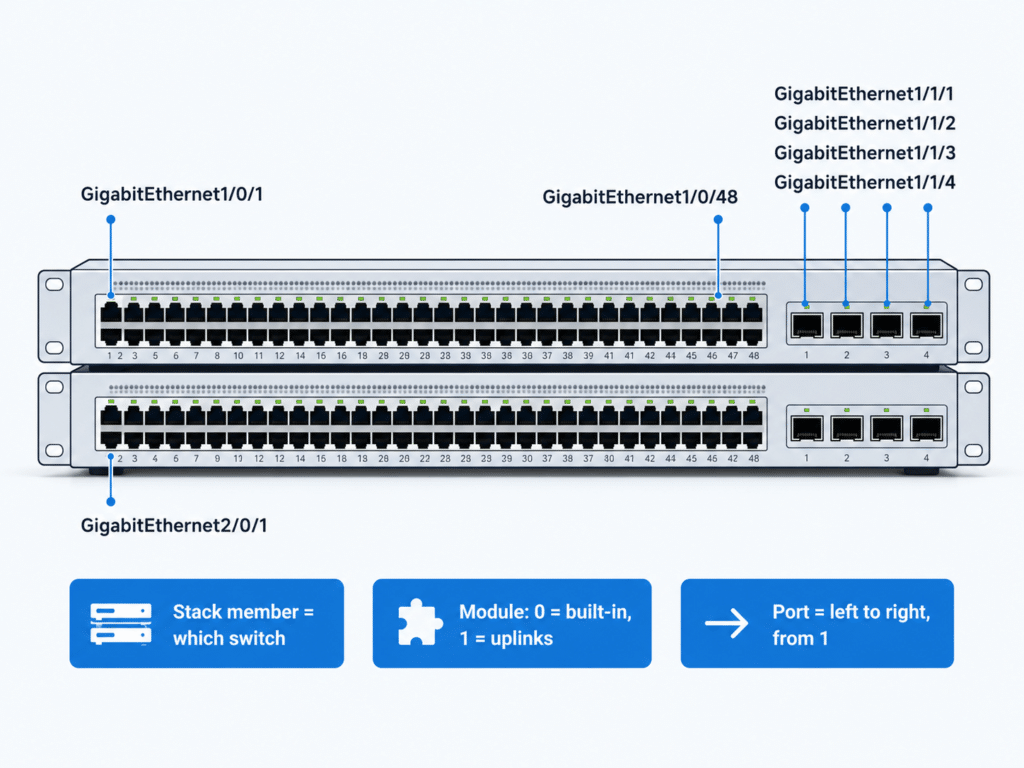
The first number identifies the switch within a StackWise stack. The range is 1 to 8, and a brand-new standalone switch defaults to member number 1 — which is why a single switch with no stack still shows Gi1/0/1, not Gi0/0/1. When you cable switches into a stack, each unit keeps its own member number, so Gi1/0/1 and Gi2/0/1 are the same physical port position on two different switches. You can use the switch port LEDs in Stack mode to see which unit is member 1, member 2, and so on.
Module 0 vs Module 1: Downlinks and Uplinks
The middle number is the module (or slot) on that switch. On fixed switches the rule is simple and fixed: the built-in ports are module 0, and the uplink ports are module 1. On a 24-port switch, the access ports are Gi1/0/1–Gi1/0/24, and the SFP uplinks restart their count on module 1 as Gi1/1/1–Gi1/1/4 (or Te1/1/1–Te1/1/4 for 10G uplinks). If you are still getting comfortable with the difference between an access/downlink port and an uplink, see what an uplink port is and does and how SFP and SFP+ ports work.
Port Order: Left to Right, Starting at 1
The last number is the physical port. Cisco numbers the 10/100/1000 ports starting at 1 from the far-left port when you face the front of the switch, increasing to the right. There is no port 0 on a switch. That single fact resolves most “which cable goes where” mistakes: find member, find module, then count from the left.
Why Do Some Ports Have Two Numbers and Others Three?
Not every Cisco device uses three numbers, and the count tells you what kind of device you are looking at:
- Three numbers (
Gi1/0/1) — a fixed or stackable switch, where the first digit is the stack member. - Two numbers (
Gi0/1,Ethernet1/1) — an older fixed switch, a router interface, or a Nexus port, where the first digit is a slot, not a stack member.
This is also the root of the classic router-versus-switch confusion. On a router, interfaces typically start at 0 (GigabitEthernet0/0); on a switch, the built-in module is 0 but the ports start at 1 (GigabitEthernet1/0/1). Same vendor, different counting — so never assume a switch 1/0/1 is a router-style slot/port.
How Cisco Nexus Numbering Differs from Catalyst
Data center Nexus switches run NX-OS and use a different scheme, which is where a lot of cross-platform mistakes happen.
Ethernet 1/1 and Breakout Ports
A standard Nexus port is written Ethernet slot/port — for example Ethernet1/1 is port 1 on module/slot 1. There is no separate “type abbreviation for speed”; almost every front-panel port is just Ethernet, and the configured speed depends on the transceiver. When you split a high-speed port into several lower-speed ports (a breakout — e.g., one 40G port into 4×10G), NX-OS adds a third number: the four breakout ports of the second 40G port become Ethernet1/2/1, 1/2/2, 1/2/3, and 1/2/4.
When 1/2/1 Is a Breakout, Not a Stack Member
Here is the trap: 1/2/1 on a stackable Catalyst and 1/2/1 on a Nexus mean completely different things. On Catalyst, the first digit is the stack member; on Nexus, a three-part number means a breakout subport, and the first digit is a chassis slot. The platform comparison below is the part most online guides get wrong or skip entirely.
| Platform family | Numbering format | What the first number means | Example |
|---|---|---|---|
| Fixed / stackable Catalyst (9200, 9300, 3850) | Type stack-member/module/port | Stack member — which switch in the stack (1–8) | Gi1/0/1, Gi2/0/1 |
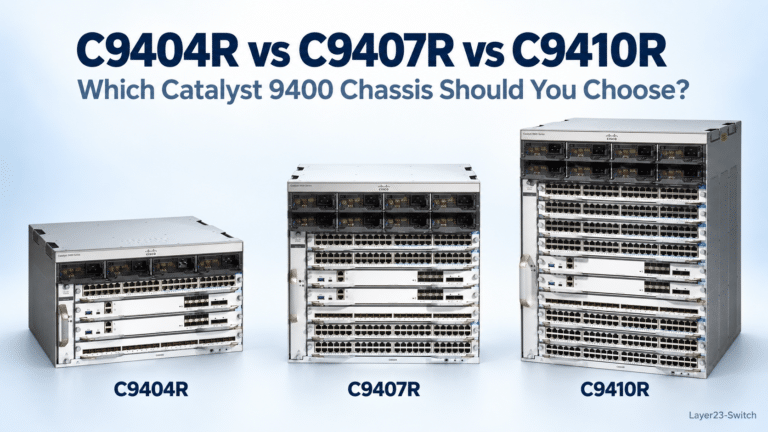
| Modular Catalyst chassis (9400, 9600) | Type slot/0/port | Chassis slot holding the line card or supervisor | HundredGigE5/0/5 (supervisor in slot 5) |
| Nexus (NX-OS) | Ethernet slot/port (breakout adds a third) | Module slot in the chassis | Ethernet1/1; breakout Ethernet1/2/1 |
On modular Catalyst chassis such as the 9400 and 9600, the format still has three numbers, but the first number is the physical chassis slot that holds the line card or supervisor — not a stack member. A supervisor uplink in slot 5 is named HundredGigE5/0/5. That is why the middle digit looking like “0” is not meaningless: the first digit is doing the work the stack member does on a fixed switch.
Verify Port Numbers on a Live Switch with show interfaces status
When in doubt, ask the switch instead of guessing from the chassis. These read-only commands map names to real hardware and are safe to run in production.
| Command | What it shows |
|---|---|
show interfaces status | Every port by name, with status, VLAN, speed, and type |
show ip interface brief | Each interface name and its up/down and IP state |
show switch | The stack members and their numbers (which unit is 1, 2, …) |
show module | Line cards/modules by chassis slot (modular 9400/9600) |
show inventory | Hardware and part numbers per slot |
show interfaces status
show switch
show module
show interfaces status is the fastest way to see the exact port names a given switch is using; show switch confirms which physical unit is stack member 1 versus 2; and show module is what you want on a modular chassis to tie a slot number to the card sitting in it.
Common Cisco Port-Numbering Mistakes
- Reading a switch
1/0/1as a router slot/port. Routers start interfaces at 0; switch ports start at 1, with module 0 as the built-in block. They are not the same counting scheme. - Assuming the first digit is always a slot. On a stackable Catalyst it is the stack member. Treating
Gi2/0/1as “slot 2” instead of “switch 2 in the stack” leads people to look at the wrong physical box. - Mistaking a Nexus breakout for a stack. A three-part Nexus name (
Ethernet1/2/1) is a breakout subport, not a stacked unit. - Forgetting uplinks restart at module 1. After
Gi1/0/48, the next uplink isGi1/1/1, notGi1/0/49. - Fumbling
interface rangesyntax. Use a space before a hyphen (interface range gi1/0/1 - 4); in a comma-separated list, repeat the interface type and put spaces around the comma. Getting this wrong applies your config to the wrong ports — or none.
A diagram of a stacked switch front panel — with Gi1/0/1 at the far left, Gi1/0/48 at the far right, the uplink module as Gi1/1/1–Gi1/1/4, and Gi2/0/1 on the unit below — makes the stack-member/module/port split obvious at a glance, and is worth keeping next to the rack.
When you are speccing switches, the port count and uplink type drive the interface names you will live with: Cisco Catalyst 9300 Series switches and Cisco Catalyst 9200 Series switches use the stack-member scheme above, while Cisco Nexus 9000 data center switches use the Ethernet slot/port scheme.
Frequently Asked Questions
What does Gi1/0/1 mean?
Gi1/0/1 is GigabitEthernet, stack member 1, module 0, port 1 — the first built-in port on the first switch in the stack. Gi is the 1 Gbps interface type; the three numbers locate the physical port as switch / module / port.
Why do Cisco switch ports start at 1 and not 0?
On a switch, the physical ports are numbered from 1, starting at the far-left port, and the built-in module is 0 — so the first port is Gi1/0/1. Routers are different: their interfaces usually start at 0, such as GigabitEthernet0/0. That router-versus-switch difference is a common source of confusion.
What does the 0 in 1/0/1 mean?
The middle 0 is the module number, and on a fixed switch module 0 is the block of built-in (downlink) ports. Uplink ports sit on module 1, which is why SFP uplinks are named Gi1/1/1 and up.
How are uplink and SFP ports numbered?
Uplinks are on module 1, and their port count restarts at 1. On a 48-port switch, the access ports end at Gi1/0/48 and the SFP uplinks are Gi1/1/1 through Gi1/1/4 (or Te1/1/1–Te1/1/4 for 10G uplinks).
Does Cisco Nexus number ports the same way as Catalyst?
No. Nexus uses Ethernet slot/port (for example Ethernet1/1), and a three-part name like Ethernet1/2/1 is a breakout subport, not a stack member. On a stackable Catalyst, the first number is the stack member instead.
How do I list all port numbers on a switch?
Run show interfaces status to see every port by name with its status and speed, or show ip interface brief for a simpler list. On a stack, show switch confirms the member numbers; on a modular chassis, show module maps cards to slots.