What Is Cisco ISE? Identity Services Engine Explained for NAC and Zero Trust
Cisco ISE (Identity Services Engine) is Cisco’s network access control (NAC) and policy platform. It authenticates users and devices, checks their security posture, profiles what connects, and enforces role-based access across wired, wireless, and VPN networks from one place — acting as the policy and RADIUS/TACACS+ engine behind a zero-trust workplace.
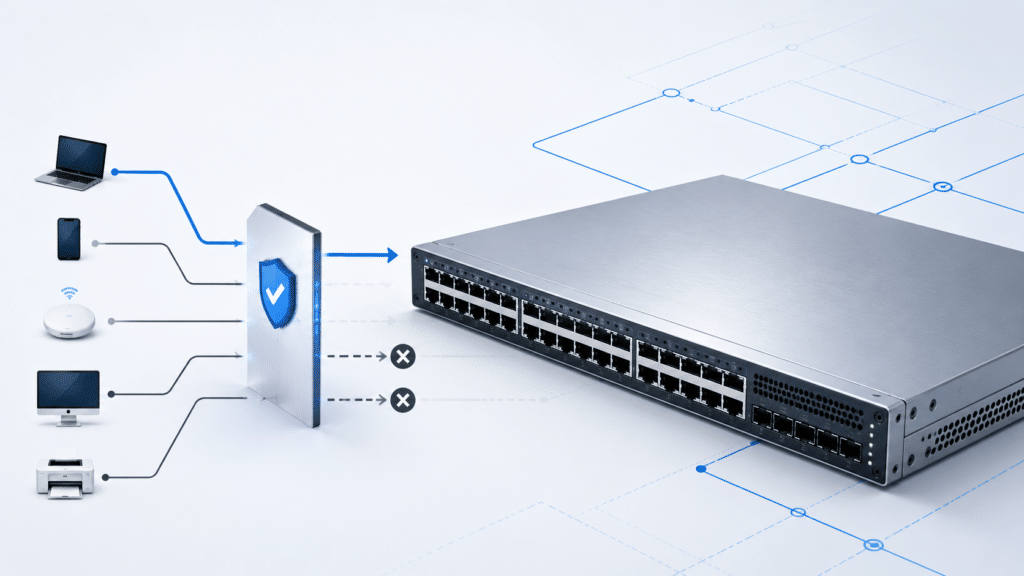
In Cisco’s own words, ISE is “the industry’s complete Network Access Control (NAC) solution” and “the bedrock for zero trust.” Put plainly: instead of trusting any device that plugs into a switch port or joins Wi-Fi, ISE decides who and what gets on the network, how much access they get, and what happens when a device falls out of compliance.
What Does Cisco ISE Do? Core Use Cases
ISE sits between the people and devices trying to connect and the network that enforces the decision. Its main jobs:
- Authentication and authorization (AAA): Verify identity and grant the right level of access across wired, wireless, VPN, and 5G connections.
- Endpoint visibility and profiling: Discover and classify every device on the network — laptops, phones, printers, cameras, IoT — and keep an attribute history.
- Guest access: Provide hotspot, self-registered, and sponsored guest portals.
- BYOD onboarding: Let employees register personal devices through a self-service flow with no IT ticket.
- Posture assessment: Check that an endpoint meets policy (antivirus, patch level, firewall state) before or during access.
- Network segmentation: Use Cisco TrustSec Security Group Tags (SGTs) to control access by business role instead of IP address or VLAN topology.
- Device administration: Control and audit who can log in to and change switches, routers, and firewalls using TACACS+.
- Threat containment: Quarantine or remove a non-compliant or compromised endpoint, turning the network itself into an enforcement point.
A useful way to think about it: ISE answers four questions for every connection — who are you, what are you, are you healthy, and what are you allowed to reach?
How Cisco ISE Works: Authentication and Policy
When a device connects, the switch or wireless controller doesn’t make the access decision itself — it asks ISE. The switch is the enforcement point; ISE is the policy decision point. The exchange usually runs over RADIUS, and ISE returns an instruction the network device applies: an allowed VLAN, a downloadable ACL (dACL), a URL redirect, a named ACL, or a Security Group ACL (SGACL).
The basic flow is: a device connects → the network device sends the request to ISE → ISE authenticates the identity against a configured identity source → ISE evaluates the policy → ISE returns an authorization result → the switch or controller enforces it.
RADIUS, 802.1X, and MAB Explained
ISE is, among other things, a full RADIUS server, and it supports the standard ways a port can authenticate a device.
| Method | Authenticates by | Typical use |
|---|---|---|
| 802.1X | A device supplicant exchanging EAP (e.g., EAP-TLS, PEAP) | Managed laptops and corporate endpoints |
| MAB (MAC Authentication Bypass) | The device’s MAC address, no supplicant needed | Printers, cameras, badge readers, IoT |
| Web Authentication | A user logging in through a browser portal | Guests and contractors |
802.1X is the strong method: the device proves identity with credentials or a certificate. MAB is a fallback for devices that cannot run an 802.1X supplicant — the switch simply forwards the MAC address to ISE as the username and password. Per Cisco’s switch documentation, the default order on a port is 802.1X first, then MAB, then web authentication; if an EAPOL packet appears, the switch treats the device as 802.1X-capable and uses that instead.
One thing to be clear about: MAB authenticates a MAC address, which can be spoofed. It is a convenience for un-credentialed devices, not a security control on its own. Pair it with profiling so ISE can also confirm the device looks like the printer it claims to be.
TACACS+ for Device Administration
The features above govern endpoints getting onto the network. TACACS+ is a separate function: it controls and audits administrator access to the network devices themselves. With ISE as the TACACS+ server, you define which engineers can log in to which switches, routers, and firewalls, what commands they can run, and you get a full audit trail of configuration changes. This is licensed separately from the access tiers (see licensing below).
External Identity Sources (Active Directory, LDAP)
ISE does not store your users — it checks them against the identity systems you already run. It integrates with Microsoft Active Directory (on-premises or Microsoft Entra ID / Azure AD), LDAP directories, RADIUS token servers, RSA one-time-password, certificate authorities, ODBC databases, and SAML identity providers, for both authentication and authorization. So ISE does not replace Active Directory — it sits in front of it as the policy engine that turns “this is a valid user” into “this user gets this level of access.”
Is Cisco ISE a NAC, a RADIUS Server, or a Firewall?
This trips up a lot of people, so it’s worth stating plainly:
- Is it a NAC? Yes. NAC is ISE’s core identity — it’s the platform that controls network access.
- Is it a RADIUS server? Yes, ISE includes a full RADIUS server (and a TACACS+ server). But it is much more than RADIUS, because it adds profiling, posture, guest, BYOD, and segmentation on top.
- Is it a firewall? No. This is the most important distinction. ISE decides who gets on the network and what they can reach, and it can quarantine a bad endpoint — but Cisco’s own data sheet is explicit that ISE “does not block or prevent bad guys from gaining access using popular mechanisms such as phishing, malware, etc.” ISE controls access and contains threats; it does not inspect traffic for exploits the way a next-generation firewall does. The two are complementary, not interchangeable.
If someone tells you ISE will “replace the firewall,” that’s a misunderstanding of what it does.
Posture, Profiling, and BYOD: How ISE Sees Every Device
Authentication answers who. Profiling and posture answer what and is it healthy — and that context is what makes ISE more than a login server.
How ISE Profiles and Identifies Devices
Profiling is how ISE classifies a device without anyone telling it what the device is. ISE collects attributes through a set of probes and matches them against profiling policies. Per Cisco’s administrator guide, the probes include RADIUS, DHCP (and DHCP SPAN), HTTP, SNMP, NetFlow, DNS, and active NMAP scanning, with conditions that can also use CDP and LLDP data. From the MAC address vendor (OUI), DHCP fingerprint, HTTP user-agent, and open ports, ISE infers that an endpoint is, say, a Cisco IP phone, a Windows laptop, or an IP camera — then applies the right policy automatically.
Profiling is what makes large-scale MAB safe: instead of trusting any MAC address, ISE only lets a device onto the printer VLAN if it actually profiles as a printer.
Posture Assessment with Cisco Secure Client
Posture checks whether an endpoint meets your security requirements — current antivirus, disk encryption, required patches, firewall enabled — before granting or keeping full access. ISE can gather posture three ways:
- Full agent — the Cisco Secure Client (formerly AnyConnect) posture module.
- Temporal agent — a lightweight, run-once check with no permanent install.
- Agentless — no software on the endpoint, supported from Cisco ISE release 3.0 onward.
A device that fails posture can be put into a remediation VLAN until it’s fixed. Posture that integrates with mobile device management platforms such as JAMF and Microsoft Intune is part of the Premier license tier.
Device Profiling and Guest Access
ISE provides three guest models out of the box: open hotspot access, self-registered access, and sponsored access where an employee vouches for a visitor. Portals are customizable through an on-box or cloud-delivered editor, and guests can sign in with social credentials if you allow it. BYOD onboarding uses the same machinery — an employee registers a personal device through a self-service portal, ISE provisions it and applies the BYOD policy, and IT never touches the device.
Cisco ISE Architecture: PAN, PSN, and MnT Nodes
ISE runs as one or more nodes, and each node takes on one or more personas. A persona determines which services that node provides. Per Cisco’s administrator guide, a node can assume the Administration, Policy Service, Monitoring, and pxGrid personas.
| Persona | What it does | Notes |
|---|---|---|
| Administration (PAN) | Central configuration and management; all config changes are made here | Primary + secondary PAN for high availability |
| Policy Service (PSN) | Does the actual work — authentication, authorization, profiling, posture, guest | One or more; processing is distributed across PSNs |
| Monitoring (MnT) | Logging, reporting, and troubleshooting | At least one required in a distributed deployment |
| pxGrid | Shares context with Cisco and third-party security tools | Enables ecosystem integration |
The key idea: in a distributed deployment, administration and monitoring are centralized, while authentication and policy processing are spread across the PSNs. You scale ISE by adding PSNs, and you make it resilient by pairing PANs and MnT nodes.
Standalone vs Distributed Deployment
A single node that runs all personas is a standalone deployment — fine for a lab or a very small site. More than one node is a distributed deployment; a basic two-node setup gives you high availability. All configuration is done on the primary PAN and replicated to the secondary nodes, so the PAN is the single source of truth for the whole deployment.
Where ISE Runs: Appliance, VM, or Cloud
ISE is software, and Cisco delivers it in two appliance forms that can be mixed in the same cluster.
- Physical appliance: Cisco Secure Network Server (SNS) hardware; the current generation is the SNS-3700 Series (detailed specs are in Cisco’s SNS data sheet).
- Virtual / cloud appliance: Per the ISE data sheet, virtual ISE is supported on VMware ESXi (6.5/6.7/7.x), KVM on Red Hat, Microsoft Hyper-V, Nutanix AHV, VMware Cloud, Amazon Web Services, Microsoft Azure, and Red Hat OpenShift (4.19 or later).
So the answer to “is Cisco ISE hardware or software?” is: it’s software that you run on a Cisco appliance, your own virtualization platform, or a public cloud. Each virtual node needs its own VM license (covered next).
ISE Licensing Tiers: Essentials, Advantage, and Premier
ISE is subscription-licensed, and the tiers are nested — each higher tier includes everything in the tiers below it. There are three access tiers plus two functional licenses. This is where many BOMs go wrong, because features people assume are “in ISE” actually sit in a higher tier.
| License | What it adds (higher tiers include all lower tiers) | Buy it for |
|---|---|---|
| Essentials | Foundational secure access: 802.1X, MAB, and RADIUS authentication (AAA) and guest access | Getting users and devices authenticated onto the network |
| Advantage | Endpoint profiling, BYOD onboarding, TrustSec/SGT segmentation, context-based dynamic policy, and ecosystem integration | Device visibility, IoT segmentation, automation |
| Premier | MDM-integrated posture (e.g., JAMF, Microsoft Intune) and Threat Centric NAC for automatic quarantine | Compliance-driven posture and threat response |
| Device Administration | Enables TACACS+ device administration (separate from the access tiers) | Controlling and auditing admin access to network devices |
| VM | Infrastructure license required for each ISE node running as a virtual machine, on-prem or cloud | Running ISE on a hypervisor or public cloud |
Two practical takeaways from the official At-a-Glance: profiling and BYOD require Advantage, not the base Essentials tier, and MDM-integrated posture and Threat Centric NAC require Premier. The exact feature-to-tier mapping can shift between releases, so confirm against the current Cisco ISE Licensing Guide before you order. And no — ISE is not free; Cisco offers an evaluation, but production use is licensed.
Cisco ISE vs ClearPass, Forescout, and Microsoft NPS
ISE is not the only NAC option, and the right choice depends on how Cisco-centric and how multi-vendor your network is. The table below is positioning, not a spec sheet — validate current capabilities with each vendor before deciding.
| Platform | Vendor | Primary role | Where it tends to fit |
|---|---|---|---|
| Cisco ISE | Cisco | Full NAC: authentication, profiling, posture, guest, BYOD, plus TrustSec segmentation | Cisco-heavy networks wanting deep switch/wireless/SD-Access integration |
| Aruba ClearPass | HPE Aruba | Vendor-neutral NAC | Multi-vendor estates and Aruba-centric wireless |
| Forescout | Forescout | Agentless device visibility and control | Highly heterogeneous environments and OT/IoT visibility |
| Microsoft NPS | Microsoft | RADIUS / AAA server bundled with Windows Server | Basic authentication only — no native profiling, posture, guest, or segmentation |
The honest summary: ISE is strongest where you run Cisco switching and wireless and want segmentation (TrustSec) and ecosystem integration tied together. NPS is a free RADIUS server but not a NAC — if you need profiling, posture, or guest, you’ve outgrown it. ClearPass and Forescout are the usual alternatives when vendor-neutrality or agentless OT visibility is the priority.
Common Cisco ISE Deployment Mistakes
ISE is powerful, and most of the pain teams report is operational rather than conceptual. The recurring ones:
- Treating MAB as security. MAB authenticates a spoofable MAC address. Use it only as a fallback, and back it with profiling so ISE confirms the device type before granting access.
- Undersizing PSNs. Because authentication processing is distributed across Policy Service Nodes, an undersized deployment shows up as slow logins under load. Plan PSN count and placement for peak authentication volume, not average.
- Nodes going “out of sync.” This is one of the most-searched ISE problems. Configuration replicates from the primary PAN to secondary nodes; if the primary can’t publish events and the backlog of unpublished events exceeds 1.5 million, ISE marks all secondary nodes OUT OF SYNC. If the delta for a specific node exceeds 2 million events, that PSN is marked OUT OF SYNC. Also note that from release 3.3, dynamically discovered endpoints are no longer auto-replicated to every node by default — an Endpoint Replication setting controls it, and when it’s off and a PSN becomes unreachable, ISE clears stale ownership within 3–5 minutes, during which authentication can briefly slow.
- Node registration failures. Registering a secondary node fails if the two nodes can’t resolve each other’s fully qualified domain names, or if the secondary’s certificate isn’t trusted by the primary PAN. Fix DNS and certificate trust first.
- License surprises. The classic BOM error is assuming profiling, BYOD, or MDM posture come with the base tier. They don’t — profiling/BYOD are Advantage, MDM posture and Threat Centric NAC are Premier, TACACS+ needs the separate Device Administration license, and every virtual node needs a VM license.
- Posture agent confusion. Decide up front whether you’re using the full Cisco Secure Client agent, the temporal agent, or agentless posture (3.0+); each behaves differently and changes the endpoint experience.
A reminder on the bigger picture: ISE is only as good as the enforcement points it talks to. The access-layer hardware — your Cisco Catalyst 9300 access switches and Cisco wireless LAN controllers — is what actually applies the VLAN, dACL, or SGT that ISE returns. Confirm your switches and controllers run a software version that supports the ISE features (802.1X, MAB, TrustSec, CoA) you plan to use.
Frequently Asked Questions
Is Cisco ISE a RADIUS server?
Yes. ISE includes a full RADIUS server and a TACACS+ server. RADIUS handles network access authentication (802.1X, MAB, web auth) for endpoints, while TACACS+ handles administrative access to network devices. ISE adds profiling, posture, guest, BYOD, and segmentation on top of that AAA core.
Is Cisco ISE a firewall?
No. ISE controls who and what gets on the network and can quarantine a non-compliant device, but it does not inspect traffic for malware or block phishing the way a next-generation firewall does. Cisco’s data sheet states this directly. ISE and a firewall are complementary layers, not substitutes.
Is Cisco ISE free?
No. ISE is subscription-licensed across Essentials, Advantage, and Premier tiers, with separate Device Administration and VM licenses. Cisco offers an evaluation period for testing, but production deployments require licenses.
Is Cisco ISE hardware or software?
It’s software delivered as an appliance. You can run it on Cisco Secure Network Server (SNS) physical hardware, on a hypervisor (VMware, KVM, Hyper-V, Nutanix), or in public cloud (AWS, Azure). Physical and virtual nodes can be mixed in the same deployment.
What is the difference between ISE Essentials, Advantage, and Premier?
The tiers are nested. Essentials covers authentication (802.1X, MAB, RADIUS) and guest access. Advantage adds endpoint profiling, BYOD, and TrustSec segmentation. Premier adds MDM-integrated posture and Threat Centric NAC. Higher tiers include everything in the lower tiers.
Does Cisco ISE replace Active Directory?
No. ISE integrates with Active Directory (or Microsoft Entra ID), LDAP, and other identity stores as external identity sources. It uses your existing directory to verify users, then applies access policy on top — it does not store or replace your user accounts.