Cisco Switch Naming Convention: How to Read Model Numbers and -E vs -A
Cisco switch model numbers follow a readable pattern. In most cases, a Cisco switch SKU tells you the platform, port count, port type, uplink type, and software tier. If you can decode those parts, you can usually tell whether a switch is data-only or PoE, fixed or modular, and whether it comes with Network Essentials (-E) or Network Advantage (-A).
If you want the broader picture behind Cisco software tiers, Smart Accounts, subscription terms, and how license levels fit into hardware ordering, see our Cisco Licensing Ultimate Guide.
In this guide, we will focus on the two things most buyers actually need:
- how to decode a Cisco switch model number
- how to understand the final
-Eor-Asuffix before buying
Once you know how to split a model number into platform, port count, uplink type, and license suffix, it becomes much easier to review quotes, compare models, and avoid ordering mistakes.
Once you have decoded the SKU, you can compare exact Cisco switch Product IDs side by side to verify ports, uplinks, PoE, forwarding performance, stacking, software, and power.
That matters because a Cisco switch SKU is more than a part number. It is often the fastest way to verify what you are actually buying before the quote becomes a purchase order. One wrong letter can mean no PoE, the wrong uplink speed, or a higher software tier than your project really needs.
Cisco Switch Naming Convention at a Glance
Let’s start with a real-world example:
C9300L-48T-4X-E
This can be read in four parts:
- C9300L = platform and chassis family
- 48T = port count and port type
- 4X = uplink type
- E = license tier suffix
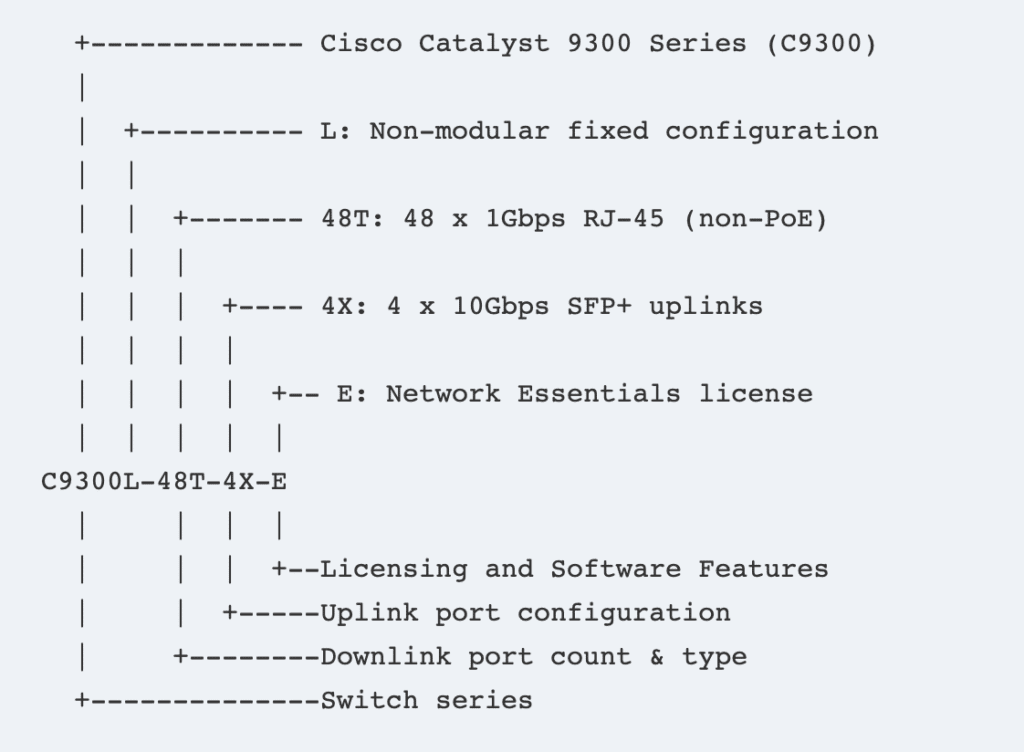
Once you understand those four blocks, most Cisco Catalyst switch SKUs become much easier to read.
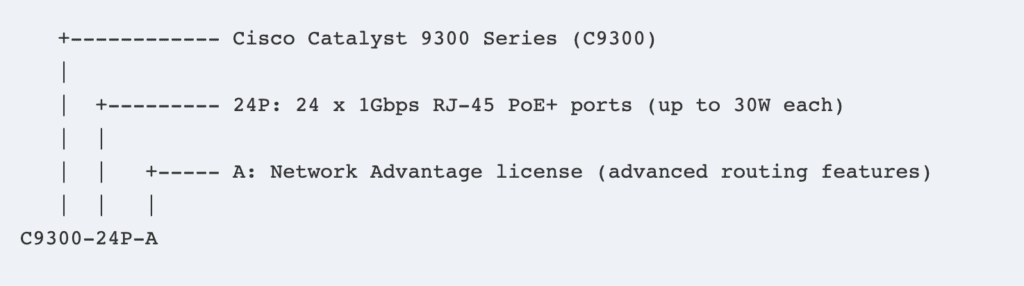
How to Read a Cisco Switch Model Number
The easiest way to decode a Cisco switch SKU is to read it from left to right.
Part 1: Platform and Series
The first block tells you the product family and general platform level.
Examples:
- C9200 = Cisco Catalyst 9200 family
- C9300 = Cisco Catalyst 9300 family
- C9500 = Cisco Catalyst 9500 family
This part usually tells you which switch family you are looking at, and that already gives you useful buying context. A 9200, 9300, and 9500 are not just different names. They usually sit in different design roles and budget ranges.
Part 2: What the “L” Means
The letter immediately after the platform number can be one of the most important parts of the SKU.
For example:
- C9300 usually refers to the standard Catalyst 9300 platform with modular uplinks
- C9300L refers to the fixed uplink version
This matters because fixed uplink and modular uplink models behave differently from a buying perspective.
If you choose a fixed uplink model, the uplink configuration is part of the hardware itself.
If you choose a modular uplink model, you usually get more flexibility later.
That means the L is not a cosmetic letter. It can affect future upgrade options and long-term deployment flexibility.
Part 3: Port Count and Port Type
The middle block usually tells you how many access ports the switch has and what kind of copper power profile you are getting.
Examples:
- 24T = 24 copper data ports, no PoE
- 48T = 48 copper data ports, no PoE
- 24P = 24 PoE+ ports
- 48P = 48 PoE+ ports
- 24U = 24 UPOE ports
- 48U = 48 UPOE ports
- 24H = 24 UPOE+ ports
- 48H = 48 UPOE+ ports
For many buyers, this is where the most expensive mistakes happen.
A switch can look “close enough” on a quote, but a T model and a P model are not interchangeable if you are powering phones, access points, or other PoE devices.
Part 4: Uplink Codes
The next block tells you the uplink type.
Common examples include:
- 4G = 4 x 1G SFP uplinks
- 4X = 4 x 10G SFP+ uplinks
- 2Y = 2 x 25G uplinks
This part matters because uplinks affect more than speed. They also affect how the switch fits into your aggregation, server edge, or campus backbone design.
A buyer who selects the right access ports but the wrong uplink type may still end up with the wrong switch for the project.
What the Final Letter Means: Cisco -E vs -A Explained
After the hardware part of the model number, the final suffix often tells you the software tier bundled with that switch model.
This is one of the most searched Cisco switch questions for a reason.
What Does -E Mean on Cisco Switches?
In common Catalyst switch hardware SKU context, -E usually means the switch is sold with Network Essentials.
Examples include:
C9300L-24T-4G-EC9300L-48T-4X-EC9300-48P-E
For buyers, the main takeaway is simple: -E tells you this is the Essentials software tier variant of that hardware model.
What Does -A Mean on Cisco Switches?
In the same Catalyst hardware SKU context, -A usually means the switch is sold with Network Advantage.
Examples include:
C9300L-24T-4G-AC9300L-48T-4X-AC9300-48P-A
That means the same physical hardware family can often appear as both an -E and an -A SKU. The difference is not the number of ports or uplinks. The difference is the bundled software tier.
Cisco -E vs -A: What Buyers Actually Need to Know
Most buyers do not need a giant licensing theory lesson here. They need a practical rule.
Use this simple idea:
-E= Essentials tier-A= Advantage tier
If you are reviewing a quote, the suffix is one of the fastest ways to verify whether the switch is being quoted at the lower or higher software tier.
That matters because some projects only need the Essentials tier, while others are intentionally designed around the Advantage tier. If the suffix is wrong, the whole quote may still be wrong even if the hardware looks correct.
Cisco Switch SKU Decoder Table
The table below shows how this works in practice.
| Example SKU | Meaning | Buyer Takeaway |
|---|---|---|
| C9300L-24T-4G-E | Catalyst 9300L, fixed uplinks, 24 data ports, 4 x 1G uplinks, Network Essentials | Good example of a fixed-uplink, data-only Essentials model |
| C9300L-48P-4X-E | Catalyst 9300L, fixed uplinks, 48 PoE+ ports, 4 x 10G uplinks, Network Essentials | Useful for buyers who need PoE+ and 10G uplinks without moving to Advantage |
| C9300L-48U-4X-A | Catalyst 9300L, fixed uplinks, 48 UPOE ports, 4 x 10G uplinks, Network Advantage | Higher power access model with the Advantage software tier |
| C9300-48P-A | Catalyst 9300, modular uplinks, 48 PoE+ ports, Network Advantage | Good example of a modular uplink platform with the Advantage tier |
| C9300-48P-E | Catalyst 9300, modular uplinks, 48 PoE+ ports, Network Essentials | Same general hardware family as above, but Essentials instead of Advantage |
The easiest way to read any one of these is:
- identify the platform
- identify whether it is fixed or modular
- read the port count and PoE type
- read the uplink code
- check whether the suffix is
-Eor-A

How to Tell Key Hardware Specs from a Cisco Switch SKU
A good Cisco switch model number usually reveals most of the hardware basics if you know where to look.
How to Tell If a Cisco Switch Has PoE
Look at the access port letter:
- T = data only
- P = PoE+
- U = UPOE
- H = UPOE+
This is one of the fastest checks buyers should make before approving a quote.
How to Tell If the Uplinks Are 1G, 10G, or 25G
Look at the uplink block:
- 4G usually means 1G SFP uplinks
- 4X usually means 10G SFP+ uplinks
- 2Y usually means 25G uplinks
This is critical in campus designs, especially when an access switch must connect into an existing aggregation or core design with a specific speed expectation.
How to Tell If the Switch Uses Fixed or Modular Uplinks
In the Catalyst 9300 family, this is where the L becomes useful:
- C9300 = modular uplink family
- C9300L = fixed uplink family
A lot of buyers miss this and only compare port count. That is not enough.
How to Spot Higher-Power or More Specialized Access Models
The access port letters often tell you more than just “PoE or not.” They can also indicate whether the switch is intended for higher power endpoints or more demanding edge devices.
If the project includes high-power Wi-Fi, building controls, or power-hungry edge devices, this part of the SKU matters more than many buyers expect.
How to Choose Between -E and -A Before Buying
This is where the article becomes more than a decoder.
The final suffix is not just a label. It affects the software tier the switch is sold with, which means it can affect project fit, budget, and software capability planning.
When -E Is Usually Enough
In many straightforward switching projects, -E is enough.
Typical examples include:
- standard access switching
- data-only or lighter PoE edge deployments
- projects where the lower software tier is already aligned with the design
- budget-sensitive deployments where the higher tier is not required
If the environment is simple and the project does not require the higher software tier, buying -A by habit can just increase cost without increasing real value.
When -A Is Usually Worth It
-A is usually the better choice when the project is intentionally designed around the higher software tier.
This is more common when:
- the design standard already specifies Network Advantage
- the team knows the higher tier is required
- the switch is part of a larger enterprise architecture that expects the Advantage level
The key point is that -A should be chosen because the design needs it, not because the suffix sounds safer.
Common Mistakes Buyers Make with -E and -A
The three most common mistakes are:
- buying
-Aby default without checking whether the project actually needs it - buying
-Eonly because it is cheaper, even when the design expects the higher tier - reviewing only the hardware portion of the SKU and ignoring the suffix completely
The last mistake is especially common in long quotes where the part numbers look almost identical.
Common Cisco Switch SKU Mistakes Buyers Should Avoid
A good decoder guide should not just explain model numbers. It should also help buyers avoid bad orders.
Confusing Data-Only and PoE Models
A T model and a P model are not small variations. They can serve completely different endpoint environments.
Missing the Difference Between Fixed and Modular Uplinks
Some buyers compare C9300 and C9300L only on price and port count. That misses one of the biggest design differences between them.
Buying the Wrong Uplink Speed for Future Expansion
It is common to focus on current needs and forget how fast access-layer uplinks can become a limit later.
Paying for -A When -E Would Have Been Enough
Not every project needs Advantage. Buyers who do not check the design requirement may end up paying for the higher tier automatically.
Other Cisco Suffixes Buyers May Notice
This article focuses on switch SKU decoding, especially model structure and the -E / -A suffix.
But buyers may also see other suffixes in Cisco part numbers.
What -RF Usually Means
In many Cisco quoting contexts, -RF refers to refurbished hardware rather than brand-new hardware. That is important commercially, but it should not be confused with a switch software tier suffix.
What the = Spare Suffix Means
A trailing = often indicates a spare part ordering format rather than the primary hardware product identifier. Again, this matters in procurement, but it is a different question from -E versus -A.
Why These Should Not Be Confused with -E and -A
The biggest risk is mixing hardware condition or spare notation with software tier meaning. They are different kinds of suffixes serving different purposes.
FAQ
What does -E mean on a Cisco switch?
-E usually means the switch is sold with the Essentials software tier, commonly Network Essentials in Catalyst hardware SKU naming.
What does -A mean on a Cisco switch?
-A usually means the switch is sold with the Advantage software tier, commonly Network Advantage in Catalyst hardware SKU naming.
How do I read a Cisco switch model number?
The fastest method is to split the SKU into platform, port and power type, uplink code, and final suffix.
What does L mean in Cisco Catalyst switch models?
In the Catalyst 9300 family, L usually indicates a fixed uplink version rather than a modular uplink version.
How do I know if a Cisco switch has PoE from the SKU?
Check the port letter. P, U, and H indicate power-capable models, while T usually indicates data-only copper access ports.
How do I know the uplink type from a Cisco switch model number?
Look at the uplink code block, such as 4G, 4X, or 2Y.
Final Takeaway
A Cisco switch SKU usually tells you four important things:
- the platform family
- the port count and power profile
- the uplink type
- the software tier suffix
If you can read those four parts, you can avoid a large number of common ordering mistakes before they happen.
For most buyers, the two most important checks are simple:
- does the hardware fit the real deployment
- does the suffix end in
-Eor-Afor the correct software tier
That is why learning how to read Cisco switch model numbers is not just useful. It is one of the easiest ways to protect your budget and avoid buying the wrong switch.
About Layer23-Switch
Layer23-Switch is a global Cisco supplier helping B2B buyers decode Cisco switch SKUs, compare model options, and avoid costly ordering mistakes before purchase.