When to Choose 4G vs 4X vs 8X Network Modules in Catalyst Switches
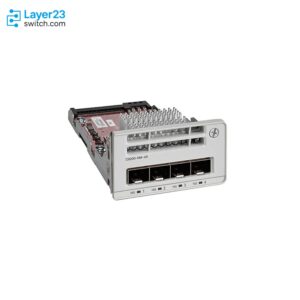
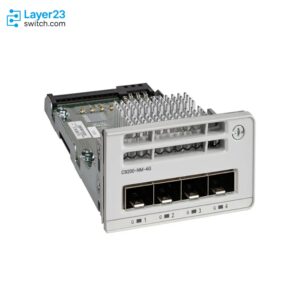
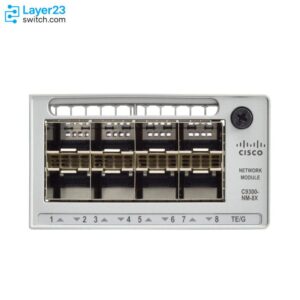
In Cisco Catalyst uplink naming, 4G means four 1G SFP ports, 4X means four 10G SFP+ ports, and 8X means eight 10G SFP+ ports. On a modular Catalyst 9200 the real choice is C9200-NM-4G against C9200-NM-4X; on a modular Catalyst 9300 it is C9300-NM-4G against C9300-NM-8X, because Cisco never made a C9300-NM-4X. Choose a 1G module only for small sites with light traffic and no wireless growth. Choose a 10G module whenever PoE access points, 48-port density, or a 10G distribution layer appear anywhere in the design.

What 4G, 4X, and 8X Mean in Cisco Part Numbers
Catalyst network module names follow one convention: the digit is the port count, and the letter is the speed class. Read C9200-NM-4X as “Catalyst 9200 network module, four ports, 10G class.” The same letters repeat across the whole Catalyst 9000 family, so decoding them once pays off on every quote you read afterward.
| Suffix | What it denotes | Where you will see it |
|---|---|---|
| 4G | 4 x 1G SFP | C9200-NM-4G, C9300-NM-4G, and “-4G” fixed-uplink switch models |
| 4X | 4 x 10G/1G SFP+ | C9200-NM-4X and “-4X” fixed-uplink switch models |
| 8X | 8 x 10G/1G SFP+ | C9300-NM-8X (the Catalyst 9500 has its own C9500-NM-8X) |
| 4M / 8M | 4 or 8 x Multigigabit copper | C9300-NM-4M, C9300X-NM-8M |
| 2Y / 8Y / 4Y | 25G SFP28 | C9200-NM-2Y, C9300-NM-2Y, C9300X-NM-8Y, C9300LM “-4Y” models |
| 2Q | 2 x 40G QSFP+ | C9200-NM-2Q, C9300-NM-2Q, C9300L “-2Q” models |
| 2C / 4C | 2 or 4 x 100G/40G | C9300X-NM-2C, C9300X-NM-4C |
Two clarifications prevent most confusion. First, 4G here has nothing to do with cellular service; it is simply four Gigabit ports. Second, the same suffix appears both in module part numbers and at the end of fixed-uplink switch SKUs such as C9200L-48P-4X or C9300L-24T-4G. On those L-series switches the uplinks are built in, so the 4G-or-4X decision happens when you buy the switch, and no module can change it later.
The convention also crosses product lines that do not share hardware. A C9500-NM-8X serves the Catalyst 9500, and Cisco’s routing side uses names like C-NIM-4X on the Catalyst 8300. Same grammar, different connectors: none of these travel between families.
Which Modules Fit Which Switch
Each family takes only its own module set, and several popular models take none at all. The table below covers the current lineup according to the Catalyst 9200 and 9300 data sheets as updated in July and June 2026.
| Switch | Uplink slot | 4G / 4X / 8X options | Other uplink options |
|---|---|---|---|
| Catalyst 9200 modular (T, P, PL, PB models) | 1 module slot | C9200-NM-4G, C9200-NM-4X | None |
| C9200-24PXG / C9200-48PXG | 1 module slot | C9200-NM-4X only; the NM-4G is not supported on these two models | C9200-NM-2Y and C9200-NM-2Q, which are supported only on these two models |
| C9200L / C9200CX | Fixed | Chosen at purchase: “-4G” or “-4X” model variants (most CX models: 2 x 10G SFP+ fixed) | “-2Y” variants on C9200L PXG models |
| Catalyst 9300 modular (24/48-port) | 1 module slot | C9300-NM-4G, C9300-NM-8X | C9300-NM-4M, C9300-NM-2Y, C9300-NM-2Q, plus Catalyst 3850 network modules |
| Catalyst 9300X | 1 module slot | None of the three | C9300X-NM-8M, C9300X-NM-8Y, C9300X-NM-2C; C9300X-NM-4C on the 24Y, 48HX, and 48TX models only |
| C9300L / C9300LM | Fixed | Chosen at purchase: “-4G” or “-4X” variants | “-2Q” on C9300L UXG models; 4 x 25G “-4Y” on C9300LM |
Three boundary rules sit behind this table. Cisco’s Catalyst 9000 platform FAQ states directly that Catalyst 9300 network modules cannot be used on Catalyst 9200 switches; the two module sets are not interchangeable despite the similar names. The same FAQ confirms the one useful exception: Catalyst 3850 network modules may be used in Catalyst 9300 modular models, though not the reverse. And the Catalyst 9300 hardware installation guide scopes the C9300X-NM set to Catalyst 9300X models only, so an X-series switch is planned around its own module list.
If a fixed-uplink model is on your shortlist, treat the uplink suffix as part of the platform decision; our C9300 vs C9300L comparison covers what else changes between modular and fixed chassis. For the full accessory picture around these switches, including optics, power supplies, and stacking hardware, use the Catalyst 9200/9300 hardware compatibility matrix; this article stays on the question of which uplink option to pick.
1G or 10G: Do the Bandwidth Math First
The honest way to choose between a 4G module and its 10G siblings is arithmetic, and it takes one minute. Add up the downlink capacity that could realistically be busy at once, then divide by uplink capacity.
A 48-port Gigabit access switch carries up to 48 Gbps of downlink demand. Behind a C9200-NM-4G, those 48 ports share 4 Gbps of uplink, a 12:1 oversubscription ratio. The same switch behind a C9200-NM-4X running all four ports at 10G sits at 1.2:1. A Catalyst 9300 with a C9300-NM-8X fully populated has 80 Gbps of uplink for 48 Gbps of access, which means the uplink is no longer the constraint at all. On a 24-port switch the 1G module looks better on paper at 6:1, and for a small office of wired desktops that ratio is usually fine.
Ratios describe the worst case, so the deciding question is what actually drives simultaneous load. Three things reliably push a site past 4 x 1G: wireless access points (a single Wi-Fi 6/6E AP can burst beyond 1 Gbps on a Multigigabit downlink, and a floor of them aggregates fast), nightly backup or imaging windows that run the links flat out, and any local server, NAS, or firewall hanging off the same switch. A 48-port PoE+ switch feeding a modern office floor will hit the 4 Gbps ceiling on day one.
The 10G modules also carry a hedge that the 4G module lacks: their ports are dual-rate. Both data sheets describe the C9200-NM-4X and C9300-NM-8X as 10G/1G, so you can populate them with 1G SFPs today, match an older distribution layer, and move to 10G optics later with no hardware change. A C9300-NM-4G never goes above 1G, and on a fixed “-4G” L-series switch that ceiling is welded into the chassis for its whole service life.
So the 1G module earns its place in a narrow band: data-only sites around 24 ports, an upstream device that only offers 1G SFP ports with no upgrade planned, or a hard budget floor on a site with a short remaining life. For a deeper C9200-specific version of this trade-off, including typical switch pairings, see our C9200-NM-4X vs C9200-NM-4G guide.
Four Uplink Ports or Eight
Port count matters less than most buyers expect, because uplinks are consumed in pairs. The standard access design takes two physical links to two different distribution or core switches, bundles them where the design allows, and keeps the rest as growth. Four ports cover that with room to spare, which is why the Catalyst 9200 never needed an eight-port option.
Stacking changes the math in the 8X’s favor on paper, then back against it in practice. A StackWise stack is one logical switch, so you do not uplink every member; the resilient pattern lands uplinks in two members so the stack survives a chassis failure. Two C9300-NM-8X modules in an eight-member stack expose up to sixteen 10G ports from one logical device, far more than the stack’s northbound need. The consequence for your BOM: price modules per stack, not per switch. Many stacks are fully served by two modules, with blanks in the remaining members. Our Catalyst 9200/9300 stacking guide covers the cabling and design side.
Where the eight ports genuinely earn their cost is the collapsed core. In a small building where the Catalyst 9300 stack is the network, spare 8X ports connect the firewall pair, a hypervisor host, or a backup NAS at 10G without buying a separate aggregation switch. If your site has more than two or three such devices, the 8X is effectively an access module and a small aggregation layer in one slot.
If none of that applies and the switch is a straightforward access box under an existing distribution layer, four ports are enough, and on the 9300 the money saved against the 8X can fund better optics or the second power supply.
Scenario Recommendations
| Your situation | Pick | Why |
|---|---|---|
| Small branch, data-only desktops, around 24 ports | C9200 with NM-4G, or a C9200L “-4G” model | 6:1 oversubscription is acceptable; lowest cost per port |
| Standard 48-port PoE+ office floor | C9200 with NM-4X, or a C9200L “-4X” model | APs and 48-port density outgrow 4 x 1G immediately; dual-rate ports start at 1G if the core is not ready |
| Wi-Fi 6/6E floor with Multigigabit APs | C9300 with NM-8X | mGig downlink models pair with 10G-class uplinks; eight ports cover cross-stack uplinks plus growth |
| Collapsed core with local servers and firewall | C9300 with NM-8X | Spare 10G ports replace a separate aggregation switch |
| Refresh from a Catalyst 3850 estate | C9300 modular models | Existing 3850 network modules carry over per Cisco’s platform FAQ; verify their dates in our EOL/EoSL tool before you count on them |
| 25G, 40G, or 100G anywhere in the plan | See the next section | The three headline modules top out at 10G |
When None of the Three Is the Right Buy
The 4G/4X/8X trio covers 1G and 10G fiber uplinks, and that is all it covers. Four cases call for a different line on the order.
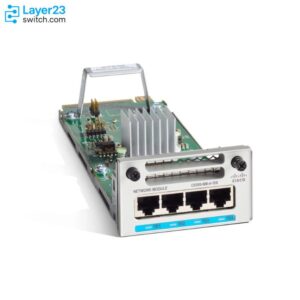
Multigigabit copper uplinks. Where the riser is Cat6A copper, the C9300-NM-4M provides four mGig copper ports, and the C9300X-NM-8M does the same at eight ports for X models.
25G. The C9300-NM-2Y gives a Catalyst 9300 two 25G/10G/1G ports for a modern distribution layer. On the 9200 side, the C9200-NM-2Y exists but fits only the two PXG models. The C9300X-NM-8Y brings eight multi-rate 25G ports to X-series switches.
40G. The C9300-NM-2Q and the C9200-NM-2Q (again PXG-only) serve designs whose core already speaks 40G QSFP+.
100G. Only the Catalyst 9300X reaches it, with the C9300X-NM-2C and the model-restricted C9300X-NM-4C.
The pattern worth noticing: on the Catalyst 9200 everything above 10G is confined to two PXG models, so if dense 25G-plus uplinks are a requirement, you are shopping in the Catalyst 9300 lineup, not adding a module to a 9200.
Ordering Checklist Before You Commit
- The module is a separate line item. Per the current data sheets, the default switch configuration does not include a network module. A switch that arrives without one has an empty slot and no uplink ports.
- Order a blank if you skip uplinks. The installation guide requires a module or a blank (C9300-NM-BLANK, C9200-NM-BLANK) in the slot at all times to meet thermal and EMC specifications.
- Check the PXG footnotes on the 9200. The NM-4G does not fit the 24PXG/48PXG, and the NM-2Y/2Q fit nothing else. Quoting an NM-4G against a PXG switch is an avoidable rejection.
- Fixed-uplink models lock the decision. A C9200L or C9300L has no slot; the “-4G” or “-4X” in its SKU is permanent. When in doubt between the two variants, the 10G-capable one is the safer default.
- Plan optics for both ends. A 10G module port accepts 1G SFPs, but a 4G module port never accepts SFP+. Confirm what the distribution side offers before choosing module speed, and price the transceivers or DACs into the same order.
- Expect 10G interface names even at 1G. The installation guide notes that C9300-NM-8X ports are configured as TenGigabitEthernet1/1/1 through 1/1/8 regardless of the optic installed. Update config templates and monitoring accordingly.
- Hot-swap is supported, within reason. Both hardware installation guides state the network module is hot-swappable, and the 9300 guide asks for 6 to 8 seconds between insertion and removal and warns that interfaces can go error-disabled if you swap with fiber attached. Treat a module change as a maintenance-window task anyway.
- Lifecycle is currently clean. As of July 2026, Cisco’s end-of-life listings for the Catalyst 9200 and 9300 series show no notices for these network modules or the current switch hardware. Recheck close to purchase.
FAQ
Can C9300-NM-8X ports run 1G SFPs? Yes. The data sheet lists the module as 8 x 10G/1G, so each port takes either a 10G SFP+ or a 1G SFP. The interfaces remain TenGigabitEthernet in IOS XE regardless of which optic is installed.
Can I use a C9200 module in a C9300, or the other way around? No. Cisco’s Catalyst 9000 platform FAQ states that Catalyst 9300 network modules cannot be used on Catalyst 9200 switches, and each family’s data sheet lists only its own modules. The one supported crossover is older Catalyst 3850 modules in 9300 modular switches.
Can I add a network module to a C9200L or C9300L later? No. L-series and CX models have fixed uplinks and no module slot. The uplink configuration you buy is the one the switch retires with, which is why the “-4X” variants are usually worth their premium over “-4G.”
What is the difference between C9300X-NM-8M and C9300-NM-8X? Despite one character of difference, they serve different switches and media. The C9300X-NM-8M provides eight Multigigabit copper ports and fits Catalyst 9300X models; the C9300-NM-8X provides eight SFP+ fiber ports and fits Catalyst 9300 modular models.
Module pricing and availability change over time, so check the live listings on our Catalyst 9200 and Catalyst 9300 , or send us your uplink BOM and we will confirm chassis fit, optics, and availability before you order.