Cisco Catalyst 9200 and 9300 Hardware Accessory & Procurement Guide
Looking for compatible modules, power supplies, or optics for Cisco Catalyst 9200 or 9300?
Here’s a quick compatibility overview:
- 9200 and 9300 uplink modules are NOT interchangeable
- 9200 requires identical PSU wattage (strict limitation)
- 9300 supports mixed PSU configurations
- “L” models have fixed uplinks (no module support)
This guide provides a complete compatibility reference including supported modules, PSU options, optics, PoE budgets, and stacking accessories with exact SKU details.
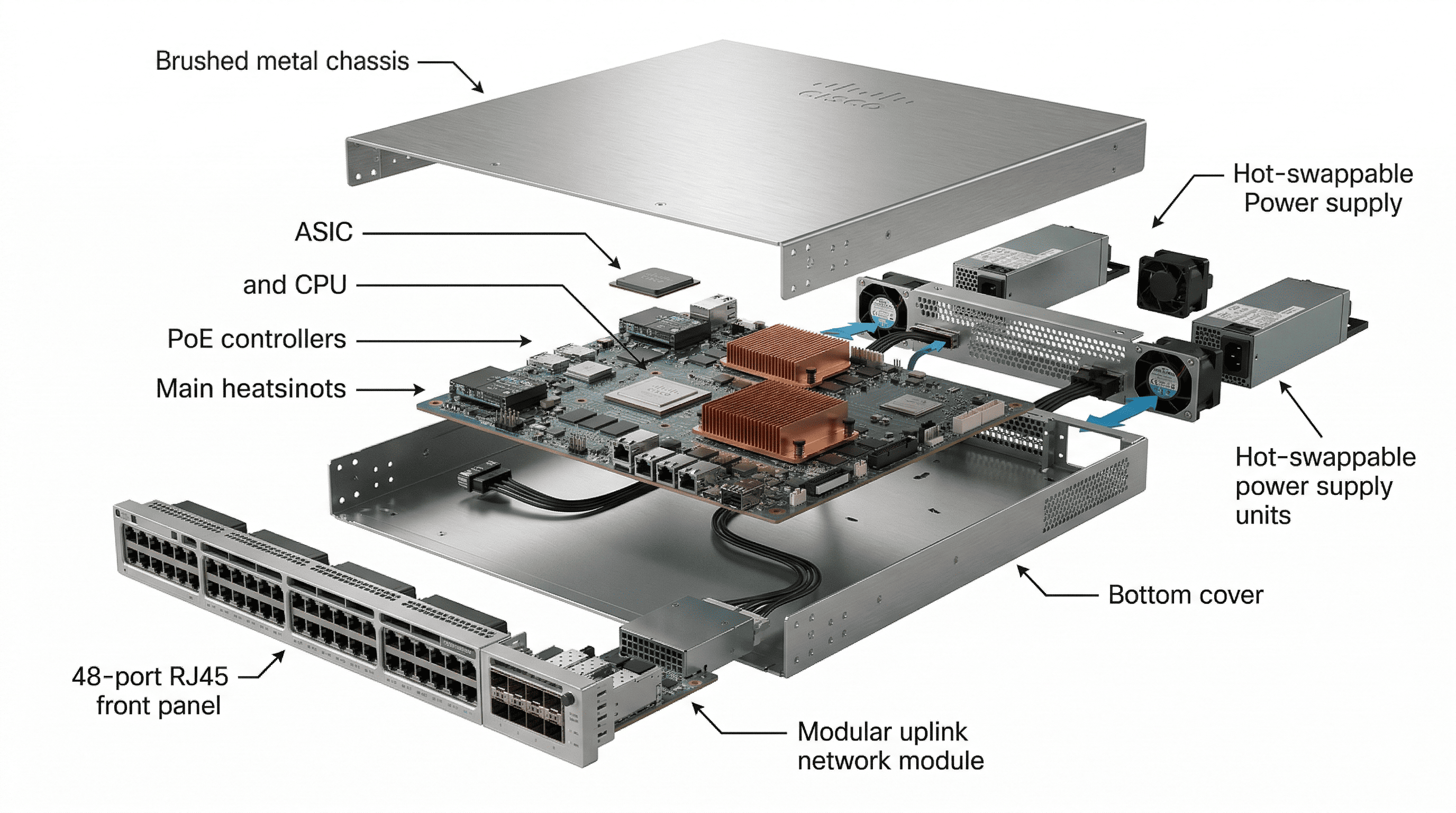
What Uplink Modules Are Supported on Cisco 9200 and 9300?
Selecting the correct uplink module requires navigating strict hardware boundaries to ensure you only purchase supported modules.
- Strict Incompatibility: Catalyst 9200 network modules are strictly incompatible with Catalyst 9300 switches.
- The “L” Series Limitation: Catalyst 9200L and 9300L models feature fixed, soldered uplinks directly on the motherboard. These variants do not possess a field-replaceable module slot.
Table 1: Cisco Catalyst 9200, 9300, and 9300X Uplink Module Compatibility
| Series | Uplink Module SKU | Port Configuration & Description |
| C9200 | C9200-NM-4G | 4x 1G SFP (Does not support SFP+) |
| C9200 | C9200-NM-4X | 4x 1G/10G SFP+ |
| C9200 | C9200-NM-2Y | 2x 25G SFP28 (Only supported on C9200 mGig models) |
| C9200 | C9200-NM-2Q | 2x 40G QSFP+ (Only supported on C9200 mGig models) |
| C9200 | C9200-NM-BLANK | Blank module required for thermal airflow when no NM is installed |
| C9300 | C9300-NM-4G | 4x 1G SFP |
| C9300 | C9300-NM-8X | 8x 10G/1G SFP+ |
| C9300 | C9300-NM-2Y | 2x 25G/10G/1G SFP28 |
| C9300 | C9300-NM-2Q | 2x 40G QSFP+ |
| C9300 | C9300-NM-4M | 4x Multigigabit (10G/mGig) Copper |
| C9300 | NM-BLANK-T1 | Type 1 Blank Network Module |
| C9300X | C9300X-NM-8M | 8x 10G/mGig Copper (Port limits apply if used with C9300X-48HXN) |
| C9300X | C9300X-NM-8Y | 8x 25G/10G/1G SFP28 (Port limits apply if used with C9300X-48HXN) |
| C9300X | C9300X-NM-2C | 2x 100G/40G Dual-rate QSFP28 |
| C9300X | C9300X-NM-4C | 4x 100G/40G Dual-rate QSFP28 (Restricted to C9300X-24Y, C9300X-48HX, C9300X-48TX) |
| C9300X | C9300X-NM-BLANK | Blank module |
What Optics Are Compatible with Cisco 9200 and 9300?
Optical transceiver selection relies heavily on required bandwidth and physical distance across your campus or data center. Downlink fiber models (such as the C9300-24S, C9300-48S, C9300X-12Y, and C9300X-24Y) rely exclusively on finding a compatible SFP, SFP+, or QSFP transceiver for access layer connectivity.
Table 2: Common Optical Transceivers by Distance and Scenario
| Optic SKU | Transceiver Type | Speed | Max Distance & Use Case |
| GLC-T | RJ45 Copper | 1G | 100m / Standard copper patching |
| GLC-SX-MMD | SFP (Multimode) | 1G | 550m / Wiring closet to edge |
| SFP-10G-SR | SFP+ (Multimode) | 10G | 400m / High-speed floor distribution |
| SFP-10G-LR | SFP+ (Single-mode) | 10G | 10km / Campus building-to-building |
| SFP-25G-SR-S | SFP28 (Multimode) | 25G | 100m / High-speed server access |
| QSFP-40G-SR4 | QSFP+ (Multimode) | 40G | 150m / Core aggregation |
| QSFP-100G-SR4-S | QSFP28 (Multimode) | 100G | 100m / Data Center Backbone |
What Power Supplies Are Compatible with Cisco 9200 and 9300?
Power supply procurement entails strict configuration rules enforced by hardware firmware. Reviewing the available PSU options and understanding their limitations is key.
- The Catalyst 9200 Wattage Lockout: The Catalyst 9200 and 9200L models enforce a rigid rule where a single chassis supports power supplies of exactly one wattage value. If you insert power supplies of different wattages into slots A and B, the switch will generate a
%PLATFORM_FEP-1-FRU_PS_INCOMPATIBLEsyslog error and disable the module. - PWR-C5 vs PWR-C6: The PWR-C5 and PWR-C6 series can be mixed in standard modular C9200 models, but fixed-uplink Catalyst 9200L models strictly prohibit the use of C6 variants.
- Legacy 3850 Compatibility: Older Catalyst 3850 power supplies share the same physical form factor and pinouts and are unofficially universal within the newer modular 9300 chassis.
⚠️ C9200 PSU Rule: Both power supplies must use the same wattage. Mixed PSU (e.g., 600W + 1000W) is not supported.
Table 3: Validated Base Power Supply (PSU) SKUs
| Switch Series | Validated Primary Power Supply SKUs | Notes & Alternate Formats |
| C9200 | PWR-C6-125WAC, PWR-C6-600WAC, PWR-C6-1KWAC | DC options supported: PWR-C6-715WDC= |
| C9200L | PWR-C5-125WAC, PWR-C5-600WAC, PWR-C5-1KWAC | DC options supported: PWR-C5-715WDC= |
| C9200CX | External Adapter (80W, 150W) or Internal Fixed (315W AC/HVDC) | Fanless design; no secondary PSU slot. |
| C9300 / C9300L | PWR-C1-350WAC-P, PWR-C1-715WAC-P, PWR-C1-1100WAC-P | All downlink fiber models (C9300-24S, C9300-48S) default to 715WAC-P. |
| C9300LM | PWR-C6-600WAC, PWR-C6-1KWAC | Shallow depth series uses C6 footprint. |
| C9300X | PWR-C1-715WAC-P, PWR-C1-1100WAC-P | Upgrades to PWR-C1-1900WAC-P supported. |
How Much PoE Power Do Cisco 9200 and 9300 Support?
Cisco Catalyst switches deliver varying Power over Ethernet budgets depending on the installed power supply. For accurate procurement planning, PoE capacity must always be evaluated together with exact switch models and dual-PSU expansion.
⚠️ C9200 PSU Rule: Both power supplies must use the same wattage. Mixed PSU (e.g., 600W + 1000W) is not supported.
Table 4: Cisco Catalyst 9200 / 9200L PoE Budget and Power Supply Mapping
| Specific Switch Model | Default PSU SKU | Default PoE (Single PSU) | Max PoE Budget (Dual PSU) |
| C9200-24P, C9200-24PB, C9200-24PXG | PWR-C6-600WAC | 370W | 740W |
| C9200-48PL | PWR-C6-600WAC | 370W | 740W |
| C9200-48P, C9200-48PB, C9200-48PXG | PWR-C6-1KWAC | 740W | 1440W |
| C9200L-24P-4G, C9200L-24P-4X, C9200L-24PXG-4X, C9200L-24PXG-2Y | PWR-C5-600WAC | 370W | 740W |
| C9200L-48PL-4G, C9200L-48PL-4X | PWR-C5-600WAC | 370W | 740W |
| C9200L-48P-4G, C9200L-48P-4X, C9200L-48PXG-4X, C9200L-48PXG-2Y | PWR-C5-1KWAC | 740W | 1440W |
| C9200CX-12P, C9200CX-8P, C9200CX-8UXG | Fixed Internal 315W | 240W | 240W (Not upgradable) |
Table 5: Cisco Catalyst 9300 / 9300L / 9300X PoE Budget and Power Supply Mapping
| Specific Switch Model | Default PSU SKU | Default PoE (Single PSU) | Max PoE Budget (Dependent on 2nd PSU) |
| C9300-24P | PWR-C1-715WAC-P | 445W | 720W (Capped at 24 ports x 30W) |
| C9300-48P | PWR-C1-715WAC-P | 437W | 1440W |
| C9300-24U, C9300-24UB | PWR-C1-1100WAC-P | 830W | 1440W (Capped at 24 ports x 60W) |
| C9300-48U, C9300-48UB | PWR-C1-1100WAC-P | 822W | 1537W (Reaches 1800W if dual 1900W used) |
| C9300-24UX, C9300-24UXB | PWR-C1-1100WAC-P | 560W | 1275W (Reaches 1440W if dual 1900W used) |
| C9300-48UN | PWR-C1-1100WAC-P | 645W | 1360W (Reaches 2545W if dual 1900W used) |
| C9300-48UXM | PWR-C1-1100WAC-P | 490W | 1205W (Reaches 2880W if dual 1900W used) |
| C9300-24H | PWR-C1-1100WAC-P | 830W | 1545W (Reaches 2160W if dual 1900W used) |
| C9300-48H | PWR-C1-1100WAC-P | 822W | 1537W (Reaches 2880W if dual 1900W used) |
| C9300L-24P-4G, C9300L-24P-4X | PWR-C1-715WAC-P | 505W | 720W (Capped at 24 ports x 30W) |
| C9300L-48P-4G, C9300L-48P-4X | PWR-C1-715WAC-P | 505W | 1220W |
| C9300L-48PF-4G, C9300L-48PF-4X | PWR-C1-1100WAC-P | 890W | 1440W |
| C9300L-24UXG-4X, C9300L-24UXG-2Q | PWR-C1-1100WAC-P | 880W (4X) / 722W (2Q) | 1440W |
| C9300L-48UXG-4X, C9300L-48UXG-2Q | PWR-C1-1100WAC-P | 675W | 1390W |
| C9300LM-24U-4Y | PWR-C6-600WAC | 420W | 1420W (Requires 1KWAC for expansion) |
| C9300LM-48U-4Y, C9300LM-48UX-4Y | PWR-C6-1KWAC | 790W | 1505W |
| C9300X-24HX | PWR-C1-1100WAC-P | 735W | 1450W (Reaches 2160W if dual 1900W used) |
| C9300X-48HX | PWR-C1-1100WAC-P | 590W | 1305W (Reaches 3290W if dual 1900W used) |
| C9300X-48HXN | PWR-C1-1100WAC-P | 690W | 1405W (Reaches 3390W if dual 1900W used) |
Stacking Accessories Compatibility for Cisco 9200 & 9300
Stacking technologies vary heavily across the Catalyst portfolio. Understanding stacking bandwidth, required kits, and stacking cable compatibility is critical for deployment planning.
- Stack Kits: The Catalyst 9200 requires a physical stack kit to function, which must be factored into the Bill of Materials (BOM). Conversely, the Catalyst 9300 features built-in stacking ports, meaning only the cables are needed.
- Connector Differences: The Catalyst 9300L uses STACK-T3 cables with a push-tab connector, while the shallower Catalyst 9300LM uses STACK-T3A cables with a thumb-screw connector.
- StackPower: StackPower allows interconnected switches to pool their power supplies dynamically. This feature is exclusive to the 9300 series and requires CAB-SPWR-30CM or CAB-SPWR-150CM cables.
Table 6: Complete Stacking Compatibility Matrix
| Switch Series (All Models Included) | Stacking Technology | Stacking Kit Required? | Stack Cable / Kit SKU |
| C9200 | StackWise-160 | Yes | Kit: C9200-STACK-KIT Cables: STACK-T4-50CM, STACK-T4-1M, STACK-T4-3M |
| C9200L | StackWise-80 | Yes | Kit: C9200L-STACK-KIT Cables: STACK-T4-50CM, STACK-T4-1M, STACK-T4-3M |
| C9200CX | Not Supported | N/A | None |
| C9300 | StackWise-480 | No (Built-in) | Cables: STACK-T1-50CM, STACK-T1-1M, STACK-T1-3M |
| C9300X | StackWise-1T | No (Built-in) | Cables: STACK-T1-50CM, STACK-T1-1M, STACK-T1-3M |
| C9300L | StackWise-320 | Yes | Kit: C9300L-STACK-KIT or C9300L-STACK-KIT2 Cables: STACK-T3-50CM, STACK-T3-1M, STACK-T3-3M |
| C9300LM | StackWise-320 | Yes | Kit: C9300L-STACK-KIT2 Cables: STACK-T3A-50CM, STACK-T3A-1M, STACK-T3A-3M |
| C9300 / C9300X Power | StackPower | No (Built-in) | Cables: CAB-SPWR-30CM, CAB-SPWR-150CM |
Real-World Procurement Scenarios & BOM Examples
Translating compatibility matrices into actionable Bill of Materials (BOM) is critical for error-free procurement. Below are three common enterprise deployment scenarios.
- Scenario 1: The Cost-Optimized Branch Office
- Objective: Provide reliable PoE+ for standard VoIP phones, desktop PCs, and basic security cameras while minimizing CapEx.
- Design Choice: The Catalyst 9200L is ideal here. By utilizing fixed uplinks, you avoid the cost of modular network modules.
- BOM:
- Switch: 2x C9200L-48P-4G-E (48-port PoE+, 4x 1G fixed uplinks)
- Power Supply: 2x PWR-C5-1KWAC (Provides 740W PoE budget per switch)
- Stacking Kit: 2x C9200L-STACK-KIT (Mandatory for “L” series)
- Stacking Cable: 1x STACK-T4-50CM
- Optics: GLC-SX-MMD
- Scenario 2: The High-Density Wi-Fi 6E/7 Campus Edge
- Objective: Support a massive deployment of Wi-Fi 6E or Wi-Fi 7 access points requiring Multigigabit throughput and 90W UPOE+ power budgets.
- Design Choice: The Catalyst 9300X is the platform of choice to drive 100G uplinks and deliver 90W UPOE+.
- BOM:
- Switch: 2x C9300X-48HX-A (48-port mGig, UPOE+)
- Uplink Module: 2x C9300X-NM-4C (4x 100G QSFP28 slots)
- Power Supply: 4x PWR-C1-1900WAC-P (Dual PSUs to achieve max 3290W PoE budget)
- Stacking Kit: None required
- Stacking Cable: 1x STACK-T1-50CM
- StackPower Cable: 1x CAB-SPWR-30CM
- Optics: QSFP-100G-SR4-S
- Scenario 3: The Value Enterprise Access (Fixed Uplink Architecture)
- Objective: Deploy Catalyst 9300 performance for standard enterprise floors without the cost overhead of modular uplinks.
- Design Choice: The Catalyst 9300L hits the sweet spot for enterprise procurement with fixed 10G uplinks.
- BOM:
- Switch: 2x C9300L-48P-4X-A (48-port PoE+, fixed 4x 10G uplinks)
- Power Supply: 2x PWR-C1-715WAC-P (Default)
- Stacking Kit: 2x C9300L-STACK-KIT (Mandatory for “L” models)
- Stacking Cable: 1x STACK-T3-50CM (Must use the push-tab “T3” cable)
- Optics: SFP-10G-SR
Common Mistakes When Buying Cisco Switch Components
- Mixing Incompatible Uplinks: Buying modular uplinks (like the C9300-NM-8X) for Catalyst “L” series models (like the C9200L or C9300L). The “L” signifies fixed uplinks; they do not feature expansion slots.
- Mismatched Power Wattage in the 9200: Attempting to run a Catalyst 9200 with mismatched power supply capacities (e.g., Slot A: 600W, Slot B: 1000W) will instantly trigger the
%PLATFORM_FEP-1-FRU_PS_INCOMPATIBLEerror. - Forgetting Stacking Hardware: Believing that the 9200 operates identically to the 9300 and forgetting to purchase the mandatory physical stacking kit (C9200-STACK-KIT).
Frequently Asked Questions (Hardware & Procurement)
Do legacy Catalyst 3850 network modules work in a 9300?
Yes. Most legacy Cisco Catalyst 3850 network modules, including the standard 4x10G and 8x10G SFP+ variants, are fully backward compatible with the modular Catalyst 9300 series chassis. However, they are not compatible with fixed-uplink Catalyst 9300L models.
Can I mix a 125W and 600W power supply in a Cisco Catalyst 9200?
No. The Cisco Catalyst 9200 enforces strict wattage matching via its firmware. If you insert power supplies of different wattages into slots A and B, the switch will generate a syslog error and immediately disable the mismatched module to protect the system.
Do I need to purchase a physical stacking kit for the Catalyst 9300?
No, the standard modular Catalyst 9300 and 9300X switches feature built-in stacking ports on the rear of the chassis. You only need to purchase the StackWise cables (e.g., STACK-T1-50CM). However, the fixed-uplink Catalyst 9300L and 9300LM models do require a separate stacking kit.
Are StackWise-320 cables interchangeable between 9300L and 9300LM models?
Not directly. The standard Catalyst 9300L uses STACK-T3 cables featuring a push-tab connector, while the shallower Catalyst 9300LM requires STACK-T3A cables featuring a thumb-screw connector. Mixing these switch models in a single stack requires the standardized KIT2 (C9300L-STACK-KIT2 with STACK-T3A).
Can I use a Catalyst 9200 Network Module in a Catalyst 9300?
Absolutely not. Network modules are strictly bound to their respective families. The physical bus connectors are completely different, making cross-series module insertion physically impossible.
Will third-party SFP optics void my Cisco 9200 hardware warranty?
No. Utilizing compliant third-party SFP, SFP+, or QSFP optics from reputable vendors does not void the standard Cisco hardware warranty. Third-party optics programmed to mimic Cisco OEM EEPROM data are highly cost-effective alternatives for expanding Catalyst 9200 and 9300 uplinks.