What Is a WAN Port on a Router? WAN vs LAN Explained
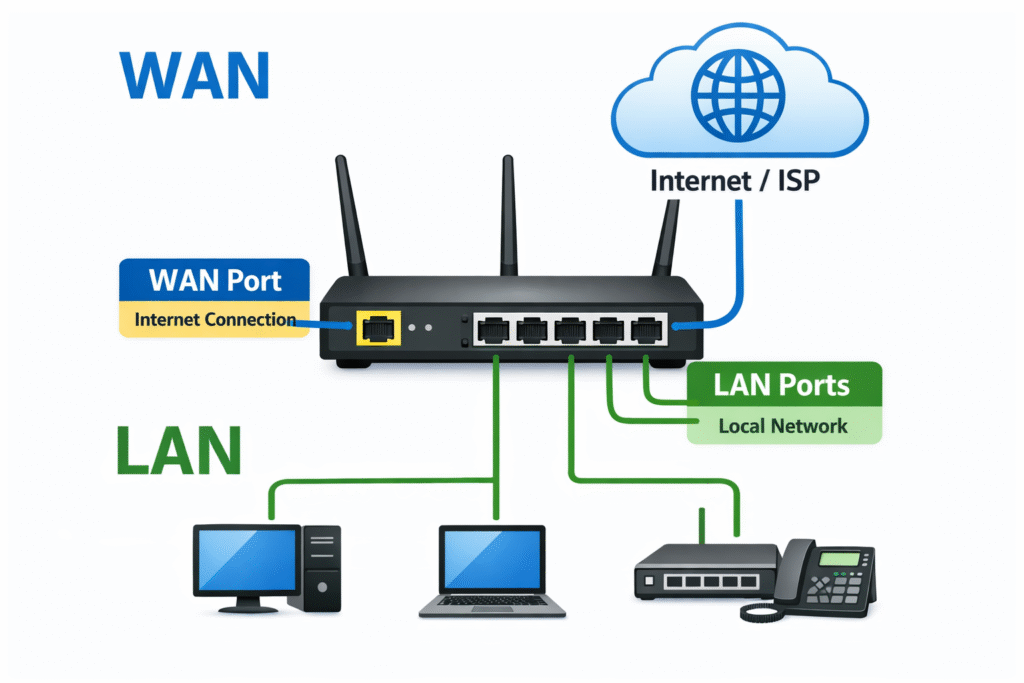
A WAN port on a router connects the router to the outside network, usually a modem, fiber ONT, ISP gateway, firewall, or internet handoff. LAN ports connect local devices such as PCs, switches, printers, access points, IP phones, cameras, and NAS systems.
For setup, use a strict cabling rule: plug the modem or ONT into the WAN port. Plug computers, switches, access points, printers, and other local devices into LAN ports. WAN brings the upstream connection into the router; LAN shares network access inside the home, office, branch, or site.
For business networks, the cabling principle is the same, but the hardware decision carries more risk. A router with the wrong WAN speed, media type, firewall throughput, or failover capability can limit the whole site even if the LAN side appears correctly sized.

What Is a WAN Port on a Router?
A WAN port is the router interface used for the upstream internet or external network connection. In a typical setup, the Ethernet cable from the modem, fiber ONT, ISP gateway, firewall, or provider handoff plugs into the WAN port.
WAN stands for Wide Area Network. On a router, the WAN label normally means the port or interface that faces the modem, ONT, ISP gateway, or external network. On consumer routers, the WAN port may be labeled WAN, Internet, or shown with a globe icon. It is often physically separated from the LAN ports or marked with a different color.
On business routers, firewalls, and Cisco edge platforms, a port may not be permanently labeled as WAN. The role can be assigned by configuration, security zone, routing policy, or SD-WAN transport design. The function matters more than the printed label: the WAN side points toward the provider, upstream gateway, or external network.
The WAN interface often receives a public IP address, a provider-assigned private address, or another upstream address from DHCP, PPPoE, or static configuration. From there, the router forwards traffic to the LAN side and applies NAT, firewall policy, VPN, and routing rules when required.
What Does WAN Mean on a Router?
On a router, WAN means the outside or upstream side of the network. It is the side that faces the internet provider, modem, ONT, ISP gateway, upstream firewall, or another external network.
WAN does not mean the port is automatically faster than a LAN port, and it does not require a special cable in most Ethernet setups. It means the router treats that interface as the path toward the external network rather than the local devices inside the site.
WAN vs LAN Port: Quick Difference
The WAN vs LAN port difference is about role, not connector shape. WAN and LAN ports may use the same RJ-45 Ethernet connector, but the router treats them differently. WAN is the upstream side. LAN is the local-device side.
| Item | WAN Port | LAN Port |
|---|---|---|
| Main role | Connects the router to an upstream network | Connects local devices to the router |
| Typical device | Modem, ONT, ISP gateway, firewall, upstream router | PC, switch, access point, printer, NAS, IP phone |
| Network direction | Outside-facing or provider-facing | Inside-facing or local-facing |
| IP behavior | Receives upstream or provider-side addressing | Serves the local private network |
| Security role | NAT, firewall, VPN, port forwarding, routing policy | Local access, device connectivity, VLANs, internal traffic |
| Common label | WAN, Internet, globe icon | LAN1, LAN2, Ethernet, numbered ports |
| Typical quantity | Usually one, sometimes two or more on dual-WAN routers | Usually multiple |
| Common mistake | Plugging a switch or PC into WAN | Plugging a modem or ONT into LAN |
In normal use, the WAN port is not where a desktop, printer, access switch, or access point should connect. Those devices belong on the LAN side unless the network design intentionally creates a separate routed segment.
Where Is the WAN Port on a Router?
On many home and small-office routers, the WAN port is straightforward to identify. It may be separated from the other Ethernet ports, colored differently, labeled WAN or Internet, or marked with a globe icon.
Newer mesh routers, multi-gig routers, and business appliances can be less obvious. A port may be labeled WAN/LAN, 2.5G WAN, 10G WAN, or simply shown as a configurable Ethernet interface in the web interface or command line.
| Label or behavior | What it usually means |
|---|---|
WAN | Upstream internet or provider connection |
Internet | Same practical role as WAN on many routers |
| Globe icon | Usually the upstream or WAN port |
WAN/LAN | Configurable port; check router mode and port assignment |
2.5G WAN or 10G WAN | Multi-gig upstream port |
| Unlabeled business interface | Role may be assigned by configuration |
If the port is not obvious, check the router label, setup screen, interface role, or hardware guide before cabling the site. On business devices, do not assume port order alone tells you which interface is WAN.
Which Cable Goes Into the WAN Port?
The cable from the upstream device normally goes into the WAN port. That upstream device may be an ISP modem, fiber ONT, ISP gateway, firewall, Ethernet handoff, or another router in a routed design.
Local devices and network expansion should use LAN ports. If the router does not have enough LAN ports, connect a switch to a LAN port instead of using the WAN port as an extra local port.
| Device or cable | Use WAN or LAN? | Why |
|---|---|---|
| ISP modem | WAN | It is the upstream internet source |
| Fiber ONT | WAN | It hands off the provider circuit |
| ISP Ethernet handoff | WAN | It is the outside-facing service handoff |
| Upstream firewall | WAN or routed uplink, depending on design | It may be the external gateway for the router |
| Desktop PC or laptop | LAN | It is a local endpoint |
| Network switch | LAN | It expands the local wired network |
| Wireless access point | LAN | It serves local wireless clients |
| Printer, NAS, or IP phone | LAN | It belongs inside the local network |
| Second router for a separate subnet | WAN on the second router | It creates another routed boundary |
| Second router used only as an access point | LAN-to-LAN or AP mode | It keeps devices on the same local network |
Most wrong-port problems come from treating all Ethernet ports as equal. The connector may look the same, but the router role is different.
How to Set Up a WAN Port on a Router
WAN port setup is a cabling and upstream-addressing check, not only a router web-interface task. The router must have a physical link to the modem or ONT and must receive the correct WAN address from the provider or upstream gateway.
| Step | What to check | Why it matters |
|---|---|---|
| 1 | Modem or ONT is powered on | The router cannot receive an upstream signal if the provider device is offline |
| 2 | Cable runs from modem or ONT to WAN | WAN is the router’s upstream interface |
| 3 | WAN link light is active | Confirms physical link between router and upstream device |
| 4 | WAN IP address is received | Confirms DHCP, PPPoE, or static IP behavior |
| 5 | Local device connects to LAN or Wi-Fi | Local devices should not normally connect to WAN |
| 6 | Router mode is correct | Router mode, bridge mode, and AP mode change how WAN behaves |
| 7 | ISP speed matches WAN port speed | A 1G WAN port can bottleneck multi-gig service |
For many home and small-office connections, the WAN side receives an address automatically by DHCP. Some providers require PPPoE credentials or a static IP configuration. If the physical cable is correct but the WAN interface shows no address, confirm the provider handoff method before replacing hardware.
Router mode also matters. In normal router mode, WAN is the upstream side and LAN is the local side. In AP mode or bridge mode, the device may stop using the WAN port in the same way, or a configurable WAN/LAN port may be reassigned.
What Happens If the WAN Port Is Unplugged or Not Working?
If the WAN port is unplugged or not working, the local network may still appear operational. Wi-Fi may still broadcast, LAN devices may still see each other, and switch link lights may stay on, but internet access fails because the router has no working upstream path.
Start with the physical WAN link and the WAN IP address. A correct LAN connection does not prove the internet side is working.
| Symptom | Likely cause | First fix |
|---|---|---|
| WAN port unplugged warning | Cable disconnected or wrong port used | Move modem or ONT cable to WAN |
| Wi-Fi works but no internet | LAN is active but WAN has no upstream address | Check WAN IP status |
| PC connected to WAN does not behave like a LAN client | WAN is not a normal endpoint port | Move PC to LAN |
| Switch connected to WAN isolates devices | Wrong routed boundary | Move switch to LAN |
| Double NAT warning | Second router connected LAN-to-WAN | Use AP mode or LAN-to-LAN if extending the same network |
| Slow internet | WAN port, router throughput, or ISP plan bottleneck | Check WAN speed and router specifications |
If the WAN link is active but there is still no internet, check whether the router is receiving the expected WAN address. A 0.0.0.0 address, missing default gateway, failed PPPoE login, or provider-side outage can all look like a WAN port failure from the user side. When troubleshooting a WAN port not working, verify the cable path, WAN address, upstream device, and provider status before replacing the router.
Can You Use a WAN Port as a LAN Port?
On most basic routers, the WAN port should not be used as a LAN port unless the router firmware explicitly supports WAN/LAN reassignment or AP mode. A WAN port normally creates the outside boundary of the router; a LAN port connects local devices inside that boundary.
Some routers include a WAN/LAN combo port. That port may be usable as a second WAN, a LAN expansion port, or a failover interface depending on the operating mode. Check the router interface settings before assuming how it behaves.
Business routers and firewalls are more flexible. A physical port may be assigned to an outside zone, inside zone, routed interface, trunk, management network, or WAN transport. In those environments, the configuration defines the port role.
LAN-to-LAN vs LAN-to-WAN: Which Connection Should You Use?
LAN-to-LAN or AP mode is usually correct when a second router is being used only to extend the same local network. LAN-to-WAN creates a second routed network and can cause double NAT, device discovery problems, and port-forwarding conflicts.
LAN-to-WAN is valid when the second router is intentionally creating a separate subnet, guest network, lab network, or security boundary. It is not the right default when the goal is simply more Wi-Fi coverage or more Ethernet ports.
| Goal | Recommended connection | Why |
|---|---|---|
| Extend the same Wi-Fi or wired network | LAN-to-LAN or AP mode | Keeps clients on one network |
| Create a separate routed network | LAN-to-WAN | Creates another NAT or routing boundary |
| Add more Ethernet ports | Switch to LAN | Expands local access without changing routing |
| Separate guest or lab network | LAN-to-WAN or VLAN design | Depends on security and routing requirements |
For a simple office or home extension, AP mode is usually more predictable than chaining routers. For business segmentation, VLANs or a properly designed firewall/router boundary are easier to operate than accidental double NAT.
Is a WAN Port the Same as an Ethernet Port?
Many WAN ports are Ethernet ports, but that does not make them the same as LAN ports. Ethernet describes the physical or data-link technology. WAN describes the network role assigned to the port.
The same RJ-45 connector can be used for a WAN connection, a LAN connection, a management port, or a routed interface depending on the device. On a home router, the role is often fixed by the manufacturer. On a business router or firewall, the role may be assigned in software.
This distinction matters when replacing equipment. A router can match the required port count and still be unsuitable if the WAN side lacks the required speed, media type, failover support, or throughput.
Is WAN Faster Than LAN?
WAN is not automatically faster or slower than LAN. WAN and LAN describe network roles. Actual speed depends on the port speed, internet service, router hardware, firewall/VPN load, switch capacity, and cable quality.
In many networks, LAN traffic is faster than internet traffic. A PC and NAS may communicate over 1G, 2.5G, or 10G Ethernet while the WAN circuit is limited by the ISP plan. The reverse can also happen when a site buys multi-gig internet but keeps an older router with only a 1G WAN port.
For internet service above 1Gbps, confirm that the router has a 2.5G, 5G, 10G, SFP, or SFP+ WAN path that matches the provider handoff. Also confirm NAT, firewall, VPN, and SD-WAN throughput, because a port label alone does not prove the router can forward traffic at line rate.
Single WAN vs Dual WAN vs Multi-Gig WAN
A single-WAN router receives one upstream connection and shares it with LAN and Wi-Fi clients. It is sufficient for many homes, small offices, and simple branch sites.
Dual-WAN routers support two upstream connections. They are used when a branch needs a backup ISP, cellular failover, circuit redundancy, or traffic distribution across two providers. Dual WAN does not always make one user’s download twice as fast, but it can improve uptime and multi-user resilience.
Multi-gig WAN matters when the ISP or upstream provider delivers more than 1Gbps. A router with only a 1G WAN port can become the bottleneck even if the internet plan and LAN switch are faster. For branch and enterprise sites, confirm the WAN media type, speed, transceiver requirement, failover behavior, and support coverage before quoting hardware.
For Cisco edge-router selection, use the Cisco router selection guide. For branch and enterprise edge platforms, compare the Cisco Catalyst 8000 Series router options.
Router, Switch, Firewall, and Access Point: Where Each Connects
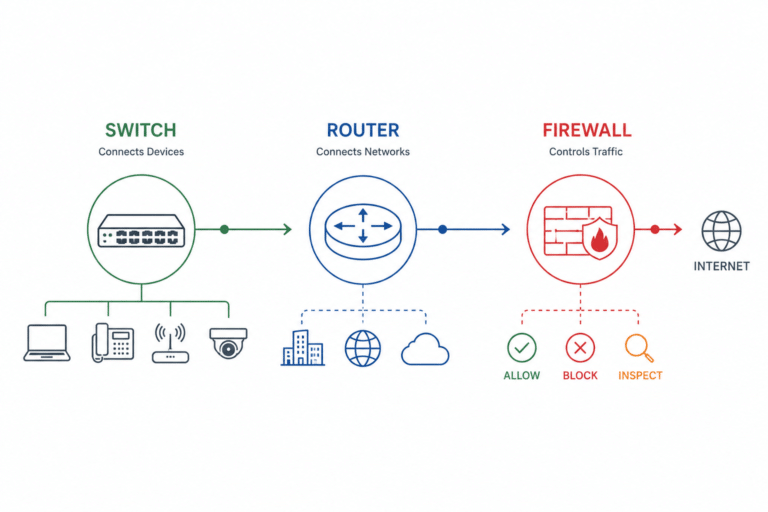
A typical small-office topology follows this path: provider device to router or firewall, router/firewall inside interface to switch, switch ports to local endpoints and access points.
| Network item | Typical connection |
|---|---|
| ISP modem or ONT | Router WAN port or firewall outside interface |
| Router LAN port | Switch uplink |
| Switch ports | PCs, printers, phones, cameras, access points |
| Firewall | Between upstream network and LAN, depending on design |
| Wireless access point | LAN port or switch port |
The switch expands the LAN. It should normally sit behind the router or firewall on the inside network. An access point also belongs on the LAN side because it serves local wireless clients. A firewall may sit before or after a router depending on architecture, but it should be treated as a security and routing boundary, not as a port extender.
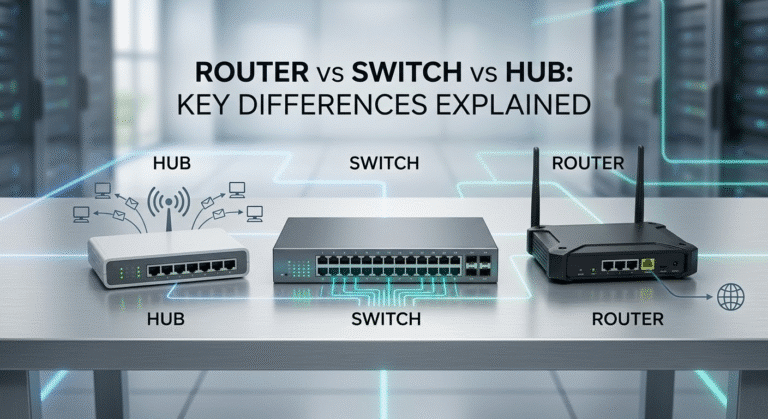
For the device-role difference between routers, switches, and hubs, see the router vs switch vs hub guide. For business edge designs involving routers, firewalls, and switches, see router, firewall, and switch roles.
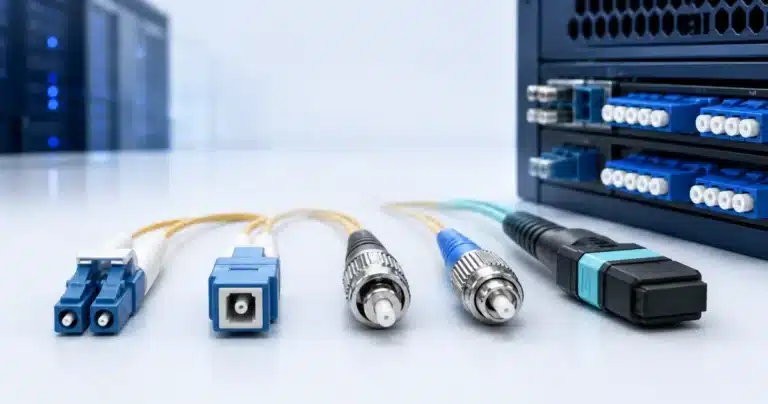
For Ethernet cabling basics, see the straight-through cable guide. If the provider handoff or uplink media is fiber rather than copper, review fiber vs Ethernet cable.
Business Router Buying Checks for WAN and LAN Ports
WAN and LAN port decisions affect hardware selection. A router may match the expected port count yet fail the deployment if the WAN interface, throughput, license, or upstream media does not match the service.
| Check | Why it matters |
|---|---|
| WAN port speed | Must match the ISP or upstream handoff, especially above 1Gbps |
| WAN media type | Confirm RJ-45 copper, SFP, SFP+, fiber, or copper handoff |
| Router throughput | NAT, firewall, VPN, and SD-WAN services can reduce usable speed |
| Dual-WAN support | Required for backup ISP, failover, or load distribution |
| LAN expansion | Determines whether a downstream switch is required |
| VLAN support | Important for business segmentation and managed switching |
| Optics and cables | SFP/SFP+ WAN designs require compatible transceivers and fiber type |
| License and software image | Some enterprise features depend on licensing or software |
| Support and warranty | Edge devices are high-impact failure points in branch networks |
| Stock and replacement | Similar routers may differ in WAN speed, licensing, and expansion options |
Layer23-Switch can help buyers validate router, switch, firewall, optics, power supply, and license requirements when a WAN upgrade, branch refresh, or provider handoff change affects the bill of materials. The most important check is not the number of ports; it is whether those ports match the role, speed, media, throughput, and support expectations of the deployment.
For broader network hardware planning, start from the Cisco switches catalog when the WAN project also requires LAN switching, access expansion, optics, or replacement hardware.
FAQ: WAN Port on Router and WAN vs LAN Port
What is a WAN port on a router?
A WAN port is the router interface that connects to the upstream network, usually a modem, fiber ONT, ISP gateway, firewall, or provider handoff. It brings the outside connection into the router before traffic is shared with LAN devices.
What does WAN mean on a router?
WAN stands for Wide Area Network. On a router, it usually means the outside-facing side that points toward the internet provider, modem, ONT, upstream firewall, or another external network.
Do I plug the modem into WAN or LAN?
In a normal router setup, plug the modem, fiber ONT, or ISP gateway into the router’s WAN port. LAN ports should be used for local devices or for a downstream switch that expands the local network.
What is the difference between WAN and LAN ports?
A WAN port connects the router to an outside or upstream network. A LAN port connects local devices inside the network, such as computers, switches, printers, access points, IP phones, cameras, and NAS systems.
Where is the WAN port on a router?
On many routers, the WAN port is labeled WAN, Internet, or marked with a globe icon. On business routers, firewalls, and some multi-gig routers, the WAN role may be assigned by configuration rather than by a fixed printed label.
How do I set up a WAN port?
Connect the modem, ONT, or ISP handoff to the WAN port, confirm the WAN link light, and check that the router receives a WAN IP address. Some providers require DHCP, PPPoE credentials, or static IP settings before the WAN connection works.
Why is my WAN port not working?
Common causes include a cable in the wrong port, no link from the modem or ONT, no WAN IP address, failed PPPoE login, provider outage, router mode mismatch, or a WAN speed mismatch. Check the physical cable path and WAN address before replacing hardware.
Can I use the WAN port as a LAN port?
On most basic routers, the WAN port should not be used as a LAN port unless the router supports WAN/LAN reassignment or AP mode. Some business routers and firewalls allow physical interfaces to be assigned different roles in software.
Is the WAN port the same as an Ethernet port?
Many WAN ports are Ethernet ports, but Ethernet describes the connection technology while WAN describes the network role. The same RJ-45 connector can be used for WAN, LAN, management, or routed interfaces depending on the device and configuration.
Is WAN faster than LAN?
WAN is not automatically faster or slower than LAN. Actual speed depends on the internet service, port speed, router throughput, firewall or VPN load, switch capacity, and cabling.
What is a dual-WAN router?
A dual-WAN router supports two upstream connections, usually for backup ISP service, cellular failover, circuit redundancy, or traffic distribution. Dual WAN can improve uptime, but it does not always double the speed of a single user’s download.
Final Takeaway
Use the WAN port for the modem, fiber ONT, ISP gateway, firewall, or upstream handoff. Use LAN ports for local devices, access switches, printers, access points, phones, cameras, and internal wired expansion.
For setup and troubleshooting, the operating rule is upstream connection to WAN, local network to LAN. For procurement and deployment teams, the port label is only the starting point. Confirm WAN speed, media type, router throughput, dual-WAN needs, LAN expansion, optics, software, warranty, stock, and replacement options before approving the router or branch-edge BOM.