Unified Memory vs RAM: What’s the Difference and How Much Do You Need?
Unified memory is RAM. On Apple Silicon Macs, “unified memory” is Apple’s name for the system’s working memory built directly into the processor package and shared by the CPU, GPU, and Neural Engine instead of sitting in separate slots or on a separate graphics card. Capacity maps 1:1 — 16GB of unified memory is 16GB of RAM — but the shared, on-chip design delivers far higher bandwidth and removes the CPU-to-GPU copying that a traditional RAM-plus-VRAM system pays for. The practical catch: it is soldered to the chip, so you choose the amount once, at purchase, and cannot upgrade it later.
Is Unified Memory the Same as RAM?
Yes. Unified memory is RAM — the same fast, volatile working memory that holds your open apps and active data and empties when you shut down. Apple did not invent a new kind of memory; it changed where the memory lives and who shares it. The capacity is identical unit for unit: 16GB of unified memory is exactly 16GB of RAM, not more.
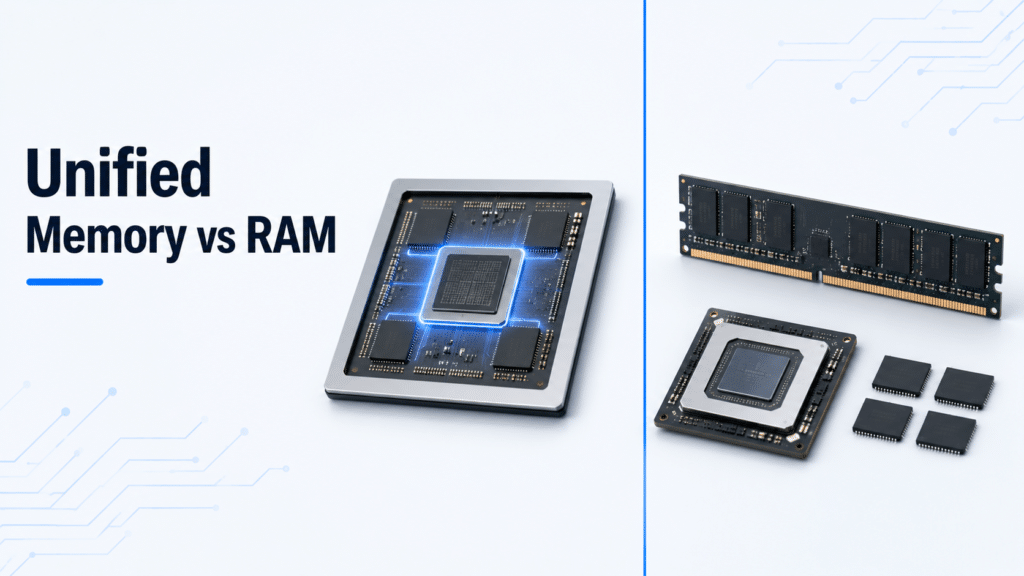
What changed is the architecture. Traditional RAM sits in slots on the motherboard, and a discrete graphics card carries its own separate video memory. Apple’s unified memory puts one shared pool on the same package as the processor, so the CPU and GPU read and write the same physical memory. Apple introduced the term with the M1 chip in 2020, and it now spans the M1 through M5 families.
(One footnote on the name: in GPU programming, “unified memory” can also mean a software-managed shared address space, such as NVIDIA CUDA Unified Memory. That is a different, developer-facing meaning. This article is about the Apple Silicon hardware sense, which is what almost everyone is asking about.)
What Is Unified Memory?
Unified memory is a single pool of RAM placed on the processor’s system-on-a-chip (SoC) and shared by every processing block — CPU cores, GPU cores, the Neural Engine, and the media engines. Because they all address the same memory, no component needs its own private copy of the data, and nothing has to be shuttled from one pool to another.
This is the design behind every Apple Silicon Mac. The DRAM chips sit on the same package as the compute cores, millimeters away, connected by a very wide internal bus. That physical closeness and width is what gives unified memory its high bandwidth.
What Is RAM and Traditional Memory Architecture?
RAM (random-access memory) is the volatile working memory a computer uses for active programs and data; it is fast, temporary, and wiped at every power-off. In a conventional PC, RAM comes as DDR5 modules in DIMM or SO-DIMM slots, and on desktops and many laptops you can add or replace it.
The key trait of the traditional layout is separation. The CPU works out of system RAM, while a discrete GPU has its own dedicated video memory (VRAM, usually GDDR6). When the GPU needs data the CPU prepared, the system copies it across the PCI Express bus from system RAM into VRAM, and back again for results. That copying costs time, power, and duplicated capacity — the exact overhead unified memory removes.
Unified Memory vs RAM: Key Differences
| Factor | Unified memory (Apple Silicon) | Traditional RAM (+ discrete VRAM) |
|---|---|---|
| Location | On the processor package (SoC) | In motherboard slots; VRAM on the GPU |
| Shared with the GPU | Yes — one pool for CPU, GPU, Neural Engine | No — CPU uses RAM, GPU uses separate VRAM |
| CPU↔GPU data copying | None; both read the same memory | Copies over PCI Express between RAM and VRAM |
| Bandwidth | Very high (153–819 GB/s, by chip) | Moderate for system RAM (~80–90 GB/s typical DDR5) |
| Upgradeable | No — soldered, fixed at purchase | Often yes on desktops/many laptops |
| Capacity model | Choose once; one pool serves everything | Add RAM and/or a GPU with more VRAM |
| Where you see it | Macs, plus consoles and many integrated chips | Most Windows desktops and discrete-GPU laptops |
Why Unified Memory Is Faster: Inside the Architecture
Unified memory is faster for two concrete reasons, and neither is marketing. First, it removes the copy. In a discrete-GPU system, data the GPU needs is duplicated from system RAM into VRAM across PCI Express; with unified memory the CPU and GPU point at the same physical addresses, so that transfer simply does not happen. That saves time, power, and the wasted capacity of holding two copies.
Second, the physical layout favors bandwidth. The DRAM sits on the processor package, beside the cores, on a wide memory bus. The result is bandwidth a slotted-RAM laptop cannot match. Apple’s published figures climb with the chip tier: the M5 delivers 153 GB/s, the M5 Pro 307 GB/s, the M5 Max up to 614 GB/s, and the M3 Ultra in the Mac Studio 819 GB/s. A typical dual-channel DDR5 laptop runs in the region of 80–90 GB/s. That is several times the throughput, which is why memory-heavy work — video, 3D, and on-device AI — runs so well on Apple Silicon.
Bandwidth is not capacity, though. A high-bandwidth chip still only holds the gigabytes you bought, so the speed advantage does not let you skip buying enough memory for your workload.
Is 8GB Unified Memory the Same as 16GB RAM?
No. 8GB of unified memory is 8GB of RAM, not 16GB. Capacity is 1:1, and the popular claim that “a Mac needs half the RAM of a PC” is an oversimplification, not a spec. What is true is narrower: a Mac can often do a little more with a given amount of memory for two real reasons.
- No separate VRAM carve-out. On a PC with integrated graphics, a slice of system RAM is reserved for the GPU. On Apple Silicon the GPU draws from the shared pool dynamically, so none is permanently fenced off.
- Efficient memory handling. macOS uses memory compression and a fast SSD swap file, so light workloads stretch further before they slow down.
The limits are real, too. Under genuine load — many browser tabs, big photo libraries, virtual machines — an 8GB Mac swaps heavily to the SSD, and performance drops. Worth knowing: current Macs now start at 16GB of unified memory, so the old “8GB” debate mostly applies to older M1, M2, and M3 machines still in use rather than to a Mac you would buy today.
How Much Unified Memory Do You Need?
For a current Mac, 16GB is the sensible floor, 24–32GB covers most creative and development work comfortably, and 48GB or more is for heavy 8K video, large 3D scenes, and local AI models. Because the memory cannot be upgraded later, buy for the workload you expect to run two or three years from now, not just today.
| Workload | Recommended unified memory | Why |
|---|---|---|
| Web, email, office, streaming | 16GB | The current base handles everyday multitasking |
| Coding, Docker, light VMs | 24–32GB | Containers and IDEs are memory-hungry |
| Photo editing, 4K video | 24–32GB | Large libraries and timelines need headroom |
| Local LLMs / on-device AI | 32–64GB+ | The GPU can address the whole pool, so models that need a big VRAM card on a PC run in unified memory |
| Pro 8K, heavy 3D, ML training | 64–128GB | Sustained large datasets and many layers |
Everyday, office, and web
16GB is enough for browsing, email, office apps, and streaming, with room to keep many tabs and apps open. This is the floor on current Macs and the right pick for general use.
Developers, Docker, and local LLMs
Development work pushes memory hard: containers, language servers, and local databases add up fast, so 24–32GB is the comfortable range. Running local language models is the standout case — because the GPU shares the entire pool, a 32GB or 64GB Mac can load models that would need an expensive high-VRAM graphics card on a PC.
Photo editing and 4K video
Photo and 4K video editing want 24–32GB. Large RAW libraries, multi-layer edits, and 4K timelines keep a lot of working data resident, and the extra memory prevents stalls during export and playback.
Pro 8K, 3D, and machine learning
For 8K footage, large 3D scenes, and machine-learning work, 48–128GB pays off. These workloads hold enormous datasets in memory, and the high bandwidth of the Pro, Max, and Ultra chips only helps if there is enough capacity to keep the data resident.
Unified Memory vs VRAM
VRAM is the dedicated memory on a discrete graphics card; unified memory has none, because the GPU shares the system pool instead. On a traditional PC, a graphics card ships with a fixed amount of fast video memory (often 8–16GB of GDDR6), separate from system RAM. Apple Silicon has no such separate block — the integrated GPU takes what it needs from the unified pool on the fly.
The upside is flexibility: a 32GB Mac can hand the GPU far more memory than a typical mid-range card’s VRAM, which is exactly why local AI and large 3D scenes run well. The trade-off is contention — the CPU and GPU draw from the same pool, so a heavy graphics task and a heavy compute task compete for the same gigabytes.
Unified Memory vs SSD Storage: Memory Is Not Storage
Unified memory and SSD storage are different things, and mixing them up is the most common buying mistake. Memory (unified memory or RAM) is temporary working space for active apps and empties when you power off. Storage (the SSD) is permanent space for your files, apps, and operating system, and it keeps its contents with the power off.
A spec like “16GB unified memory, 512GB SSD” lists both: 16GB of working memory and 512GB of file storage. They are not interchangeable, and you cannot substitute one for the other. When memory fills up, macOS temporarily uses part of the SSD as overflow “swap,” which works but is far slower than real memory and adds wear to the drive — another reason to buy enough unified memory up front.
Unified Memory vs DDR5
This is not really a versus: Apple’s unified memory is built from low-power LPDDR5-class memory, the mobile relative of the DDR5 in a PC. The difference is packaging, not a rival memory type. Instead of DDR5 modules in slots, Apple mounts LPDDR5/LPDDR5X chips on the processor package and connects them over a much wider bus, which is how it reaches bandwidth figures a standard dual-channel DDR5 laptop (around 80–90 GB/s) does not approach. So “unified memory vs DDR5” compares a memory architecture to a memory standard — unified memory uses DDR5-generation chips; it just deploys them differently.
Does Windows or a PC Have Unified Memory?
Yes, in several forms — shared, unified memory is not unique to Apple. Game consoles have used it for years: the PlayStation 5 and Xbox Series X share a single GDDR memory pool between CPU and GPU. AMD’s APUs, and the chips in many mini-PCs and handheld PCs, share system RAM with their integrated graphics, and AMD’s newer large-memory mobile chips lean into this for on-device AI. Intel’s integrated graphics likewise carve graphics memory from system RAM.
The real difference is that Apple made unified memory the only model on the Mac and tuned its bandwidth high, while most Windows machines still offer the classic discrete-GPU-with-separate-VRAM design alongside any integrated option. So a PC can have unified or shared memory — it just usually is not the headline the way it is on a Mac.
Downsides of Unified Memory
The convenience comes with hard trade-offs. The memory is soldered onto the chip package, so it is not upgradeable — the amount you buy is the amount you keep for the life of the machine. Per-gigabyte upgrade pricing is steep, so jumping a tier costs more than adding a RAM stick to a PC would. Because memory and processor are one unit, a memory fault can mean replacing the whole logic board rather than a single module. And the shared pool means heavy GPU use and heavy CPU use draw on the same capacity, so they can compete under extreme load.
Common Misconceptions About Unified Memory
- “Unified memory isn’t real RAM.” It is RAM — the same working memory, placed on the chip and shared.
- “8GB unified equals 16GB regular RAM.” Capacity is 1:1. A Mac may use memory a bit more efficiently, but the gigabytes do not double.
- “I need the same amount as my old PC.” Often you can drop a little, thanks to the shared pool and efficient handling — but plan for your real workload, not a fixed discount.
- “Unified memory is storage.” No. It is temporary working memory, not your files; the SSD is your storage.
- “More bandwidth means more capacity.” Separate specs. An Ultra chip has huge bandwidth, but you still choose the number of gigabytes.
Is Unified Memory the Future of Computing?
Unified memory is already spreading well beyond Macs — into consoles, AMD and Intel integrated graphics, AI-focused laptops, and the data-center hardware where CPUs and accelerators increasingly share high-bandwidth memory pools to feed AI workloads. The same trend is reshaping the networking and server hardware that those systems run on. For AI in particular, a large shared pool lets the GPU address far more memory than a typical graphics card, which is a structural advantage.
It will not erase traditional RAM. Desktops, workstations, and servers that depend on upgradeable, expandable memory keep socketed DDR5 alive, and the no-upgrade trade-off of unified memory is a real cost for those buyers. The realistic outlook is coexistence: unified memory where integration and bandwidth win, and slotted RAM where flexibility and expansion matter more.
FAQ
Is unified memory the same as RAM?
Yes. Unified memory is RAM built into the processor package and shared by the CPU, GPU, and Neural Engine. Capacity is identical unit for unit — 16GB unified memory is 16GB of RAM — but it is faster and not upgradeable.
Is 8GB unified memory the same as 16GB RAM?
No. 8GB of unified memory is 8GB of RAM. A Mac can use memory a little more efficiently because the GPU shares the pool and macOS compresses and swaps well, but capacity does not double. Current Macs start at 16GB anyway.
How much unified memory do I need?
16GB for everyday use, 24–32GB for development and 4K video or photo editing, and 48–128GB for 8K, heavy 3D, and local AI. Buy for future workloads, since you cannot upgrade later.
Is unified memory faster than DDR5 RAM?
In bandwidth, yes. Apple Silicon ranges from 153 GB/s to 819 GB/s depending on the chip, versus roughly 80–90 GB/s for a typical dual-channel DDR5 laptop, because the memory sits on-package with a wide bus.
Can you upgrade unified memory?
No. Unified memory is soldered onto the chip package and fixed at purchase. Choose the capacity you will need for the life of the machine before you buy.
Is unified memory the same as VRAM?
No. VRAM is dedicated memory on a discrete graphics card. Unified memory has no separate VRAM; the GPU draws from the shared system pool, which can give it more memory than a typical graphics card.
Does unified memory count as storage?
No. Unified memory is temporary working memory that empties at shutdown. Your SSD is permanent storage for files and apps. A spec like “16GB memory, 512GB SSD” lists both separately.
Do Windows PCs have unified memory?
Yes, in forms like game consoles, AMD APUs, and integrated graphics that share system memory. The difference is that Apple made it the only option on Macs and tuned its bandwidth high, while PCs usually still offer discrete GPUs with separate VRAM.
References
- Apple — MacBook Air technical specifications (unified memory capacity and memory bandwidth): https://www.apple.com/macbook-air/specs/
- Apple — MacBook Pro technical specifications (M5, M5 Pro, M5 Max unified memory and bandwidth): https://www.apple.com/macbook-pro/specs/
- Apple — Mac Studio technical specifications (M4 Max and M3 Ultra unified memory and bandwidth): https://www.apple.com/mac-studio/specs/
- JEDEC DDR5 and LPDDR5 memory standards (DRAM generations referenced for comparison).