
Cisco Industrial Switch Selection Guide: IE3100 vs IE3200 vs IE3300 vs IE3400 vs IE3500 vs IE9300
Cisco industrial switches are designed for OT environments such as factories, substations, roadside cabinets, rail systems, utilities, mining sites, smart-city infrastructure, and outdoor industrial networks where standard enterprise switches may not be suitable for heat, vibration, dust, moisture, unstable power, or strict uptime requirements.
Choose IE3100 for tight machine enclosures, IE3200 for fixed rugged cabinet access, IE3300 for modular plant-floor expansion, IE3400 for critical OT networks that require advanced resiliency or segmentation, IE3500 for newer high-performance DIN-rail projects, and IE9300 / IE9320 for rugged rack-mount aggregation.
The right Cisco IE switch is not selected by port count alone. Buyers should confirm the deployment role, fixed vs modular design, PoE budget, fiber or 10G uplink requirement, industrial redundancy, timing, security features, power supply, and complete BOM before ordering.
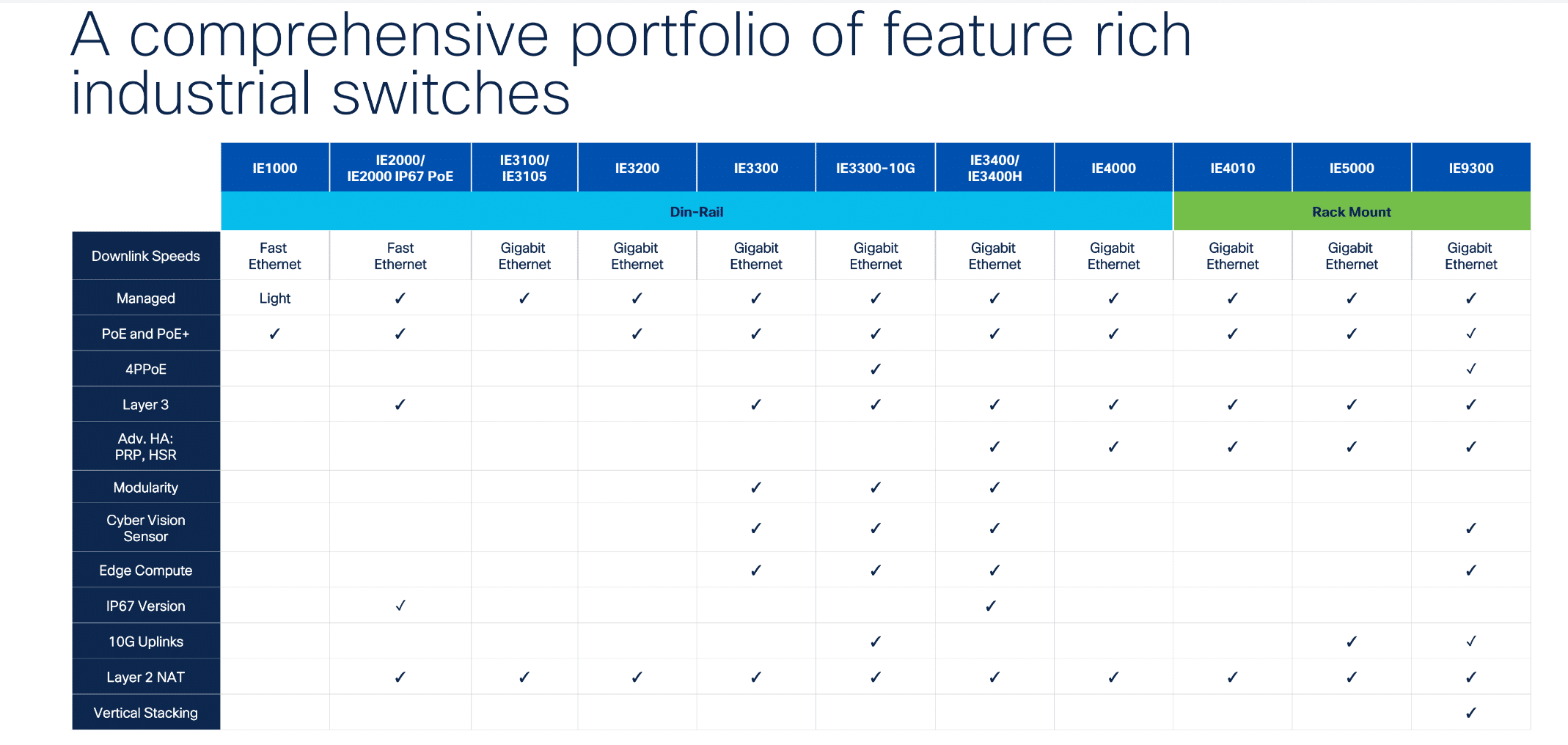
Which Cisco Industrial Switch Should You Choose?
Use this quick selection table before comparing individual SKUs.
| Project Requirement | Best Cisco IE Family | Why |
|---|---|---|
| Tight machine enclosure or small control box | IE3100 | Ultra-compact rugged access |
| Fixed rugged cabinet access | IE3200 | Simple 10-port industrial access |
| Modular plant-floor growth | IE3300 | Expansion modules and select 10G uplink options |
| Critical OT resiliency or segmentation | IE3400 | Advanced OT features such as PRP, HSR, and TrustSec-class requirements |
| Newer high-performance DIN-rail OT edge | IE3500 | Higher bandwidth, higher power, newer rugged modular platform |
| Rugged rack-mount aggregation | IE9300 / IE9320 | Industrial aggregation, fiber concentration, timing, and distribution |
If your project is simple and fixed, start with IE3100 or IE3200. If the plant-floor network may expand, start with IE3300. If the project requires advanced OT resiliency, segmentation, timing, or rugged aggregation, compare IE3400, IE3500, and IE9300.

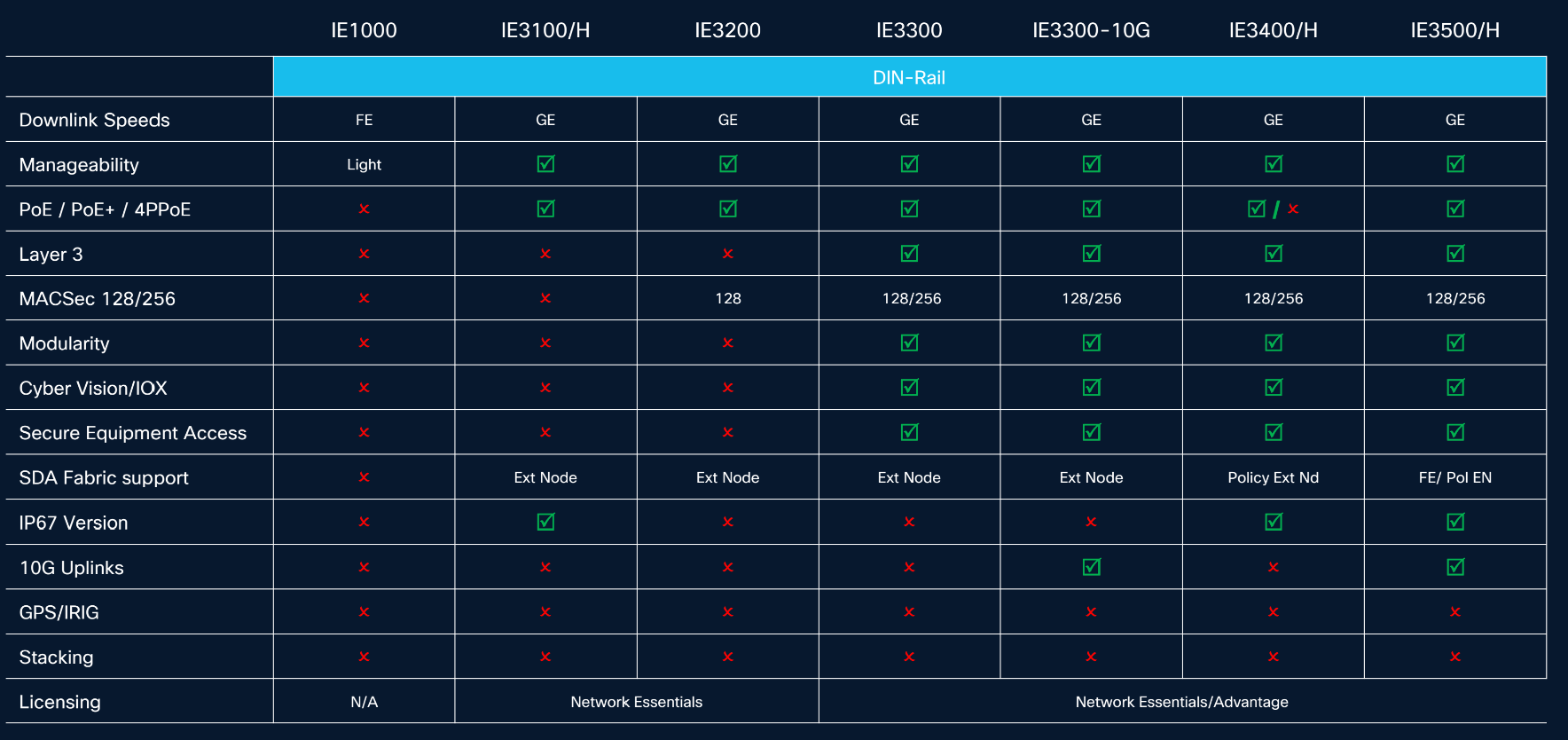
Cisco Industrial Switch Comparison: IE3100 vs IE3200 vs IE3300 vs IE3400 vs IE3500 vs IE9300
The fastest way to choose a Cisco industrial switch is to match the switch family to the deployment role first. Detailed SKU selection, power supply sizing, expansion modules, and protocol support should be checked after the family is selected.
| Family | Best Role | Form Factor | Fixed or Modular | Main Buying Reason |
|---|---|---|---|---|
| IE3100 | Compact machine edge | DIN rail | Fixed | Tight enclosures and small cabinet spaces |
| IE3200 | Fixed rugged cabinet access | DIN rail | Fixed | Simple 10-port industrial access |
| IE3300 | Modular plant-floor access | DIN rail | Modular | Expansion modules and select 10G uplinks |
| IE3400 | Critical OT edge | DIN rail | Modular | PRP, HSR, TrustSec-class requirements |
| IE3500 | High-performance next-gen OT edge | DIN rail | Modular | Higher bandwidth, higher power, TSN-oriented OT projects |
| IE9300 / IE9320 | Rugged aggregation | 1RU rack-mount | Fixed high-density | Fiber aggregation, timing, rugged distribution |
This page is a series-level selection guide. It helps you decide which Cisco IE family to evaluate. For detailed SKU comparisons, power supply selection, PoE budget planning, and expansion module sizing, use the dedicated cluster articles linked throughout this guide.
What Is a Cisco Industrial Ethernet Switch?
A Cisco industrial Ethernet switch is a rugged network switch designed for OT environments where ordinary office switches may not be suitable. Industrial switches are commonly used in factories, road cabinets, power utilities, rail systems, oil and gas sites, mining networks, smart city infrastructure, and harsh outdoor cabinets.
Industrial switches are usually selected when the project needs one or more of the following:
- DIN-rail, wall, or rugged rack installation
- extended temperature operation
- DC power input
- vibration and electrical noise resistance
- fiber uplinks for long-distance or high-EMI environments
- PoE for cameras, APs, sensors, or industrial endpoints
- industrial resiliency features
- OT segmentation or security features
- support for industrial network architectures
Exact temperature range, PoE capability, PRP/HSR, TrustSec, MACsec, TSN, and timing support vary by series and SKU. Do not assume every Cisco IE switch supports every industrial feature.
Industrial Switch vs Enterprise Switch: When Do You Really Need Cisco IE?
A standard enterprise switch is usually designed for clean, climate-controlled IT environments. It expects stable power, predictable airflow, and a standard rack or wiring closet.
Industrial environments are different. A switch may be installed inside a hot control cabinet, near a vibrating machine, in a dusty plant, in a roadside traffic cabinet, or inside a utility environment with electrical noise and strict uptime requirements.
You probably need a Cisco industrial switch if:
| Requirement | Why It Matters |
|---|---|
| Harsh temperature, dust, vibration, or moisture | Enterprise switches may not be suitable |
| DIN-rail or compact cabinet installation | Industrial form factor matters |
| DC power input | Many OT cabinets use DC power |
| Fiber over long distances | Industrial sites often span large areas |
| PoE for cameras, APs, or sensors | Power budget planning becomes critical |
| OT downtime creates operational risk | Ruggedness and resiliency matter |
If you are still deciding whether an industrial switch is required at all, start with our Industrial vs Enterprise Switch guide before choosing a Cisco IE family.
How Do You Choose a Cisco Industrial Switch for Your Project?
Cisco industrial switch selection should start with the deployment role, not the model number.

Is the switch for machine edge, cabinet edge, outdoor cabinet, critical OT, or aggregation?
Start by identifying where the switch will physically live.
| Deployment Location | Usually Shortlist |
|---|---|
| Machine enclosure | IE3100 |
| Standard control cabinet | IE3200 / IE3300 |
| Expandable plant-floor cabinet | IE3300 |
| Critical OT edge, substation, or rail | IE3400 / IE3500 |
| Industrial aggregation room or site hub | IE9300 / IE9320 |
For physical mounting decisions such as DIN rail, rack, wall, or enclosure installation, see our industrial switch installation methods guide.
Do you need fixed ports, modular expansion, or rack-mount aggregation?
The second decision is physical architecture.
| Architecture | Cisco IE Families | Best For |
|---|---|---|
| Fixed compact access | IE3100 / IE3200 | Simple and predictable deployments |
| Modular DIN-rail access | IE3300 / IE3400 / IE3500 | Projects that may grow or need modules |
| Rack-mount aggregation | IE9300 / IE9320 | Consolidating multiple industrial cabinets or fiber links |
Cisco’s IE3200 / IE3300 FAQ identifies modularity as the primary difference between IE3200 and IE3300: IE3200 is fixed, while IE3300 supports expansion modules.
Do you need PoE, fiber uplinks, or 10G uplinks?
Endpoint type often determines the correct switch family.
- Data-only PLCs, HMIs, and controllers may only need copper access ports.
- Cameras, APs, sensors, and badge readers may require PoE.
- PTZ cameras or high-power wireless APs may require higher power.
- Long cable runs or high-EMI sites may require SFP fiber.
- Aggregation or high-throughput access may require 10G uplinks.
If your project includes cameras, wireless APs, or powered industrial endpoints, review our Cisco industrial PoE switch port guide and Cisco industrial switch power supply guide before finalizing the BOM.
Do you need PRP, HSR, TrustSec, MACsec, TSN, or precision timing?
Advanced OT features are not needed in every warehouse or factory. But they can be mandatory in substations, rail signaling, generation control, and critical OT environments.

| Requirement | Usually Consider |
|---|---|
| PRP / HSR zero-loss redundancy | IE3400 / IE3500 / IE9300 |
| TrustSec segmentation | IE3400 / IE3500 / IE9300 |
| MACsec or stronger OT security requirements | IE3400 class and above |
| TSN or deterministic Ethernet | IE3500 |
| Rugged aggregation with timing | IE9300 / IE9320 |
If none of these advanced features are required, IE3300 is often the more cost-effective modular choice.
When Should You Choose Cisco IE3100?
Choose Cisco IE3100 when physical space is the main constraint.
IE3100 is best for:
- tight machine enclosures
- compact control boxes
- robotics cells
- small industrial cabinets
- edge nodes with limited mounting space
- projects that need rugged access but not modular expansion
Common examples include:
| Example Model | Best Use | Buying Check |
|---|---|---|
| IE-3100-8T2C-E | Compact data-only access | Choose when endpoints have local power |
| IE-3100-8P2C-E | Compact PoE access | Check PoE load and cabinet power |
| IE-3100-6P2U2C-E | Compact high-power PoE use | Confirm 4PPoE and power budget needs |
Do not choose IE3100 if the project may require modular expansion or high-density aggregation. In those cases, evaluate IE3300 or IE9300 instead.
When Should You Choose Cisco IE3200?
Choose Cisco IE3200 when you need a simple fixed-port rugged switch for a cabinet or roadside deployment where the port count is unlikely to change.
IE3200 is best for:
- fixed 10-port industrial access
- stable cabinet deployments
- roadside or outdoor cabinets
- data-only or PoE edge connections
- projects where expansion modules are not required
Common examples include:
| Example Model | Best Use | Buying Check |
|---|---|---|
| IE-3200-8T2S-E | 8 copper data ports + 2 SFP uplinks | Choose when endpoints have local power |
| IE-3200-8P2S-E | 8 PoE+ ports + 2 SFP uplinks | Check PoE budget and DC power supply |
IE3200 is easier to specify than modular platforms because buyers mainly choose between data-only and PoE models. If the site may need more ports later, IE3300 is usually a better starting point.
When Should You Choose Cisco IE3300?
Choose Cisco IE3300 when you need modular industrial access and may need to expand the network later.
IE3300 is best for:
- plant-floor modular access
- growing production lines
- warehouses and factory zones
- projects that may need IEM expansion modules
- designs requiring select 10G uplink options
- buyers who need flexibility without moving to IE3400-class advanced OT features
Cisco’s IE3300 data sheet describes a modular design that can expand up to 26 Gigabit Ethernet ports or up to 24 Gigabit Ethernet ports plus 2 10G ports with the right expansion module options.
Common examples include:
| Example Model | Best Use | Buying Check |
|---|---|---|
| IE-3300-8T2S-E | Modular data access with 1G uplinks | Choose for data-only expansion |
| IE-3300-8P2S-E | Modular PoE access with 1G uplinks | Check PoE budget and future modules |
| IE-3300-8U2X-E | Higher-power PoE with 10G uplinks | Check 4PPoE, power supply, and uplink requirement |
If you are comparing IE3300 and IE3400 for a modular DIN-rail project, read the dedicated Cisco IE3300 vs IE3400 comparison guide.
When Should You Choose Cisco IE3400?
Choose Cisco IE3400 when the project needs advanced OT features that IE3300 should not be expected to provide.
IE3400 is best for:
- utility substations
- rail and transportation signaling
- critical OT edge networks
- projects requiring PRP or HSR
- environments requiring TrustSec-class segmentation
- high-security industrial access designs
The key reason buyers step from IE3300 to IE3400 is not simple port count. Cisco identifies the main hardware difference as an additional FPGA in the IE3400 data path, enabling advanced features such as HSR, Cisco TrustSec, and PRP.
Common examples include:
| Example Model | Best Use | Buying Check |
|---|---|---|
| IE-3400-8T2S-E | Critical OT data access | Confirm advanced OT feature requirement |
| IE-3400-8P2S-E | Critical OT PoE access | Confirm PoE budget and redundancy requirement |
Do not choose IE3400 only because it is “higher-end.” If the project does not require PRP, HSR, TrustSec, or similar advanced OT requirements, IE3300 may be the more cost-effective modular choice.
For detailed module, power supply, and PoE budget planning, use our IE3300 / IE3400 module and power supply guide.
When Should You Choose Cisco IE3500?
Choose Cisco IE3500 when the project needs a newer DIN-rail industrial platform with higher bandwidth, higher power options, and more advanced OT network capabilities than standard fixed or modular access designs.
IE3500 is best for:
- newer high-performance OT edge projects
- machine vision
- robotics and advanced automation
- high-bandwidth industrial endpoints
- TSN or time-sensitive control traffic
- edge-to-cloud industrial networking
- projects requiring newer rugged modular hardware
Cisco positions IE3500 as a rugged modular platform delivering high bandwidth, higher power, and feature-rich industrial switching performance. Cisco also describes IE3500 as suitable for machine vision, AI-driven analysis, virtualization, large-scale networks, robust security, and edge-to-cloud connectivity.
Cisco’s IE3500 data sheet also lists TSN frame-preemption capabilities and notes that IE3500 is designed for expanding networks with three 10G uplink ports and up to 90W of PoE power per port.
Do not treat IE3500 as an automatic replacement for every IE3400 project. If the project only requires IE3400-class resiliency or segmentation and does not need the newer platform capabilities, IE3400 may still be the more cost-effective choice.
When Should You Choose Cisco IE9300 or IE9320?
Choose Cisco IE9300 or IE9320 when you are no longer selecting a small DIN-rail edge switch. This family is better understood as rugged aggregation or distribution for industrial networks.
IE9300 / IE9320 is best for:
- rugged rack-mount aggregation
- fiber-heavy industrial distribution
- traffic aggregation from multiple DIN-rail switches
- centralized OT rooms
- large industrial sites
- utility, rail, ITS, and manufacturing aggregation
- deployments that need advanced timing, resiliency, or high-density rugged switching
Cisco describes the IE9300 Rugged Series as offering 28 ports of Gigabit and 10 Gigabit Ethernet interfaces, built for harsh environments including manufacturing, energy, transportation, mining, smart cities, and oil and gas.
Common examples include:
| Example Model | Best Use | Buying Check |
|---|---|---|
| IE-9320-22S2C4X-E | Fiber-heavy aggregation with 10G uplinks | Confirm fiber distance and optics |
| IE-9320-24T4X-E | Copper access + 10G uplinks | Confirm copper endpoint density |
| IE-9320-16P8U4X-E | Mixed PoE / 4PPoE aggregation | Confirm high-power endpoint load |
Do not evaluate IE9300 as a direct peer to IE3200 or IE3300. IE9300 is usually a distribution or aggregation decision, not a small cabinet-edge decision.
Which Cisco Industrial Switch Is Best for Manufacturing, Utilities, Transportation, and Smart Cities?
Different industries prioritize different physical and architectural requirements.
| Industry Scenario | Usually Start With | Why |
|---|---|---|
| Compact machine enclosure | IE3100 | Space constraint |
| Standard factory cabinet | IE3200 / IE3300 | Fixed vs modular access |
| Growing plant-floor network | IE3300 | Expansion modules |
| Utility substation | IE3400 / IE9300 | PRP / HSR, segmentation, aggregation |
| Robotics / machine vision / advanced OT | IE3500 | Higher-performance rugged platform |
| Transportation roadside cabinet | IE3200 / IE3400 | Rugged edge access |
| Central traffic or rail aggregation | IE9300 | Rugged aggregation |
| Smart city camera / sensor network | IE3200 / IE3300 / IE9300 | PoE edge plus aggregation |
This section should be used as a starting point, not a final BOM. For example, a small transportation cabinet may only need IE3200, while a large rail signaling network may require IE3400 or IE9300 depending on redundancy and aggregation requirements.
What Should Buyers Confirm Before Ordering a Cisco Industrial Switch?
Before ordering, confirm the complete BOM instead of choosing the switch family alone.
| BOM Item | Why It Matters |
|---|---|
| Exact IE family | Avoids overbuying or underbuying |
| Exact SKU | Data-only vs PoE vs higher-power PoE |
| Power input | DC range and cabinet power supply must match |
| PoE budget | Cameras, APs, and PTZ devices may exceed available power |
| Uplink media | Copper vs SFP vs 10G |
| Expansion modules | Needed for IE3300, IE3400, and IE3500 scaling |
| SFP modules | Fiber distance and compatibility |
| Mounting method | DIN rail, rack, wall, or enclosure |
| License / software | Essentials vs Advantage and feature requirements |
| Redundancy requirements | PRP, HSR, REP, STP, DLR, or other project requirements |
| Lead time | Important for project deployment and replacement planning |
The most common procurement mistake is selecting a switch based only on port count. Industrial projects should also check power, optics, redundancy, mounting, and future expansion.
Common Buying Mistakes When Choosing Cisco Industrial Switches
- Choosing by series name instead of deployment role
A “higher” series is not always the right series. - Buying IE3400 when IE3300 is enough
If the project does not need PRP, HSR, TrustSec, or advanced OT features, IE3300 may be more cost-effective. - Buying IE3200 when future expansion is likely
IE3200 is fixed. If the cabinet may grow, IE3300 is usually safer. - Ignoring cabinet power and PoE budget
Adding PoE ports does not automatically mean the cabinet power supply can support them. - Forgetting SFP modules and fiber distance
The switch is only one part of the industrial BOM. - Treating IE9300 as a DIN-rail edge switch
IE9300 is usually a rugged aggregation or distribution platform. - Assuming every Cisco IE model supports every industrial protocol
PRP, HSR, TrustSec, MACsec, TSN, and timing support vary by family and SKU.
What About Legacy Cisco IE2000, IE3000, IE4000, and IE5000 Switches?
Legacy Cisco industrial switches should be handled as replacement and migration topics, not as first-choice options for new projects.
For new deployments, buyers should usually start with current Catalyst IE families such as IE3200, IE3300, IE3400, IE3500, or IE9300 depending on the deployment role.
As a simple migration starting point:
| Legacy Family | Modern Shortlist |
|---|---|
| IE2000 | IE3200 or IE3300 |
| IE3000 | IE3300 |
| IE4000 | IE3400 or IE9300 depending on edge vs aggregation |
| IE5000 | IE9300 / IE9320 |
If your project involves brownfield migration, build a dedicated replacement BOM instead of guessing a like-for-like model.
Final Recommendation: Which Cisco IE Switch Should You Buy?
| If your project needs… | Choose |
|---|---|
| Smallest fixed rugged edge switch | IE3100 |
| Simple fixed cabinet access | IE3200 |
| Modular growth | IE3300 |
| Critical OT resiliency or segmentation | IE3400 |
| Newer high-performance DIN-rail platform | IE3500 |
| Rugged rack aggregation | IE9300 / IE9320 |
The best rule is:
Choose the smallest Cisco IE family that satisfies the engineering requirement. Do not pay for IE3400, IE3500, or IE9300 features unless the project specification actually requires them.
For many standard industrial access projects, IE3200 or IE3300 is enough. For critical OT resiliency, evaluate IE3400. For newer high-performance OT edge designs, evaluate IE3500. For rugged aggregation, evaluate IE9300 or IE9320.
FAQ: Cisco Industrial Switch Selection
What is the best Cisco industrial switch for a control cabinet?
For a simple fixed control cabinet, start with IE3200. For a compact machine enclosure, start with IE3100. If the cabinet may need expansion modules later, start with IE3300.
What is the difference between Cisco IE3100 and IE3200?
IE3100 is more compact and better for tight machine enclosures. IE3200 is a standard fixed rugged access switch for general-purpose industrial cabinets.
What is the difference between Cisco IE3200 and IE3300?
IE3200 is fixed, while IE3300 is modular. Choose IE3300 if you expect to add expansion modules or need select 10G uplink options.
When should I choose Cisco IE3400 instead of IE3300?
Choose IE3400 when the project requires advanced OT features such as PRP, HSR, TrustSec, or similar critical infrastructure requirements. If the project only needs modular rugged access, IE3300 may be enough.
Is Cisco IE3500 replacing IE3400?
Not necessarily. IE3500 is a newer rugged modular platform for higher-performance OT use cases, but IE3400 may still be appropriate when the project only requires IE3400-class resiliency and segmentation.
When do I need Cisco IE9300 or IE9320?
Choose IE9300 or IE9320 when you need rugged rack-mount aggregation, fiber concentration, industrial distribution, or site-level aggregation from multiple edge switches.
Do all Cisco industrial switches support PRP and HSR?
No. Industrial protocol and redundancy support varies by family and SKU. Confirm PRP, HSR, DLR, TrustSec, MACsec, TSN, and timing requirements before choosing a switch.
What should buyers confirm before ordering a Cisco industrial switch?
Buyers should confirm switch family, exact SKU, power input, PoE budget, SFP modules, fiber distance, mounting method, license level, redundancy requirements, lead time, and whether the project requires brand-new Cisco equipment or approved replacement options.
About Layer23-Switch
Layer23-Switch is a global provider of network equipment supply and infrastructure solutions, supporting enterprises, system integrators, and resellers with reliable sourcing, technical assistance, and worldwide delivery for network deployment, expansion, replacement, and upgrade projects.
Need Help Building a Cisco Industrial Switch BOM?
Send us your industrial site type, endpoint count, PoE requirement, cabinet power condition, fiber distance, redundancy requirement, preferred Cisco IE family, destination country, and project deadline. Layer23-Switch can help confirm the right Cisco industrial switch, power supply, SFP modules, accessories, stock status, and shipping options before you place an order.






