
What Does “Platform Event Trap” Mean on Cisco Switch?
Direct Answer A platform event trap (PET) is an out-of-band SNMP notification generated directly by a device’s Baseboard Management Controller (BMC). It provides real-time alerts for critical physical hardware faults, such as power supply failures or thermal anomalies. Unlike standard syslog messages, a platform event trap operates completely independently of the main operating system (like Cisco IOS XE or NX-OS), meaning it can successfully send distress signals even if the switch has crashed, frozen, or powered off.
Executive Summary
Enterprise network engineers frequently encounter catastrophic switch reboots or hardware lockups that leave absolutely no trace in standard operating system logs. When the main CPU halts, standard logging mechanisms fail, creating massive visibility blind spots for the IT operations team.
Understanding Platform Event Traps is the key to eliminating these blind spots. By moving hardware telemetry monitoring off the main processor and onto an independent micro-controller, Cisco ensures that hardware failures are always reported. This guide explains exactly what PETs are, decodes common hexadecimal error codes (such as thermal excursions and power failures), demonstrates real-world log examples, and provides a definitive troubleshooting runbook for Cisco Catalyst and Nexus platforms.
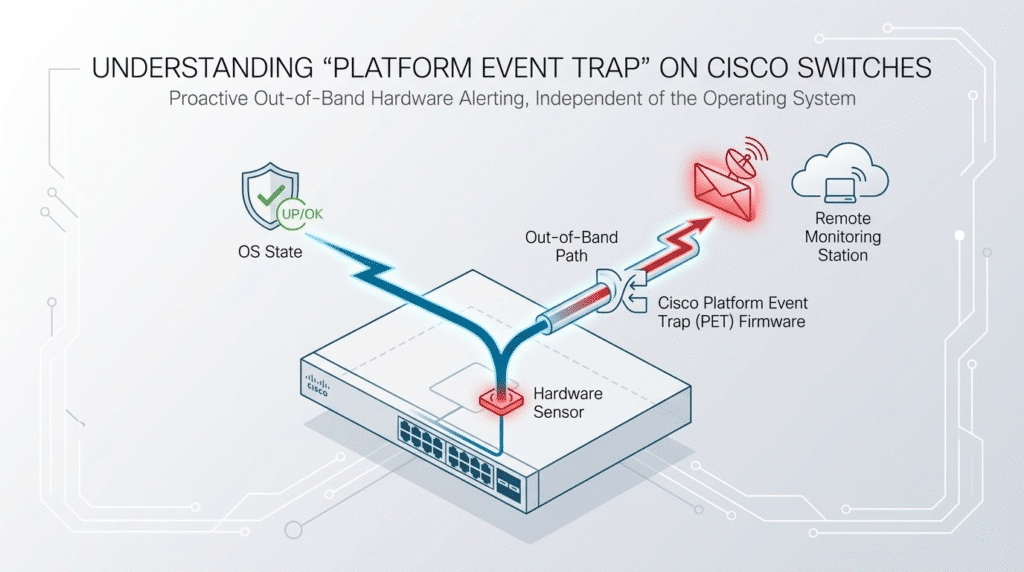
What Is a Platform Event Trap?
A platform event trap is a highly specialized hardware alert mechanism. Specifically, it is an out-of-band SNMP trap (typically sent over UDP port 162) that is triggered exclusively by physical sensor threshold violations.
The critical differentiator of a PET is its source: it originates from the Baseboard Management Controller (BMC). The BMC is a dedicated, independent micro-controller embedded on the switch’s motherboard with its own processor, memory, and out-of-band network interface.
While standard syslog is OS-dependent and relies on the primary CPU to process historical forensics, a platform event trap is OS-independent. It is built strictly for real-time, survivable hardware alerting, ensuring that a dying switch can issue a final warning to the Network Management System (NMS) before a complete power loss.
Why Cisco Switches Generate Platform Event Trap Logs
To understand why Cisco utilizes PETs, you must look at the architectural limitations of traditional logging:
- The Architectural Need: If a catastrophic physical event occurs—such as a sudden thermal runaway, a critical CPU voltage drop, or a short circuit—the main operating system will instantly freeze or reboot to protect the silicon. Consequently, the OS dies before it can write a syslog entry to NVRAM or forward it to a syslog server.
- The Silent Sentinel: The BMC solves this by operating on standby power. It constantly monitors motherboard components and Field Replaceable Unit (FRU) sensors via the internal I2C bus, remaining active even if the primary switch power rails fail.
- Guaranteed Delivery: Offloading this hardware telemetry to the BMC frees up the primary CPU for core data-plane routing tasks and guarantees that the distress signal is delivered to administrators, even during severe software interrupt storms or L2 watchdog timeouts.
Common Causes of Platform Event Trap Messages
When the NMS receives a platform event trap, the payload often contains hexadecimal codes representing specific hardware components and their failure states. Here is a breakdown of the most common physical faults that trigger these traps:
- Thermal Excursions (0x010107 & 0x010109): These codes indicate critical overheating. They are typically triggered by catastrophic fan module failures, data center HVAC collapse, or severe dust accumulation acting as an insulator over the ASICs and CPU.
- Power Supply Anomalies (0x086F01): This indicates a power delivery failure. It is often caused by PSU capacitor degradation (ripple voltage), facility power brownouts exceeding the PSU’s holdup time, or physical micro-vibrations unseating the power supply from the chassis midplane.
- ECC Memory Faults (0x0C0001): This indicates correctable Error-Correcting Code (ECC) errors in the DIMMs. These are usually caused by cosmic ray strikes (single-event upsets) or physically decaying memory cells.
- Storage Subsystem Degradation (0x0D6F01): Triggered when the BMC detects flash memory wear-leveling failures or bad physical blocks on the switch’s internal NVMe or eMMC boot drives.
Example Cisco Switch Log Showing Platform Event Trap
If the control plane is still partially alive when a hardware threshold is crossed, the primary operating system will attempt to log the event in-band simultaneously with the BMC’s out-of-band PET.
The primary correlating syslog message you will see in the CLI is %PLATFORM-4-ELEMENT_WARNING.
Log Example: %PLATFORM-4-ELEMENT_WARNING:Switch 2 R0/0: smand: 1/RP/0: Used Memory value 91% exceeds warning level 90%
In scenarios where the hardware issue causes an abrupt crash, the OS log will be empty at the exact time of the event. Instead, after the BMC initiates an automated hardware recovery and the switch boots back up, you will typically find post-crash indicators in the logs, such as L2 watchdog timeout hard reset.
How to Troubleshoot Platform Event Trap on Catalyst Switches
When a platform event trap fires, engineers must follow a structured approach to isolate the failing hardware component.
- Step 1: Initial Triage (In-Band): If the switch is still reachable via SSH, check the device state using CLI commands. Run
show environment allto check current sensor readings andshow logging | include PLATFORMto scan for correlating%PLATFORM-4-ELEMENT_WARNINGalerts. - Step 2: BMC Forensics (Out-of-Band): If the OS is hung or unresponsive, access the CIMC (Cisco Integrated Management Controller) or BMC web interface. Review the NVRAM-backed System Event Log (SEL) to read the raw, timestamped sensor assertions.
- Step 3: Deep-Dive Hardware CLI: If the issue appears to be resource exhaustion rather than environmental, use
show platform hardware capacityorshow processes cpu platform sortedto isolate ASIC or control plane bottlenecks. - Step 4: Physical Remediation: Based on the BMC logs, physically hot-swap the failed PSUs or fan trays. Ensure no blanking panels are missing in the equipment rack, as missing panels cause hot air recirculation which triggers thermal PETs.
Is Platform Event Trap a Critical Error?
Yes. Platform event traps should always be treated as critical alerts. They act as the “final distress beacon” of failing hardware.
PETs are the direct consequence of physical phenomena crossing strict operational boundaries—they are not arbitrary software bugs or false positives. Even traps labeled as “warnings,” such as correctable ECC memory errors (0x0C0001), are critical predictors of hardware degradation. If ignored, correctable memory errors will inevitably evolve into uncorrectable errors, resulting in a total hardware halt (kernel panic).
When Should You Ignore Platform Event Trap Logs?
There is only one scenario where a flood of platform event traps is expected and benign: during scheduled hardware maintenance or firmware upgrades.
When a network technician is actively hot-swapping physical components (like ripping out fan trays or power supplies) or applying upgrades directly to the BMC firmware, the sensors will rapidly transition states, causing a massive influx of spurious traps to your NMS.
- Actionable Advice: To prevent alert fatigue and false P1 incident tickets, administrators should programmatically disable PET logging globally at the start of the change control window. For example, on platforms supporting CIMC CLI, execute
set platform-event-enabled no, and ensure you re-enable it immediately after the maintenance concludes.
Cisco Platforms That Commonly Generate Platform Event Trap
Because PET functionality requires dedicated baseboard management silicon, it is primarily found on enterprise-grade and data center hardware:
- Enterprise Campus: Cisco Catalyst 9000 series switches (specifically the modular Catalyst 9400, and the high-performance Catalyst 9300 and 9500 platforms).
- Data Center: Cisco Nexus 9000 and 3000 series switches.
- Compute/Server: Cisco Unified Computing System (UCS) C-Series rack servers and B-Series blade chassis.
Best Practices for Monitoring Platform Events
To effectively integrate platform event traps into your enterprise monitoring strategy, implement the following best practices:
- Explicit Configuration: Do not assume traps are fully enabled by default. Use CLI commands like
snmp-server enable traps entity(for module and fan states) andsnmp-server enable traps envmon(for temperature and voltage) to ensure the OS forwards correlating in-band traps. - Granular Filtering (PEF): Avoid the “enable all” anti-pattern. Use Platform Event Filters (PEF) inside the BMC to suppress benign traps and prevent alert fatigue.
- NMS Deduplication: A failing voltage regulator may trigger hundreds of traps in seconds. Configure your Network Management System to deduplicate “flapping” hardware sensors into a single, actionable incident ticket.
- Secure Transport: Always utilize SNMPv3. Legacy SNMP versions (v1/v2c) transmit data in clear text. SNMPv3 provides cryptographic authentication and payload encryption, securing your hardware telemetry.
- Update MIBs: Regularly update the NMS MIB repository with the latest Cisco MIBs (e.g.,
CISCO-ENTITY-SENSOR-MIB). Without the correct MIBs, your NMS will display a string of meaningless hexadecimal OIDs instead of decoding the payload into human-readable text.
Frequently Asked Questions (FAQ)
1. How do I view platform event traps locally on a Cisco switch? While the actual traps are sent over the network to an NMS, you can view the local records of the events that triggered them by checking the System Event Log (SEL) via the BMC/CIMC interface, or by looking for %PLATFORM-4-ELEMENT_WARNING messages in the show logging CLI output.
2. What is the difference between an SNMP trap and a platform event trap? A standard SNMP trap is generated by the switch’s main operating system (IOS XE/NX-OS) to report software, routing, or interface state changes. A platform event trap is generated out-of-band by the Baseboard Management Controller (BMC) specifically for physical hardware sensor alerts, making it immune to OS crashes.
3. What does Cisco error code 0x086F01 mean? The hexadecimal code 0x086F01 within a Cisco platform event trap indicates a severe power supply anomaly. This typically points to voltage degradation, an external facility power drop, or a hardware failure within the Power Supply Unit (PSU) itself.
4. Can a platform event trap cause my Cisco switch to reboot? No, the trap itself is merely a notification mechanism. However, the physical hardware fault that triggered the trap—such as a critical thermal overrun or an uncorrectable memory error—is what physically forces the switch to reboot or halt to prevent silicon damage.
5. How do I disable platform event traps during maintenance? To prevent false alarms during hardware hot-swaps, you can suppress traps in your NMS, disable specific SNMP traps via the switch CLI using no snmp-server enable traps envmon, or temporarily disable PET alerting directly within the BMC/CIMC configuration settings.





