
Cisco Catalyst 8300/8200 Expansion Modules: Which Card Adds Ports, Voice, and 5G?
On a Cisco Catalyst 8300 or 8200, every capability maps to one module family in one slot type:
- Ethernet switch ports and PoE — C-NIM-8T or C-NIM-8M in a NIM bay; C-SM-16P4M2X or C-SM-40P8M2X switch modules in an SM slot
- 10G WAN links — C-NIM-1X or C-NIM-4X (Catalyst 8300 only)
- Voice, FXS/FXO, and PRI — “P”-version analog cards and T1/E1 NIMs, plus NIM-PVDM or SM-X-PVDM DSPs
- LTE and 5G — the P-5GS6-GL PIM, or a CG522-E / CG418-E cellular gateway
- Serial console — NIM-16A or NIM-24A async cards
Catalyst 8300 and 8200 Module Slots Explained
Three slot types define what each chassis can grow into. The PIM bay takes cellular 5G/LTE modules, the NIM bay takes WAN, LAN, voice, DSL, and async interface cards, and the SM bay — Catalyst 8300 only — takes the large cards: Layer 2 switch modules, SM-X voice and DSP farms, UCS-E compute blades, and the C-SM-NIM-ADPT carrier adapter. Per Cisco’s ordering guide, every Catalyst 8200 and 8200L carries exactly one NIM and one PIM, so anything SM-based is off the table for the smaller platform. The Cisco 8000 series module listings cover the orderable cards for both.
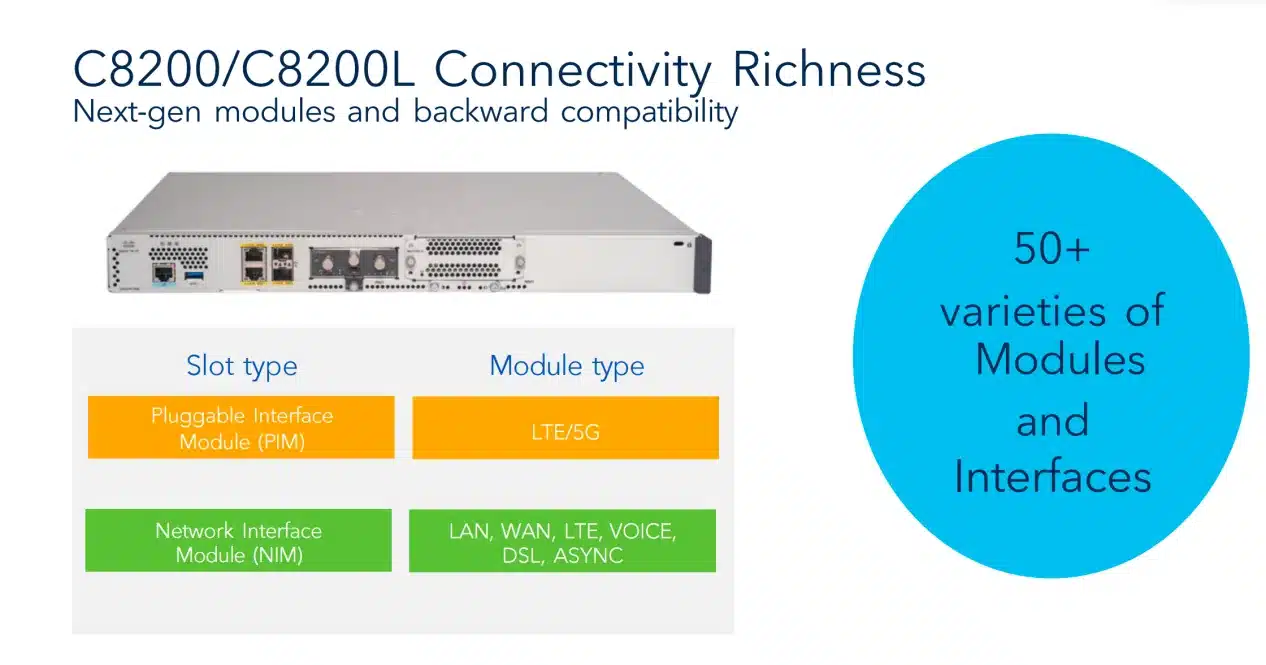 Catalyst 8200/8200L expansion runs on two slot types: PIM for cellular, NIM for everything else.
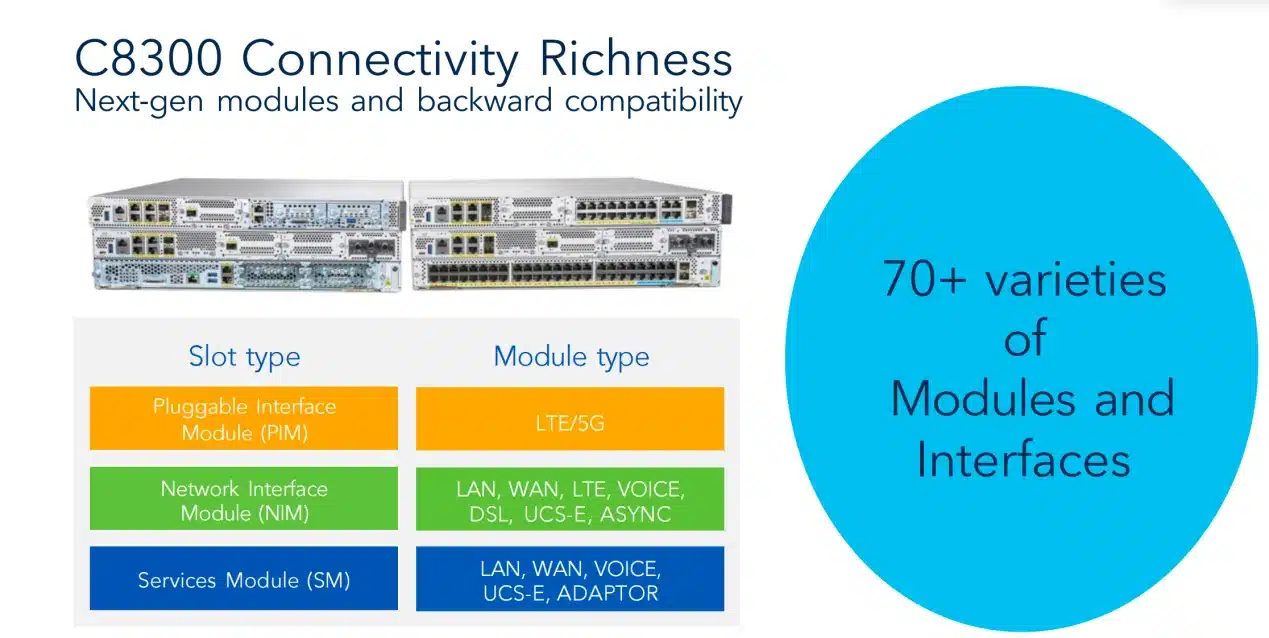 The Catalyst 8300 adds the SM layer — switch modules, DSP farms, UCS-E, and the SM-NIM carrier adapter all live there.
Slot Counts for Every Catalyst 8300 and 8200 Model
| Platform | SM slots | NIM slots | PIM slots | Max NIMs with C-SM-NIM-ADPT |
|---|---|---|---|---|
| C8300-2N2S-4T2X / -6T (2RU) | 2 | 2 | 1 | 6 |
| C8300-1N1S-4T2X / -6T (1RU) | 1 | 1 | 1 | 3 |
| C8200-1N-4T / C8200L-1N-4T | — | 1 | 1 | Not supported |
Per Cisco’s Catalyst 8300/8200 ordering guide. The slot budget is the hard constraint every plan below draws from — on a 1RU chassis, one ambitious module claims the only SM bay.
Catalyst 8300 Supported Modules List
| Category | Supported modules |
|---|---|
| LAN switching | NIM-ES2-4, NIM-ES2-8, NIM-ES2-8-P, C-NIM-8T, C-NIM-8M, C-NIM-4X, C-SM-16P4M2X, C-SM-40P8M2X |
| WAN Ethernet / serial | C-NIM-1X, C-NIM-1M, C-NIM-2T, NIM-1T, NIM-2T, NIM-4T, SM-X-1T3/E3, NIM-2BRI-S/T, NIM-4BRI-S/T |
| T1/E1 WAN + voice | NIM-1MFT-T1/E1, NIM-2MFT-T1/E1, NIM-4MFT-T1/E1, NIM-8MFT-T1/E1, NIM-1CE1T1-PRI, NIM-2CE1T1-PRI, NIM-8CE1T1-PRI |
| LTE | NIM-LTEA-EA, NIM-LTEA-LA, P-LTEA-EA, P-LTEA-LA, P-LTEAA-EA, P-LTEAP18-GL, P-LTE-VZ/NA/US/JN/GB/IN/AU, CG418-E (standalone) |
| 5G | P-5GS6-GL (PIM), CG522-E (standalone) |
| Voice (NIM) | NIM-2FXSP, NIM-4FXSP, NIM-2FXS/4FXOP, NIM-2FXO, NIM-4FXO, NIM-4E/M, NIM-2BRI-NT/TE, NIM-4BRI-NT/TE, NIM-PVDM-32/64/128/256 |
| Voice (SM) | SM-X-PVDM-500/1000/2000/3000, SM-X-24FXS/4FXO, SM-X-16FXS/2FXO, SM-X-8FXS/12FXO, SM-X-72FXS |
| Async | NIM-16A, NIM-24A, SM-X-64A |
| DSL | NIM-VAB-A, NIM-VA-B, NIM-VAB-M, NIM-4SHDSL-EA |
| Storage | M2USB-16G, M2USB-32G, SSD-M2NVME-600G |
| NIM carrier adapter | C-SM-NIM-ADPT |
| Compute | UCS-E160S-M3/K9, UCS-E1120D-M3/K9, UCS-E180D-M3/K9, UCS-E1100D-M6 |
Compiled from Cisco’s Catalyst 8300 supported-modules matrix and current module documentation. Lifecycle status changes over time, so confirm each PID’s orderability and minimum IOS XE release before it goes on a BOM.
Catalyst 8200 and 8200L Supported Modules
| Category | Supported modules |
|---|---|
| LAN switching | NIM-ES2-4, NIM-ES2-8, NIM-ES2-8-P, C-NIM-8T, C-NIM-8M |
| WAN Ethernet / serial | C-NIM-1M, C-NIM-2T, NIM-1T, NIM-2T, NIM-4T, NIM-2BRI-S/T, NIM-4BRI-S/T |
| T1/E1 WAN + voice | NIM-1MFT-T1/E1, NIM-2MFT-T1/E1, NIM-4MFT-T1/E1, NIM-8MFT-T1/E1, NIM-1CE1T1-PRI, NIM-2CE1T1-PRI, NIM-8CE1T1-PRI |
| LTE | NIM-LTEA-EA, NIM-LTEA-LA, P-LTEA-EA, P-LTEA-LA, P-LTEAP18-GL, CG418-E (standalone) |
| 5G | P-5GS6-GL (PIM), CG522-E (standalone) |
| Voice (NIM) | NIM-2FXSP, NIM-4FXSP, NIM-2FXS/4FXOP, NIM-2FXO, NIM-4FXO, NIM-4E/M, NIM-2BRI-NT/TE, NIM-4BRI-NT/TE, NIM-PVDM-32/64/128/256 |
| Async | NIM-16A, NIM-24A |
| DSL | NIM-VAB-A, NIM-VA-B, NIM-VAB-M, NIM-4SHDSL-EA |
| Storage | M2USB-16G, M2USB-32G, SSD-M2NVME-600G |
No SM-based cards appear here because the Catalyst 8200 family has no SM slot. Per Cisco’s current module documentation the C-NIM-8T and C-NIM-8M are supported on the 8200/8200L; the 10G C-NIM-1X and C-NIM-4X are not.
Doubling NIM Capacity with the C-SM-NIM-ADPT
The C-SM-NIM-ADPT converts one single-wide SM slot into two NIM bays, which is how a 2RU chassis reaches six NIMs and a 1RU chassis reaches three. Cisco’s datasheet gives the adapter two 10-Gbps backplane links, so even a pair of 10G cards runs without a bottleneck, hot-swap works, and nothing limits how many adapters you install except free SM slots.
One restriction causes most of the mis-orders around it: the adapter accepts classic NIMs and the routed C-NIM-1X/2T/1M WAN modules, but not the C-NIM-4X, C-NIM-8M, or C-NIM-8T — Cisco’s configuration guide restricts those three to native NIM slots. The adapter is also a Catalyst 8300 exclusive that no ISR 4000 accepts.
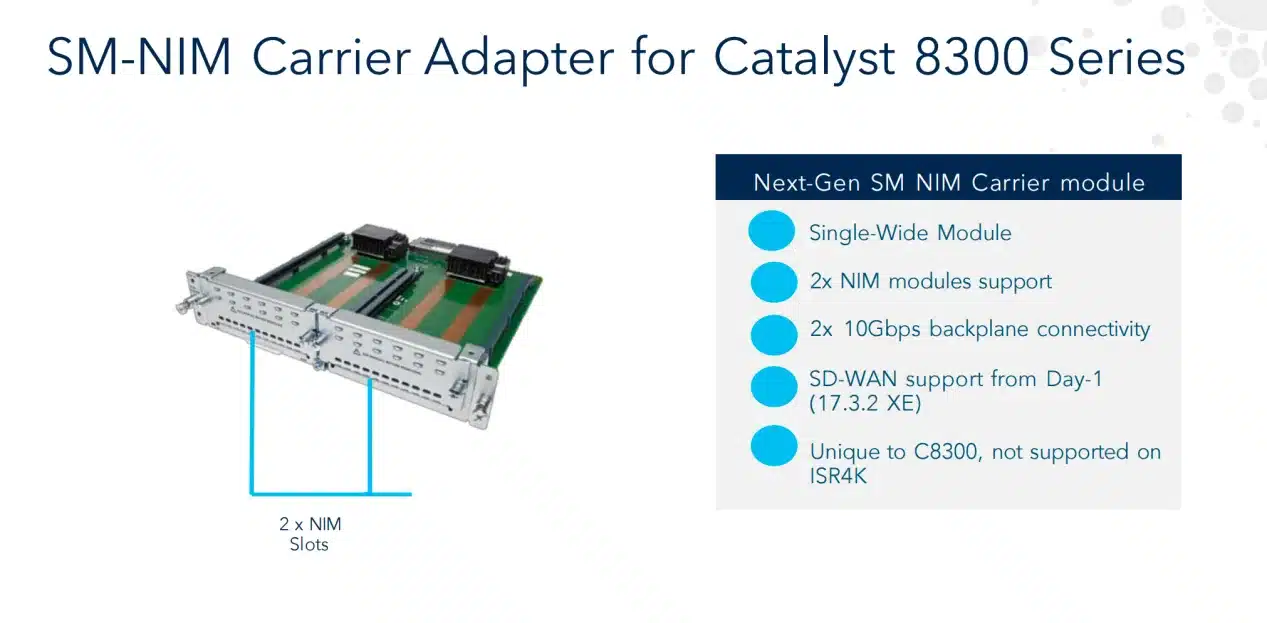 One SM slot becomes two NIM bays with dual 10G backplane links — never for the C-NIM-8T/8M/4X, which need native NIM slots.
How Do You Add More Ethernet Ports to a Catalyst 8300?
For a handful of routed or switched ports, add a C-NIM card to a NIM bay; for a wiring-closet’s worth of PoE access ports, put a switch module in an SM slot. That split — NIM for small expansions, SM for density — decides the hardware faster than any spec sheet, because the 22- and 50-port switch modules exist only on the Catalyst 8300, while the C-NIM cards also fit a Catalyst 8200.
PoE Switch Modules for the NIM and SM Slots
At NIM scale, the C-NIM-8T adds eight 1G RJ45 ports and the C-NIM-8M adds eight 2.5G mGig ports, both Layer 2/Layer 3 configurable. PoE reality check from the configuration guide: only the C-NIM-8M powers devices, and only on ports 4 through 7 with UPoE+ — a plan that feeds eight access points from one NIM card does not work.
At SM scale, two UADP-based switch modules turn the router into a branch-in-a-box. The C-SM-16P4M2X is a single-wide, 22-port card (sixteen 1G, four 2.5G mGig, two 10G SFP+ uplinks); the C-SM-40P8M2X is a 50-port double-wide card (forty 1G, eight mGig) that needs the 2RU chassis’s SM capacity. Every copper port on both supports PoE/PoE+ at up to 30W, up to eight ports per module deliver 60W UPOE, and the mGig ports exist to feed Wi-Fi 6/6E access points and cellular gateways above gigabit. The PoE budget comes from the router’s power supplies, not the module — sized in the ordering section at the end.
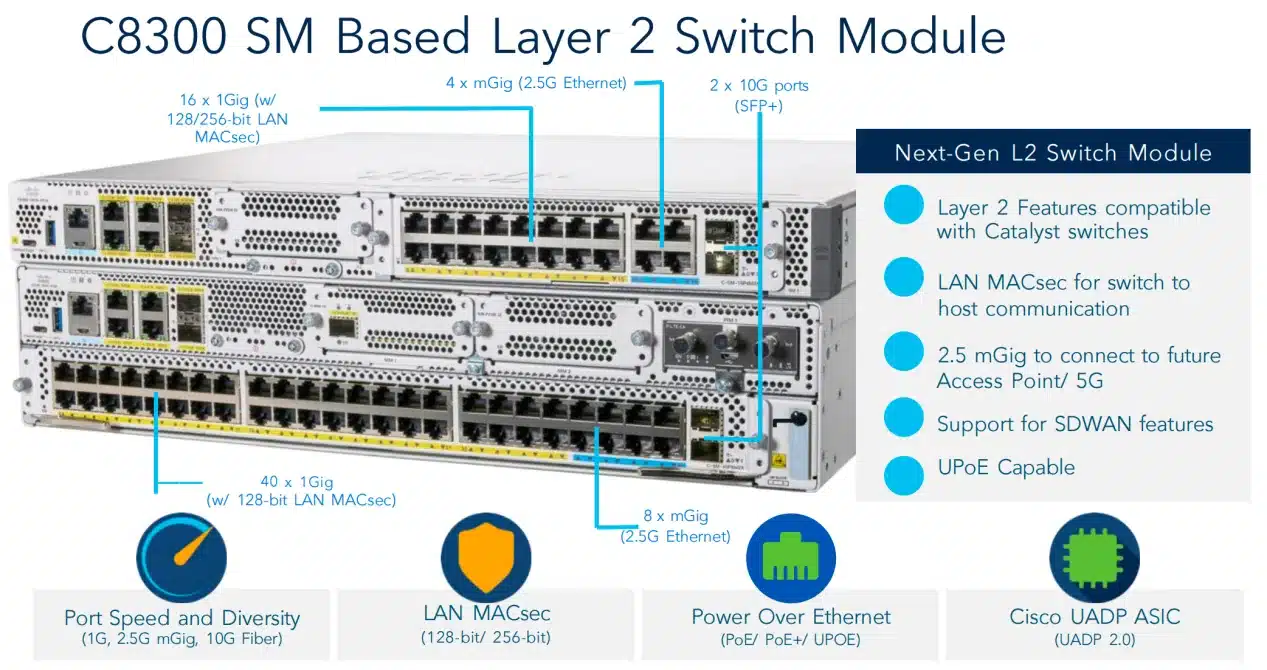 Two switch-module tiers: 22 ports single-wide for any Catalyst 8300, 50 ports double-wide for the 2RU chassis.
More Than Two 10G Ports on a Catalyst 8300
A 4T2X-model chassis ships with two 10G ports onboard, and two module families extend that. The C-NIM-1X adds one 10G/1G SFP+ port with 256-bit WAN MACsec on a non-oversubscribed backplane link, and it is also adapter-eligible — a C-SM-NIM-ADPT carries two of them at full rate. The C-NIM-4X adds four 1/10G SFP+ cages in one native NIM bay, the densest option per slot. Both cards are Catalyst 8300 exclusives; no 10G Ethernet NIM exists for the Catalyst 8200.
Worked from the slot rules: a C8300-2N2S-4T2X can pair its two onboard 10G ports with C-NIM-4X cards in both native NIM bays and C-NIM-1X pairs in adapter-equipped SM slots — well past ten 10G ports on one chassis. Treat that as slot-rule math for planning and validate the exact combination in Cisco’s ordering guide, since per-configuration limits belong to the current release notes, not a blog table.
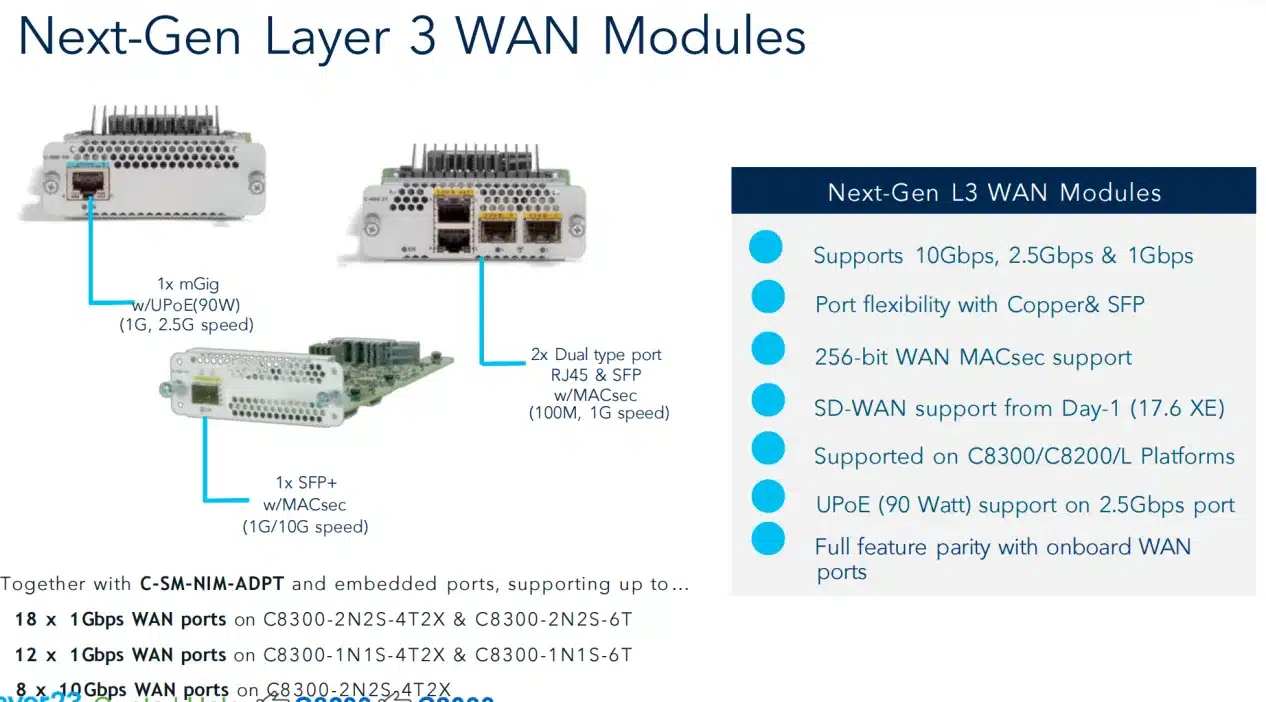 Routed WAN port shapes: mGig with 90W UPOE, RJ45/SFP combo pairs, and the 10G SFP+ options that stack past ten ports per chassis.
Catalyst 8300 Voice Gateway Modules for FXS, FXO, and PRI
Building a voice gateway on these platforms takes two card types: interface cards for the physical lines and PVDM DSP cards for media processing. Analog lines land on FXS/FXO NIMs — and here sits a trap Cisco’s FAQ states plainly: only the newer “P”-version analog cards work (NIM-2FXSP, NIM-4FXSP, NIM-2FXS/4FXOP); older FXS NIMs from an ISR refresh do not carry over. PRI and T1/E1 trunks use the NIM-xMFT-T1/E1 and NIM-xCE1T1-PRI series, high-density analog scales through SM-X cards up to the 72-port SM-X-72FXS, and DSP capacity ships on NIM-PVDM-32 through NIM-PVDM-256 or the SM-X-PVDM farm cards.
Licensing got simpler than the ISR 4000 era: per the ordering guide, the UCK9/SECK9/APPK9 licenses no longer exist as separate line items — their function is bundled into the Network Stack entitlement with the DNA tier. Two exceptions still need their own order line: CUBE (available from DNA Essentials, on both the 8300 and 8200) and SRST (requires DNA Advantage), both licensed through A-FLEX-3. Note there is no on-box CME on these platforms; SRST covers branch survivability instead.
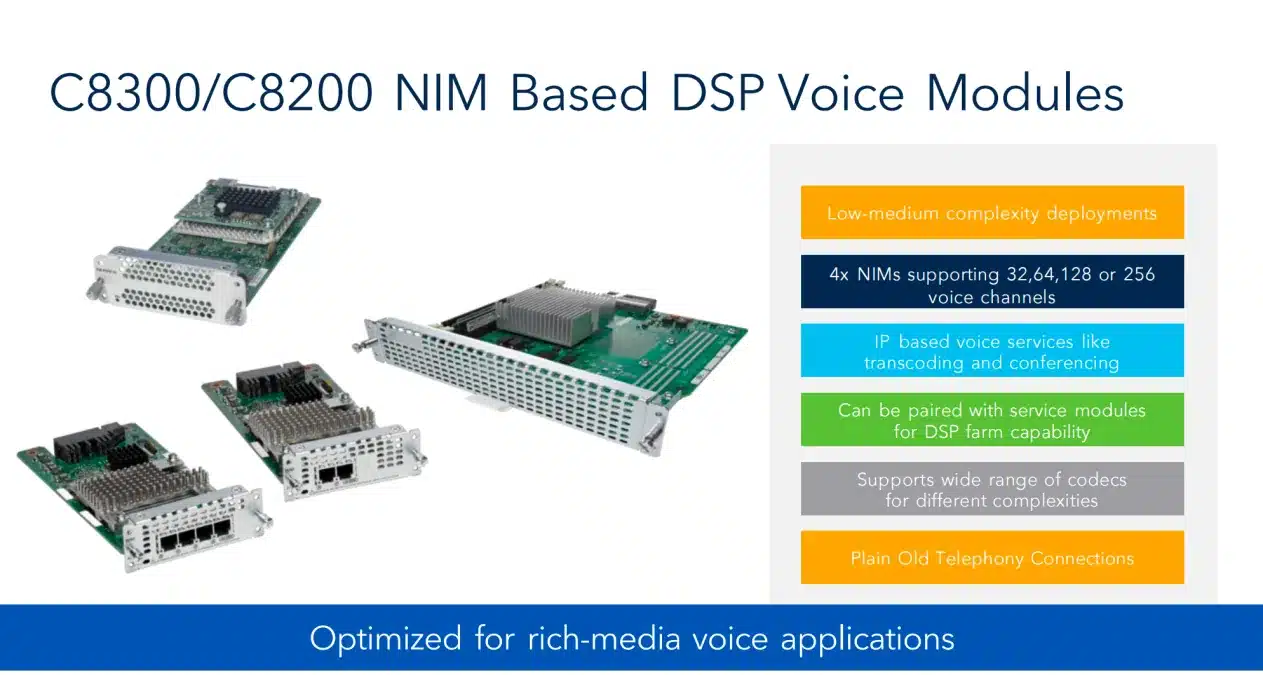 Voice needs both axes: interface cards for the lines, PVDM DSP channels for codecs, transcoding, and conferencing.
Voice Bundles vs a Modular Build
Cisco also sells voice-bundle chassis PIDs — the C8300-1N1S-6T-V pairs the chassis with a NIM-PVDM DSP card in one orderable line. A bundle makes sense when the site is voice-first and the included DSP matches your channel count; a modular build wins when you need a different PVDM size or the NIM bay for something else. Confirm the exact bundled DSP on the current price list before choosing, and remember the bundle consumes the 1RU chassis’s only NIM bay.
PVDM DSP Cards and the SD-WAN Mode Restriction
Deployment mode quietly decides which DSP hardware is legal. Cisco’s FAQ is explicit: in autonomous IOS XE mode, PVDM4, NIM-PVDM, or SM-X-PVDM modules all support DSP-farm services; in SD-WAN controller mode, only NIM-PVDM and SM-X-PVDM can be used. A voice branch that plans to migrate into Catalyst SD-WAN should buy NIM-PVDM or SM-X-PVDM from day one — a PVDM4 carried over from an ISR becomes dead weight the day the router switches modes.
Adding LTE, 5G, and Serial Console Modules
Cellular and out-of-band serial round out the non-Ethernet options, and both are PIM- or NIM-bay decisions rather than SM-scale ones.
5G PIM or External Cellular Gateway
The built-in path is the 5G Sub-6 GHz PIM (P-5GS6-GL, Telit FN980 modem) in the router’s PIM slot — order its four 5G/LTE antennas and active GPS antenna with it, or the module arrives unusable. The external path is a Catalyst Cellular Gateway mounted where the signal is: per Cisco’s datasheet, the CG522-E delivers 5G at up to 2.2 Gbps down / 400 Mbps up and the CG418-E delivers CAT18 LTE at up to 1.2 Gbps / 150 Mbps, both with dual micro-SIMs in active/standby and IP passthrough back to the router. The C-NIM-1M’s 90W UPoE+ port can power a gateway over the same Ethernet run, which is what makes the roof-mount design a one-cable job.
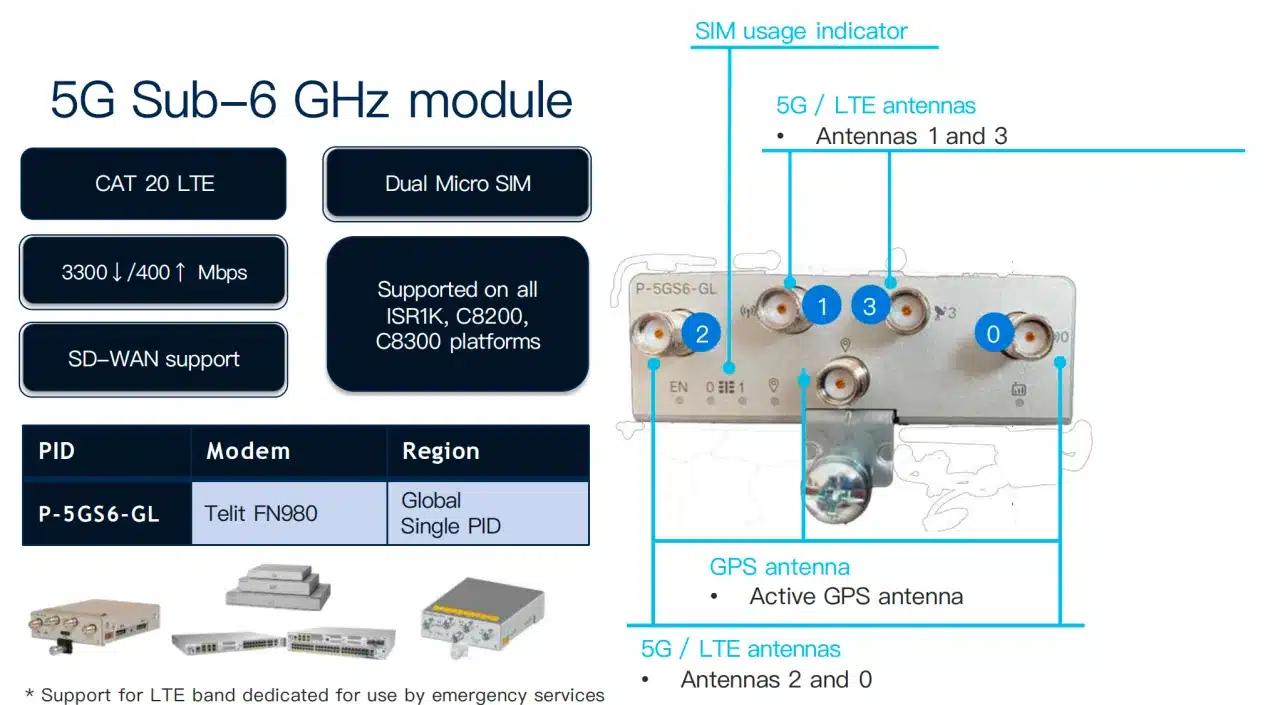 The 5G PIM keeps the radio in the chassis — the antennas and GPS feed belong on the same order.
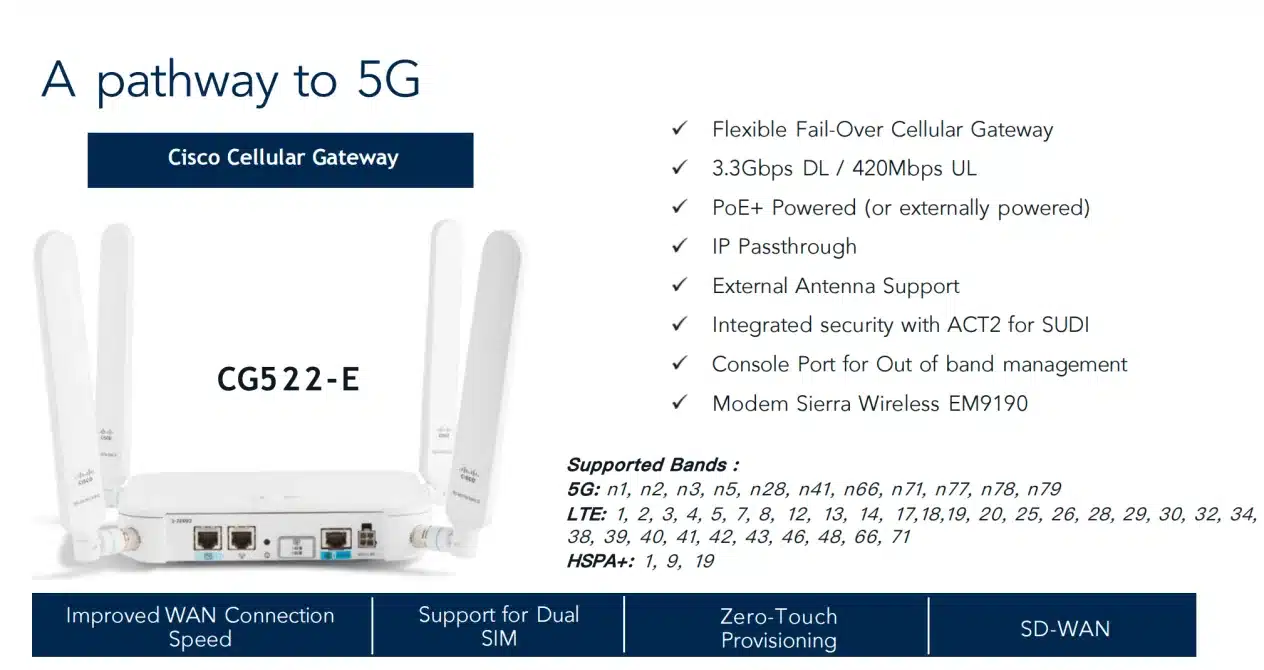 CG522-E: mount the radio at the window or roof, reach the router over one PoE+ Ethernet run.
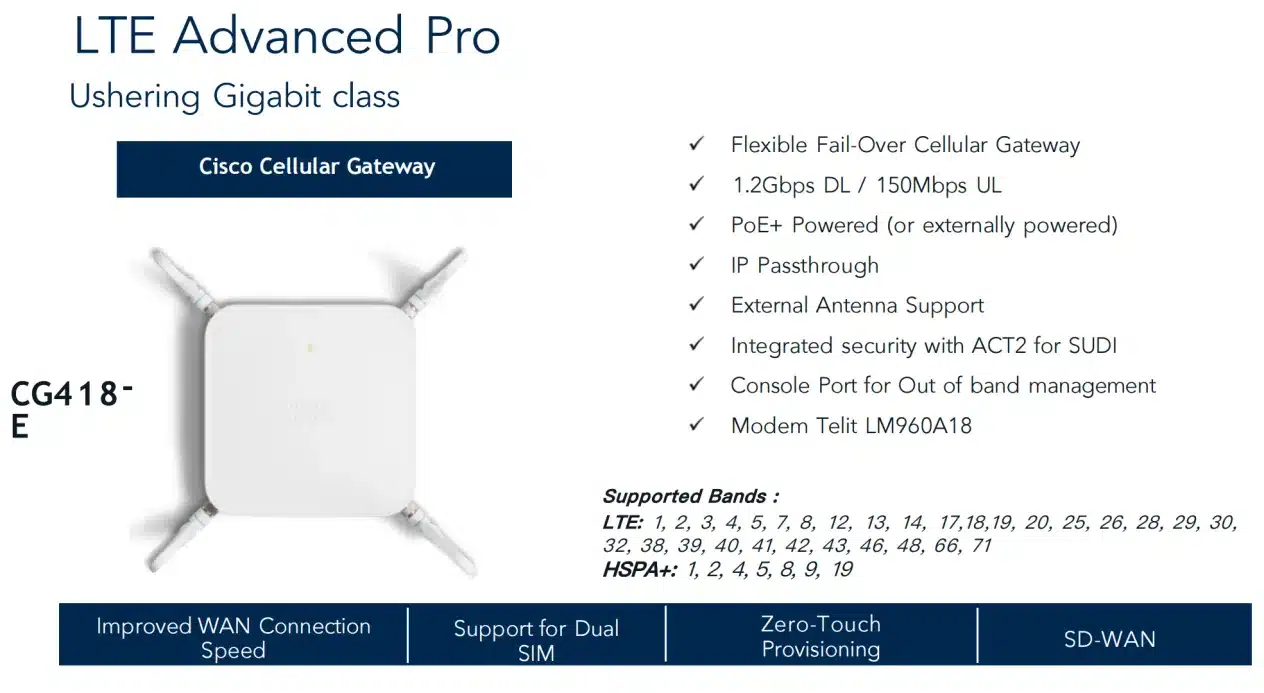 CG418-E covers gigabit-class LTE failover where 5G coverage or budget is not there yet.
NIM-16A and NIM-24A for Out-of-Band Console Access
A Catalyst 8300 doubling as a console server uses the async NIMs: NIM-16A for sixteen serial lines, NIM-24A for twenty-four, both on the supported list for the 8300 and 8200. One NIM bay turns the branch router into the terminal server for every switch, firewall, and PDU console in the rack — worth remembering before all bays go to Ethernet.
Can You Still Use ISR 4000 Modules in the Catalyst 8300?
Yes, for most of them — Cisco’s ordering guide keeps backward compatibility for the widely deployed data and voice NIMs and SMs of the ISR 4000 era, and the Catalyst 8200 does the same for NIMs. T1/E1 cards, most voice interfaces, async and DSL NIMs carry straight across, which is real money saved on a branch migration. Reuse is one-directional, though: every C-NIM, the C-SM switch cards, and the C-SM-NIM-ADPT are Catalyst 8000-only and will not work back in an ISR 4000.
NIM and SM-X Exceptions That Do Not Carry Over
Cisco’s FAQ names the exact exclusions. NIMs: the NIM-1GE-CU-SFP and NIM-2GE-CU-SFP. SM-X cards: SM-X-ES3-16-P, SM-X-ES3-24-P, SM-X-ES3-48-P, SM-X-6X1G, SM-X-4X1G-1X10G, and the UCS-E M1/M2 compute modules. Older generations fail wholesale — EHWIC cards from ISR G2 routers and ASR 1000 SPAs are not compatible at all. Add the voice trap of non-“P” analog FXS cards staying behind too. Every carried-over module still needs its lifecycle status and minimum IOS XE release checked before it lands on the BOM.
Catalyst 8300 Power Supply, PoE Budget, and Fan Options
Every Catalyst 8300 takes dual internal power supplies, and the wattage class follows the chassis: 250W/400W-class units on the 1RU models, 650W-class on the 2RU, with AC, DC, or mixed AC + DC feeds and N+1 redundancy with inline power. Once a build includes PoE-drawing modules, the PSU choice stops being an afterthought — the C-NIM-1M, C-SM-16P4M2X, C-SM-40P8M2X, and NIM-ES2-8-P all power their endpoints from the chassis supplies, so the module plan and the power plan are one decision.
| Power supply option | 1RU (C8300-1N1S) | 2RU (C8300-2N2S) | Example PID |
|---|---|---|---|
| 250W AC | ✓ | — | PWR-CC1-250WAC |
| 400W AC / 400W DC | ✓ | — | PWR-CC1-400WAC / PWR-CC1-400WDC |
| 650W AC / 650W DC | — | ✓ | PWR-CC1-650WAC |
| 650W DC, NEBS variant | — | ✓ | — |
| 500W AC with PoE | ✓ | — | PWR-CC1-500WAC |
| 1000W AC with PoE converter | — | ✓ | PWR-CC1-1000WAC-P |
| Dual PSUs (AC + AC, DC + DC) | ✓ | ✓ | order two units |
| Mixed AC + DC feeds | ✓ | ✓ | one of each |
Per Cisco’s Catalyst 8300 power matrix and ordering guide; both models in each chassis class support every option in their row, and Cisco’s matrix also lists high-voltage DC support. Confirm the exact PSU PID against the current ordering guide when the site runs DC or NEBS power.
Dual supplies run in one of two PoE modes, and Cisco’s FAQ separates them precisely. Redundancy mode keeps full PoE power available through a single supply failure — the second unit is a standby. PoE Boost mode combines both supplies for double the PoE budget (the 500W and 1000W figures Cisco quotes), but a failure cuts the available power in half exactly when the site is fully loaded. The two modes order identical hardware and behave in opposite ways on a bad day, so a branch feeding forty phones and a dozen access points from a C-SM-40P8M2X should pick its failure behavior deliberately.
Cooling follows the same chassis split: three internal field-replaceable fans on the 1RU platforms, four hot-swappable fan trays on the 2RU, and both classes ride out a single fan failure (Cisco qualifies full-load operation below 6,000 feet in that state). Default airflow is front-to-back, with a reverse-airflow fan option for NEBS and directional hot-aisle rooms.
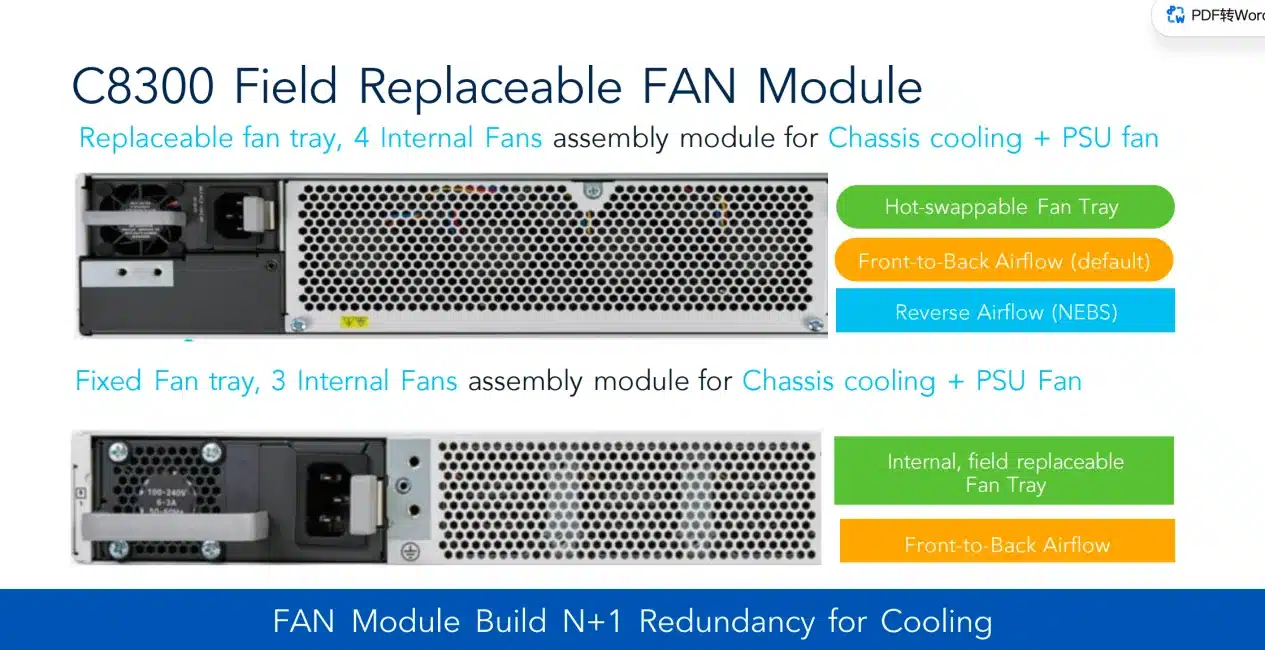 1RU chassis run three internal fans, 2RU run four hot-swappable trays; airflow direction is an orderable option.
Before You Order: Blanks, Power, and BOM Checks
- Blank panels are not automatic on partial builds. Cisco adds SM/NIM/PIM blanks only when zero modules of that type are ordered — a chassis with one filled and one empty NIM bay needs an explicit C8300-NIM-BLANK line, for airflow as much as looks.
- Lock the PSU pair and its PoE mode. Wattage class follows the chassis, and Redundancy-or-Boost picks the failure behavior — both belong on the order, not in the commissioning window.
- Count the bays against every plan at once. Voice, switching, adapters, and compute all draw from the same slot table above; the 1RU chassis runs out of bays long before it runs out of forwarding capacity.
- Memory rides the service load. 8 GB DRAM default (4 GB on the 8200L), upgradeable to 16/32 GB; flash is fixed; M.2 storage scales to 600 GB or 2 TB NVMe for app hosting.
- Cellular needs its accessories — PIM antennas and GPS, or the gateway’s PoE+ feed — and NEBS or hot-aisle rooms need the airflow variant of the fan tray on the order.
Frequently Asked Questions
Does the Catalyst 8300 need a PVDM for FXS ports?
Plan on it for any real voice service. The analog NIM handles the physical line, but transcoding, conferencing, and DSP-farm services need PVDM channels — and in SD-WAN controller mode only NIM-PVDM or SM-X-PVDM qualify. Confirm the DSP requirement for basic termination in the UC configuration guide for your IOS XE release.
Can a Catalyst 8200 replace an ISR 4000 as a CUBE?
Yes. Per Cisco’s ordering guide, CUBE runs on both the Catalyst 8300 and 8200, licensed through A-FLEX-3 with DNA Essentials as the minimum tier — and the old UCK9 license is gone, folded into the Network Stack entitlement. Size the session count against the platform before committing.
Does the Catalyst 8200 support switch modules?
Not the SM kind — the 8200 has no SM slot, so the 22- and 50-port switch modules are Catalyst 8300 territory. It does take the switching C-NIM cards: the C-NIM-8T (8 × 1G) and C-NIM-8M (8 × 2.5G mGig, UPoE+ on four ports) both work in its single NIM bay.
Can the C-NIM-8T go into the C-SM-NIM-ADPT?
No. The C-NIM-8T, C-NIM-8M, and C-NIM-4X are restricted to native NIM slots by Cisco’s configuration guide. The adapter takes classic NIMs and the routed C-NIM-1X/2T/1M; for switch ports in an SM slot, the C-SM-16P4M2X is the intended card.
When do I need to order blank panels?
Whenever a slot type ships partially used. Blanks are auto-included only when no module of that type is on the order, so one filled NIM bay out of two means adding C8300-NIM-BLANK explicitly to close the empty bay.






