What is STP: The Most Comprehensive Guide to Spanning Tree Protocol
In computer networking, preventing loops in Ethernet switching is a critical design requirement. What is STP? The Spanning Tree Protocol (STP) is a Layer 2 network protocol designed to eliminate loops in bridged Ethernet networks by creating a loop-free logical topology. STP ensures stable connectivity, prevents broadcast storms, and provides automatic recovery when links fail. Understanding what is STP and how it works is fundamental knowledge for every network engineer, especially when comparing STP with its successors RSTP and MSTP.To learn more about how STP compares to newer protocols, see our STP vs RSTP vs MSTP: Detailed Comparison Guide
Key Attributes of STP
- Full English Name: Spanning Tree Protocol
- Abbreviation: STP
- Protocol Type: Layer 2 protocol
- Main Purpose: Loop prevention at Layer 2; adaptive to network changes and failures
- Multicast Address:
01:80:C2:00:00:00
Key Terminology in STP
- Bridge ID (BID): Bridge Priority + MAC Address
- Bridge Priority Range: 0–65535
- Default Priority: 32768
- Port ID: Port Priority + Port Number
- Port Priority: 0–240 (default 128, increments of 16)
- Path Cost: Accumulated cost of all links between a switch and the Root Bridge
How STP Operates
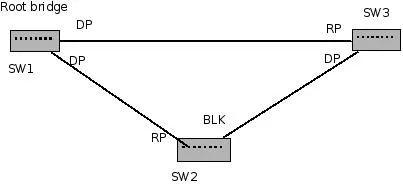
- Select the Root Bridge (RB)
- Select the Root Port (RP)
- Select the Designated Port (DP)
- Block all remaining ports
Root Bridge Selection
- To prevent loops, STP puts interfaces in Forwarding or Blocking mode by first electing a Root Bridge.
- When switches boot up, they exchange BPDUs containing their BID. Each switch initially assumes itself as the Root.
- If a switch hears a lower BID, it stops advertising itself as root and forwards the superior BPDU.
- Eventually, the switch with the lowest priority (default 32768), or if equal then the lowest MAC address, becomes the Root Bridge.
- By default, all Root Bridge ports are Designated Ports and always remain in forwarding state.
Root Port Selection
On a non-root switch, the Root Port is the port receiving the best BPDU.
Criteria:
- Lowest path cost to the Root
- Lowest Sender Bridge ID
- Lowest Sender Port ID
(Port ID = Port Priority + Port Number; default port priority is 128.)
Designated Port Selection
- The Designated Port on each LAN segment is the port with the lowest path cost back to the Root Bridge.
- Cost depends on interface speed and cumulative path calculation.
- A switch can have many Designated Ports, but the Root Bridge has no Root Ports—all its ports are Designated.
Quick memory rule:
- A Root Port cannot also be a Designated Port.
- RP = lowest-cost port from a switch to the Root.
- DP = lowest-cost port on a LAN segment to the Root.
Blocking Remaining Ports
All other non-root, non-designated ports are placed in Blocking state.
STP Path Selection Rules
- Bridge with the lowest Root ID becomes Root.
- Prefer the neighbor with the lowest path cost.
- If tied, prefer the neighbor with the lowest Bridge ID.
- If still tied, prefer the port with the lowest Port ID (e.g., F0/1 beats F0/2).
STP BPDU Types
- Configuration BPDU (CBPDU)
- Topology Change Notification BPDU (TCN BPDU)
Configuration BPDU
- Purpose: Spanning-tree calculation, Root Bridge election, port role determination.
TCN BPDU
- Purpose: Notify the network of topology changes.
- Sent upstream to the Root Bridge whenever a link or port changes.
STP Topology Example
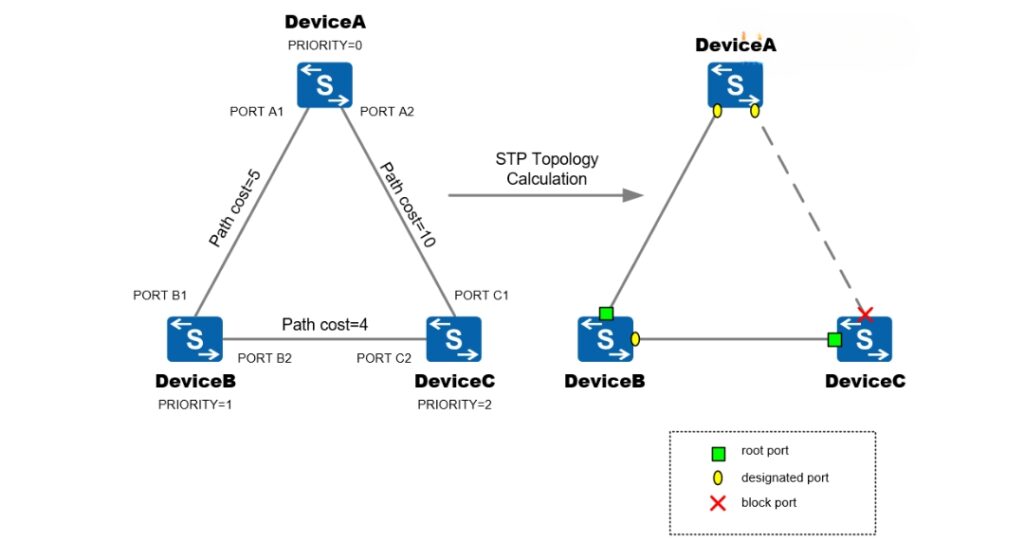
Suppose:
- Device A priority = 0
- Device B priority = 1
- Device C priority = 2
Link costs:
- A ↔ B = 5
- A ↔ C = 10
- B ↔ C = 4
Result after STP:
- Device A becomes Root.
- All A’s ports = Designated (Forwarding).
- B’s port toward A = Root Port; B’s port toward C = Designated.
- C’s port toward A = Blocking; C’s port toward B = Root Port.
STP Bridge ID
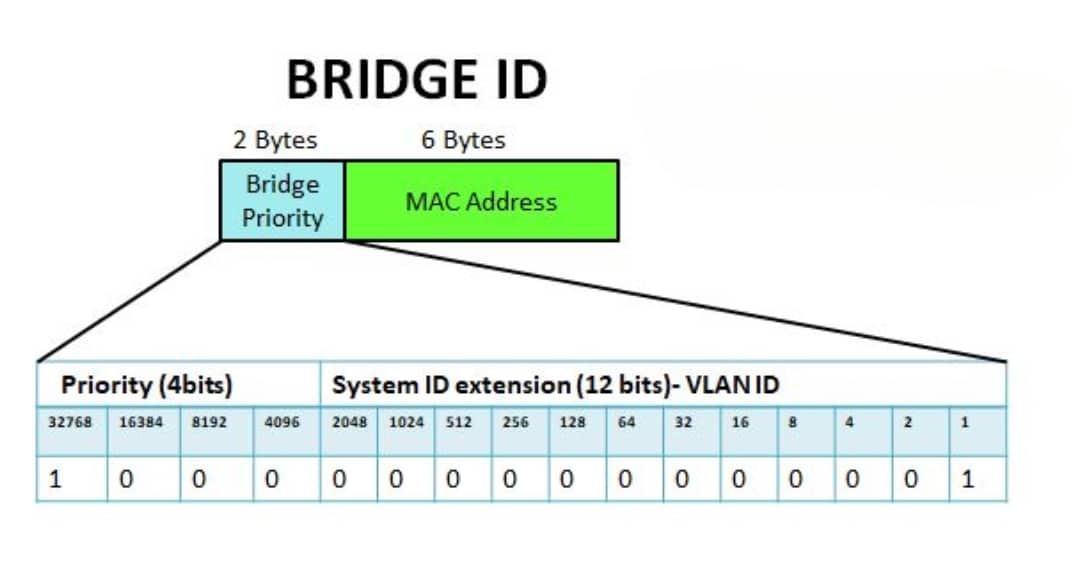
- BID = 8 bytes total:
- 2 bytes = Bridge Priority (configurable)
- 6 bytes = Switch MAC address
The lowest BID switch becomes the Root Bridge, i.e., the center of the tree.
STP Port States
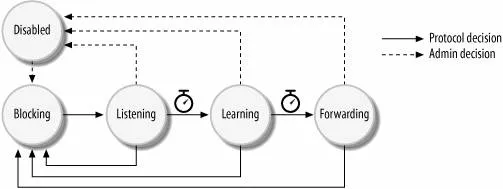
Five port states exist in classic STP:
- Blocking
- Listens to BPDUs only
- No MAC learning
- No data forwarding
- Max Age = 20s
- Listening
- Listens and exchanges BPDUs
- No MAC learning
- Waits for Root Bridge election
- Forward Delay = 15s
- Learning
- Learns MAC addresses
- Does not forward user traffic yet
- Forward Delay = 15s
- Forwarding
- Full BPDU processing
- Learns and forwards MAC/data
- Disabled
- Port administratively shut down
Transition Summary:
Blocking → Listening (15s) → Learning (15s) → Forwarding
STP Path Costs
|
Link Bandwidth |
Path Cost |
|---|---|
|
4 Mbps |
250 |
|
10 Mbps |
100 |
|
16 Mbps |
63 |
|
45 Mbps |
22 |
|
100 Mbps |
10 |
|
622 Mbps |
2 |
|
1 Gbps |
1 |
|
10 Gbps |
0 |
STP Timers
Hello Time
- BPDU transmission interval
- Range: 1–10s (default 2s)
Forward Delay
- Time spent in Listening + Learning
- Range: 4–30s (default 15s)
Max Age
- Maximum time a port stores BPDU info
- Range: 4–60s (default 20s)
Conclusion
The Spanning Tree Protocol (STP) is a fundamental Layer 2 technology for preventing loops, ensuring stability, and adapting to failures. While later protocols like RSTP and MSTP enhance speed and scalability, understanding What is STP remains essential for every network engineer.While this article explained what is STP in depth, understanding its evolution is equally important. For a full comparison of features, convergence speed, and use cases, check our STP vs RSTP vs MSTP pillar article.
FAQ
-
What is STP in networking?
STP, or Spanning Tree Protocol, is a Layer 2 protocol that prevents switching loops by creating a loop-free logical topology.
-
Why is STP important?
Without STP, redundant links can cause broadcast storms and MAC table instability, which may crash the entire network.
-
What are the five STP port states?
Blocking, Listening, Learning, Forwarding, and Disabled. These states help stabilize the network during topology changes.
-
How does STP select the Root Bridge?
The switch with the lowest Bridge ID (Bridge Priority + MAC address) is elected as the Root Bridge.
-
What is the difference between STP and RSTP?
STP takes 30–50 seconds to converge after a topology change, while RSTP (Rapid Spanning Tree Protocol) converges in 1–10 seconds with additional port roles and states.