Layer 2 vs Layer 3 Switch Confusion Solved: Choose the Right Switch with Enterprise Architecture Insight
A Layer 2 switch forwards traffic within the same VLAN using MAC addresses, while a Layer 3 switch adds IP routing and can move traffic between VLANs and subnets. In practice, Layer 2 switches fit access-layer endpoint connectivity, while Layer 3 switches are better for inter-VLAN routing, segmentation, and scalable enterprise network design.
Choosing between a Layer 2 switch vs Layer 3 switch is not just a technical preference. It affects VLAN design, routing policy, network scalability, and long-term operating cost. If the network only needs local endpoint connectivity, a Layer 2 switch is often enough. If the design requires inter-VLAN routing, policy control, and distribution-layer intelligence, a Layer 3 switch is usually the better choice. For enterprise campus networks, the right answer depends on where the switch sits in the architecture and how much routing logic you want inside the switching layer.
Before deciding between a Layer 2 switch and a Layer 3 switch, it helps to review the OSI model and what a network switch actually does. This creates the technical foundation for making the right design choice in a real network, not just comparing definitions.
For a deeper product-level overview, see our internal guide on what a Layer 3 switch is.
Layer 2 vs Layer 3 Switch: At-a-Glance Comparison
| Feature | Layer 2 Switch | Layer 3 Switch |
|---|---|---|
| Primary Function | Switches frames within the same LAN or VLAN | Switches frames and routes packets between VLANs/subnets |
| OSI Layer | Layer 2 (Data Link) | Layer 3 (Network) with Layer 2 switching |
| Forwarding Basis | MAC address table | MAC table + IP routing table |
| Inter-VLAN Routing | No | Yes |
| Broadcast Domain Handling | Works inside a VLAN/broadcast domain | Connects multiple VLANs and subnets |
| Typical Deployment Role | Access layer | Distribution layer, aggregation, campus core |
| Configuration Complexity | Lower | Higher |
| Cost | Lower | Higher |
| Policy Control | Basic segmentation | ACLs, QoS, routing policy, segmentation |
| Best Fit | Small LANs, endpoint access, simple networks | Enterprise networks, multi-VLAN environments, campus routing |
Understanding Layer 2 and Layer 3 in the OSI Model
The Open Systems Interconnection (OSI) model is still the clearest way to explain the difference between Layer 2 and Layer 3 switching. Even though real networks are often described using the TCP/IP model, the OSI model remains useful because it shows where switching ends and routing begins.
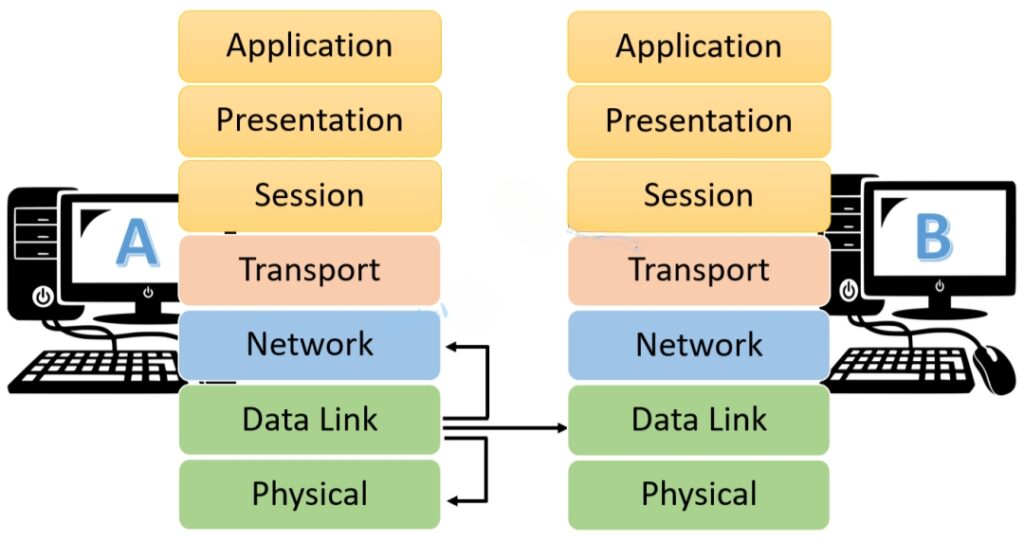
The OSI model includes seven layers:
- Physical (Layer 1): Cables, optics, interfaces, and raw bit transmission
- Data Link (Layer 2): Frames, MAC addressing, switching, and local forwarding
- Network (Layer 3): IP addressing, routing, and packet delivery across networks
- Transport (Layer 4): End-to-end sessions, reliability, and flow control
- Session (Layer 5): Session establishment and management
- Presentation (Layer 6): Data translation, encoding, and encryption
- Application (Layer 7): User-facing services such as email, file transfer, and web access
For this topic, the two most important layers are straightforward:
- Layer 2 decides where to forward traffic inside a local switching domain
- Layer 3 decides how traffic moves between different networks or VLANs
That distinction is the foundation of the entire layer 2 switch vs layer 3 switch comparison.
What Is a Network Switch?
A network switch connects devices such as PCs, printers, IP phones, servers, and wireless access points so they can communicate across a LAN. Traditional switching logic operates at Layer 2, where the switch learns MAC addresses and forwards Ethernet frames to the correct destination port instead of blindly broadcasting traffic.
In practical terms, a switch improves efficiency because it builds a forwarding table based on the MAC addresses it sees on each interface. Once learned, traffic can be sent point-to-point rather than flooded across the entire network.
Modern switches also provide different interface types and speeds, including copper Ethernet, SFP/SFP+ fiber uplinks, Multi-Gig, and PoE/UPoE support. In enterprise environments, switching platforms such as the Cisco Catalyst series may also include VLAN support, ACLs, QoS features, and routing capabilities, which is where the Layer 2 vs Layer 3 distinction becomes important.
What Is a Layer 2 Switch?
A Layer 2 switch is a switch that forwards frames using MAC addresses. Its job is to move traffic within the same LAN segment or VLAN as efficiently as possible. It does not make IP routing decisions between subnets.
Historically, bridges performed this role, but switches replaced them by delivering much higher performance, dedicated collision domains per port, and more scalable hardware forwarding. A Layer 2 switch builds a MAC address table and uses that table to send frames only where they need to go.

In most enterprise access-layer designs, a Layer 2 switch is the device that connects endpoints and uplinks those users to a higher layer where routing happens.
How a Layer 2 Switch Works
When a frame enters a Layer 2 switch, the switch examines:
- the source MAC address, to learn where that device lives
- the destination MAC address, to decide where to forward the frame
If the destination MAC already exists in the MAC address table, the frame is forwarded directly to the correct port. If the destination is unknown, the switch floods the frame to all ports in that VLAN except the incoming port.
This is why Layer 2 switching is efficient for local communication but limited when traffic must move between subnets.
Layer 2 Communication Process (ARP Example)
Assume Host A and Host B are connected to the same Layer 2 switch and are in the same VLAN.

- Host A wants to communicate with Host B
Host A knows Host B’s IP address but does not know Host B’s MAC address. - Host A sends an ARP request
The ARP request is a broadcast asking which device owns Host B’s IP address. - The switch floods the ARP request within the VLAN
Because broadcasts are sent to all devices in the same broadcast domain, every host receives it. - Host B replies with an ARP response
The reply contains Host B’s MAC address. - The switch learns Host B’s MAC location
Future traffic from Host A to Host B is then forwarded directly to the correct port.
If Host A and Host B are in different VLANs, a Layer 2 switch alone cannot complete the communication path. At that point, a router or Layer 3 switch is required.
Layer 2 Switching Functions
A Layer 2 switch mainly performs three jobs:
- Address learning
The switch learns source MAC addresses and maps them to ingress ports. - Frame forwarding
It sends traffic only to the correct destination port when the MAC is known. - Loop control with STP
It prevents Layer 2 loops in redundant topologies.
Loop Avoidance with STP
If multiple Layer 2 switches are interconnected with redundant links, traffic loops can form. These loops are dangerous because broadcasts and unknown unicasts can circulate continuously, consuming bandwidth and destabilizing the LAN.
Spanning Tree Protocol (STP) solves this by:
- electing a root bridge
- calculating the best path to the root
- blocking redundant ports that would otherwise create loops
- recalculating topology if a path fails
This is a core part of Layer 2 design. It is also one reason access-layer switching is simple in concept but still requires disciplined architecture.
Layer 2 Switch: Advantages and Disadvantages
Advantages
- Lower cost than Layer 3 switches
- Efficient local forwarding using MAC addresses
- Easy to deploy in small and medium networks
- Good fit for endpoint connectivity
- Low-latency LAN switching
- Strong fit for access-layer designs
Disadvantages
- No native routing between VLANs or subnets
- Limited policy intelligence compared with Layer 3 platforms
- Broadcast domains still need to be managed carefully
- Requires an external router or Layer 3 switch for inter-VLAN communication
What Is a Layer 3 Switch?
A Layer 3 switch combines traditional switching with routing intelligence. It still performs Layer 2 switching using MAC addresses, but it can also make Layer 3 forwarding decisions using IP addresses and a routing table.
That means a Layer 3 switch can route between VLANs, connect different subnets, and apply more advanced policies without sending all traffic to an external router.
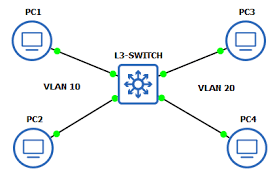
This makes Layer 3 switches especially useful in enterprise campus and aggregation designs, where traffic must move efficiently between departments, user segments, server networks, or voice/data VLANs.
How a Layer 3 Switch Works
When traffic arrives that must leave the local VLAN, a Layer 3 switch examines the destination IP address and checks the IP routing table. If a valid route exists, it forwards the packet to the appropriate next hop or destination VLAN interface.
Unlike a traditional router built primarily for WAN-edge functions, a Layer 3 switch often performs this routing in hardware using ASICs and TCAM, which allows very fast inter-VLAN and campus traffic forwarding.
Layer 3 Communication Process

A Layer 3 switch supports two different traffic behaviors:
- Intra-VLAN communication
When two hosts are in the same VLAN, the switch behaves like a normal Layer 2 switch and forwards based on MAC addresses. - Inter-VLAN communication
When traffic must move to a different VLAN or subnet, the switch routes the packet using Layer 3 logic.
A simplified flow looks like this:
- A host sends traffic destined for another subnet
- The traffic is sent to the VLAN gateway IP
- The Layer 3 switch receives the packet on the SVI
- The switch checks the routing table
- The packet is re-encapsulated and forwarded to the correct outbound VLAN or interface
What Is an SVI?
An SVI (Switch Virtual Interface) is the virtual Layer 3 interface associated with a VLAN. It allows the switch to assign an IP address to that VLAN and act as the default gateway for hosts inside it.
For example:
- VLAN 10 may have an SVI of
192.168.10.1 - VLAN 20 may have an SVI of
192.168.20.1
Once those SVIs exist and routing is enabled, the Layer 3 switch can route between VLAN 10 and VLAN 20 internally.
This is one of the main reasons engineers compare Layer 2 switch vs Layer 3 switch in the first place: the need for inter-VLAN routing.
Layer 3 Switch: Advantages and Disadvantages
Advantages
- Supports routing between VLANs and subnets
- Enables stronger segmentation and access control
- Supports ACLs and more advanced policy design
- Better suited for large enterprise networks
- Can provide QoS and traffic prioritization
- Reduces dependence on external routers for internal LAN routing
Disadvantages
- Higher cost than Layer 2 switches
- More configuration complexity
- Requires stronger design discipline
- Does not fully replace WAN-edge routers, firewalls, or VPN appliances
Layer 2 Switch vs Layer 3 Switch: Side-by-Side Comparison
The most practical way to evaluate layer 2 switch vs layer 3 switch is to compare them across enterprise decision criteria.
| Dimension | Layer 2 Switch | Layer 3 Switch |
|---|---|---|
| Cost | More cost-effective for simple LAN deployments | Higher price, especially when advanced routing and policy features are required |
| Initial Setup | Easier to deploy and manage | Requires more planning and configuration |
| Routing Capability | Limited to local switching only | Supports routing between subnets and VLANs |
| Scalability | Good for simple access expansion | Better for multi-VLAN and growing enterprise environments |
| Traffic Scope | Works within a single VLAN or broadcast domain | Connects multiple VLANs and routed segments |
| Performance Focus | High-speed local switching | High-speed internal routing and segmentation |
| Security Control | Basic VLAN separation | ACLs, policy enforcement, segmentation options |
| QoS | Limited compared with Layer 3 platforms | Better traffic prioritization for voice, video, and critical applications |
| Best Deployment Role | Access layer | Distribution layer, aggregation, campus routing |
| Enterprise Fit | Smaller or simpler network edge | Medium to large enterprise campus architecture |
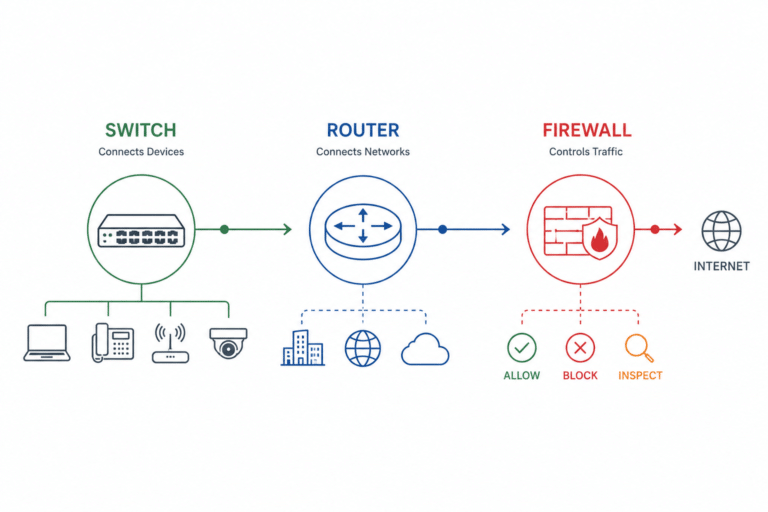
Layer 3 Switch vs Router
One of the most common follow-up questions is whether a Layer 3 switch can replace a router. The short answer is: sometimes inside the LAN, but not at the WAN edge.
What a Layer 3 Switch Can Replace
A Layer 3 switch can often replace a router for:
- inter-VLAN routing
- routing between internal subnets
- campus distribution-layer routing
- high-speed internal traffic movement
In many enterprise LANs, using a Layer 3 switch for internal routing is more efficient than hairpinning traffic through a separate router.
What a Layer 3 Switch Usually Cannot Replace
A Layer 3 switch is not always the right replacement for a traditional router when you need:
- NAT
- Internet edge connectivity
- MPLS / WAN handoff
- advanced VPN termination
- deep firewall features
- carrier or branch WAN services
That is why Layer 3 switch vs router is not an either-or decision in most enterprise networks. They usually serve different architectural roles.
Practical Rule
- Use a Layer 3 switch for fast internal LAN and campus routing
- Use a router for WAN edge, branch routing, Internet access, and service-provider-facing roles
Performance Comparison: Speed, Latency, and Hardware Architecture
Many engineers also compare layer 2 vs layer 3 switch speed and latency. In real enterprise networks, the answer is more nuanced than “Layer 2 is faster.”
A Layer 2 switch typically has slightly simpler forwarding logic because it only switches on MAC addresses. A Layer 3 switch must also perform routing lookups. However, modern enterprise Layer 3 switches use hardware acceleration, so the difference is often negligible for internal LAN traffic.
Important hardware concepts include:
- ASICs for line-rate switching
- TCAM for fast policy and route lookups
- Backplane bandwidth for moving traffic across the chassis or fabric efficiently
In practice:
- a Layer 2 switch is excellent for endpoint access and local forwarding
- a Layer 3 switch is better when the architecture demands segmentation, multiple VLANs, or scalable routed traffic
In enterprise campus design, performance is usually determined more by architecture placement, uplink design, oversubscription, and feature usage than by the simple Layer 2 vs Layer 3 label alone.
When Should You Use a Layer 2 Switch?
A Layer 2 switch is usually the better choice when the network design is relatively simple and most traffic stays local.
Use a Layer 2 switch when you need:
- endpoint connectivity in a small or mid-sized LAN
- access-layer switching for PCs, phones, and APs
- lower acquisition cost
- simpler deployment and operations
- VLAN segmentation without internal routing requirements
Typical use cases include:
- small office networks
- simple branch LANs
- user access closets
- edge access where routing is handled upstream
In Cisco campus terms, this often maps to campus access layer roles.
When Should You Use a Layer 3 Switch?
A Layer 3 switch becomes the better choice when the network needs more than basic VLAN separation.
Use a Layer 3 switch when you need:
- inter-VLAN routing
- multiple user or application subnets
- tighter segmentation and policy control
- distribution-layer intelligence
- scalable enterprise growth
- internal routing without relying on an external router for every path
Typical use cases include:
- enterprise campus distribution layer
- aggregation of multiple access switches
- server farm or internal services routing
- branch or campus designs with multiple VLANs
- environments requiring ACLs and QoS enforcement
This is why the layer 2 switch vs layer 3 switch decision is really an architecture decision. The question is not only what the switch can do, but where it sits in the network hierarchy.
Layer 2 vs Layer 3 Switch in Enterprise Network Design
In modern enterprise network architecture, these two switch types often work together rather than compete directly.
Access Layer
The access layer connects endpoints:
- desktops
- VoIP phones
- wireless access points
- printers
- IoT devices
This is where Layer 2 switching is usually the most cost-effective and operationally clean choice.
Distribution Layer
The distribution layer aggregates access switches and commonly performs:
- inter-VLAN routing
- policy enforcement
- ACL application
- traffic path control
- segmentation between departments or services
This is the classic home of the Layer 3 switch.
Core / Aggregation Considerations
In larger enterprise environments, high-performance Layer 3 switching is also common at the core or aggregation layer. The exact platform depends on scale, uplink speeds, redundancy design, and service requirements.
In Cisco environments, for example:
- Cisco Catalyst 9200 series commonly fits access-layer roles
- Cisco Catalyst 9300 series is frequently used where richer Layer 3 capability is needed
- Cisco Catalyst 9500 series is often deployed at distribution or core roles in campus networks
This is also where related design topics such as StackWise, uplink architecture, PoE/UPoE at the access layer, and distribution-layer routing capacity start to matter.
Which Should You Choose?
If you only need local device connectivity and basic VLAN separation, choose a Layer 2 switch.
If you need internal routing, scalable segmentation, and better control between VLANs or subnets, choose a Layer 3 switch.
A practical decision framework looks like this:
- Single VLAN or simple local LAN: Layer 2 switch
- Multiple VLANs with inter-VLAN traffic: Layer 3 switch
- Budget-sensitive edge access: Layer 2 switch
- Enterprise campus distribution: Layer 3 switch
- WAN edge or Internet routing: Router, not just a Layer 3 switch
Summary
The real difference between a Layer 2 switch vs Layer 3 switch is not just the OSI layer label. It is the role each platform plays in the network.
A Layer 2 switch is designed for efficient local forwarding inside a VLAN or LAN segment. It is simpler, lower cost, and ideal for endpoint access.
A Layer 3 switch adds IP routing and can move traffic between VLANs and subnets at high speed. It is the better choice when the network needs segmentation, policy control, and scalable enterprise architecture.
In most real enterprise designs, both are used together:
- Layer 2 at the access layer
- Layer 3 at the distribution or aggregation layer
If you are also planning your switching hierarchy, see our related guide on Core vs Distribution vs Access Switches: The Complete Architecture Guide.
FAQ
What is the difference between a Layer 2 switch and a Layer 3 switch?
A Layer 2 switch forwards frames based on MAC addresses within the same VLAN, while a Layer 3 switch can also route traffic using IP addresses between VLANs and subnets.
Which is faster: Layer 2 or Layer 3 switch?
Layer 2 switching is slightly simpler in theory, but modern Layer 3 switches use hardware acceleration, so they can deliver very fast internal routing in enterprise networks.
Does a Layer 2 switch use IP addresses?
No. A Layer 2 switch forwards traffic primarily using MAC addresses. It may have a management IP, but that does not make its forwarding logic Layer 3.
Can a Layer 3 switch replace a router?
It can often replace a router for internal inter-VLAN routing, but it usually does not replace a router for WAN edge services such as NAT, VPN termination, or Internet-facing connectivity.
When should I choose a Layer 3 switch?
Choose a Layer 3 switch when you need inter-VLAN routing, multiple subnets, stronger segmentation, policy control, or a scalable enterprise campus design.
How do VLANs work across Layer 2 and Layer 3 switches?
Layer 2 switches create and carry VLANs, while Layer 3 switches use SVIs to act as VLAN gateways and route traffic between those VLANs.