Managed vs Unmanaged Switch: The Complete 2026 Buying Guide & Technical Comparison
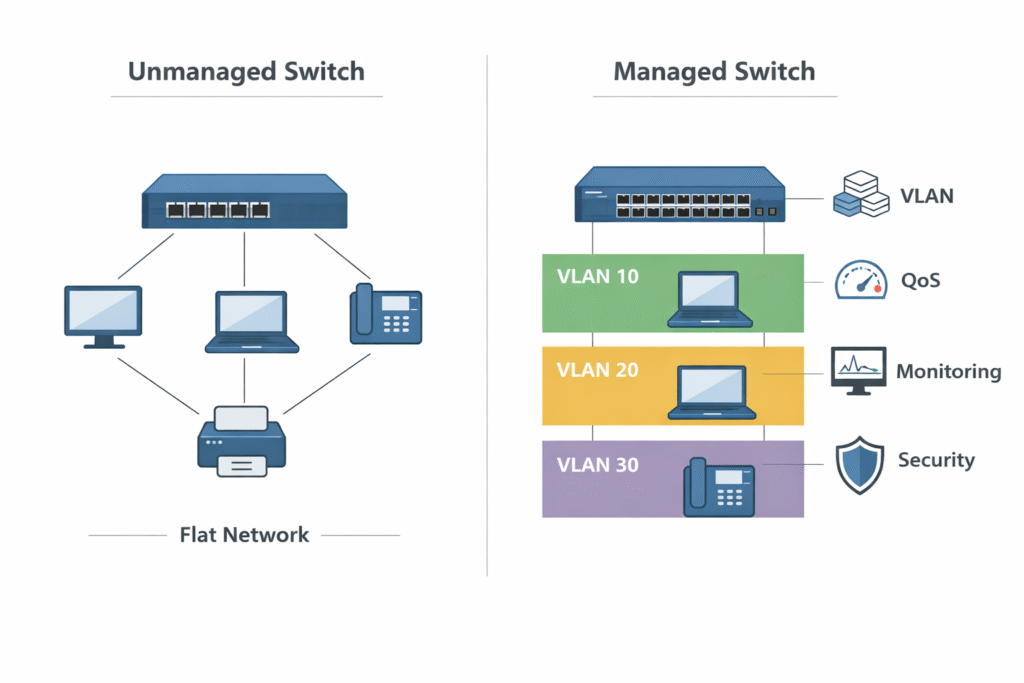
The main difference between a managed and unmanaged switch is configuration control. An unmanaged switch is a simple plug-and-play device that allows connected devices to communicate on a single broadcast domain with no user intervention. A managed switch allows network administrators to configure Virtual LANs (VLANs), prioritize traffic via Quality of Service (QoS), enforce strict security protocols, and remotely monitor network health through advanced telemetry.
What is the Difference Between a Managed and Unmanaged Switch?
When engineering an enterprise campus network, upgrading a small business infrastructure, or designing an industrial data center, IT architects face a foundational hardware decision: deploying managed switches versus unmanaged switches. The distinction between these two hardware categories does not inherently lie in their physical appearance, port counts, or base forwarding speeds. Rather, the core difference is entirely rooted in the administration of the network traffic, the isolation of the control plane from the data plane, and the ability of a human engineer to dictate exactly how packets are handled at the microscopic level.
What is an Unmanaged Switch?
An unmanaged switch is the most fundamental building block of local area networking. Operating strictly at Layer 2 (the Data Link Layer) of the OSI model, an unmanaged switch is a pure “plug-and-play” appliance. Its sole algorithmic purpose is to read the source and destination Media Access Control (MAC) addresses embedded within incoming Ethernet frames and forward those frames out of the corresponding physical ports.
When you unbox an unmanaged switch and connect power, it immediately begins building its internal MAC address table (often called a CAM table) by passively listening to the traffic on the wire. However, this device possesses no brain accessible to the user.
- Zero Configuration: It has no IP address, no Command Line Interface (CLI), no web-based Graphical User Interface (GUI), and no console port. You cannot log into an unmanaged switch.
- Single Broadcast Domain: Every device plugged into an unmanaged switch resides in the exact same broadcast domain. If one device sends out a network-wide broadcast (such as an ARP request), every other device plugged into that switch receives that broadcast.
- The Vulnerability: Because it lacks intelligence, if a user accidentally creates a physical network loop by plugging both ends of a single Ethernet cable into two ports on the same unmanaged switch, the resulting broadcast storm will exponentially replicate traffic until the switch’s internal processors are overwhelmed, crashing the entire local network.
What is a Managed Switch?
A managed switch is essentially a highly specialized, dedicated computer designed specifically for routing and switching network traffic. It contains a robust CPU, Random Access Memory (RAM), flash storage, and a complex network operating system (such as Cisco IOS-XE, Juniper Junos, or Arista EOS).
A managed switch transfers absolute control to the network administrator. Engineers can interact with the switch via a console cable, Secure Shell (SSH) over the network, a local web interface, or a centralized Software-Defined Networking (SDN) controller.
- Traffic Manipulation: Administrators can actively drop specific traffic, throttle bandwidth on a per-port basis, and logically separate physical ports into entirely different virtual networks.
- Proactive Defense: Managed switches actively participate in network defense, utilizing complex algorithms to detect unauthorized devices, block network loops before they cause outages, and authenticate users against corporate identity servers.
- Observability: They generate vast amounts of telemetry data, allowing monitoring systems to track CPU utilization, port error rates, and temperature fluctuations in real-time.
Smart Switch vs Managed Switch
Within the hardware market, there is a tertiary category often referred to as a “Smart Switch” or “Web-Managed Switch.” This represents a middle ground designed primarily for the Small and Medium-sized Business (SMB) sector.
A Smart Switch typically lacks a full Command Line Interface (CLI) and instead relies entirely on a simplified Web GUI. While it supports foundational managed features such as basic VLAN tagging, Link Aggregation, and static Quality of Service (QoS), it strips away the enterprise-grade protocols. You will generally not find support for dynamic routing protocols (like OSPF or BGP), advanced automated provisioning, or deep integration with enterprise identity engines (like Cisco ISE). Smart switches are ideal for organizations that need to separate their guest Wi-Fi from their point-of-sale systems but lack the budget or dedicated networking staff to maintain a full enterprise CLI-driven environment.
Managed vs Unmanaged Switch: Feature Comparison Matrix
To objectively quantify the technical divide between these platforms, the following feature comparison matrix outlines the capabilities expected from enterprise-grade managed switches versus standard unmanaged hardware.
| Feature / Capability | Unmanaged Switch | Managed Switch (Enterprise) |
| Configuration Interface | None (Fixed Plug & Play) | CLI, Web GUI, REST API, SDN Controller |
| VLAN Support (802.1Q) | No (Single Broadcast Domain) | Yes (Supports up to 4,094 isolated VLANs) |
| Quality of Service (QoS) | Default Hardware queues only | Advanced L2/L3 prioritization, DSCP marking |
| Loop Prevention | None (Loops cause network crash) | STP, RSTP, MSTP algorithms |
| Link Aggregation | No | LACP (EtherChannel) for combined bandwidth |
| Security Protocols | None | 802.1X, ACLs, DHCP Snooping, Port Security |
| Monitoring & Telemetry | LED link lights only | SNMPv3, Syslog, Port Mirroring (SPAN/RSPAN) |
| Multicast Management | Floods to all ports | IGMP Snooping to optimize video/audio streams |
| Cost Profile | Lowest upfront Capital Expenditure | Higher CapEx, but vastly lower OpEx during outages |
Technical Capabilities: Why Managed Switches Cost More
The premium paid for a managed switch is not merely for the inclusion of a management interface; it is an investment in business continuity, cybersecurity, and operational efficiency. Unmanaged switches are cheap because they lack the Application-Specific Integrated Circuits (ASICs) and software licensing required to perform deep packet inspection and protocol manipulation. The following technical pillars justify the cost of managed infrastructure.
Network Segmentation: Unmanaged vs Managed VLAN Support
The most critical feature of a managed switch is its ability to support Virtual Local Area Networks (VLANs) via the IEEE 802.1Q standard.
In an unmanaged environment, all connected devices share the same broadcast domain. If an infected laptop is plugged into the switch, ransomware can rapidly propagate laterally across the flat network, discovering and infecting financial servers, HR workstations, and IP printers because there are no internal barriers. Furthermore, excessive broadcast traffic (such as devices constantly querying for IP addresses) degrades the overall performance of the network.

A managed switch solves this by allowing engineers to logically segment the hardware. A single 48-port switch can be divided into dozens of isolated networks. Ports 1 through 10 can be assigned to VLAN 10 (Corporate Data), ports 11 through 20 to VLAN 20 (VoIP Phones), and ports 21 through 30 to VLAN 30 (Guest Wi-Fi).
At the hardware level, the managed switch injects a 4-byte 802.1Q tag into the Ethernet frame. Devices in VLAN 10 are cryptographically and logically prohibited from communicating directly with devices in VLAN 30 without passing through a heavily firewalled router. This segmentation contains broadcast storms to their specific VLAN and provides the foundational layer of a Zero Trust network architecture.
Quality of Service (QoS) and Traffic Prioritization
Network congestion is an inevitability in modern enterprises. When a switch’s uplink port is saturated, the switch must hold incoming packets in its memory buffers. In an unmanaged switch, packets are processed using a strict First-In, First-Out (FIFO) methodology. If an employee initiates a massive multi-gigabyte file transfer, those data packets will fill the buffer. If a CEO simultaneously makes a critical VoIP telephone call, the voice packets will be queued behind the file transfer, resulting in severe audio latency, jitter, and dropped calls.
Managed switches utilize advanced Quality of Service (QoS) mechanisms to evaluate and prioritize traffic in real-time. Network engineers can configure the switch to identify voice traffic (typically via Differentiated Services Code Point, or DSCP markings in the IP header) and place those packets into a “Strict Priority” queue. This guarantees that latency-sensitive traffic, such as Zoom video conferences and VoIP calls, instantly skips the line and is transmitted ahead of bulk background data, ensuring flawless communication regardless of total network load.
Security Protocols: ACLs, DHCP Snooping, and 802.1X
Physical layer security is the most vulnerable attack vector in corporate IT. An unmanaged switch implicitly trusts any device plugged into it.
Managed switches deploy an arsenal of security protocols to defend the network edge:
- 802.1X Port-Based Network Access Control (NAC): When a device is plugged into a managed switch port, the port remains in a mathematically blocked, unauthorized state. The switch acts as an authenticator, demanding credentials or a digital certificate from the device. It forwards this request to a central RADIUS server (like Cisco Identity Services Engine). Only upon successful authentication does the switch open the port and dynamically assign the correct VLAN based on the user’s identity.
- DHCP Snooping and Dynamic ARP Inspection (DAI): Malicious actors often plug rogue DHCP servers into networks to intercept traffic (a Man-in-the-Middle attack). Managed switches use DHCP Snooping to designate only specific uplink ports as “trusted” to distribute IP addresses, actively dropping rogue DHCP offers. DAI prevents ARP spoofing by validating ARP packets against a trusted binding database.
- Port Security: Administrators can restrict a specific physical switch port to only allow communication from a single, pre-approved MAC address. If a user unplugs their corporate desktop and plugs in a personal unauthorized laptop, the switch will instantly detect the MAC address change and administratively shut down the port, generating a security alert.
Diagnostic Telemetry: SNMP, Port Mirroring (SPAN), and STP
When an application slows down, IT teams utilizing unmanaged switches must guess the root cause by staring at blinking green LED lights. Managed switches transform the network into an observable, data-rich environment.
- Simple Network Management Protocol (SNMP): Managed switches expose thousands of data points via SNMP MIBs (Management Information Bases). Network Monitoring Systems (NMS) can poll the switch every minute to generate historical graphs of bandwidth utilization, CPU load, memory consumption, and environmental temperatures.
- Port Mirroring (SPAN / RSPAN): If a cybersecurity analyst suspects a specific server is exfiltrating data, they cannot easily intercept traffic on a switched network. Managed switches support Switched Port Analyzer (SPAN) functionality, allowing the switch to silently duplicate all traffic entering Port 5 and send a copy out of Port 48, where a packet sniffer (like Wireshark) or an Intrusion Detection System (IDS) is listening.
- Spanning Tree Protocol (STP): To prevent catastrophic broadcast storms caused by accidental physical loops, managed switches run STP (or modern variants like RSTP and MSTP). These algorithms map the entire physical topology of the network using Bridge Protocol Data Units (BPDUs). If a loop is detected, the switch automatically calculates the optimal path and mathematically blocks the redundant port, providing automatic failover without crashing the network.
Layer 2 vs Layer 3 Switch: Understanding Managed Switch Routing
When navigating the managed switch market, buyers will quickly encounter the distinction between Layer 2 and Layer 3 switches. This differentiation dictates how the switch handles traffic passing between different segmented VLANs.
Layer 2 Managed Switches operate entirely at the Data Link layer. They make their forwarding decisions based purely on the MAC address table. While a Layer 2 switch can create multiple isolated VLANs, it lacks the ability to route traffic between them. If a computer on VLAN 10 needs to send a file to a server on VLAN 20, the Layer 2 switch must push that traffic out of an uplink port to an external, dedicated hardware router. The router processes the traffic, makes the routing decision, and sends it back down to the switch. This configuration (known as a “Router on a Stick”) is functional but introduces severe traffic bottlenecks and latency, as the router’s physical uplink becomes a choke point.
Layer 3 Managed Switches (Multilayer Switches) represent the pinnacle of enterprise edge networking. These devices contain highly specialized routing ASICs that allow them to perform IP routing directly within the switch hardware at “wire speed.” A Layer 3 switch can host Switch Virtual Interfaces (SVIs) for each VLAN. When a device on VLAN 10 communicates with VLAN 20, the Layer 3 switch acts as the default gateway, instantly routing the packets internally without ever sending the traffic to an external router.
Furthermore, advanced Layer 3 switches support dynamic routing protocols such as Open Shortest Path First (OSPF) and Border Gateway Protocol (BGP). This allows the switch to actively participate in complex, campus-wide routing tables, automatically calculating new paths if an upstream core link fails.
For a comprehensive engineering deep-dive into the architectural differences, packet forwarding mechanics, and deployment strategies of routing switches, read our definitive guide: Layer 2 vs Layer 3 Switch: Enterprise Routing Guide
Power over Ethernet: Managed vs Unmanaged Switch for PoE Cameras
The convergence of IT (Information Technology) and physical security has made Power over Ethernet (PoE) a mandatory requirement for modern access switches. Devices such as pan-tilt-zoom (PTZ) IP surveillance cameras, Wi-Fi 6/7 Access Points, and VoIP desk phones rely entirely on the Ethernet cable to deliver both data connectivity and electrical power.

The Unmanaged PoE Experience:
An unmanaged PoE switch functions as a “dumb” power supply. It provides standard IEEE 802.3af (15W) or 802.3at (30W) power to connected devices automatically. However, it lacks any concept of a “PoE Budget” hierarchy. If you plug in too many high-draw devices and exceed the total wattage capacity of the unmanaged switch’s internal power supply, the switch will indiscriminately shut down ports. You cannot dictate which cameras stay online and which ones fail. Furthermore, if an IP camera freezes in the field, a technician must physically walk to the unmanaged switch, locate the correct cable, and manually unplug it to reboot the camera.
The Managed PoE Advantage:
Managed PoE switches provide weak-current engineers and IT administrators with granular, software-driven electrical engineering capabilities:
- LLDP-MED Negotiation: Managed switches use Link Layer Discovery Protocol for Media Endpoint Devices to actively negotiate power requirements with the endpoint, ensuring no wattage is wasted.
- Granular Power Allocation: Administrators can manually dictate maximum power thresholds per port. More importantly, they can assign strict priority levels. If a power supply fails or the budget is exceeded, the switch will intelligently shed load by disabling low-priority ports (like breakroom phones) while maintaining uninterrupted power to “Critical” ports (like main entrance security cameras).
- Remote Power Cycling and Automation: The greatest operational cost savings of a managed PoE switch is the elimination of physical “truck rolls.” If an access point mounted on a 30-foot ceiling becomes unresponsive, an administrator can log into the switch’s CLI from across the globe and issue a
power inline neverfollowed bypower inline autocommand, remotely cutting and restoring electrical power to reboot the endpoint in seconds. - Perpetual and Fast PoE: Advanced managed switches (such as the Cisco Catalyst 9000 series) support features like Perpetual PoE, which ensures that even if the switch’s operating system is rebooting for a software upgrade, the hardware continues to deliver uninterrupted electrical power to the endpoints, keeping cameras recording during maintenance windows.
Industrial OT Networks: Managed vs Unmanaged Industrial Ethernet Switch
Standard enterprise switches are designed to live in pristine, climate-controlled data centers or wiring closets. However, in Operational Technology (OT) environments—such as automotive manufacturing plants, oil refineries, utility substations, and outdoor traffic control cabinets—standard IT hardware will rapidly fail due to extreme temperatures, severe vibrations, and intense electromagnetic interference (EMI).
Industrial Ethernet switches are purpose-built for these harsh environments, typically featuring ruggedized, fanless, DIN-rail mountable chassis with redundant DC power inputs. But within the industrial space, the choice between managed and unmanaged has critical implications for physical safety and manufacturing uptime.
Unmanaged Industrial Switches:
In simplistic automation setups, unmanaged industrial switches are used as basic splitters inside a single machine’s control cabinet. They connect a localized Programmable Logic Controller (PLC) to a few sensors and actuators. Because the network is small and entirely isolated from the corporate IT network, the lack of management features is acceptable.
Managed Industrial Switches:
Modern “Industry 4.0” and smart manufacturing facilities require highly deterministic, synchronized networks where a delayed packet can result in robotic arms colliding or assembly lines halting. This requires heavily managed industrial switches.
- Protocol Prioritization: Industrial managed switches support advanced QoS tailored for automation protocols. They ensure that time-critical PROFINET, EtherNet/IP, or Modbus TCP control packets are guaranteed immediate delivery, prioritizing them over background traffic like video surveillance feeds.
- Precision Time Protocol (PTP): Advanced industrial managed switches support IEEE 1588 PTP, utilizing hardware timestamping to synchronize the internal clocks of robotic components down to the microsecond level, which is impossible on an unmanaged switch.
- Industrial Ring Redundancy: In a factory, a forklift accidentally severing a fiber optic cable cannot be allowed to halt production. While standard IT networks use STP (Spanning Tree Protocol) for redundancy, STP can take 1 to 30 seconds to converge. Industrial managed switches utilize the Media Redundancy Protocol (MRP) or proprietary ring protocols that detect a severed cable and recalculate the network path in less than 50 milliseconds, ensuring zero disruption to the manufacturing process.
When Should You Use a Managed vs Unmanaged Switch?
Understanding the technical specifications is only half the battle; aligning the hardware capabilities with real-world deployment scenarios is the key to cost-effective procurement.
Do I need a managed switch at home or for a home lab?
For the average consumer residential network, an unmanaged switch is perfectly adequate. Plugging game consoles, smart TVs, and desktop computers into a cheap 8-port unmanaged Gigabit switch connected to a consumer ISP router will work flawlessly.
However, for homelab enthusiasts, cybersecurity researchers, or advanced smart home builders, a managed switch is highly recommended. If you wish to isolate vulnerable Internet of Things (IoT) devices (like smart bulbs and generic IP cameras) onto their own restricted VLAN away from your personal NAS (Network Attached Storage) and banking data, you absolutely require a managed switch capable of 802.1Q tagging.
Managed switch vs unmanaged switch for small business
A newly founded startup with five employees in a single open-plan office can easily operate on an unmanaged switch.
The pivot point occurs when the business scales. As soon as a small business introduces a VoIP phone system, hires dedicated HR and finance personnel (requiring data isolation), or implements regulatory compliance standards (like PCI-DSS for credit card processing or HIPAA for healthcare data), unmanaged switches become a liability. At this stage, migrating to at least a Smart Switch or an entry-level managed switch is legally and operationally mandatory to segment sensitive data and prioritize voice traffic.
Enterprise Edge vs Core (Cisco Catalyst Managed vs Unmanaged)
In medium to large enterprise environments, unmanaged switches are strictly prohibited by IT security policies. The inability to authenticate endpoints via 802.1X or push security policies makes unmanaged hardware an unacceptable risk. A standard enterprise deployment typically utilizes the Cisco networking ecosystem:

- The Access Edge: Deployed in wiring closets across the campus, Layer 2/3 managed access switches (such as the Cisco Catalyst 9200 or 9300 series) provide PoE+ to endpoints, enforce identity-based VLAN assignment via Cisco ISE, and secure the physical perimeter.
- The Distribution and Core: Deep inside the data center, modular, high-density Layer 3 managed core switches (like the Cisco Catalyst 9500 or 9600 series) handle massive terabit-level routing, utilizing BGP and highly redundant StackWise Virtual architecture to ensure the campus backbone never goes offline.
Cisco SMB and Edge Clusters (Cisco Business Series)
Are there any acceptable use cases for unmanaged switches in the enterprise? Yes, but only in highly restricted “edge cluster” scenarios.
Imagine an engineering workstation where a developer needs to connect three testing laptops, but there is only one physical Ethernet jack on the wall. An IT administrator can provision a small, unmanaged switch (such as the Cisco Business 110 Series) to act as a desktop port multiplier.
However, this is only safe because the upstream wall port connects to a secure, managed Cisco Catalyst switch. The Catalyst switch must be heavily configured with BPDU Guard (to prevent the unmanaged switch from causing Spanning Tree loops) and Port Security MAC-limits (to prevent the employee from connecting unauthorized devices). In this scenario, the unmanaged switch is merely a physical extension cable, entirely subordinated to the intelligence of the upstream managed architecture.
Frequently Asked Questions (FAQ)
Is a managed switch faster than an unmanaged switch?
In terms of raw physical backplane switching capacity, a Gigabit unmanaged switch and a Gigabit managed switch will both forward data at 1,000 Mbps under optimal conditions. However, in heavily congested networks, a managed switch will feel significantly “faster” and more responsive because its Quality of Service (QoS) algorithms will prioritize your critical applications (like VoIP and video conferencing) over low-priority background downloads.
Can I use a managed switch as an unmanaged switch?
Yes. The vast majority of managed switches ship from the factory in a default configuration where all ports belong to VLAN 1, Spanning Tree is globally enabled, and all ports are administratively active. If you unbox a managed switch and simply plug in your devices without ever logging into the console, it will function identically to an unmanaged plug-and-play switch.
Do unmanaged switches have IP addresses?
No. Unmanaged switches operate strictly at Layer 2 (Data Link Layer) using physical MAC addresses. Because they possess no management interface or web GUI, they do not require an IP address, cannot request an IP address via DHCP, and cannot be pinged across the network for diagnostic purposes.
Can I mix managed and unmanaged switches on the exact same network?
Yes, they can coexist within the same physical topology. A common implementation involves linking an unmanaged switch to an edge port of a managed switch to add cheap port density to a specific room. However, any device plugged into the unmanaged switch will be forced into whatever single VLAN is assigned to the uplink port on the managed switch. The unmanaged switch cannot parse or maintain VLAN tags sent to it.