RJ11 vs RJ45: Difference, Pinout, and Ethernet Use
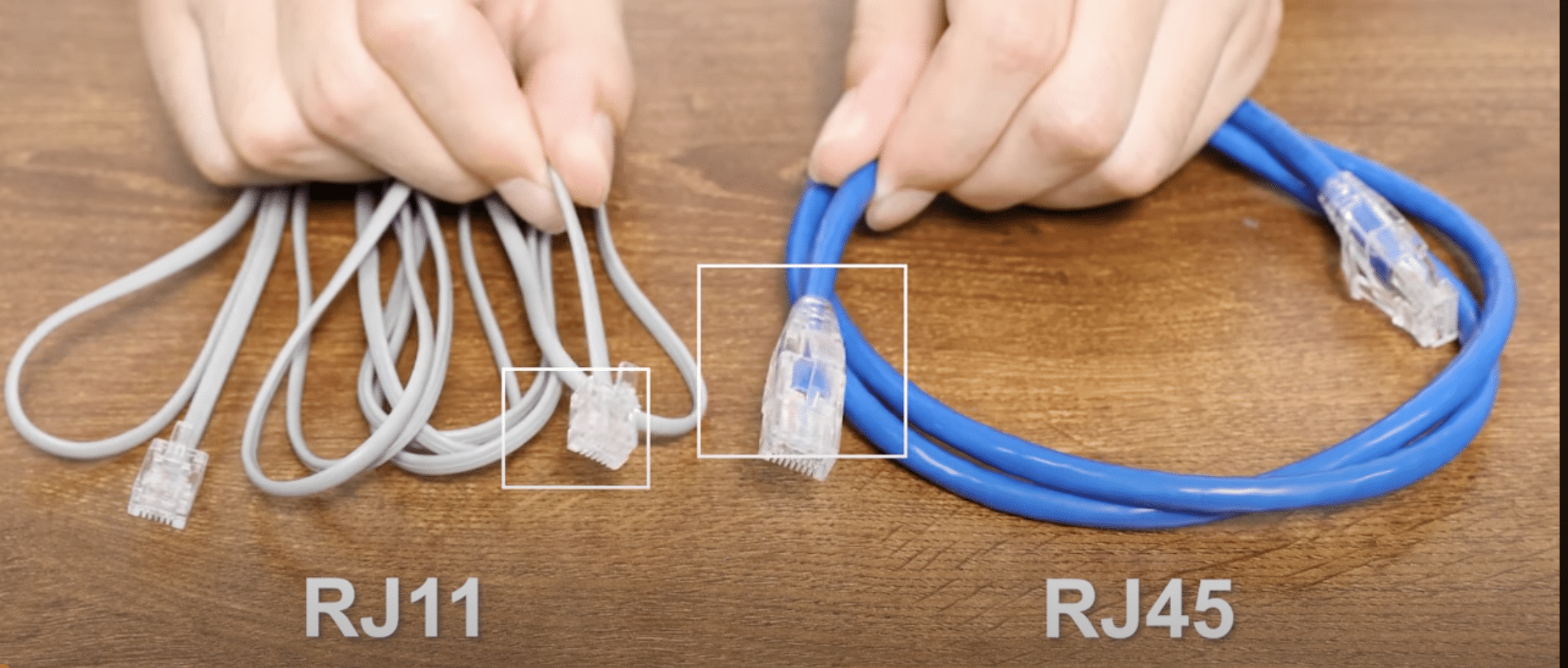
RJ11 is mainly used for telephone lines, fax connections, and DSL line-side cabling. RJ45, in everyday networking language, usually refers to the 8P8C connector used for Ethernet ports on switches, routers, patch panels, computers, IP phones, access points, and cameras. The two connectors are not interchangeable for Ethernet service.
The practical difference is both physical and electrical. RJ11 is narrower and usually carries one or two telephone pairs. RJ45 Ethernet uses a wider 8-position connector and structured twisted-pair cabling. An RJ11 plug may physically enter an RJ45 jack, but that does not make it safe, supported, or electrically correct.
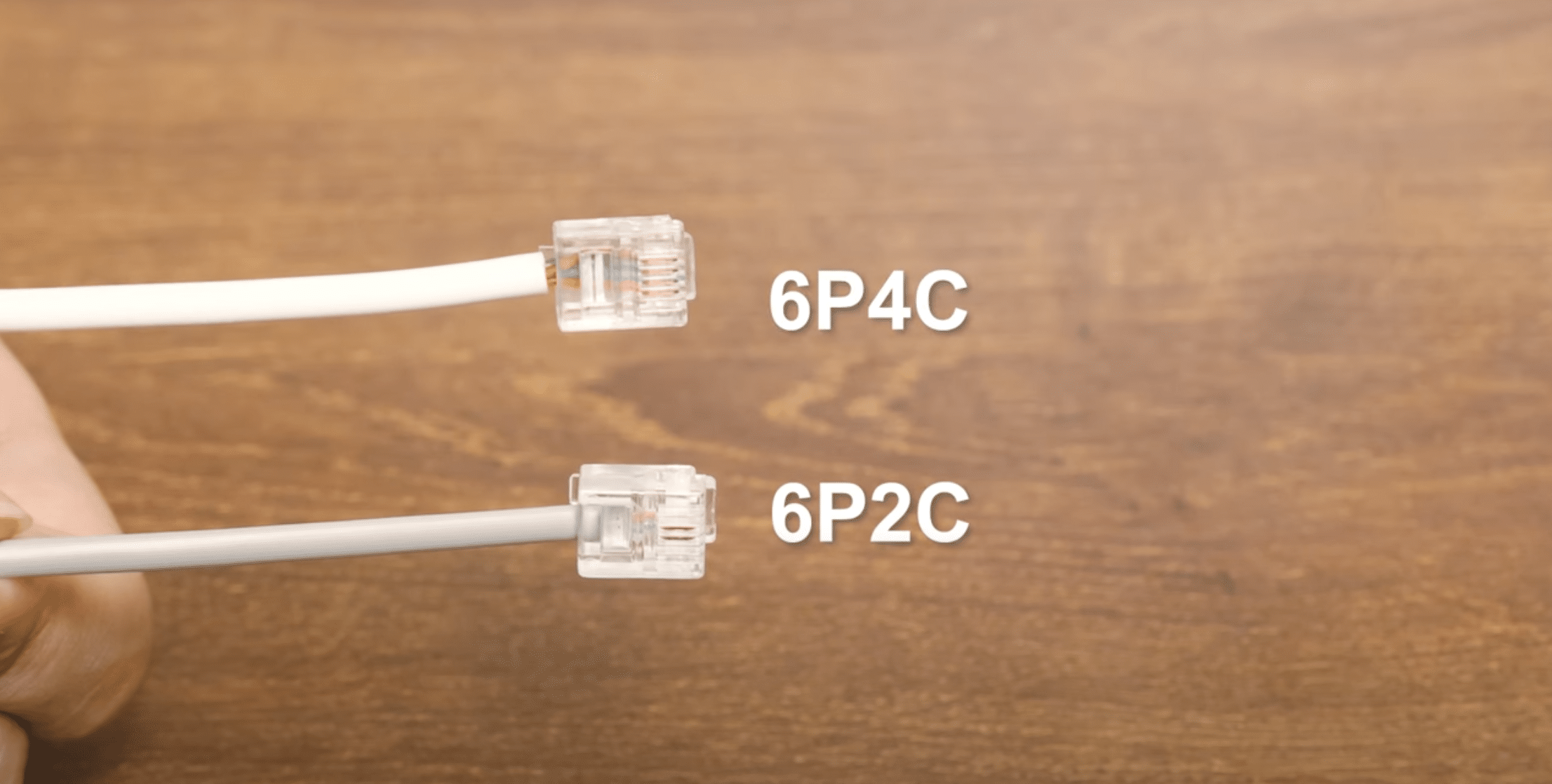
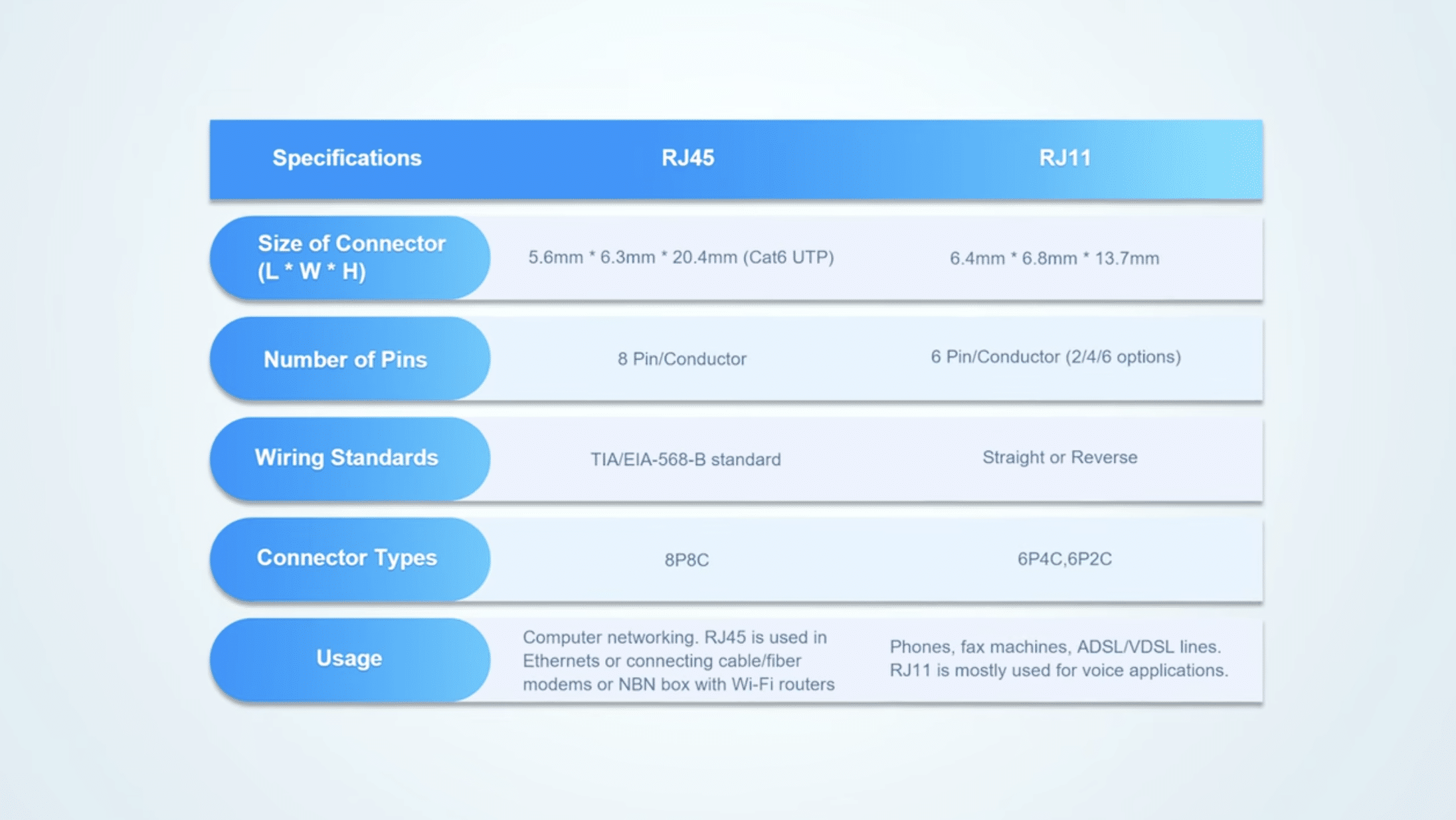
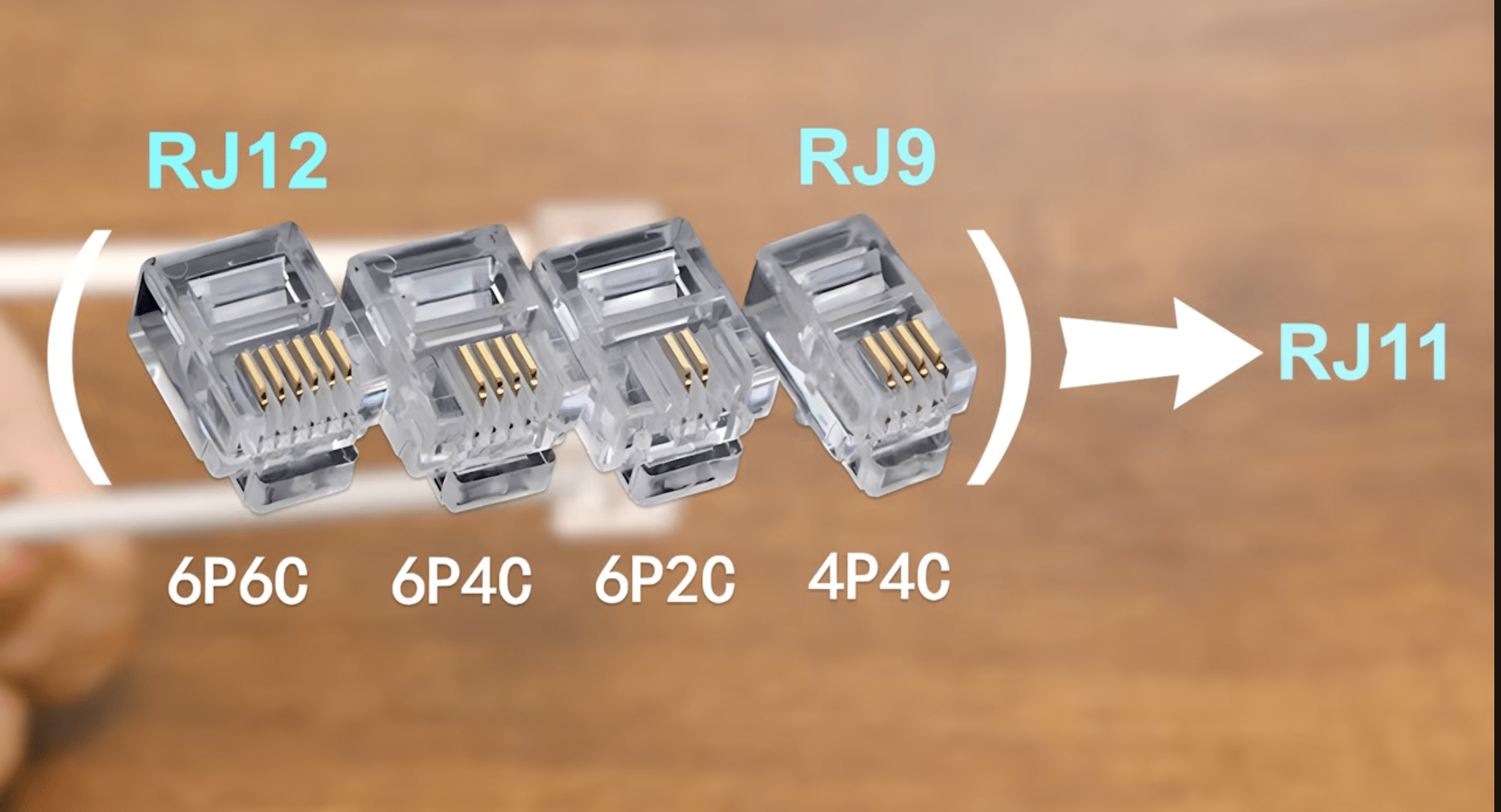
RJ12 adds a third name to the mix: it shares RJ11’s 6-position body but wires all six contacts for key or PBX phone systems. The fastest way to tell all three apart is to count positions and contacts — 6P2C/6P4C for RJ11, 6P6C for RJ12, and 8P8C for RJ45.
RJ11 vs RJ45 Quick Comparison
| Feature | RJ11 | RJ45 / 8P8C Ethernet |
|---|---|---|
| Common role | Telephone line, fax, DSL line-side connection | Ethernet data, LAN, WAN, switching, routing, structured cabling |
| Typical connector format | 6P2C or 6P4C in many phone cables | 8P8C in Ethernet cabling |
| Physical size | Narrower plug | Wider plug |
| Typical contacts used | 2 or 4 contacts | 8 contact positions available |
| Cable type | Telephone cable, often flat or voice-grade | Cat5e, Cat6, Cat6A, or other twisted-pair Ethernet cable |
| Signal type | Analog voice or DSL line signal | Ethernet data; PoE where supported |
| Ethernet support | Not suitable for Ethernet | Standard connector format for copper Ethernet |
| PoE support | No standard Ethernet PoE role | Supported on PoE-capable Ethernet switch ports |
| Can fit into the other port? | May fit into an RJ45 jack, but should not be used there | RJ45 does not fit into an RJ11 jack |
| Field warning | Do not use RJ11 as an Ethernet patch cable | Verify whether the RJ45 jack is patched for data, voice, or another service |
For network engineers, the important distinction is not only the plastic connector. RJ11 and RJ45 normally belong to different cabling systems, different signal types, and different troubleshooting workflows. Treat a phone cord, a DSL lead, and an Ethernet patch cord as separate items in the bill of materials.
What Is RJ11?
RJ11 is a telephone connector commonly associated with single-line analog phone service. In many installed environments it appears as a small modular plug used between a wall jack and a landline phone, fax machine, DSL modem, alarm panel, or legacy voice device.
The connector body often has six physical positions, but not every position contains a metal contact. A single-line telephone cable commonly uses the center pair. Some phone cables use four contacts for two-line service or related telephone applications. This is why RJ11 is often described in formats such as 6P2C or 6P4C.
RJ11 should not be selected for Ethernet networking. Even if a short phone cable appears to connect two pieces of equipment mechanically, it does not provide the correct four-pair Ethernet channel needed for modern LAN links, Gigabit Ethernet, PoE endpoints, or enterprise access switch cabling.
What Is RJ45?
RJ45 is the common industry name used for the modular Ethernet connector found on copper network ports. Strictly, many Ethernet patch cables and jacks are 8P8C modular connectors, but engineers, vendors, installers, and datasheets often refer to them as RJ45 in daily networking work.
RJ45 Ethernet ports appear on switches, routers, firewalls, servers, desktop PCs, wireless access points, IP cameras, IP phones, patch panels, and wall outlets. They are used with twisted-pair Ethernet cabling such as Cat5e, Cat6, and Cat6A, depending on speed, distance, PoE load, and installation quality.
An RJ45-looking wall jack does not always guarantee a live Ethernet connection. In offices, schools, hotels, warehouses, and older buildings, the same 8P8C wall outlet may be patched to a data switch, a voice block, a PBX, a DSL service, or nothing at all. The far-end patching matters as much as the faceplate.
RJ11 vs RJ45 Pinout and Contact Difference
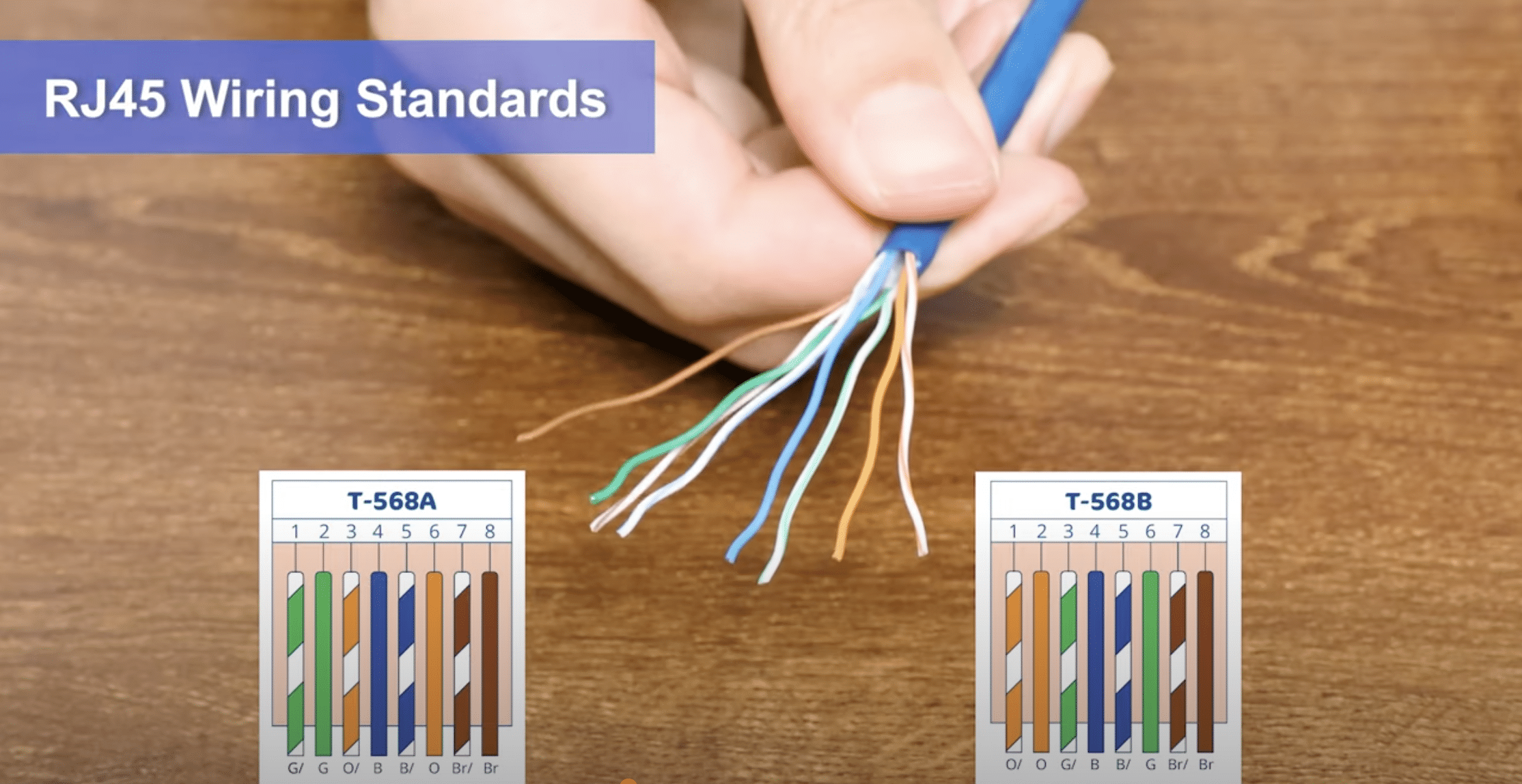
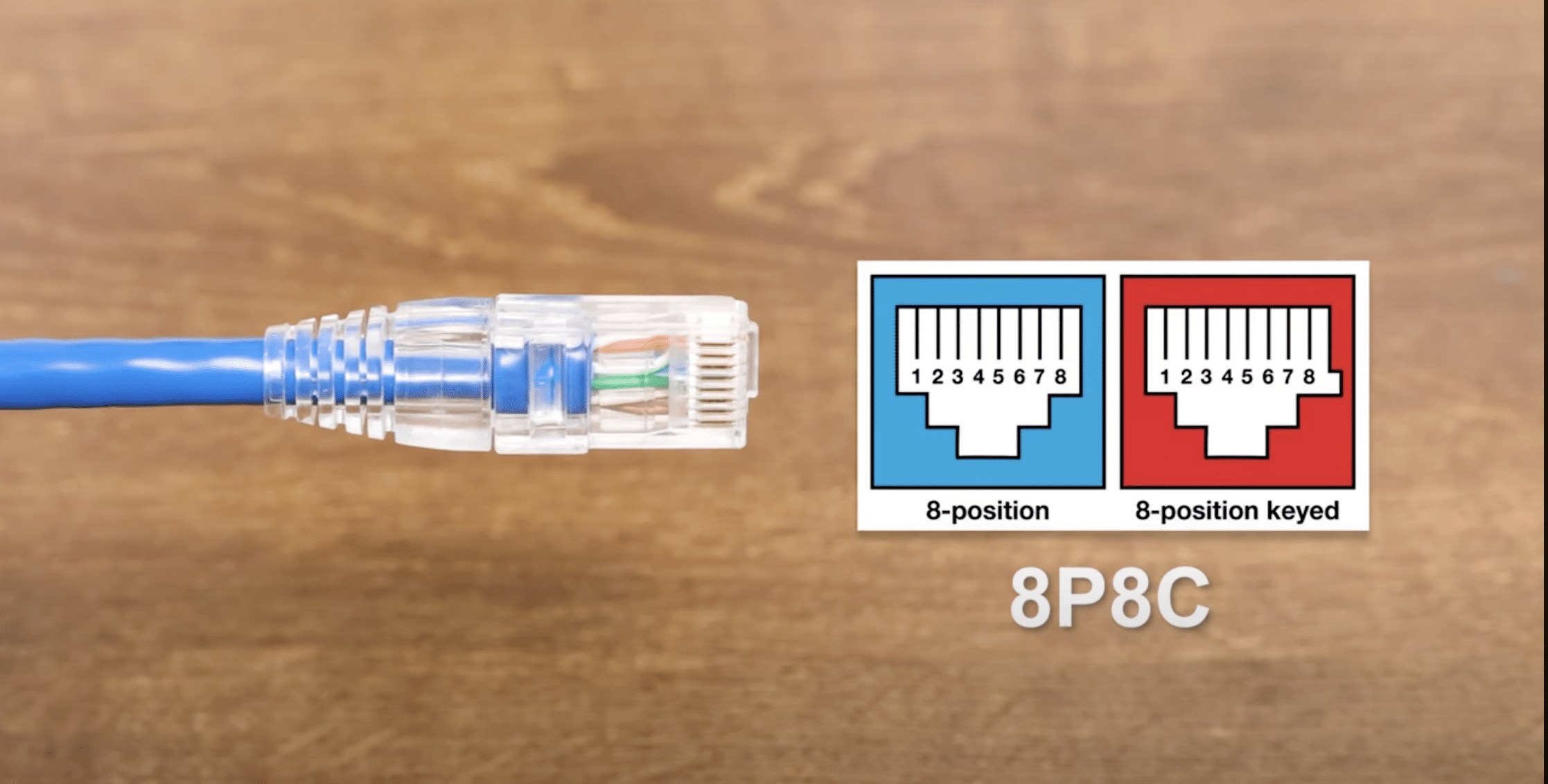
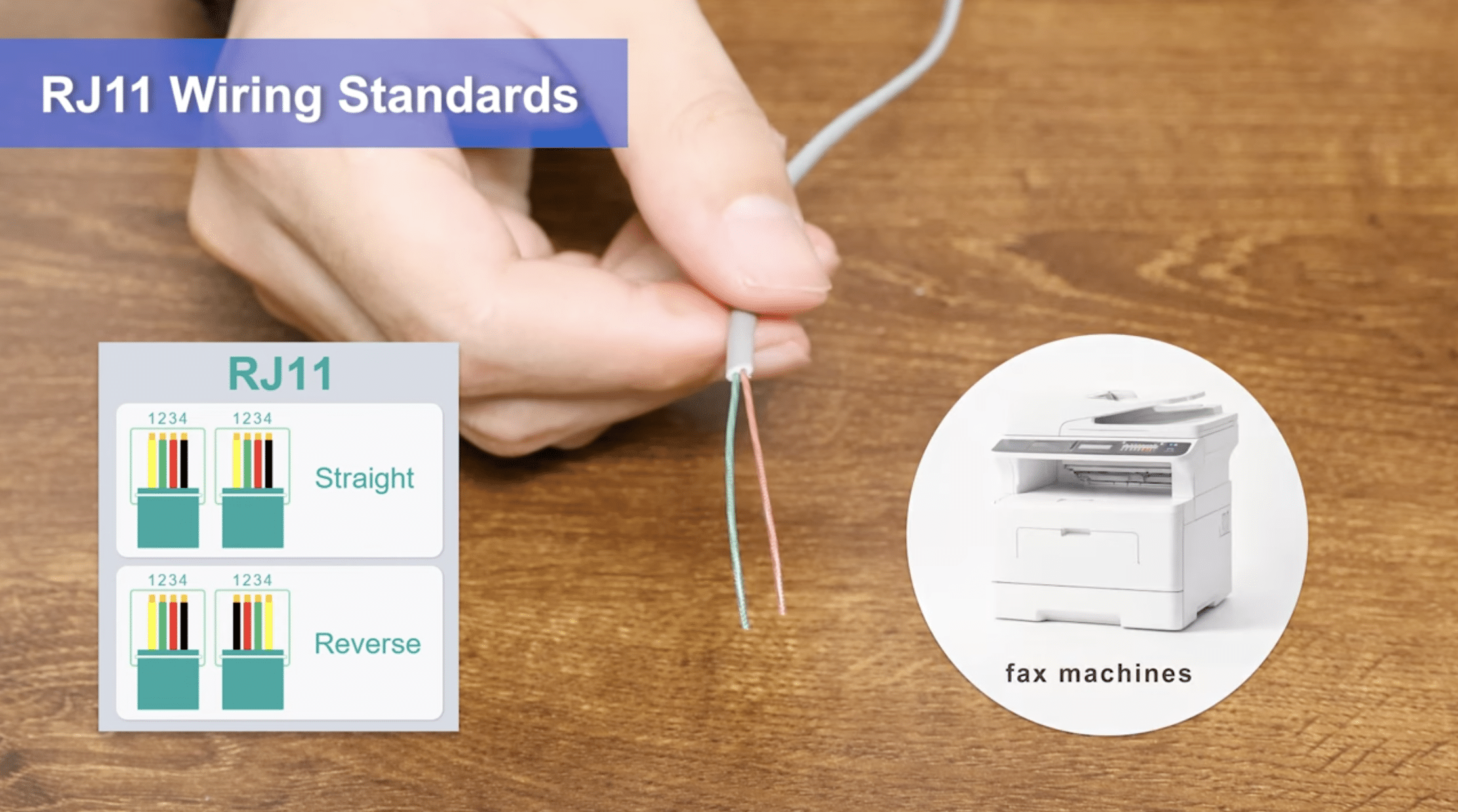
The pinout difference matters because the two connectors do not use the same number of contacts or the same pair assignments. RJ11 telephone wiring is normally centered around one or two voice pairs. RJ45 Ethernet wiring uses an 8-position connector and follows Ethernet pair assignments such as T568A or T568B.
| Item | RJ11 | RJ45 / 8P8C Ethernet |
|---|---|---|
| Common position count | 6 positions | 8 positions |
| Common contact count | 2 or 4 contacts | 8 contacts available |
| Typical notation | 6P2C, 6P4C | 8P8C |
| Common pair use | Center pair for single phone line | Ethernet pairs assigned by T568A or T568B |
| Cable construction | Often flat phone cable or simple voice cable | Balanced twisted-pair Ethernet cable |
| Visual check | Smaller, narrower plug with fewer metal contacts | Wider plug with eight contact positions |
T568A and T568B are RJ45 Ethernet wiring schemes, not RJ11 wiring schemes. For RJ45 color order, pin diagrams, and choosing one standard for a site, use the T568A vs T568B wiring guide.
RJ11 vs RJ12: 6P4C vs 6P6C and Multi-Line Wiring
RJ11 and RJ12 use the exact same 6-position plastic body, so they look identical from the outside. The difference is how many contacts are loaded and how they are wired: RJ11 is a 6P2C or 6P4C jack carrying a single telephone line, while RJ12 is a 6P6C jack — six positions, six contacts — defined as an official USOC registered jack for key telephone (PBX-style) systems. RJ12 carries one line plus the control signaling that business key systems need, not three independent lines.
That last point is where most comparison pages get it wrong. A 6P6C body wired for three separate lines is RJ25, not RJ12. RJ12 uses all six contacts for one line plus key-system control ahead of the line circuit. If you are tracing an old office phone harness, the contact count alone will not tell you the role — you have to check the wiring.
| Attribute | RJ11 | RJ12 |
|---|---|---|
| Modular body | 6-position | 6-position (identical shell) |
| Format | 6P2C or 6P4C | 6P6C |
| Contacts wired | 2 or 4 | 6 |
| Typical role | One residential phone line | One line + key/PBX control |
| Defining standard | USOC / FCC Part 68 | USOC / FCC Part 68 |
| Tell them apart | 1–2 pairs populated | all 3 pairs populated |
RJ11, RJ14, and RJ25: One Jack Body, Different Wiring
The 6-position family is a single physical connector reused at three wiring levels: 6P2C/6P4C is RJ11 (one line), 6P4C is RJ14 (two lines), and 6P6C is RJ25 (three lines). They are the same modular shell — only the number of populated contacts changes. This is the core idea behind every “RJ” name: the RJ code describes the wiring assignment registered under FCC Part 68, while the plug it sits in is a generic modular connector. Two cables can share one body and still be wired for completely different services.
RJ12 vs RJ45: Pin Count, Wiring, and Why They Don’t Mix
An RJ12 plug (6P6C, ~9.65 mm wide) and an RJ45 plug (8P8C, ~11.7 mm wide) are not interchangeable. The Ethernet jack is wider and carries eight contacts in four pairs; the 6-position phone plug carries at most six. An RJ45 plug physically cannot enter a 6-position phone jack, so that direction simply fails to seat.
The reverse direction is the dangerous one. Because the contact pitch is identical — 1.02 mm (0.040 in) on both bodies — a narrow RJ12 plug will slide into an 8P8C Ethernet jack and press on only the middle contacts. It makes no valid Ethernet connection and can splay or deform the outer contacts of the port over time. Treat an RJ12-into-RJ45 fit the same way you treat RJ11-into-RJ45: it seats, but it should never be used.
Can RJ11 Plug Into an RJ45 Port?
An RJ11 plug can sometimes physically enter an RJ45 jack because it is narrower than the Ethernet connector. That does not make the connection correct. Inserting RJ11 into an RJ45 port can put uneven pressure on the jack contacts and may weaken or bend contacts that must later align with a proper Ethernet plug.
This is a common field problem in offices with mixed phone and data wiring. A user sees a familiar modular jack, inserts a phone cord into a network port, and assumes the port is compatible. The result is usually no Ethernet link, intermittent contact, or a damaged jack that later fails even with a correct patch cable.
The risk is higher where the RJ45 port belongs to a switch, router, firewall, access point injector, IP phone pass-through port, or patch panel tied into active equipment. Unknown cables should be traced or tested before they are connected to production network hardware.
Can You Use RJ11 for Ethernet?
RJ11 should not be used for Ethernet. Ethernet requires the correct connector, twisted-pair cable construction, pair assignment, impedance behavior, and link negotiation. A telephone cable cannot be treated as a substitute for a Cat5e, Cat6, or Cat6A Ethernet patch cable.
Some older 10/100 Ethernet links used two twisted pairs, while Gigabit Ethernet and many modern access designs depend on all four pairs. Enterprise cabling should not be planned around marginal two-pair behavior. It should be planned around the required speed, PoE load, distance, patching method, and supported endpoint type.
If a wall outlet is currently wired for RJ11 telephone service, converting it for Ethernet is not just a plug change. The installer must verify the cable behind the wall, the far-end termination, the patch panel, the cable category, pair continuity, distance, and whether the run is dedicated point-to-point rather than daisy-chained for telephone service.
Can You Use an RJ45 Cable for a Phone Line?
An Ethernet-rated cable can carry analog phone service if it is terminated and patched correctly, but that does not turn the phone service into Ethernet. This distinction matters in structured cabling systems where the same type of wall outlet may be used for either voice or data depending on how the other end is patched.
In many offices, a Cat5e or Cat6 cable run terminates on an RJ45 wall jack at the desk and a patch panel in the telecom room. That outlet can be patched to a data switch for Ethernet or to a voice system for a phone line. The jack shape alone does not define the service.
This is why port labeling and documentation matter. A wall plate marked “DATA” should trace to a switch port. A jack marked “TEL,” “LINE,” or “PHONE” may be patched to voice infrastructure even if the connector looks like an RJ45 jack. Before replacing phones, switches, routers, or patch cords, confirm the far-end connection.
RJ11 to RJ45 Adapter: What It Can and Cannot Do
An RJ11-to-RJ45 adapter can change the physical fit or remap contacts for a specific voice wiring use case. It cannot convert a telephone line, fax line, or DSL signal into Ethernet. If the service is DSL, a DSL modem or gateway is still required to convert the DSL line-side signal into an Ethernet LAN connection.
Adapters are often misunderstood in home and small office troubleshooting. A user may buy an RJ11-to-RJ45 adapter expecting a phone wall jack to become an Ethernet port. The adapter does not provide Ethernet signaling, switching, routing, IP addressing, or modem functions. It only changes how conductors land on contacts.
Use adapters only when the application is known and documented, such as a voice device using structured cabling under a controlled wiring plan. Do not use an adapter to connect unknown telephone wiring directly into a switch port, PoE port, router WAN port, or firewall interface.
RJ11 vs RJ45 in Routers, Switches, and Modems
The same connector question has different answers depending on the device. A DSL modem, Ethernet router, access switch, and patch panel may all sit in the same wiring closet, but their ports do different jobs.
| Device | RJ11 Usually Means | RJ45 Usually Means | Field Note |
|---|---|---|---|
| DSL modem or DSL gateway | DSL line input from telephone service | Ethernet LAN output to router, switch, or computer | The RJ11 side is not Ethernet; the RJ45 side usually is |
| Ethernet router | Rare except DSL router models | WAN or LAN Ethernet | WAN and LAN labels matter more than connector shape |
| Network switch | Not used for standard data ports | Ethernet access or uplink ports | Do not patch phone lines into switch ports |
| Patch panel | Voice circuits may be presented through modular cabling | Data outlets may also land here | Trace the far end before connecting active equipment |
| IP phone | Handset may use a smaller modular connector | Network uplink normally uses RJ45 Ethernet | Do not confuse handset cords with the phone network uplink |
| Firewall | Not normally RJ11 | Copper Ethernet interface | Treat unknown phone cabling as unsafe until tested |
For equipment planning, RJ45 ports on Cisco switches and Cisco routers should be matched with the correct cable category, speed requirement, PoE requirement, and endpoint type. A port count alone is not enough to build a reliable cabling BOM.
PoE, Phone Lines, and Port Safety
Power over Ethernet runs over supported Ethernet cabling between a PoE-capable switch or injector and a compatible powered device. It is not a feature of ordinary RJ11 phone wiring. IP cameras, wireless access points, and VoIP phones that require PoE should be connected with suitable RJ45 Ethernet cabling and a switch port that supports the required PoE standard.
Do not connect unknown telephone, PBX, alarm, or DSL wiring into a PoE switch port as a test. A cable that disappears into a wall may be connected to legacy voice equipment, a telephone block, a service provider demarcation point, or an abandoned run. Trace and test it before attaching network hardware.
For procurement teams, this affects both equipment and accessories. A PoE switch order should include the correct patch cables, cable category, length, labels, and endpoint power assumptions. When the order includes replacement patch cords, console cables, power cords, or related accessories, review the Cisco cables and accessories category alongside the primary hardware. For powered endpoints, also check available PoE switch options against the required power budget.
How to Identify RJ11 and RJ45 in the Field
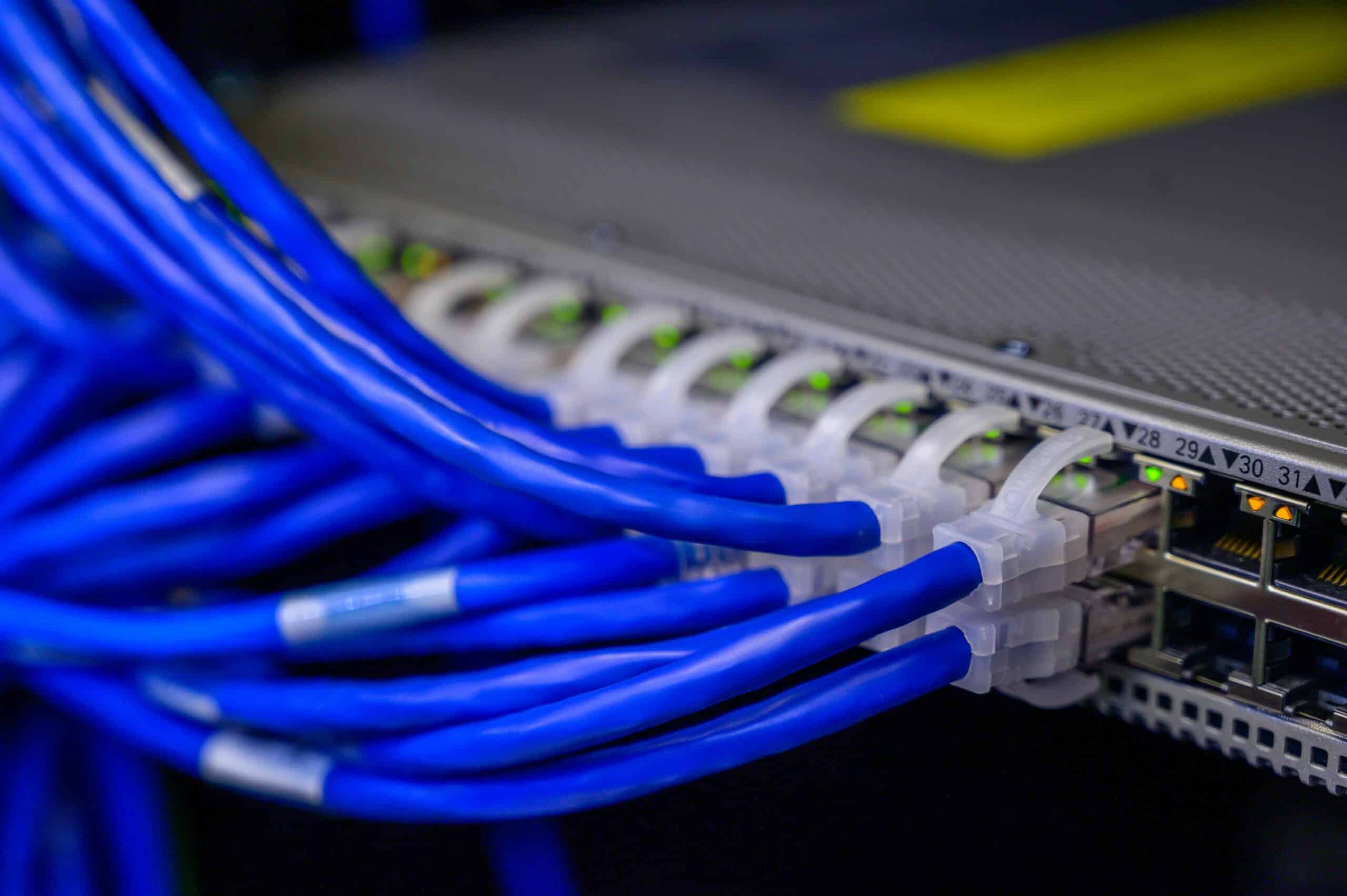
Start with the connector width. RJ11 is visibly narrower than an Ethernet connector and usually has fewer metal contacts. RJ45 Ethernet plugs are wider and have eight contact positions across the front edge.
Then check the labels. Telephone and DSL jacks may be labeled “TEL,” “PHONE,” “LINE,” “DSL,” or “FAX.” Ethernet jacks may be labeled “LAN,” “DATA,” “ETH,” “GE,” “WAN,” or a patch-panel number. Labels are not always accurate, but they are a useful first clue.
Inspect the cable jacket. Ethernet cable usually has category markings such as Cat5e, Cat6, or Cat6A printed along the jacket. Many short telephone cords are flat and do not have Ethernet category markings. A flat phone cord should not be used as a LAN patch cable.
Trace the far end. In structured cabling, a wall jack is only one side of the circuit. The other end may land on a patch panel, a telephone block, a DSL splitter, a switch, a router, or old abandoned wiring. If the destination is unclear, use a cable tester, toner, or certification tool before connecting equipment.
When to Use RJ11 or RJ45
The correct connector follows the service, not the shape of the nearest available jack. Use RJ11 for traditional telephone-side connections. Use RJ45 Ethernet for LAN connections, switch ports, router ports, and PoE endpoints.
| Requirement | Use |
|---|---|
| Analog landline phone | RJ11 |
| Fax line | RJ11 |
| DSL line from wall jack to modem | RJ11 unless the service provider equipment specifies otherwise |
| Computer to switch | RJ45 Ethernet |
| Router WAN or LAN Ethernet | RJ45 Ethernet |
| Switch to patch panel | RJ45 Ethernet |
| IP phone network uplink | RJ45 Ethernet |
| Wireless access point | RJ45 Ethernet, often with PoE |
| IP camera | RJ45 Ethernet, often with PoE |
| Office cabling refresh | Cat5e, Cat6, or Cat6A with RJ45/8P8C termination |
The one situation that causes the most confusion is an RJ45 wall outlet used for voice service. That outlet may look like a data jack but still be patched to a voice system. If a laptop does not get link light from the jack, check the telecom room before assuming the cable is bad.
RJ Connector Types Compared: RJ9 Through RJ48
If you only remember one rule, make it this: count the positions and the wired contacts. A 4-position body is a handset connector, a 6-position body is a telephone connector, and an 8-position body is Ethernet or carrier data. The table below maps the connectors people most often confuse, with the modular size and the standard that actually defines each one.
| Connector | Modular size | Contacts wired | Line / role | Common use | Defining standard |
|---|---|---|---|---|---|
| RJ9 / RJ10 / RJ22 | 4P4C | 4 | Handset audio | Phone-to-handset coil cord | Modular 4P4C (not a registered-jack wiring code) |
| RJ11 | 6P2C / 6P4C | 2–4 | 1 line | Single-line phone, DSL, dial-up | USOC / FCC Part 68 |
| RJ14 | 6P4C | 4 | 2 lines | Two-line phone | USOC / FCC Part 68 |
| RJ25 | 6P6C | 6 | 3 lines | Three-line phone | USOC / FCC Part 68 |
| RJ12 | 6P6C | 6 | 1 line + key-system control | Key / PBX system phones | USOC / FCC Part 68 |
| RJ45 (everyday) | 8P8C | 8 | 4 pairs, data | Ethernet, structured cabling | Connector: IEC 60603-7 / ISO 8877 · Wiring: ANSI/TIA-568 (T568A/B) |
| RJ45S (genuine) | Keyed 8-position | 2 + resistor | 1 modem line | Obsolete high-speed modem jack | USOC / FCC Part 68 |
| RJ48 (C/S/X) | 8P8C | 4–8 | T1 / ISDN | Carrier / WAN termination | USOC / FCC Part 68 |
Plug-Into-Port Compatibility: What Fits, What Works, What Breaks
| Plug → Port | Into a 6-position phone jack | Into an 8P8C (RJ45) jack |
|---|---|---|
| RJ11 (6P2C/6P4C) | Fits and works | Fits loosely, no link, can stress contacts |
| RJ12 (6P6C) | Fits and works (if wiring matches) | Fits loosely, no link, can stress contacts |
| RJ45 (8P8C) | Does not fit — too wide | Fits and works |
The asymmetry is the whole story: anything 6-position drops into an 8-position jack and does damage, but nothing 8-position fits a 6-position jack. When in doubt, match the body width first and the wiring second. On enterprise networks the 8-position version is the only one you will terminate, which is why patch leads and Cisco network cables and accessories are all built around the 8P8C/RJ45 body.
Is “RJ45” Even the Right Name? Registered Jack vs 8P8C
Strictly, no. The connector on every Ethernet cable is an unkeyed 8P8C modular connector specified by IEC 60603-7 and ISO 8877. “RJ45” is a registered-jack wiring code from the old USOC/FCC Part 68 telephone system, and the genuine RJ45 (the RJ45S variant) was a keyed, single-line modem jack — not a data connector at all. The industry adopted “RJ45” as shorthand for 8P8C, and the name stuck even though it is technically a misnomer.
This matters for one practical reason. An “RJ” code tells you a wiring assignment; it does not tell you the physical connector or the data rate. T568A and T568B — the pin assignments that make 8P8C carry Ethernet — are defined in ANSI/TIA-568, separately from the connector body. So when a product sheet says “RJ45 port,” read it as “8P8C jack,” then check the cable category and the port’s PHY for the actual speed.
RJ45S: The Keyed Modem Jack That Won’t Fit Ethernet
The original RJ45S had a small key on one side of the plug and used only a couple of contacts plus a programming resistor for a single high-speed modem line. That key is the point: a true RJ45S plug is mechanically shaped so it cannot be inserted into a standard Ethernet jack. If you ever see “RJ45S” in old telecom documentation, it is not the Ethernet connector in front of you — it is an obsolete keyed jack that predates structured data cabling.
Buying and Replacement Checklist
Before ordering cables, adapters, switches, routers, or replacement accessories, identify the service first. A connector name by itself is not enough. The purchasing request should state whether the connection is telephone, DSL, Ethernet, PoE Ethernet, console, fiber, or another interface type.
Use this checklist before approving the BOM:
- Confirm the endpoint: phone, fax, DSL modem, router, switch, firewall, access point, IP phone, camera, or PC.
- Confirm the service: analog phone, DSL line, Ethernet LAN, router WAN, PoE endpoint, or management console.
- Confirm the connector: RJ11, RJ45/8P8C, SFP, USB, serial console, or coax.
- Confirm the cable category: telephone cable, Cat5e, Cat6, Cat6A, fiber, DAC, AOC, or another specified medium.
- Confirm the distance, pathway, bend radius, and indoor or outdoor rating.
- Confirm whether the cable is stranded patch cord or solid horizontal cabling.
- Confirm PoE class, switch budget, endpoint wattage, and reserve capacity where powered endpoints are involved.
- Confirm labels for both wall outlet and patch-panel end.
- Confirm whether the existing cable run is dedicated point-to-point or daisy-chained for voice.
- Confirm acceptable substitutions before shipment if a project has a tight deployment window.
For enterprise deployments, “RJ45 cable” should be replaced with a specific description such as “Cat6 UTP RJ45 patch cable, 3 m, blue, factory terminated” or “Cat6A shielded patch cable for 10G copper uplink.” That level of detail prevents wrong-cable shipments and reduces installation delays.
Common RJ11 and RJ45 Mistakes
- The most common mistake is assuming that a smaller phone plug is safe because it fits into a larger Ethernet jack. It may fit, but the contact alignment is wrong for Ethernet and can damage the jack.
- The second mistake is assuming that an RJ45 wall jack always means Ethernet. Many structured cabling installations use 8P8C outlets for both voice and data. The patching in the telecom room decides the active service.
- The third mistake is buying an RJ11-to-RJ45 adapter to solve a network problem. An adapter may be useful in a voice wiring plan, but it does not convert DSL or analog voice into Ethernet.
- The fourth mistake is ignoring PoE. A PoE access design requires proper Ethernet cabling, switch power budget, endpoint power classification, and clean termination. RJ11 telephone cords have no role in a PoE endpoint path.
- The fifth mistake is replacing only the visible cord. If a wall jack is miswired, daisy-chained, connected to a voice block, or terminated with poor pair discipline, a new patch cord will not solve the link problem.
- Treating the connector as the speed limit. A connector has no data rate of its own. Ethernet speed comes from the cable category and the port’s PHY — Cat5e, Cat6, and Cat6A all terminate in the same 8P8C/RJ45 body but run at very different rates. Specify the cable category and the switch port, not the connector, when you need a given speed.
References and Standards
- IEC 60603-7 — physical dimensions and performance of the 8P8C modular connector used for Ethernet.
- ISO/IEC 8877 and ANSI/TIA-1096-A — modular connector specification for telecommunications.
- ANSI/TIA-568 (T568A / T568B) — Ethernet pin and pair assignments for 8P8C connectors.
- FCC 47 CFR Part 68 (USOC registered jacks) — original RJ11, RJ12, RJ14, RJ25, RJ45S, and RJ48 wiring definitions, now administered by ACTA.
FAQ: RJ11 VS RJ45
Is RJ12 the same as RJ11?
No. RJ11 and RJ12 share the same 6-position body, so they look identical, but RJ11 is a 6P2C/6P4C single-line jack and RJ12 is a fully loaded 6P6C jack used for key telephone (PBX) systems. RJ12 uses all six contacts for one line plus control signaling, while RJ11 uses only the inner one or two pairs.
Can I plug an RJ12 into an RJ11 wall jack?
Usually yes for a basic call, because both use the 6-position body and the inner pair carries the line. The risk is the other way: equipment that genuinely requires the full 6P6C RJ12 wiring will not work with an RJ11 cable that only populates the inner pairs. Match the wiring, not just the shell.
Is RJ45 the same as 8P8C?
In everyday use, yes — what people call an RJ45 Ethernet connector is an 8P8C modular connector defined by IEC 60603-7. Strictly, “RJ45” was a separate keyed telephone wiring standard (RJ45S). The Ethernet connector is an unkeyed 8P8C terminated with T568A or T568B wiring per ANSI/TIA-568.
What is the main difference between RJ11 and RJ45?
RJ11 is used mainly for telephone, fax, and DSL line-side connections. RJ45 commonly refers to the 8P8C connector used for Ethernet networking. RJ11 is narrower and usually uses fewer contacts, while RJ45 Ethernet uses a wider connector and structured twisted-pair cabling for LAN data.
Can RJ11 fit into an RJ45 port?
An RJ11 plug may physically fit into an RJ45 jack because it is narrower, but it should not be used there. It can press unevenly on the RJ45 contacts, fail to make a valid Ethernet connection, and potentially damage the port.
Can I use RJ11 for Ethernet?
No. RJ11 telephone cable is not suitable for Ethernet networking. Ethernet requires the correct RJ45 or 8P8C connector format, twisted-pair cabling, pair assignments, and cable category for the required speed and power level.
Can I use an RJ45 cable for a phone line?
Yes, an Ethernet-rated cable can carry analog phone service if it is terminated and patched correctly. That does not make the phone line an Ethernet connection. The service depends on what the far end of the cable is connected to.
Is RJ45 the same as Ethernet?
RJ45 is the common name for the connector used on many copper Ethernet ports, but Ethernet is the networking technology. A connector that looks like RJ45 may be patched for data, voice, or another service depending on the installation.
Is RJ11 used for DSL?
Yes. Many DSL installations use RJ11 between the telephone wall jack and the DSL modem or gateway. The modem then converts the DSL line-side signal into Ethernet, usually through an RJ45 LAN port.
Does an RJ11-to-RJ45 adapter convert phone line to Ethernet?
No. An adapter may change the physical connector or contact mapping, but it does not convert telephone, fax, or DSL signaling into Ethernet. DSL service still requires a modem or gateway before it becomes Ethernet.
What does 6P2C or 6P4C mean?
6P2C means six connector positions with two metal contacts installed. 6P4C means six positions with four contacts installed. These formats are common in telephone-style modular connectors.
What does 8P8C mean?
8P8C means eight connector positions with eight contacts installed. It is the modular connector format commonly used for copper Ethernet cabling, even though it is often called RJ45 in everyday networking language.
Can plugging RJ11 into RJ45 damage a switch or router?
It can damage or weaken the RJ45 jack contacts, especially if repeated or forced. It also will not provide a valid Ethernet connection. Unknown phone or DSL wiring should be traced and tested before it is connected to a switch, router, or firewall.
Which connector is used for PoE?
PoE uses supported Ethernet cabling and RJ45 or 8P8C Ethernet ports on PoE-capable switches or injectors. Ordinary RJ11 telephone wiring is not used for standard Ethernet PoE endpoint connections.
How can I tell if a wall jack is phone or Ethernet?
Check the label, connector width, number of contacts, cable jacket, and far-end patching. If the outlet is not documented, use a cable tester or toner before connecting network equipment. An RJ45-shaped wall jack may still be patched for voice rather than data.