Dynamic vs Static Link Aggregation: Key Differences and Real-World Use Cases
In modern enterprise and data-center networks, link aggregation is a crucial technique for increasing bandwidth and improving redundancy.
However, not all link aggregation configurations are created equal — the two most common modes are Static Link Aggregation and Dynamic Link Aggregation (LACP).
This article breaks down how both modes work, their pros and cons, and when to use each one in Cisco and Huawei networks.
What Is Link Aggregation?
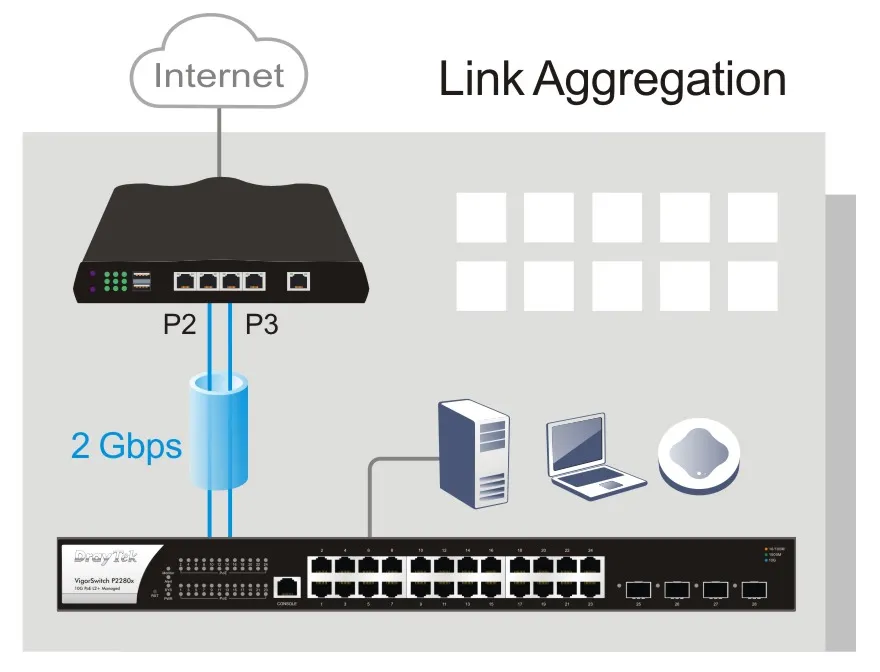
Link aggregation — standardized under IEEE 802.3ad (now 802.1AX) — allows multiple physical Ethernet interfaces to operate as a single logical interface.
It provides three main benefits:
- Increased bandwidth by combining multiple links.
- Improved redundancy — traffic continues to flow if one link fails.
- Load balancing across links for optimized performance.
Link aggregation can operate in two ways: Static Mode and Dynamic (LACP) Mode.
? Related reading: Link Aggregation Explained – LACP, Static vs Dynamic, and MLAG Guide
Static Link Aggregation Explained
Static link aggregation requires manual configuration on both devices.
There is no negotiation protocol, and the administrator explicitly defines which ports belong to the aggregation group.
How It Works
- Administrators manually configure identical aggregation groups on both devices.
- The devices treat these ports as one logical interface.
- There is no automatic handshake — both sides must match perfectly.
# Example (Cisco)
Switch(config)# interface range gigabitEthernet0/1 - 2
Switch(config-if-range)# channel-group 1 mode on
Switch(config-if-range)# interface port-channel 1
Switch(config-if)# switchport mode trunk
Advantages of Static Mode
- Simple setup, no protocol overhead.
- Works even when peer devices do not support LACP.
- Predictable and deterministic operation.
Limitations
- No automatic link status detection.
- Misconfiguration can cause link failures.
- Manual troubleshooting increases operational cost.
Best for: small or stable networks where topology changes rarely occur.
Dynamic Link Aggregation (LACP)
Dynamic link aggregation uses LACP (Link Aggregation Control Protocol) to automatically negotiate link membership and health.
It can detect, activate, and deactivate links automatically, providing better fault tolerance.
How LACP Works
- Each device sends LACP Data Units (LACPDUs) to discover compatible ports.
- Links are dynamically added or removed from the aggregation group.
- LACP monitors link health in real time to ensure reliability.
# Example (Cisco)
Switch(config)# interface range gigabitEthernet0/1 - 2
Switch(config-if-range)# channel-group 1 mode active
Switch(config-if-range)# interface port-channel 1
Switch(config-if)# switchport mode trunk
Advantages of Dynamic Mode
- Automatic negotiation and recovery.
- Simplifies configuration and reduces errors.
- Detects link failure and redistributes traffic instantly.
Limitations
- Slightly more complex configuration.
- Requires LACP support on both sides.
Best for: enterprise networks and data centers requiring high availability and flexibility.
Dynamic vs Static Link Aggregation: Feature Comparison
|
Feature |
Static Link Aggregation |
Dynamic Link Aggregation (LACP) |
|---|---|---|
|
Configuration Method |
Manual |
Automatic via LACP |
|
Protocol Dependency |
None |
IEEE 802.3ad / 802.1AX |
|
Link Detection |
No automatic detection |
Real-time link monitoring |
|
Failover Handling |
Manual intervention |
Automatic failover |
|
Scalability |
Limited |
Highly scalable |
|
Compatibility |
Works with any device |
Requires LACP support |
|
Complexity |
Low |
Moderate |
|
Use Case |
Small or fixed networks |
Large, dynamic environments |
? Related reading: MLAG High Availability Explained – How Link Aggregation Plus Works
Huawei vs Cisco: LACP Implementation
Cisco – EtherChannel
Cisco implements LACP through Port-Channel / EtherChannel interfaces.
You can configure modes such as Active, Passive, or On (Static).
Switch(config)# interface range gi0/1 - 2
Switch(config-if-range)# channel-group 2 mode passive- Active: Actively negotiates with peers.
- Passive: Waits for negotiation requests.
- On: Static configuration (no negotiation).
Huawei – Eth-Trunk
Huawei uses Eth-Trunk for link aggregation and supports both static and LACP modes.
<HUAWEI> system-view
[HUAWEI] interface eth-trunk 2
[HUAWEI-Eth-Trunk2] mode lacp-static
[HUAWEI-Eth-Trunk2] trunkport gigabitethernet 0/0/1 to 0/0/2
Tip: Huawei devices can mix static and LACP trunks in the same topology, but consistency is essential for stability.
When to Use Dynamic vs Static Link Aggregation
|
Scenario |
Recommended Mode |
Reason |
|---|---|---|
|
Small office or lab |
Static |
Easier to configure, predictable |
|
Enterprise network |
Dynamic (LACP) |
Handles topology changes automatically |
|
Data center |
Dynamic (LACP) |
High bandwidth + redundancy |
|
Mixed vendor environment |
Static |
Avoids protocol mismatch issues |
|
Network testing or lab simulations |
Static |
Quick manual setup |
Best Practices for Link Aggregation
- Keep configurations symmetrical on both sides (speed, duplex, VLANs).
- Avoid mixing modes — don’t pair a static link with a dynamic one.
- Monitor regularly using
show etherchannel summaryordisplay eth-trunk. - Use LACP active mode when interoperability issues occur.
- Combine with MLAG for ultimate device-level redundancy.
Troubleshooting Common Issues
|
Problem |
Possible Cause |
Solution |
|---|---|---|
|
Ports not aggregating |
Mode mismatch (Static vs LACP) |
Ensure both sides use same mode |
|
Unstable traffic |
Different VLAN or speed settings |
Synchronize configurations |
|
One-way traffic |
Incorrect hashing algorithm |
Adjust load-balancing policy |
|
Random disconnections |
Bad cable or port failure |
Replace cable, check logs |
|
Uneven load |
Asymmetric traffic pattern |
Modify hashing algorithm |
Conclusion
Both Static and Dynamic Link Aggregation (LACP) play vital roles in improving network reliability and performance.
- Use Static Mode when simplicity and manual control are priorities.
- Use Dynamic (LACP) when you need scalability, automation, and fast failover.
For large enterprise or data-center networks, combining LACP with MLAG ensures maximum uptime and flexibility.