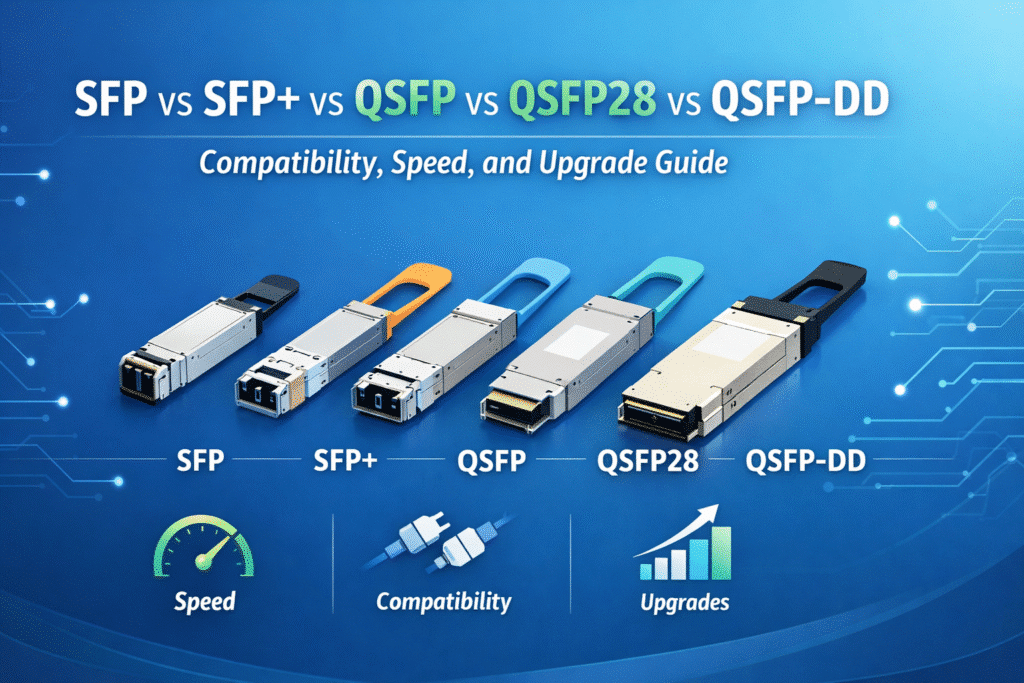
SFP vs SFP+ vs QSFP vs QSFP28 vs QSFP-DD: Compatibility, Speed, and Upgrade Guide
SFP, SFP+, QSFP, QSFP28, and QSFP-DD differ in bandwidth, lane architecture, physical size, power draw, and upgrade path. SFP-family modules are best for lower-speed edge and server links, QSFP-family modules serve higher-density aggregation and spine-leaf networks, and QSFP-DD is designed for 400G and future 800G-scale environments. The right choice depends on compatibility, breakout strategy, thermal limits, and long-term cost.
Executive Summary
Choosing between SFP, SFP+, QSFP, QSFP28, and QSFP-DD is not just a speed decision. Enterprise buyers and architects must compare lane count, modulation, breakout flexibility, host-port compatibility, thermal budget, and long-term migration cost. In most enterprise environments, SFP and SFP+ still dominate at the edge, QSFP28 remains the mainstream 100G form factor, and QSFP-DD becomes relevant when port density, 400G uplinks, and future AI-scale fabrics matter. The best choice depends on where the link sits in the network and how much future bandwidth you need to preserve.
Key Differences Between SFP, QSFP, and QSFP-DD
To build a modern network, you must understand why optical transceivers evolved into these specific families. The primary goal of the telecommunications industry is to maximize data throughput while keeping the physical footprint and power consumption as low as possible.
Quick Comparison at a Glance
Before diving into the engineering details, use this quick reference table to understand the core differences in speed, lane count, and physical shape.
| Form Factor | Typical Speed | Lane Count | Modulation | Typical Use Case | Relative Power Draw |
| SFP | 1 Gbps | 1 Lane | NRZ | Legacy Edge Access | Very Low (< 1W) |
| SFP+ | 10 Gbps | 1 Lane | NRZ | Standard Server Uplink | Low (~1W) |
| SFP28 | 25 Gbps | 1 Lane | NRZ | Modern Server Uplink | Low (< 1.5W) |
| QSFP+ | 40 Gbps | 4 Lanes | NRZ | Legacy Core Aggregation | Medium (< 3.5W) |
| QSFP28 | 100 Gbps | 4 Lanes | NRZ | Mainstream Spine-Leaf | Medium (< 4.5W) |
| QSFP-DD | 400G / 800G | 8 Lanes | PAM4 | AI Clusters & Hyperscale | High (12W – 20W+) |
Form Factor Evolution: Single-Lane to Eight-Lane
Physical shapes change to solve engineering problems.
- The SFP family was kept narrow (about 13.4 millimeters wide) to allow network switches to cram 48 to 72 ports into a standard 1-Rack-Unit (1RU) panel.
- As data centers needed more speed, engineers realized they could not just turn up the clock speed on a single copper lane without destroying the signal. The solution was the QSFP format. It is roughly one and a half times wider (18.35 millimeters), allowing it to house four parallel lanes.
- The QSFP-DD is an engineering marvel. It maintains that 18.35-millimeter width. Instead of making the module wider to fit eight lanes, engineers made it slightly deeper and added a second row of electrical contact pads. This double-density design protects a company’s investment in existing rack layouts.
The Technology Behind the Speed: Lanes, Modulation, and Power
Higher speeds require fundamental changes in how data is transmitted and how the resulting heat is managed.
1-Lane vs 4-Lane vs 8-Lane Architecture
Lane architecture dictates how a switch handles data, splits connections, and upgrades over time.
- Single-Lane (SFP, SFP+, SFP28): Simple, low-power, and highly reliable. Perfect for connecting endpoint servers or access switches where massive aggregated bandwidth is not required.
- Four-Lane (QSFP+, QSFP28): The backbone of modern 100G networks. By running four 25G lanes in parallel, switches can move massive amounts of data without needing experimental, overheated single-lane technology.
- Eight-Lane (QSFP-DD): The core of 400G and 800G connectivity. It uses eight 50G or 100G lanes, allowing a single massive port to act as an entire distribution hub.
NRZ vs PAM4: Moving to 400G and 800G
You cannot simply add more lanes to reach 400G and 800G. You must change how the data is physically encoded.
For years, networking relied on Non-Return-to-Zero (NRZ) modulation, which uses two voltage levels (high means “1”, low means “0”). NRZ powers everything from 1G SFP up to 100G QSFP28. However, pushing NRZ past 28 Gbps per lane causes the signal to fail.
To reach 400G, the industry adopted Pulse Amplitude Modulation 4-Level (PAM4). PAM4 uses four voltage levels to transmit two bits of data simultaneously (00, 01, 10, 11), effectively doubling lane capacity. Because these voltage levels are so close together, the signal is fragile. This requires power-hungry Digital Signal Processors (DSPs) to constantly clean up the signal, which drastically increases cost and heat.
Thermal Budget and Cooling Challenges
Power and heat are no longer secondary concerns; they are the primary bottleneck in high-speed networking.
A standard SFP+ module uses barely 1 Watt of power, while a 100G QSFP28 peaks at an easily managed 4.5 Watts. However, the DSP chips required for PAM4 encoding in QSFP-DD modules drive power consumption up to 14 Watts, and sometimes over 20 Watts for long-distance optics. If a 1RU switch is fully loaded with 36 QSFP-DD modules, the transceivers alone generate over 450 Watts of ambient heat, pushing hyperscale data centers toward liquid cooling solutions.
Deployment and Interoperability: Making Optics Work Together
Knowing what fits into what port—and how to configure it—is critical for hardware refreshes.
Port Density and Rack Space Planning
A network architect must balance bandwidth with physical rack space. SFP-family modules allow up to 72 ports in a single 1RU switch, maximizing access density. QSFP and QSFP-DD modules cap out around 36 ports per 1RU. However, because a single QSFP-DD port pushes up to 800G, a 36-port QSFP-DD switch moves exponentially more data than a 72-port SFP+ switch.
Hardware Compatibility Rules
Mechanical fit does not always equal electrical compatibility.
- SFP28 ports gladly accept SFP+ (10G) modules, limiting the speed to 10 Gbps.
- QSFP28 ports seamlessly accept legacy QSFP+ (40G) modules, throttling down to 40 Gbps.
- QSFP-DD ports are incredibly flexible. They can accept older QSFP+, QSFP28, and QSFP56 modules by simply ignoring the deeper second row of pins.
However, you cannot plug a newer 100G QSFP28 module into an older 40G QSFP+ switch.
| Host Port | Inserted Module | Mechanical Fit | Electrical Compatibility | Likely Result |
| SFP28 (25G) | SFP+ (10G) | Yes | Yes | Operates securely at 10G Max |
| SFP (1G) | SFP+ (10G) | Yes | No | Link fails entirely |
| QSFP28 (100G) | QSFP+ (40G) | Yes | Yes | Operates securely at 40G Max |
| QSFP-DD (400G) | QSFP28 (100G) | Yes | Yes | Operates securely at 100G Max |
Breakout Cables vs QSA Adapters: Bridging 100G and 25G
Because single-lane SFP modules are narrower than QSFP modules, you cannot plug them directly into QSFP ports. To bridge core switches and edge servers, engineers use two methods:
- Breakout Cables: A 100G QSFP28 port can be physically split using a breakout cable into four separate 25G SFP28 connections. This utilizes 100% of the expensive switch port’s bandwidth.
- QSA Adapters: A Quad-to-Single adapter is a mechanical sleeve that fits into a QSFP port and houses a single SFP module. While convenient, the host switch shuts off three of the four electrical lanes. Plugging a 10G SFP+ module into a 100G switch port via a QSA adapter permanently wastes 75% of the port’s available routing bandwidth.
Fixing Auto-Negotiation Failures
When you cross compatibility thresholds—such as placing a 10G SFP+ module into a 25G SFP28 port—the link will frequently fail to establish automatically. The network operator must log into the switch’s Command-Line Interface (CLI) and manually disable auto-negotiation. For example, when breaking out a 100G port to four 25G ports, you must explicitly partition the interface using commands like speed forced 25gfull.
Procurement Strategy: TCO, Mistakes, and Selection
The smartest procurement strategy balances today’s capital expenditure with tomorrow’s migration costs.
Avoiding Common Procurement Mistakes
- Ignoring MPO Polarity: Upgrading from QSFP28 to QSFP-DD often requires moving from 12-fiber MPO connectors to 16-fiber MPO connectors. Reusing old MPO-12 trunks for 400G leads to severe alignment failure.
- Mixing Singlemode and Multimode: Plugging a Long Range (singlemode) optic into a Multimode fiber plant causes immediate, catastrophic signal loss.
- Fearing Third-Party Optics: Many buyers waste budgets on branded OEM optics because they fear voiding their switch warranties. Using high-quality MSA-compatible third-party optics does not void your warranty.
10G to 400G Upgrade Strategy and TCO
For standard enterprise access, the SFP+ format remains the budget champion. The hardware is cheap, uses almost no power, and does not require expensive cooling.
For data center aggregation, QSFP28 (100G) offers the absolute best cost-per-bit ratio in the industry today. The massive strategic value of QSFP-DD lies in avoiding future “forklift upgrades”. By deploying QSFP-DD switches today, an organization can run legacy 100G QSFP28 modules now. When the business scales up for AI workloads, they can simply hot-swap the optics to 400G or 800G QSFP-DD modules without throwing away the underlying switch chassis.
| Network Layer | Recommended Form Factor | Cost Efficiency | Upgrade Path |
| Basic Server Edge | SFP+ (10G) | Extremely High | Limited |
| Modern Server Access | SFP28 (25G) | High | Excellent (to 100G) |
| Spine-Leaf Core | QSFP28 (100G) | Best Cost-Per-Bit | Good |
| AI / Hyperscale Core | QSFP-DD (400G+) | High Initial CapEx | Unmatched |
Final Verdict: Which Module Should You Choose?
- Choose SFP or SFP+ If: You are wiring corporate office floors or connecting standard business servers in highly cost-sensitive environments.
- Choose SFP28 If: You are connecting modern, high-performance servers to Top-of-Rack switches. 25 Gbps pairs perfectly with 100G core switches using breakout cables.
- Choose QSFP28 If: You are designing the mainstream core or distribution layer of an enterprise data center. 100G provides a massive data pipeline and a highly stable cost structure.
- Choose QSFP-DD If: You are deploying artificial intelligence training clusters or hyperscale cloud infrastructure. QSFP-DD ensures you will not have to replace your core switches when the business demands 400G or 800G throughput.
FAQs About SFP, SFP+, QSFP, QSFP28, and QSFP-DD
What is the difference between SFP and QSFP?
SFP modules utilize a single electrical lane to transmit data, making them small and ideal for 10G or 25G edge connections. QSFP (Quad) modules are physically wider, utilizing four parallel lanes to aggregate data, enabling high-density 40G and 100G core connections.
Can SFP+ work in an SFP28 port?
Yes. An SFP28 (25G) switch port is mechanically and electrically backward compatible with an SFP+ (10G) module. The port will safely downshift and operate at a maximum of 10 Gbps.
Is QSFP28 backward compatible with QSFP+?
Yes. A 100G QSFP28 switch port will physically accept and support a legacy 40G QSFP+ module, throttling the connection down to 40 Gbps across the four electrical lanes.
What is QSFP-DD used for?
QSFP-DD (Double Density) is the premier form factor for 400G and 800G networking. It is primarily used in hyperscale data centers, 5G backhaul, and AI clusters where massive aggregate throughput and backward compatibility with older QSFP modules are required.
Why do QSFP-DD modules run hotter?
To achieve 400G and 800G speeds, QSFP-DD modules use PAM4 modulation, which requires highly complex Digital Signal Processors and Error Correction chips. These extra components consume significantly more electricity, pushing power draw up to 14W or 20W+, which generates substantial ambient heat.
Are breakout cables better than QSA adapters?
Generally, yes. Breakout cables divide a high-speed port (like 100G) into multiple low-speed connections (4x 25G), utilizing 100% of the port’s bandwidth. QSA adapters allow a single SFP module to fit in a QSFP port but permanently disable three lanes, wasting 75% of the port’s bandwidth.