
Fixed vs Modular Cisco Switch: Architecture, Cost, and Upgrade Path Guide
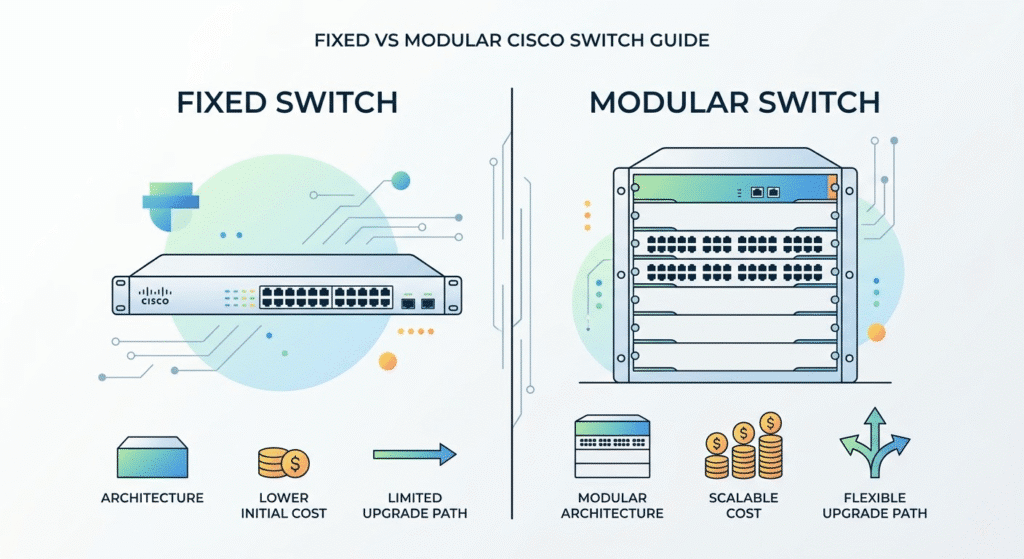
A fixed Cisco switch has a predetermined number of ports built into the hardware and is typically deployed as a stackable 1RU platform like the Catalyst 9300. A modular Cisco switch, or chassis switch, uses hot-swappable line cards, supervisor engines, and shared power resources to deliver higher scalability, stronger redundancy, and lower long-term expansion costs.
Executive Summary:
Choosing between a fixed and modular Cisco switch is not just a hardware form-factor decision. It determines how your network scales, how failures are isolated, how software upgrades impact downtime, and how much you will spend over a five-to-seven-year refresh cycle. In modern campus environments, the real comparison is often Catalyst 9300 stackable switching versus Catalyst 9400 chassis-based switching. Fixed switches offer lower upfront cost and flexible edge deployment, making them ideal for standard access closets. Meanwhile, modular systems provide centralized power, supervisor redundancy, and cleaner long-term expansion in high-density access, distribution, and core roles.
What Is the Difference Between a Fixed and Modular Cisco Switch?
What “Fixed Configuration” Means in Cisco Switching
A fixed configuration switch is a self-contained unit with a set number of ports (typically 24 or 48) built directly into the front panel. You cannot add more base ports to the physical chassis. To scale port density, network engineers must purchase an entirely new switch and connect it to the existing network, often using stacking technology. In the modern Cisco enterprise portfolio, the Catalyst 9200 and Catalyst 9300 series are the premier examples of fixed configuration switches.
What “Modular” Means in Cisco Switching
A modular switch consists of a large, empty metal chassis equipped with a high-capacity internal backplane. Instead of built-in ports, the chassis features empty slots. Network engineers populate these slots with dedicated components: supervisor engines (the “brains” of the switch), massive power supplies, cooling fan trays, and various line cards that provide 1G, 10G, or multi-gigabit ports. The Cisco Catalyst 9400 and Catalyst 9600 series are the flagship modular platforms for campus environments.
Why “Chassis Switch” and “Modular Switch” Often Mean the Same Thing
In enterprise networking vernacular, the terms “chassis switch” and “modular switch” are used interchangeably. When a network architect asks if an Intermediate Distribution Frame (IDF) requires a “chassis,” they are specifically asking if the density and redundancy requirements justify deploying a modular switch frame rather than a stack of 1RU fixed switches.
| Feature | Fixed Cisco switch | Modular Cisco switch |
| Physical form factor | Self-contained unit | Chassis with slots |
| Port expansion | Limited to built-in ports and model choice | Add line cards as needed |
| Typical deployment | Access / edge / smaller collapsed roles | High-density access, distribution, core |
| Common Cisco examples | Catalyst 9200, 9300 | Catalyst 9400, 9600 |
Why This Decision Is Really About Architecture, Not Just Hardware
The Fault Domain Question
The choice between fixed and modular defines your network’s fault domain and risk profile. Stacking multiple fixed switches distributes the hardware risk; if one unit suffers a catastrophic power failure, the rest of the stack generally survives. A modular switch puts “all your eggs in one basket.” However, that basket is engineered with extreme, carrier-grade fault tolerance, utilizing redundant supervisor engines and N+1 power supplies to prevent single points of failure.
The Upgrade and Downtime Question
Operational risk and maintenance windows dictate enterprise design. Upgrading the Cisco IOS-XE software on a stack of fixed switches traditionally requires a coordinated reboot, causing an unavoidable (albeit brief) network outage. Conversely, modular chassis switches equipped with dual supervisors can often perform hitless upgrades, failing over from the primary to the standby supervisor without dropping a single packet.
The Five-to-Seven-Year Lifecycle Question
Procuring network hardware is a long-term architectural commitment. A wiring closet designed for fixed switches requires planning for future rack space, stack cables, and distributed power circuits. A closet designed for a modular chassis requires a higher upfront power and cooling commitment but offers a vastly simplified upgrade path when adding ports in year four or five of the lifecycle.
Fixed Stackable Switches: Strengths, Limits, and Best-Fit Use Cases
Why Fixed Switches Win on Upfront Simplicity
Fixed switches dominate the access layer due to their low barrier to entry. They require a lower initial Capital Expenditure (CapEx), take up minimal rack space (1RU), and simplify phased rollouts. You can purchase exactly what you need today and defer the cost of expansion until the business physically outgrows the port count.
Where Stackable Fixed Switching Scales Well
Stackable fixed switching is the undisputed champion of the campus edge. They are perfectly suited for standard branch offices, moderate-density wiring closets, and collapsed core designs in small-to-medium businesses. Using technologies like Cisco StackWise, up to eight Catalyst 9300s can be joined to act as a single logical switch, simplifying management.
Where Fixed Switching Starts to Break Down
Fixed switching breaks down when port density requirements skyrocket. Scaling a fixed environment means buying a complete new switch every time you need more ports. This means paying for redundant CPUs, RAM, and cooling fans that you don’t actually need, just to get another 48 ports. Furthermore, managing the complex physical cabling of StackWise and StackPower cables across six or seven units in a rack creates an operational nightmare for technicians.
| Area | Strength | Limitation |
| Upfront cost | Lower CapEx | Higher long-term per-port scaling cost |
| Deployment | Easy 1RU rollout | More units to manage as density grows |
| Expansion | Add another switch quickly | Requires a full new switch each time |
| Redundancy | Stack-based options | Still constrained by stack architecture |
Modular Chassis Switches: Strengths, Limits, and Best-Fit Use Cases
Why Modular Switching Wins in High-Density Environments
Modular switches thrive on centralization. Instead of managing eight separate power supplies and eight motherboards across a stack of fixed switches, a chassis utilizes one massive, shared power pool and a centralized control plane. When you need to add 48 more ports to a modular switch, you simply slide a new line card into an empty slot—a process that takes seconds and costs significantly less than buying a standalone switch.
Where Chassis-Based Design Makes the Most Sense
Chassis-based switches are the standard for the campus distribution layer, the core layer, and highly dense access closets (such as those in large universities or hospitals). They are exceptionally well-suited for heavy Power over Ethernet (PoE) environments, as their massive centralized power supplies can drive 90W UPOE+ to hundreds of ports simultaneously without the limitations of distributed stack power.
Why Modular Is Not Always the Better Choice
Modular switches are not a universal solution. They carry a steep initial CapEx because you must purchase the chassis, the supervisor engine, and the power supplies before you buy a single port. They also require substantial rack space (ranging from 7RU to 13RU) and high-amperage power circuits, making them gross overkill for a standard 50-person branch office.
| Area | Strength | Limitation |
| Scalability | Add line cards instead of whole switches | Higher initial entry cost |
| Redundancy | Dual supervisors and centralized HA | Bigger failure domain in one chassis |
| Power | Shared large power pools | More planning required upfront |
| Lifecycle | Better long-term scaling economics | Can be excessive for smaller sites |
StackWise vs Chassis Backplane: The Real Engineering Difference
How Cisco StackWise Works in Fixed Switches
Cisco StackWise is the technology that allows multiple fixed Catalyst switches to act as one. It relies on proprietary, heavy-duty external cables that daisy-chain the switches together in a ring topology on the back of the rack. While highly effective, the stacking bandwidth is ultimately limited by the capacity and physical integrity of these external cables.
How a Chassis Backplane Works in a Modular Switch
A modular switch does not use external cables to connect its ports. Instead, every line card slots directly into a massive internal circuit board called the backplane (or midplane). This internal switching fabric routes traffic directly to the supervisor engine at speeds measured in Terabits per second (Tbps), providing a non-blocking architecture that external stack cables cannot match.
Why the Difference Matters in Real Operations
In real-world operations, external stack cables can be accidentally bumped, unplugged, or damaged during routine maintenance, potentially splitting a stack and causing a network outage. A chassis backplane is securely housed inside the metal frame, completely protected from human error, offering a vastly more reliable and high-capacity forwarding path for mission-critical data.
| Characteristic | Stackable fixed switches | Modular chassis switch |
| Internal linkage | External stack cables | Internal chassis backplane |
| Expansion method | Add whole switch units | Add line cards |
| Power model | Per-switch or ring-based sharing | Centralized power matrix |
| Failure behavior | Distributed across units | Centralized within one chassis |
High Availability and Redundancy: StackWise, SSO, and ISSU
Redundancy in Fixed Cisco Switches
Redundancy in fixed switches is achieved through the stack architecture. If the “Active” switch fails, a “Standby” switch takes over the control plane. Cisco StackPower also allows switches in a stack to share power supplies. However, a failure during a master election or a catastrophic power surge to the stack ring can still result in downtime.
Redundancy in Modular Cisco Switches
Modular switches utilize Stateful Switchover (SSO) between two physically separate supervisor engines housed in the same chassis. The active supervisor continuously syncs routing tables and connection states to the standby supervisor. If the active unit fails, the standby takes over in sub-second timeframes, completely transparent to connected users and devices.
Why ISSU Changes the Downtime Discussion
In-Service Software Upgrade (ISSU) is a massive differentiator for enterprise networks. Available on dual-supervisor modular switches, ISSU allows network engineers to upgrade the Cisco IOS-XE operating system with zero downtime. The standby supervisor is upgraded and rebooted, traffic is seamlessly shifted to it, and then the primary supervisor is upgraded. For hospitals, factories, and 24/7 operations where maintenance windows are impossible to secure, this feature alone justifies the cost of a modular chassis.
| Redundancy area | Fixed / stackable | Modular / chassis |
| Control-plane resiliency | Stack architecture dependent | Dual supervisor model |
| Upgrade impact | Often more disruptive | Can support cleaner switchover paths (ISSU) |
| Power redundancy | Per unit / stack power models | Centralized shared power |
Total Cost of Ownership: Why “Cheaper” Is Not Always Cheaper
Lower Initial Cost vs Lower Long-Term Expansion Cost
The financial curve between fixed and modular switching always intersects. Fixed switches are undeniably cheaper to purchase on day one. However, if an organization is growing rapidly, the modular switch becomes significantly cheaper by year three. Adding a 48-port line card to a chassis costs a fraction of the price of buying a brand-new 48-port Catalyst 9300.
The Hidden Cost of Repeated Fixed-Switch Expansion
Every time you add a fixed switch to a stack, you are paying a premium for duplicate components. You are buying another motherboard, another CPU, more RAM, and more power supplies. In a dense wiring closet requiring 200+ ports, the cumulative cost of these duplicate components quickly eclipses the initial investment required for a modular chassis.
CapEx vs OpEx in the Cisco Era
Modern cost planning must include software licensing. In the Cisco DNA (Catalyst Software) era, licensing is a major operational expense (OpEx). While both fixed and modular switches require software subscriptions, managing licensing compliance, smart accounts, and support contracts is operationally simpler when dealing with fewer centralized chassis platforms versus dozens of distributed fixed switches.
| Cost factor | Fixed switch model | Modular switch model |
| Initial purchase | Lower | Higher |
| Incremental scaling | Buy full new switches | Add line cards |
| Rack space growth | Grows quickly | More efficient at scale |
| Long-term density economics | Weaker in dense sites | Stronger in dense sites |
When a Fixed Cisco Switch Is Enough — and When Modular Is Worth It
Fixed Is Usually Enough When…
- You are designing a small to medium campus edge.
- Port density requirements per closet are modest (under 150 ports).
- You prefer an incremental, pay-as-you-grow hardware rollout.
- Standard stack-level redundancy meets the business’s uptime requirements.
Modular Is Usually Worth It When…
- You are managing high-density PoE environments requiring massive shared power.
- You are outfitting large IDFs or core/distribution layers.
- You have a long, five-to-seven-year refresh horizon and expect significant port growth.
- Uptime is mission-critical, requiring ISSU and dual-supervisor redundancy.
The Simplest Decision Rule
If your wiring closet will eventually need more than four stacked fixed switches to support the user base, it is time to upgrade the architecture and deploy a modular chassis.
Where Nexus Fits — and Why This Article Stays Campus-Focused
Why This Topic Is Primarily About Catalyst
When IT professionals search for guidance on “fixed vs modular Cisco switches,” the underlying search intent is almost exclusively driven by campus and enterprise LAN design. The Cisco Catalyst family is purpose-built for these user-facing environments, focusing on PoE, endpoint security, and unified access.
The Short Nexus Note
It is worth noting that Cisco’s Nexus portfolio (designed for the data center) also features fixed (Nexus 9300) and modular (Nexus 9500) switches. However, the decision metrics in the data center focus on Spine-Leaf architecture, ultra-low latency, and VXLAN routing—not PoE budgets or wiring closet limits. The physical definitions of fixed and modular remain the same, but the architectural application is entirely different.
Frequently Asked Questions About Fixed vs Modular Cisco Switches
What is the difference between a fixed and modular Cisco switch?
A fixed switch has a set number of built-in ports and scales by stacking multiple units together. A modular switch consists of an empty chassis where network engineers can install and swap individual line cards, supervisor engines, and power supplies to scale capacity.
Is a chassis switch the same as a modular switch?
Yes. In enterprise networking, the terms “chassis switch” and “modular switch” are used interchangeably to describe a large hardware frame that accepts hot-swappable line cards and supervisor engines.
When should I choose a modular switch instead of a fixed stackable switch?
You should choose a modular switch when outfitting high-density wiring closets, when you require the highest levels of high availability (like dual supervisors for zero-downtime upgrades), or when deploying heavy PoE environments that benefit from massive, centralized power supplies.
Is it cheaper to buy multiple fixed switches or one modular chassis?
Fixed switches are cheaper for initial, low-density deployments. However, in high-density environments, a modular chassis is cheaper in the long run because adding a new line card costs significantly less than buying a complete, brand-new fixed switch.
What is the difference between StackWise and a chassis backplane?
StackWise is a Cisco technology that uses external cables to link multiple fixed switches into a single logical unit. A chassis backplane is a high-speed, internal circuit board inside a modular switch that directly connects all line cards to the supervisor engine, offering superior bandwidth and physical protection.
Can a fixed Cisco switch still have modular components?
Yes. While the primary ports on a fixed switch cannot be changed, advanced fixed switches like the Catalyst 9300 feature modular uplink modules (allowing you to swap between 10G, 25G, or 40G uplinks) and field-replaceable power supplies and fans.






