
Router vs Firewall vs Switch: Who Controls Traffic, Access, and Security?
Most business networks don’t fail because a router, switch, or firewall is “bad.” They fail because the wrong device was asked to control the wrong part of the network.
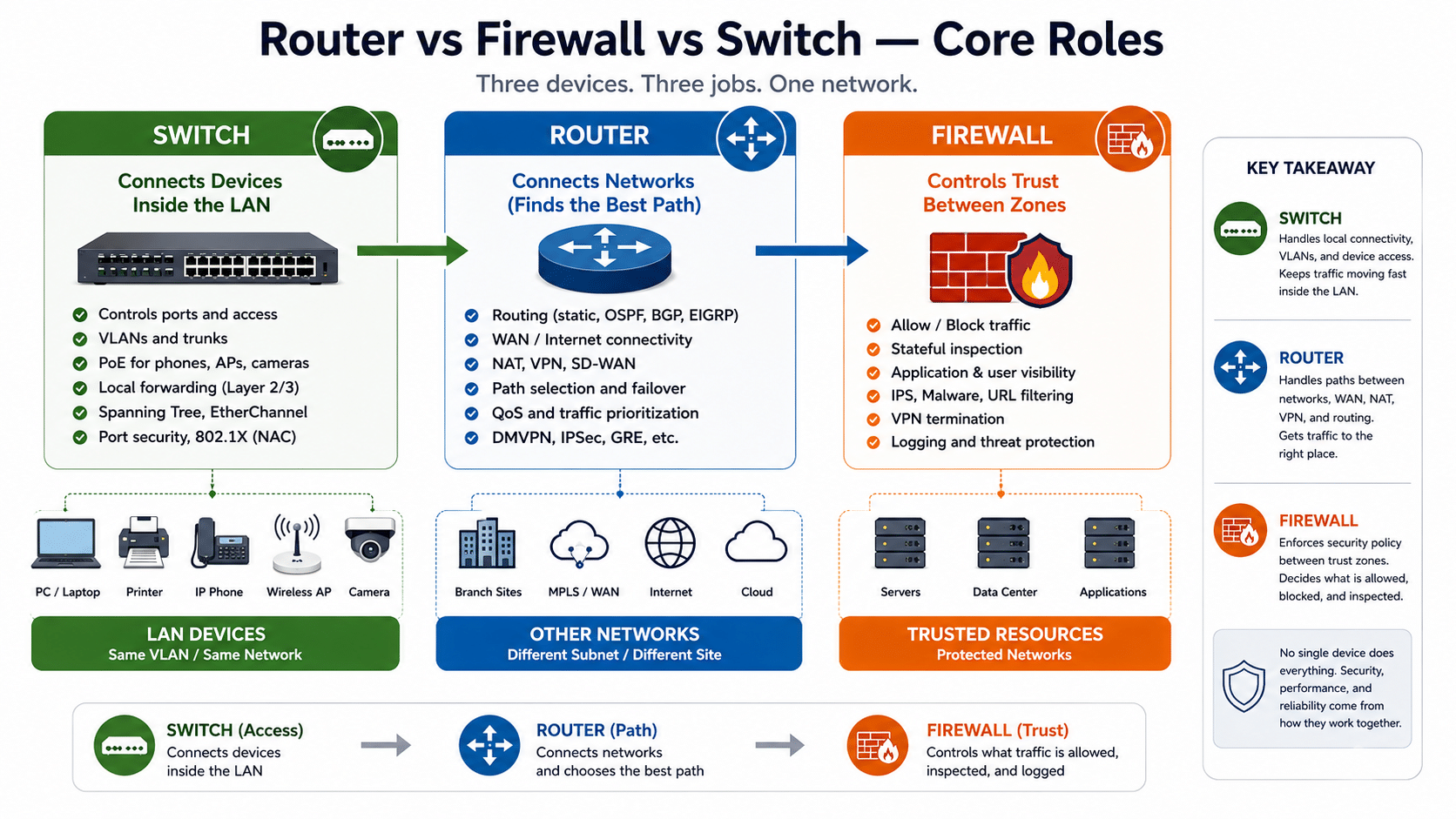
A router controls paths between networks. A switch controls connectivity inside the LAN. A firewall controls trust between zones. In a real Cisco-style business network, no single device owns control — it’s shared across routing, switching, segmentation, identity, and security policy.
This guide explains where each device actually belongs, how to verify which one is controlling a given flow, and the design mistakes that quietly break growing networks.
Last updated: May 2026
Reviewed for: Cisco Catalyst, Catalyst 8000, and Secure Firewall deployments
Audience: Network architects, IT decision-makers, and engineers evaluating business network design
Quick Answer
A router connects different IP networks and decides where traffic goes. A switch connects devices inside a LAN or VLAN and handles local forwarding. A firewall enforces security policy by allowing, blocking, inspecting, and logging traffic between zones.
The simplest way to remember it:
A switch connects devices. A router connects networks. A firewall decides whether the traffic should be allowed.
Cisco describes switches as the devices that tie networked equipment together inside a building or campus, while routers connect multiple networks so users can reach other networks or the internet. NIST defines firewalls as devices that control the flow of traffic between networks or hosts with different security postures.
| Device | Primary Control | Best Location |
|---|---|---|
| Router | Path between networks (routing, NAT, VPN, WAN) | Internet edge, branch, WAN, inter-network |
| Switch | Local LAN forwarding (ports, VLANs, PoE) | Access, distribution, core LAN |
| Firewall | Security policy between trust zones | Internet edge, DMZ, segmentation boundary |
What “Controls Your Network” Actually Means
Most articles answer “router vs firewall vs switch” with definitions. That isn’t enough for a business network. The word control has several layers.
A device may control whether an endpoint can plug in, where traffic is forwarded, which route is used, whether a session is allowed, whether a user can reach a server, or whether suspicious traffic is blocked.
In practical network design, control splits into five layers.
1. Connectivity Control
Connectivity control decides which device can physically or logically join the network.
This is handled by switches through access ports, VLAN assignment, port security, PoE, 802.1X, and sometimes identity-based access control. A Cisco Catalyst access switch may connect laptops, printers, IP phones, wireless access points, and cameras — and decide which of them is even allowed on.
2. Forwarding Control
Forwarding control decides how traffic moves inside the LAN.
A Layer 2 switch forwards frames based on MAC addresses. If two devices are in the same VLAN, their traffic normally stays within the switching domain and never touches a router or firewall.
3. Path Control
Path control decides where traffic goes when it must leave one network and reach another.
This is the job of a router or Layer 3 switch. Routing tables, static routes, OSPF, BGP, policy-based routing, SD-WAN policies, and default gateways all influence path control.
4. Security Policy Control
Security policy control decides whether traffic should be allowed at all.
This is the firewall’s primary role. NIST describes firewalls as controlling traffic flow between networks or hosts with different security postures — which is why firewalls are placed at trust boundaries such as the internet edge, DMZ, guest network, data center, cloud edge, or internal segmentation points.
5. Identity and Segmentation Control
Modern networks increasingly control access based on who the user is, what the device is, and what role it has.
Cisco TrustSec, for example, uses Security Group Tags (SGTs) and Cisco ISE to apply policy consistently across the network rather than relying solely on IP addresses or VLANs.
What a Router Controls
A router controls where traffic goes between networks.
If traffic needs to move from one subnet to another, from a branch office to headquarters, from a LAN to the internet, or from a campus network to a cloud environment, a router or Layer 3 device usually decides the next hop.
A Router Controls the Traffic Path
A router answers questions like:
- Which next-hop IP address should receive the packet?
- Which WAN link should carry the traffic — MPLS, broadband, LTE, 5G, VPN, or SD-WAN?
- Should traffic be NATed before reaching the internet?
- Should a VPN tunnel be used?
- Which routing protocol or static route determines the path?
Common Router Use Cases
- Internet edge routing
- Branch-to-HQ connectivity
- Site-to-site VPN
- BGP with an ISP
- OSPF or EIGRP between internal networks
- NAT for outbound internet access
- SD-WAN path selection
- WAN failover
- Cloud or data center connectivity
In a business environment, a router is not just “the box that connects to the internet.” It’s often the device that determines how branches, users, applications, and cloud services reach each other.
When a Router Is Not Enough
A router may support ACLs, NAT, VPN, QoS, and even integrated security features. But routing capability does not automatically make it a full security control point.
A router ACL can block traffic based on IP address, port, and protocol. A next-generation firewall can inspect connection state, applications, users, URLs, malware behavior, intrusion attempts, and security events.
That difference matters. A router can say:
“This traffic should go to the internet through this next hop.”
A firewall can say:
“This user is allowed to access this SaaS application, but this file download is suspicious and should be blocked.”
In practice, modern routing platforms blur this line. Cisco’s Catalyst 8000 Edge family, for example, runs routing, IPsec VPN, QoS, basic firewalling, NAT, application recognition (NBAR), and NetFlow telemetry on a single IOS XE image. That convergence is useful — but it’s also exactly why design discipline matters. Just because a device can enforce security policy doesn’t mean it should be your primary enforcement point. Inspection depth, throughput at full feature load, and operational ownership all factor in.
What a Switch Controls
A switch controls local connectivity inside the LAN.
Switches connect endpoints such as laptops, servers, printers, IP phones, wireless access points, surveillance cameras, and IoT devices. In most business networks, the switch is the first infrastructure device an endpoint ever touches.
A Switch Controls Local Device Communication
A switch decides:
- Which port is the endpoint connected to?
- Which VLAN does the device belong to?
- Is the port access or trunk?
- Is the port allowed to carry this VLAN?
- Is PoE required for an IP phone, camera, or access point?
- Is the MAC address learned on the expected port?
- Is Spanning Tree blocking or forwarding?
- Is the uplink bundled with EtherChannel?
Layer 2 Switch vs Layer 3 Switch
Not all switches do the same job.
A Layer 2 switch forwards traffic based on MAC addresses. It’s used at the access layer and for VLAN separation.
A Layer 3 switch also routes traffic between VLANs or subnets. It’s used in distribution or core layers where high-speed inter-VLAN routing is required.
| Feature | Layer 2 Switch | Layer 3 Switch |
|---|---|---|
| Main forwarding method | MAC address | MAC address + IP routing |
| VLAN support | Yes | Yes |
| Inter-VLAN routing | No | Yes |
| Default gateway for VLANs | No | Yes |
| WAN edge role | No | Sometimes, but rarely ideal |
| Security inspection | Limited | Limited |
| Best fit | Access layer | Distribution, core, campus |
Cisco’s Catalyst 9000 switching family covers enterprise campus access, distribution, and core switching — with Catalyst 9300 at access, 9400/9500 at distribution and aggregation, and 9600 at the campus core.
Can a Layer 3 Switch Replace a Router?
Sometimes — but not always.
A Layer 3 switch can replace a router for internal campus routing, especially when routing between VLANs at high speed. User VLANs, voice VLANs, wireless VLANs, and server VLANs may use SVIs on a Layer 3 switch as their default gateways.
But a Layer 3 switch usually does not replace a router when the design requires:
- WAN edge routing
- ISP handoff
- NAT-heavy internet access
- Site-to-site VPN
- SD-WAN
- LTE or 5G backup
- BGP with service providers
- Branch routing services
- Cloud edge connectivity
A Layer 3 switch answers: “How do I route quickly inside the campus?”
A router answers: “How do I connect this network to another network, branch, ISP, WAN, or cloud?”
Why Switch ACLs Are Not the Same as Firewall Policy
A switch may support ACLs, but a switch ACL is not a firewall policy.
Switch ACLs are useful for basic filtering — limiting management access, blocking unnecessary VLAN-to-VLAN traffic, or enforcing simple source/destination restrictions.
Firewall policy is designed for security enforcement. It includes stateful inspection, application visibility, user identity, URL filtering, malware defense, intrusion prevention, NAT policy, VPN policy, and detailed logging.
That’s why a Layer 3 switch can route between VLANs — but it shouldn’t automatically become the security boundary between sensitive zones.
What a Firewall Controls
A firewall controls trust.
It doesn’t primarily exist to connect a large number of devices. It exists to enforce policy between networks, users, applications, and security zones.
A Firewall Controls Whether Traffic Is Allowed
A firewall answers:
- Is this traffic allowed from this zone to that zone?
- Is this session part of an established connection?
- Is the application permitted?
- Is the user allowed to access this resource?
- Is this URL category blocked?
- Is this traffic malicious?
- Should this file be inspected?
- Should this connection be logged?
- Should this VPN user access the internal network?
NIST’s firewall guidance focuses specifically on firewall technologies, security capabilities, policies, configuration, testing, deployment, and management — not on connecting endpoints.
Stateless Filtering vs Stateful Firewall vs NGFW
Not every filtering device is the same.
| Type | What It Checks | Best For | Limitation |
|---|---|---|---|
| Packet filter / ACL | IP address, port, protocol | Basic traffic filtering | No connection context |
| Stateful firewall | Connection state + rules | Perimeter and zone control | Less application context than NGFW |
| Next-generation firewall | App, user, URL, IPS, malware, threat intelligence | Modern business security | Requires correct sizing and tuning |
NIST notes that stateful inspection improves on packet filtering by tracking the state of connections and blocking packets that deviate from expected state.
What Modern Firewalls Add
A modern NGFW typically provides:
- Stateful inspection
- Intrusion prevention (IPS)
- Application control
- URL filtering
- Advanced malware protection
- User identity policy
- VPN
- NAT
- TLS inspection
- Security event logging
- Threat intelligence integration
- East-west segmentation
Cisco Secure Firewall, for example, combines these capabilities with Cisco Secure Firewall Management Center for unified policy across application control, intrusion prevention, URL filtering, and advanced malware protection.
Router vs Switch vs Firewall: Side-by-Side
| Question | Router | Switch | Firewall |
|---|---|---|---|
| Connects devices in the same LAN? | Not primarily | Yes | Not primarily |
| Connects different networks? | Yes | L3 switch can | Yes, if routing is enabled |
| Controls switch ports? | No | Yes | No |
| Controls VLAN membership? | No | Yes | No |
| Routes between VLANs? | Yes | L3 switch can | Yes, but not always ideal |
| Controls internet path? | Yes | No | Sometimes (if it’s the edge device) |
| Blocks unauthorized traffic? | Basic ACL | Basic ACL | Yes — primary function |
| Performs NAT? | Yes | Usually no | Yes |
| Performs VPN? | Yes | Usually no | Yes |
| Inspects application traffic? | Limited | No | Yes (NGFW) |
| Logs security events? | Limited | Limited | Yes |
| Best location | WAN, edge, branch | Access, distribution, core | Internet edge, DMZ, segmentation |
Router vs Switch
The difference between a router and a switch is simple:
A switch connects devices inside a network. A router connects different networks.
A switch handles traffic when users, servers, printers, phones, cameras, and wireless APs need to communicate inside the LAN. A router handles traffic that must leave one IP network and reach another.
Example: when a laptop prints to a printer in the same VLAN, the switch handles it. When that laptop accesses a cloud application, the router sends traffic toward the internet.
When You Need a Switch
- More Ethernet ports
- VLAN segmentation
- PoE for phones, cameras, or APs
- Trunk links between switches
- High-speed local forwarding
- Access, distribution, or core switching
When You Need a Router
- Internet or WAN connectivity
- Branch connectivity
- NAT and VPN
- Routing protocols (BGP, OSPF, EIGRP)
- SD-WAN
- ISP handoff
- Cloud connectivity
A managed switch may organize the LAN, but it does not replace the router’s role at the WAN or internet edge.
Router vs Firewall
The difference between a router and a firewall is:
A router decides where traffic goes. A firewall decides whether traffic is allowed.
This is where many B2B buyers get confused, because modern devices overlap. A router may include basic firewall functions. A firewall may also route traffic. A home Wi-Fi router often combines router, switch, AP, NAT, and basic firewall in one device.
In business networks, however, the design question is not “Can this box technically do it?” It’s:
Should this device be responsible for security policy enforcement?
Router Firewall vs Dedicated Firewall
| Scenario | Router Firewall May Be Enough | Dedicated Firewall Is Better |
|---|---|---|
| Home network | ✅ | |
| Very small office | Sometimes | |
| Guest Wi-Fi isolation | Sometimes | ✅ |
| Public-facing servers | ✅ | |
| Multi-site business | ✅ | |
| Compliance environment | ✅ | |
| Need IPS / URL filtering / app control | ✅ | |
| Need detailed security logs | ✅ | |
| Need user-based policies | ✅ |
A router provides path control and basic filtering. A firewall provides security policy control.
Switch vs Firewall
A switch moves traffic inside the LAN. A firewall filters traffic across trust boundaries.
A switch is optimized for fast local forwarding. A firewall is optimized for deciding whether traffic should pass between zones.
Why This Matters
A common design mistake is letting a Layer 3 switch route all VLANs internally, while the firewall only protects the internet edge.
That design may look fine on a diagram, but it creates gaps:
- Guest Wi-Fi may reach internal servers
- IoT devices may talk to business applications
- User VLANs may access management networks
- Server VLANs may communicate without inspection
- Malware can move laterally across VLANs
The firewall cannot enforce a policy on traffic that never passes through it.
When Switch ACLs Help
- Restricting access to switch management interfaces
- Blocking obvious unnecessary traffic
- Limiting access between selected VLANs
- Protecting infrastructure subnets
- Reducing noise before traffic reaches a firewall
When Switch ACLs Are Not Enough
- Stateful session tracking
- Application inspection
- User-based policy
- URL filtering, IPS, malware protection
- Security event logs and compliance reporting
- Centralized threat visibility
A switch can help segment. A firewall enforces trust.
Which Device Should Come First?
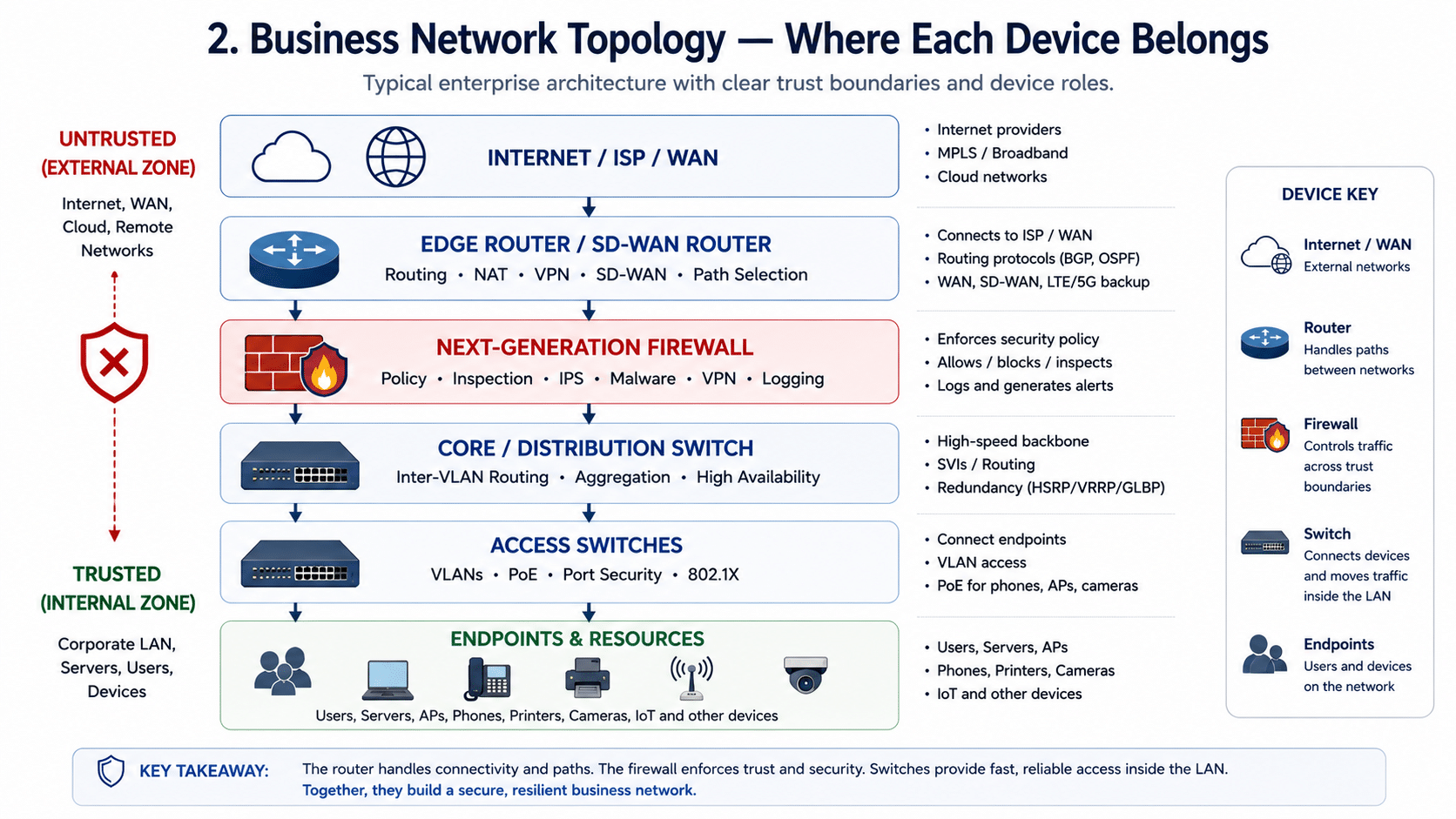
There’s no single correct order for every network. The right topology depends on the ISP handoff, NAT design, WAN routing, firewall role, public IP addressing, DMZ requirements, and whether the firewall also acts as the router.
Common Small Business Topology
ISP Modem / Circuit
        │
        ▼
Firewall-Router (combined)
        │
        ▼
Managed Switch
        │
        ▼
Users · Printers · Phones · APs · Cameras
In many small businesses, one device combines routing, NAT, VPN, and firewall functions. A managed switch then provides VLANs, ports, and PoE.
More Secure Business Topology
ISP / WAN
   │
   ▼
Edge Router or SD-WAN Router
   │
   ▼
Next-Generation Firewall
   │
   ▼
Core / Distribution Switch
   │
   ▼
Access Switches
   │
   ▼
Users · Servers · IoT · Wi-Fi
This design separates routing from security enforcement. The router handles WAN/ISP. The firewall enforces policy. Switches provide LAN connectivity.
Enterprise Campus Topology
Internet / WAN / Cloud
        │
        ▼
Edge Routers / SD-WAN
        │
        ▼
Perimeter Firewalls
        │
        ▼
Core Switches
        │
        ▼
Distribution Switches
        │
        ▼
Access Switches
        │
        ▼
Endpoints
In larger environments, firewalls also appear inside the network — for data center segmentation, guest access control, OT/IoT isolation, cloud connectivity, and east-west inspection.
The Key Rule
The firewall doesn’t always have to be physically “before” or “after” the router. The more important rule is:
Traffic that crosses a trust boundary should pass through a firewall policy.
Real Packet Path Examples
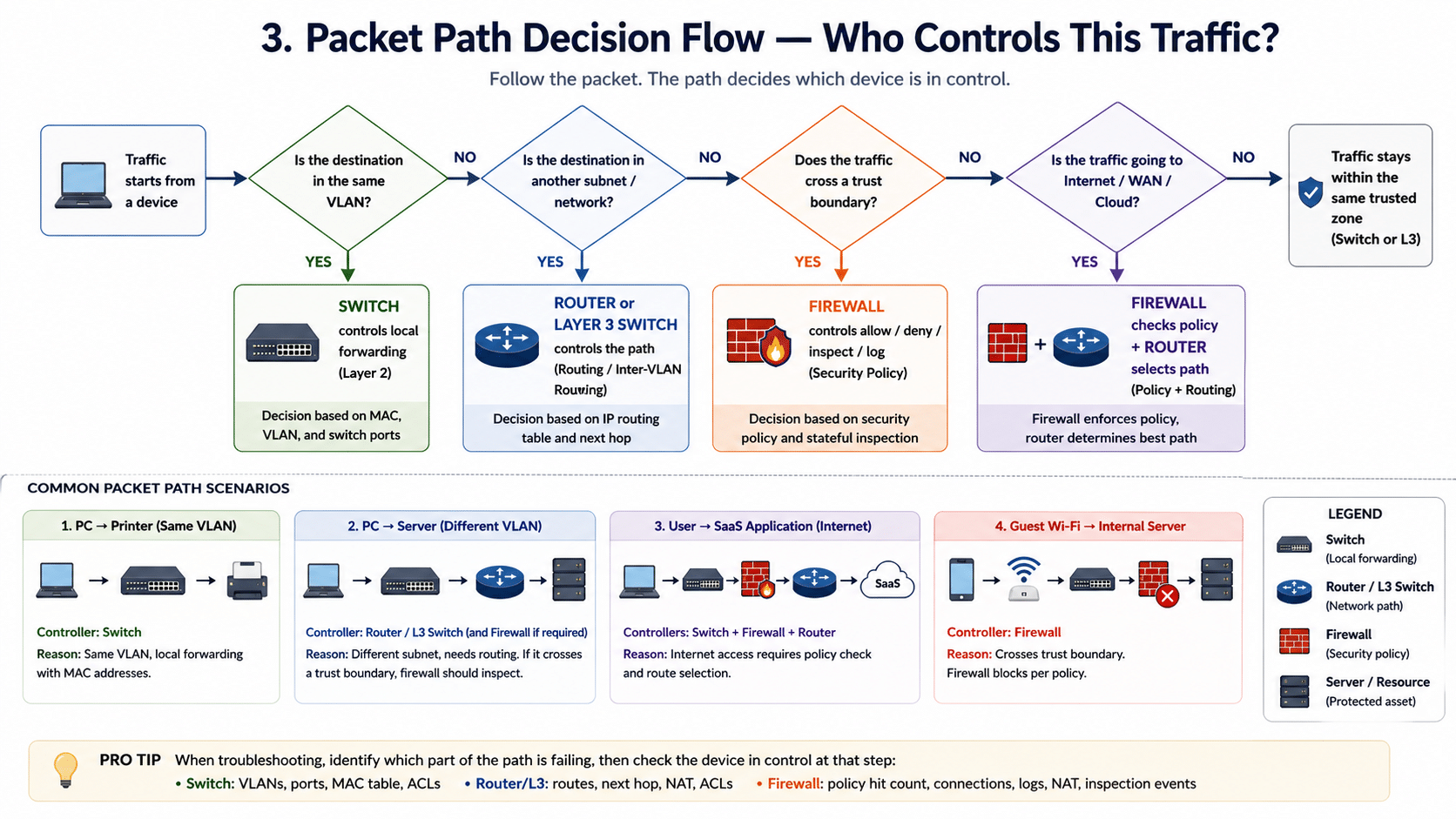
The best way to understand router vs firewall vs switch is to follow the packet.
Example 1 — PC → Printer (Same VLAN)
PC ──► Access Switch ──► Printer

Primary controller : Switch
Router involved    : No
Firewall involved  : No
Why it matters: If you’re seeing this traffic on your firewall logs, your VLAN design is broken — local traffic is being hairpinned through a Layer 3 device unnecessarily.
Example 2 — PC → Server in Another VLAN
PC ──► Access Switch ──► L3 Switch / Router ──► Server VLAN

Primary controller : Layer 3 switch or router
Firewall involved  : Should be, if the server VLAN is sensitive
Why it matters: If both VLANs are part of the same trust zone, a Layer 3 switch can route between them. If the server VLAN holds finance, HR, or production data, this traffic should pass through a firewall or segmentation policy — not just a routing ACL.
Example 3 — User → SaaS Application
PC ──► Switch ──► Firewall ──► Router / ISP ──► Internet ──► SaaS App

Primary controllers : Switch + Firewall + Router
Why it matters: Each device has a distinct role. The switch connects the user. The firewall decides whether the session is allowed and inspects it. The router sends traffic toward the ISP or SD-WAN path. If any one of them is misconfigured, the SaaS app feels “slow” or “broken” — and the root cause is rarely obvious without tracing the path.
Example 4 — Guest Wi-Fi → Internal File Server
Guest VLAN ──► Firewall Policy ──► ❌ Blocked

Primary controller : Firewall
Why it matters: This is a trust-boundary decision. The guest user may be physically connected through a switch and wireless AP, but it’s the firewall (or segmentation policy) that prevents access to internal resources. If you don’t see a deny in the firewall logs here, the guest VLAN is probably routing directly through a Layer 3 switch — which is one of the most common audit findings.
Control Matrix
What Actually Controls Your Network?
| Network Control Question | Primary Controller | Supporting Control |
|---|---|---|
| Which device can physically connect? | Switch port | NAC / 802.1X |
| Which VLAN is the device in? | Switch | Identity policy |
| Which path does traffic take? | Router / L3 switch | Routing protocol / SD-WAN |
| Can this VLAN talk to that VLAN? | Firewall or L3 ACL | Segmentation policy |
| Can users access the internet? | Firewall + router | DNS / proxy / SASE |
| Which applications are allowed? | NGFW | SWG / CASB / SASE |
| Which traffic gets priority? | Router / switch QoS | SD-WAN policy |
| Which traffic is logged? | Firewall | SIEM / NetFlow / telemetry |
| Which device blocks threats? | Firewall / IPS | Endpoint security |
| Which device creates broadcast domains? | Switch VLANs | Network design |
The real answer:
Your network is controlled by the interaction between switching, routing, security policy, segmentation, and identity — not by any single device.
Common Design Mistakes
Mistake 1 — Treating the Router as the Firewall
A router may have ACLs and NAT, but that does not equal full firewall protection. If you need application control, user identity, IPS, malware detection, URL filtering, and audit logs, a dedicated firewall (or integrated NGFW policy) is required.
Mistake 2 — Letting the Layer 3 Switch Bypass the Firewall
A Layer 3 switch can route between VLANs efficiently. That’s useful — but it can also bypass the firewall if all inter-VLAN routing happens at the core switch. This is one of the most common segmentation problems in growing networks.
Mistake 3 — Building One Flat VLAN
A flat network is easy to build, hard to secure. When users, servers, printers, cameras, guest devices, and management interfaces share the same broad network, lateral movement becomes easier and troubleshooting becomes harder.
Mistake 4 — Sending Every Flow Through the Firewall
The opposite mistake. Not every packet needs firewall inspection. High-volume, low-risk traffic within the same trust zone is better handled by switching or Layer 3 routing. Forcing every internal flow through a firewall creates bottlenecks, cost problems, and unnecessary complexity.
Mistake 5 — Buying Faster Hardware Instead of Fixing the Design
If traffic is bypassing the firewall, VLANs are poorly designed, routing is asymmetric, or policies are too broad — buying a faster switch, router, or firewall will not fix the root cause. Hardware capacity matters; architecture matters more.
Mistake 6 — No Logging, No Visibility
A network without logs is a network that forces engineers to guess. Firewalls should log meaningful policy hits. Routers should expose route, NAT, VPN, and telemetry visibility. Switches should expose MAC, VLAN, interface, and error data.
How to Verify Which Device Is in Control
In real troubleshooting, don’t guess whether the router, switch, or firewall controls the flow. Verify it.
On a Cisco Switch
show mac address-table
show vlan brief
show interfaces trunk
show spanning-tree
show etherchannel summary
show access-lists
show interfaces status
These answer:
- Which port learned the endpoint MAC?
- Which VLAN is the device in?
- Is the VLAN allowed on the trunk?
- Is Spanning Tree blocking the path?
- Is an ACL applied?
- Is the interface up, down, err-disabled, or misconfigured?
On a Cisco Router or Layer 3 Switch
show ip route
show ip cef
traceroute <destination>
show ip interface brief
show running-config | include ip route
show ip nat translations
show access-lists
These answer:
- What is the next hop?
- Is there a default route?
- Is the route learned dynamically or configured statically?
- Is CEF forwarding as expected?
- Is NAT being applied?
- Is an ACL blocking traffic?
On a Firewall
Check the following — exact commands vary by platform (Cisco Secure Firewall / FTD, ASA, FortiGate, Palo Alto, etc.):
- Connection table
- Policy hit count
- Packet trace / packet capture
- NAT rule hit count
- Security event logs
- IPS events
- URL filtering logs
- VPN logs
These answer:
- Did the traffic hit the expected rule?
- Was the traffic allowed or denied?
- Was NAT applied?
- Is return traffic following the same path?
- Did IPS, URL filtering, or malware inspection block the session?
- Is there asymmetric routing?
Pro tip: If a flow “should work” but doesn’t, run
traceroutefrom the source first. Whichever hop disappears tells you which device — switch, router, or firewall — to log into next.
How to Choose
Most businesses don’t choose router vs switch vs firewall. They need all three. The question is whether each device is doing the right job.
Choose a Switch When You Need
- More LAN ports, PoE for phones/cameras/APs
- VLANs and trunking
- Access-layer or campus connectivity
- High-speed Layer 2 or Layer 3 LAN forwarding
Choose a Router When You Need
- Internet, WAN, or branch connectivity
- NAT, VPN, BGP/OSPF
- SD-WAN, LTE/5G backup
- Cloud or data center edge connectivity
Choose a Firewall When You Need
- Security policy enforcement at any trust boundary
- Stateful inspection, IPS, malware protection
- URL filtering, application control
- VPN with security policy
- Compliance logging and east-west segmentation
Choose All Three When You’re Building a Real Business Network
A serious business network usually needs:
- Switches for access
- Routers for paths
- Firewalls for trust boundaries
- Identity systems for user/device context
- Monitoring tools for visibility
Cisco-Oriented Architecture Map
For Cisco-focused business networks, the roles typically map like this:
| Network Layer | Main Job | Cisco Product Family Angle |
|---|---|---|
| Access layer | Connect users, phones, APs, printers, cameras | Cisco Catalyst 9200 / 9300 access switches |
| Distribution layer | Aggregate access switches, route VLANs | Cisco Catalyst 9400 / 9500 |
| Core layer | High-speed campus backbone | Cisco Catalyst 9500 / 9600 |
| WAN / edge | Connect sites, internet, cloud, SD-WAN | Cisco Catalyst 8000 Edge Platforms (ISR-class routing) |
| Security edge | Enforce security policy | Cisco Secure Firewall |
| Identity segmentation | Apply role-based access | Cisco ISE / TrustSec |
The Catalyst 9000 family covers campus switching from access to core. Catalyst 8000 Edge Platforms cover SD-WAN, secure connectivity, and cloud or branch edge. Cisco Secure Firewall provides advanced threat protection and policy enforcement.
Sizing by Business Size
Home Office
ISP Router / Firewall Combo
        │
        ▼
Small Switch or Built-in LAN Ports
        │
        ▼
Laptop · Printer · Phone · Wi-Fi
One device often combines routing, firewalling, switching, and wireless. Convenient — but visibility and segmentation are limited.
Small Business
ISP Handoff
        │
        ▼
Firewall-Router
        │
        ▼
Managed Switch
        │
        ▼
Users · APs · Printers · Phones
A small business should move from unmanaged to managed switching so VLANs, PoE, trunks, and access controls can be used.
Growing SMB
Edge Router / SD-WAN
        │
        ▼
Next-Generation Firewall
        │
        ▼
Core / Distribution Switch
        │
        ▼
Access Switches
        │
        ▼
Users · Servers · Wi-Fi · IoT
At this stage, the business needs clear separation between LAN, WAN, internet, guest Wi-Fi, servers, and management networks.
Enterprise
Internet / WAN / Cloud
        │
        ▼
Edge Routers
        │
        ▼
Perimeter Firewalls
        │
        ▼
Core Switches → Distribution → Access
        │
        ▼
Endpoints
Enterprises add internal segmentation firewalls, identity-based policies, centralized logging, redundant routing, redundant switching, and high-availability firewall pairs.
Decision Checklist Before Buying
Before Buying a Switch
- How many access ports are required?
- Is PoE, PoE+, or higher-power PoE needed?
- Layer 2 only, or Layer 3 switching?
- How many VLANs?
- Stacking required?
- Uplink speed: 1G, 10G, 25G, 40G, 100G?
- Redundant power?
- MACsec, 802.1X, or advanced access security?
- Will the switch carry phones, cameras, APs, servers, or endpoints?
Before Buying a Router
- How many WAN links?
- SD-WAN required?
- BGP with an ISP?
- Routing throughput target?
- IPsec / VPN throughput target?
- NAT at scale?
- LTE / 5G backup?
- Branch voice, QoS, or cloud connectivity?
- Centralized routing management?
Before Buying a Firewall
- Inspected throughput (with all NGFW features on)?
- Expected concurrent sessions?
- IPS required?
- SSL/TLS inspection?
- URL filtering, application control, malware protection?
- Site-to-site or remote access VPN?
- High availability?
- Compliance logs?
- North-south, east-west, or both?
FAQ
Is a firewall the same as a router?
No. A router decides where traffic should go between networks. A firewall decides whether traffic should be allowed based on security policy. Some firewalls can route, and some routers include firewall features, but their primary design goals are different.
Do I need a router if I have a firewall?
Usually yes — unless the firewall is also acting as the router. Many business firewalls can route, NAT, and terminate VPNs, but WAN design, ISP handoff, BGP, SD-WAN, and performance requirements determine whether a dedicated router is still needed.
Do I need a switch if my router has Ethernet ports?
For a very small setup, router LAN ports may be enough. For a business network, a managed switch is needed for more ports, VLANs, PoE, uplinks, access control, and scalable LAN design.
Should the firewall be before or after the router?
It depends on the design. Many networks use ISP → edge router → firewall → switch. In smaller networks, the firewall may also act as the router. The key rule: traffic crossing a trust boundary should pass through a firewall policy.
Can a Layer 3 switch replace a router?
A Layer 3 switch can route between VLANs inside a campus LAN, but it usually does not replace a WAN router for ISP edge, SD-WAN, NAT-heavy, VPN-heavy, LTE/5G backup, or BGP-heavy use cases.
Can a switch replace a firewall?
No. A switch can use VLANs and ACLs to limit traffic, but it does not provide stateful inspection, threat detection, application control, user policy, VPN security, or the logging expected from a dedicated firewall.
Can a router replace a firewall?
Only for basic filtering in simple environments. A router can use ACLs and NAT, but a dedicated firewall is better for security policy, stateful inspection, application control, IPS, URL filtering, malware defense, and compliance logging.
Which device controls internet access?
The router controls the path to the internet. The firewall controls whether users, applications, or devices are allowed to access the internet. In most business networks, both devices participate.
Which device controls VLANs?
Switches control VLAN membership and trunking. Routers, Layer 3 switches, or firewalls may route between VLANs depending on the design.
What is the correct order: modem, router, firewall, switch?
A common order: modem / ISP handoff → router or firewall → switch → devices. In larger networks, an edge router sits before the firewall, and the firewall sits before internal core or distribution switches.
Is a firewall needed for internal network traffic?
Yes — when internal traffic crosses trust boundaries: guest-to-corporate, user-to-server, IoT-to-business systems, branch-to-data-center, production-to-management. Not every internal packet needs firewall inspection, but sensitive boundaries should be protected.
What actually controls a business network?
A business network is controlled by design. Switches control local connectivity, routers control paths, firewalls control security policy, and identity or segmentation systems control who can access what.
Final Answer: It’s Not Router vs Firewall vs Switch — It’s Paths vs Access vs Trust
Go back to the question in the title: who controls traffic, access, and security?
- Traffic paths are controlled by routers (and Layer 3 switches inside the campus).
- Access — who and what gets onto the network — is controlled by switches, with help from 802.1X and identity systems.
- Security and trust are controlled by firewalls at every boundary that matters.
The strongest network designs don’t ask one device to do everything. They place each control function where it belongs, and they verify — with show commands, policy hit counts, and packet traces — that traffic is actually following the path the design intended.
That’s what actually controls your network.
Next Step
If you’re sizing a Cisco Catalyst switch, Catalyst 8000 edge router, or Secure Firewall for a new site, branch refresh, or campus redesign, the right answer depends on throughput, port count, PoE budget, inspection requirements, and WAN topology — not just the model number.






