Webex vs Teams vs Zoom: Which Platform and Devices Fit Your Business in 2026
There is no single winner between Webex, Microsoft Teams, and Zoom. The right platform depends on your existing office ecosystem, how many meetings involve outside guests, your management requirements, and your budget. This guide gives realistic purchasing scenarios and a way to match your own situation to one of them, rather than a generic feature list.
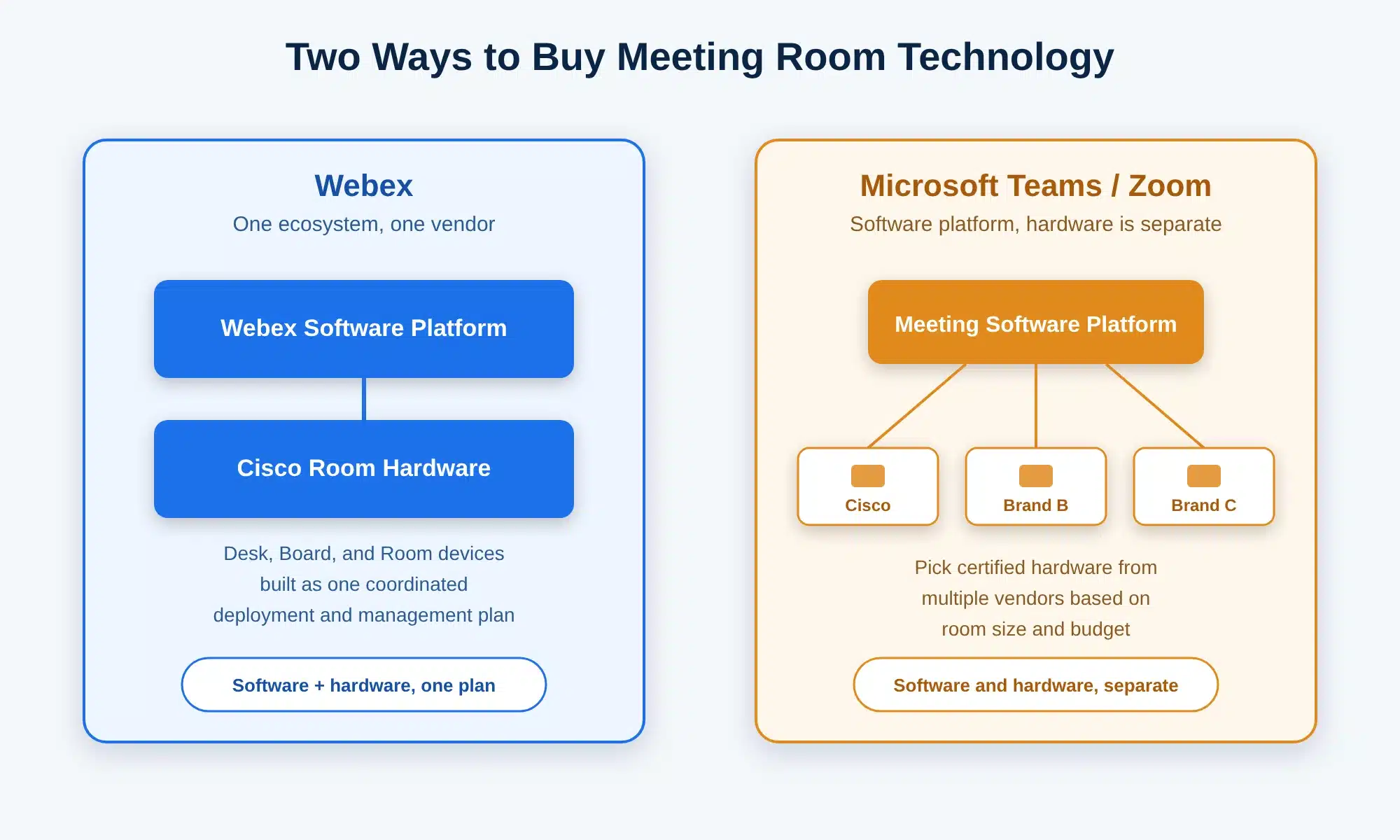
One distinction matters more than any single feature: Webex is built as a complete hardware-and-software ecosystem, with Cisco’s own room devices as its native hardware. Teams and Zoom are software platforms where meeting room hardware is a separate purchase, chosen from a list of certified devices across several brands. That difference shapes how you budget, how you plan device purchases, and how much flexibility you keep over time.
All platform and device information in this guide was checked against vendor documentation as of November 2026. Licensing terms, certified device lists, and feature availability change frequently and should be re-confirmed against current vendor pricing pages before you finalize a purchase.
Quick Answer: Match Your Situation to a Platform
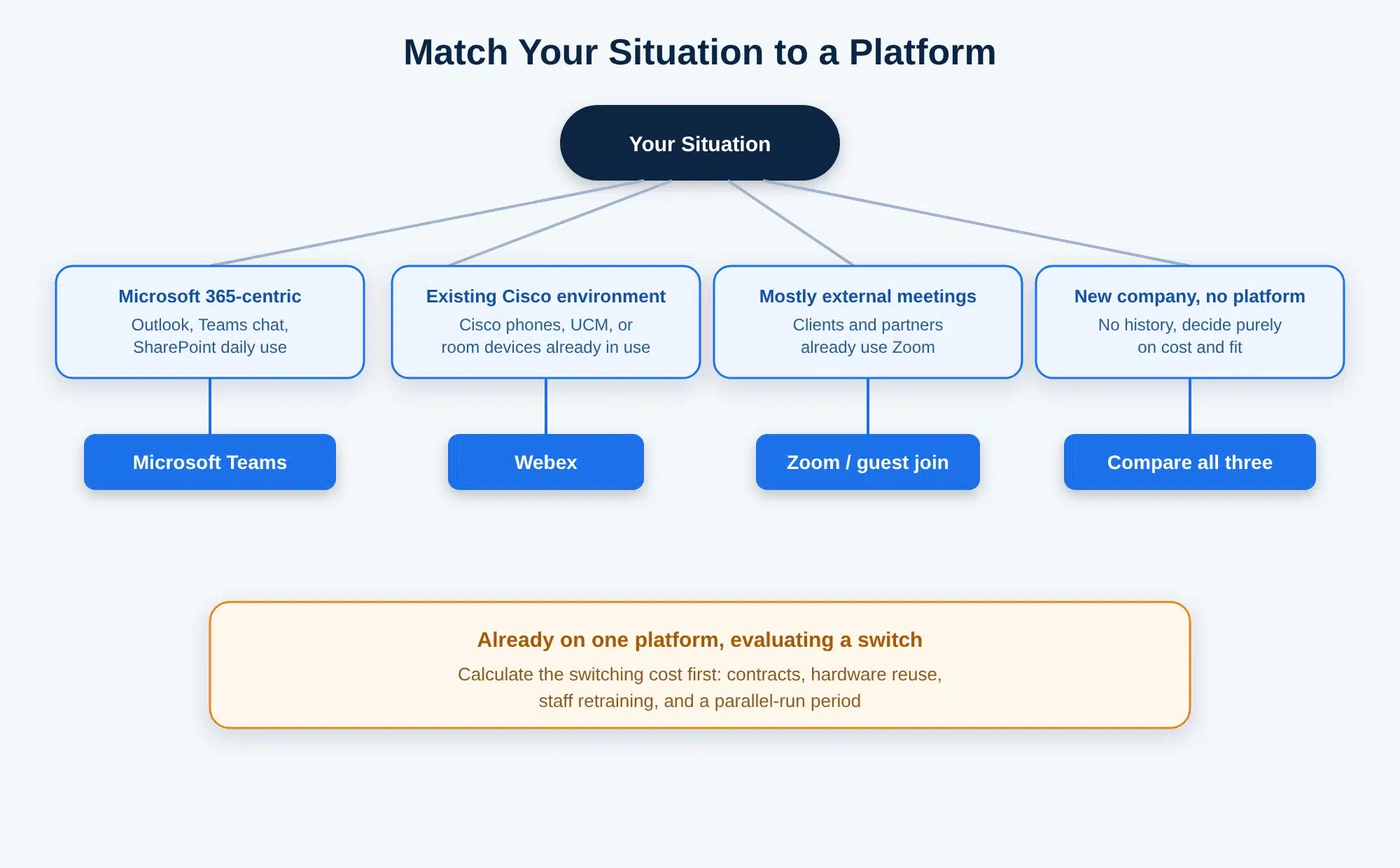
| Your situation | Evaluate first | Why | Confirm before buying |
|---|---|---|---|
| Daily work runs on Outlook, Teams chat, and SharePoint | Microsoft Teams | Deepest integration with Microsoft 365 workflows; hardware can be chosen from multiple brands | Whether your current Microsoft 365 plan already includes the Teams Rooms licensing you need |
| You already run Cisco phones, UCM, or Cisco room devices and want one vendor managing everything | Webex | Cisco hardware and the Webex platform are built as one ecosystem | Current device models and their RoomOS version |
| A large share of meetings are with outside clients who use Zoom | Zoom, or Webex with guest join | External join experience matters more than internal tooling | Which platform your clients actually use; current Zoom-certified device list |
| New company or new office, no existing platform or hardware | Compare all three on cost and management fit, without migration constraints | No sunk cost in any platform | Three-year software and hardware cost for each option |
| Already on one platform, evaluating a switch to another | Calculate switching cost before comparing features | Existing contracts, hardware, and staff habits are real costs | Contract end date, device resale or reuse value, parallel-run period |
The last two rows cover situations that are easy to overlook in a feature comparison but common in real procurement: a brand-new deployment with no history, and a deliberate migration away from an existing platform. Both appear as full scenarios later in this guide.
Webex vs Teams vs Zoom: Key Differences
| Dimension | Webex | Microsoft Teams | Zoom |
|---|---|---|---|
| Office integration | Webex Suite, Webex Calling | Deep integration with Outlook, SharePoint, OneDrive | Integrates with common calendar and office tools |
| External guest meetings | Browser and client guest join supported | Browser and client guest join supported | Widely used for external meetings; familiar to most outside guests |
| AI features | Available by plan and add-on license | Available by plan and add-on license | Available by plan and add-on license |
| Management and security | Centralized admin console (Control Hub) | Centralized admin console (Teams Admin Center) | Centralized admin console (Zoom admin portal) |
| Meeting room hardware strategy | Built around Cisco’s own devices as one ecosystem | Software platform; supports certified devices from multiple hardware brands | Software platform; supports certified devices from multiple hardware brands |
| Cost structure | Software and hardware are typically planned together | Software licensing and hardware purchases are separate line items | Software licensing and hardware purchases are separate line items |
Each row is a starting point only; the sections below go through the specifics, including what each platform actually requires in terms of licensing and hardware before you can rely on it for a real deployment.
Webex: A Complete Hardware and Software Ecosystem
Webex fits businesses that already run Cisco phones, Cisco UCM, or Cisco meeting room devices, are planning to move from an on-premises PBX to Webex Calling, or want desk, room, and board devices managed by a single vendor under one console.
How Webex’s Ecosystem Approach Works
A Webex purchase is best planned as a set of rooms, not as individual devices. Before buying, map out: which device goes in each room size, what desk and collaboration devices individual employees need, which cameras, touch controllers, and audio accessories pair with each device, and how devices will be registered and monitored in Control Hub. If you are also replacing an on-premises phone system, decide at the same time whether Webex Calling will run alongside or replace it.
Reference Configurations by Room Type
| Room type | Reference device | Notes | Confirm before buying |
|---|---|---|---|
| Personal desk, hot-desking | Desk Pro G2 | Listed in current RoomOS supported device list | Matches your current Webex software version |
| Huddle space, whiteboard collaboration | Board Pro G2 (55″) or Board Pro G3 | Interactive board combined with video conferencing | Wall space and mounting requirements |
| Medium meeting room | Room Bar Pro | Dual camera with AI framing | Room size and seating capacity |
| Large meeting room | Room Kit EQ | Modular; supports multiple displays and microphones | Number of displays and audio layout needed |
| Boardroom, flagship room | Room Kit EQX | Cisco’s flagship video conferencing bundle | Budget and room conditions |
Check stock, compare options, or talk with our team.
Third-Party Certified Devices
Webex is not exclusively Cisco hardware, but the ecosystem works differently than Teams or Zoom. Cisco runs a Webex device certification program for third-party peripherals, covering displays, cameras, microphones, speakers, and workspace management software, that are tested to work with Cisco’s own Room, Desk, and Board devices. This is a peripheral and accessory ecosystem rather than a market of competing full room systems from other brands. For the dedicated room hardware itself, Webex’s native experience runs on Cisco-built devices; there is no broad multi-vendor market of alternative “Webex Rooms” systems the way there is for Teams Rooms or Zoom Rooms. The Webex App itself, separately, runs on ordinary laptops, desktops, and mobile devices for anyone joining without dedicated room hardware.
Models to Watch for Generation Changes
Cisco’s room device lineup moves in generations (for example, Room Kit Pro to Room Kit Pro G2, Board Pro to Board Pro G2 and G3). When planning a new purchase, check which generation is currently being sold and ask directly whether the model you are considering is the current generation or an earlier one Cisco has stopped selling, since this affects both pricing and how long software updates will continue.
Additional Costs to Budget For
Beyond the Webex subscription itself, plan for: Room licensing, Webex Calling licensing if used, cameras and audio accessories, Room Navigator touch controllers, installation, and ongoing device support. Because Webex is typically sold as one coordinated deployment, these costs are usually quoted together rather than as separate software and hardware line items.
Looking for specific Cisco Webex device pricing? Browse our Cisco Webex hardware for current models and configurations.
Microsoft Teams: A Software Platform with Multi-Brand Hardware
Teams fits businesses that run heavily on Microsoft 365, where Outlook calendars and Teams chat are the daily default, and that want to choose meeting room hardware from more than one brand based on budget and room requirements.
Software Layer
A Teams deployment requires: a Microsoft 365 plan that includes the Teams features you need, Teams Rooms licensing for each room (billed per room or per device, depending on current Microsoft pricing), and Teams Phone if you need calling functionality through Teams.
Hardware Selection
Start from room size and seating capacity, then check the current certification status of any device you are considering, then decide whether any existing hardware can be reused. Device categories to plan for: displays and cameras for small rooms, all-in-one bars for medium rooms, modular kits for large rooms with custom audio/video needs, touch controllers, and microphones or speakers.
Cisco is one of several hardware vendors certified for Microsoft Teams Rooms. As of our research, the Cisco devices in Microsoft’s Teams Rooms certification program include Room Bar, Room Bar Pro, Room Kit Pro, Room Kit Pro G2, Room Kit EQ, Room Kit EQX, Desk Pro, Desk Pro G2, Board Pro 55-inch and 75-inch, Board Pro G2, and Room Navigator for Wall. Cisco introduced the Board Pro G3 as a newly Teams-Rooms-certified board at Cisco Live US 2026. Other hardware vendors also sell devices certified for Teams Rooms; this guide focuses on the Cisco side of that market because it is this site’s core product category, but the choice is not limited to Cisco.
Switching Between Webex Mode and Teams Rooms Mode
Certified Cisco devices can run either as a native Cisco Rooms experience (Webex-first, with video interoperability to other platforms) or as a native Microsoft Teams Rooms device, while still being able to join full-featured Webex meetings either way. If you are considering a phased migration, confirm with your vendor or Cisco directly whether switching an already-deployed device between these two modes requires re-provisioning or re-registration, since that affects how a rollout can be staged room by room.
Additional Costs to Budget For
Teams Rooms licensing, any Microsoft 365 plan upgrade needed, Teams Phone if used, and hardware purchase and installation. Unlike Webex, these are generally quoted and budgeted as two separate line items: software licensing and hardware.
Zoom: A Software Platform with Multi-Brand Hardware
Zoom fits businesses where a large share of meetings are with external clients or partners who already use Zoom, where the meeting itself is the main workflow, and where internal calling needs are limited.
Software Layer
A Zoom deployment requires a Zoom Workplace plan, Zoom Rooms licensing per room, and Zoom Phone if calling is needed.
Hardware Selection
As with Teams, start from room size and certification status rather than brand loyalty. Device categories follow the same pattern: small-room displays and cameras, medium-room all-in-one bars, large-room modular kits, controllers, and audio accessories.
Can You Use Cisco Devices with Zoom?
Yes, and this is a newer development worth understanding in two parts, because Cisco currently offers two different ways to bring Zoom to its devices:
Zoom for Cisco Rooms runs the Zoom meeting experience as a full-featured app inside the standard Cisco Rooms interface. The device stays in its native Cisco Rooms mode, and Zoom runs within that experience rather than replacing it.
Cisco Devices for Zoom Rooms is the newer, deeper integration: select Cisco devices run the native Zoom Rooms user experience directly, the same interface and layout a dedicated Zoom Rooms appliance would show, in addition to retaining the option to run full Webex Meetings. According to Cisco and Webex’s own announcements, Cisco Devices for Zoom Rooms became available as a certified option in September 2026. The devices listed in Webex’s current requirements for Zoom Rooms are Room Bar, Room Bar Pro, Desk Pro, Desk Pro G2, Board Pro G2, Board Pro G3, Room Kit Pro, Room Kit Pro G2, and Room Kit EQ. Because this capability is still rolling out as of this guide’s publication, confirm the current certification status and exact model list directly with Cisco or Webex before specifying it in a procurement decision.
In practice this gives two workable paths: standardize on Zoom and buy Zoom-certified devices (which may include non-Cisco brands), or keep Cisco devices and run them natively as Zoom Rooms once a given model’s certification is confirmed, rather than relying on generic USB or BYOD join.
Additional Costs to Budget For
Zoom Workplace and Zoom Rooms licensing, Zoom Phone if used, and hardware purchase and installation, budgeted separately from software as with Teams.
Meeting Experience and External Collaboration
Internal collaboration and client-facing meetings have different requirements. A platform that works well for internal teams may create friction for outside guests, and vice versa.
| Factor | What to check | Notes |
|---|---|---|
| Guest join requirements | Does the guest need an account or a downloaded client, or can they join from a browser link | Verify current behavior directly on each vendor’s help documentation |
| Client and device experience | Differences between desktop, browser, and mobile join | Confirm on current platform documentation; this changes with app updates |
| Content sharing | Screen sharing, recording, and captioning for external participants | Admin settings may restrict these for guests by default |
| Cross-company management limits | Common restrictions when guests from another company join | Varies by plan tier; confirm with admin documentation |
For businesses where client meetings are frequent, it is worth testing the guest join experience directly, from a guest’s own device and network, before committing to a platform.
AI Features: What Is Included and What Costs Extra
“Supports AI” is not a useful comparison point on its own, since all three platforms gate most AI features behind specific plans or add-on licenses. Confirm each row below against current vendor pricing pages before you rely on it.
| AI capability | What to confirm per platform |
|---|---|
| Meeting summaries | Included plan tier, and whether it is a standard feature or paid add-on |
| Transcription | Included plan tier, and supported languages |
| Action item extraction | Whether this is bundled with summaries or a separate feature |
| Real-time translation | Supported language pairs, and licensing requirement |
| Post-meeting search and Q&A | Availability, and whether it requires a separate AI assistant license |
| Admin controls | Whether AI features must be explicitly enabled by an administrator, and at what scope (user, group, or org-wide) |
Because these features and their licensing change frequently, treat any specific claim about what is “included” as something to verify on the day you request a quote, not something to copy from an older comparison article.
Security and Administration
None of the three platforms is categorically “more secure” than the others; each offers comparable controls, implemented differently. Evaluate each against your own requirements rather than a vendor’s marketing claim.
- Authentication: Single sign-on and identity provider support, and whether it is included at your plan tier.
- External guest policy: How guest access is controlled, and what an admin can restrict.
- Recording and transcript access: Who can access recordings and transcripts, and configurable retention periods.
- Data storage location: Where meeting data and recordings are stored, relevant for regulatory or contractual requirements.
- AI data handling: Whether AI features process data in ways that require separate admin consent or configuration.
- Device management and troubleshooting: What the centralized admin console shows for room devices, and how incidents are diagnosed remotely.
For regulated industries or companies with specific data residency requirements, confirm each of these points in writing from the vendor before signing, rather than relying on general marketing pages.
Real Procurement Scenarios
These five scenarios illustrate how the platform decision and the hardware decision actually play out together, including the two situations a simple feature comparison tends to miss: a brand-new deployment with no existing platform, and an active migration between platforms.
Scenario A: 200-Employee Company, Microsoft 365-Centric, 8 Meeting Rooms
Every employee already works in Outlook and Teams, and external meetings are relatively infrequent. The company selects Microsoft Teams.
For hardware, there are two paths: buy Cisco devices certified for Teams Rooms (4 small rooms with Room Bar, 3 medium rooms with Room Bar Pro, 1 large room with Room Kit EQ), or buy certified devices from another hardware brand. Either path requires checking the current certification list before ordering.
What to confirm: whether the existing Microsoft 365 plan already covers the Teams Rooms licensing needed, and the certification status of the specific devices selected.
Scenario B: 500-Employee Company, Existing Cisco Phone System, 30 Meeting Rooms
The company already has a large installed base of Cisco devices, including some earlier-generation Room Kit Pro and Codec Pro units. It selects Webex.
The hardware plan is a full ecosystem review rather than a device-by-device purchase: evaluate which older devices should move to current-generation hardware, specify Desk Pro G2 or Board Pro G2 for small rooms and Room Bar Pro for medium rooms, and standardize cameras, controllers, and management across all 30 rooms.
What to confirm: current generation and support status of each existing model, a phased upgrade plan, and what percentage of existing hardware can be reused versus replaced.
Scenario C: 50-Person Consulting Firm, 70% External Meetings, 3 Meeting Rooms
Most of the firm’s clients use Zoom, and internal collaboration is meeting-centric. The firm first confirms which platform its clients actually use, then decides between standardizing on Zoom or using Webex with guest join for Zoom-using clients.
If it chooses Zoom, it needs to confirm current Zoom-certified devices, which, as of this guide’s research, can include select Cisco devices (such as Room Bar, Room Bar Pro, Desk Pro G2, Board Pro G3, Room Kit Pro G2, and Room Kit EQ) running native Zoom Rooms, pending confirmation of each model’s certification status, or devices from other certified brands. If it keeps existing Cisco devices on Webex, it needs to clearly understand the difference between joining a Zoom meeting and running native Zoom Rooms on that hardware.
What to confirm: the client’s actual platform preference, and the current certification status of any device being considered for Zoom Rooms.
Scenario D: 80-Person New Company, No Existing Platform, 5 Meeting Rooms
This is a greenfield deployment: no existing meeting platform, no existing devices, and no migration cost to factor in. The decision comes down entirely to three-year cost and the team’s management preferences, without any pull toward a platform the company already uses.
Hardware plans for all three platforms can be laid out side by side, and the company selects based on budget rather than compatibility constraints. The one open question worth raising even in a greenfield case is whether the company expects to adopt Microsoft 365 or Google Workspace as its primary office suite in the near future, since that can tip the decision even without existing hardware.
What to confirm: whether any office-suite decision is already planned, since that affects which platform integrates most naturally later.
Scenario E: 300-Employee Company, Currently on Zoom, Evaluating a Move to Webex
The company’s Zoom contract is approaching renewal, and it has recently purchased new Cisco networking equipment, making this a natural point to consider standardizing on Webex.
A migration decision needs to weigh the new platform’s benefits against the actual cost of switching, not just a feature comparison. The hardware plan needs to specify whether existing Zoom-certified devices can be reused or resold, and what new Cisco devices would need to be purchased.
Migration carries cost categories a same-platform renewal does not: staff retraining, running both platforms in parallel during a transition period (meaning two active subscriptions for a time), and migrating or archiving historical recordings and data.
What to confirm: the Zoom contract’s cancellation terms, the resale or reuse value of existing devices, and how long a parallel-run period would realistically need to be.
What to Test Before a Company-Wide Rollout
Run a pilot in a small number of rooms before committing to a full rollout, and check:
- Can outside clients join smoothly, from their own device and network, without a confusing login step
- Is audio and video clear from the back of the room, not just near the device
- Does content sharing work correctly when someone joins from a different platform
- Do meeting summaries and transcripts meet your language requirements
- Does the certification and software version of each selected device actually match the target platform
- Can an administrator detect and resolve a device or connectivity issue quickly
Plan for a pilot period of at least a week across a few representative rooms before rolling out further; this is a recommended practice, not a result this guide has tested directly.
Frequently Asked Questions
-
Does Microsoft 365 include all the Teams features a business needs?
It depends on your specific Microsoft 365 plan and whether Teams Rooms licensing is bundled or sold separately. Confirm against Microsoft’s current plan comparison page.
-
Does Webex only work with Cisco hardware?
Not entirely. Cisco certifies third-party displays, cameras, microphones, and speakers to work with its devices, and the Webex App runs on ordinary laptops and mobile devices. For dedicated room hardware specifically, Webex’s native experience is built around Cisco’s own devices; there is no broad market of competing full room systems from other brands the way there is for Teams Rooms or Zoom Rooms.
-
Can existing Cisco devices work with Teams or Zoom?
This breaks into three questions: can the device join a meeting at all, can it run the platform natively, and what does that require. For Microsoft Teams Rooms, a specific and growing list of Cisco devices is currently certified. For Zoom Rooms, select Cisco devices have been available as certified native Zoom Rooms devices since September 2026; confirm the current certified model list before relying on it. In both cases, check the specific model, its software version, and its current certification status rather than assuming based on the device family.
-
Are AI meeting summaries included in every paid plan?
No. Availability depends on the specific plan and sometimes a separate add-on license across all three platforms. Confirm against each vendor’s current pricing page.
-
Should we standardize on one meeting platform?
This depends on how much of your meeting volume is external, how much management overhead you can absorb from running multiple platforms, and your existing systems. There is no single correct answer; the scenarios above are meant to help you reason through your own situation rather than adopt a blanket rule.
-
What does it cost to switch from one platform to another?
More than the new platform’s subscription price. A realistic switching cost includes staff retraining, running both platforms in parallel for a transition period (meaning two active subscriptions at once), and migrating or archiving historical recordings and meeting data. See Scenario E above for how this plays out in practice.
Not sure which platform fits your hardware plan? Share your preferred meeting platform, number of rooms, and any existing devices, and we can help review compatibility and configuration options.