How to Check Cisco SFP Compatibility With Your Switch
A Cisco transceiver is compatible with a switch when three things line up: the module fits the port type, the Cisco Optics-to-Device Compatibility Matrix lists that module for that exact switch or network module at or below your software release, and the optic at the far end runs the same standard. After installation, show commands confirm the switch reads the module and the optical levels sit inside their thresholds.
The examples below use two Catalyst 9300 builds: a C9300-48P-A with a C9300-NM-8X uplink module, and a C9300X-24Y-A fiber switch.
Which Transceivers Work With Each Cisco Switch Port Type?
Every Cisco port accepts its own form factor, and most accept the next form factor down at that module’s speed. Fit is only the first filter: the matrix still decides whether a module is supported in that port.
How to Identify the Port Type on Your Cisco Switch
Start from the PID of the part that owns the port, not the chassis name alone:
- C9300-48P-A: the 48 front ports are 10/100/1000 copper with PoE+. They take no transceivers. The fiber ports sit on the uplink module, so a C9300-48P-A with a C9300-NM-8X has eight SFP+ ports, and compatibility is checked against C9300-NM-8X.
- C9300X-24Y-A: the 24 front ports are SFP28 and run at 25G, 10G or 1G. The matrix lists switches without the -A or -E license suffix: a search for C9300X-24Y-A returns no results, so search
C9300X-24Yfor both C9300X-24Y-A and C9300X-24Y-E.
On a running switch, the interface name gives the port class. IOS XE names SFP+ ports TenGigabitEthernet (Te), SFP28 ports TwentyFiveGigE (Twe) and QSFP28 ports HundredGigE (Hu). The C9300-NM-8X ports come up as Te1/1/1 through Te1/1/8. Run show inventory to get the exact PID of the uplink module installed in the slot.
Compatible Transceivers for SFP, SFP+, SFP28, QSFP28 and QSFP-DD Ports
The table lists what the Cisco matrix shows for each port type on real Cisco hardware.
| Port type | Native modules | Also listed in this port | Matrix example |
|---|---|---|---|
| SFP (1G) | GLC-SX-MMD, GLC-LH-SMD, GLC-TE | Nothing faster: 1G SFP only | C9300-24S-A |
| SFP+ (10G) | SFP-10G-SR-S, SFP-10G-LR-S | 1G SFP such as GLC-SX-MMD and GLC-TE | C9300-NM-8X |
| SFP28 (25G) | SFP-25G-SR-S, SFP-10/25G-CSR-S | 10G SFP+ and 1G SFP | C9300X-24Y-A |
| QSFP28 (100G) | QSFP-100G-SR4-S, QSFP-100G-LR4-S | 40G QSFP+ such as QSFP-40G-SR4; SFP+ through the CVR-QSFP-SFP10G adapter; SFP28 through CVR-QSFP28-SFP25G from IOS XE 17.12.1 | C9300X-NM-2C |
| QSFP-DD (400G) | QDD-400G-DR4-S, QDD-400G-FR4-S | 100G QSFP28 and 40G QSFP+ | N9K-C9332D-GX2B |
A QSFP28 port never takes an SFP module directly. The C9300X-NM-2C note in the matrix states that its QSFP ports need the QSA adapter for any SFP+ module. Lane counts, power and breakout options for each form factor are covered in our SFP vs QSFP vs QSFP-DD guide.
How to Check Cisco SFP Compatibility in the Optics Compatibility Matrix
Search the matrix (tmgmatrix.cisco.com) for the PID that owns the port, find the transceiver row, and compare its Minimum software release with the release you run. A module that is not in the list for that PID is not supported in that port.
1. Enter the network device PID. Type the PID in the search box: C9300-NM-8X for the uplink module, C9300X-24Y for the C9300X-24Y-A. Pick the suggestion marked “in Network Device Product ID”, not a transceiver or family match.

2. Narrow the list with a filter. The matrix returns every supported module for that PID: 54 rows for C9300-NM-8X across SFP and SFP+. Tick a value under Data Rate, Form Factor, Media or Connector Type to cut the table down. The active filter appears above the results, and the X on it clears it.
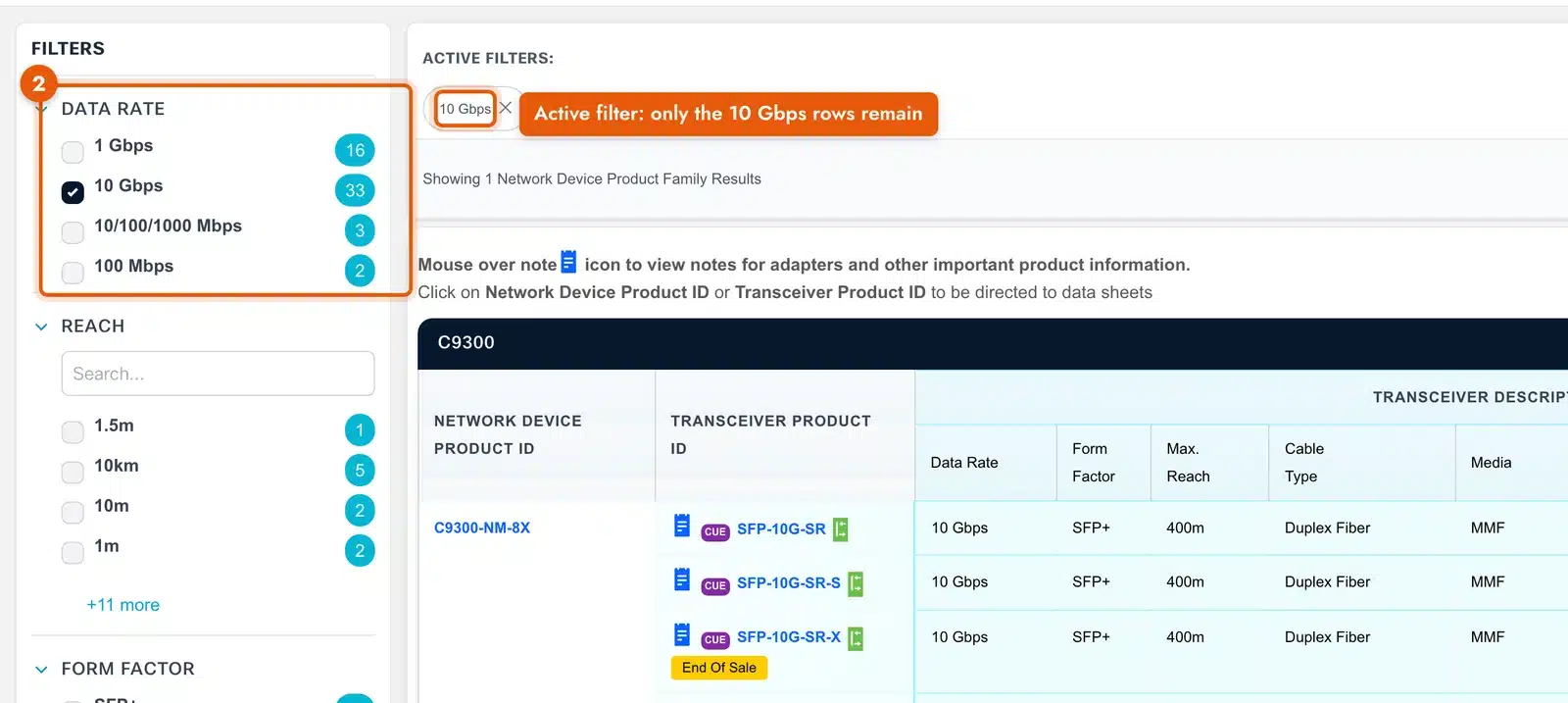
3. Read the row for your transceiver. The columns give data rate, form factor, maximum reach, cable type, media, connector, case temperature, DOM support and two software columns: Minimum (the release that supports the module) and DOM SW (the release that reports its diagnostics).

For a C9300-NM-8X with SFP-10G-SR-S, the row reads 10 Gbps, SFP+, 400 m, duplex MMF, LC, DOM capable, minimum IOS XE 16.5.1. A Catalyst 9300 with this uplink module on IOS XE 16.5.1 or later supports SFP-10G-SR-S in all eight ports.
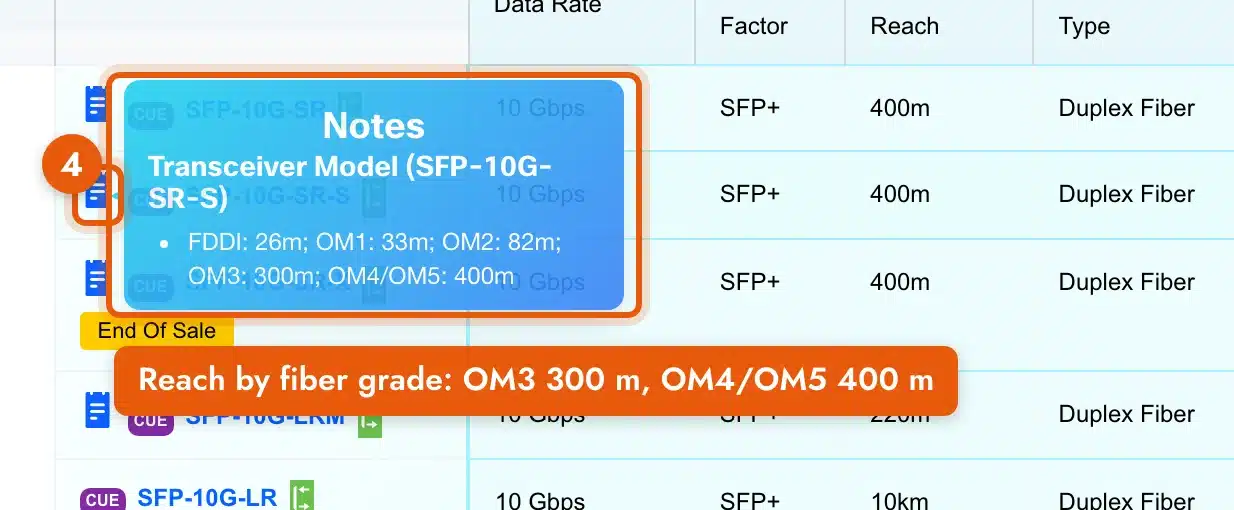
4. Hover the note icon next to the transceiver PID. Notes carry the details that decide an order: reach by fiber grade, adapter requirements and hardware version limits. For SFP-10G-SR-S the note splits the 400 m figure by fiber: 300 m on OM3 and 400 m on OM4/OM5.
The software column matters most on newer modules. On a C9300X-24Y-A, SFP-25G-SR-S and SFP-10G-SR-S need IOS XE 17.5.1, while SFP-10G-T-X needs IOS XE 17.6.1. Filter its results to Media: Copper and the difference sits in two adjacent rows: GLC-TE at 17.5.1, SFP-10G-T-X at 17.6.1.

The same SFP-10G-SR-S needs IOS XE 17.6.1 in a C9300X-NM-2C QSFP port through the adapter, and SFP-25G-SR-S needs 17.12.1 there. Check show version before ordering a module listed above your current release.
Nexus 9000 switches that run both NX-OS and ACI show one row per operating system. N9K-C9332D-GX2B lists QSFP-100G-SR4-S separately for NX-OS and for ACI mode, each with its own minimum release, so filter OS Type to the mode the switch runs.
Order the exact PID from the matrix row. Layer23-Switch lists each transceiver by its Cisco PID in its Cisco optical module range.
Do Both Ends of a Fiber Link Need the Same Transceiver?
No. Both ends need the same optical standard, not the same part number. An SFP-10G-SR-S links to an SFP-10G-SR because both are IEEE 10GBASE-SR. It does not link to an SFP-10G-LR-S, which is 10GBASE-LR on a different wavelength and fiber type.
| Check | Both ends must match | Example |
|---|---|---|
| Standard | Same IEEE standard | 10GBASE-SR to 10GBASE-SR |
| Wavelength and fiber | Same wavelength on the same fiber type | SR: 850 nm on multimode. LR: 1310 nm on single-mode (OS2) |
| Connector | Same connector on the patch cord | LC duplex for SFP-10G-SR-S. MPO-12 for QSFP-100G-SR4-S |
| Reach | The run stays inside the shorter-rated end | SFP-25G-SR-S: 70 m on OM3, 100 m on OM4 |
| FEC (25G and 100G) | Same FEC mode on both ports | Set on the interface, not on the optic |
Bidirectional (BiDi) optics must be installed as a matched U/D pair. They transmit and receive on different wavelengths over one strand: GLC-BX-U at one end and GLC-BX-D at the other, or SFP-10G-BXU-I with SFP-10G-BXD-I. Two U modules on one strand never come up.
FEC sets the reach on 25G multimode. The matrix note for SFP-10/25G-CSR-S at 25G gives 30 m (OM3) and 50 m (OM4) with no FEC, 70 m and 100 m with FC-FEC, and 300 m and 400 m with RS-FEC. Configure the same FEC mode on both ports, or the link stays down.
A different part number on each end is also normal on breakout links. One QSFP-100G-SR4-S feeds four SFP-25G-SR-S through an MPO-12 to 4× LC duplex breakout cable, with RS-FEC, up to 70 m on OM3 and 100 m on OM4.
For any pair that is not the same standard, check Cisco’s Optics-to-Optics Interoperability Matrix (tmgmatrix.cisco.com/iop). Search one transceiver PID and it lists the partner optics, the reach for each pairing, the FEC mode and the breakout cable required.
How to Verify a Transceiver After Installing It in a Cisco Switch
Two checks confirm the install: the switch reads the PID you ordered, and the module reports link and optical levels inside its thresholds.
How to See Which Transceiver Model Is Installed
Run show inventory. Each transceiver appears as its own entry with PID, version (VID) and serial number:
Switch# show inventory
NAME: "Te1/1/1", DESCR: "SFP-10GBase-SR"
PID: SFP-10G-SR-S      , VID: V01  , SN: XXXXXXXXXXX
Match the PID against the matrix row. Check the VID as well where a matrix note names a version: on C9300-NM-8X, the SFP-H10GB-CU3M note says only version -02 and later of that DAC is supported.
For a quick view of every port at once, show interfaces status shows the module type for each port in the Type column.
How to Check Whether the Transceiver Is Working Properly
A working optic shows connected in show interfaces status, and every DOM reading sits between its low and high warning thresholds. Read the values with:
Switch# show interfaces te1/1/1 transceiver detailThe output lists temperature, voltage, laser bias current, transmit power and receive power, each with four thresholds: high alarm, high warning, low warning and low alarm. This example from the Catalyst 9300 IOS XE 17.12 command reference shows a healthy receive level:
         Optical            High Alarm  High Warn  Low Warn   Low Alarm
         Receive Power      Threshold   Threshold  Threshold  Threshold
Port     (dBm)              (dBm)       (dBm)      (dBm)      (dBm)
-------  -----------------  ----------  ---------  ---------  ---------
Gi1/1/1  -23.5              -5.0        -9.0       -28.2      -32.2
-23.5 dBm sits between the low warning (-28.2 dBm) and the high warning (-9.0 dBm), so the link has margin. A reading flagged - or -- is below the low warning or low alarm: check the far-end optic, the fiber and the connector cleanliness. A flag of + or ++ on receive power means too much light, usually a long-reach optic on a short run. Typical power ranges per Cisco module are in our Cisco SFP TX and RX light levels guide.
show interfaces transceiver without an interface prints one summary line per installed optic, which is the fastest check after populating a full uplink module. If the switch rejects the module or puts the port in err-disable, the fix is in our Cisco unsupported transceiver error guide.
Frequently Asked Questions
Do Cisco DAC and AOC cables follow the same compatibility rules as optics?
Yes. The matrix lists DAC and AOC cables as rows under each device, with Media set to DAC or AOC. A cable has the same module at both ends, so the far-end check is already done; the port-type check, the minimum release and the notes still apply. On C9300-NM-8X, for example, SFP-H10GB-CU3M is supported only from version -02.
Do copper SFP modules like GLC-TE and SFP-10G-T-X work in every SFP port?
GLC-TE is listed on C9300-24S-A, C9300-NM-8X and C9300X-24Y-A. SFP-10G-T-X is listed on C9300X-24Y-A and C9300X-NM-8Y from IOS XE 17.6.1, but not on C9300-NM-8X. Its reach is 30 m at 10G on Cat6A or Cat7 and 100 m at 100M/1G on Cat5e or better. Check the copper modules row by row like any optic.
Does the Cisco compatibility matrix list end-of-sale transceivers?
Yes. End-of-sale transceivers stay in the device results with an “End Of Sale” tag next to the PID. SFP-10G-SR-X under C9300-NM-8X and GLC-T under C9300X-24Y-A both carry the tag.
Can a 1G SFP-only port run a 10G SFP+ module?
No. A C9300-24S-A lists 20 transceivers, all SFP form factor. An SFP-10G-SR-S fits the cage but has no 1G mode, so the port does not bring up a link with it.