What is Optical Signal Strength? Understanding TX/RX Light Levels in Cisco Transceivers
Have you ever encountered a Cisco switch interface that constantly flaps (goes up and down) or suddenly enters an err-disabled state? Before you blame the switch or replace the cable, you need to look at the invisible data: the light levels.

For network engineers working with fiber optics (SFP, SFP+, QSFP), understanding TX (Transmit) and RX (Receive) signal strength is critical. It is the difference between a stable, high-speed link and a nightmare of packet loss.
In this guide, we will explain what optical signal strength is, how to check it on Cisco IOS using the command line, and how to troubleshoot common light level issues.
What are TX and RX Power Levels?
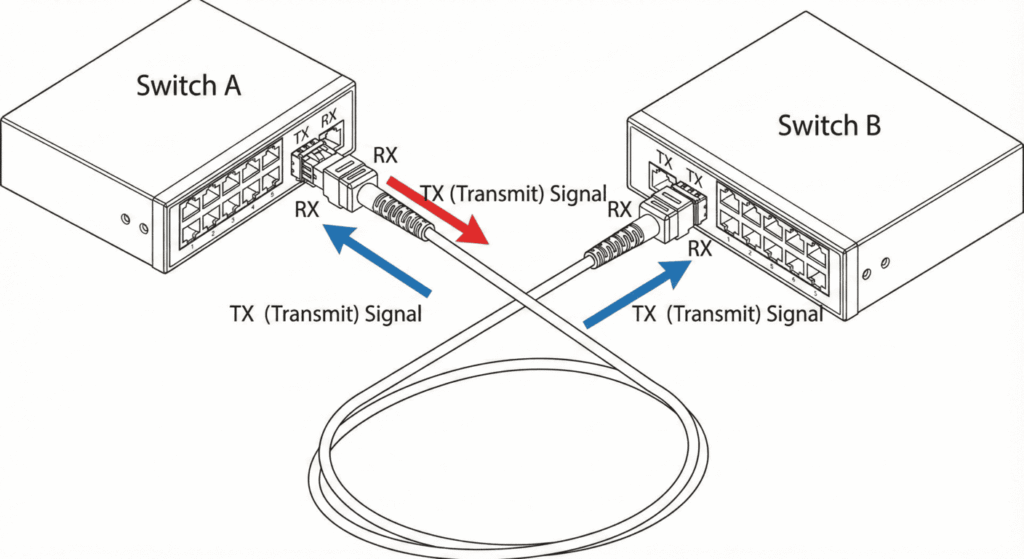
Fiber optic communication relies on light pulses to transmit data. The strength of this light is measured in dBm (decibel-milliwatts).
- TX Power (Transmit): The amount of light signal leaving the SFP module on your switch.
- RX Power (Receive): The amount of light signal arriving at the SFP module from the remote end.
Why dBm and not Watts?
In networking, we use a logarithmic scale.
- 0 dBm = 1 milliwatt (mW).
- -3 dBm = 0.5 mW (50% signal loss).
- -10 dBm = 0.1 mW.
Key Rule: The more negative the number, the weaker the signal. For example, -20 dBm is a much weaker signal than -5 dBm.
How to Check Light Levels on Cisco Switches
To see these statistics, your Cisco transceiver must support DOM (Digital Optical Monitoring). Most genuine Cisco and high-quality third-party compatible modules support this.
Use the following command in the CLI:
Switch# show interfaces transceiver detailOr, to check a specific interface:
Switch# show interfaces GigabitEthernet1/0/1 transceiver detailUnderstanding the Output
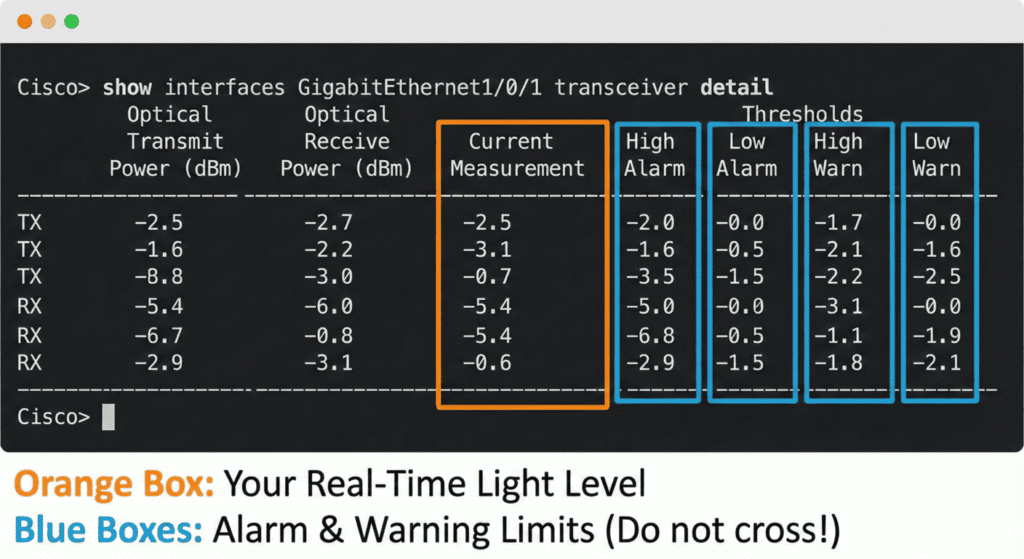
Here is a typical output from a healthy connection. Let’s break down what matters.
Optical   High    Low    High    Low
                                Transmit  Alarm   Alarm  Warn    Warn
Port      Temp  Voltage  Current Power    Power   Power  Power   Power
          (C)   (Volts)  (mA)    (dBm)    (dBm)   (dBm)  (dBm)   (dBm)
--------  ----  -------  -----   -------  -----   -----  -----   -----
Gi1/0/1   30.2  3.30     6.2     -2.5     1.0     -9.5   0.0     -9.0
                                 [TX]     ^^^^ Thresholds ^^^^

                                Optical   High    Low    High    Low
                                Receive   Alarm   Alarm  Warn    Warn
Port      Temp  Voltage  Current Power    Power   Power  Power   Power
          (C)   (Volts)  (mA)    (dBm)    (dBm)   (dBm)  (dBm)   (dBm)
--------  ----  -------  -----   -------  -----   -----  -----   -----
Gi1/0/1   30.2  3.30     6.2     -5.4     1.0     -17.0  0.0     -16.0
[RX]- Optical Transmit Power (TX): The strength of the laser your module is firing. If this is too low, your module’s laser might be dying.
- Optical Receive Power (RX): The most critical metric. This tells you how much light is making it through the fiber cable to your switch.
- Thresholds (Alarm/Warn): These are hard-coded limits. If the value crosses these numbers, the switch logs a syslog message or shuts down the port.
Reference Guide: Normal Light Levels for Common Cisco Modules
Different modules are designed for different distances, which means they operate at different power levels. Below is a general reference guide for 10G SFP+ modules.
|
Module Type |
Reach |
Typical TX Range (dBm) |
Min RX Sensitivity (dBm) |
Max RX Overload (dBm) |
|---|---|---|---|---|
|
10G-SR (Multimode) |
300m |
-7.3 to -1 |
-11.1 |
-1.0 |
|
10G-LR (Singlemode) |
10km |
-8.2 to +0.5 |
-14.4 |
+0.5 |
|
10G-ER (Singlemode) |
40km |
-4.7 to +4.0 |
-15.8 |
-1.0 |
|
10G-ZR (Singlemode) |
80km |
0 to +4.0 |
-24.0 |
-7.0 |
Note: Always check the specific datasheet for your transceiver model, as values can vary slightly by manufacturer.
Troubleshooting: Why is my signal bad?
As a solution engineer, I see three common scenarios when analyzing show interfaces transceiver detail.
Scenario 1: Low RX Power (e.g., -25 dBm on an LR link)
The Problem: The light arriving is too weak to be read. Common Causes:

- Dirty Connectors: Dust is the #1 enemy of fiber. Even a speck of dust can block light.
- Cable Bend: The fiber patch cord is bent too tightly (macro-bend).
- Distance Exceeded: Trying to use an SR (300m) module for a 500m run.
- Bad Splicing: Poor quality fusion splicing in the fiber plant.
The Fix:
- Clean the fiber ends using a specialized One-Click Cleaner (We recommend checking our [Fiber Cleaning Kits]).
- Swap the patch cord.
- If the distance is too long, upgrade to a longer-range module (e.g., switch from LR to ER).
Scenario 2: High RX Power (Optical Overload)
The Problem: The signal is too strong and is blinding or burning the receiver. Common Causes:
- Using a Long-Range module (like ZR 80km) for a Short-Range test (e.g., connecting two switches in the same rack).
The Fix:
- NEVER plug an ER or ZR module directly into another without fiber length.
- Use an Optical Attenuator. This is a passive device that reduces signal strength. For a ZR module used over short distances, a 10dB or 15dB attenuator is usually required to prevent permanent hardware damage.
Scenario 3: Low TX Power
The Problem: Your switch is not sending enough light. Cause: The laser diode inside the SFP module has degraded over time or failed. The Fix:
- Replace the transceiver immediately.
Summary
Understanding TX and RX light levels is the scientific way to manage your network infrastructure. Stop guessing why a link is slow and start measuring.
- Rx too low? Clean your fiber or check your cable path.
- Rx too high? Add an attenuator before you burn the optic.
- Need reliable optics?
FAQ
Q1: What is a good dBm range for Cisco SFP modules?
A “good” range depends on the module type. Generally, for a standard 10G-SR (Short Range) module, the RX power should be between -2 dBm and -9 dBm. For 10G-LR (Long Range), it is typically between -3 dBm and -12 dBm. Always ensure the level is higher than the “Receiver Sensitivity” limit found in the Cisco datasheet.
Q2: What causes low RX power on a Cisco switch?
Low RX power is usually caused by dirty fiber connectors, damaged cables, excessive bending of the fiber patch cord, or exceeding the maximum distance of the transceiver. It can also indicate a failing transmitter at the remote end.
Q3: Can high TX/RX power damage my equipment?
Yes. If the optical signal is too strong (e.g., using an 80km ZR module for a 10 meter connection), it can permanently burn out the receiver (ROSA). In these cases, you must use an Optical Attenuator to lower the dBm levels to a safe range.
Q4: How do I check SFP light levels on a Cisco Nexus switch?
On Cisco Nexus (NX-OS), the command is slightly different. Use show interface Ethernet1/1 transceiver details to view the TX and RX power levels along with DOM thresholds.