
What Happens When Cisco DNA License Expires? What Still Works and What Stops
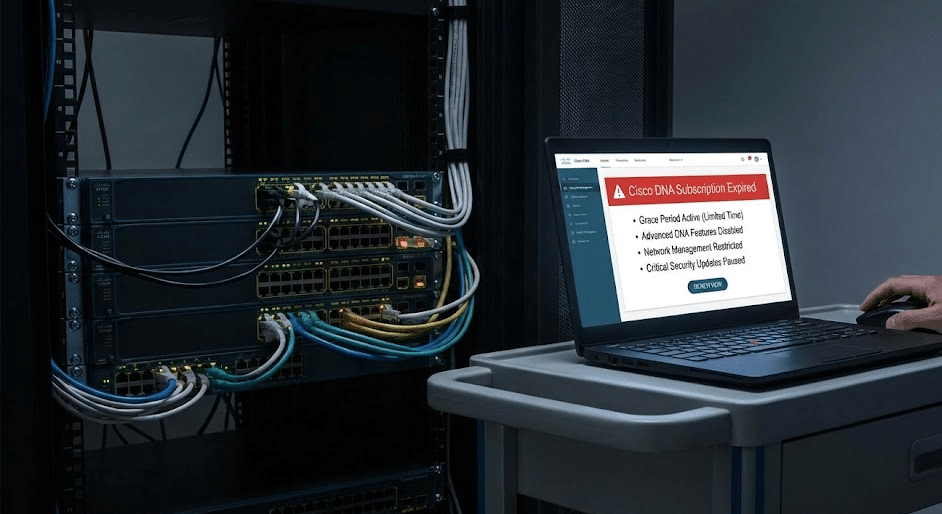
When a Cisco DNA license expires, a Catalyst 9200 or 9300 switch does not suddenly stop forwarding traffic. In most cases, the switch keeps working for basic network connectivity, but the subscription layer expires. That means the real impact is usually not “the switch is dead.” The real impact is that advanced management, automation, analytics, software-related entitlement, and controller-driven workflows may be reduced, limited, or lost.
If you want the broader picture behind Cisco licensing, subscription terms, Smart Accounts, and renewal planning, start with our Cisco Licensing Ultimate Guide.
This is the part many teams discover too late. A network can stay up, users can still pass traffic, and yet the operating model around the network may change in important ways. That is why this question matters to both technical teams and procurement teams. For some organizations, DNA expiration is manageable. For others, it creates immediate operational friction.
This guide focuses on the scenario most buyers and IT managers actually care about: Catalyst 9200 and 9300 switches in real enterprise use.
Short Answer: Does the Switch Stop Working When Cisco DNA Expires?
No, a Catalyst 9200 or 9300 switch does not simply stop working when the Cisco DNA subscription expires.
Basic switching and routing functions that depend on the underlying perpetual software layer generally continue. The hardware does not become unusable just because the DNA subscription term ends.
But that short answer is only half the story.
What expires is the subscription layer. If your team depends on Cisco DNA-driven management, advanced assurance, automation workflows, or subscription-linked software capabilities, the operational effect can still be significant. So the better summary is this:
The network usually stays online, but the subscription-based operating model changes.
Cisco DNA Expiration at a Glance
| Area | What Still Works | What You Lose or Limit | Why It Matters |
|---|---|---|---|
| Basic connectivity | Core switching and routing functions usually continue | Nothing dramatic at the packet-forwarding level | The switch can remain in production |
| Device operation | The hardware still powers on and carries traffic | Subscription-based capabilities are affected | Teams often confuse “still running” with “no impact” |
| Centralized management | Local device access and basic management remain possible | Controller-driven workflows may be reduced or unavailable | Operations become more manual |
| Automation | Manual configuration remains possible | DNA-driven automation and orchestration value may be lost | Day-to-day work becomes less efficient |
| Assurance and analytics | Basic visibility may remain through other tools | Richer assurance and advanced analytics can be lost | Troubleshooting and trend analysis get harder |
| Software-related entitlement | Existing installed software continues running | New subscription-linked updates and support paths may be affected | Lifecycle planning becomes harder |
| Renewal flexibility | You can still evaluate your options | Delay may create planning gaps | Decisions should be made before expiration, not after |
What Still Works After a Cisco DNA License Expires
This is the part people usually want to hear first.
Basic Layer 2 and Layer 3 Forwarding
If your Catalyst 9200 or 9300 is being used for normal switching and routing, the switch usually continues to forward traffic after the DNA subscription expires. VLANs, routing, uplinks, and ordinary network traffic do not simply stop because the subscription term ended.
This is why many customers ask, “So why renew at all if the switch still works?”
That is a fair question. But it only makes sense if you first separate data plane continuity from operations and lifecycle capability.
The Perpetual Network Layer Remains
Cisco DNA should not be understood as the entire software identity of the switch. In these switching platforms, there is an underlying network software layer that remains tied to the hardware. That is one reason the device can continue running after the DNA term expires.
From an end-user perspective, this means the switch can still behave like a switch. It does not become a dead asset overnight.
Why the Device Can Stay in Production
For some environments, this is exactly why non-renewal can be a valid decision. If a team only uses the switch for straightforward access switching and does not depend on DNA-driven workflows, the practical impact of expiration may be smaller than expected.
This is especially true in organizations where:
- the network is stable
- advanced automation is not being used
- the team manages switches directly
- the hardware is already close to planned refresh
In those cases, the switch may stay in production just fine. But that does not mean nothing changed.
What Stops or Becomes Limited After Cisco DNA Expires
This is where the real business decision begins.
Advanced Cisco DNA Features
The first loss is not usually core connectivity. It is the subscription-based feature set that sits on top of that connectivity. The exact list depends on the deployment, but the broader pattern is consistent: advanced DNA value is where expiration becomes visible.
If your organization bought DNA largely because it wanted more than basic switching, this is the section that matters.
Catalyst Center or DNA Center-Driven Workflows
For many enterprise teams, the biggest change is not on the switch CLI. It is in the management plane.
If your environment depends on Cisco DNA Center or Catalyst Center workflows, expiration can reduce the value of that operating model. The switch may still carry traffic, but centralized workflows can become harder to justify, harder to maintain, or less effective.
This is one of the biggest gaps in current search results. Too many pages say “the switch still works” without saying what operations teams actually lose.
If your environment depends on:
- centralized provisioning
- controller-driven policy workflows
- automation at scale
- assurance-based troubleshooting
- platform-level visibility across multiple sites
then DNA expiration matters much more than a basic packet-forwarding answer suggests.
Assurance, Analytics, and Visibility
This is where many teams feel the impact first.
A switch may remain online, but your ability to use richer visibility, assurance logic, and analytics may be reduced or lost. From a pure connectivity standpoint, that may sound acceptable. From an operations standpoint, it can change how quickly your team finds issues, how well it understands user experience, and how confidently it manages a large environment.
In smaller networks, that loss may be tolerable. In larger campus environments, it can be a serious downgrade in day-to-day operational quality.
Software-Related Entitlement and Future Updates
Another important effect is software-related entitlement.
Expiration does not usually remove the software image already running on the switch. But it can affect the future path: what your team can access, how it plans upgrades, and how comfortably it can move forward with software lifecycle decisions.
This is where many non-renewal decisions feel fine at first, then become painful later. The switch still works, so the decision seems harmless. Then an upgrade need appears, or a security review happens, or the organization wants to standardize the environment again, and suddenly the expiration matters more than anyone expected.
Cisco DNA Expiration vs Real Network Impact
The best way to think about expiration is this:
network continuity may remain, but operational maturity may drop.
What Changes for Operations Teams
If the switch is mostly managed manually and the team does not rely heavily on DNA-based workflows, expiration may not create immediate pain.
But if the network team has built its operating habits around centralized workflows, automation, and richer visibility, the loss is not theoretical. The network might stay online, yet the team has to work harder to run it well.
What Changes for IT Managers and Procurement Teams
For IT managers, the question is not just “Will users lose connectivity?” It is also:
- will the team become less efficient
- will troubleshooting take longer
- will future changes become harder
- are we increasing lifecycle risk by not renewing
This is why DNA renewal is not only a technical decision. It is also an operational budgeting decision.
What Changes for Long-Term Planning
Expiration can also shift the long-term picture. If the switch is near the end of its useful role in your environment, non-renewal may be rational. But if the switch will remain in place for years and is part of a managed campus strategy, the cost of losing subscription-linked operational value may outweigh the savings from skipping renewal.
Does Cisco DNA Expiration Affect Catalyst Center?
Yes, and this is one of the most important reasons some customers choose to renew.
If your environment uses Catalyst Center as more than just a nice dashboard, DNA expiration should be evaluated carefully. The switch may still be operational at the device level, but controller-driven workflows, management consistency, and visibility can be affected.
For example, teams that depend on centralized orchestration, assurance, and broader operational workflows often discover that the switch staying online is not the same thing as the operating model staying intact.
That is why one of the smartest pre-expiration questions is:
If we stop renewing, can we still run this environment the way we actually manage it today?
If the honest answer is no, then the renewal decision becomes easier.
Do You Need to Renew Cisco DNA? A Practical Decision Table
This is the question most buyers really want answered.
| Situation | Renewal Usually Makes Sense | Non-Renewal May Be Acceptable |
|---|---|---|
| You only use the switch for basic access switching | Not always necessary | Often reasonable |
| You rely on Catalyst Center workflows | Usually yes | Risky |
| You use advanced automation or assurance | Usually yes | Usually not a good fit |
| The switch is close to refresh or replacement | Not always | Often reasonable |
| The network is stable and managed manually | Maybe not | Often reasonable |
| You expect future growth, upgrades, or architecture changes | Usually yes | Can create future friction |
| Your team worries the switch will stop passing traffic | Renewal may not be needed for that reason alone | Basic forwarding usually continues |
| Your team wants to preserve the current management experience | Usually yes | Operational downgrade likely |
The simplest version is this:
- If you only use the switch for basic switching, non-renewal can be a rational choice.
- If you depend on subscription-based operations, renewal usually matters much more.
When Renewal Is Usually Worth It
Renewal usually makes sense when the subscription is tied to real daily value, not just theoretical value.
That often includes environments where:
- Catalyst Center is part of normal operations
- automation is already in use
- assurance and richer analytics matter
- the network is growing or changing
- the organization wants a clean software and lifecycle path
In these environments, renewal is less about “keeping the switch alive” and more about keeping the operating model intact.
When Non-Renewal May Be Acceptable
Non-renewal may be acceptable when the switch is mostly being used as a stable connectivity device and the business does not rely on DNA-specific workflows.
This often matches the real-world scenario you mentioned:
the customer only uses basic switching and does not plan to renew.
That can be a reasonable business choice if:
- the team understands what it is giving up
- the environment does not rely on controller-driven workflows
- the switch is already in a stable operational phase
- the organization has a refresh plan or low complexity environment
The key is not to confuse “can” with “should.” Non-renewal can be fine, but only if it is a deliberate choice.
How to Prepare Before a Cisco DNA License Expires
The best time to think about expiration is not the day it ends.
Review What You Actually Use
Many organizations renew because they assume they need DNA, not because they checked what they actually use. Others skip renewal without realizing how dependent they are on the subscription layer.
Review:
- what features are actually in use
- whether Catalyst Center is operationally important
- whether the team depends on assurance and analytics
- whether any future upgrade plans depend on subscription-linked access
Check Management Dependencies
This is critical for 9200 and 9300 environments that were rolled out with a controller-led operating model. If the management workflow depends on centralized capabilities, do not wait until expiration to test what life looks like without them.
Align Renewal with Hardware Lifecycle
This is one of the most underused decision points.
If the switch is nearing refresh, a long renewal may not make sense. If the hardware still has years of useful life and remains strategically important, renewal may be easier to justify.
That is why DNA subscription planning should be tied to hardware lifecycle planning, not treated as a separate afterthought.
Create a Fallback Plan if You Will Not Renew
If the team decides not to renew, it should plan for that choice.
That means documenting:
- how switches will be managed
- what operational visibility will remain
- how upgrades will be handled
- how troubleshooting will change
- what the next hardware refresh timeline looks like
A non-renewal decision without an operational fallback plan is usually where avoidable pain starts.
Common Mistakes Teams Make When Cisco DNA Expires
Assuming “Still Works” Means “No Real Impact”
This is the biggest mistake. The switch still forwarding traffic does not mean operations, visibility, and lifecycle planning remain unchanged.
Waiting Too Long to Review Feature Usage
If a team only reviews usage after expiration, it is already reacting instead of planning.
Treating Renewal as a Pure Finance Decision
This is another common mistake. Renewal is partly a budget decision, but it is also a management model decision. Some environments save money by not renewing. Others create much bigger downstream cost by losing operational efficiency.
Forgetting How Much the Team Depends on Centralized Workflows
A team can become used to the way Catalyst Center supports the environment, then underestimate what changes when that subscription-backed experience is no longer in place.
Ignoring Expiration Until an Upgrade or Support Need Appears
This is how DNA expiration surprises people. The network seems fine until a future need appears, and then the earlier decision suddenly has more consequences than expected.
FAQ
What happens when Cisco DNA license expires?
A Catalyst 9200 or 9300 switch usually keeps forwarding traffic after the Cisco DNA license expires, but subscription-based capabilities such as advanced management, automation, assurance, and parts of the software lifecycle path may be reduced or lost.
Do Cisco switches stop working when DNA expires?
No, they do not normally stop basic switching and routing just because the DNA subscription expires.
Can I keep using the switch without renewing Cisco DNA?
Yes, in many cases you can keep using it for basic network connectivity. But whether that is a good long-term decision depends on how much your team relies on subscription-driven workflows.
Does Cisco DNA expiration affect Catalyst Center?
Yes, it can. If your environment depends on Catalyst Center workflows, visibility, and operational automation, expiration may have a more noticeable effect.
Do I need to renew Cisco DNA if I only use basic switching?
Not always. If the environment only uses the switch for basic connectivity and does not depend on DNA-driven operations, non-renewal may be acceptable.
Final Recommendation
If your Catalyst 9200 or 9300 is only being used for basic switching, Cisco DNA expiration may be manageable. The switch usually continues to pass traffic, and some customers choose not to renew for exactly that reason.
But if your environment depends on Catalyst Center, advanced assurance, automation, or a cleaner lifecycle path, DNA expiration matters much more.
So the right question is not just:
Will the switch still work?
The better question is:
Will our network still be managed the way we need it to be managed after the subscription ends?
That is the decision that should drive renewal.

Layer23-Switch is a global Cisco supplier helping B2B buyers and IT teams review Cisco licensing, renewal timing, and network planning decisions before purchase or refresh.





