
Cisco PoE Budget Planning: How to Choose the Right Access Switch for Powered Devices
To plan PoE budget for an access switch, list every powered device, estimate the real power demand, add growth headroom, and compare that total to the switch’s usable PoE budget. The right switch is not the one with the most PoE ports. It is the one that can reliably power your actual mix of access points, IP phones, cameras, and other edge devices over the life of the deployment. Cisco’s own hardware documentation reflects this by publishing model-specific PoE budgets based on platform and power configuration, rather than treating all PoE-capable switches as equivalent.
If you are planning enterprise access switches, PoE budget should be treated as a separate design step, not a box to check at the end of model comparison. In many office refresh projects, teams get the port count right but still end up with the wrong switch because the powered-device load was never sized properly. That usually shows up later, after rollout, when fixing it is more disruptive and more expensive. For the broader campus decision framework, start with our Cisco switch selection guide for enterprise campus networks.
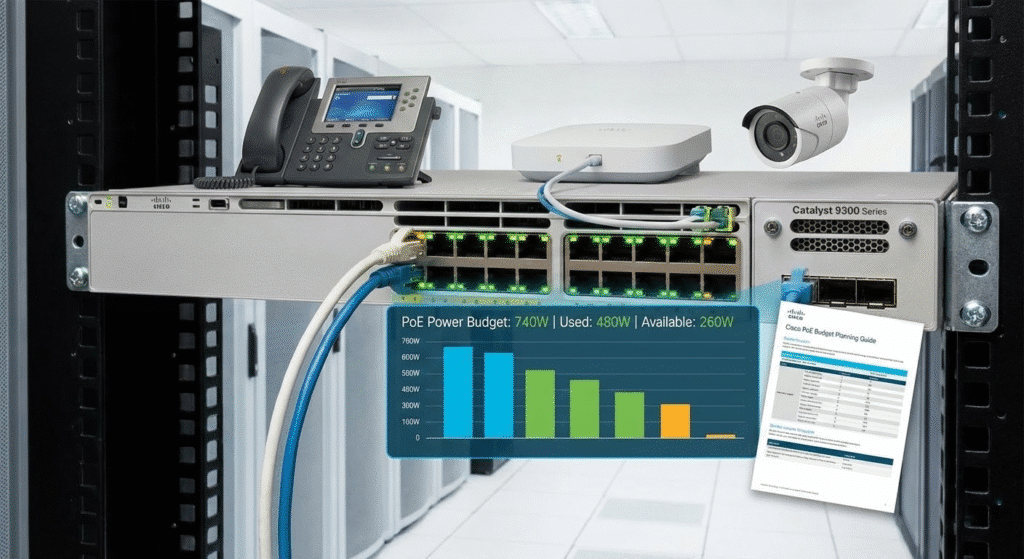
What Is PoE Budget on a Switch?
PoE budget is the amount of power a switch can actually allocate to connected powered devices. That includes endpoints such as wireless access points, IP phones, cameras, and readers. It is not the same as saying a switch “has PoE ports,” and it is not the same as the raw wattage printed on the power supply. Cisco’s Catalyst documentation shows this clearly by listing specific PoE budgets by model and power supply combination, such as 437 W for the C9300-48P with a 715 W AC power supply, 822 W for the C9300-48U and C9300-48H with an 1100 W AC power supply, and 505 W for C9300L-48P variants with a 715 W AC power supply.
That difference matters because two switches can both be PoE-capable and still deliver very different endpoint power in real deployments. A switch that looks fine in a quote can become the wrong choice if the actual powered-device mix is heavier than expected or if the next AP refresh was never included in the plan.
Why PoE Budget Planning Should Be a Separate Step in Access Switch Selection
Many buyers still use the same shortcut: they count PoE ports and assume the power side is covered. That is where mistakes start.
A switch can support PoE on many ports and still not have enough usable power for the real load at the same time. Cisco publishes separate PoE budgets by model because port count alone does not answer the real planning question. The real question is whether the switch can support the powered devices that will actually be connected to it.
Powered-device mix matters more than many teams expect. A closet with 24 IP phones behaves very differently from a closet with multiple Wi-Fi access points, cameras, room devices, and readers. In real projects, PoE planning usually fails for one of three reasons: the team buys for current devices only, assumes PSU wattage equals endpoint power, or chooses the switch before calculating the powered load.
That is why PoE budget planning should sit inside the access-switch selection process as its own step. It helps you avoid underpowered closets, reduces post-install troubleshooting, and makes the final switch shortlist far more accurate.
Start With a Powered Device Inventory
Before comparing switch models, list every powered device the wiring closet may need to support during the switch lifecycle.
In most enterprise access environments, that includes some combination of:
- wireless access points
- IP phones
- security cameras
- badge readers
- room schedulers or room systems
- specialty PoE endpoints
This sounds basic, but it prevents one of the most common design errors. Teams often use a rough assumption like “we need PoE” instead of building a real device inventory. That usually works only until the first wireless expansion, camera request, or office layout change.
It also helps to group devices by how they behave. APs and cameras are often steady, always-on demand. Phones may be lower power per device but appear in much larger numbers. Mixed-use floors create uneven demand across ports even when the total endpoint count looks reasonable at first.
How to Calculate PoE Budget for Access Switches
If the question is “how do I calculate PoE budget for access switches?”, the process is simple:
- List every powered device in the closet.
- Estimate the expected power demand for each device type.
- Multiply by quantity.
- Add the totals together.
- Add headroom for future growth.
- Compare that number to the switch’s usable PoE budget, not just the number of PoE ports.
That is the most reliable way to choose the right access switch for powered devices. It is also the easiest way to avoid buying a switch that looks acceptable on day one but runs short on available power later.
Estimate Real Power Demand by Device Type
Different endpoint categories affect switch choice in different ways. Good PoE sizing starts with device type, not just total device count.
PoE Budget for Wireless Access Points
Wireless access points are often the biggest driver in PoE budget planning today. As AP generations become more capable, power demand can rise, and that changes the switch requirement faster than many teams expect. In wireless-heavy closets, power planning matters just as much as uplink planning because stronger AP deployments usually increase both power demand and traffic demand.
A common mistake is sizing the switch only for the APs installed today. In many office refresh projects, that becomes the weak point later, not because the switch has too few ports, but because the original power plan had no room for the next wireless cycle.
PoE Budget for IP Phones
IP phones usually draw less power per device than APs, but they still matter because of scale. A floor with dozens of phones can create a meaningful continuous load even when no single device looks demanding on its own.
Phones are a good example of why low-power devices should not be ignored. Many small, constant loads can consume usable PoE budget faster than buyers expect.
PoE Budget for Security Cameras
Security cameras are often treated as a separate facilities topic, but from a switch-planning perspective they belong in the same power conversation. Cameras create continuous demand and are usually not devices you want to troubleshoot after deployment because the closet was sized too tightly from the start.
Camera-heavy office areas, entry points, and mixed-use facilities can change the switch requirement quickly, especially when cameras are combined with APs and phones in the same closet.
Mixed Powered Devices Change the Math
Most enterprise access closets do not support one device type only. They support a mix.
That is where planning gets real. A closet that looks comfortable on total port count can still become power-constrained once APs, phones, cameras, and other powered devices are combined. In many mixed-use environments, buyers reach power limits earlier than they expected because the closet was evaluated by port count rather than by total powered demand.
Usable PoE Budget vs. Power Supply Wattage
This is one of the most important points in the whole selection process:
Power supply wattage is not the same as usable PoE budget.
The switch has to power its own internal components first. Only the supported remaining capacity is available for endpoints. That is why Cisco publishes explicit PoE budgets by model and power configuration. Cisco’s Catalyst 9300 platform documentation also shows that some models are non-PoE, while PoE-capable models can differ substantially in available endpoint power depending on the installed power supply and switch type.
This is also why comparing switches by PSU size alone often leads to the wrong answer. The better comparison is always:
real powered-device demand vs. published usable PoE budget
If you start there, the shortlist becomes much more accurate.
Add Headroom Before You Choose the Switch
Do not size PoE only for the devices plugged in today.
In many refresh projects, the current powered-device mix is not the final mix. New APs get added after a wireless survey. Extra cameras appear after a security review. Meeting rooms are upgraded. Reader devices and small edge systems grow over time. A switch that looked sufficient during procurement can become tight much sooner than expected if no headroom was built into the plan.
This is especially important in:
- wireless-heavy office floors
- mixed-use enterprise areas
- spaces with frequent layout changes
- closets expected to stay in service for several years
A practical rule is simple: do not design for a perfectly full PoE budget. Leave room for realistic growth and operational flexibility.
What Happens If Switch PoE Budget Is Exceeded?
When switch PoE budget is exceeded, the result is not just a spreadsheet problem. It becomes an operations problem.
Devices may not receive the expected level of power, deployment may require troubleshooting, and teams may need to reprioritize or redesign the powered layout after rollout. Cisco publishes a dedicated troubleshooting workflow for PoE on Catalyst 9000 switching platforms, which is a good reminder that power-delivery issues are real field problems, not just theory.
That is why it is much cheaper to solve PoE sizing during planning than after installation.
How to Choose the Right Cisco Access Switch Based on PoE Requirements
Once powered-device demand is clear, switch selection becomes much easier.
For a standard office floor with a moderate number of APs and phones, a switch with moderate usable PoE budget may be enough if the growth plan is limited.
For a wireless-heavy access closet, the priority usually shifts toward stronger usable PoE budget because AP growth can change the requirement quickly.
For a camera-heavy or mixed powered environment, the safer choice is usually the switch class that can support continuous demand without running too close to the edge of its available power.
For a future-looking deployment where AP capability, room devices, or endpoint count are likely to rise, the better decision is often the switch that leaves room for that increase rather than the one that only matches today’s inventory.
Cisco’s official Switch Selector is useful for narrowing product families after you define the requirement. Cisco describes it as a tool to help identify the right switch based on deployment needs.
A Simple PoE Budget Planning Workflow
If you want a clean workflow you can reuse across projects, use this:
1. List every powered device
Build a real inventory for the closet.
2. Estimate per-device power demand
Group devices by APs, phones, cameras, readers, and other endpoints.
3. Calculate total powered load
Add the expected demand across the full device mix.
4. Add growth headroom
Leave room for future APs, cameras, and endpoint changes.
5. Compare that total to the switch’s usable PoE budget
Do not compare it to PoE port count alone.
6. Shortlist the right Cisco access switch class
Only now should detailed model comparison begin.
This order matters. If you choose the switch first and calculate the power later, you are much more likely to size the closet incorrectly.
Common PoE Budget Planning Mistakes
Confusing PoE Ports With Total Power Budget
A switch can support PoE on many ports and still not have enough usable power for the real load. Cisco’s model-specific budget tables exist for exactly this reason.
Planning for Current Devices Only
PoE demand often grows after rollout. APs are upgraded. Cameras are added. Room systems change. Buying only for today’s devices is one of the fastest ways to shorten the useful life of the switch choice.
Ignoring AP Refresh Cycles
Wireless upgrades can increase both bandwidth demand and power demand. A switch that fits the current AP generation may not be the right fit for the next one.
Forgetting Mixed Powered-Device Demand
APs, phones, cameras, and room devices create a very different power profile than a single-device environment. Mixed closets are where rough assumptions fail fastest.
Choosing the Switch Before Calculating Power Needs
This is usually the most expensive mistake because it turns a design question into a post-deployment correction.
FAQ
What is PoE budget on a switch?
PoE budget is the amount of power a switch can actually allocate to connected powered devices. It is not the same as simply having PoE ports, and it is not just the PSU wattage. Cisco publishes model-specific PoE budgets because usable endpoint power varies by platform and power setup.
How do I calculate PoE budget for access switches?
List all powered devices, estimate their expected power demand, total the load, add growth headroom, and compare that number against the switch’s usable PoE budget.
Does every PoE port provide full power?
Not automatically. Real behavior depends on the switch model, the total available budget, and the demands of all powered devices sharing that budget. Cisco’s PoE configuration and troubleshooting documentation both reflect that power allocation is a real planning and operations issue.
How many PoE devices can a switch support?
That depends on the mix of devices and the switch’s usable PoE budget. A switch may support many lower-power devices or fewer higher-power ones. The real answer comes from total power draw, not port count alone.
What happens if switch PoE budget is exceeded?
The switch may not be able to deliver the expected power profile to all endpoints, which can lead to deployment and troubleshooting problems after rollout. Cisco publishes a dedicated Catalyst 9000 PoE troubleshooting workflow because these issues do happen in real installations.
How do I choose a Cisco switch based on PoE requirements?
Start with the powered-device inventory, calculate the real total demand, add future headroom, then compare that requirement to the published PoE budgets of the switch models you are considering.
Conclusion
Cisco PoE budget planning is one of the most important parts of access-switch selection because it connects the switch directly to the devices the business actually depends on. APs, phones, cameras, and other powered devices all compete for the same finite power pool, and the wrong assumption early in the project often becomes an expensive correction later.
The best approach is straightforward: list every powered device, estimate real demand, add growth headroom, and compare that total against the switch’s usable PoE budget, not just the number of PoE ports or the PSU label. That gives you a much better chance of choosing the right access switch the first time.
For broader campus-level planning, read our Cisco switch selection guide for enterprise campus networks.






