
Cisco StackWise vs StackWise Virtual: Differences and Design Choices
Quick answer: Cisco StackWise connects compatible switches through dedicated stacking ports and typically suits access-port expansion, while StackWise Virtual connects two supported chassis through an SVL using supported network interfaces. Both provide one logical system with distributed forwarding, so the choice depends on platform compatibility, placement, port budgets, surviving capacity, and maintenance requirements. VSS belongs in the comparison when assessing an older campus system for replacement.
What Are Cisco StackWise and StackWise Virtual?
Cisco StackWise and StackWise Virtual combine physical switches into one logical system, using dedicated stack connections for physical StackWise and an SVL between two supported chassis for StackWise Virtual.
Cisco StackWise: Physical Stacking Across Compatible Switches
Cisco StackWise is a physical stacking technology that connects compatible switches through dedicated stack interfaces and cables. The members share system management and configuration while retaining their own forwarding hardware. On platforms such as the Catalyst 9300, the stack operates with an Active control role, a Standby role, and distributed forwarding across its members.
For example, three compatible access switches in one wiring closet can provide ports across one managed system, with uplinks distributed across members. Cisco describes this architecture in its Catalyst 9300 StackWise white paper. Our explanation of how Cisco StackWise works follows the physical ring, member roles, and packet paths in more detail.
Cisco StackWise Virtual: Two Chassis Operating as One Logical Switch
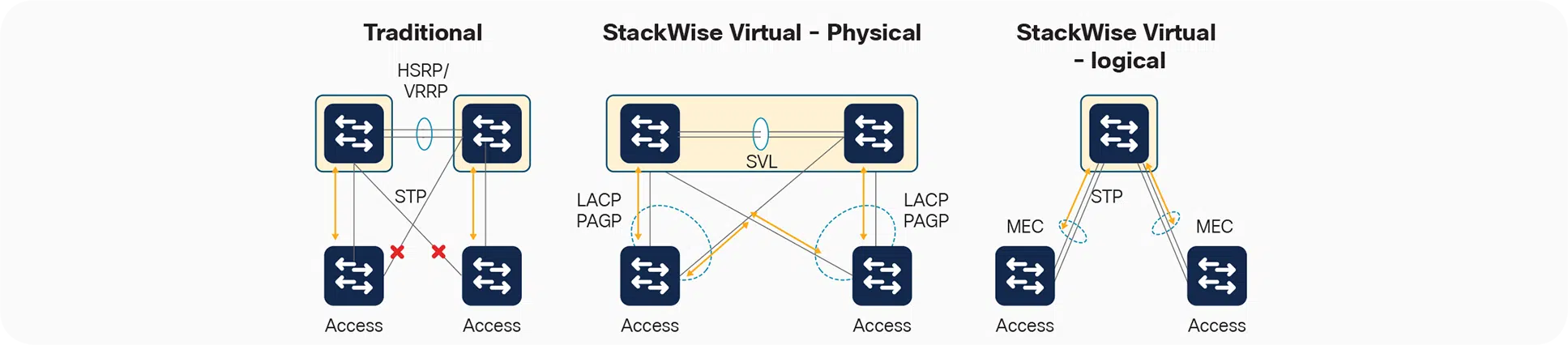
StackWise Virtual combines two supported switches into one logical control and management system. Supported front-panel interfaces form the StackWise Virtual Link, or SVL, between the chassis. The pair can present interfaces on both chassis as one multichassis EtherChannel, or MEC, to a connected device. Dual-active detection (DAD) identifies the condition in which both chassis believe they hold the Active role; it does not carry backup user traffic.
One chassis holds the Active control role and the other provides Standby control capacity. Both can forward traffic through their hardware during normal operation. Cisco’s StackWise Virtual architecture white paper explains that separation between control roles and forwarding activity. For a virtual-pair design, map which traffic crosses the SVL and how MEC and DAD respond to failures before sizing the connections.
The shared principle is straightforward: one logical system can contain several active forwarding devices. A Standby control role does not mean all ports on that chassis sit idle. It also means the design retains shared software and configuration risks alongside its hardware redundancy.
What Are the Key Differences Between Cisco StackWise and StackWise Virtual?
Cisco StackWise and StackWise Virtual differ in their interconnects, supported platforms, member expansion, placement constraints, and interface budgets, which determine how the system grows and survives failures.
The following comparison uses established Catalyst 9200/9300 stacking families and supported Catalyst 9400/9500/9600 StackWise Virtual configurations as examples. It is a design overview, rather than a complete list of current Cisco platforms.
| Design dimension | StackWise | StackWise Virtual |
|---|---|---|
| Physical interconnect | Dedicated stack interfaces, supported adapters where required, and stack cables | Supported front-panel interfaces configured as SVL connections |
| Members and expansion | Up to eight members in the C9200/L and C9300 families discussed here; compatible combinations still apply | Two chassis form the logical system; expansion depends on their available ports and platform capabilities |
| Platform examples | C9200/L and C9300/L/LM/X, with separate compatibility groups | Supported C9400, C9500, and C9600 configurations; supervisor and software conditions vary |
| Placement and reach | Constrained by supported stack-cable lengths and physical layout | Constrained by supported interfaces, media, optics, and connection requirements |
| Bandwidth interpretation | Stack-fabric ratings depend on the model and architecture | SVL capacity depends on its supported physical members and the traffic crossing between chassis |
| Uplinks and port budget | Cross-stack EtherChannel spreads uplinks across members; stack connections use dedicated interfaces | MEC spreads connections across chassis; reserve appropriate resources for SVL and dual-active detection |
| Maintenance planning | Check the exact platform and supported upgrade method | Check the exact platform, operating mode, and source-to-target software upgrade path |
How Do Placement, Capacity, and Maintenance Affect a Cisco StackWise or StackWise Virtual Design?
Placement sets the required reach and cabling, failure-state traffic sets the surviving capacity requirement, and the supported upgrade procedure sets the maintenance plan for a Cisco StackWise or StackWise Virtual deployment.
Location, Expansion, and Port Budget
Consider the next expansion step. If a wiring closet needs another group of access ports, adding a compatible physical stack member may fit the existing operating model. Check rack space, power, cabling, member limits, and whether the enlarged stack still has sufficient uplink capacity.
A two-node distribution design has a different resource budget. StackWise Virtual consumes interfaces for communication between chassis and requires an effective dual-active detection design. Price and capacity comparisons should therefore include the interfaces and optics left for production connections after those resources are allocated.
For a concrete port budget, each C9500-24Y4C has four 40/100G interfaces. Assigning two to 100G SVL leaves two per chassis for other connections at those speeds. A requirement for four 100G production interfaces plus two 100G SVL interfaces per chassis exceeds that layout. Revisit the platform or port plan before ordering.
Longer reach can help separate chassis physically, but it does not establish that a proposed connection is supported. Select the exact interfaces and media before committing to a rack, building, or fiber route. StackWise Virtual is not an arbitrary tunnel through an existing network.
Bandwidth Under Normal and Failure Conditions
Begin with where traffic enters and leaves the system. A fabric-capacity label cannot tell you whether a particular application path has enough capacity. Likewise, a 100G SVL member describes one interface’s nominal rate, not the throughput available to every flow through the pair.
In a hypothetical distribution pair, some traffic may normally leave through an uplink on the chassis where it arrived. Losing that local exit can move traffic onto another path, potentially increasing demand on the inter-chassis connection. The surviving path must accommodate the changed load as well as any capacity lost in the failure.
Evaluate normal operation and credible degraded states separately. Include single-homed devices, uplink placement, and individual flow limits. Comparing “StackWise-1T” directly with “100G SVL” skips these requirements and compares unlike capacity measures.
Shared Failure Domains and Maintenance Windows
Redundant chassis can preserve a service only when the surviving system still has the necessary connections and capacity. A device attached solely to a failed chassis loses that attachment regardless of control-plane failover features.
Shared control and configuration also deserve their own review. A configuration error or common software defect can affect a logical system across multiple physical devices. Neither stacking label removes that risk. Evaluate hardware failures, shared operational mistakes, and software maintenance as separate events.
For upgrades, record the platform, running mode, current release, and target release. Consult Cisco’s Catalyst 9000 ISSU matrix for the applicable path. An available In-Service Software Upgrade feature does not establish that every proposed upgrade is supported or that every connected application will see no interruption.
What Changes When Replacing Cisco VSS with StackWise Virtual?
Replacing Cisco VSS with StackWise Virtual changes the supported hardware, interconnect implementation, configuration requirements, and upgrade procedures, so each existing service and interface must be mapped to the target platform.
VSS, VSL, and SVL: What the Names Mean
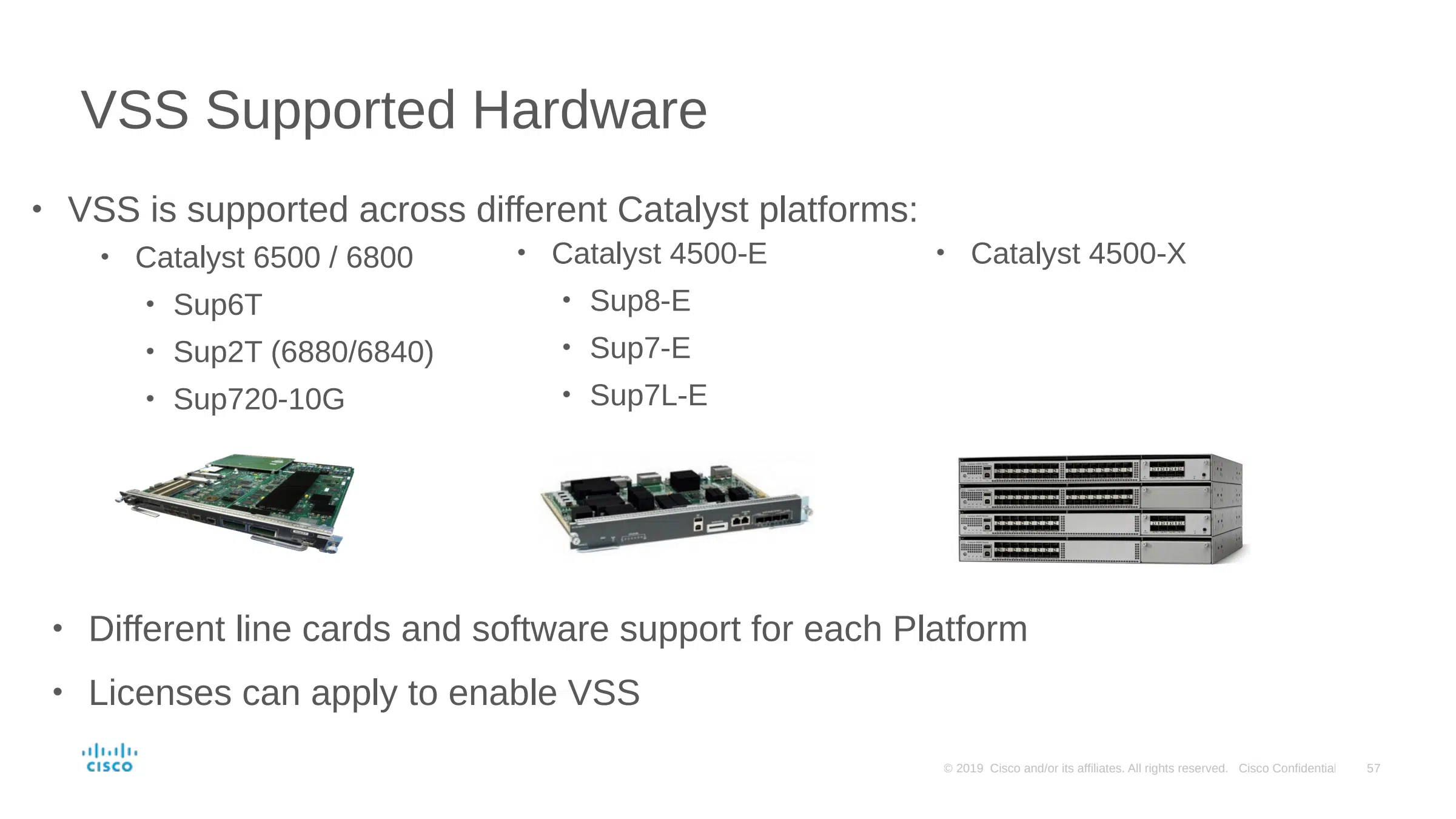
Virtual Switching System, or VSS, is Cisco’s related technology for combining supported switches in older campus platforms into a logical system. Installed examples include supported Catalyst 4500-X, 6500, and 6800 configurations. It is useful context when evaluating replacements for those systems.
VSS uses the term Virtual Switch Link (VSL) for its inter-chassis connection. StackWise Virtual uses StackWise Virtual Link (SVL). Searches for “SVL vs VSS” often use SVL as shorthand for the entire StackWise Virtual system. Strictly, that compares a link name with a system technology; the architectural comparison is VSS versus StackWise Virtual.
Shared Architecture and Platform Differences
The designs share important goals: a single logical system, Active and Standby control roles, forwarding on both chassis, multichassis EtherChannel, and protection against a dual-active condition. These similarities help an engineer understand a replacement architecture, but they do not establish interchangeable hardware or configuration.
Cisco’s Catalyst 6500/6800 to 9600 migration guide relates VSS to StackWise Virtual while identifying implementation differences. Use that relationship to organize a migration assessment. Check feature and interface behavior on the actual source and destination platforms.
| Technology | Typical installed-platform context | Interconnect name | Next design decision |
|---|---|---|---|
| StackWise | Compatible C9200 or C9300 family access stacks | Dedicated StackWise connections | Expand the supported stack or change the access design |
| VSS | Supported older Catalyst 4500-X, 6500, and 6800 systems | VSL | Map existing services and connections to a supported replacement |
| StackWise Virtual | Supported C9400, C9500, and C9600 deployments | SVL | Validate pair design, interconnect resources, and operating requirements |
What to Recheck Before Replacing VSS
Start with the services the existing pair provides: interfaces, VLANs, routing, EtherChannels, policy features, and attached equipment. Then compare the target’s support, scale, supervisor requirements, software, and licensing. Interface mapping matters because an equivalent logical function may use different physical resources or configuration.
Cisco’s 4500-X and 6880/6840-X to 9500 migration guide provides a platform-specific starting point. Its applicability follows those source and destination families.
Finally, plan how connections and services move, how the new system will be verified, and what would trigger a return to the previous arrangement. A familiar logical architecture helps with understanding; the replacement still needs its own change plan, maintenance window, and recovery criteria.
When Should You Choose Cisco StackWise or StackWise Virtual?
Evaluate Cisco StackWise for compatible access-port expansion and StackWise Virtual when two supported distribution or core chassis must act as one logical system; assess an existing VSS replacement against the services it must retain.
| Deployment need | Likely direction | What must still be verified |
|---|---|---|
| Add compatible access ports in the same wiring closet | Evaluate physical StackWise expansion | Member compatibility, rack and power space, full-ring cabling, uplink capacity, and maintenance impact |
| Present two supported distribution/core chassis as one logical node with multichassis port channels | Evaluate StackWise Virtual | Platform support, SVL resources, dual-active detection, surviving paths, and degraded capacity |
| Replace an installed VSS system | Assess the target architecture against existing services | Functional coverage, interface mapping, software and license requirements, migration sequence, and recovery plan |
Physical StackWise and StackWise Virtual can also be used at different layers of the same campus. In the following training example, access stacks provide endpoint ports while StackWise Virtual pairs consolidate the distribution and core systems. The technologies have separate roles; an access stack does not become a third member of the virtual pair.
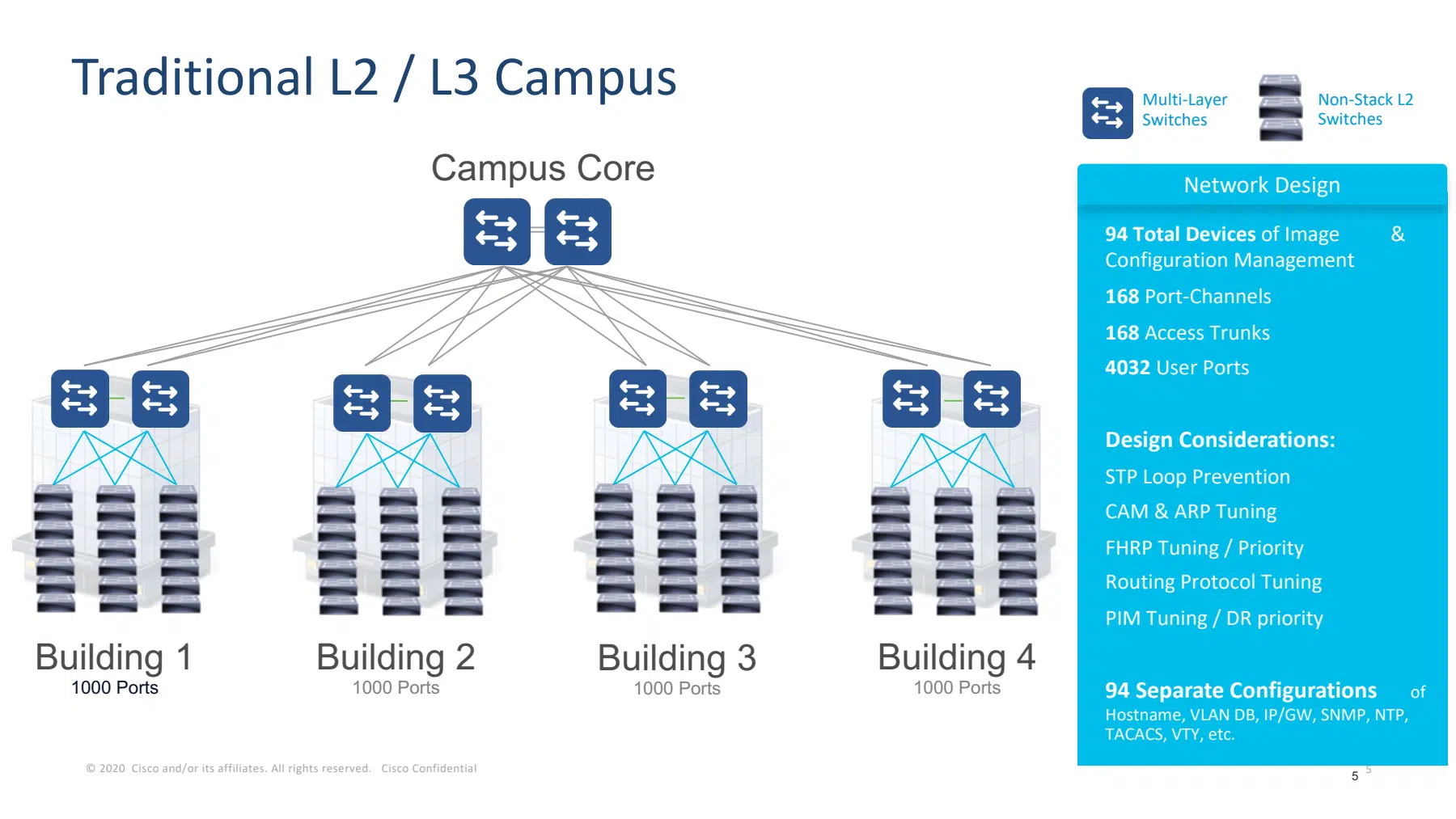
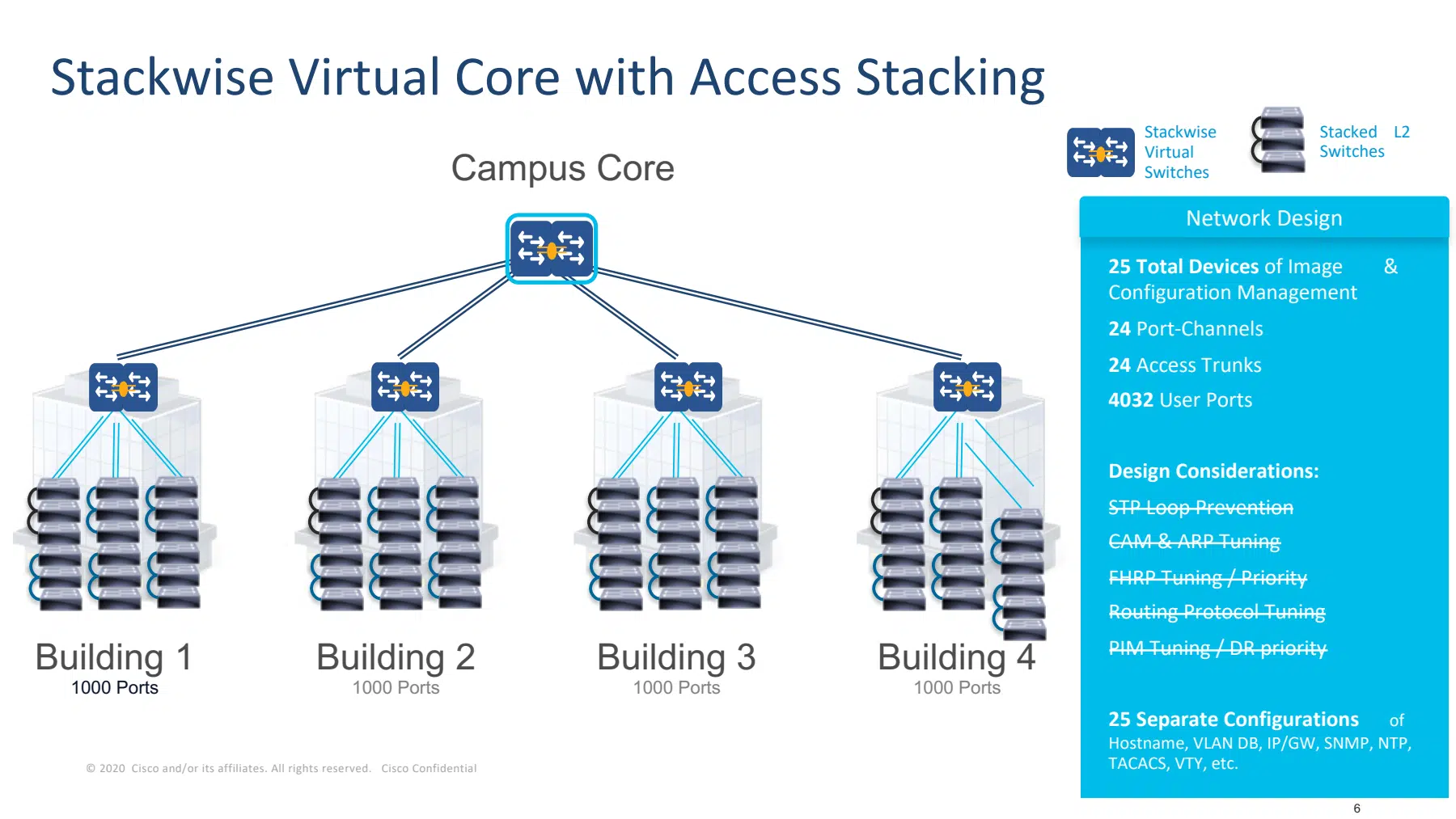
Read the change as a reduction in separately managed logical systems within this particular design. The source counts keep the endpoint-port total constant, but are not a universal savings ratio. The surviving uplinks, shared control boundaries and maintenance requirements still need to be checked at each layer.
When to Consider Independent Routed Switches
Consider independent routed switches when separate control planes and independent maintenance are central requirements, and the relevant network boundaries can use Layer 3 connectivity. This gives each node its own control and configuration context, with continuity depending on the routed topology and convergence design.
That choice changes the surrounding network. Review where gateways reside, which services depend on Layer 2 adjacency, how traffic uses alternate paths, and how operations will manage separate devices. It can suit a requirement for greater independence, but it cannot be substituted blindly for a pair that currently presents one bridge or one EtherChannel peer. Common software, automation, and physical dependencies still need review.
What Hardware Checks Are Required for Cisco StackWise and StackWise Virtual?
Before ordering Cisco StackWise or StackWise Virtual hardware, verify exact platform support, software and licensing, reserved connection resources, surviving capacity, physical dependencies, and change procedures:
- Exact hardware: Record PIDs, supervisors, line cards, and interface modules. Confirm their support for the proposed topology.
- Software and licensing: Check the applicable release guide, matching requirements, license level, and configuration prerequisites. For example, the Catalyst 9500 IOS XE 17.18 guide specifies Network Advantage and matching model, software, license, and SDM conditions for StackWise Virtual.
- Connection resources: Reserve supported ports, cables, and optics for the actual reach. Verify SVL and DAD port restrictions for the selected model.
- Surviving capacity: Check expected demand after a member, link, or chassis failure, including traffic that changes paths.
- Physical dependencies: Review power feeds, rack placement, cable routes, and shared failure points. Separate ports can still share one vulnerable route.
- Change and recovery: Define conversion requirements, maintenance windows, backups, validation, and a supported upgrade or recovery procedure.
Develop the pair’s interconnect and failure plan from the platform’s supported SVL, DAD, and MEC requirements. If the remaining question concerns fixed versus modular equipment, compare stacking vs chassis switches separately.

What Else Should Engineers Know When Comparing Cisco StackWise and StackWise Virtual?
Cisco StackWise and StackWise Virtual differ in supported hardware, member expansion, and interconnect requirements; an existing VSS system also needs a platform-specific replacement assessment.
-
What is the difference between SVL and VSS?
SVL means StackWise Virtual Link, the interconnect within a StackWise Virtual pair; VSS means Virtual Switching System, a related technology used on supported older Catalyst platforms. VSS calls its interconnect the Virtual Switch Link, or VSL. When comparing complete architectures, compare VSS with StackWise Virtual rather than treating SVL as the name of a separate switching system.
-
Can StackWise and StackWise Virtual be used in the same campus?
Yes. Compatible physical StackWise switches can provide access ports while a supported StackWise Virtual pair serves the distribution or core role. Standard Ethernet connections link those layers; the access stack does not become an additional member of the StackWise Virtual pair. Validate the inter-layer EtherChannel or routed design and each layer's separate compatibility requirements.
-
Can a Catalyst 9300 run StackWise Virtual instead of physical StackWise?
No. The C9300, C9300X, C9300L and C9300LM families discussed here use physical StackWise and do not provide the StackWise Virtual operating mode described for supported C9500 configurations. Connecting their front-panel Ethernet ports with fiber does not enable that mode; select a platform whose exact hardware and software support StackWise Virtual.
-
Is StackWise Virtual simply VSS with a new name?
No. They share goals such as one logical system, redundant control roles and forwarding across two chassis, but the platforms and implementations differ. Cisco's 6500/6800-to-9600 migration guide describes that relationship; a replacement still needs feature, interface, configuration and maintenance checks.
-
Is StackWise Virtual more reliable than a physical StackWise stack?
There is no universal reliability ranking: both designs share logical control and configuration while distributing forwarding hardware. Compare which links, endpoints and capacity survive the failures you need to tolerate, together with the required maintenance windows. StackWise Virtual does not remove common software or configuration risks simply because the chassis are separate.
-
Can StackWise Virtual connect switches in different buildings?
Potentially, if the exact platform, interfaces, optics and physical connection meet Cisco's support requirements. Check the actual fiber route, reach, SVL capacity and dual-active detection path before committing to the placement; a shared cable route can undermine the intended separation. StackWise Virtual is not an arbitrary tunnel through an existing routed network, and there is no single distance limit applicable to every platform.
-
Can I add a third switch to an existing StackWise Virtual pair?
No; the StackWise Virtual system described here consists of two chassis. A third switch cannot join that pair as another StackWise Virtual member. Plan growth through supported port or chassis capacity, or a separately designed system, rather than assuming the member expansion model of physical StackWise applies.
-
When should I choose independent routed switches instead of one logical pair?
Consider independent routed switches when separate control and configuration contexts and independent maintenance are priorities, and the relevant network boundary can use Layer 3 connections. Check gateway placement, Layer 2 dependencies and routing convergence before making the change. The independent design still needs a review of shared software, automation and physical dependencies.
-
How many 100G production ports remain on a C9500-24Y4C after reserving two for SVL?
Two 40/100G interfaces per chassis remain after assigning two of its four such interfaces to 100G SVL, before any other reservations. A requirement for four 100G production interfaces plus two 100G SVL interfaces per chassis therefore exceeds this layout. Check the C9500 hardware specifications and revise the platform or port plan before ordering.
Check stock, compare options, or talk with our team.





