NAT vs PAT: Key Differences, NAT Types, and How They Work
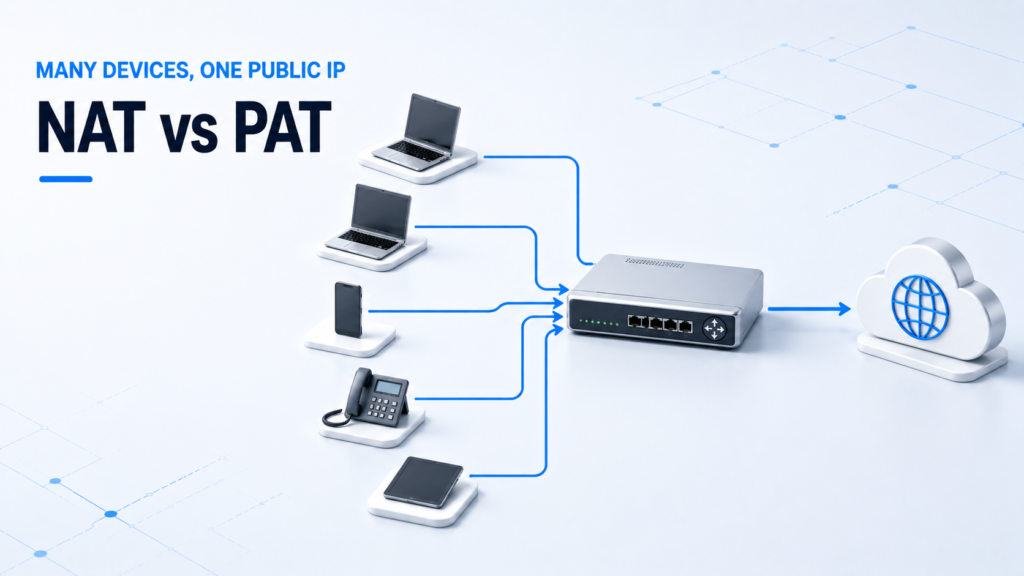
NAT and PAT both translate private IP addresses to public ones, but PAT also translates ports. Plain NAT (static or dynamic) maps addresses one-to-one; PAT — also called NAT overload or NAPT — maps many private hosts to a single public IP by giving each connection a unique port number. PAT is a type of NAT, and it is what home routers and most enterprise edge devices actually use.
The naming is where most confusion starts, because the same idea has three names and PAT is often described as if it were separate from NAT. The table below is the quick comparison; the sections after it cover the NAT types, the port mechanism that makes PAT work, a worked example, and the standards that define both.
NAT vs PAT: Quick Comparison Table
| Dimension | NAT (static / dynamic) | PAT (NAT overload) |
|---|---|---|
| What it translates | IP address only | IP address + transport port |
| Mapping | One-to-one | Many-to-one |
| Public IPs needed | One per active inside host | One shared by many hosts |
| How return traffic is matched | By the inside global IP | By the unique port (and protocol) |
| Also called | Static NAT, dynamic NAT | NAT overload, NAPT |
| Typical use | A server needing a fixed public IP (static); a small pool (dynamic) | Home and most enterprise internet access |
| Relationship | The umbrella concept | A type of NAT |
The one line to remember: NAT changes addresses; PAT changes addresses and ports so that many devices can hide behind a single public IP.
What Is NAT?
NAT (Network Address Translation) rewrites the IP addresses in a packet as it crosses the boundary between a private network and the public internet. In Cisco’s terms, NAT “translates the private (inside local) addresses within the internal network into public (inside global) addresses” before forwarding packets outward, which lets an organization present one or a few public addresses to the world while using private addressing internally.
NAT exists because IPv4 public addresses are scarce, and because hiding internal addresses adds a degree of security. The behavior is formally described in IETF RFC 2663 (NAT terminology) and RFC 3022 (Traditional NAT).
Static NAT and Dynamic NAT
Plain NAT comes in two one-to-one forms:
- Static NAT — a fixed, manually configured one-to-one mapping between an inside local address and an inside global address. Per Cisco, it is “useful when a host on the inside must be accessible by a fixed address from the outside” — for example, a web server that must always answer on the same public IP.
- Dynamic NAT — maps inside addresses to public addresses drawn from a pool, on demand, for the duration of a session. It is still one-to-one while a translation is active, so the number of hosts that can be online at once is limited by the size of the pool.
Neither static nor dynamic NAT conserves public addresses on its own — each active inside host still consumes one public address. That is the problem PAT solves.
What Is PAT (NAT Overload / NAPT)?
PAT (Port Address Translation) extends NAT by translating the transport-layer port in addition to the IP address, so that many private hosts can share one public IP. Cisco calls this overloading: it “maps multiple unregistered IP addresses to a single registered IP address (many to one) by using different ports,” and states plainly that “thousands of users can be connected to the internet by using only one real global IP address through overloading.”
The three names you will see are the same mechanism:
- PAT — Port Address Translation (common networking term).
- NAT overload — Cisco’s configuration term (the
overloadkeyword). - NAPT — Network Address Port Translation, the term used in the standards. RFC 2663 defines it as allowing “the transport identifiers of a number of private hosts to be multiplexed into the transport identifiers of a single external address.”
So when a study guide, a Cisco router, and an RFC say PAT, overload, and NAPT, they are describing one thing.
The Core Difference Between NAT and PAT
The functional difference is one extra field. Plain NAT rewrites only the IP address and keeps a one-to-one mapping, so it needs a public address for every inside host that is online. PAT rewrites the IP address and the source port, and records the port in its translation table, so a single public address can serve many hosts at once — each distinguished by its port number.
That difference is why PAT dominates real networks: it turns “one public IP per device” into “one public IP for the whole site,” which is exactly what IPv4 address scarcity demands.
How PAT Works with Port Numbers
The mechanism most explanations skip is what happens to return traffic. When packets come back from the internet, every reply is addressed to the same shared public IP — so how does the router know which inside host each reply belongs to? The answer is the translation table and the port number.
When an inside host opens a connection, the router creates an extended translation entry recording the protocol, the inside local address and port, the inside global address and port, and the destination. Per Cisco, “the TCP or UDP port numbers of each inside host distinguish between local addresses,” and on the way back the router matches a reply “by using a protocol, the inside global address and port, and the outside address and port as keys.”
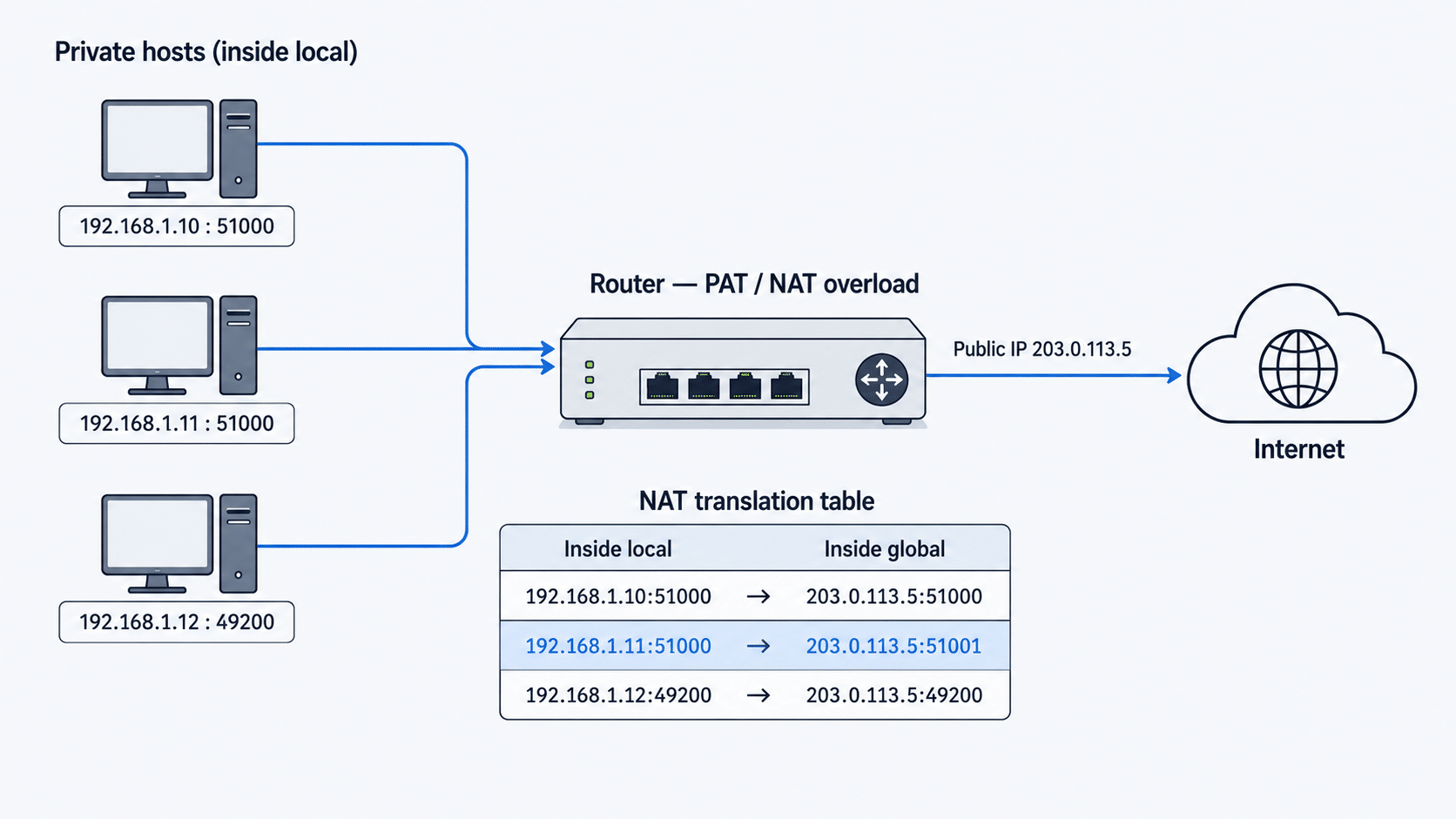
Here is a worked example — three hosts behind one public IP, 203.0.113.5:
| Inside local (host : port) | Inside global (public : port) | Notes |
|---|---|---|
| 192.168.1.10 : 51000 | 203.0.113.5 : 51000 | Port kept as-is |
| 192.168.1.11 : 51000 | 203.0.113.5 : 51001 | Same source port — router reassigns it to stay unique |
| 192.168.1.12 : 49200 | 203.0.113.5 : 49200 | Port kept as-is |
The key idea: the router guarantees that every public IP : port pair is unique. If two hosts happen to choose the same source port (rows 1 and 2 above), the router rewrites one of them. A reply arriving for 203.0.113.5:51001 is therefore unambiguously mapped back to 192.168.1.11. That single rule — unique port per session — is the whole trick behind PAT.
NAT Types: Static, Dynamic, and PAT
It is cleaner to think of NAT as one concept with three configurable types, rather than “NAT vs PAT” as two rival technologies:
| Type | Mapping | How addresses are assigned | Public IPs used | Typical use |
|---|---|---|---|---|
| Static NAT | One-to-one, fixed | Manually configured | One per host | An inside server reachable at a fixed public IP |
| Dynamic NAT | One-to-one, temporary | From a pool, on demand | As many as the pool holds | Outbound access for a limited set of hosts |
| PAT (overload) | Many-to-one | Port-multiplexed onto one IP | One (or a small pool) | Home and most enterprise internet access |
Where PAT Fits as a Type of NAT
PAT is not a separate technology from NAT — it is the overload form of NAT. This is where some guides get it backwards: NAT is the umbrella concept, and static NAT, dynamic NAT, and PAT are types under it. PAT is not NAT’s “superset,” and NAT is not a kind of PAT. If you remember “PAT is overloaded NAT,” the hierarchy stays straight.
NAT vs PAT for Security and IPv4 Conservation
Both hide inside addresses — Cisco notes that NAT “effectively hides the internal network from the world, giving you some additional security.” But neither NAT nor PAT is a firewall: they translate addresses, they do not inspect or filter traffic by policy, so they should sit alongside a firewall, not replace one.
On address conservation, PAT is the reason IPv4 has lasted as long as it has: one public IP can front an entire site. One caveat worth knowing — PAT only works for protocols that have ports. Per Cisco, “Port Address Translation (also called NAT overload) only supports protocols whose port numbers are known; these protocols are ICMP, TCP, and UDP.” Traffic for a protocol with no ports (“non-PATable” traffic) consumes an entire public address as a one-to-one binding, defeating the point of overload — which is why PAT access lists are usually scoped to TCP, UDP, and ICMP.
NAT and PAT on Cisco: Inside Local vs Inside Global
Cisco’s NAT documentation uses two terms that confuse newcomers:
- Inside local address — the private address assigned to a host on the inside network (e.g.,
192.168.1.10). It is usually not a globally routable address. - Inside global address — the public, routable address that represents one or more inside hosts to the outside world (e.g.,
203.0.113.5).
PAT is enabled by adding the overload keyword to a dynamic NAT statement, which tells the router to reuse one inside global address for many inside local addresses:
interface GigabitEthernet0/0
 ip nat outside
interface GigabitEthernet0/1
 ip nat inside
ip nat inside source list 1 interface GigabitEthernet0/0 overload
Without overload, the same statement performs one-to-one dynamic NAT; with it, the router performs PAT against the outside interface’s address.
Common NAT and PAT Misconceptions
- “NAT and PAT are completely different technologies.” No — PAT is the overload type of NAT.
- “NAT is a kind of PAT” / “NAT is PAT’s superset.” Backwards. NAT is the umbrella; PAT (overload) is one form of it, alongside static and dynamic NAT.
- “NAT/PAT is a firewall.” No. It hides internal addresses but does not filter traffic; pair it with a firewall.
- “PAT works for any traffic.” No — only for protocols with ports (TCP, UDP, ICMP). Other protocols consume a whole public address.
- “Static NAT saves public IP addresses.” No — static and dynamic NAT are one-to-one. PAT is the type that conserves addresses.
When to Use NAT vs PAT
In practice you rarely choose “NAT or PAT” in the abstract — you choose the type that fits the job:
- PAT (overload) — the default for internet access. Many devices, one or a few public IPs. This is what home routers and most enterprise edges run.
- Static NAT — when an inside server must be reachable from outside at a fixed public address (inbound services like web, mail, or VPN).
- Dynamic NAT — when you have a pool of public addresses and want one-to-one translation without fixed assignments, for a bounded number of hosts.
Most real edge configurations combine them: static NAT for the handful of inbound servers, and PAT for everyone’s outbound traffic.
Frequently Asked Questions
Is PAT a type of NAT?
Yes. PAT is the “overload” form of NAT. NAT is the umbrella concept, and static NAT, dynamic NAT, and PAT are its three types. PAT adds port translation on top of address translation so many hosts can share one public IP.
Is PAT the same as NAT overload?
Yes. PAT, NAT overload, and NAPT are three names for the same mechanism. “NAT overload” is Cisco’s configuration term (the overload keyword), PAT is the common networking term, and NAPT (Network Address Port Translation) is the term used in IETF RFC 2663 and RFC 3022.
What is the difference between NAT and PAT?
Plain NAT translates only the IP address and maps one-to-one, so it needs one public IP per active host. PAT translates the IP address and the port, mapping many hosts to one public IP and telling sessions apart by port number. PAT is the address-conserving type of NAT.
Does PAT use port numbers?
Yes. PAT records each session’s transport port (TCP/UDP) or ICMP query ID in its translation table and keeps every public-IP-plus-port pair unique. Return traffic is matched back to the right inside host using that port, which is what lets one public IP serve many devices.
How many devices can share one public IP with PAT?
Many — Cisco states “thousands of users” can share a single global address through overloading. A port number is 16 bits, so a single public IP can track tens of thousands of simultaneous sessions per protocol; the practical limit is available ports, not a fixed device count.
Do home routers use NAT or PAT?
PAT. A home router has one public IP from the ISP and many internal devices, so it runs PAT (NAT overload) to let them all share that single address using port numbers.