KB vs MB vs GB vs TB: Which Is Bigger? (Order, Chart & Conversions)
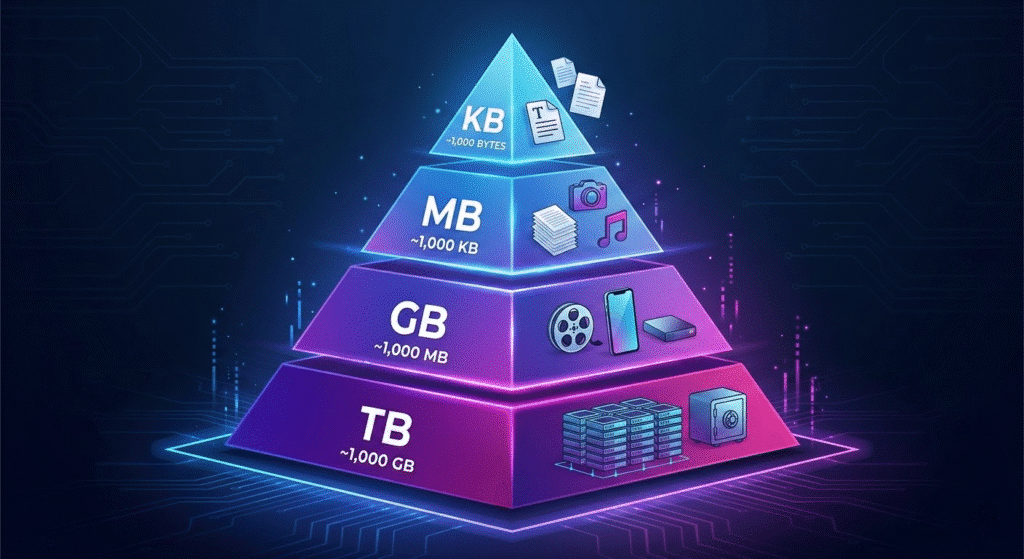
From smallest to largest, the order is byte < KB < MB < GB < TB. Each unit is about 1,000 times larger than the one before it in decimal terms, or 1,024 times larger in binary terms. So a megabyte is bigger than a kilobyte, a gigabyte is bigger than a megabyte, and a terabyte is bigger than a gigabyte. (Internet speeds written in Mbps measure something different — that is covered near the end.)
Quick Answer: KB, MB, GB, and TB From Smallest to Largest
The correct size order is:
KB → MB → GB → TB (smallest to largest)
- 1 KB (kilobyte) = 1,000 bytes
- 1 MB (megabyte) = 1,000 KB
- 1 GB (gigabyte) = 1,000 MB
- 1 TB (terabyte) = 1,000 GB
Common questions answered in one line:
- Is KB bigger than MB? No — MB is bigger.
- Is MB bigger than GB? No — GB is bigger.
- Is GB bigger than TB? No — TB is bigger.
- Which is biggest of the four? TB (terabyte).
The values above use the decimal (base‑1,000) system that storage makers and networks use. Computers often count in binary (base‑1,024), which is why a drive can show a slightly smaller number than the label — explained in the 1,000 vs 1,024 section below.
KB, MB, GB, TB Chart: Every Unit in Order
| Unit | Full name | Equals (decimal) | In bytes | Binary equivalent (IEC) | Typical use |
|---|---|---|---|---|---|
| Byte | Byte | 8 bits | 1 byte | — | One character of text |
| KB | Kilobyte | 1,000 bytes | 1,000 | 1 KiB = 1,024 bytes | Text, switch config files |
| MB | Megabyte | 1,000 KB | 1,000,000 | 1 MiB = 1,048,576 bytes | Photos, PDFs, firmware images |
| GB | Gigabyte | 1,000 MB | 1,000,000,000 | 1 GiB = 1,073,741,824 bytes | OS images, backups, drives |
| TB | Terabyte | 1,000 GB | 1,000,000,000,000 | 1 TiB ≈ 1.0995 × 10¹² bytes | Servers, NAS, archives |
| PB | Petabyte | 1,000 TB | 10¹⁵ | 1 PiB = 1,024 TiB | Data‑center scale storage |
Each step up the table multiplies capacity by 1,000 (decimal) or 1,024 (binary). That single rule is enough to answer every “which is bigger” question for these units.
KB vs MB: Is a Kilobyte Bigger Than a Megabyte?
No. A megabyte (MB) is bigger than a kilobyte (KB) — about 1,000 times bigger.
- Decimal: 1 MB = 1,000 KB
- Binary: 1 MiB = 1,024 KiB
A kilobyte holds roughly one thousand bytes — enough for a short text file, an email, or a network device’s running configuration. A megabyte holds about a million bytes, which is why photos, PDFs, and switch firmware images are measured in MB rather than KB. If you see a file listed as 500 KB, it is still half a megabyte, not bigger than one.
How Many KB Are in an MB?
- 1 MB = 1,000 KB (decimal — used by storage and networking).
- 1 MiB = 1,024 KiB (binary — how memory and many operating systems count).
In everyday use people often say “1 MB = 1,024 KB.” That figure is really the binary value (1 MiB). Both numbers are close, so for quick mental math, treating 1 MB as about 1,000 KB is accurate enough.
MB vs GB: Is a Megabyte Bigger Than a Gigabyte?
No. A gigabyte (GB) is bigger than a megabyte (MB) — about 1,000 times bigger.
- Decimal: 1 GB = 1,000 MB
- Binary: 1 GiB = 1,024 MiB
Megabytes measure individual files: an image, a document, a firmware image. Gigabytes measure collections of files or whole devices: an operating system image, a backup set, or the flash capacity on a network switch. A 700 MB file is still less than 1 GB.
How Many MB Are in a GB?
There are 1,000 MB in 1 GB using the decimal system, or 1,024 MiB in 1 GiB using the binary system. Storage makers, internet providers, and most phones label capacity in decimal, so 1 GB = 1,000 MB is the value you will see on a spec sheet.
| Gigabytes | Decimal (MB) | Binary equivalent (MiB) |
|---|---|---|
| 1 GB | 1,000 MB | 1,024 MiB |
| 2 GB | 2,000 MB | 2,048 MiB |
| 4 GB | 4,000 MB | 4,096 MiB |
| 8 GB | 8,000 MB | 8,192 MiB |
| 16 GB | 16,000 MB | 16,384 MiB |
| 32 GB | 32,000 MB | 32,768 MiB |
| 64 GB | 64,000 MB | 65,536 MiB |
| 128 GB | 128,000 MB | 131,072 MiB |
| 256 GB | 256,000 MB | 262,144 MiB |
| 512 GB | 512,000 MB | 524,288 MiB |
| 1 TB | 1,000,000 MB | 1,048,576 MiB |
GB vs TB: Is a Terabyte Bigger Than a Gigabyte? (and What Comes After)
Yes. A terabyte (TB) is bigger than a gigabyte (GB) — about 1,000 times bigger.
- Decimal: 1 TB = 1,000 GB
- Binary: 1 TiB = 1,024 GiB
Terabytes measure large drives, server storage, and backup archives. A single 4K movie might be a few GB; a full backup of a department’s servers is measured in TB.
What comes after a terabyte? The next units are the petabyte (PB) = 1,000 TB, the exabyte (EB) = 1,000 PB, and beyond that the zettabyte and yottabyte. Petabyte and exabyte scales appear in data centers and cloud platforms, not on a single device.
KB vs GB and Other Cross-Unit Comparisons
Skipping a level does not change the rule — you just multiply by 1,000 more than once:
| Comparison | Which is bigger | Difference (decimal) |
|---|---|---|
| KB vs GB | GB | 1 GB = 1,000,000 KB |
| KB vs TB | TB | 1 TB = 1,000,000,000 KB |
| MB vs TB | TB | 1 TB = 1,000,000 MB |
| MB vs GB vs KB | GB > MB > KB | each step ×1,000 |
So a gigabyte is a million kilobytes, and a terabyte is a million megabytes. The unit name tells you the scale; the number in front only matters once the units match.
KB ↔ MB ↔ GB ↔ TB Converter
Enter a value, pick the units, and switch between decimal (1,000) and binary (1,024) counting.
Conversion Tables: KB to MB, MB to GB, GB to TB
Use this as a quick reference for each adjacent step:
| Conversion | Decimal | Binary |
|---|---|---|
| 1 MB | 1,000 KB | 1,024 KiB |
| 1 GB | 1,000 MB | 1,024 MiB |
| 1 TB | 1,000 GB | 1,024 GiB |
| 1 PB | 1,000 TB | 1,024 TiB |
And going the other way, smaller into larger:
| Conversion | Value |
|---|---|
| 1 KB | 0.001 MB |
| 1 MB | 0.001 GB |
| 1 GB | 0.001 TB |
What Do KB, MB, GB, and TB Mean?
- KB (kilobyte): about one thousand bytes. Holds plain text, small logs, and device configuration files.
- MB (megabyte): about one million bytes. Holds photos, PDFs, songs, and firmware images.
- GB (gigabyte): about one billion bytes. Measures operating system images, backups, and device storage capacity.
- TB (terabyte): about one trillion bytes. Measures large drives, servers, and backup archives.
Every one of these units measures stored data (bytes). They are not the same as the bit-based units used for network speed, which is the single most common point of confusion — see below.
1,000 vs 1,024: Why Storage Sizes Look Different (Decimal vs Binary)
Two counting systems are in use at the same time, and that is why you see both 1,000 and 1,024:
Decimal (base 10) — the SI prefixes:
- 1 KB = 1,000 bytes
- 1 MB = 1,000 KB
- 1 GB = 1,000 MB
- 1 TB = 1,000 GB
Binary (base 2) — the IEC prefixes:
- 1 KiB = 1,024 bytes
- 1 MiB = 1,024 KiB
- 1 GiB = 1,024 MiB
- 1 TiB = 1,024 GiB
Storage makers, internet providers, and macOS use the decimal values. Memory (RAM) and Windows count in binary but still print the label “GB” instead of “GiB.” In everyday conversation many people say “1 GB = 1,024 MB” — technically that figure is the binary value, and the precise binary terms are GiB and MiB. Both systems are correct; they just answer slightly different questions.
GB vs GiB: Why Your 1 TB Drive Shows Only 931 GB
This is the practical effect of the two systems. A drive labeled 1 TB holds 1,000,000,000,000 bytes (decimal). Windows divides that by 1,024 three times to display gigabytes:
1,000,000,000,000 ÷ 1,024³ ≈ 931 GiB, shown on screen as “931 GB.”
No space is missing. The manufacturer counted in decimal (1 TB = 10¹² bytes) and the operating system reported in binary (1,024³ bytes per “GB”). The same gap is why a “256 GB” drive shows about 238 GB, and a “512 GB” drive shows about 477 GB.
File Size vs Internet Speed: Why MB Is Not Mbps
This is where most mistakes happen, so keep one rule in mind: 1 byte = 8 bits.
- File size is measured in bytes: KB, MB, GB, TB. (Capital B = byte.)
- Network speed is measured in bits per second: Kbps, Mbps, Gbps. (Lowercase b = bit.)
Because a byte is 8 bits, you divide a connection’s speed by 8 to estimate real download speed. A 100 Mbps connection moves about 12.5 MB/s, and a 1 Gbps link moves about 125 MB/s. That is why a fast plan does not download a file as quickly as the headline number suggests.
For the full breakdown of these two ideas, see our dedicated guides on MB vs Mbps and Mbps vs Gbps. High-speed links also depend on the right optics and transceivers to reach 10G, 25G, 40G, or 100G rates.
Real-World Examples: Config Files, Firmware, OS Images, and Backups
Pairing each unit with a familiar object makes the scale concrete:
| Item | Typical size | Unit |
|---|---|---|
| Plain-text email | 5–20 KB | KB |
| Network switch running-config | 10–100 KB | KB |
| High-resolution photo | 3–8 MB | MB |
| Switch firmware / IOS image | 30–500 MB | MB |
| Enterprise network OS image | 0.5–2 GB | GB |
| Operating system install | 5–30 GB | GB |
| Full server backup | 100 GB–several TB | GB → TB |
| Data-center archive | many TB–PB | TB → PB |
A useful pattern for network teams: configuration files live in KB, firmware images in MB, full OS images in the high MB to low GB range, and backups in GB to TB. Knowing the unit up front prevents under-provisioning flash or backup storage.
Which Unit Matters When Buying Network Hardware?
For most networking decisions, the relevant capacity unit is MB or GB, not TB:
- Switch flash and storage: firmware and OS images are sized in MB to low GB, so on-device flash is typically specified in those units. Check that a platform’s flash can hold the target image plus a rollback copy before an upgrade.
- Backups and logging: syslog archives, configuration backups, and packet captures accumulate in GB to TB; plan retention storage accordingly.
- Link speed (a different unit): port and uplink ratings use Gbps, not GB — a 10 Gbps port is a speed, not a storage size.
Common Mistakes With KB, MB, GB, and TB
- Thinking KB is bigger than MB. The shorter name is the smaller unit: KB < MB < GB < TB.
- Comparing only the number. 900 MB is smaller than 1 GB even though 900 looks larger than 1 — the units differ.
- Mixing file size with network speed. MB (megabyte, storage) is not Mbps (megabit per second, speed); they differ by a factor of 8.
- Confusing MB with MB/s. MB is a size; MB/s is a transfer rate.
- Ignoring 1,000 vs 1,024. A “1 TB” drive showing 931 GB is normal — decimal label, binary display.
Frequently Asked Questions
Is KB bigger than MB?
No. MB is bigger. 1 MB = 1,000 KB (decimal) or 1,024 KiB (binary).
Is MB bigger than GB?
No. GB is bigger. 1 GB = 1,000 MB (decimal) or 1,024 MiB (binary).
Which is bigger, KB or MB?
MB. A megabyte is about 1,000 times larger than a kilobyte.
How many MB are in 1 GB?
1,000 MB in decimal, or 1,024 MiB in binary. Storage and network specs use the decimal value, so 1 GB = 1,000 MB.
How many KB are in 1 MB?
1,000 KB in decimal, or 1,024 KiB in binary.
How many GB are in 1 TB?
1,000 GB in decimal, or 1,024 GiB in binary.
What is the correct order of KB, MB, GB, and TB?
From smallest to largest: KB, MB, GB, TB. Each is about 1,000 times the previous unit.
Why do some pages say 1 GB is 1,024 MB?
That is the binary value (1 GiB = 1,024 MiB). Decimal counting, used by storage and networks, gives 1 GB = 1,000 MB.
What comes after a terabyte?
The petabyte (1,000 TB), then the exabyte, zettabyte, and yottabyte.
Is MB the same as Mbps?
No. MB (megabyte) measures file size; Mbps (megabit per second) measures speed. One byte equals 8 bits, so they differ by a factor of 8. See our MB vs Mbps guide.
References
- IEC 80000-13:2008, Quantities and units — Part 13: Information science and technology (defines kibibyte, mebibyte, gibibyte, tebibyte).
- BIPM, The International System of Units (SI), 9th edition — SI decimal prefixes (kilo, mega, giga, tera).
- NIST, Prefixes for binary multiples — physics.nist.gov/cuu/Units/binary.html.