Straight Through Cable: Color Code, Wiring, Uses, and Crossover Difference
A straight-through cable is an Ethernet cable with the same wiring order on both RJ45 connectors. It can be terminated as T568A-to-T568A or T568B-to-T568B. It is normally used to connect different device types, such as a computer to a switch, a router to a switch, a firewall to a switch, or a wireless access point to an access switch.
The operating rule is straightforward: if both ends use the same wiring standard, the cable is straight-through. If one end uses T568A and the other end uses T568B, the cable is crossover. That distinction matters when checking old patch cords, troubleshooting link problems, or validating cabling before a switch, router, firewall, camera, phone, or access point deployment.
What Is a Straight Through Cable?
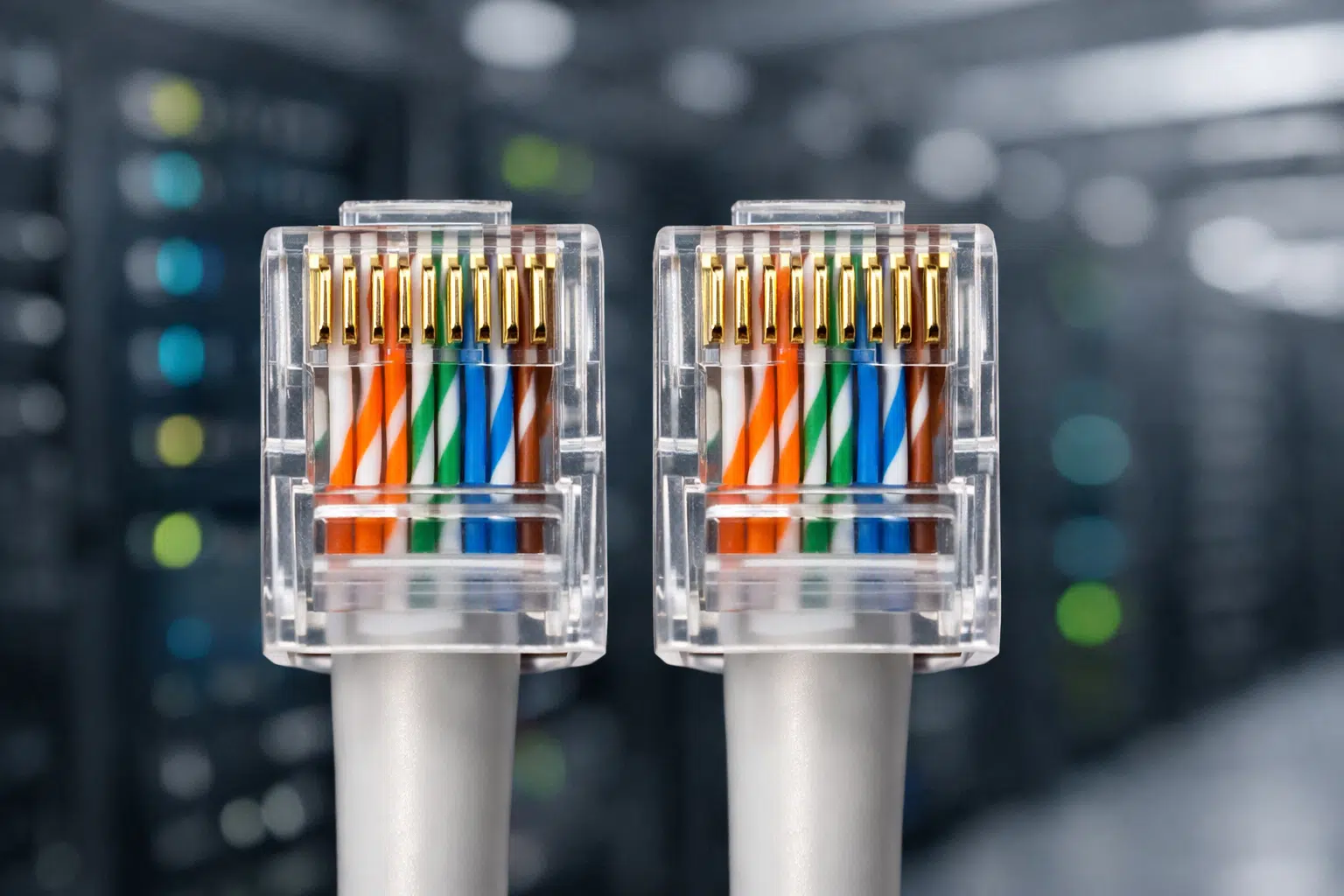
A straight-through cable uses identical pin order on both ends of the Ethernet cable. Pin 1 connects to pin 1, pin 2 connects to pin 2, and the same pattern continues through pin 8. Most pre-made Ethernet patch cables used in offices, network closets, and equipment racks are straight-through cables.
Straight-through cables are the default choice for ordinary Ethernet patching. Use them for endpoint-to-switch connections, router-to-switch handoffs, firewall-to-switch links, IP phone connections, camera connections, and most access point cabling. Modern access switches usually support Auto-MDI/MDIX, which reduces the need for crossover cables in switch-to-switch links.
Straight Through Cable Color Code
A straight-through cable can use either T568A or T568B, but both ends must use the same standard. T568B-to-T568B is the most common form in commercial patch cords and enterprise LAN environments. T568A-to-T568A is also a valid straight-through cable when a site standard or project document requires it.
| Cable wiring | End A | End B | Result |
|---|---|---|---|
| T568A straight-through | T568A | T568A | Straight-through cable |
| T568B straight-through | T568B | T568B | Straight-through cable |
| Mixed wiring | T568A | T568B | Crossover cable |
T568A and T568B are covered here only as they apply to straight-through cables. For full RJ45 pinout diagrams, wiring-standard background, and a deeper comparison of the two standards, use the T568A vs T568B wiring guide.
T568B Straight Through Cable Color Order
T568B is the most common wiring order for commercial Ethernet patch cables. A T568B straight-through cable uses the following color order on both RJ45 connectors.
| Pin | T568B color |
|---|---|
| 1 | White/Orange |
| 2 | Orange |
| 3 | White/Green |
| 4 | Blue |
| 5 | White/Blue |
| 6 | Green |
| 7 | White/Brown |
| 8 | Brown |
If both connectors follow this same order, the cable is T568B straight-through. If one connector follows T568B and the other follows T568A, the cable is not straight-through; it is a crossover cable.
In most business networks, T568B is a practical default because many pre-terminated patch cords and existing commercial cabling systems use it. Consistency still matters more than preference. Match the site standard already used in the patch panel, wall outlet, or structured cabling documentation.
T568A Straight Through Cable Color Order
T568A is also a valid straight-through wiring standard. A T568A straight-through cable uses the following color order on both RJ45 connectors.
| Pin | T568A color |
|---|---|
| 1 | White/Green |
| 2 | Green |
| 3 | White/Orange |
| 4 | Blue |
| 5 | White/Blue |
| 6 | Orange |
| 7 | White/Brown |
| 8 | Brown |
If both connectors follow this same order, the cable is T568A straight-through. T568A is common in some residential, government, and legacy environments. It should be used when the building standard, contract requirement, or existing cabling plant already uses T568A.
Do not choose T568A or T568B because one is expected to be faster. The selected standard does not determine Ethernet speed or PoE power delivery. Cable category, termination quality, cable length, switch port capability, and endpoint support determine whether a link can reliably run at 1G, 2.5G, 5G, or 10G.
Straight Through vs Crossover Cable
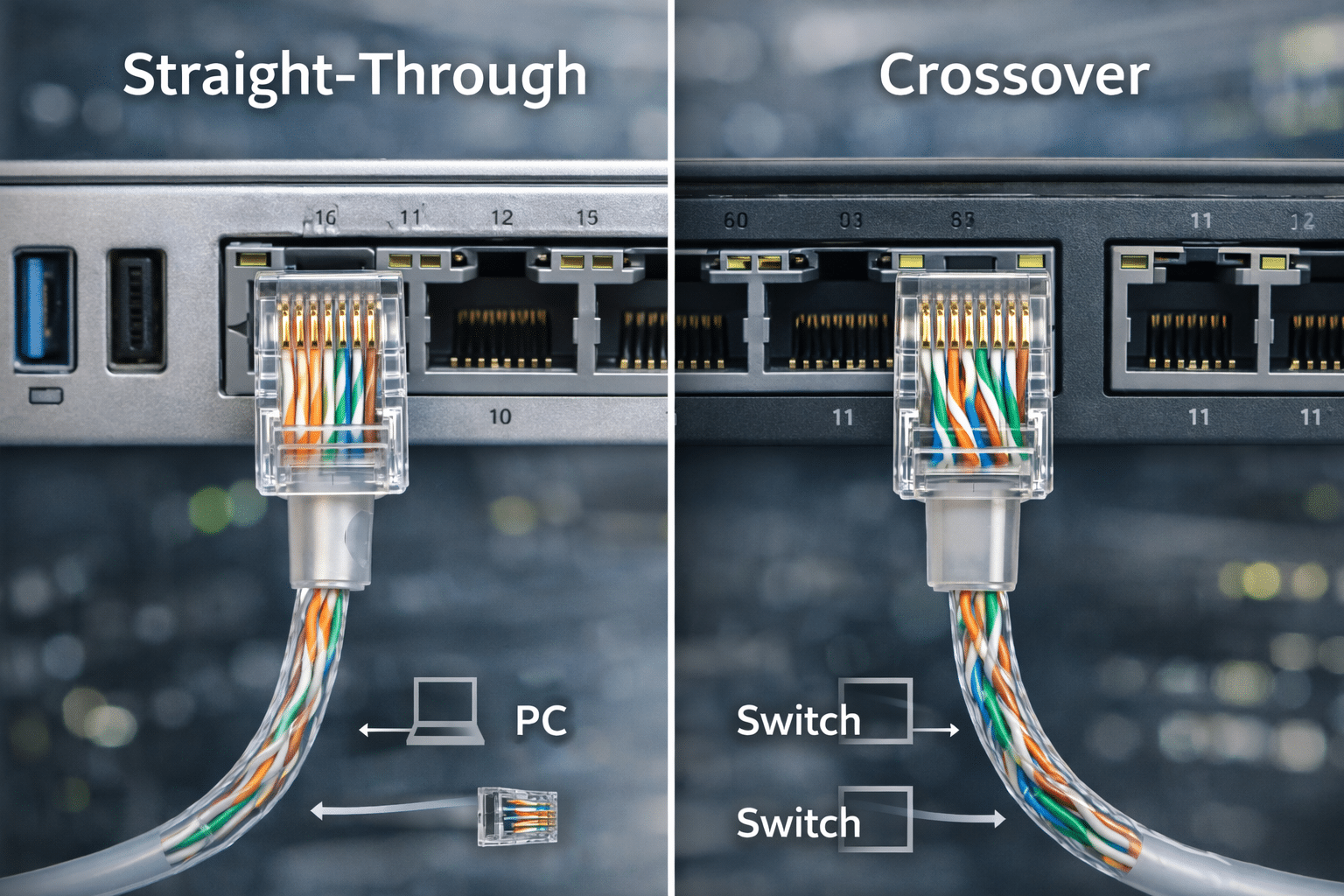
The difference between straight-through and crossover cable is the wiring pattern at the two RJ45 ends. A straight-through cable uses the same pinout on both ends. A crossover cable uses T568A on one end and T568B on the other end, which swaps the transmit and receive pairs used by older Ethernet devices.
For the full crossover wiring, pinout, Auto-MDIX behavior, and when you still need one, see our crossover cable guide.
| Item | Straight-through cable | Crossover cable |
|---|---|---|
| RJ45 wiring pattern | Same standard on both ends | T568A on one end, T568B on the other |
| Common example | T568B-to-T568B | T568A-to-T568B |
| Typical use | Different device types | Similar device types in older networks |
| Common connection | PC to switch, router to switch, AP to switch | PC to PC, switch to switch in legacy designs |
| Modern relevance | Standard patch cable | Rare unless a project or old device requires it |
| Buying risk | Wrong category or low-quality cable | Usually unnecessary in modern access networks |
Older Ethernet designs often required crossover cables when connecting similar devices, such as switch to switch or PC to PC. Most modern Ethernet ports can automatically detect and correct the transmit/receive pairing, so a straight-through cable is usually accepted even where a crossover cable was once required.
For real deployments, do not decide only from a generic rule. Check the device documentation, cabling standard, and existing patching practice if the link involves older switches, industrial devices, lab equipment, unmanaged equipment, or a known fixed MDI/MDIX port.
When to Use a Straight Through Cable
Use a straight-through cable for most ordinary Ethernet connections in an office, branch, campus, warehouse, or equipment room. The most common pattern is an endpoint or network edge device connecting to an access switch.
Computer, Printer, Camera, or Access Point to Switch
Use straight-through cable when connecting a PC, printer, IP camera, IP phone, wireless access point, badge reader, thin client, or other endpoint to an access switch. This is the normal patching model for Cisco Catalyst access switches in enterprise LANs.
For PoE endpoints, the cable type is only one part of the decision. Confirm cable category, cable length, connector quality, and the switch PoE budget. A poorly terminated or damaged patch cord can cause link flaps, reduced negotiated speed, camera power instability, or access point power warnings even when the wiring pattern is technically straight-through. For projects built around phones, cameras, and APs, check the required PoE switch options and the exact endpoint load before finalizing the patch-cord list.
Router, Firewall, or Modem Handoff to Switch
Use straight-through cable when connecting a router LAN interface, firewall interface, or modem/ONT handoff into a switch, unless the provider or hardware document specifies a different media type. Many WAN edge deployments use a copper handoff from the provider device into a Cisco router or Cisco Firepower firewall, then from that device into a switch.
If the deployment question is where the ISP modem or ONT should connect, the port choice matters more than the cable pattern. The provider handoff normally connects to a WAN or outside interface, while internal devices connect to LAN or switch ports.
Server to Access or Top-of-Rack Switch
Use straight-through copper patch cables for standard RJ45 server connections to an access switch or top-of-rack switch. This applies to ordinary copper server NICs and management ports, including out-of-band management connections where RJ45 Ethernet is used.
For higher-speed server links, do not assume copper patch cable is the correct medium. Some designs use fiber, DAC, AOC, or Cisco optical modules instead of RJ45 patch cords. For copper-versus-fiber planning, compare distance, speed, port type, and transceiver requirements before selecting the cable and transceiver mix.
Switch to Switch in Modern Networks
Modern switch-to-switch copper links often work with a straight-through cable because Auto-MDI/MDIX can adjust the port internally. This is why crossover cables are rarely stocked for ordinary office and campus networks today.
There are still exceptions. Older switches, unmanaged industrial devices, lab equipment, and some fixed-function appliances may behave differently. If a switch-to-switch copper link does not come up, verify speed and duplex negotiation, port state, cable tester results, and whether a crossover cable is required by the device documentation.
How to Identify a Straight Through Cable
The fastest way to identify a straight-through cable is to compare both RJ45 connectors. Hold both plugs in the same orientation and check whether the wire colors appear in the same left-to-right order. If the order is identical on both ends, the cable is straight-through.
Visual inspection is useful for transparent connectors, but it is not enough for production cabling. Poor crimps, split pairs, damaged conductors, and weak terminations may not be visible. For installed cabling, use a cable tester or certification report instead of relying on jacket labels or visual checks alone.
| Check | What to look for | Why it matters |
|---|---|---|
| Connector color order | Same order on both ends | Confirms straight-through wiring pattern |
| Cable tester result | Pin 1 to 1, 2 to 2, through 8 to 8 | Confirms pin-to-pin continuity |
| Patch panel record | Matches site wiring standard | Prevents mixing standards by accident |
| Cable category marking | Cat5e, Cat6, Cat6A, or project-specified category | Confirms speed and installation suitability |
| Physical condition | No broken latch, crushed jacket, loose boot, or exposed conductor | Reduces intermittent link issues |
Do not use cable jacket color to decide whether a cable is straight-through or crossover. The outer jacket color is only a site labeling choice. Blue, gray, yellow, red, or black patch cords can all be wired as straight-through or crossover.
Straight Through Cable Wiring Diagram
In a straight-through cable, each pin connects to the same pin number on the far end. Pin 1 connects to pin 1, pin 2 connects to pin 2, pin 3 connects to pin 3, and the pattern continues through pin 8. This keeps the two RJ45 ends electrically aligned.
| RJ45 pin on End A | RJ45 pin on End B |
|---|---|
| 1 | 1 |
| 2 | 2 |
| 3 | 3 |
| 4 | 4 |
| 5 | 5 |
| 6 | 6 |
| 7 | 7 |
| 8 | 8 |
The wiring order still matters because Ethernet uses twisted pairs, not just eight individual wires. Keeping the correct pair relationship is important for signal quality, especially on Gigabit Ethernet and faster copper links. A cable can show continuity but still perform poorly if the pairs were untwisted too far or terminated incorrectly.
For new site work, installed cabling should be tested against the required category and link length. A cable that works at 100 Mbps during a quick check may still fail the real requirement for 1G, 2.5G, 5G, 10G, or high-power PoE endpoints.
Do Modern Cisco Switches Still Need Crossover Cables?
Most modern Cisco switch deployments do not require crossover cables for ordinary Ethernet links. Auto-MDI/MDIX support allows the port to detect and adjust for the cable wiring in many common scenarios, which makes straight-through patch cables the normal choice for endpoint, access switch, router, and firewall connections.
That does not mean crossover cables are impossible to use or never required. Some older devices, lab devices, industrial endpoints, and unmanaged equipment may still require a specific cable type. If a project specification calls for crossover cable, follow the specification or confirm with the network engineer before substituting a straight-through patch cord.
From a stocking and procurement standpoint, straight-through cables should be the default patch-cord inventory for modern enterprise access networks. Crossover cables should be treated as a special-purpose item, not a general replacement for standard Ethernet patch cords.
Ethernet Cable Category for Straight Through Cable
Straight-through describes the wiring pattern, not the cable performance class. A Cat5e, Cat6, or Cat6A cable can all be wired as straight-through. The right choice depends on endpoint speed, PoE load, cable run, installation environment, and the switch ports being deployed. For quote preparation, the cable decision should sit beside the switch, AP, router, firewall, optics, and accessory lines in the same BOM.
| Use case | Practical cable choice | Planning note |
|---|---|---|
| 1G desktop, printer, or IP phone | Cat5e or Cat6 | Cat6 is often preferred for new office patching |
| Wi-Fi 6 or Wi-Fi 6E access point | Cat6 or Cat6A | Confirm PoE demand and negotiated port speed |
| 2.5G or 5G mGig access | Cat6 for many shorter runs; confirm site conditions | Existing cabling should be tested before reuse |
| 10G copper | Cat6A is the safer planning baseline | Confirm channel length and switch port support |
| Outdoor, warehouse, or industrial area | Environment-rated cable | Check jacket, shielding, temperature, and pathway requirements |
| Patch panel to switch | Match the site cabling standard | Keep length, labeling, and category consistent |
For procurement teams, “straight-through” is not enough information for a quote. The BOM should also state cable category, length, color, boot type, shielded or unshielded construction, indoor or outdoor rating, and whether the cable supports the expected PoE and speed requirement. If the order includes patch cords, transceivers, power cords, rack accessories, or replacement parts, check the Cisco cables and accessories category alongside the primary hardware.
Common Straight Through Cable Mistakes
Straight-through cable problems usually come from mixing wiring standards, using the wrong cable category, or treating a patch cord as interchangeable with installed cabling. These mistakes are easy to miss during procurement because many Ethernet cables look similar from the outside.
| Mistake | Why it matters |
|---|---|
| One end is T568A and the other is T568B | Creates crossover, not straight-through |
| Assuming jacket color indicates cable type | Jacket color does not prove wiring pattern |
| Buying low-grade patch cords for PoE access points | Can cause power negotiation or link stability issues |
| Reusing old Cat5e for mGig or 10G without testing | May limit speed or create intermittent faults |
| Stocking crossover cables for modern access switches by default | Usually unnecessary with Auto-MDI/MDIX |
| Ignoring patch-panel wiring standard | Can create documentation and troubleshooting problems |
| Using damaged latch plugs in switch closets | Leads to loose connections and avoidable service calls |
The safest operational habit is to label cables by purpose, keep patching records current, and test suspect links before replacing switches, access points, routers, or firewalls. A failed cable can look like a switch port problem if the troubleshooting process starts at the device instead of the physical link.
Straight Through Cable in Enterprise Network Buying
For small office networks, straight-through cable selection may look like a commodity purchase. In enterprise deployments, the decision affects installation speed, troubleshooting time, PoE reliability, and whether the cabling plant can support future access-layer upgrades.
Before ordering patch cords or approving a cabling BOM, confirm the following items:
- Cable category: Cat5e, Cat6, Cat6A, or the project-specified type.
- Termination standard: T568A-to-T568A or T568B-to-T568B.
- Length: short patch cords for racks, longer runs only where appropriate.
- Shielding: UTP for typical offices, shielded options where EMI or grounding design requires it.
- PoE load: IP phones, cameras, APs, and high-power endpoints should not use poor-quality patch cords.
- Environment: indoor office, plenum, riser, outdoor, warehouse, or industrial conditions.
- Labeling: color and tag scheme for network operations, not as a substitute for testing.
- Connected equipment: switch port speed, router/firewall interface, AP power class, and endpoint NIC speed.
For Cisco equipment projects, cabling assumptions should be checked with the rest of the BOM. Switches, routers, firewalls, access points, optics, power supplies, and accessories should be quoted against the same deployment context, especially when a project involves PoE endpoints, mGig access, WAN handoffs, or replacement hardware.
| Common access requirement | Product category to review | Typical cabling relevance |
|---|---|---|
| Standard enterprise access closets | Cisco Catalyst 9200 switches | Common access-switch category for endpoint and PoE patching |
| Higher-feature enterprise access closets | Cisco Catalyst 9300 switches | Access-layer refresh category where uplink, stacking, mGig, and PoE planning matter |
| Small office and branch switching | Cisco Catalyst 1300 switches | Smaller office or branch category for fixed access switching |
For wireless access projects, the endpoint side should also be checked against the selected Cisco wireless access points, because AP speed and power class affect both cable and switch-port planning.
Straight Through Cable Decision Table
Most Ethernet patching decisions can be reduced to the connection type. If the connection is between an endpoint or edge device and a switch, straight-through is normally the correct cable. If the connection involves older similar devices, check whether crossover is still required.
| Connection | Use straight-through? | Notes |
|---|---|---|
| PC to switch | Yes | Standard LAN patching |
| Printer to switch | Yes | Common office access connection |
| IP phone to switch | Yes | Confirm PoE and voice VLAN design separately |
| Wireless AP to switch | Yes | Confirm AP power and mGig requirements |
| Camera to PoE switch | Yes | Confirm outdoor or industrial cable rating if needed |
| Router LAN port to switch | Yes | Common enterprise LAN edge connection |
| Firewall inside interface to switch | Yes | Common security edge connection |
| Modem or ONT to router WAN port | Usually yes | Port selection matters; cable pattern is usually straight-through |
| Switch to switch | Usually yes on modern gear | Auto-MDI/MDIX usually handles cable pairing |
| PC to PC | Usually no for legacy devices | Crossover may be needed if Auto-MDI/MDIX is not available |

FAQ: Straight Through Cable
What is a straight through cable?
A straight-through cable is an Ethernet cable with the same RJ45 wiring order on both ends. It is commonly used to connect different device types, such as a computer to a switch, a router to a switch, or an access point to a switch.
What is the straight through cable color code?
A straight-through cable can use T568A on both ends or T568B on both ends. T568B uses White/Orange, Orange, White/Green, Blue, White/Blue, Green, White/Brown, Brown from pin 1 to pin 8. T568A uses White/Green, Green, White/Orange, Blue, White/Blue, Orange, White/Brown, Brown.
Is T568B straight-through or crossover?
T568B by itself is a wiring standard, not a cable type. A cable is straight-through when both ends use T568B. It becomes crossover only when one end uses T568A and the other end uses T568B.
Is T568A to T568B straight-through?
No. T568A on one end and T568B on the other end creates a crossover cable. A straight-through cable uses the same standard on both ends, either T568A-to-T568A or T568B-to-T568B.
What is the difference between straight-through and crossover cable?
A straight-through cable uses the same wiring order on both RJ45 connectors. A crossover cable uses T568A on one end and T568B on the other end, which swaps the transmit and receive pairs used by older Ethernet devices.
When should I use a straight-through cable?
Use a straight-through cable for most endpoint-to-switch and network-edge connections, including PC to switch, printer to switch, IP phone to switch, wireless AP to switch, router to switch, and firewall to switch. It is the normal Ethernet patch cable for modern office and campus networks.
Can I use a straight-through cable between two switches?
Usually yes on modern switches because Auto-MDI/MDIX can adjust the transmit and receive pairing automatically. For old switches, unmanaged equipment, industrial devices, or lab gear, check the device documentation before assuming a straight-through cable will work.
Do modern Cisco switches need crossover cables?
Most modern Cisco switch deployments do not need crossover cables for ordinary Ethernet links. Straight-through patch cables are the normal choice. Crossover cables are mainly relevant for older equipment, special lab scenarios, or project documents that explicitly require them.
How do I know if my Ethernet cable is straight-through?
Compare the color order on both RJ45 connectors. If both ends have the same order, the cable is straight-through. For production cabling, use a cable tester to confirm pin-to-pin continuity from 1-to-1 through 8-to-8.
Is a patch cable the same as a straight-through cable?
Most Ethernet patch cables sold for ordinary LAN use are straight-through, especially commercial T568B patch cords. However, patch cable describes how the cable is used, while straight-through describes the wiring pattern. A patch cable should still be checked if the wiring type matters.
Which cable category should I use for straight-through Ethernet?
Use Cat5e or Cat6 for many 1G office links, Cat6 or Cat6A for higher-speed access points and mGig ports, and Cat6A as the safer baseline for 10G copper planning. The final choice should match speed, PoE load, distance, and installation environment.
Can a straight-through cable carry PoE?
Yes. A properly terminated straight-through Ethernet cable can carry PoE when the switch, endpoint, cable category, and installation quality support the required power level. For PoE access points, cameras, and phones, confirm cable quality and switch PoE budget before deployment.