
5 Common Mistakes in Cisco Campus Network Upgrades
Campus network upgrades often start with good intentions—better performance, higher reliability, and future readiness.
However, many enterprise projects run into problems not because of technology limitations, but due to avoidable design and planning mistakes.
This topic is part of our
Cisco Switch Selection Guide for Enterprise Campus Networks,
which provides a structured framework for designing and upgrading enterprise campus networks.

Based on real-world Cisco campus network upgrade projects, here are five of the most common mistakes organizations make—and how to avoid them.
Mistake #1: Focusing on Switch Models Instead of Network Architecture
One of the most frequent errors is starting an upgrade by comparing switch models before defining the network structure.
Typical symptoms:
- Jumping directly to model comparisons
- Treating access, distribution, and core layers as interchangeable
- Using the same selection logic across all layers
Why this is a problem:
Each campus network layer serves a different role. A model that works well at the access layer may be completely unsuitable for distribution or core functions.
How to avoid it:
Define the campus architecture first, then select switches based on the role they will play within that structure.
Mistake #2: Underestimating PoE Requirements and Device Growth
Many campus upgrades fail to account for how quickly PoE demand grows.
Commonly overlooked factors include:
- Wi-Fi upgrades increasing AP count and power draw
- Expansion of IP phones, cameras, and access control systems
- IoT devices added after the initial deployment
Why this is a problem:
Insufficient PoE capacity often forces mid-cycle hardware replacements or additional power modules—both expensive and disruptive.
How to avoid it:
Plan PoE requirements based on future device growth, not just current endpoints, and treat power planning as a core design decision.
Mistake #3: Creating Uplink Bottlenecks Between Access and Distribution Layers
Upgrading access switches without upgrading uplinks is a classic campus network mistake.
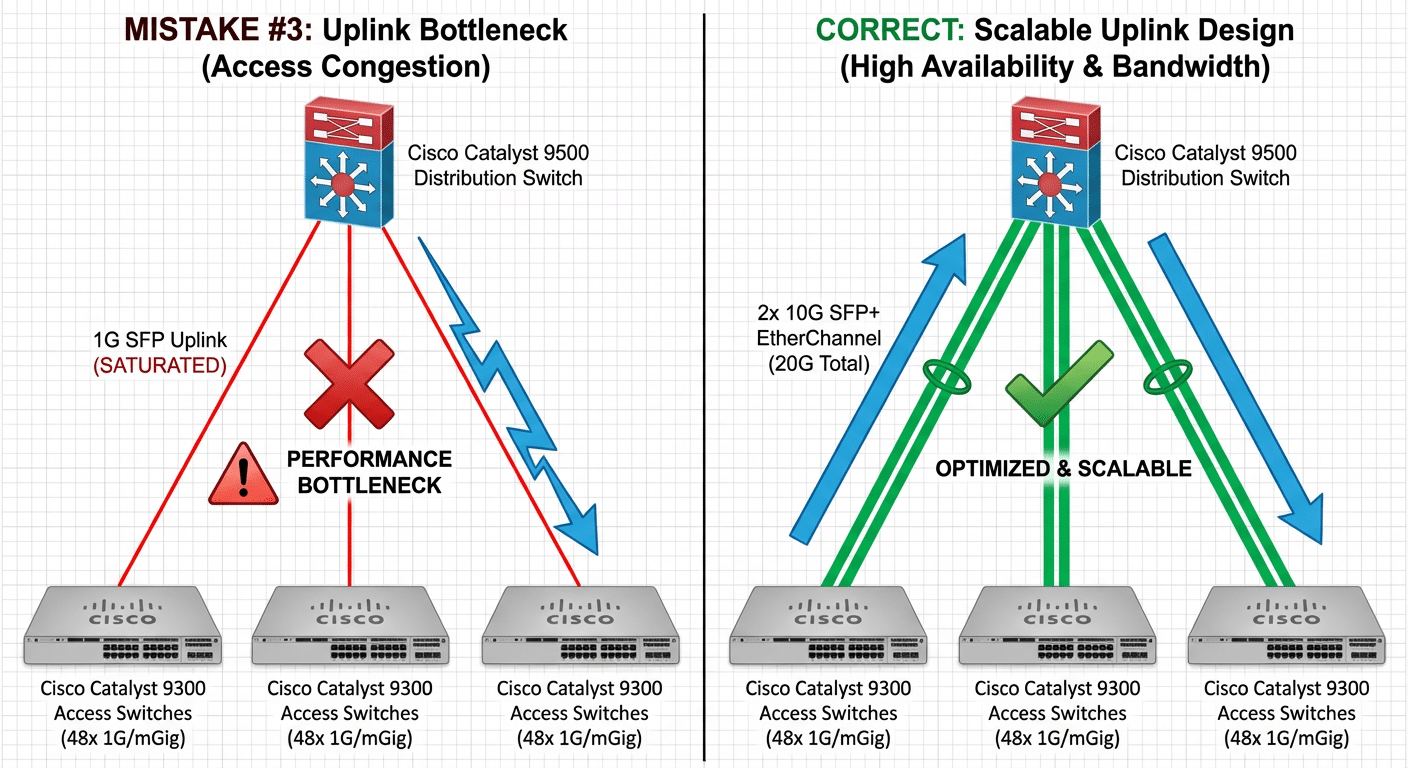
Typical scenarios:
- Higher-density access switches connected to low-speed uplinks
- Increased wireless usage without corresponding backbone capacity
- Performance complaints despite “new hardware” being installed
Why this is a problem:
Traffic aggregation increases with user density and wireless adoption. If uplinks are not designed to scale, the network becomes constrained even when access ports are underutilized.
How to avoid it:
Evaluate uplink bandwidth as part of the upgrade plan and ensure the access-to-distribution design supports peak traffic patterns, not average usage.
Mistake #4: Ignoring Lifecycle and EOL Planning During the Upgrade
Some organizations upgrade hardware without considering product lifecycle timelines.
This often results in:
- Selecting switches already close to End-of-Life (EOL)
- Limited availability of replacement parts or support
- Shortened upgrade cycles and unexpected refresh costs
Why this is a problem:
A campus network upgrade should extend usable life, not introduce new lifecycle risks.
How to avoid it:
Review EOL and End-of-Support dates during the planning phase and choose platforms with a clear long-term roadmap.
Mistake #5: Treating Budget as a Hardware-Only Calculation
Another common error is viewing campus upgrades as a “switch purchase” rather than a network project.
Frequently ignored costs include:
- Software licensing and support coverage
- Deployment and configuration effort
- Downtime risk during cutover
- Future expansion and maintenance
Why this is a problem:
Projects that optimize only for initial hardware cost often experience higher total cost of ownership over time.
How to avoid it:
Approach budgeting holistically and evaluate long-term operational impact, not just upfront pricing.
How to Avoid These Mistakes in Practice
Successful Cisco campus network upgrades follow a consistent pattern:
- Start with architecture, not models
- Plan PoE and uplinks for growth, not just current needs
- Design for scalability and operational simplicity
- Align hardware choices with lifecycle timelines
- Treat upgrades as long-term investments, not one-time purchases
These principles help reduce redesign risk and improve network stability after deployment.
Final Thoughts
Most campus network upgrade issues are predictable—and preventable.
By addressing these common mistakes early, organizations can avoid unnecessary cost, performance bottlenecks, and premature refresh cycles.
This topic is part of a broader Cisco switch selection and campus network planning framework, where upgrade decisions should always align with architecture, growth, and lifecycle strategy.
Related Reading
- Cisco Switch Selection Guide for Enterprise Campus Networks
- Cisco Switch Selection: Commonly Overlooked Parameters
Need Help with a Cisco Campus Network Upgrade?
If you are planning a campus network upgrade and need help with:
- Architecture and switch selection
- PoE and uplink capacity planning
- EOL-aware upgrade strategies
- Cisco hardware sourcing and project support






