Cisco SD-WAN License Ordering Guide for Catalyst 8000: C8200, C8300 and C8500 Throughput Tiers
Cisco Catalyst 8000 SD-WAN license orders should start with two checks: the router platform and the throughput the site must carry. C8200 and C8300 deployments commonly start from a 250 Mbps SD-WAN controller-mode baseline, while C8500 platforms are handled differently and should be sized by exact model, role and entitlement. A correct order also confirms the management model, feature tier, bandwidth tier, HSEC or SLAC requirement, Smart Account, term length and support coverage.
Most buyers ask for a “Cisco SD-WAN license.” Cisco ordering expresses that requirement through Cisco DNA Software for SD-WAN and Routing subscriptions, with PIDs such as DNA-P-T0-A-3Y, DNA-C-T1-E-3Y, L-DNA-C8000V, L-DNA-C8000-MOD and L-DNA-TIER-ADD. Those part numbers are useful only after the platform, management direction and target throughput are known.
Default SD-WAN Throughput for C8200, C8300 and C8500
The default SD-WAN throughput question cannot be answered by the Catalyst 8000 family name alone. C8200, C8300, C8500, C8500L and C8000V are ordered under related software families, but their controller-mode throughput behavior and upgrade ceilings differ by exact platform and software release.
| Platform or model family | Cisco SD-WAN controller-mode baseline | Higher-throughput direction to validate |
|---|---|---|
| C8200-1N-4T | 250 Mbps without HSECK9 | HSECK9 path shows 500 Mbps in older behavior and 1 Gbps aggregate in newer behavior; confirm release and entitlement |
| C8200L-1N-4T | 250 Mbps without HSECK9 | More limited than C8200-1N-4T; HSECK9 path reaches a lower ceiling, so confirm before quoting an upgrade |
| C8300-1N1S-6T / C8300-2N2S-6T | 250 Mbps without HSECK9 | HSECK9 path shows 1 Gbps in older behavior and 2 Gbps aggregate in newer behavior |
| C8300-1N1S-4T2X / C8300-2N2S-4T2X | 250 Mbps without HSECK9 | Cisco’s SD-WAN controller-mode table lists these models as unthrottled with HSECK9; quote by exact PID and release |
| C8500-12X / C8500-12X4QC / C8500L-8S4X | Default unthrottled in Cisco’s SD-WAN controller-mode table | Do not size like C8200/C8300. Validate exact model, role, entitlement and software release |
| C8500-20X6C | Default T4 in Cisco’s SD-WAN controller-mode table | Cisco’s table lists unthrottled where applicable; quote by exact PID, required tier, release and export-compliance requirement |
| C8000V | Separate virtual-platform table and ordering path | Use the C8000V-specific license path and validate virtual platform sizing, HSEC and tier |
This table is a buying guide, not a substitute for final BOM validation. Cisco changes throughput behavior by platform and software release, and some limits are bidirectional while others are aggregate. Before quoting, check the exact router PID, current software release, HSEC status and whether the project uses SD-WAN controller mode or autonomous routing.

What Buyers Usually Get Wrong About C8000 SD-WAN Bandwidth
The physical interface speed is not the licensed SD-WAN throughput. A router with 1G, 10G, 25G or 100G interfaces may still require the correct DNA bandwidth tier, HSEC authorization and throughput configuration before the intended encrypted or SD-WAN traffic level is available.
Three numbers often get mixed together:
| Term | What it means in a C8000 order |
|---|---|
| Physical port speed | The speed of the Ethernet, SFP, SFP+, QSFP or module interface |
| Default throughput | The baseline throughput behavior shown for the platform and operating mode |
| Entitled throughput | The throughput allowed by the purchased license, HSEC status, Smart Account entitlement and device configuration |
For procurement teams, the safest rule is to size the order around real WAN traffic. A quote for a 1G internet circuit, dual 1G SD-WAN transports or encrypted hub traffic should not be built from the chassis data sheet alone.
Cisco SD-WAN License vs Cisco DNA Subscription
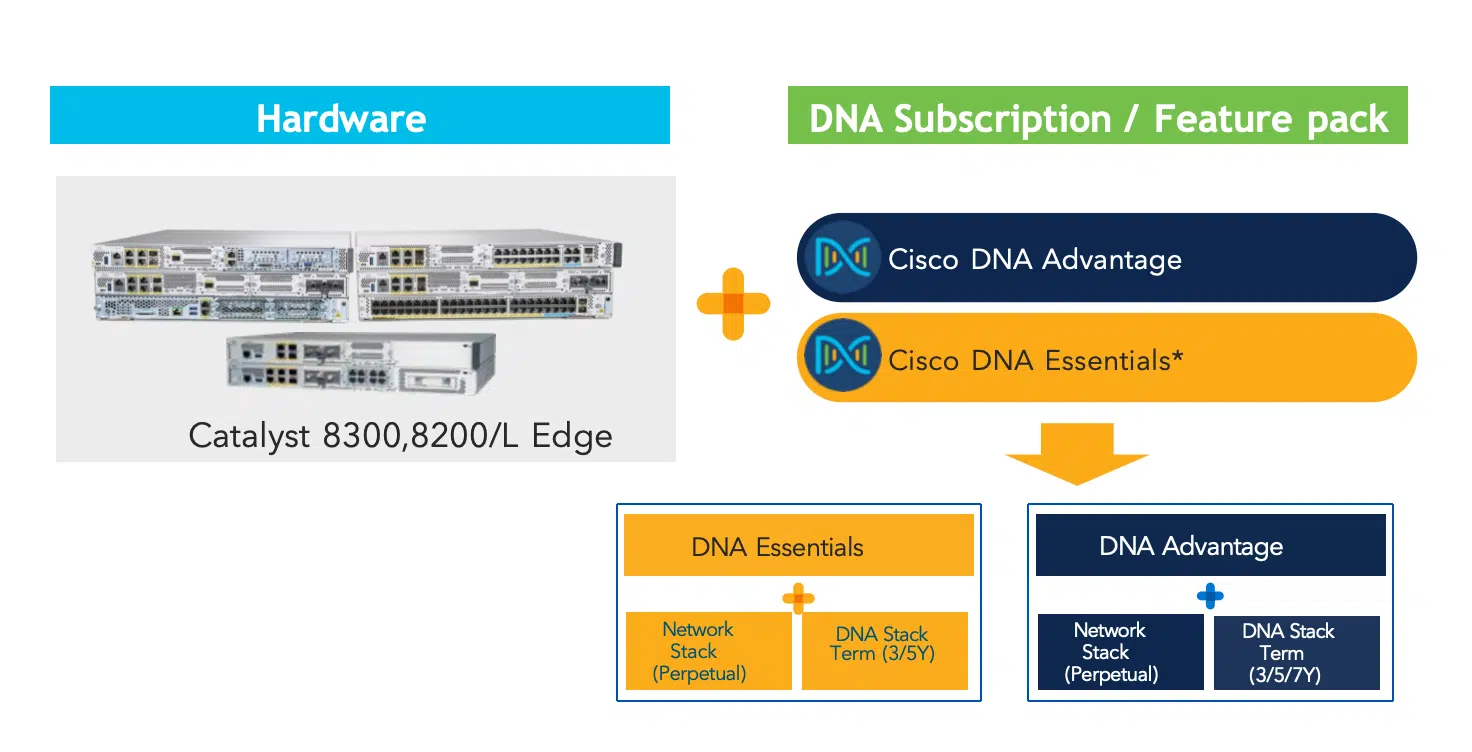
In commercial language, the customer is buying SD-WAN licensing. In Cisco ordering language, the customer is usually buying Cisco DNA Software for SD-WAN and Routing. The subscription includes a feature tier, a bandwidth tier, a management direction and a term.
The DNA subscription also contains two operational ideas that matter during renewal. The network stack covers the IOS XE routing entitlement tied to the device capability level. The DNA stack is the term-based subscription component tied to controller-based management, SD-WAN functions, analytics, automation and related subscription features.
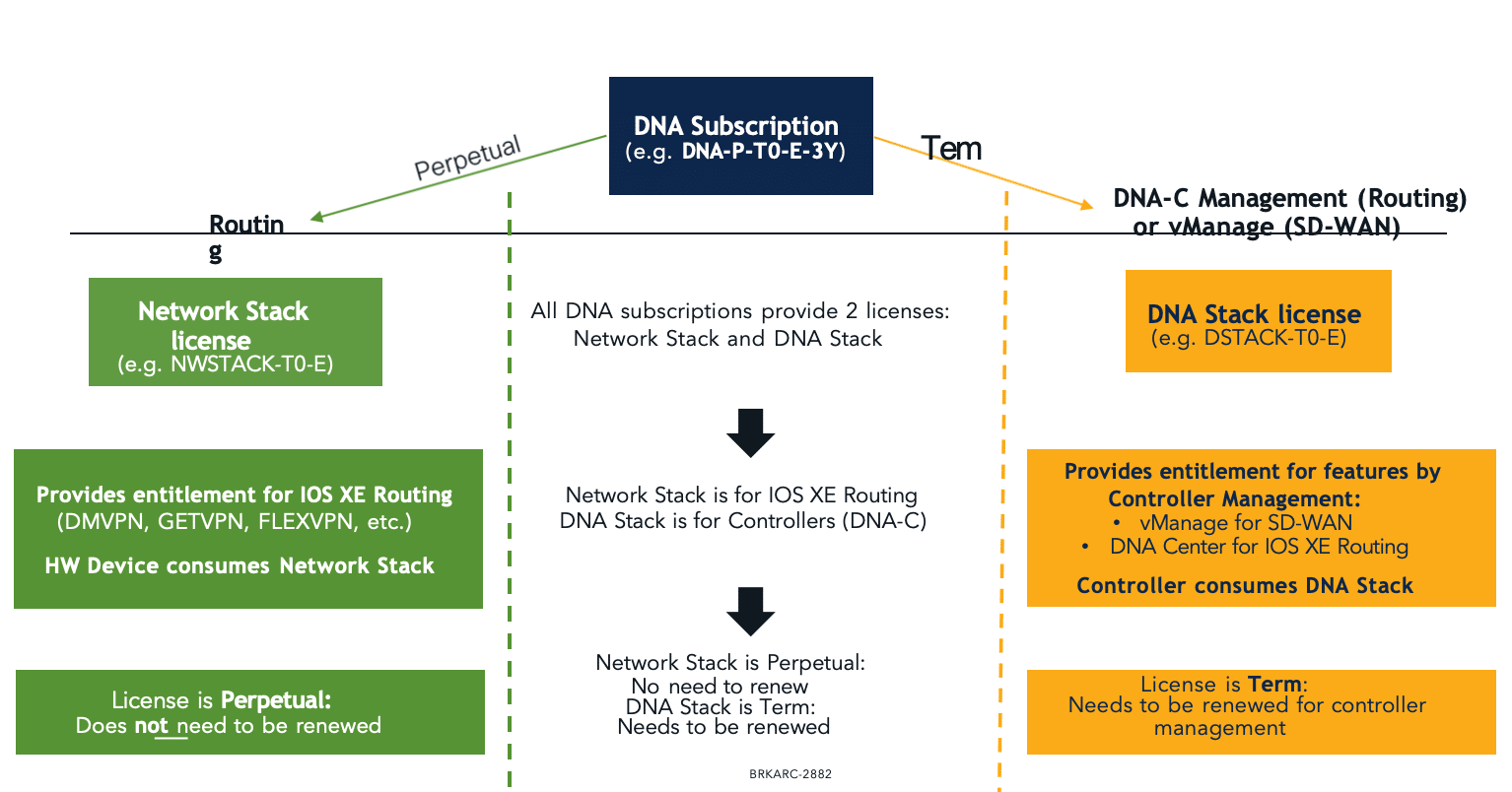
In autonomous routing mode, a router may continue to use its perpetual network stack capabilities after the term-based DNA subscription expires, although subscription features and compliance still need attention. In SD-WAN controller mode, the DNA stack is tied to controller entitlement and license compliance, so renewal ownership is not a minor administrative detail.
How to Read Cisco C8000 SD-WAN License PIDs
Cisco C8000 license PIDs are short, but each segment changes the order. A part number such as DNA-P-T0-A-3Y tells the buyer the management direction, bandwidth tier, feature tier and subscription term. It does not tell the buyer which hardware model is being deployed or whether HSEC is ready.

| PID segment | Buying meaning | Example |
|---|---|---|
DNA | Cisco DNA subscription for SD-WAN and Routing | DNA-P-T0-A-3Y |
C or P | Cloud-oriented or On-Premises management direction | DNA-C-* or DNA-P-* |
T0, T1, T2, T3, T4, T5 | Bandwidth tier | DNA-P-T1-A-3Y |
E, A, or higher bundle where supported | Essentials, Advantage or higher feature tier | DNA-P-T0-A-3Y |
3Y | Subscription term used for the default examples in this guide | DNA-P-T0-A-3Y |
Do not treat a bandwidth tier as a universal Mbps value across every router. Cisco’s tier-to-throughput mapping depends on platform, software release and operating mode. A tier that makes sense on a C8300 may not mean the same final buying decision on a C8200L, C8500 or C8000V.
Cisco SD-WAN Bandwidth Tiers and License SKU Patterns
The bandwidth tier inside a Cisco DNA PID is the buyer’s first sizing checkpoint. Estimate the aggregate WAN, IPsec or SD-WAN transport traffic, then select a tier that covers the required nominal and aggregate bandwidth. The final quote still needs platform validation because the router model, IOS XE release, HSEC status and Smart Account entitlement determine what the device can actually use.
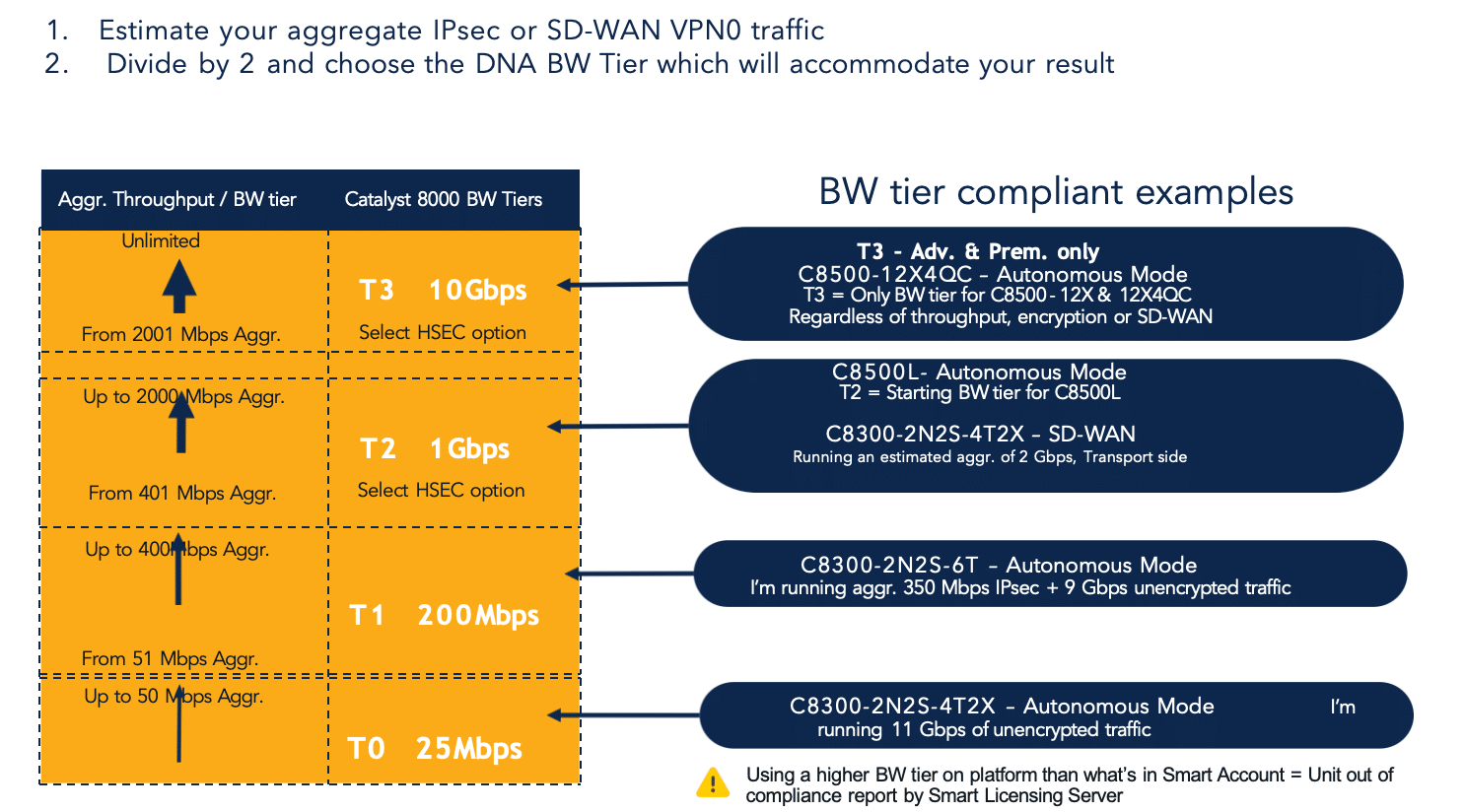
| Bandwidth tier | SD-WAN nominal bandwidth | Aggregate bandwidth | 3-year Essentials PID patterns | 3-year Advantage PID patterns |
|---|---|---|---|---|
| T0 | Up to 25 Mbps | Up to 50 Mbps | DNA-C-T0-E-3YDNA-P-T0-E-3Y | DNA-C-T0-A-3YDNA-P-T0-A-3Y |
| T1 | Up to 200 Mbps | Up to 400 Mbps | DNA-C-T1-E-3YDNA-P-T1-E-3Y | DNA-C-T1-A-3YDNA-P-T1-A-3Y |
| T2 | Up to 1 Gbps | Up to 2 Gbps | DNA-C-T2-E-3YDNA-P-T2-E-3Y | DNA-C-T2-A-3YDNA-P-T2-A-3Y |
| T3 | Up to 10 Gbps | Up to 20 Gbps | Not applicable | DNA-C-T3-A-3YDNA-P-T3-A-3Y |
The 3Y examples above are the easiest way to read the PID structure for a default quote. T3 is not applicable to Essentials orders, and T2 or higher should be reviewed with HSEC or SLAC handling before purchase.
DNA-C vs DNA-P for Cisco SD-WAN Orders
DNA-C and DNA-P are not interchangeable suffixes. They reflect the subscription’s management direction and should follow the customer’s SD-WAN architecture.
| Subscription direction | Buying interpretation | What to confirm |
|---|---|---|
DNA-C | Cisco DNA Cloud direction | Whether the customer is using a Cisco-hosted or cloud-oriented management model |
DNA-P | Cisco DNA On-Premises direction | Whether the customer hosts or operates the controller environment under enterprise control |
| Cloud-delivered Catalyst SD-WAN path | Separate cloud-delivered ordering workflow where applicable | Whether the project uses Cisco’s cloud-delivered SD-WAN offer rather than a traditional DNA-C or DNA-P order |
For enterprise procurement, this decision is normally defined by the network architecture before the final quote. For resellers and distributors, the risk is quoting a PID that looks close but belongs to the wrong controller model.
Essentials vs Advantage for Catalyst 8000 SD-WAN
Feature tier and bandwidth tier solve different problems. Essentials or Advantage controls the feature entitlement. T0, T1, T2, T3 and higher tiers control the bandwidth entitlement. A buyer can choose the right feature tier and still under-size the bandwidth tier.
| Feature tier | Typical buying fit | Procurement check |
|---|---|---|
| Essentials | Simpler branch routing or limited SD-WAN requirements | Confirm that segmentation, advanced policies and required controller features are not excluded |
| Advantage | Enterprise SD-WAN branch, richer routing, segmentation and edge policy use cases | Often the safer starting point for managed enterprise SD-WAN fabrics |
| Premier or higher bundle where supported | Higher feature bundle where required by design | Validate exact platform support and feature need before quoting |
A query such as “Routing DNA Advantage Tier 1” mixes two decisions: Advantage is the feature tier, and Tier 1 is the bandwidth tier. The order should document both instead of relying on shorthand.
Cisco C8000 SD-WAN License and Throughput Upgrade Paths
The upgrade path should be written by series, not by a generic “C8000” label. C8200, C8300, C8500 and C8000V may all sit in the same SD-WAN fabric, but they do not share the same platform ceiling, hardware role or ordering top line.
Use the matrix below as the procurement map. Find the router model first, then move across to the required SD-WAN bandwidth tier. Each cell lists the 3-year SKU options that belong to that tier and platform group.
| Platform / model group | T0 25 Mbps / 50 Mbps aggregate | T1 200 Mbps / 400 Mbps aggregate | T2 1 Gbps / 2 Gbps aggregate | T3 10 Gbps / 20 Gbps aggregate | Buying note |
|---|---|---|---|---|---|
C8200-1N-4T | DNA-C-T0-E-3YDNA-P-T0-E-3YDNA-C-T0-A-3YDNA-P-T0-A-3Y | DNA-C-T1-E-3YDNA-P-T1-E-3YDNA-C-T1-A-3YDNA-P-T1-A-3Y | DNA-C-T2-E-3YDNA-P-T2-E-3YDNA-C-T2-A-3YDNA-P-T2-A-3Y | Not applicable for this platform order | T2 is the highest standard C8200 bandwidth tier. Confirm HSEC, SLAC, IOS XE release and configured throughput before quoting the upgrade. |
C8200L-1N-4T | DNA-C-T0-E-3YDNA-P-T0-E-3YDNA-C-T0-A-3YDNA-P-T0-A-3Y | DNA-C-T1-E-3YDNA-P-T1-E-3YDNA-C-T1-A-3YDNA-P-T1-A-3Y | DNA-C-T2-E-3YDNA-P-T2-E-3YDNA-C-T2-A-3YDNA-P-T2-A-3Y | Not applicable for this platform order | C8200L has a lower effective platform ceiling than C8200-1N-4T. Validate the release and entitlement before promising 1G-class SD-WAN performance. |
C8300-1N1S-6T, C8300-2N2S-6T | DNA-C-T0-E-3YDNA-P-T0-E-3YDNA-C-T0-A-3YDNA-P-T0-A-3Y | DNA-C-T1-E-3YDNA-P-T1-E-3YDNA-C-T1-A-3YDNA-P-T1-A-3Y | DNA-C-T2-E-3YDNA-P-T2-E-3YDNA-C-T2-A-3YDNA-P-T2-A-3Y | Not applicable for this model group | T2 is the standard upgrade ceiling for the 6T branch models. Confirm HSEC, SLAC and IOS XE release before increasing throughput. |
C8300-1N1S-4T2X, C8300-2N2S-4T2X | DNA-C-T0-E-3YDNA-P-T0-E-3YDNA-C-T0-A-3YDNA-P-T0-A-3Y | DNA-C-T1-E-3YDNA-P-T1-E-3YDNA-C-T1-A-3YDNA-P-T1-A-3Y | DNA-C-T2-E-3YDNA-P-T2-E-3YDNA-C-T2-A-3YDNA-P-T2-A-3Y | DNA-C-T3-A-3YDNA-P-T3-A-3Y | Use T3 when the project needs the 10G-WAN model’s higher SD-WAN entitlement. T3 is an Advantage-tier order. |
C8500L-8S4X | Not applicable for this platform order | Not applicable for this platform order | DNA-C-T2-A-3YDNA-P-T2-A-3Y | DNA-C-T3-A-3YDNA-P-T3-A-3Y | Use T2 where 2 Gbps aggregate entitlement is enough. Use T3 for the maximum standard C8500L platform-throughput tier. |
C8500-12X, C8500-12X4QC | Not applicable for this platform order | Not applicable for this platform order | Not applicable for this platform order | DNA-C-T3-A-3YDNA-P-T3-A-3Y | Use T3 for high-speed WAN edge, aggregation or hub roles. Do not size these models with C8200/C8300 branch-tier assumptions. |
C8500-20X6C | Not applicable for this platform order | Not applicable for this platform order | Not applicable for this platform order | Not applicable for this platform order | Use the T4/T5 C8500-20X6C path below. Treat it as a separate high-end order, outside the standard T0-T3 branch table. |
For C8500-20X6C, handle the order outside the standard T0-T3 branch table.
| Platform | T4 3-year SKU | T5 3-year SKU | Buying note |
|---|---|---|---|
C8500-20X6C | DNA-C-T4-A-3YDNA-P-T4-A-3Y | DNA-C-T5-A-3YDNA-P-T5-A-3Y | Use T4 for up to 50 Gbps aggregate entitlement. Use T5 for the maximum C8500-20X6C platform-throughput tier. |
C8200 SD-WAN License and Throughput Upgrade Path
C8200 is usually selected for smaller and mid-size branch sites where a compact Catalyst 8000 edge is enough. In SD-WAN controller mode, C8200 and C8200L commonly start from a 250 Mbps baseline, but the upgrade path is not identical between C8200-1N-4T and C8200L-1N-4T.
Use L-DNA-C8200 when the Cisco DNA subscription is ordered separately from the hardware. The bandwidth tier selected under that top-line item should match the real branch traffic plan, not just the circuit label.
C8200 orders often fail when the hardware is treated as a simple ISR replacement and the SD-WAN license is added late. If the site may grow beyond the entry bandwidth level, include the expected circuit upgrade in the first license discussion. A lower initial license can be corrected later, but it creates extra procurement and maintenance work.
For hardware sourcing, review Cisco Catalyst 8200 Series Edge Platforms before finalizing the license tier.
C8300 SD-WAN License and Throughput Upgrade Path
C8300 is the most common Catalyst 8000 physical branch platform in license-sizing conversations. It supports modular WAN and LAN designs, larger branch deployments and many ISR 4000 replacement projects. It is also where buyers most often confuse port capability, SD-WAN throughput and HSEC readiness.
Use L-DNA-C8300 when the Cisco DNA subscription is ordered separately from the hardware. The model family matters: the 6T models and 4T2X models do not have the same top-end SD-WAN behavior.
A practical C8300 order should list the expected WAN traffic in plain numbers. “Two 1G transports with SD-WAN and encrypted traffic” is more useful than “C8300 with DNA Advantage.” The first statement allows the reseller to check bandwidth tier, HSEC and support. The second only describes part of the license.
For hardware sourcing, start with Cisco Catalyst 8300 Series Edge Platforms. If the project is an ISR 4000 refresh, compare the license and hardware path with the ISR 4000 to Catalyst 8000 migration guide.
C8500 SD-WAN License and Throughput Upgrade Path
C8500 and C8500L should not be quoted as if they were larger C8200 or C8300 branch routers. They are usually selected for high-performance edge, aggregation, hub, cloud edge or service-rich WAN roles. Their SD-WAN throughput behavior and default assumptions are different from the 250 Mbps branch starting point used for many C8200 and C8300 discussions.
Use L-DNA-C8500 when the subscription is ordered through the C8500 software path. In many C8500 orders, the first decision is not “T1 or T2”; it is whether the platform role is regional hub, high-speed edge, cloud edge, data center edge or ASR-class replacement.
The C8500 rows in the matrix use Advantage-tier 3-year SKUs. Essentials SKUs do not apply to those C8500 bandwidth upgrades.
The procurement risk on C8500 is over-simplification. A buyer may ask for “C8500 SD-WAN license,” but the distributor needs to know whether the router is a regional hub, cloud edge, data center edge, high-speed aggregation router or replacement for an ASR-class role. That context changes the license review and the accessory BOM.
For hardware sourcing, review Cisco Catalyst 8500 Series Edge Platforms before quoting the subscription.
C8000V SD-WAN License and Throughput Upgrade Path
C8000V is a virtual edge router, not a physical C8200, C8300 or C8500 chassis. It can be used in cloud, colocation, lab and virtual branch environments, but its throughput is tied to virtual-platform licensing, release behavior and deployment sizing.
| C8000V ordering item | What to verify |
|---|---|
| License path | Whether L-DNA-C8000V or another C8000V-specific subscription item applies |
| Virtual environment | Cloud platform, hypervisor, colocation platform or lab environment |
| Throughput tier | Licensed virtual throughput, not physical interface speed |
| Management model | SD-WAN controller mode or autonomous routing |
| Export compliance | Whether C8000V-HSEC, HSECK9 or SLAC handling is required |
| Support ownership | Smart Account, Virtual Account, renewal owner and support coverage |
Keep C8000V as its own BOM line even when it joins the same SD-WAN fabric as physical Catalyst 8000 routers. A physical-platform license assumption can produce a quote that looks complete but fails during virtual deployment.
New Purchase, Renewal, Modification or Bandwidth Upgrade
The same customer may need different license items depending on the commercial action. A new router purchase, subscription renewal, bandwidth upgrade and license modification are not the same event.
| Customer situation | Likely ordering direction | Risk to avoid |
|---|---|---|
| New C8200, C8300 or C8500 SD-WAN router | Chassis, platform-specific DNA subscription, bandwidth tier, HSEC or SLAC where applicable, support and accessories | Hardware quote without subscription entitlement |
| New C8000V virtual edge | C8000V-specific subscription path such as L-DNA-C8000V | Applying physical-router assumptions to a virtual router |
| Existing subscription change | Modification workflow such as L-DNA-C8000-MOD where applicable | Treating a modification item as a new-router license |
| Bandwidth tier increase | Platform-specific modification or supported tier-add path after checking current entitlement | Buying L-DNA-TIER-ADD without confirming platform support and current license state |
| Renewal | Renew the correct subscription in the correct Smart Account and Virtual Account | Renewing the wrong entitlement owner or term |
| ISR, ASR or software WAN subscription | Supported a-la-carte or migration path where Cisco allows it | Assuming a legacy or software WAN path also applies to a new C8000 hardware order |
L-DNA-C8000-MOD and L-DNA-TIER-ADD are important because buyers already use those part numbers when they try to change existing subscriptions or bandwidth tiers. They should be handled with context. Before quoting either item, confirm the installed platform, current subscription, target tier, Smart Account, HSEC status and whether the router is physical or virtual.
How to Increase SD-WAN Bandwidth on Cisco C8000 Routers
Increasing SD-WAN bandwidth on a Catalyst 8000 router is a licensing and configuration workflow. A faster circuit or faster interface does not automatically raise the entitled SD-WAN or encrypted throughput.
| Step | What to verify | Why it matters |
|---|---|---|
| 1 | Exact platform and PID | C8200, C8200L, C8300, C8500 and C8000V have different limits |
| 2 | Current operating mode | SD-WAN controller mode and autonomous routing are not sized the same way |
| 3 | Current license tier | Existing entitlement may not match the new circuit speed |
| 4 | Target throughput | Quote around expected WAN, SD-WAN and encrypted traffic, not only port speed |
| 5 | HSEC / SLAC status | Throughput above 250 Mbps can require export-controlled authorization on many platforms |
| 6 | Smart Account and Virtual Account | Entitlement must land in the correct customer account |
| 7 | Software release | Aggregate, bidirectional and virtual-platform Tx behavior changes by release |
| 8 | Device configuration | The router may need boot license and throughput configuration changes |
| 9 | Reload window | Some throughput changes require a reload |
| 10 | Post-change validation | Confirm configured and enforced throughput after the change |
For production SD-WAN sites, schedule the license change with the controller and network operations teams. A bandwidth increase can affect entitlement reporting, templates, HSEC installation and maintenance windows.
HSECK9, SLAC and Smart Account Compliance
HSECK9 is easy to miss because it is not a physical module and it does not look like a normal bandwidth tier. It relates to export-controlled cryptographic capability and higher-throughput use cases. On C8200, C8200L and C8300 platforms, throughput above 250 Mbps usually brings HSEC and SLAC into the order review. C8000V has its own export-compliance handling through C8000V-HSEC, and virtual-platform throttling behavior is not the same as physical-platform throttling behavior.
| Item | Why it belongs in the quote review |
|---|---|
| HSECK9 / HSEC | Enables or authorizes higher encrypted-throughput use cases where required |
| SLAC | Smart Licensing Authorization Code used for HSEC authorization where required |
| C8000V-HSEC | Export-compliance path for Catalyst 8000V |
| Smart Account | Owns the subscription entitlement |
| Virtual Account | Keeps entitlement assigned to the correct customer, region or project |
| Usage reporting | Helps validate compliance under Smart Licensing Using Policy |
For procurement teams, keep the router quote, subscription order, HSEC requirement and Smart Account together. A router can arrive on time and still be delayed if the authorization path is incomplete.
Autonomous Mode vs SD-WAN Mode Renewal Impact
Autonomous routing and SD-WAN controller mode have different renewal consequences. In autonomous mode, the perpetual network stack remains the foundation for routing operation. The term-based DNA stack still needs renewal attention, but the site is not managed in the same way as a fabric node under SD-WAN controller entitlement.
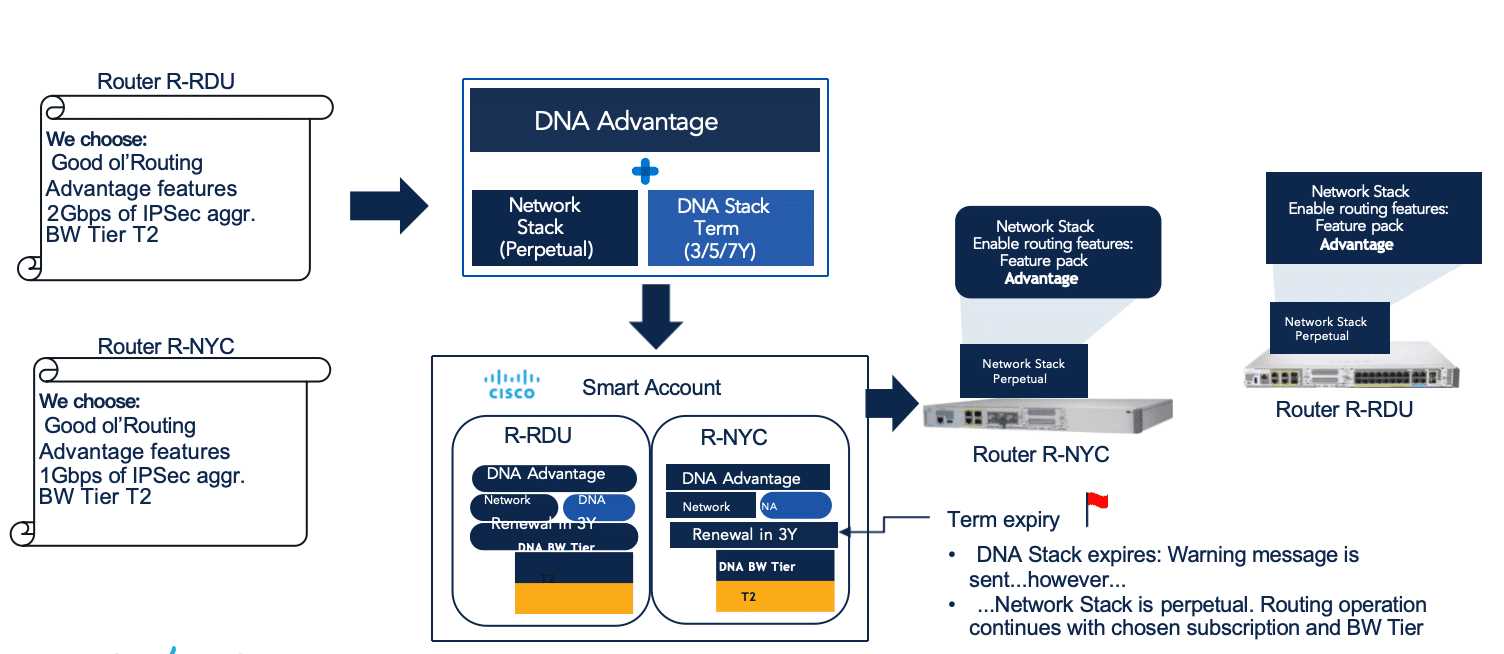
In SD-WAN controller mode, the DNA stack is tied to controller-managed entitlement and license compliance. If the subscription expires, the customer needs a renewal path or another supported lifecycle action for that device.
Renewal ownership should be defined during the first order, not after the license term is nearly over. Enterprises with many branch routers should align the subscription term with WAN contract dates, hardware support and site refresh planning.
C8000 SD-WAN Ordering Scenarios
The best license choice depends on the site role. A small branch, a large branch, a regional hub and a cloud edge can all use Catalyst 8000 technology, but they do not deserve the same buying assumption.
| Scenario | Recommended buying direction |
|---|---|
| Small branch with moderate SD-WAN traffic | Start with C8200-class hardware and size the license around real WAN traffic |
| C8200 site expected to grow beyond the baseline | Confirm higher tier, HSEC, software release and maintenance window before ordering |
| Medium branch with modular WAN and services | C8300 is often the practical starting point; confirm modules, throughput and HSEC together |
| Large branch or aggregation site | Consider C8500/C8500L based on role, interface mix and throughput need |
| Cloud or virtual SD-WAN edge | Use C8000V ordering logic and L-DNA-C8000V where applicable |
| Installed router needs more bandwidth | Review current entitlement first, then select the correct modification or tier-add path |
| ISR 4000 replacement | Validate feature parity, module strategy, license tier and migration timing before quoting |
For a broader platform view, use the Cisco Catalyst 8000 router comparison before the license order is finalized.
Pre-Quote Checklist for Cisco C8000 SD-WAN Licenses
A clean quote request should give the reseller enough information to validate hardware, entitlement, throughput and delivery risk without guessing. Before requesting price and lead time, collect the following details.
- Exact router model or target family: C8200, C8200L, C8300, C8500, C8500L or C8000V.
- Deployment mode: SD-WAN controller mode or autonomous routing.
- Management direction: DNA-C, DNA-P or cloud-delivered Catalyst SD-WAN path.
- Feature tier: Essentials, Advantage or higher bundle where supported.
- Bandwidth tier or numeric throughput target.
- Expected WAN, SD-WAN, VPN and encrypted traffic.
- Current or planned IOS XE and SD-WAN Manager release.
- HSEC, HSECK9, C8000V-HSEC or SLAC requirement.
- Smart Account and Virtual Account.
- Subscription term and renewal owner.
- Existing license state if the project is an upgrade or renewal.
- Required modules, optics, power supplies and accessories.
- Hardware support and subscription support requirements.
- Delivery deadline, destination and acceptable substitution rule.
For software entitlement review, use the Cisco Networking Licenses category. For related hardware items, check Cisco 8000 Series router modules and cards before the BOM is released. Layer23-Switch can help validate platform, stock, SD-WAN license, bandwidth tier, HSEC requirement, accessories and global delivery timing before purchase.

FAQ
What is the default SD-WAN throughput on Cisco C8200?
C8200 SD-WAN controller-mode planning commonly starts from a 250 Mbps baseline. Higher throughput requires validation of the exact C8200 model, Cisco DNA bandwidth tier, HSEC or SLAC requirement, software release and throughput configuration.
What is the default SD-WAN throughput on Cisco C8300?
C8300 SD-WAN controller-mode planning also commonly starts from a 250 Mbps baseline. The upgrade path depends on the exact C8300 model, because 6T and 4T2X variants do not have the same higher-throughput behavior in Cisco throughput tables.
Is Cisco C8500 limited to 250 Mbps by default?
No. C8500 and C8500L platforms should not be sized with the same small-branch 250 Mbps assumption used for many C8200 and C8300 discussions. Quote C8500 by exact model, role, software release, entitlement and HSEC compliance requirement.
What does L-DNA-C8000-MOD mean?
L-DNA-C8000-MOD appears in Cisco DNA subscription modification workflows for Catalyst 8000. Treat it as a modification-related item and confirm whether the customer is making a new purchase, renewal, bandwidth change or correction to an existing subscription.
When do I need L-DNA-TIER-ADD?
L-DNA-TIER-ADD may be relevant when adding or modifying bandwidth-tier entitlement in supported Cisco DNA for SD-WAN and Routing scenarios. Before quoting it, confirm the installed platform, current entitlement, target tier, Smart Account, HSEC status and whether the router is physical or virtual.
What is the difference between DNA-P and DNA-C?
DNA-P indicates an on-premises management direction, while DNA-C indicates a cloud-oriented subscription direction. The correct choice follows the customer’s SD-WAN management architecture and controller ownership model.
What bandwidth does T0, T1, T2 and T3 provide for Cisco SD-WAN?
T0 provides up to 25 Mbps nominal / 50 Mbps aggregate, T1 provides up to 200 Mbps nominal / 400 Mbps aggregate, T2 provides up to 1 Gbps nominal / 2 Gbps aggregate, and T3 provides up to 10 Gbps nominal / 20 Gbps aggregate. Platform support is not universal; C8200-class orders normally top out at T2, while T3 belongs to supported higher-throughput C8300 and C8500 models.
Is bandwidth tier the same as Essentials or Advantage?
No. Essentials and Advantage are feature tiers. T0, T1, T2, T3 and higher values are bandwidth tiers. A correct order must include both the feature tier and the bandwidth tier.
Does throughput above 250 Mbps require HSEC?
For many Catalyst 8000 and virtual SD-WAN use cases, throughput above 250 Mbps brings HSEC, HSECK9, C8000V-HSEC or SLAC into the order review. Confirm the exact platform and operating mode before quoting.
Should C8000V be ordered the same way as C8200, C8300, or C8500?
No. C8000V is a virtual edge router and should be ordered through C8000V-specific license logic. Validate L-DNA-C8000V, virtual platform sizing, throughput tier, HSEC and support separately from physical Catalyst 8000 routers.