
Cisco Switch EOL Migration Guide: Best Upgrade Paths by Series
Direct Answer
Cisco switch EOL migration is not just about replacing old hardware with newer hardware. The right upgrade path depends on the legacy switch family, the network role, and the physical and operational differences between the old and new platforms. In practice, access-layer refreshes usually move toward Catalyst 9200 or 9300-class switches, while larger modular or backbone refreshes often move toward Catalyst 9400, 9500, or 9600 depending on the original architecture. Cisco’s official switches EoL/EoS listing and migration guides support this series-based approach.
Executive Summary
If you are planning to retire legacy Cisco switching hardware, start with the bigger architectural question before you compare part numbers. Our Cisco Switch Selection Guide for Enterprise Campus Networks is the best place to align switch refresh planning with campus design, fault domains, and long-term capacity decisions. Your current selection guide already frames campus switching as an architecture-first decision rather than a simple hardware shortlist, which makes it the right supporting pillar for this migration hub.
This guide is built to help readers move from broad lifecycle planning to the right model-specific migration article. It covers common Cisco switch EOL migration paths by legacy series and by network role, then points to the detailed replacement guides already linked from your current page, including Cisco 2960-X EoL Replacement: Catalyst 9200 Migration Guide, Cisco 3650 to 9300L Migration: Hardware Mapping & Replacement and Cisco 3850 Replacement 9300: Hardware Setup & Migration Guide Cisco’s official lifecycle and migration resources provide the authority layer behind these upgrade paths.
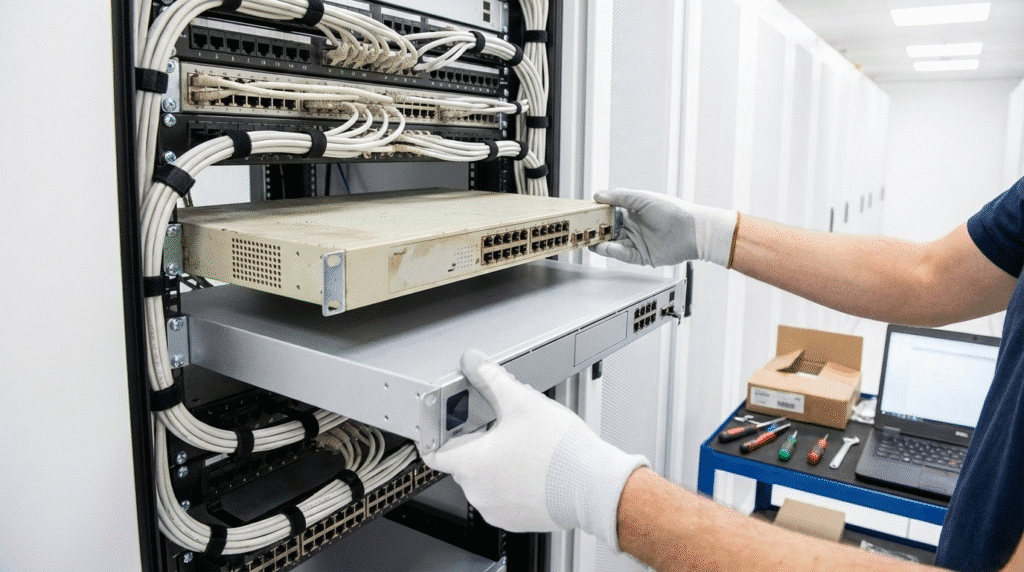
How to Use This Cisco Switch EOL Migration Guide
Use this page in one of three ways.
If you already know the legacy platform you are replacing, start with the migration overview table below and then move into the relevant detailed guide. If you know the network role but not the best replacement family yet, jump to the access, distribution, or core migration sections. If you are still early in planning, use this page as a screening framework before opening the deeper model-specific articles. That structure fits both your existing hub page and Cisco’s own documentation pattern, where broad lifecycle resources sit above platform-specific migration guides.
Cisco Switch EOL Migration Overview Table
| Legacy Cisco Switch Family | Typical Replacement Path | Network Role | Key Migration Concern | Detailed Guide |
|---|---|---|---|---|
| Catalyst 2960-X | Catalyst 9200 | Access | Stacking changes, optics reuse, closet refresh planning | Cisco 2960-X EoL Replacement: Catalyst 9200 Migration Guide |
| Catalyst 3650 | Catalyst 9300L or 9300 | Access | PoE recalculation, feature tradeoffs, access refresh scope | Cisco 3650 to 9300L Migration: Hardware Mapping & Replacement |
| Catalyst 3850 | Catalyst 9300 | Access | Stack architecture, uplink modules, power and optics | Cisco 3850 Replacement 9300: Hardware Setup & Migration Guide |
| Catalyst 4500-E | Catalyst 9400 | Distribution / modular campus | Chassis migration, supervisor mapping, line-card and power planning | Dedicated Catalyst 4500-E replacement guide |
| Catalyst 4500-X / 6840-X / 6880-X | Catalyst 9500 | Distribution / fixed aggregation | Operational defaults, management VRF, platform behavior differences | Dedicated Catalyst 4500-X / 6880-X to 9500 migration article |
| Catalyst 6500 / 6800 | Catalyst 9600 | Core / campus backbone | VSS to StackWise Virtual, management differences, interface numbering | Dedicated Catalyst 6500 / 6800 to 9600 migration article |
The paths above follow the logic already present in your current migration page and are strongly reinforced by Cisco’s official migration guides for 4500E→9400, 4500-X/6840-X/6880-X→9500, and 6500/6800→9600.
Best Cisco Upgrade Paths by Legacy Switch Series
Catalyst 2960-X migration path
Catalyst 2960-X refresh projects are usually access-layer decisions, not core or distribution redesigns. The real questions are whether the new switch still fits the closet role, whether it supports current wireless and PoE growth, and whether the physical stacking model changes the cutover plan. Your existing hub already sends this traffic to upgrading the Catalyst 2960-X to the 9200, which is the right spoke page for stacking, hardware, and physical migration detail.
Catalyst 3650 migration path
Catalyst 3650 migrations usually sit in the middle of the access-refresh spectrum. They are often driven by power-density growth, feature boundary changes, and the need to avoid overbuying for edge closets that do not require a full high-end access platform. Your current page already frames these projects around feature limits and PoE traps, so readers who need deeper guidance should move into Cisco 3650 to 9300L Migration: Hardware Mapping & Replacement.
Catalyst 3850 migration path
Catalyst 3850 migrations are usually more operationally sensitive because older 3850 deployments often depended on uplink modules, larger stacks, and more complex access designs. Your current article already highlights uplink compatibility, StackPower differences, and rack constraints, which is why the detailed spoke should remain Cisco 3850 Replacement 9300: Hardware Setup & Migration Guide.
Catalyst 4500-E migration path
For modular campus distribution and chassis-based enterprise environments, Catalyst 9400 is the most direct successor path. Cisco publishes a dedicated guide for migrating from Catalyst 4500E to 9400 Series, and that guide explicitly says the Catalyst 9400 Series retains the same centralized architecture as the 4500E Series while introducing newer capabilities. That makes 4500-E migration one of the clearest official refresh paths in the Cisco switching portfolio.
Catalyst 4500-X, 6840-X, and 6880-X migration path
Cisco also publishes an official migration guide for 4500-X and 6880/6840-X to Catalyst 9500. That is important because it shows this is not just a general “buy a newer switch” recommendation. It is a documented platform transition aimed at fixed aggregation and similar roles where design continuity matters.
Catalyst 6500 and 6800 migration path
Core-layer migrations carry the highest structural risk. Cisco’s official guide for migrating from Catalyst 6500/6800 to 9600 documents interface-numbering differences, management-interface and VRF changes, and software-behavior differences. In other words, this is not a simple core hardware refresh. It is often a topology and operations refresh at the same time.
Best Cisco Upgrade Paths by Network Role
Access layer migration
Access-layer migrations are the most common EOL refresh projects, but they are also the easiest to underestimate. Your current article is right to emphasize stacking cable incompatibilities, SFP reuse questions, rack-depth changes, and growing PoE demand at the edge. For access readers, this hub should route directly into Cisco 2960-X EoL Replacement: Catalyst 9200 Migration Guide, Cisco 3650 to 9300L Migration: Hardware Mapping & Replacement, or Cisco 3850 Replacement 9300: Hardware Setup & Migration Guide, depending on the exact legacy platform.
Distribution layer migration
Distribution migration often exposes design assumptions that have been hidden for years. Legacy chassis platforms such as Catalyst 4500-E were designed for different endpoint densities, policy patterns, and campus growth profiles than many current deployments. That is why distribution migrations should be treated as architecture reviews, not just refresh exercises. Cisco’s official 4500E→9400 migration guide supports exactly this approach.
Core layer migration
Core migrations should be planned as controlled architecture transitions. Cisco’s 6500/6800→9600 guide makes clear that the shift includes management and operational differences, not just throughput gains. If your current network still depends on older supervisor models, VSS-era logic, or limited high-speed optics headroom, core replacement planning should start well before the first maintenance window.
What to Check Before Migrating Any Cisco Switch
Interface and uplink changes
Modern Cisco replacements often change interface naming and uplink presentation. Cisco’s official migration guides for both 4500E→9400 and 6500/6800→9600 explicitly document interface-reference differences, which affect templates, documentation, and validation workflows after cutover.
Management interface and VRF differences
Management-plane differences are easy to overlook in planning but painful during rollout. Cisco’s official migration content documents management-interface and VRF naming changes between older and newer switching platforms, especially in modular migration paths.
Power and PoE budget
Power design should never be treated as a simple part-number swap. Your current article correctly emphasizes rack depth, power headroom, and optics compatibility, and Cisco’s 4500E→9400 migration guide includes dedicated chassis and power comparisons that reinforce the same point.
Stacking, virtualization, and redundancy differences
Legacy stacking, VSS, and newer StackWise or StackWise Virtual models are not interchangeable. Your current article already notes that old stacking cables do not carry forward into newer Catalyst 9000 families, and Cisco’s 6500/6800→9600 migration guide confirms that newer virtualization models require their own operational planning.
Software behavior and operational defaults
Cisco’s official migration guides for 9500 and 9600 call out operational and behavior differences between generations. That means a strong migration plan should validate defaults, platform behavior, and operations handling before maintenance windows begin, not during them.
Official Cisco Resources for EOL and Migration Planning
For authoritative lifecycle status, start with Cisco’s Switches End-of-Sale and End-of-Life Products. For broader lifecycle policy, Cisco’s End-of-Sale and End-of-Life Policy explains the meaning of those milestones. For platform-specific execution planning, Cisco’s migration guides for 4500E→9400, 4500-X/6840-X/6880-X→9500, and 6500/6800→9600 are the most important references.
FAQ
How do I know if my Cisco switch is end of life?
Start with Cisco’s switches EoL/EoS listing. Cisco states there that only the linked items on that page are end-of-sale or end-of-life products and points readers to the formal EoL policy for more detail.
What is the best way to plan a Cisco switch migration?
Start by identifying the legacy switch family, then confirm the network role, and only then move into the detailed replacement guide. That mirrors both Cisco’s own documentation model and the structure of your current migration hub.
What replaces Cisco Catalyst 4500-E?
For most modular campus refresh projects, the direct successor path is Catalyst 9400. Cisco publishes a dedicated 4500E→9400 migration guide for that transition.
What replaces Cisco Catalyst 3850?
In your current content structure, Catalyst 3850 refreshes are handled through a dedicated 3850-to-9300 replacement path, with attention to uplink, stacking, and physical migration issues.
Can I keep old optics when migrating to a newer Cisco switch?
That depends on the exact optic and target platform. Your current article is right to surface optics compatibility as a pre-purchase planning item rather than assuming reuse is automatic.
Should I migrate by model number or by network role?
Use both. Model number determines the likely hardware family, while network role determines whether the replacement path actually fits the deployment. That is why this hub is strongest when it offers both series-based and role-based navigation.
Final Conclusion
The strongest Cisco switch EOL migration strategy is not a generic replace-old-with-new rule. It is a structured process that starts with lifecycle status, identifies the right replacement family by series and by network role, and then routes into model-specific migration pages for the real hardware and cutover details. Cisco already provides the authority layer through its lifecycle and migration documentation. The job of this page is to become the clearest navigation hub for the next step.





