How to Check Cisco Warranty Status by Serial Number: 4 Ways
To check Cisco warranty status by serial number, start with the chassis serial number printed on the device label. Without a Cisco account tied to the device’s contract, a third-party lookup such as the Layer23-Switch Cisco Serial Number Check returns the model, service level and service end date. Cisco’s Device Coverage Checker and My Devices need a Cisco.com account and show full contract details only to associated accounts. Cisco Warranty and Service Finder works from a product ID and tells you which warranty applies, not whether one unit is still covered.
4 Ways to Check Cisco Warranty Status by Serial Number
Pick the method by the account you have. Details reflect Cisco’s documentation as of September 2026.
| Method | Account needed | What you enter | What you get back | Best for |
|---|---|---|---|---|
| Layer23-Switch Cisco Serial Number Check | Free Layer23-Switch tools account; no Cisco account | One chassis serial number | Model (PID), coverage or service name, service end date, component lines | Buyers and IT teams without a contract-associated Cisco account |
| Cisco Device Coverage Checker | Cisco.com account | One or more serial numbers | Covered or not covered; contract details only when the contract is associated with your account | Contract holders confirming coverage |
| Cisco My Devices | Cisco.com account | Chassis serial numbers, one at a time or from a CSV or TXT file | Warranty type and expiration date, contract type and expiration date | Teams tracking an installed base |
| Cisco Warranty and Service Finder | Cisco.com sign-in may be requested | Product ID, description or product family | The Cisco warranty that applies to that product | Knowing the model but not the unit’s status |
Before You Start: Use the Chassis Serial Number
Every method below needs the chassis serial number, printed on the device label next to “SN” or “S/N” and on the shipping carton. From the CLI, run show inventory and copy the SN from the chassis row, normally the first entry.
Skip the serial numbers of modules, power supplies and stack members; each has its own record. On IOS and IOS XE, filter with show inventory | include SN, because grep is NX-OS syntax and returns an error on IOS. Label locations and commands for other platforms are in our guide to finding a Cisco serial number.
1. Layer23-Switch Cisco Serial Number Check (No Cisco Account Needed)
The Layer23-Switch Cisco Serial Number Check checks one chassis serial number against Cisco’s service records without a Cisco account of your own.
- Enter the serial number as printed.
- Complete the security check.
- Sign in or create a free Layer23-Switch tools account to view the result.
The result shows the model (PID) and description, the coverage or service name, the service end date and the component lines recorded for that serial number. Lookups are limited per account, results depend on Cisco’s record for the unit, and Layer23-Switch operates the tool independently of Cisco.
2. Cisco Device Coverage Checker
Cisco Device Coverage Checker is the tool many guides call the Cisco Serial Number Check, because it opens at cway.cisco.com/sncheck. Both names describe the same page, and it needs a Cisco.com account.
What you see depends on whether the device’s service contract is associated with your Cisco.com profile:
- Contract associated with your account: coverage status, contract number and contract type.
- Contract not associated: only a count such as “1 of 1 covered” or “0 of 1 covered”, with contract status, number and type shown as unavailable.
So “0 of 1 covered” on an unassociated account proves little. It neither rules out a contract nor describes the hardware warranty, since the checker is built for service contracts.
3. Cisco My Devices
Cisco My Devices is an inventory portal on Cisco.com that tracks warranty type and expiration date for each device, according to its user guide. It needs a Cisco.com account.
To check one unit, open My Devices, select Add Device, choose Manual Entry, then enter a device name and the chassis serial number. The device record shows product, contract and warranty details where your account has visibility.
Contract details appear only for contracts associated with your Cisco.com profile. The Contract Renewal report lists “Devices on Unassociated Contracts” separately: units covered by an active contract that your account is not linked to.
4. Cisco Warranty and Service Finder
Cisco Warranty and Service Finder looks up the warranty for a product model. Search by product ID (PID), product description or product family, and the result names the warranty that applies. The C9300-48P-A, for example, carries the Enhanced Limited Lifetime Warranty; the warranty document it names holds the full terms.
Finder does not check an individual unit. Use it when you know the model but have no account access, then combine the warranty length with the ship date as shown in the next section.
Checking Warranty on a Cisco Meraki Device
Meraki hardware follows its own rules. Serial numbers use a 12-character pattern such as Q2XX-XXXX-XXXX, and support is tied to the Meraki license. Warranty length depends on the product line:
| Meraki product line | Hardware warranty |
|---|---|
| MX and Z security appliances | Lifetime |
| MG cellular gateways | Lifetime |
| MS and CS switches | Lifetime |
| Indoor MR and CW access points | Lifetime |
| Outdoor MR and CW access points | 1 year |
| MV cameras, first generation and MV2 | 3 years |
| MV cameras, second generation and later | 5 years |
| MT sensors | 3 years |
A license does not extend the warranty. Meraki’s own example is an outdoor MR74 access point with a 3-year license and a 1-year warranty. To confirm a specific unit, open a support case from the Meraki dashboard (Help > Get help) with its serial number.
How to Read a Cisco Warranty Check Result
The example below is a saved Layer23-Switch lookup for a Catalyst 9300, with serial numbers hidden.
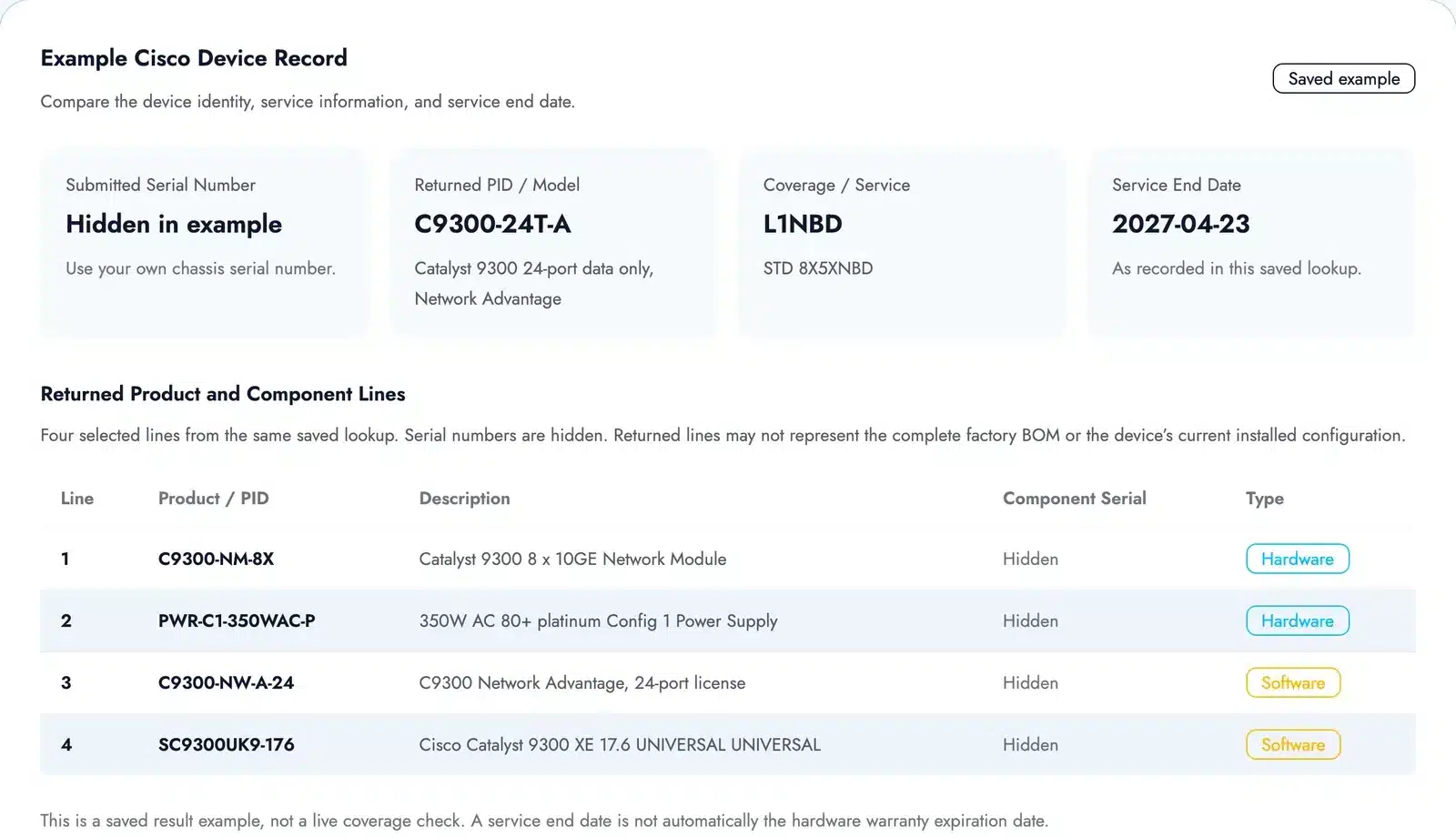
What Each Field in a Cisco Warranty Check Result Means
| Field | Example value | What it tells you |
|---|---|---|
| Submitted serial number | Hidden | The chassis SN you entered. If Cisco returns a different SN, check it against the label. |
| Returned PID and model | C9300-24T-A, Catalyst 9300 24-port data only, Network Advantage | The product on Cisco’s record. Compare it with the label and invoice. |
| Coverage or service | L1NBD, described as STD 8X5XNBD | The service attached to the serial number. 8X5XNBD means business-hours support (8×5) with next-business-day (NBD) parts replacement. |
| Service end date | 2027-04-23 | When that listed service ends. |
| Product and component lines | C9300-NM-8X and PWR-C1-350WAC-P (hardware); C9300-NW-A-24 and SC9300UK9-176 (software) | Parts, licenses and software recorded against the unit; they may differ from what is installed today. |
Cisco Warranty Check Result Statuses and What to Do Next
| Result | What it means | What it does not tell you | Next step |
|---|---|---|---|
| Service end date not passed | The listed service is current | Whether you are entitled to use it | Keep the result; on a used unit, ask who holds the contract |
| Service end date passed | That listed service has ended | That the hardware warranty has ended | Check the warranty type and ship date |
| Service end date not returned | Cisco matched the unit but returned no date | Whether coverage is active or expired | Check the unit in My Devices or ask the contract holder |
| Coverage not returned | The product record exists, but no coverage field came back | That the unit has no warranty | Cross-check in Device Coverage Checker |
| No matching record | Nothing matched the serial number you entered | Why it failed | Work through the causes in the next section |
| Service temporarily unavailable | The coverage query could not finish | Anything about the unit | Try again later |
Why the Service End Date Is Not the Warranty End Date
A Cisco warranty and a service contract are separate. Cisco’s hardware warranty FAQ states that warranties generally do not include TAC support, software updates or other service contract benefits, so a passed service end date says nothing definite about the hardware warranty.
Cisco counts the warranty from the date the product shipped from Cisco manufacturing and adds a 90-day distribution allowance for transit and warehousing. For a fixed-term warranty:
- Warranty type: 1-year limited hardware warranty
- Shipped from Cisco: 1 March 2025
- Warranty plus allowance: 1 year + 90 days
- Approximate warranty end: 30 May 2026
Lifetime-type warranties follow their own terms, set in the warranty document. Whether to rely on the warranty or add a service contract is a separate decision, covered in Cisco SmartNet vs warranty.
Why a Cisco Serial Number Shows No Coverage or No Record
Most failed or empty lookups trace back to one of these causes.
| Cause | How to spot it | Fix |
|---|---|---|
| Typing error | Letter O for zero, I for 1, a missing character | Copy the SN from show inventory output |
| Prefix from a sales order | The SN on an invoice has extra characters, such as a leading S | Use the SN from the device label or CLI |
| Module or power supply SN | The returned PID is a module, a power supply or nothing | Resubmit with the SN from the chassis row |
| Contract not associated with your account | Device Coverage Checker shows “0 of 1 covered” and contract fields are unavailable | Ask the contract holder, or associate the contract with your Cisco.com profile |
| No service contract on the unit | No tool returns coverage or a contract | Check the warranty terms, or buy coverage |
| Meraki serial number | Q2XX-XXXX-XXXX format | Use the Meraki steps above |
| Temporary service error | An error message instead of a result | Try again later |
How to Check Warranty for Multiple Cisco Serial Numbers
For 20 or more units, start from an exported inventory.
- Cisco My Devices imports up to 1,000 devices at a time from a CSV or TXT file, one serial number per line. Guest accounts without an associated contract can add one device at a time, up to 100 per day.
- Cisco Device Coverage Checker accepts bulk submissions from accounts associated with the contracts.
- Layer23-Switch takes larger lists by email: download the CSV template from the serial number lookup page and send it to support@layer23-switch.com.
Keep one record per unit: chassis SN, PID, lookup source, lookup date and returned status. Coverage changes after renewals, so record the date.
Does a Cisco Warranty Transfer When You Buy Used Equipment?
No. Cisco’s warranty listing states that all Cisco warranties apply to the end customer or original owner and are not transferable.
That limits what a lookup proves on second-hand hardware:
- A current service end date shows that a service record is attached to the serial number. It does not show that a new owner may use it.
- A matching PID confirms the model on record. It does not prove that the unit is new or where it was sourced.
Software licenses do not move to a new owner automatically either. Before paying for a used unit sold as “still covered,” ask who holds the contract. Our Cisco SmartNet guide explains clean and covered serial numbers and what they mean for renewals.
What to Do When a Cisco Warranty Has Expired
An expired or missing result leaves three practical options:
- Add a service contract. Ask a Cisco reseller whether the model is still eligible for a service contract and what reinstating coverage requires.
- Use the seller’s warranty. Units bought from a reseller may carry the seller’s own warranty. Check the invoice terms and open an RMA with the seller.
- Replace the unit. New enterprise equipment from Layer23-Switch ships with a 3-year LSCare warranty under our warranty policy. Compare current models in Cisco switches.
To replace several units at once, send the part numbers for a written quote.
Cisco Warranty Check FAQ
Is a Cisco warranty check free?
Yes. Cisco’s tools need a Cisco.com account and the Layer23-Switch lookup needs a free tools account; neither charges for a basic check.
Can I check Cisco warranty without a Cisco account?
Yes. A third-party lookup returns the service record for a serial number, and Warranty and Service Finder shows which warranty applies to a model.
How long is the warranty on Cisco switches?
It depends on the model. Cisco warranties run from 90 days to 1, 2, 3 or 5 years, plus Limited Lifetime and Enhanced Limited Lifetime terms. Search the exact PID in Warranty and Service Finder.
When does a Cisco hardware warranty start?
On the date the product shipped from Cisco manufacturing, plus a 90-day distribution allowance, according to Cisco’s warranty FAQ.
Can a Cisco serial number show the manufacturing date?
Often, yes. In the common 11-character format, characters four and five are a year code (add 1996 for the calendar year) and six and seven are the week. Our Cisco manufacturing date decoder guide covers the format. The manufacturing date is not the warranty start date.