
What Is a Cisco Multigigabit Switch? Speeds, Cabling, and Selection
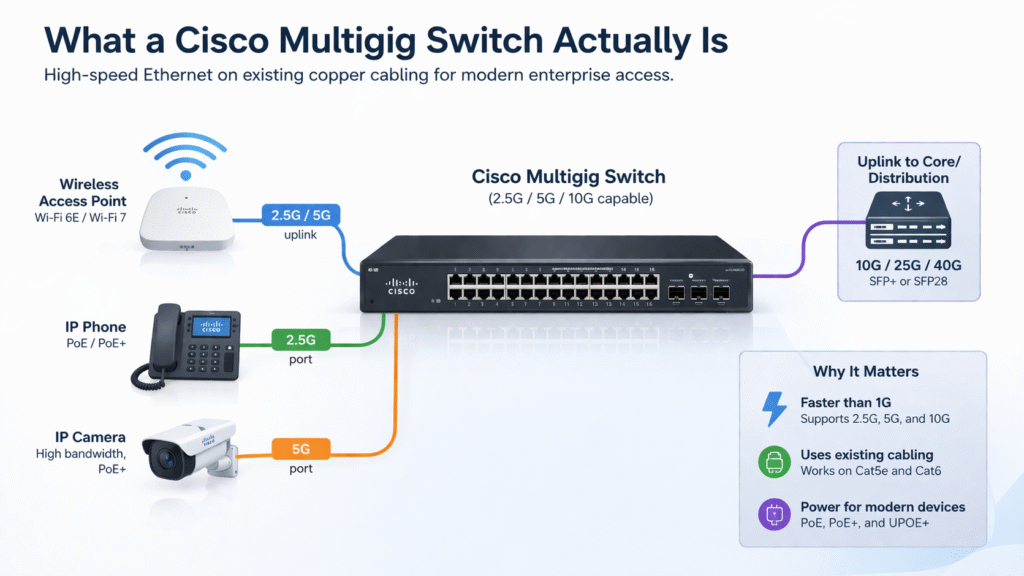
A Cisco multigigabit switch has multi-rate copper ports that can negotiate a common Ethernet speed such as 1, 2.5, 5, or—on supported hardware—10 Gbps. IEEE 802.3bz defines 2.5GBASE-T and 5GBASE-T; Cisco mGig products combine those intermediate rates with other Ethernet speeds, platform-specific PoE, and different uplink designs.
The mGig label alone does not tell you how many ports support each speed, how far an installed cable can carry it, how much power the switch can deliver, or whether the uplinks can absorb the traffic. Those five checks must be made against the exact PID.
What Does IEEE 802.3bz Cover?
IEEE 802.3bz-2016 defines 2.5 Gb/s and 5 Gb/s Ethernet over balanced twisted-pair structured cabling. The corresponding physical interfaces are 2.5GBASE-T and 5GBASE-T. It does not define 10GBASE-T, and it does not make every 100M-to-10G port mode one feature of 802.3bz.
Cisco mGig ports use standards-based rates and auto-negotiation to find a speed both ends support. On current Catalyst platforms, the exact set can include 100 Mbps, 1 Gbps, 2.5 Gbps, 5 Gbps, and 10 Gbps. Some PIDs stop at 5G; others provide 10G on every mGig port or only a subset.
How Does a Cisco mGig Link Choose Its Speed?
The switch and endpoint advertise supported capabilities through auto-negotiation and establish the highest common rate that the link conditions support. Cisco also documents downshift behavior: a link that cannot sustain a requested rate can negotiate down through lower supported speeds rather than remaining down.
This makes mGig useful during phased upgrades. A 1G endpoint can use the same access port today, while a replacement access point or workstation can negotiate 2.5G or 5G later. The result still depends on the endpoint NIC, driver, switch configuration, patching, and installed cable channel. Standards improve interoperability; they do not guarantee that every device and cable combination will reach the highest number printed on the switch.
Cisco Multigigabit Speeds and Cabling
Existing copper is the main reason 2.5G and 5G exist at the access layer, but cable-category shorthand is not a substitute for channel qualification.
| Cable channel | 2.5G | 5G | 10G | Design guidance |
|---|---|---|---|---|
| Cat5e | Supported by mGig technology | May work on qualified channels; do not assume every legacy run reaches 5G at 100 m | Not the standard full-reach design | Treat 2.5G as the lower-risk reuse target; test 5G at the actual length and bundle conditions |
| Cat6 | Supported | Supported on qualified channels | Up to about 55 m in Cisco guidance | Check distance, bundling, termination, and alien crosstalk |
| Cat6a | Supported | Supported | Up to 100 m | Preferred for predictable full-reach 10G and high-confidence new builds |
Cisco’s current Catalyst 9200 and 9300 hardware guides document the Cat5e/Cat6/Cat6a capability matrix and warn that reach can be reduced by cable quality, length, bundling, termination, and crosstalk; traditional Cat5e should not be assumed to deliver full 100 m above 2.5G without qualification.
Cable testing should use the installed permanent link and patch cords, not the jacket label alone. A clean short Cat5e run can behave differently from a tightly bundled 90 m channel with old terminations. For a multi-floor upgrade, sample-test representative long and dense bundles before committing the switch BOM.
Exact Cisco mGig Model Examples
The model number determines port density and speed distribution. A family-level statement such as “Catalyst 9300 has 48 mGig ports” is too broad to buy from.
| Cisco PID example | mGig downlink layout | Power capability | Best-fit shape |
|---|---|---|---|
| C9200L-48PXG-4X-A | 12 mGig ports up to 10G plus 36 ports up to 1G | PoE+ | A closet needs mGig for a subset of APs and 1G for the remaining endpoints |
| C9200CX-8UXG-2X | 4 mGig ports up to 10G plus 4 ports up to 1G | UPOE | Compact, fanless access with a small high-speed endpoint count |
| C9300-24UX-A | 24 copper mGig ports up to 10G | UPOE | Every access port may need a multi-rate path, with modular uplinks |
| C9300-48UN-A | 48 copper mGig ports up to 5G | UPOE | High-density 2.5G/5G access without paying for 10G on every port |
| C9300X-24HX-A | 24 copper mGig ports up to 10G | UPOE+ | High-speed access plus endpoints that can require more than 60 W |
Port layouts come from Cisco’s current Catalyst 9200 and Catalyst 9300 data sheets. Verify the complete license suffix, default power supply, total PoE budget, uplink option, software release, and management mode before ordering.
One useful counterexample is the C9300-24U or C9300-24UB. Both support UPOE, but their 24 access ports stop at 1G. The U means UPOE, not mGig. Even a C9300-NM-4M multigigabit uplink module does not change those 1G downlinks.
mGig Speed and PoE Are Separate Design Axes
Multigigabit describes data rate; PoE describes power delivery. A switch can combine mGig with PoE+, UPOE, UPOE+, or no power on a particular port design.
| Power type | Maximum PSE port rating | Planning implication |
|---|---|---|
| IEEE 802.3af PoE | 15.4 W | Basic low-power endpoints |
| IEEE 802.3at PoE+ | 30 W | Common AP, phone, and camera class |
| Cisco UPOE | 60 W | Higher-power endpoints on supported ports |
| Cisco UPOE+ / IEEE 802.3bt Type 4 | 90 W | Highest supported endpoint class on qualifying hardware |
Port rating is not the switch’s total budget. Cisco’s PoE guidance and the exact platform power table control both values.
A 90 W-capable port does not prove that 24 ports can deliver 90 W simultaneously. Multiply each endpoint’s required draw by quantity, add commissioning margin, and compare the result with the available PoE budget for the installed power-supply combination. Then decide whether the secondary supply is being used for more PoE capacity or reserved for redundancy.
Size mGig Ports, Uplinks, and Power Together
Start with the endpoint inventory rather than a switch-family name:
- Endpoint link: record the supported Ethernet rates for each AP, workstation, camera, or edge device.
- Port count: separate endpoints that need 2.5G, 5G, or 10G from those that remain at 1G.
- Cable channel: record category, length, patching, bundle density, and test result. Flag long Cat5e and Cat6 runs for qualification.
- Per-port power: use the endpoint data sheet and required operating mode, not a generic device-type estimate.
- Total PoE budget: sum all endpoints and compare the total with the exact switch and power-supply combination.
- Uplink capacity: model concurrent traffic and resiliency instead of adding only access-port line rates.
- License and operations: verify software tier, stacking, management platform, telemetry, and support requirements.
An eight-port group of 2.5G access points represents 20 Gbps of access line rate. Feeding all eight through one 10G uplink creates a theoretical 2:1 oversubscription ratio. That can be entirely acceptable when measured concurrent traffic stays below 10G, but it should be a documented choice rather than an accidental bottleneck.
A Cisco mGig Port, Cable, and Power Decision Matrix
| Endpoint requirement | Cable condition | Port and power target | Suitable switch shape |
|---|---|---|---|
| A few 2.5G/5G APs, most endpoints remain 1G | Qualified Cat6/Cat6a or tested Cat5e | Partial mGig density, up to 30 W | Catalyst 9200 PXG-type mixed-port model |
| Small quiet space with a few high-speed devices | Short, verified channel | Four mGig ports, up to 60 W | C9200CX-8UXG-2X-type compact model |
| Twenty-four multi-rate access ports | Qualified channel, often Cat6a for 10G plans | Up to 10G and 60 W per supported port | C9300-24UX-type model |
| Forty-eight endpoints need 2.5G/5G, not 10G | Qualified cable plant | High-density mGig up to 5G and UPOE | C9300-48UN-type model |
| High-speed devices also need up to 90 W | Cat6a and full power design | 10G mGig plus UPOE+ | C9300X-HX-type model |
This decision matrix is an editorial sizing aid. Validate every selected PID and endpoint against current Cisco and endpoint-vendor documentation.
When a Cisco Multigigabit Switch Is Not Necessary
Stay with 1G access when endpoint NICs, measured traffic, and planned refreshes remain below 1G. Buying mGig ports for phones, printers, and ordinary desktops that will stay at 1G does not increase their throughput.
A device that needs more than 30 W also does not automatically need mGig. C9300-24U is a simple example: it delivers UPOE on 1G access ports. Select power and data rate independently.
Full 10G access may be the cleaner target when the building already has qualified Cat6a, endpoints support 10G, and the uplink/core design can absorb it. Conversely, 2.5G is often the practical reuse step when existing Cat5e cabling is the binding constraint.
Common mGig Deployment Mistakes
- Assuming every port in a Catalyst family is mGig. Read the exact PID’s port matrix.
- Treating IEEE 802.3bz as the 10G standard. It defines 2.5GBASE-T and 5GBASE-T.
- Promising 5G over every 100 m Cat5e run. Qualify the installed channel and follow the platform guide.
- Equating UPOE with mGig. Data speed and power are independent.
- Using the per-port wattage as the total-budget calculation. The installed PSU combination sets the switch total.
- Ignoring the endpoint’s port. A 1G AP or NIC cannot negotiate 2.5G because the switch supports it.
- Moving the bottleneck to the uplink. Record the chosen oversubscription and redundancy ratios.
- Forcing a fixed speed before testing negotiation. Confirm both endpoints, driver support, and cable quality first.
Frequently Asked Questions
What speeds does a Cisco mGig port support?
It depends on the PID. Common supported rates include 100 Mbps, 1G, 2.5G, and 5G; some ports also support 10G. Check the exact port matrix because some switches provide 10G mGig on only a subset of access ports.
Is Cisco mGig the same as IEEE 802.3bz?
Not exactly. IEEE 802.3bz defines 2.5GBASE-T and 5GBASE-T. Cisco mGig products use those standards-based rates and may combine them with 100M, 1G, and 10G modes plus Cisco platform features.
Can Cisco multigigabit run over Cat5e?
Yes, especially at 2.5G, but do not promise every existing Cat5e channel will deliver 5G over the full 100 m. Cable length, bundle density, termination, and crosstalk matter. Test representative links and follow the exact platform guidance.
Does Wi-Fi 7 always require a multigigabit switch?
No. Check the access point’s Ethernet port, enabled radio mode, expected aggregate throughput, and power requirement. An AP with a multi-gig port can be bottlenecked by 1G, but a lightly loaded deployment may not justify an immediate full-closet mGig refresh.
Is 10GBASE-T part of 802.3bz?
No. IEEE 802.3bz covers 2.5GBASE-T and 5GBASE-T. Cisco may include 10GBASE-T in a multi-rate mGig port, but 10G is governed by its own Ethernet specification and stricter cable-reach considerations.
References
- IEEE, IEEE 802.3bz-2016: 2.5 Gb/s and 5 Gb/s Ethernet
- Cisco, Cisco Multigigabit Technology
- Cisco, Transform the Workspace with Cisco Multigigabit Ethernet
- Cisco, Catalyst 9200 Series Hardware Installation Guide: Product Overview
- Cisco, Catalyst 9300 Series Hardware Installation Guide: Product Overview
- Cisco, Catalyst 9200 Series Switches Data Sheet
- Cisco, Catalyst 9300 Series Switches Data Sheet
- Cisco, Catalyst mGig Interface Characteristics
For a mixed-speed access BOM, compare the exact port matrices across the Catalyst 9200 and Catalyst 9300 families before selecting power supplies and uplinks.






