What Is a Distribution Switch? The Definitive Guide to Enterprise Network Design
A distribution switch is a Layer 3 network switch that sits between the access layer and the core layer in a traditional three-tier architecture. Its main role is to aggregate access-layer traffic, perform inter-VLAN routing, enforce policies such as ACLs and QoS, and forward traffic efficiently toward the core backbone.
Executive Summary
A distribution switch is not just a passive “middle switch” in a network diagram. In real enterprise deployments, it acts as the critical Layer 2 to Layer 3 boundary, the primary inter-VLAN routing point, the default gateway for downstream users, and the strict policy control layer between access switches and the core. This is the strategic tier where network architects design high availability, gateway failover, uplink aggregation, and security segmentation. While smaller IT environments might merge these functions into a single collapsed core design, mid-to-large campus networks rely heavily on a dedicated distribution layer for scalability, fault tolerance, and operational control. Whether you are learning network fundamentals or evaluating hardware for a procurement refresh, understanding the mechanical role of this layer is essential.
If you want a clearer view of how the distribution layer fits into the full hierarchy, read our guide to Core vs Distribution vs Access Switches first. It explains what each layer is responsible for, where routing and policy decisions happen, and why the distribution layer matters in enterprise network design.
What a Distribution Switch Does in a Network
Its Role in the Three-Tier Architecture
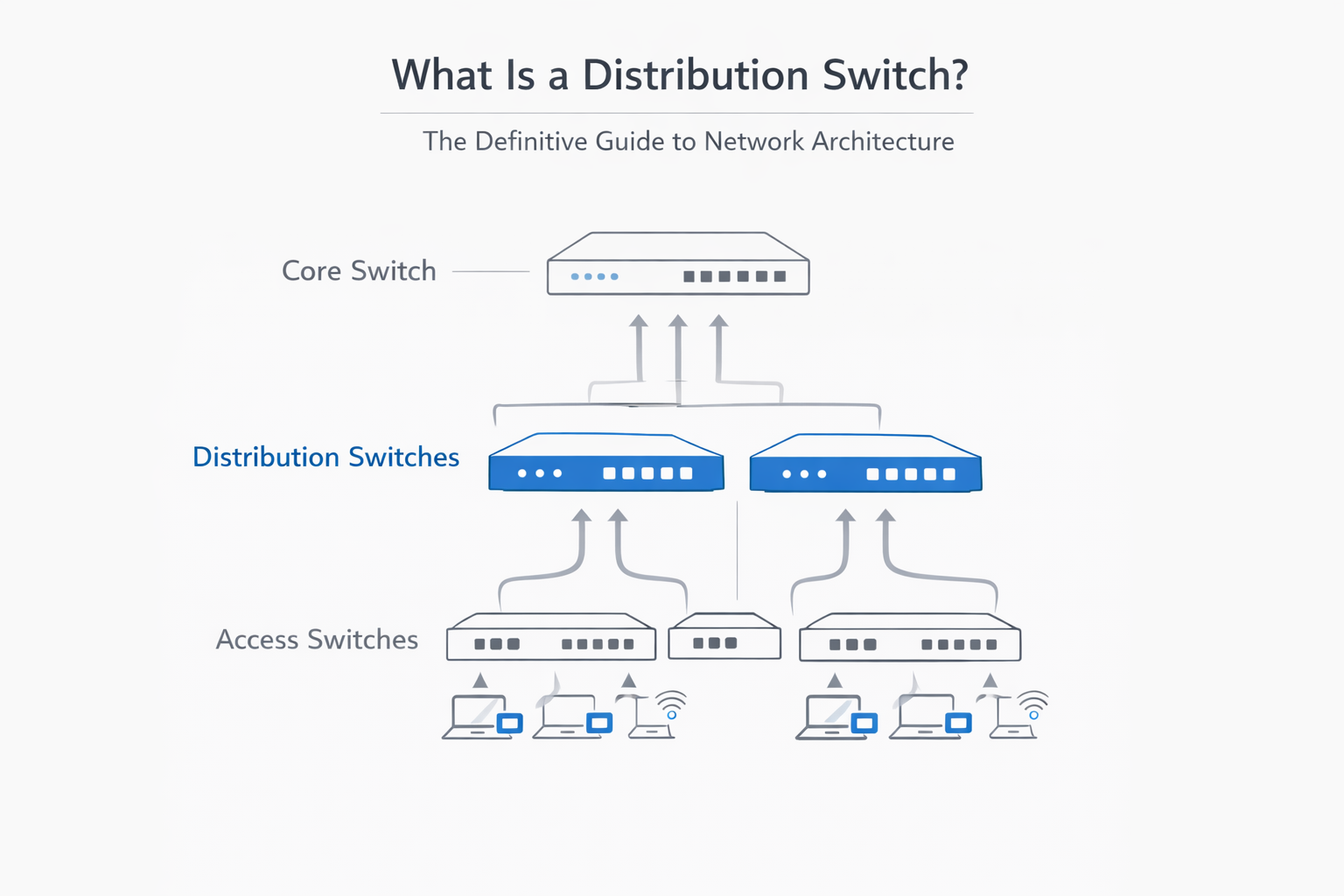
In the classic enterprise network model, traffic flows through three distinct tiers: Access, Distribution, and Core. The access layer connects end-user devices (PCs, phones, Wi-Fi access points). The core layer acts as the ultra-fast backbone transporting traffic across the campus. The distribution switch sits right in the middle. It serves as the intelligent aggregation point, gathering all the localized traffic from various access closets (IDFs) and routing it logically toward the core (MDF) or to other local subnets.
Why the Distribution Layer Exists
Without a distribution layer, a network quickly collapses under its own weight. If hundreds of access switches were connected directly to the core, the core switch would exhaust its physical ports and CPU cycles managing localized traffic. The distribution layer solves this by aggregating multiple access switches, reducing the complexity of flat Layer 2 networks, controlling broadcast domains, and creating a highly scalable routing boundary.
Why It Is More Than Just a Traffic Aggregator
A distribution switch does far more than just collect and pass along packets. It is the network’s operational control point. It applies Quality of Service (QoS) tags to prioritize voice and video traffic, routes packets between different VLANs, and enforces security policies to ensure that unauthorized departments cannot communicate with restricted servers.
Why a Distribution Switch Operates at Layer 3
The Layer 2 to Layer 3 Boundary Explained
A widespread point of confusion in networking is OSI layer mapping. Access switches are typically Layer 2 devices; they use MAC addresses to forward frames within the same local network. However, a distribution switch must operate at Layer 3 (the network layer). It acts as the absolute boundary where flat Layer 2 broadcast domains end and routed Layer 3 IP networks begin.
How Inter-VLAN Routing Happens at the Distribution Layer
Because access switches separate users into different VLANs (e.g., HR on VLAN 10, Engineering on VLAN 20), those users cannot speak to each other using Layer 2 logic. The distribution switch steps in using Switch Virtual Interfaces (SVIs). By assigning an IP address to the SVI for each VLAN, the distribution switch becomes the default gateway, enabling it to route packets intelligently between different VLANs at wire speed.
Why Router-on-a-Stick Is Not the Enterprise Answer
In small, legacy networks, engineers often used a “router-on-a-stick” design, forcing all inter-VLAN traffic through a single external router via a trunk link. In an enterprise environment, this creates a massive throughput bottleneck. Distribution switches feature dedicated hardware routing ASICs, allowing them to route inter-VLAN traffic internally at speeds vastly superior to traditional branch routers.
How a Distribution Switch Handles Inter-VLAN Routing and Default Gateways
SVIs and the Default Gateway Function
A Switch Virtual Interface (SVI) is a logical, routed interface inside a Layer 3 switch. For every VLAN configured on the access layer, the distribution switch hosts a corresponding SVI. The IP address assigned to this SVI acts as the default gateway for all end-user devices residing in that specific VLAN.
How Packets Move Between VLANs
When a host on VLAN 10 wants to communicate with a server on VLAN 20, the packet journey is highly efficient. The host sends the traffic directly to its default gateway (the distribution switch’s SVI for VLAN 10). The distribution switch inspects the destination IP, consults its internal routing table, and instantly forwards the packet out the SVI for VLAN 20 toward the target subnet.
Why This Matters for Performance and Control
Keeping this routing process at the distribution layer provides immense business value. It results in ultra-low latency since traffic doesn’t have to traverse the core just to reach a neighboring desk. It also prevents localized inter-VLAN traffic from consuming expensive core backbone bandwidth, completely eliminating upstream bottlenecks.
Policy Enforcement at the Distribution Layer
ACLs, QoS, and Traffic Control
The distribution layer is the ideal topological location to deploy Access Control Lists (ACLs), route filtering, and Quality of Service (QoS) policies. Because all traffic leaving an access closet must pass through this tier, the distribution switch acts as an intelligent traffic conductor. It ensures a VoIP call gets priority bandwidth before dropping a bulk file transfer, while silently dropping unauthorized packets.
Why the Distribution Layer Is a Security Control Point
Security is about boundaries. The distribution switch provides a rigid boundary between different user groups. By applying ACLs directly to the SVIs, network engineers can easily enforce segmentation—ensuring, for example, that the guest Wi-Fi VLAN cannot ping the internal accounting VLAN.
The Distribution Switch in a Zero Trust Network
In modern Zero Trust architectures, the distribution switch plays a pivotal role in microsegmentation. By acting as a localized policy enforcement point, it limits lateral movement for malware or bad actors. It continuously verifies traffic boundaries between segments before that traffic is ever allowed to reach the core or data center.
High Availability at the Distribution Layer
Why Redundancy Matters Here
If an access switch fails, a few dozen users lose connectivity. If a distribution switch fails, an entire building or campus wing goes dark. Because it aggregates so many downstream devices, redundancy at the distribution layer is a strict design requirement, not an optional luxury.
HSRP, VRRP, and Gateway Resiliency
First-Hop Redundancy Protocols (FHRPs) like HSRP (Hot Standby Router Protocol) or VRRP (Virtual Router Redundancy Protocol) are deployed precisely at this layer. By configuring two physical distribution switches to share a single “virtual” IP address, they provide gateway resiliency. If the primary distribution switch suffers a power failure, the secondary switch takes over the default gateway IP instantly, keeping active sessions alive.
MCLAG and Active-Active Distribution Designs
Legacy redundancy relied on Spanning Tree Protocol (STP), which blocked redundant links to prevent loops, wasting 50% of available bandwidth. Modern distribution designs utilize Multi-Chassis Link Aggregation (MCLAG) or switch stacking technologies. MCLAG allows an access switch to connect to two separate distribution switches simultaneously in an active-active forwarding state, doubling available bandwidth while maintaining sub-second failover.
When to Use a Dedicated Distribution Layer vs a Collapsed Core
What a Collapsed Core Topology Means
In many Small and Medium-Sized Businesses (SMBs) or localized campus networks, maintaining three separate hardware tiers is financially and architecturally excessive. A collapsed core topology merges the distribution and core layers into a single, high-performance physical layer. The “core” switches in this design handle both high-speed transit and all the routing/policy functions of the distribution layer.
When a Dedicated Distribution Layer Makes More Sense
A dedicated three-tier design (keeping distribution separate) is mandatory for larger enterprise campuses. If your network has multiple buildings, dozens of access closets (IDFs), complex segmentation rules, and massive routing tables, separating the distribution layer ensures the core is kept completely free of CPU-intensive policy enforcement.
When a Collapsed Core Is the Better Choice
A collapsed core is the better choice for environments looking for operational simplicity and lower capital expenditure. If your network consists of a single building, fewer than a few thousand nodes, and simpler routing requirements, collapsing the core eliminates unnecessary hardware hops and licensing costs.
How to Choose a Distribution Switch
Port Density and Physical Deployment
Physical layout drives hardware selection. Distribution switches generally reside in an MDF or large IDF and must aggregate fiber uplinks from distant access closets. Ensure the switch has adequate SFP/SFP+ fiber density, as copper ethernet is strictly limited to 100-meter runs.
Backplane Capacity and Forwarding Rate
Vague marketing terms like “high performance” are useless. You must evaluate the switch’s backplane capacity (measured in Gbps/Tbps) and forwarding rate (measured in Mpps). A distribution switch must be capable of non-blocking, wire-speed forwarding even when all aggregated access links are fully saturated.
Fixed vs Modular Distribution Switches
Procurement teams must choose between fixed configuration and modular switches. Fixed switches are 1RU or 2RU devices that are cheaper and simpler to deploy. Modular chassis switches are larger, more expensive units that allow engineers to slide in new line cards and supervisor engines as the network grows, making them ideal for long-term scalability.
Uplink Speed, Redundancy, and Future Growth
A distribution switch bought today must survive a 5 to 7-year lifecycle. Plan for uplink evolution from 10G to 25G, 40G, or 100G. Additionally, ensure the hardware supports dual hot-swappable power supplies, field-replaceable fan trays, and robust stacking or MCLAG features.
- Layer 3 routing capability
- Port density and uplink design
- Backplane and forwarding performance
- Redundancy and failover features
- Fixed vs modular architecture
- Security and policy enforcement needs
The Future of Distribution Switching
AI-Driven Telemetry and Smarter Operations
The distribution layer is moving from manual CLI configurations to intent-based networking. Modern distribution switches actively generate streaming telemetry, passing deep packet analytics and predictive insights to cloud-based AI engines to identify failing transceivers or network anomalies before users notice.
Why High-Speed Aggregation Is Changing
As Wi-Fi 7 access points and high-definition video endpoints saturate the access layer, the distribution tier is being forced to adapt. Traditional 10G uplinks are rapidly being replaced by 100G and 400G interfaces to support high-performance campus and AI-adjacent workloads.
Why This Matters for Enterprise Buyers
For IT leaders and procurement officers, this shift impacts lifecycle planning. Buying a switch that lacks advanced telemetry or modern uplink speeds risks premature obsolescence. Platform choice must now prioritize software intelligence and silicon adaptability just as much as raw port counts.
Frequently Asked Questions About Distribution Switches
What is a distribution switch in networking?
A distribution switch is a middle-tier network device that connects the edge access switches to the core backbone. It aggregates traffic, routes data between different VLANs, and enforces security policies within an enterprise network.
Is a distribution switch Layer 2 or Layer 3?
A distribution switch primarily operates at Layer 3. While it understands Layer 2 traffic, its main purpose is to serve as the routed boundary between local subnets, performing IP routing and acting as the default gateway for downstream devices.
Why does a distribution switch handle inter-VLAN routing?
Handling inter-VLAN routing at the distribution switch keeps localized traffic from needlessly traveling up to the core network or external routers. This prevents bottlenecks, reduces latency, and speeds up communications between different departments.
What is the difference between a distribution switch and a collapsed core?
A distribution switch is part of a dedicated three-tier design (Access, Distribution, Core). A collapsed core design physically merges the distribution and core layers into a single set of switches to save money and simplify management in smaller networks.
Why are HSRP and VRRP used at the distribution layer?
HSRP and VRRP are First-Hop Redundancy Protocols used to provide a highly available default gateway. If the primary distribution switch fails, these protocols allow a secondary switch to take over the gateway IP address seamlessly, preventing network outages.
When should a network use a dedicated distribution layer?
A dedicated distribution layer should be used in large campus environments with multiple buildings, numerous access closets, high traffic volumes, and strict needs for security segmentation and routing scale.
How do you choose the right distribution switch?
Choose a distribution switch by evaluating its Layer 3 routing capabilities, non-blocking backplane performance, port density for fiber uplinks, and hardware redundancy features (like dual power supplies and MCLAG support).