
Cisco StackWise Explained: How Cisco Switch Stacking Works
Quick answer: Cisco StackWise joins compatible switches through dedicated stacking connections so they operate as one logical switch, with shared control and management and forwarding hardware on each member. It supports access-port expansion and uplinks across members, but compatibility, full-ring cabling, and surviving capacity determine whether the design meets your requirements. A failed member still disconnects endpoints attached only to that switch.
This guide explains physical StackWise on supported Cisco stackable switches in the Catalyst 9200 and 9300 families. A three-member stack of identical C9300 switches provides the working example; it is a design illustration, not a lab test. We will follow its cables, switch roles and packet paths before considering failure behavior and deployment checks.
What Is Cisco StackWise?
Cisco StackWise is a technology that joins compatible physical switches through dedicated stacking connections into one logical switch. Engineers manage a common configuration while continuing to address the interfaces on individual members. For example, an interface name identifies both the member and its local port; one management session does not erase the physical location of the connection.
Three functions help explain the arrangement. The control plane learns network topology and determines forwarding information. The data plane moves packets through switching hardware. The management plane provides configuration, monitoring and administrative access. A StackWise system centralizes control and management while distributing packet forwarding across its members.
This distinction matters during troubleshooting. A healthy management session confirms access to the logical system, but does not prove that every stack cable, member port or redundant uplink is healthy. Check those physical resources separately.
Here, StackWise means the dedicated physical stacking implementations discussed below. StackWise Virtual uses a different interconnection architecture, and other Cisco product lines have their own stacking rules.
How Does Cisco StackWise Connect Switches and Forward Traffic?
Cisco StackWise connects compatible members through a dedicated stack ring, assigns active and standby control roles, and uses forwarding hardware on each member to deliver traffic locally or across the stack.
Stack Cables and Full-Ring Topology
Our three C9300 switches each have two rear StackWise ports. Connect member 1 to member 2, member 2 to member 3, and member 3 back to member 1. The final connection closes the ring. Two switches also need both stacking connections for a full ring; one cable only provides an incomplete topology.
These are dedicated data-stack connections. A front-panel Ethernet cable between two ordinary access ports does not turn the devices into a physical StackWise stack. Select the cable and, where required, adapters for the exact switch family. Cisco documents these components in the C9300 connector and cable specifications.
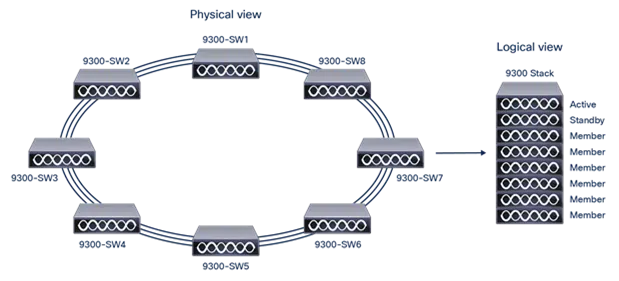
The closing cable can be easy to overlook in a crowded rack. Include its route and length in the rack plan, and label both ends with the member and stack-port identities. A complete ring provides a second path if one stacking connection fails. A stack that was already cabled as a chain has less protection before a fault occurs.
Active, Standby, and Member Roles
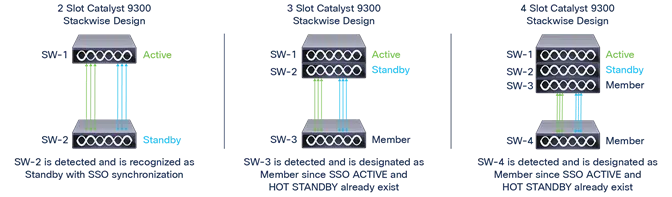
In our healthy three-switch example, one switch is active, another is standby, and the third has the member role. The active manages the logical system. The standby receives synchronized state so it can take over control if the active becomes unavailable. All three can forward ordinary traffic through their local switching hardware.
Choose intended roles before installation and record member numbers independently of roles. Member 1 does not have to remain active forever. Likewise, assigning a higher priority is a preference for an election; it does not immediately displace a running active switch. A newly added switch with longer uptime does not automatically take control. The current-active state and the circumstances of startup or joining matter. See Cisco’s stack membership and election rules for IOS XE 17.18.
For an operations team, predictable numbering often matters as much as predictable roles: rack labels, interface descriptions and replacement instructions should all identify the same physical member.
Local and Cross-Member Packet Forwarding
Consider two known-unicast conversations in the example stack. If a workstation and its destination are both connected to member 2, the switching decision and local delivery can occur on that member. If the workstation is on member 2 and the destination is on member 3, the packet must use the stack fabric to reach the remote egress.
Neither example requires every packet to pass through the active switch’s CPU. Members use locally programmed forwarding information. Broadcast, multicast and unknown-destination traffic have different replication requirements, so a local unicast example should not be applied to every packet type. Cisco’s C9300 StackWise architecture paper explains the distributed forwarding design.
This gives you a useful capacity question: which traffic actually crosses members? An access closet with uplinks concentrated on one switch can place different demands on the stack fabric from a closet with suitable uplinks spread across members, even when both have the same endpoint count.
Which Catalyst Switches Support Cisco StackWise, and How Much Bandwidth Do They Provide?
The Catalyst 9200 and 9300 families covered here support different Cisco StackWise implementations with advertised capacities from 80 Gbps to 1 Tbps, subject to model and mixed-stack restrictions.
What StackWise Bandwidth Ratings Mean
Names such as StackWise-160 and StackWise-480 describe the advertised capacity of a particular stacking architecture. They are not the speed of an individual access port or a promise that one application flow can use the full figure.
Keep three measurements separate: the nominal stack capacity, the capacity available along a particular packet path, and the throughput the application actually receives. The last depends on its endpoint links, uplinks, traffic distribution and other constraints as well as the stack. The architecture’s capacity accounting also matters when comparing it with an Ethernet-based interconnect.
For planning, draw the busiest expected paths and repeat the exercise with one connection unavailable. A stack can have ample nominal capacity yet leave too little upstream capacity after an uplink fails. Conversely, adding together every access-port speed can overstate the stack load when much of the traffic stays local or endpoints rarely transmit simultaneously at line rate.
Catalyst 9200 and 9300 Stacking Families
The following table covers commonly deployed 9200 and 9300 variants. The member limit is a supported maximum for the relevant stacking family, not permission to combine any eight Cisco switches.
| Switch family | StackWise technology | Advertised stack capacity | Maximum members | Compatibility reminder |
|---|---|---|---|---|
| C9200 | StackWise-160 | 160 Gbps | 8 | Do not mix with C9200L. |
| C9200L | StackWise-80 | 80 Gbps | 8 | Uses its own supported stacking group and accessories. |
| C9300 | StackWise-480 | 480 Gbps | 8 | Selected C9300X mixing is supported; higher-scale UB variants form a separate group. |
| C9300L / C9300LM | StackWise-320 | 320 Gbps | 8 | Current documentation permits L/LM mixing with matching license level and the required cable, adapter and software support. |
| C9300X | StackWise-1T | 1 Tbps | 8 | Supported mixing with ordinary C9300 operates at StackWise-480. |
The Catalyst 9200 data sheet distinguishes C9200 and C9200L and excludes C9200CX from StackWise stacking. The Catalyst 9300 data sheet defines the 9300 compatibility groups: C9300/C9300X do not stack with C9300L/LM, and C9300-24UB, C9300-24UXB and C9300-48UB require their own supported group.
For an actual bill of materials, use the Catalyst 9200 and 9300 hardware compatibility guide to check exact product IDs and accessories. In particular, C9300X uses STACK-T1 data cables; STACK-T3A is associated with supported L/LM adapters, not C9300X.
This is not a complete Cisco portfolio table. Newer platforms have separate documentation—for example, C9350 stacking documentation describes StackWise-1.6T. Do not treat 1 Tbps as a universal ceiling or transfer a newer platform’s capabilities to an installed 9300 stack.
How Do Cisco StackWise, StackPower, and Cross-Stack EtherChannel Differ?
Cisco StackWise joins the data-switching system, StackPower shares power on supported models, and cross-stack EtherChannel bundles Ethernet links across stack members; each requires its own compatibility and failure-capacity checks.
Data Stacking and Power Sharing
StackWise, StackPower and EtherChannel address different resources. Their names sometimes appear together in a proposal, but the presence of one does not establish the availability or redundancy of the others.
| Technology | What it connects | What it provides | What still needs a separate design |
|---|---|---|---|
| StackWise | Compatible members through data-stack ports | One logical switching system and traffic paths between members | External connectivity and electrical power |
| StackPower | Power systems on supported switches through power-stack connections | Shared power resources within the supported power group | Available power budget, feeds and data connectivity |
| Cross-stack EtherChannel | Ethernet interfaces on different stack members to a compatible peer | One logical link bundle with physically distributed members | Peer resilience and capacity after a link or switch failure |
Cisco lists StackPower for supported modular-uplink C9300 and C9300X models; it is not a consequence of every 9300 variant supporting data stacking. Its 9300 data sheet also distinguishes data-stack and power-stack arrangements. An eight-member data stack does not automatically mean one eight-member power-sharing group.
Size the power system against the intended failure condition. If a supply or feed is lost, the remaining budget must support the required switches and powered devices. A data path can remain healthy while insufficient power affects access points or other PoE endpoints.
Uplink Redundancy Across Stack Members
Suppose the three-member example has one member link of an EtherChannel on switch member 1 and another member link on switch member 3, both connected to the same valid logical peer. The bundle has links on two physical switches. Losing member 1 removes its local interfaces, but the member 3 uplink may remain available to the surviving stack.
That arrangement requires a correctly configured EtherChannel at both ends. Two independent upstream switches cannot automatically terminate the same bundle merely because the access side is stacked. Confirm the peer architecture and channel consistency. Cisco’s C9300 EtherChannel guide covers cross-stack channels and load balancing.
Check the surviving bandwidth as well as link continuity. Two 10 Gbps members offer more aggregate capacity across suitable flows than one, but do not turn a single flow into a 20 Gbps connection. EtherChannel also does not remove the need to assess spanning tree elsewhere in the Layer 2 topology.
What Happens When a Cisco StackWise Link or Member Fails?
A single link failure in a healthy Cisco StackWise ring can leave the members connected with reduced capacity, while a member failure removes its local ports and an active-member failure also requires control to transfer to a ready standby.
A Stack Cable Failure
Starting from a healthy full ring, one failed stack connection can leave the members connected through the remaining path. The system has lost ring redundancy and its available stack capacity is reduced. The immediate engineering concern is whether the remaining path supports the workload, not simply whether all members still appear in management.
A half-ring indication is evidence about topology, not a diagnosis of every performance issue. Correlate it with the physical cable map, stack-port state and error counters. If the stack was already incomplete, another break may partition it rather than merely reduce its capacity.
A Member or Active Switch Failure
Losing an ordinary member removes the devices and uplinks attached to that chassis. A workstation with one cable to the failed switch has no alternative connection simply because its switch belonged to a redundant stack. Other members may continue serving their own endpoints if the remaining topology and upstream paths support them.
An active-switch failure adds a control-plane transition. A ready standby can assume the active role; protocol behavior, synchronized state and surviving physical paths determine the service impact. Losing the standby leaves the active in control but reduces control-plane protection until redundancy is restored. Cisco documents the protocol considerations in its NSF and SSO configuration guide.
Shared control also creates a shared operational boundary. A harmful global configuration or a common software problem can affect the logical system despite redundant physical switches. Hardware redundancy should therefore be paired with configuration review and a recovery plan.
Stack Splits and Stack Merges
A split occurs when connectivity no longer keeps all members in one stack. Separate partitions can retain related configuration and identities, creating conflicts when their network-facing links remain connected. A merge occurs when independently running switches or stacks are joined. It can trigger elections, reloads and configuration replacement; it is not equivalent to connecting a powered-off prepared member.
This is why member lifecycle procedures matter. Record which system’s configuration must survive and follow the model’s documented joining process. Cisco’s stack management guide describes these distinctions.
| Failure condition | Direct impact | What may remain available | What to check |
|---|---|---|---|
| One stack connection fails in a full ring | Ring redundancy and capacity decrease | Reachability between remaining connected members | Ring state, stack-port errors and busy-path utilization |
| Ordinary member fails | Its endpoint and uplink ports disappear | Services through surviving members and uplinks | Remaining topology, channel members and endpoint attachment |
| Active member fails | Its ports disappear and control must transfer | Forwarding through surviving hardware with successful takeover | Standby readiness, new roles and protocol recovery |
| Multiple breaks partition the stack | A single logical system can become separate partitions | Availability depends on each partition and network attachment | Member membership, duplicate identities and upstream behavior |
For diagnostic commands and corrective checks, see how to troubleshoot StackWise link and member problems.
What Should Engineers Check Before Deploying Cisco StackWise?
Before deploying Cisco StackWise, verify exact member compatibility, stacking accessories, software and licenses, then plan full-ring cabling, power, surviving uplinks, and member replacement or upgrade procedures.
Hardware, Software, and License Compatibility
Begin with exact product IDs, not a family name on a quotation. Then confirm the supported member combination, cable and adapter set, software compatibility and license level. A spare that looks identical from the front may require different stacking hardware or preparation.
Translate those checks into a physical plan. Leave a valid closing-cable route, service access and space for cable bend requirements. Place uplinks and important dual-connected services so that the failure of one member does not remove every useful path. Keep the actual upstream topology visible on the drawing.
Finally, estimate traffic in both normal operation and the failure state you intend to tolerate. Define acceptance in service terms: which endpoints may disconnect, which applications must remain reachable, and how much capacity must remain. This makes a later failure test more useful than a simple check that the stack has returned to a ready state.
Member Addition, Replacement, and Upgrade Planning
Before a change, save the configuration and inventory the member numbers, roles, software and cabling. Member identity determines interface configuration, so a replacement plan should explicitly map the replacement chassis to the removed member’s identity and ports.
Prepare the incoming switch and follow the documented powered-off joining procedure. Treat an already running standalone switch as a different case with merge risk. Schedule the physical work with enough time to verify a restored full ring, expected roles, all intended interfaces and application reachability afterward.
Software changes need their own plan. Upgrade methods and supported paths vary by platform and release; the word “stack” does not establish either guaranteed continuous service or a mandatory outage for every possible upgrade. Review the applicable procedure, recovery options and maintenance window before changing the production system. The separate guide to configure a Catalyst 9200 or 9300 stack handles the deployment sequence and commands.
When Should You Use Cisco StackWise?
StackWise fits deployments where nearby compatible switches should provide more ports under one operational system, with uplinks distributed across members. Access closets are a common example. A small-campus collapsed core can also be assessed on its actual scale, traffic and availability needs; the stack label alone does not decide its suitability.
The decision changes when switches must be farther apart, require independent maintenance boundaries, or need a different interconnect and platform class. Use StackWise vs StackWise Virtual for that comparison, or stacking vs a chassis switch when the question is physical form factor. For a Catalyst 1300 deployment, use its separate stacking guide.

What Else Should Engineers Know About Cisco StackWise?
Cisco StackWise compatibility, member limits, failure behavior, and power-sharing support depend on the exact switches and topology, so check each requirement separately.
How many Cisco switches can be stacked together?
The supported Catalyst 9200/L and 9300-family physical stacks covered here allow up to eight members. That limit does not make different stacking families interchangeable: verify the exact models, accessories, software and license conditions before adding a member. StackWise Virtual follows a different model and combines two chassis.
Can a Catalyst 9300 stack with a 9300L or 9300LM?
No. C9300 and C9300X switches cannot join the same physical stack as C9300L or C9300LM switches. C9300L and C9300LM can form a supported mixed stack when the license level, software, cables and adapters meet the documented requirements; check the hardware compatibility guide for the exact components.
Will a mixed C9300 and C9300X stack retain StackWise-1T capacity?
No: a supported C9300/C9300X mixed stack operates at StackWise-480. Check the exact C9300 model before planning the mix, because C9300-24UB, C9300-24UXB and C9300-48UB belong to a separate compatibility group. Adding a C9300X therefore does not automatically increase an existing stack to the 1T architecture rating.
Can Catalyst 9200 and 9200L switches share one stack?
No. C9200 uses StackWise-160 and C9200L uses StackWise-80, with separate supported stacking groups and accessories. Their eight-member limits do not make the two groups compatible, and C9200CX does not support physical StackWise stacking.
Will the whole stack go offline if one StackWise cable fails?
Starting from a healthy full ring, one failed stacking connection can leave the members connected through the remaining path, with reduced capacity and no ring redundancy. If the stack was already incomplete, another break can partition it. Verify the actual topology and port state using the StackWise troubleshooting guide, then check whether the surviving capacity meets the workload.
Will a higher-priority replacement immediately become the Active switch?
No; increasing priority does not immediately displace the running Active switch. Prepare the replacement and follow the documented powered-off joining procedure, because connecting an independently running switch is a merge case that can trigger elections, reloads and configuration replacement. Longer uptime alone does not make the incoming switch take control.
Does every Catalyst 9300 data stack support StackPower?
No. In the families covered here, Cisco lists StackPower for supported modular-uplink C9300 and C9300X models; StackWise support on another variant does not establish power-sharing support. Check the power-group arrangement, cables and remaining power budget separately from the data stack, especially when PoE endpoints must survive a supply or feed failure.
Can one cross-stack EtherChannel connect to two independent upstream switches?
Only if the upstream architecture supports presenting those connections as a valid common EtherChannel peer. Stacking the access switches does not make two otherwise independent upstream switches able to terminate the same bundle. Confirm the peer design and channel settings at both ends before treating the links as one redundant uplink.





