
Hardware Firewall vs Software Firewall: Differences, Costs, and How to Choose (2026 Buyer’s Guide)
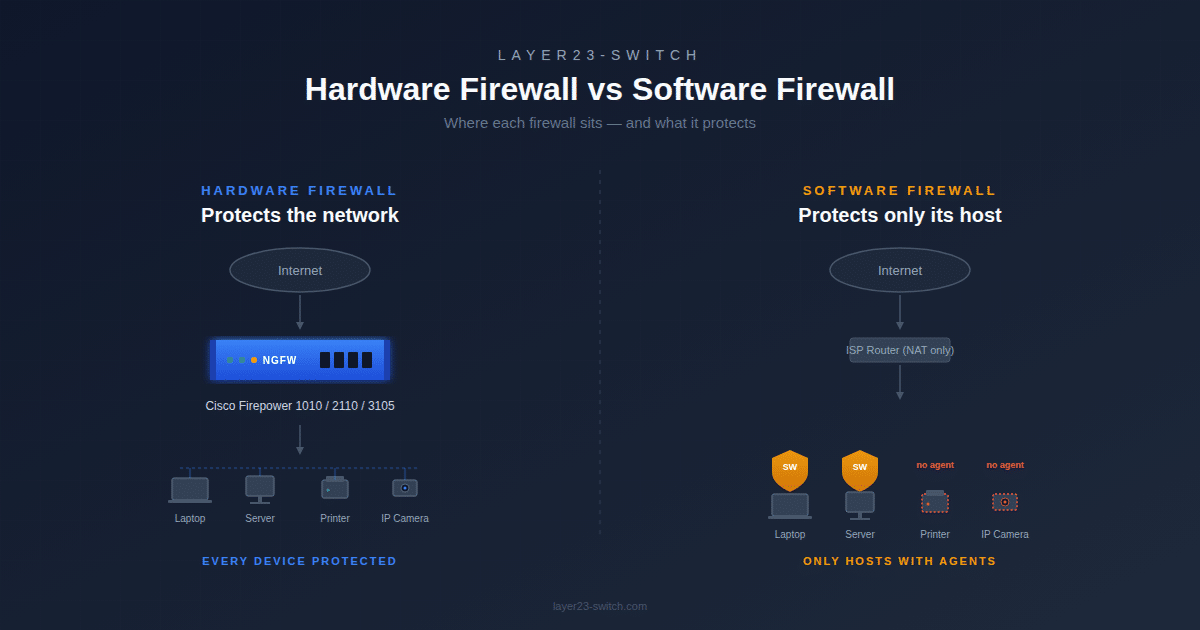
A hardware firewall is a dedicated physical appliance that protects an entire network at the perimeter, typically delivering 1 to 100+ Gbps throughput depending on the model. A software firewall is a security application installed on individual devices or virtual machines, protecting only that host. Most business networks deploy both: hardware at the network edge, software on every endpoint.
That summary covers the basics, but the real decision for IT buyers is more nuanced. Performance under encrypted traffic, total cost over five years, compliance fit, and how a firewall behaves at scale all change which option makes sense. This guide walks through the differences, the real costs, and a clear decision framework for SMB and mid-market networks, with reference Cisco Firepower models throughout.
Hardware Firewall vs Software Firewall at a Glance
| Dimension | Hardware Firewall | Software Firewall |
|---|---|---|
| Deployment location | Network perimeter or between segments | Inside a host OS, VM, or container |
| Form factor | Dedicated physical appliance | Application or virtual image |
| Protection scope | Every device behind it | Only the host it runs on |
| Throughput range | 1 Gbps to 100+ Gbps | Limited by host CPU and NIC |
| Encrypted traffic (TLS) inspection | Hardware-accelerated, line-rate possible | Heavy CPU cost, often skipped |
| Resource consumption | Dedicated ASIC, NPU, or x86 silicon | Consumes host CPU and RAM |
| Initial cost | Higher (appliance + license) | Low or free |
| Five-year cost | Predictable hardware refresh + license renewal | Endpoint licenses + management overhead |
| Management at scale | Centralized (FMC, CDO, Panorama, FortiManager) | Per-device or via EDR/MDM |
| Typical lifespan | 5 to 7 years before EoL/EoS | Continuous updates, no hardware refresh |
| Compliance fit | PCI DSS, HIPAA, SOC 2 perimeter requirements | Endpoint controls only |
| Reference examples | Cisco Firepower 1010, FortiGate 60F, Palo Alto PA-440 | Windows Defender Firewall, pfSense, FTDv |
The most important rows for buyers are throughput, TLS inspection, and compliance. These three together determine whether a software-only setup will hold up as the network grows or whether a hardware appliance is required from day one.
What Is a Hardware Firewall?
A hardware firewall is a dedicated network appliance with purpose-built processors (ASICs, network processing units, or hardened x86 platforms) and a security-focused operating system that inspects all traffic between two networks. It sits inline at the network perimeter, between VLANs, or in front of data center workloads, applying security policy to every packet that passes through.
Modern hardware firewalls are next-generation firewalls (NGFW), meaning they inspect traffic well beyond simple port and protocol filtering. They classify applications, decrypt TLS sessions, run intrusion prevention (IPS), enforce URL categories, and check files against threat intelligence feeds in real time.
Reference models commonly deployed in 2026:
- Cisco Firepower 1010 — fanless desktop NGFW, up to 0.65 Gbps NGFW throughput, branch and small office
- Cisco Firepower 2110 — 1RU rack appliance, up to 2.6 Gbps NGFW throughput, enterprise edge
- Cisco Firepower 3105 — high-performance 1RU NGFW for campus core and data center perimeter
- Fortinet FortiGate 60F / 100F — common SMB and mid-market alternatives
- Palo Alto PA-440 / PA-1410 — enterprise-focused NGFW platform
Because all inspection runs on dedicated hardware, NGFW appliances maintain consistent throughput even when TLS decryption, IPS, and malware inspection are all enabled — the workload that typically crushes software-only deployments. Layer23-Switch ships brand-new sealed Cisco Secure Firewall hardware across the full Firepower family, with pre-shipment serial verification and global delivery.
What Is a Software Firewall?
A software firewall is a security application running on a host operating system, virtual machine, or container. It controls connections at the system or application level using rules tied to processes, users, ports, and protocols.
Software firewalls fall into two distinct categories that buyers often confuse.
Host-based software firewalls
Host-based firewalls run on individual endpoints and protect only the device they are installed on. They are usually built into the operating system or bundled with endpoint security software.
- Windows Defender Firewall — built into Windows, manageable via Group Policy or Intune
- macOS Application Firewall — built into macOS, application-level rules
- Linux iptables / nftables / ufw — kernel-level packet filtering on Linux servers and workstations
- Endpoint security suites — products like CrowdStrike, SentinelOne, or FortiClient that bundle a host firewall with EDR
Yes, Windows Defender Firewall is a software firewall. It is the host-based firewall built into every modern Windows installation and is enabled by default.
Virtual and cloud-based software firewalls
Virtual firewalls deliver NGFW logic in software form, designed for virtualized data centers and public cloud environments where physical appliances cannot be deployed.
- Cisco Secure Firewall Threat Defense Virtual (FTDv) — virtual edition of Firepower software
- FortiGate VM and Palo Alto VM-Series — virtual editions of leading NGFWs
- pfSense / OPNsense — open-source software firewalls that run on commodity hardware or VMs
- Cloud-native firewalls — AWS Network Firewall, Azure Firewall, Google Cloud Firewall
Virtual firewalls are technically “software firewalls” but operationally behave more like hardware firewalls — they enforce network-wide policy rather than protecting a single host.
8 Key Differences Between Hardware and Software Firewalls
1. Deployment Location
Hardware firewalls sit at network boundaries, inspecting traffic flowing between segments. Software firewalls run inside the host they protect, inspecting only that host’s traffic. This single difference drives most of the others.
2. Protection Scope
A hardware firewall protects every device behind it, including printers, IP cameras, IoT sensors, and legacy systems that cannot run firewall agents. A software firewall protects only the host it runs on. If an IoT camera has no agent, it has no software firewall.
3. Performance and Throughput
Hardware firewalls deliver predictable throughput because inspection runs on dedicated silicon. A Firepower 2110 sustains around 2.6 Gbps NGFW throughput regardless of host workloads. A software firewall’s throughput depends entirely on the host’s CPU and is reduced when the host runs other applications.
4. Encrypted Traffic (TLS) Inspection
This is where the gap between the two becomes severe. Inspecting TLS-encrypted traffic requires decrypting, inspecting, and re-encrypting every session, which is CPU-intensive. Hardware NGFWs accelerate TLS inspection in silicon. Software firewalls running on shared hosts often skip TLS inspection entirely because the CPU cost is too high. With over 95% of web traffic now encrypted, a firewall that cannot inspect TLS is largely blind to modern threats.
5. Resource Consumption
A hardware firewall consumes only its own power and rack space. A software firewall consumes host CPU, RAM, and I/O — resources that would otherwise serve users or applications. On a busy server, a misconfigured host firewall can become a measurable performance drag.
6. Cost Structure
Hardware firewalls require upfront CAPEX (the appliance) plus recurring OPEX (subscription licenses, support contracts). Software firewalls shift cost toward licensing and management labor. Over five years, the gap narrows more than buyers expect once endpoint license counts grow.
7. Management at Scale
Hardware firewalls are managed centrally — Cisco Firepower Management Center (FMC), Cisco Defense Orchestrator (CDO), FortiManager, or Panorama. One pane of glass for all sites. Software firewalls require per-device configuration unless deployed through MDM, GPO, or an endpoint management platform.
8. Lifecycle and Refresh Cycle
Hardware firewalls follow a defined lifecycle. Cisco typically supports a Firepower platform for 5 to 7 years before End-of-Sale, with End-of-Support Life following several years later. Software firewalls have no hardware refresh cycle but require continuous OS, license, and signature updates to stay effective.
Hardware Firewall Pros and Cons
Advantages of a Hardware Firewall
- Dedicated processing under load. Throughput stays predictable even with TLS decryption, IPS, and malware inspection enabled simultaneously.
- Centralized policy across the entire network. One ruleset enforced on every device behind the firewall, including devices that cannot run agents.
- Strong logging and SIEM integration. Native syslog, NetFlow, and integration with Splunk, QRadar, Elastic Security, and Cisco’s own platforms.
- Protects unmanageable devices. IoT, OT, printers, IP cameras, and legacy systems get full network-layer protection without needing software installed.
- Compliance-friendly. PCI DSS, HIPAA, and SOC 2 audits typically expect a dedicated network perimeter control. A hardware firewall makes this straightforward to evidence.
Disadvantages of a Hardware Firewall
- Higher upfront cost. The appliance, license bundle, and support contract create real CAPEX that software-only setups avoid.
- Single point of failure without HA. A single appliance failure takes the network down. Production deployments require an HA pair, doubling cost.
- Physical footprint. Rack space, power, cooling, and cabling are real considerations for distributed branch deployments.
- License renewal cycle. Cisco’s TMC bundle (Threat, Malware, URL filtering) renews on 1-, 3-, or 5-year cycles. Letting it lapse disables NGFW features and leaves the appliance running as a stateful firewall only.
- End-of-Life replacement. Plan for a hardware refresh every 5 to 7 years.
Software Firewall Pros and Cons
Advantages of a Software Firewall
- Low or zero acquisition cost. Windows Defender Firewall, iptables, and pfSense are free.
- Travels with the device. A laptop firewall protects the user on hotel Wi-Fi, in a coffee shop, or at home — not just on the corporate LAN.
- Granular per-application rules. Block a specific process, allow another, all on the same host.
- Native fit for cloud and containers. Cloud workloads cannot sit behind a physical appliance. Software and virtual firewalls are the only option.
- Easy to deploy at scale via MDM, GPO, or configuration management.
Disadvantages of a Software Firewall
- Consumes host resources. Visible on resource-constrained endpoints and busy servers.
- Per-device management complexity at scale. Without an EDR or MDM in place, hundreds of independent firewall configurations become unmanageable.
- A compromised host means a compromised firewall. If malware reaches admin level on the device, it can disable or reconfigure the local firewall.
- Cannot protect agentless devices. IoT, printers, IP cameras, OT equipment, and embedded systems get no protection from a host firewall they cannot install.
- Limited east-west visibility. A host firewall sees only its own traffic, not what’s happening between other devices on the LAN.
Performance and Cost: A Realistic 5-Year Comparison for a 50-User Office
A common SMB scenario: 50 users, one office, mixed Windows and Mac endpoints, a few printers and IP cameras, light web and email traffic, no on-premises servers. The two paths look like this.
| Item | Hardware-led path | Software-only path |
|---|---|---|
| Perimeter device | Cisco Firepower 1010 (FPR1010-NGFW-K9) | None — relies on ISP router NAT |
| Endpoint protection | Windows Defender Firewall + EDR | Windows Defender Firewall + EDR |
| Year-1 hardware (sealed, new) | $700 – $800 | $0 |
| 3-year TMC license | $1,000 – $1,500 | $0 |
| Smart Net 24x7x4 (3-year) | Included in license bundle | $0 |
| Refresh at year 5–6 | Plan for replacement | N/A |
| TLS inspection | Hardware-accelerated | Not practical at host level |
| Centralized logging | Yes (FDM, FMC, or CDO) | No — fragmented across endpoints |
| East-west visibility | Limited (single perimeter) | Limited (host-only) |
| Compliance fit | PCI DSS / HIPAA / SOC 2 ready | Significant gap |
Three-year hardware-led entry cost lands around $1,700 – $2,300 for a single Firepower 1010 deployment. Pricing reflects current Layer23-Switch channel pricing for brand-new sealed units and varies by region and order quantity. An HA pair roughly doubles this.
The software-only path looks free on paper. In practice, the hidden costs are different: forensic investigation if a breach happens, compliance remediation work, lost productivity during incidents, and the per-endpoint EDR licenses that often exceed an NGFW’s three-year cost once the company passes 100 employees. For most offices with 5+ users and any compliance exposure, the hardware path pays for itself before the first refresh cycle.
For Cisco-specific licensing detail, see our Cisco Firepower license ordering guide. For the broader CAPEX vs OPEX trade-off across Cisco platforms, see Cisco perpetual vs subscription licensing.
Should You Use Hardware and Software Firewalls Together?
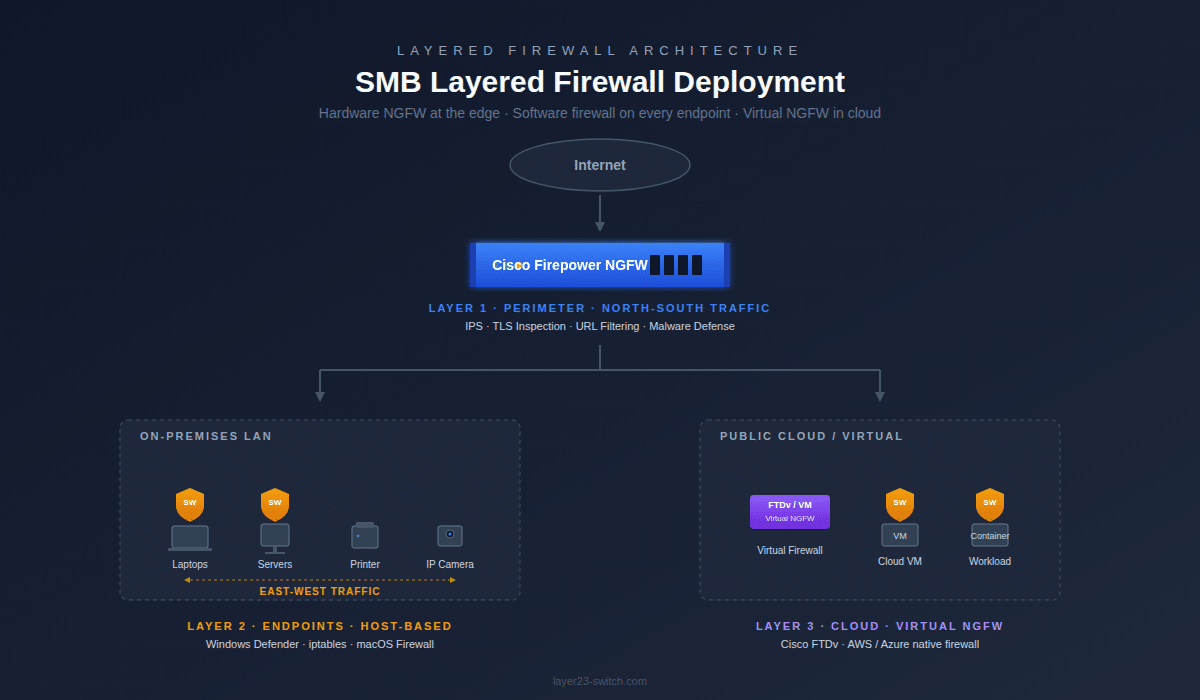
Yes. In most enterprise networks, hardware and software firewalls are deployed together rather than as alternatives. The hardware firewall enforces perimeter policy on north-south traffic entering and leaving the network, while host-based software firewalls protect each endpoint and inspect traffic between devices on the same LAN.
This layered approach matters because attackers no longer rely solely on perimeter breaches. Lateral movement — an attacker pivoting from one compromised host to another inside the network — is now the default playbook. A perimeter firewall does not see this traffic; it only sees what crosses the boundary. Host firewalls fill that gap.
A typical SMB layered design looks like this:
- Edge: A Cisco Firepower 1010 or 2110 sits at the internet edge, enforcing perimeter policy, IPS, URL filtering, and TLS inspection on north-south traffic.
- Endpoints: Windows Defender Firewall (or equivalent) runs on every laptop, workstation, and server, enforcing host-level rules and inspecting east-west traffic.
- Cloud: Cloud workloads sit behind the cloud provider’s native firewall, with a virtual NGFW (such as Cisco FTDv) added for advanced inspection where required.
This is also the architecture that aligns with zero-trust principles, where no traffic is trusted by default — including traffic already inside the network.
When a Software Firewall Alone Is Enough
A software firewall on its own is sufficient in a narrow set of scenarios:
- A single-user home office with one or two devices and no shared infrastructure
- A fully cloud-native company with no on-premises network, where SASE or ZTNA replaces the traditional perimeter
- Test labs, dev environments, and isolated air-gapped systems
- A mobile-only or laptop-only workforce protected by a cloud-based SSE or SWG instead of an on-prem appliance
Outside these cases, software-only is not a security strategy — it’s a gap. Any office with 5+ employees sharing a LAN, any business handling cardholder data or PHI, and any organization with IoT or OT devices needs a hardware firewall at the perimeter.
When You Definitely Need a Hardware Firewall
Hardware firewalls become non-negotiable in these situations:
- Any office with 5+ employees on a shared LAN
- Compliance environments — PCI DSS, HIPAA, SOC 2, ISO 27001, NIS2
- Multi-site businesses requiring site-to-site VPN
- Networks with VoIP, IP cameras, badge readers, or other IoT devices
- Environments requiring TLS inspection at scale
- Any business where a network outage carries real revenue or reputation cost
How to Choose: A Decision Framework by Network Size
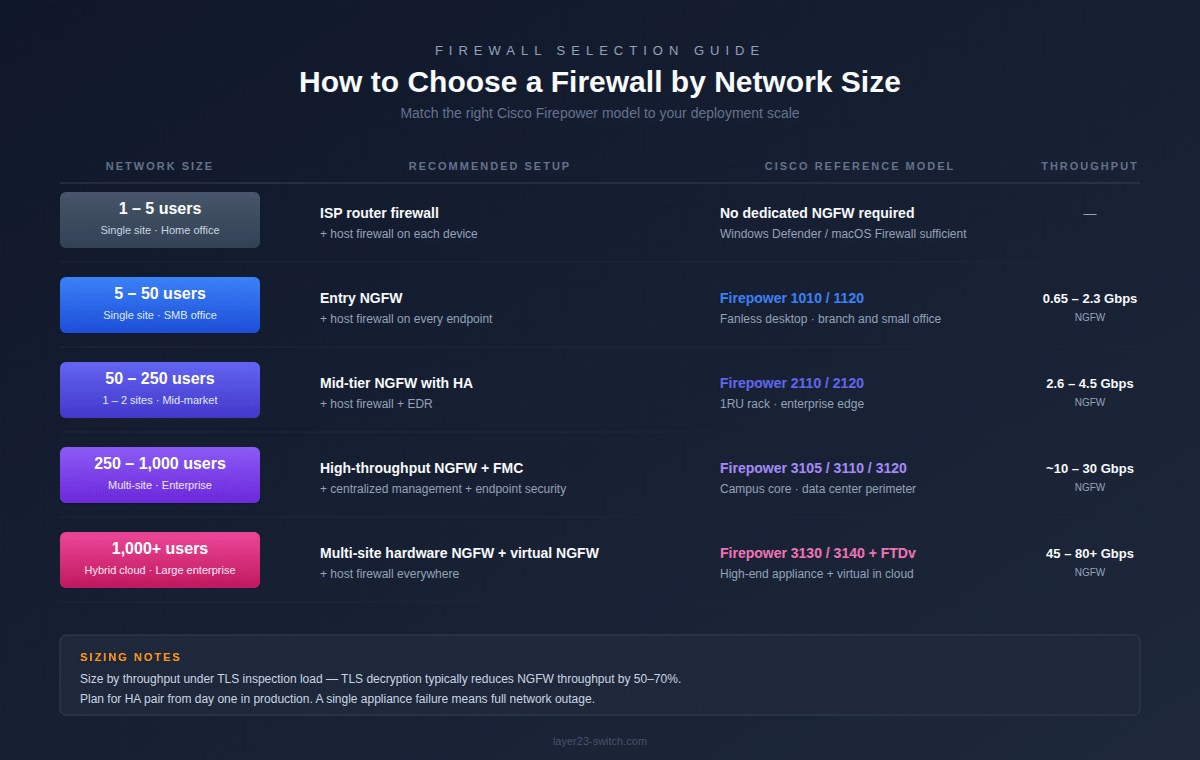
The right firewall depends on user count, throughput needs, and how distributed the network is. Use this framework as a starting point.
| Network Size | Recommended Setup | Cisco Reference Models |
|---|---|---|
| 1–5 users, single site | ISP router firewall + host firewall on each device | None required |
| 5–50 users, single site | Entry NGFW + host firewall on every endpoint | Firepower 1010, Firepower 1120 |
| 50–250 users, 1–2 sites | Mid-tier NGFW with HA + host firewall + EDR | Firepower 2110, Firepower 2120 |
| 250–1,000 users, multi-site | High-throughput NGFW + FMC centralized management + endpoint security | Firepower 3105, Firepower 3110, Firepower 3120 |
| 1,000+ users, hybrid cloud | Multi-site hardware NGFW + virtual NGFW (FTDv) in cloud + host firewall everywhere | Firepower 3130, Firepower 3140, plus FTDv |
Two practical notes when sizing. First, size by throughput under TLS inspection load, not user count — TLS inspection cuts NGFW throughput by 50–70% on most platforms, and that’s the number that matters once the appliance is in production. Second, plan for HA from the start in production deployments. A single perimeter NGFW failure means full network outage; an HA pair eliminates that risk.
For deeper Cisco selection detail, see our Cisco Firepower 1000 / 2100 / 3100 comparison and the broader Cisco firewall family comparison.
5 Common Mistakes When Choosing a Firewall
- Treating the ISP router as a firewall. Most ISP-supplied routers do NAT and basic stateful filtering. They are not NGFWs — no IPS, no application visibility, no TLS inspection, no malware scanning.
- Buying NGFW hardware but skipping the threat license. A Firepower or FortiGate without its threat license bundle runs as a stateful firewall only. The advanced features are license-gated.
- Sizing by user count instead of throughput under TLS load. A “50-user firewall” specification is meaningless. What matters is how much TLS-inspected throughput it sustains.
- Assuming Windows Defender Firewall replaces a perimeter firewall. It doesn’t. Host firewalls protect hosts, not networks.
- Skipping HA design on the perimeter. A single appliance is a single point of failure for the entire site’s internet connectivity and security policy.
Frequently Asked Questions
What is the main difference between a hardware firewall and a software firewall?
A hardware firewall is a dedicated physical appliance that protects an entire network at the perimeter, while a software firewall is an application installed on individual devices or virtual machines that protects only that host. Hardware firewalls offer dedicated performance and centralized control; software firewalls offer per-device flexibility and lower cost.
Do I need both a hardware firewall and a software firewall?
For any business with 5+ employees sharing a network, yes. The hardware firewall protects everything at the perimeter, including devices that cannot run software firewalls (IoT, printers, cameras, legacy systems). The software firewall protects each endpoint when it leaves the corporate network and provides east-west protection inside the LAN.
Is Windows Defender Firewall a software firewall?
Yes. Windows Defender Firewall is a host-based software firewall built into every modern Windows installation. It controls inbound and outbound connections at the application and port level on the device it runs on. It does not protect other devices on the network.
Should you run a hardware and software firewall at the same time?
Yes. Running both is the standard layered security model used by virtually all enterprises. The hardware firewall handles north-south traffic at the perimeter; software firewalls handle east-west traffic between hosts and protect endpoints when they roam off the corporate network. The two do not conflict.
What is the typical lifespan of a hardware firewall?
Most enterprise hardware firewalls have a useful lifespan of 5 to 7 years. Vendors typically announce End-of-Sale around year 5, with End-of-Support Life following several years later. Layer23-Switch can verify EoL/EoS status for any Cisco Firepower model before purchase to help plan refresh cycles and avoid buying near End-of-Life.
Why is it best to use a hardware firewall in a business network?
A hardware firewall delivers consistent throughput under load, inspects TLS-encrypted traffic at line rate, applies one centralized policy to every device behind it (including agentless IoT), and provides the perimeter control that compliance frameworks like PCI DSS, HIPAA, and SOC 2 expect. For a quote on Cisco Firepower hardware with current pricing and stock, contact Layer23-Switch.
Can a single device be both a hardware and software firewall?
Strictly speaking, every firewall is software running on some hardware. The meaningful distinction is purpose-built appliance versus host application. A Firepower 1010 is a hardware firewall — dedicated silicon, security OS, inline at the perimeter. Windows Defender Firewall on a laptop is a software firewall — running on a general-purpose OS, protecting only that host.
Can a router replace a hardware firewall?
For consumer use, a router with built-in NAT and basic stateful filtering may be enough. For business networks, no. Routers route traffic; firewalls inspect it. A router does not provide IPS, malware scanning, application visibility, TLS inspection, or threat intelligence integration. Business networks need a dedicated NGFW.
Does a VPN replace the need for a firewall?
No. A VPN encrypts traffic between two endpoints; it does not inspect that traffic for threats, enforce application-level policy, or block malicious destinations. VPNs and firewalls solve different problems and are typically used together — modern NGFWs like Cisco Firepower handle both VPN termination and threat inspection on the same appliance.
How much does a hardware firewall cost for a small business?
Entry-level NGFWs for small business start around $700–$800 for the appliance alone. A typical 3-year deployment including the appliance, threat license bundle (TMC), and support runs roughly $1,700–$2,300 for a single Firepower 1010. HA pairs roughly double the cost. Pricing varies by region, order quantity, and channel — contact Layer23-Switch for current pricing on any Cisco Firepower model.
Final Thoughts
Hardware and software firewalls solve different problems. Hardware protects the network; software protects the host. For any business beyond a single-user home office, the answer is almost always both — hardware at the perimeter, software on every endpoint, and virtual firewalls in the cloud where physical appliances cannot reach.
For a 50-user office, an entry NGFW like the Cisco Firepower 1010 with a 3-year TMC bundle is the most common starting point. For larger or compliance-driven environments, the Firepower 2100 or 3100 series provide the throughput, TLS inspection capacity, and centralized management to scale.
Layer23-Switch ships brand-new sealed Cisco Secure Firewall hardware across the full Firepower family, with pre-shipment serial verification, global delivery, and engineering support. Browse Cisco Firepower NGFW solutions or request a quote for current pricing and stock.






