Cisco Room Bar vs Room Bar Pro vs Room Kit EQ vs Room Kit Pro G2: Which Fits Your Room?
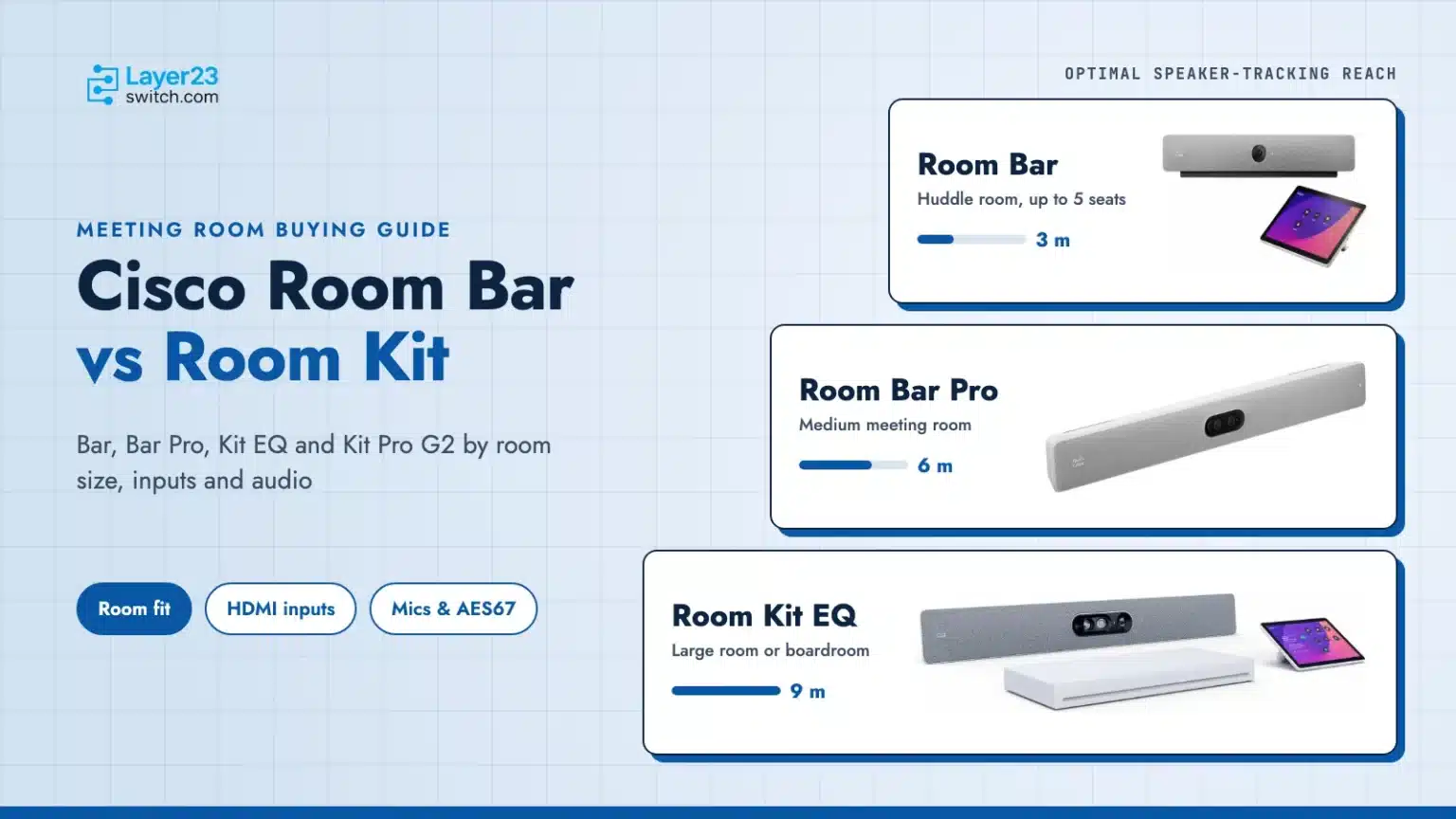
Choose Cisco Room Bar for a small huddle room and Room Bar Pro for a medium room where a front-of-room bar can cover the seating. Choose Room Kit EQ when the camera and codec need to be installed separately or the room needs more wired sources. Room Kit Pro G2 is the step up for more direct HDMI connections, phantom-powered microphones or more video-over-IP streams.
Cisco Room Bar vs Room Kit by Room Type
Measure from the planned camera position to the farthest seat. Then count the wired sources and decide where the presenter, displays and microphones will go.
| Model | Typical room | HDMI outputs | When to compare another model |
|---|---|---|---|
| Cisco Room Bar | Huddle room with up to 5 people seated within about 3 m | 2 | The far seats need tighter framing or the room needs several external microphones |
| Cisco Room Bar Pro | Medium meeting room with a front-of-room bar | 3 | The room needs a rack-mounted codec, more HDMI inputs or a different camera layout |
| Cisco Room Kit EQ | Large conference room, boardroom or training room with separate AV components | 3 | The room needs more direct HDMI inputs or 48 V phantom power for existing microphones |
| Cisco Room Kit Pro G2 | AV-integrated room with multiple cameras, wired sources or a professional audio system | 3 | Room Kit EQ can cover rooms with fewer inputs and simpler audio |
The HDMI column counts physical outputs. Check which displays can show live video or shared content in your meeting platform. The seating distances are Cisco planning guidance. Room acoustics and furniture placement affect coverage.
Cisco Room Bar vs Room Bar Pro
Room Bar Pro is a better fit when the farthest seats are beyond Room Bar’s roughly 3 m speaker-tracking range, or when the room needs multiple external microphones. The Pro’s built-in microphones are optimized for seats within 4 m. Cisco recommends keeping the farthest seat within 6 m for optimal speaker tracking, so a long room may need external microphones even when the camera can frame the far seats.
| Spec | Room Bar | Room Bar Pro |
|---|---|---|
| Camera | 12 MP, 120° field of view, 5x digital zoom | Dual camera: 112° wide lens + 70° tele lens, 48 MP each |
| Built-in mic pickup | Up to 5 people within 3 m | People seated within 4 m |
| Speaker tracking distance | Under 3 m for optimal tracking | Up to 6 m for optimal tracking |
| Displays | Up to 2 | Up to 3 for live video and content in Cisco Rooms mode |
| Video inputs | 1 HDMI + 1 USB-C | 1 HDMI + 1 USB-C |
| Microphone extension | 1 analog mic input and PoE connectivity for 1 Cisco IP microphone | 2 analog line inputs and support for up to 8 Cisco IP microphones. A PoE switch may be needed. |
A Huddle Room and a Longer Meeting Room
A 4-person huddle room. Everyone sits within 3 m of the camera, facing the front of the room. Room Bar is a good starting point for built-in speech pickup and group framing.
A 10-person room with a 5 m table. The farthest seats are 5–6 m from the device, within Cisco’s speaker-tracking guidance for Room Bar Pro. Plan external speech microphones for those seats and verify coverage during commissioning.
Dual and Triple Displays
Both bars can run a dual-display setup. Room Bar Pro can use a third display for live video and content in Cisco Rooms mode. For native Microsoft Teams Rooms, plan on two displays for that layout.
Cisco Room Bar Pro vs Room Kit EQ
Choose Room Kit EQ when the room needs a separate codec, more direct HDMI connections or a camera layout the bar cannot cover. Both systems support external Cisco IP microphones, including compatible ceiling microphones.
| Decision point | Room Bar Pro | Room Kit EQ |
|---|---|---|
| Where the codec sits | Inside the bar, at the front wall | Codec EQ can sit in a rack, credenza or behind the display |
| Camera options | Built-in dual camera, with support for compatible external PTZ cameras | Quad Camera, Room Vision PTZ or PTZ 4K, depending on bundle |
| Speaker tracking reach | Up to 6 m for optimal tracking | Under 9 m for optimal tracking with Quad Camera |
| Video inputs | 1 HDMI + 1 USB-C | 3 HDMI + 1 USB-C, plus video over IP. Quad Camera uses one HDMI input. |
| IP microphones | Up to 8 | Up to 8 (an extra Ethernet switch may be needed, depending on port count) |
| Speech pickup without extra mics | Built-in array optimized for seats within 4 m | Separate speech microphones required |
Two Camera and Codec Layouts
Front-of-room bar. In a 12-seat room with the farthest seats 5–6 m from the device, Room Bar Pro can stay under the display. Plan Cisco Table Microphone Pro units or compatible ceiling microphones for the far seats. Size the microphone layout and PoE capacity together.
Lectern with a separate AV rack. A lectern PC, a wall-plate input and a document camera each need an HDMI input. With Room Kit EQ Vision PTZ, Codec EQ sits in the rack and the camera uses a PoE+ Ethernet connection for power, video and control. That leaves all three HDMI inputs available. Include speech microphones, loudspeakers and the PoE capacity for the camera and other peripherals.
Speech Microphones and Loudspeakers
The Quad Camera’s microphone array locates the active speaker for camera framing. Order separate speech microphones to carry voices to the far end. Cisco lists compatible table and ceiling microphones as options for the standard Room Kit EQ and Room Kit Pro G2 bundles.
Ask the supplier to name the speech microphone models and quantities. The Quad Camera has built-in loudspeakers. For a Vision PTZ or PTZ 4K bundle, specify a separate loudspeaker system or a compatible existing room audio system.
Cisco Room Kit EQ vs Room Kit Pro G2
Room Kit Pro G2 gives you two more HDMI inputs than Room Kit EQ, four analog inputs with 48 V phantom power, and AES67 support without the AV Integrator license. Both kits have three HDMI outputs and support up to eight Cisco IP microphones. Budget one HDMI input for the bundled Quad Camera when you plan the remaining connections.
| Spec | Room Kit EQ | Room Kit Pro G2 |
|---|---|---|
| HDMI inputs | 3 total, 2 free with Quad Camera | 5 total, 4 free with Quad Camera |
| USB-C video input | 1 | 1 |
| Video over IP | Up to three 1080p60 streams or one 4K30 stream | Up to 5 streams |
| HDMI outputs | 3 | 3 |
| Cisco IP microphones | Up to 8 | Up to 8 |
| Analog audio inputs | 3 mini-jack inputs | 4 Euroblock inputs with adjustable mic/line gain and 48 V phantom power |
| Third-party AES67 audio | RoomOS 11.8 or later with the AV Integrator license | RoomOS 26.6 or later without the AV Integrator license |
How to Connect Four Wired Sources
A training room needs connections for a lectern PC, two table inputs and a media player. If all four sources require HDMI, ask for quotes on Room Kit EQ with an HDMI switcher and Room Kit Pro G2 with direct connections. If one table input can use USB-C, there is a third option.
- Room Kit EQ + external HDMI switcher. Connect all four content sources to the switcher and feed its output into one of the two free HDMI inputs. Keep the Quad Camera on its own codec input.
- Room Kit EQ Vision PTZ + USB-C. Put the camera on the IP connection, use three HDMI inputs for content, and connect the fourth source by USB-C. Confirm that the laptop supports DisplayPort Alt Mode and include loudspeakers in the quote.
- Room Kit Pro G2. With the Quad Camera on one input, each of the four HDMI content sources gets its own input.
Compare the installed cost for each design, including any switcher, cabling and control programming.
Analog Audio and AES67 Requirements
If the room already has a digital signal processor (DSP), a ceiling array or wired microphones, record their models and output types before choosing a codec.
- Networked audio. Confirm that the existing equipment can send or receive AES67, and document whether the DSP or the codec will handle echo cancellation. Include the AV Integrator license in a Room Kit EQ quote that uses third-party AES67 audio.
- Analog microphones. Codec Pro G2 can supply 48 V phantom power to compatible microphones wired to its Euroblock inputs. For Codec EQ, confirm the feed from an existing DSP or quote an appropriate interface for the microphones.
Room Kit EQ is usually sufficient when it covers the camera layout and has enough content inputs, and the existing audio can connect through compatible Cisco IP microphones, analog audio or licensed AES67.
Cisco Room Kit Pricing and What to Include in a Quote
Compare hardware prices in our Cisco video conferencing equipment. For a like-for-like quote, confirm the exact bundle, speech microphones, displays, mounting hardware, licensing and installation.
Check stock, compare options, or talk with our team.
What Comes in Each Bundle?
| Bundle | Main components | Check separately |
|---|---|---|
| Room Bar | Room Bar + Room Navigator (table-stand or wall-mount) | The BYOD-only version has no Room Navigator |
| Room Bar Pro | Room Bar Pro, Room Navigator table stand, screen/wall mounting kit, network and HDMI cables | External microphones for seats beyond 4 m, if needed |
| Room Kit EQ | Codec EQ, Quad Camera with wall mount, Room Navigator | Speech microphones |
| Room Kit EQ Vision PTZ | Codec EQ, Room Vision PTZ camera (12x optical zoom), Room Navigator | Speech microphones, loudspeakers |
| Room Kit EQ PTZ 4K | Codec EQ, PTZ 4K camera (20x optical zoom, HDMI video), Room Navigator | Speech microphones, loudspeakers |
| Codec EQ standalone | Codec only | Camera, touch controller, microphones, loudspeakers |
| Room Kit Pro G2 | Codec Pro G2, Quad Camera, Room Navigator | Speech microphones |
| Room Kit Pro G2 Vision PTZ | Codec Pro G2, Room Vision PTZ, Room Navigator | Speech microphones, loudspeakers |
| Codec Pro G2 standalone | Codec only | Camera, touch controller, microphones, loudspeakers |
Record the full part number for each bundle. For Room Kit EQ, CS-KIT-EQ-K9 includes the Quad Camera, CS-KIT-EQ-Z-K9 includes Room Vision PTZ, and CS-KIT-EQ-4K-K9 includes PTZ 4K. For Room Kit Pro G2, CS-KPRO-Q-L-K9 and CS-KPRO-Q-C-K9 are the First Light and Carbon Black Quad Camera bundles. Specify color, radio or non-radio, and any TAA requirement on the quote.
What Drives the Price?
- Bundle and camera. The camera choice affects the mount, cabling and whether you need separate loudspeakers.
- Microphones. The number of Table Microphone Pro or Ceiling Microphone Pro units, plus ceiling mounting kits.
- Cisco licenses. Include the AV Integrator license when using third-party AES67 audio on Room Bar Pro or Room Kit EQ. Confirm any other Cisco options required for the deployment.
- Meeting platform. Confirm the room account or device subscription, how the device will be registered and which renewals the quote includes.
- Displays, mounts and cabling. Often quoted separately or supplied by the customer.
- Network. PoE switch capacity for IP microphones and cameras.
- Installation and support. Mounting, programming, commissioning and the support contract.
Room Kit Pro G2 can eliminate a separate HDMI switcher or AES67 license in some designs. Compare the hardware, commissioning and renewals for the complete room.
Quote Checklist
Copy this table into your request for quotation. Ask each supplier to fill in the last two columns for every line.
| Item | What to specify | Included, optional or customer-supplied | One-time or recurring |
|---|---|---|---|
| Bundle | Exact part number, color, radio/non-radio, TAA if required | ||
| Camera | Model and mounting position | ||
| Speech microphones | Model and quantity that carry table audio to the far end | ||
| Loudspeakers | Built into the bar or camera, or a separate model | ||
| Room Navigator | Table-stand or wall-mount | ||
| Displays | Size, quantity and touch requirement | ||
| Mounts and cables | Display mounts, camera mounts, HDMI and network cable lengths | ||
| Network | PoE switch if needed, port count and power budget | ||
| Cisco licenses | AV Integrator, MultiSite or other licenses | ||
| Meeting platform license | Webex, Microsoft Teams Rooms or Zoom Rooms | ||
| Installation | Mounting, cabling, programming and commissioning. Test the farthest seats and display layout. | ||
| Support | Hardware support term and response level |
Specify the Meeting Platform and Display Layout
In the RFQ, name what each display should show. A Teams Rooms requirement might say “remote participants on display 1 and shared content on display 2.” Cisco lists dual-screen live video and content for Room Bar Pro and Room Kit EQ in Teams Rooms mode. For platform selection, see our guide to Webex, Teams and Zoom for business meeting rooms.
FAQ
-
Does Cisco Room Kit EQ include a microphone?
The standard Room Kit EQ bundle needs a separate speech microphone. The Quad Camera’s built-in array locates speakers for camera framing. Room Kit EQ supports up to eight Cisco IP microphones, including compatible table and ceiling models.
-
What is included in Cisco Room Kit EQ?
The standard bundle includes Codec EQ, a Quad Camera with a wall mount and one Room Navigator. Confirm the controller mounting option on your quote. The Vision PTZ and PTZ 4K bundles use different cameras. Specify speech microphones, displays and installation as separate quote items.
-
What is the difference between Room Kit EQ and Room Kit EQ Vision PTZ?
The standard kit uses a Quad Camera with built-in loudspeakers and an HDMI video connection. Room Vision PTZ adds 12x optical zoom and can use one PoE+ Ethernet cable for power, video and control. Use that IP connection to keep all three codec HDMI inputs free for content, and specify separate loudspeakers.
-
Can Cisco Room Bar Pro use ceiling microphones?
Yes. Room Bar Pro supports Cisco Ceiling Microphone Pro and up to eight compatible Cisco IP microphones. Its two PoE ports can be expanded with a compatible PoE switch when the design needs more ports. The standard Room Bar supports one Cisco IP microphone.
-
Does Cisco Room Kit EQ support AES67?
Yes. Room Kit EQ and Room Bar Pro support third-party AES67 audio from RoomOS 11.8 with the AV Integrator license. Room Kit Pro G2 supports it from RoomOS 26.6 without that license.
-
Which Cisco room devices support Microsoft Teams Rooms natively?
Room Bar, Room Bar Pro, Room Kit EQ and Room Kit Pro G2 are certified for Microsoft Teams Rooms on Android. Cisco also lists all four for Zoom Rooms on RoomOS 26.10 or later. Confirm the firmware, Room Navigator and screen layout for the platform you plan to deploy.
Get a Quote for Your Meeting Room
Send us your room dimensions, seating layout, meeting platform, display count and any AV equipment you plan to reuse. Include the exact bundle SKU if you already have one.