Cisco IE4000 and IE4010 Replacement: EOL Dates and Migration Paths
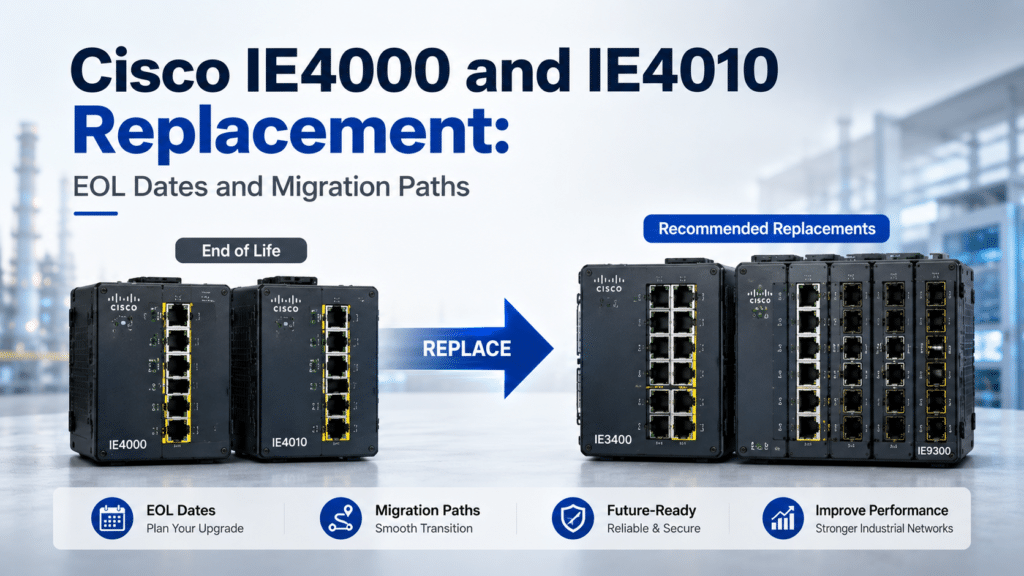
The Cisco Industrial Ethernet 4000 and 4010 Series are both end-of-life, on different timelines and with different replacements. The IE4000’s last order date was July 26, 2024; the IE4010’s last order date is July 31, 2026. The key difference for planning is that the two series migrate to different platforms: Cisco directs the compact IE4000 to the Catalyst IE3300/IE3400 Rugged Series, and the rack-mount IE4010 to the Catalyst IE9300 Rugged Series. Both move from IOS to IOS XE, so each is a hardware refresh and a configuration rebuild, not an in-place upgrade.
If you run both, you are planning two projects, not one. This guide gives the official lifecycle dates for each series, the platform each migrates to, the part-number mapping Cisco publishes for the IE4010, a safe migration sequence, and the procurement and trade-in options that lower the cost.
Are the Cisco IE4000 and IE4010 End of Life?
Yes — both are end-of-life, and the first mistake to avoid is treating them as one product. The IE4000 is a compact, modular DIN-rail switch for in-cabinet industrial access, and it migrates to the Catalyst IE3300/IE3400 Rugged Series. The IE4010 is a 1RU rack-mount switch built for aggregation, and it migrates to the Catalyst IE9300 Rugged Series. They reached end-of-sale on different dates, so the two refreshes run on separate clocks.
In practice, the teams we work with usually split the work the way Cisco split the platforms: the IE4000 fleet gets a DIN-rail rugged replacement, while the IE4010 fleet gets a rack-mount aggregation replacement. The sections below handle each path on its own, then cover the migration steps and pitfalls they share.
Cisco IE4000 and IE4010 End-of-Life Dates
The two dates that drive procurement are the last order date and the last date of support, and they differ by series. The IE4000’s last day to order was July 26, 2024, so it is already past end-of-sale and available new only as Cisco Certified Refurbished or third-party spares. The IE4010’s last day to order is July 31, 2026, so it can still be purchased new until that cutoff.
| Series | Form factor | Last day to order | Status today | Official replacement |
|---|---|---|---|---|
| Cisco IE4000 | Compact DIN-rail, modular | July 26, 2024 | Past end-of-sale; refurbished/spares only | Catalyst IE3300 / IE3400 Rugged Series |
| Cisco IE4010 | 1RU rack-mount aggregation | July 31, 2026 | Still orderable until the cutoff | Catalyst IE9300 Rugged Series |
After each series reaches its last date of support, Cisco no longer provides TAC support, hardware RMA, or software maintenance for it. The exact intermediate milestones — end of software maintenance, security support, and service-contract renewal — fall between the dates above and vary by part number. To check the lifecycle dates for a specific SKU, use the Layer23-Switch EOL/EOSL lookup tool, and confirm against the official Cisco end-of-sale and end-of-life notices for the IE4000 and IE4010 series before you finalize a refresh schedule.
What the Last Date of Support Means for an Industrial Network
After the last date of support, a switch still in service becomes an unsupported asset: no contracted replacement, no TAC case, and no software fix for a newly discovered vulnerability. On a plant floor, in a substation, or at a transportation site, that turns an aging switch into a single point of failure with no vendor-backed recovery path, and into a standing security exposure on an OT segment that is hard to isolate.
That risk profile is why the IE4000 refresh is the more urgent of the two — it is already past end-of-sale — while the IE4010 still has runway but should be scheduled before its July 31, 2026 cutoff if you want to buy new rather than rely on refurbished stock.
What Replaces the Cisco IE4000?
The Cisco Catalyst IE3300 and IE3400 Rugged Series are the official replacements for the IE4000. Cisco’s end-of-life notice directs IE4000 customers to the IE3300 or IE3400 Rugged Series and, for higher port density, to use the IE3x00 expansion modules to reach the required port count. Both families run IOS XE and keep the modular DIN-rail design the IE4000 used.
The choice between them is a feature decision: the IE3400 adds advanced OT capabilities such as Cisco TrustSec, Parallel Redundancy Protocol (PRP), and High-availability Seamless Redundancy (HSR), while the IE3300 covers standard modular access. Because that decision has its own trade-offs, see our Cisco IE3300 vs IE3400 guide; the table below maps each IE4000 model to the specific IE3300 or IE3400 replacement.
Matching an IE4000 to an IE3300 or IE3400
Map your IE4000 by its role: port count, PoE requirement, uplink type, and whether you need advanced OT redundancy. An IE4000 doing standard modular access maps to an IE3300 with the right expansion module; an IE4000 carrying TrustSec, PRP, or HSR maps to the IE3400. Because both replacements are modular, the base unit plus expansion modules must be sized to match your installed IE4000 port layout.
Unlike the IE4010, Cisco does not publish a one-to-one part-number table for the IE4000, because the IE3300/IE3400 reach their port count through a base unit plus expansion modules. The table maps each IE4000 SKU to the closest Network Essentials (-E) replacement, built from its verified ports. Choose the Network Advantage (-A) variant only where you need advanced routing or OT features, and confirm the base, modules, and external PoE supply before ordering.
| Your IE4000 (verified ports) | Network Essentials (-E) replacement | Notes |
|---|---|---|
| IE-4000-8GT4G-E — 8× GE copper + 4× GE combo, no PoE | IE-3300-8T2S-E — 8× GE + 2× 1G SFP | Standard access; for 10G uplinks use IE-3300-8T2X-E |
| IE-4000-8T4G-E — 8× FE copper + 4× GE combo, no PoE | IE-3300-8T2S-E — 8× GE + 2× 1G SFP | GbE replaces FE and stays backward compatible at 10/100 |
| IE-4000-16GT4G-E — 16× GE copper + 4× GE combo, no PoE | IE-3300-8T2S-E + IEM-3300-8T module | Base 8 ports + an 8-port module reaches 16 |
| IE-4000-4S8P4G-E — 8× FE PoE + 4× FE SFP + 4× GE combo | IE-3300-8P2S-E — 8× GE PoE+ + 2× SFP, 360W (+ external 54V supply) | Choose IE-3400-8P2S-E for advanced OT |
| Any IE4000 needing PRP, HSR, TrustSec, or DLR | IE-3400-8T2S-E / IE-3400-8P2S-E (Network Advantage where required) | Advanced OT features require the IE3400, not the IE3300 |
One BOM item that catches teams: the IE3300 and IE3400 DIN-rail platforms require an external 54V DC power supply for PoE operation. Do not assume the powering method carries over from the IE4000 — confirm the PoE budget and the external power supply on the replacement BOM before ordering.
Cisco IE4010 Migration to the IE9300 Series
The Cisco Catalyst IE9300 Rugged Series is the official replacement for the IE4010. The IE9300 is a fanless 1RU rack-mount switch with 28 Gigabit and 10 Gigabit interfaces, full Layer 2 and Layer 3 services on IOS XE with the Network Advantage license, StackWise stacking that lets multiple switches operate as one logical unit, and an operating range of −40°C to 75°C. That matches the IE4010’s aggregation role while adding stacking and higher-speed uplinks.
Choose the IE9300 when you need rack-mount aggregation rather than in-cabinet DIN-rail access. For PoE aggregation, the IE-9320-24P4S provides 24 Gigabit PoE+ ports with 4× SFP uplinks; for fiber density, the IE-9320-26S2C offers a fiber-heavy interface mix. The part-number table below maps each IE4010 SKU to its specific IE9300 replacement.
IE4010-to-IE9300 Replacement by Part Number
Cisco publishes a direct migration for one IE4010 SKU and leaves the other without a listed one-to-one replacement. The table reflects what the official IE4010 end-of-life notice states; confirm it against the current notice before ordering, because Cisco updates migration listings over time.
| IE4010 SKU (verified ports) | Migration target | Source |
|---|---|---|
| IE-4010-4S24P — 24× GE copper PoE+ + 4× GE SFP uplinks | IE-9320-24P4S-E / IE-9320-24P4S-A — 24× GE PoE+ + 4× SFP uplinks | Cisco official migration |
| IE-4010-16S12P — 12× GE SFP + 12× GE copper PoE+ + 4× GE SFP uplinks | No Cisco-listed 1:1 replacement | Editorial: spec-match a fiber-dense IE9300 such as the IE-9320-26S2C-A; confirm fit against the notice |
For the IE-4010-4S24P, the IE-9320-24P4S is a clean like-for-like move at the same 24-port PoE+ count. For the IE-4010-16S12P, Cisco does not list a one-to-one replacement, so treat any IE9300 choice as an editorial spec match: size the fiber and copper-PoE interface mix to your installed unit and confirm before ordering rather than assuming a direct swap.
How to Migrate Off the IE4000 and IE4010
Both migrations follow the same shape: audit, select, rebuild, stage, and cut over in a maintenance window. The IE4000 and IE4010 run IOS, while the IE3300/IE3400 and IE9300 run IOS XE, so there is no in-place upgrade and no direct configuration restore on either path.
- Audit the existing switch. Record the running configuration, port roles, VLANs, PoE draw, uplink type, stacking, and the IOS feature set. Capture
show running-config,show power inline, andshow interfaces statusas a baseline. - Select the replacement and BOM. For an IE4000, choose an IE3300 or IE3400 plus expansion modules and the external PoE supply. For an IE4010, choose the IE9300 model that matches the port and uplink layout. Add the correct IOS XE license tier to the BOM.
- Rebuild the configuration on IOS XE. Recreate VLANs, interface settings, ring/redundancy, QoS, and security policy as native IOS XE configuration. Do not paste the old IOS config — translate it, and validate on the bench first.
- Stage and label. Pre-load the rebuilt config, confirm the software version, and label uplinks and access ports to match the existing patching and rack layout.
- Cut over in a maintenance window. Swap the unit, verify links, PoE, and stacking, and confirm ring or uplink convergence before returning the segment to operations.
Schedule the cutover during a maintenance window. The IE4010 often sits at an aggregation point, so replacing it interrupts everything downstream — plan the order of operations accordingly.
Safe Verification Commands After Cutover
These read-only commands confirm the replacement came up correctly without changing any state. Run them after the swap to verify platform, PoE, port status, and licensing against the baseline you captured.
show version
show power inline
show interfaces status
show license usage
show version confirms the expected IOS XE release; show power inline confirms the PoE budget and per-port draw match the load you moved; show interfaces status confirms every access port and uplink negotiated as expected; and show license usage confirms the IOS XE license tier is active. If any output does not match the baseline, resolve it inside the maintenance window.
IE4000 and IE4010 Migration Mistakes to Avoid
Most problems on both paths come from treating the move as a same-platform refresh. The operating system, the power model, and the license structure all change, so the BOM and the configuration both need rework. The table summarizes the common failures; the notes after it cover the two that cause the most rework.
| Problem | Cause | Fix |
|---|---|---|
| Old config will not load | IE4000/IE4010 run IOS; replacements run IOS XE | Rebuild config natively on IOS XE; do not paste IOS config |
| IE4000 PoE devices will not power up | IE3300/IE3400 need an external 54V DC supply | Add the external PoE power supply to the IE3300/IE3400 BOM |
| IE4010 SKU has no direct match | IE-4010-16S12P has no Cisco-listed 1:1 replacement | Spec-match an IE9300 by interface mix; confirm before order |
| Feature missing after cutover | License tier not carried into the new BOM | Confirm Network Essentials vs Network Advantage before order |
| Aggregation or stacking gap | IE9300 uses StackWise and faster uplinks the IE4010 did not | Design stacking and uplinks for the IE9300, not a 1:1 copy |
IOS to IOS XE Configuration and Licensing
The configuration does not transfer because IOS and IOS XE are different operating systems, even though many commands look similar. Rebuild VLANs, trunking, spanning tree or ring protocols, QoS, and security policy as native IOS XE configuration, and validate on the bench before cutover. Pasting an IE4000 or IE4010 IOS configuration into an IE3400 or IE9300 produces errors and partial application — the worst thing to debug at a live aggregation point.
Licensing changes with the platform too. IOS XE uses tiered licensing — Network Essentials or Network Advantage — and the IE9300’s full Layer 3 routing typically sits in Network Advantage. Before ordering, verify which tier covers your required features, and confirm the current license names and feature mapping against the official Cisco IE3400 and IE9300 documentation, since packaging is updated over time.
PoE Power, Stacking, and Uplink Changes
Two physical-layer changes catch teams that plan a 1:1 swap. First, PoE powering differs: the IE3300/IE3400 DIN-rail platforms need an external 54V DC supply, so the IE4000 PoE BOM does not carry over unchanged. Second, the IE4010-to-IE9300 move adds StackWise stacking and higher-speed uplinks the IE4010 never had — an upgrade, but one that means you should design the stack topology and uplink plan for the IE9300 rather than replicating the IE4010 box for box.
For the IE4000 path, the equivalent design change is modularity: the replacement’s port count comes from the base unit plus expansion modules, so the BOM must include the right modules to match the installed IE4000 port mix. This matters most when an IE4000 used a non-standard port layout.
Buying IE4000 and IE4010 Replacements: Stock, Trade-In, and Warranty
With the IE4000 past end-of-sale and the IE4010 approaching it, sourcing the IE3300/IE3400 and IE9300 replacements — plus any remaining IE4000/IE4010 spares — runs through partners and resellers. As a Cisco certified partner, Layer23-Switch supplies brand-new original Cisco hardware with a 3-year warranty and RMA service, which matters for industrial sites that stay in production for years.
A phased migration is the lowest-risk approach: replace the IE4000 fleet first, since it is already unsupported for new purchases, and schedule the IE4010 refresh ahead of its July 31, 2026 cutoff. If you are retiring a large installed base, Cisco’s Technology Migration Program (TMP) may let you trade in eligible units for credit toward the new equipment — ask your Cisco partner or account team whether your IE4000 and IE4010 units qualify. For units you cannot migrate immediately, Cisco Certified Refurbished and reseller spares can bridge the gap until cutover.
At Layer23-Switch, we can help confirm the right IE3300/IE3400 or IE9300 SKU, expansion modules, PoE power, uplinks, and license tier against your installed base before you place a project order. For current stock, pricing, lead time, and project quantities, request a quote from Layer23-Switch.
Frequently Asked Questions
Is the Cisco IE4000 still available to buy?
The IE4000 is past its last order date of July 26, 2024, so it is no longer available new through Cisco. You can still source units as Cisco Certified Refurbished or third-party spares in limited supply until the last date of support. For new hardware, migrate to the Catalyst IE3300 or IE3400 Rugged Series.
Is the Cisco IE4010 end of life yet?
The IE4010 is end-of-life but still orderable until its last day to order on July 31, 2026. After that date it is available only as refurbished or spares. Cisco’s recommended replacement is the Catalyst IE9300 Rugged Series, so plan the migration before the cutoff if you want to buy new units.
What is the official replacement for the Cisco IE4000?
The Cisco Catalyst IE3300 and IE3400 Rugged Series are the official replacements. Cisco’s end-of-life notice directs IE4000 customers to these series and to use IE3x00 expansion modules for higher port density. Both run IOS XE.
What does the Cisco IE4010 migrate to?
The IE4010 migrates to the Catalyst IE9300 Rugged Series. Cisco lists a direct part-number migration from the IE-4010-4S24P to the IE-9320-24P4S-A or IE-9320-24P4S-E. The IE-4010-16S12P has no Cisco-listed one-to-one replacement, so spec-match an IE9300 by interface mix and confirm before ordering.
Can I reuse my IE4000 or IE4010 configuration?
No. The IE4000 and IE4010 run IOS, while the IE3300/IE3400 and IE9300 run IOS XE, so the configuration does not transfer directly. Rebuild it natively on IOS XE and validate on the bench before cutover. Pasting the old IOS configuration causes errors and partial application.
Can I trade in my old IE4000 or IE4010 units?
Possibly. Cisco’s Technology Migration Program (TMP) can provide trade-in credit toward new equipment for eligible products. Whether your specific IE4000 or IE4010 units qualify is confirmed through your Cisco partner or account team, so check eligibility before you finalize the purchase.
Final Buying Note
If you are planning an IE4000 or IE4010 refresh, confirm the EOL dates against your part numbers, map each switch to the right replacement — IE3300/IE3400 for the IE4000, IE9300 for the IE4010 — and rebuild the configuration on IOS XE before cutover. Layer23-Switch can validate that BOM, check trade-in options, and confirm current stock and lead time.