
Cisco C1300 Datasheet: Full Specifications, Quick Check & Ordering Guide
The Cisco Catalyst 1300 series includes Gigabit, PoE+, multi-gigabit (mGig), and 10G uplink models engineered specifically for small and medium-sized businesses (SMBs). Featuring a switching capacity of up to 480 Gbps and massive PoE budgets up to 740W (including PoE++ on 1300X models), this platform delivers enterprise-grade performance. This guide provides the official Cisco C1300 datasheet, a full SKU specifications table, and expert enterprise ordering recommendations.
Quick Comparison: Which Cisco C1300 is Right for You?
If you are looking for a rapid procurement decision, reference this quick matrix matching business scenarios to the optimal Cisco C1300 model:
| Best For (Scenario) | Recommended Model | Core Benefit |
| Small office / Retail edge | C1300-8P-E-2G | Fanless, silent operation with 67W PoE+ |
| Standard VoIP network | C1300-24P-4G | Highly cost-effective 195W PoE+ for phones |
| Heavy Surveillance / CCTV | C1300-48FP-4X | Massive 740W PoE budget with 10G uplinks |
| High-Density Wi-Fi 6 / 7 | C1300-24MGP-4X | 2.5G mGig ports to remove wireless bottlenecks |
| SMB Core / Aggregation | C1300-24XTS | 480 Gbps capacity with 10G copper and fiber ports |
Cisco Catalyst 1300 Series Overview
The Cisco Catalyst 1300 Series represents the next generation of enterprise-class switching designed for small and medium-sized businesses (SMBs), branch offices, and retail networks. Designed as the direct evolutionary successor to the legacy Cisco Catalyst 1000 and SG350 series, the C1300 merges powerful network performance with deployment simplicity.
This series is renowned for its intuitive Web UI and deep integration with the Cisco Business Dashboard, eliminating the strict requirement for complex Command Line Interface (CLI) knowledge. It delivers comprehensive Layer 2 and Lite Layer 3 routing capabilities, ensuring your network meets modern demands for high bandwidth, robust security, and low operational overhead.
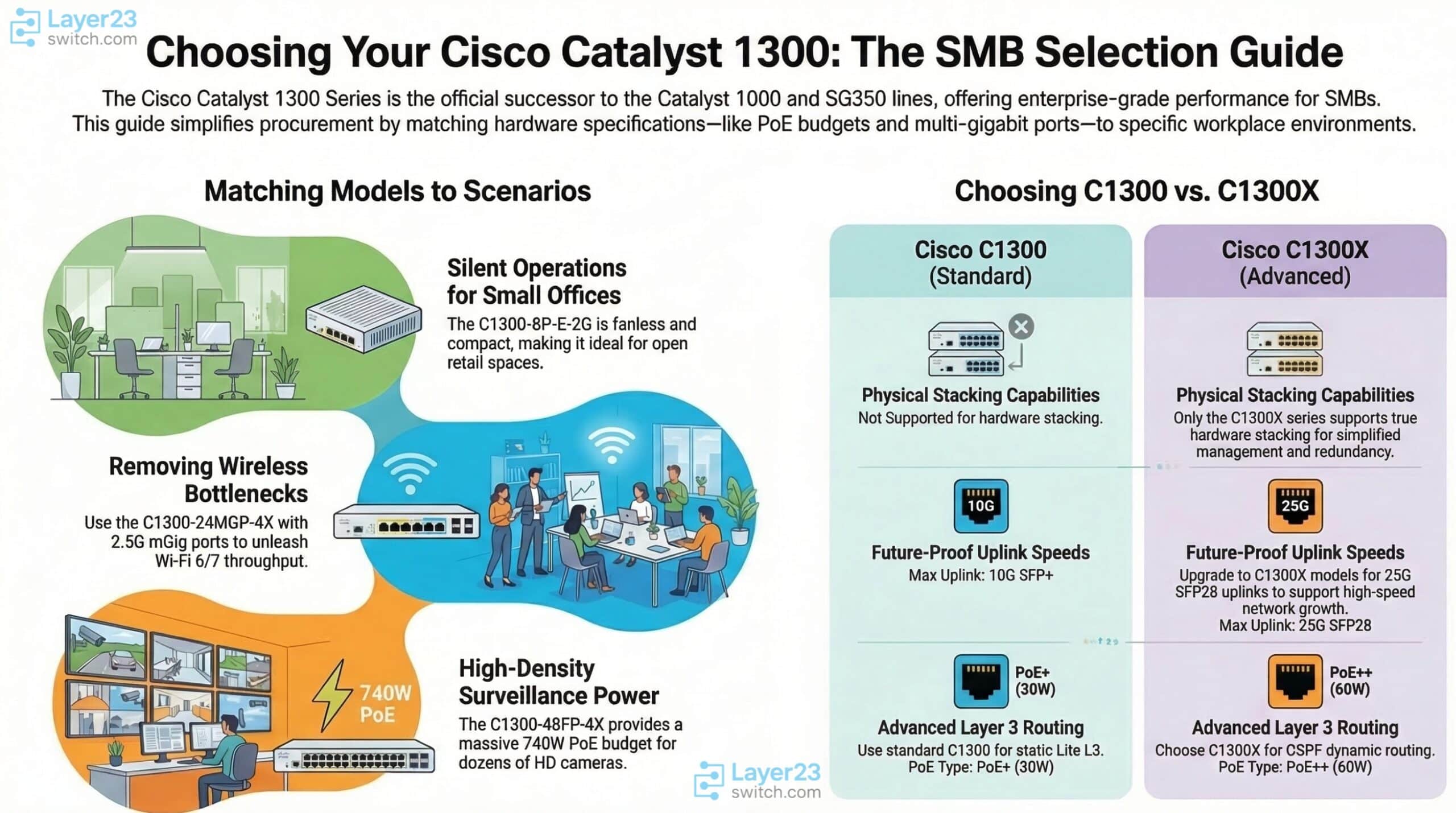
(For a full Cisco switch selection, hardware procurement, and expert network solutions, please visit the Layer23-Switch.)
Cisco C1300 Models List (Complete SKU Index)
To assist IT procurement officers and network architects in rapidly identifying the correct hardware, we have categorized the complete Cisco C1300 models list by port density and core features. Whether you require a compact desktop switch or a high-density rack-mount appliance, you can locate the exact family here:
| Category | Available Models (Full SKU List) |
| 8-port Models | C1300-8T-E-2G, C1300-8P-E-2G, C1300-8FP-2G |
| 16-port Models | C1300-16T-2G, C1300-16P-2G, C1300-16P-4X |
| 24-port Models | C1300-24T-4G, C1300-24P-4G, C1300-24FP-4G, C1300-24T-4X, C1300-24P-4X, C1300-24FP-4X |
| 48-port Models | C1300-48T-4G, C1300-48P-4G, C1300-48T-4X, C1300-48P-4X, C1300-48FP-4X |
| 10G Uplink | C1300-16P-4X, C1300-24P-4X, C1300-48P-4X, C1300-48FP-4X |
| mGig (Multi-Gigabit) | C1300-8MGP-2X, C1300-24MGP-4X, C1300-48MGP-4X |
| 10G Core / Aggregation | C1300-12XT, C1300-24XS, C1300-24XTS |
Cisco C1300 Datasheet (Full Specifications Table)
The following table represents the complete Cisco C1300 specifications datasheet. Use this matrix to precisely compare switching capacity, PoE budgets, and forwarding rates to ensure the hardware meets your technical requirements.
| Model (SKU) | Downlink Ports | Uplink Ports | Switching Capacity | Forwarding Rate | MAC Table | PoE | PoE Budget | Power / Fan | Best Use Case |
| C1300-8T-E-2G | 8x 1G RJ45 | 2x 1G Combo | 20.0 Gbps | 14.88 Mpps | 16K | None | N/A | External / Fanless | Basic micro-branch access |
| C1300-8P-E-2G | 8x 1G RJ45 | 2x 1G Combo | 20.0 Gbps | 14.88 Mpps | 16K | PoE+ | 67W | External / Fanless | Small office edge / VoIP |
| C1300-8FP-2G | 8x 1G RJ45 | 2x 1G Combo | 20.0 Gbps | 14.88 Mpps | 16K | PoE+ | 120W | Internal / Fanless | High-draw APs & Security |
| C1300-16T-2G | 16x 1G RJ45 | 2x 1G SFP | 36.0 Gbps | 26.78 Mpps | 16K | None | N/A | Internal / Fanless | Desktop data expansion |
| C1300-16P-2G | 16x 1G RJ45 | 2x 1G SFP | 36.0 Gbps | 26.78 Mpps | 16K | PoE+ | 120W | Internal / Fanless | Compact wireless coverage |
| C1300-24T-4G | 24x 1G RJ45 | 4x 1G SFP | 56.0 Gbps | 41.66 Mpps | 16K | None | N/A | Internal / Fanless | Economical data access |
| C1300-24P-4G | 24x 1G RJ45 | 4x 1G SFP | 56.0 Gbps | 41.66 Mpps | 16K | PoE+ | 195W | Internal / Fanless | Standard SMB VoIP network |
| C1300-48T-4G | 48x 1G RJ45 | 4x 1G SFP | 104.0 Gbps | 77.38 Mpps | 16K | None | N/A | Internal / Fanless | Large office data-only |
| C1300-48P-4G | 48x 1G RJ45 | 4x 1G SFP | 104.0 Gbps | 77.38 Mpps | 16K | PoE+ | 382W | Internal / Active Fan | High-density PoE endpoints |
| C1300-48FP-4X | 48x 1G RJ45 | 4x 10G SFP+ | 176.0 Gbps | 130.94 Mpps | 32K | PoE+ | 740W | Internal / Active Fan | Heavy CCTV/Surveillance |
| C1300-24MGP-4X | 24x mGig RJ45 | 4x 10G SFP+ | 176.0 Gbps | 130.94 Mpps | 32K | PoE+ | 375W | Internal / Active Fan | Multi-gig Wi-Fi 6 networks |
| C1300-24XTS | 12x 10G RJ45 + 12x 10G SFP+ | 4x 10G SFP+ | 480.0 Gbps | 357.14 Mpps | 32K | None | N/A | Internal / Active Fan | 10G Core / Aggregation layer |
| C1300X-48T-4X | 48x 1G RJ45 | 4x 10G SFP28 | 176.0 Gbps | 130.95 Mpps | 32K | None | N/A | Internal / Active Fan | Large-scale L3 aggregation |
| C1300X-24MU-4X | 24x mGig RJ45 | 4x 10G SFP28 | 128.0 Gbps | 95.23 Mpps | 32K | PoE++ | 385W | Internal / Active Fan | Next-gen PoE++ performance |
Cisco C1300 Ordering Guide (How to Choose the Right Model)
Procuring the correct network hardware optimizes your IT budget and prevents future throughput bottlenecks. Utilize this C1300 Ordering Guide to match your physical environment to the ideal switch:
| Deployment Scenario | Recommended Model | Why Choose This Model? (Core Buying Reason) |
| Small Office / Retail | C1300-8P-E-2G | Fanless + PoE: Silent operation with a 67W budget easily powers a small cluster of VoIP phones and cameras. Compact enough for open desk areas. |
| Standard VoIP Network | C1300-24P-4G | Balanced: The 195W PoE+ budget perfectly balances standard PC data connections with 24-desk VoIP requirements at a highly cost-effective price point. |
| CCTV / Surveillance | C1300-48FP-4X | High PoE: Fully loaded 48-ports with a massive 740W budget and 10G uplinks ensures dozens of high-definition cameras stream without latency or packet drops. |
| Wi-Fi 6 / Wi-Fi 7 Edge | C1300-24MGP-4X | mGig: Breaks the 1 Gigabit limitation by offering 2.5G multi-gigabit ports, fully unleashing the peak throughput of modern wireless access points. |
| SMB Core Network | C1300-24XTS | 10G Core: Provides a 480 Gbps backplane with a 50/50 mix of 10G copper and 10G fiber interfaces, acting as the perfect collapsed core for an SMB. |
Cisco C1300 PoE Models Comparison
In modern enterprise environments, Power over Ethernet (PoE) is the lifeblood of IoT devices, security infrastructure, and wireless mobility. The Cisco C1300 PoE models offer a highly granular selection of power budgets.
To assist in capacity planning, here is a breakdown of the estimated device capacities for the most popular PoE SKUs:
| Model | Total Ports | PoE Budget | Est. AP Count (30W) | Est. Camera Count (15W) |
| C1300-8P-E-2G | 8 | 67 W | 2 APs | 4 Cameras |
| C1300-8FP-2G | 8 | 120 W | 4 APs | 8 Cameras |
| C1300-16P-2G | 16 | 120 W | 4 APs | 8 Cameras |
| C1300-24P-4G | 24 | 195 W | 6 APs | 13 Cameras |
| C1300-48P-4G | 48 | 382 W | 12 APs | 25 Cameras |
| C1300-48FP-4X | 48 | 740 W | 24 APs | 48 Cameras |
| C1300X-24MU-4X | 24 | 385 W | 12 APs (PoE++) | 25 Cameras |
(Note: Capacity estimations assume an average power draw of 15W per standard IP Camera and 30W per high-performance Wi-Fi 6 AP. Always consult your endpoint datasheet for exact power requirements.)
Cisco C1300 vs 1300X (Key Differences)
A frequent dilemma during procurement is deciding between the standard C1300 and the advanced C1300X series. While both share the same Web UI, their underlying architectures cater to different scales of networking.
| Feature | Cisco C1300 (Standard) | Cisco C1300X (Advanced) |
| Target Use Case | SMB Access Layer / Network Edge | Advanced Aggregation / High-Performance Edge |
| Uplink Speeds | 1G SFP or 10G SFP+ | 10G / 25G SFP28 |
| Physical Stacking | Supported | True Hardware Stacking (Up to 25G stacking bandwidth) |
| PoE Standards | PoE+ (Up to 30W per port) | PoE+ / PoE++ (Up to 60W per port on mGig models) |
| Routing Capabilities | Layer 2 / Lite Layer 3 (Static Routing) | Enhanced Layer 3 (Includes OSPF dynamic routing) |
Verdict: Choose the C1300 for cost-effective standalone edge connectivity. Upgrade to the C1300X if your network design mandates physical switch stacking, OSPF dynamic routing, or future-proof 25G uplinks.
Cisco C1300 Performance Explained (Buyer Perspective)
As an IT procurement decision-maker, translating dense technical specifications into actual business value is critical. Here is what the datasheet metrics mean for your operational environment:
| Datasheet Metric | Technical Meaning | Buyer Impact (Business Value) |
| Switching Capacity | Total internal backplane bandwidth (up to 480 Gbps). | Avoid Congestion: Ensures that when the entire office downloads large files or joins video calls simultaneously, the network does not lag. |
| Forwarding Rate | The speed at which packets are processed (Million packets per second – Mpps). | High Traffic Stability: Guarantees that mission-critical business applications (like CRM or ERP systems) respond instantly during peak traffic spikes. |
| MAC Address Table | The number of unique device addresses the switch can store (16K or 32K). | Max Endpoints: Dictates exactly how many laptops, smartphones, and IoT devices your network can support before performance degrades. |
When NOT to Choose Cisco C1300
While the Cisco Catalyst 1300 series dominates the SMB market, establishing a trustworthy procurement strategy requires knowing its technical boundaries. You should NOT select this series if:
- You Need Full Enterprise Layer 3 Features: If your network relies on Cisco DNA Center (SD-Access), advanced BGP routing, or VRFs, you must upgrade to the Cisco Catalyst 9200 Series.
- You Operate a Large Enterprise Core: For massive campus core environments requiring modular power supplies, hot-swappable line cards, and multi-terabit capacity, you must utilize the Catalyst 9400, 9500, or 9600 series.
Where to Buy Cisco C1300 Switches (Enterprise Procurement)
Designing your next-generation network requires a hardware partner with a robust supply chain, deep technical expertise, and flexible pricing structures. As specialized enterprise network equipment providers, we offer comprehensive procurement solutions:
- Global Shipping & In-Stock Availability: We maintain extensive stock of core C1300 models, bypassing long manufacturer lead times for rapid deployment.
- Enterprise Volume Pricing: We provide highly competitive, customized discounts for multi-site rollouts and bulk IT upgrades.
- Stock / Refurbished / New: Optimize your IT budget with flexible hardware conditions, including brand-new, in-box units or certified refurbished options.
- Pre-Sales Engineering Support: Our technical team is available to assist with network topology design, PoE budget calculations, and SKU matching at no extra cost.
👉 Ready to upgrade your enterprise edge? Get a custom quote and explore our full inventory at the [Layer23-Switch].
Cisco Catalyst 1300 FAQ
To resolve any lingering technical or purchasing questions, we have compiled the most frequently asked questions regarding the Cisco Catalyst 1300 series:
Does the Cisco C1300 series require a Cisco DNA license?
No. Unlike the enterprise Catalyst 9000 family, the Cisco C1300 series operates on a perpetual hardware model. It does not require any mandatory, recurring Cisco DNA software subscription licenses, making it highly cost-effective for SMBs.
Can the Cisco C1300 replace my end-of-life SG350, CBS350, or Catalyst 1000 switches?
Yes. The Catalyst 1300 is the official, direct evolutionary successor to the Cisco Business 350 (CBS350), SG350, and Catalyst 1000 series. It offers vastly improved switching capacity and modern security features while retaining the familiar web-based management.
What is the exact difference between C1300 “P” and “FP” models?
The “P” designates standard PoE+, which generally provides a moderate power budget (e.g., 120W or 195W). The “FP” stands for “Full PoE,” which provides a massive power budget (e.g., 740W) specifically engineered to power high-draw devices like PTZ cameras across every single port simultaneously.
Can I manage Cisco C1300 switches using a Command Line Interface (CLI)?
Yes. While heavily marketed for its intuitive Web UI and seamless integration with the Cisco Business Dashboard, the C1300 series still retains full Command Line Interface (CLI) support for traditional network engineers.
Which Cisco C1300 models are completely fanless?
All 8-port, 16-port, and several 24-port models (such as the C1300-24T-4G and C1300-24P-4G) feature a fanless acoustic design. This silent operation makes them perfect for deployment directly in open-plan offices, classrooms, or retail spaces without a dedicated server room.
Do Cisco C1300X models support 25G uplinks?
Yes, advanced models within the Cisco C1300X line (such as the C1300X-48T-4X) are equipped with SFP28 transceiver ports. These ports natively support 10G and 25G fiber optic uplinks, providing massive bandwidth redundancy for future growth.
What does “mGig” mean on the C1300-24MGP-4X model?
“mGig” stands for Multi-Gigabit Ethernet (IEEE 802.3bz). This technology allows the RJ45 copper ports to surpass the traditional 1 Gbps limit, negotiating speeds of 2.5 Gbps or 5 Gbps over existing Cat5e or Cat6 cabling. It is absolutely essential for deploying high-throughput Wi-Fi 6 and Wi-Fi 7 access points.
Download Cisco Catalyst 1300 Select Guide.pdf






