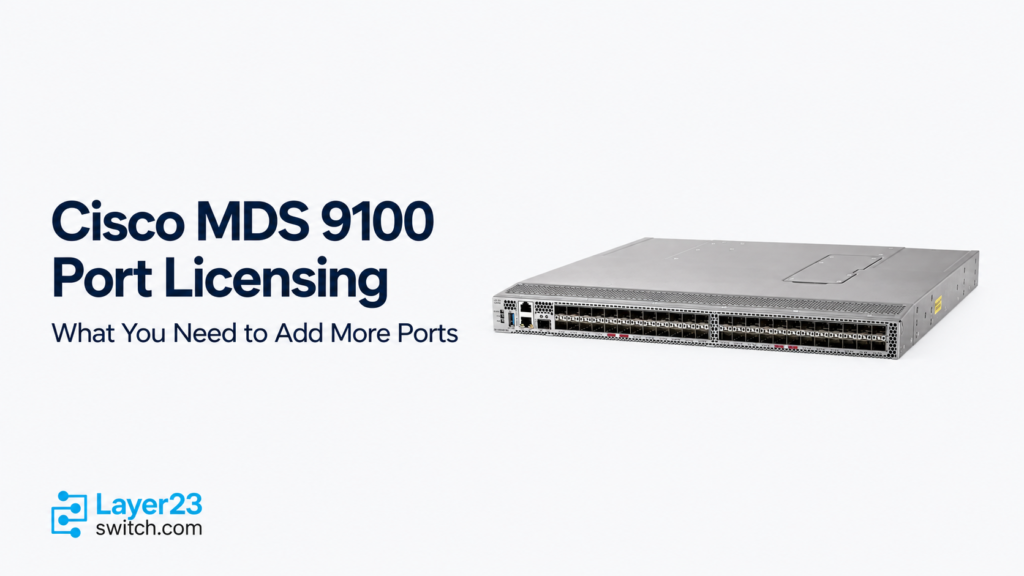
Cisco MDS 9100 Port Licensing: What You Need to Add More Ports
A Cisco MDS 9100 port license increases the number of Fibre Channel ports authorized for use on the corresponding switch. To size an upgrade, subtract the device’s existing valid licensed capacity from the target port count, then round the remaining requirement up to the model’s activation block size. Check the installed hardware first: the Cisco MDS 9132T also uses an expansion module to reach its full physical capacity.
Cisco calls this On-Demand Port Activation Licensing, often described by buyers as a SAN port license. Physical connectors, licensed capacity and online links are three different counts. This guide covers Cisco MDS 9124V, Cisco MDS 9132T, Cisco MDS 9148S, Cisco MDS 9148T and Cisco MDS 9148V, from checking existing authorization to selecting the complete license SKU and verifying the result.
Cisco MDS 9100 Port Capacity and Licensing Limits
The table below shows the base licensing position and expansion limits for each model. Base licensed ports are a reference point, not a statement of what every purchased switch includes. A higher-port-count bundle or a previous upgrade can provide more capacity from the outset.
| Switch model | Physical Fibre Channel port capacity | Base licensed ports | Activation block size | Expansion conditions |
|---|---|---|---|---|
| Cisco MDS 9124V | 24 | 8 | 8 ports | Expand licensed capacity to 16 or 24 ports |
| Cisco MDS 9132T | 16 in the base chassis; 32 with the expansion module | 8 in the base chassis | 8 ports in the base chassis | Base chassis expands to 16 licensed ports; the expansion module adds 16 active ports |
| Cisco MDS 9148S | 48 | 12 | 12 ports | Expand licensed capacity to 24, 36 or 48 ports |
| Cisco MDS 9148T | 48 | 24 | 8 ports | Expand licensed capacity to 32, 40 or 48 ports |
| Cisco MDS 9148V | 48 | 24 | 8 ports | Expand licensed capacity to 32, 40 or 48 ports |
Cisco MDS 9100 Hardware SKUs and Included Active Ports
Use the complete hardware SKU on the original order to identify the included port authorization. For example, DS-C9148T-24PETK9 includes 24 active ports, while DS-C9148T-48PETK9 includes 48. Both use a 48-port platform, but only the first configuration has remaining port activation capacity to purchase.
This table covers selected base switches and bundles. Included active ports means the authorization included with that specific ordering configuration, before any later upgrades. Additional ports are the remaining capacity up to the platform limit; Cisco MDS 9132T can require an expansion module as well as a license. The final column shows the license-package and module quantities needed to reach that limit from the listed configuration.
| Complete hardware SKU | Included active ports | Additional ports possible | Maximum active ports | Upgrade to maximum capacity |
|---|---|---|---|---|
| DS-C9148T-48PETK9 | 48 | 0 | 48 | No additional port activation license required |
| DS-C9148T-24IK9 | 24 | 24 | 48 | 3 × M9148T-PL8; each package adds 8 ports |
| DS-C9148T-24PETK9 | 24 | 24 | 48 | 3 × M9148T-PL8; each package adds 8 ports |
| DS-C9148T-24PITK9 | 24 | 24 | 48 | 3 × M9148T-PL8; each package adds 8 ports |
| DS-C9148S-12PK9 | 12 | 36 | 48 | 3 × M9148S-PL12; each package adds 12 ports |
| DS-C9148S-48PK9 | 48 | 0 | 48 | No additional port activation license required |
| DS-C9124V-8EK9 | 8 | 16 | 24 | 2 × M9124V-PL8; each package adds 8 ports |
| DS-C9132T-MEK9 | 8 | 24 | 32 | 1 × M9132T-PL8 for 8 base ports, plus 1 × M9XT-FC1632 with 16 active module ports |
| DS-C9132T-24PETK9 | 24 | 8 | 32 | 1 × M9132T-PL8 for the remaining 8 base ports |
| DS-C9148V-24PETK9 | 24 | 24 | 48 | 3 × M9148V-PL8; each package adds 8 ports |
| DS-C9148V-24PEVK9 | 24 | 24 | 48 | 3 × M9148V-PL8; each package adds 8 ports |
| DS-C9148V-48PEVK9 | 48 | 0 | 48 | No additional port activation license required |
The license identifiers here show the expansion path. Choose the appropriate complete ordering variant in the license SKU table later in this guide. Hardware SKUs with the same port counts can differ in airflow, optics and other included items; matching port counts does not make the configurations interchangeable.
For an installed switch, reconcile this original configuration with later license purchases and current device authorization. A DS-C9148T-24PETK9 previously upgraded to 40 licensed ports needs only one more eight-port package to reach 48. Its original SKU still describes a 24-port bundle, so the SKU alone cannot establish its current licensed capacity.
If you are purchasing a switch alongside the expansion, the Cisco MDS 9100 Series category provides the product starting point. Keep the included active-port quantity visible in the bill of materials instead of assuming that the chassis port count describes the licensed configuration.
Cisco MDS 9132T: Base Ports and Expansion Modules
Cisco MDS 9132T combines two forms of expansion. Its base chassis has 16 physical Fibre Channel ports, with 8 active in the entry configuration. One M9132T-PL8 adds authorization for the remaining 8 base ports.
The M9XT-FC1632 expansion module supplies another 16 physical ports with 16 active ports included. Starting from an eight-port base configuration, adding that module provides 24 active ports in total; activating all 16 base ports as well brings the total to 32. Check whether the module or base-port upgrade is already included before adding either to an order.
The base chassis uses interfaces fc1/1 through fc1/16, and the expansion module uses fc1/17 through fc1/32. Port licenses cannot move between these two groups. A capacity review therefore needs both the total required ports and their intended locations. Buying additional base-port licenses does not add the expansion-module hardware.
How Many Ports Is Your Cisco MDS Switch Licensed to Use?
Start with a record of the exact device, its serial number, NX-OS release and licensing mode. For Cisco MDS 9132T, also record the installed expansion module. Then reconcile the device’s license information with the original configuration and any later purchases.
These read-only commands help establish the starting point. Output and availability depend on the software release and licensing mode.
| Command | What to check |
|---|---|
show license default | The platform’s default license counts |
show license usage | The relevant license package, reported count and usage or authorization status |
show port-license | Interface-level license assignments and available port activation licenses |
show license authorizations | Authorization information in a Smart Licensing Using Policy environment |
The licensing overview uses the category name PORT_ACTIVATION_PKG. Device output can use a model-specific package name, such as PORT_ACTIV_9148T_PKG. Identify the port activation entry rather than using the count from a feature package.
Record three separate figures: valid licensed capacity, ports assigned a license, and ports currently online. A disconnected interface can still hold a license. Conversely, a physically installed connector does not prove that another license is available for it.
In show port-license, an available-license count of zero means that no unassigned licenses remain in the reported pool; it does not mean the switch has no licensed ports. Review the assigned interfaces too. Similarly, an unused license on the switch should be accounted for before purchasing another activation block.
For Cisco MDS 9132T, the 16 active ports included with M9XT-FC1632 may not appear in the show license usage package count. Check fc1/17 through fc1/32 in show port-license as well as the installed module before concluding that those licenses are missing.
Do not add every count from these commands together: different outputs can describe overlapping information, defaults, usage or purchased authorizations. Establish one verified capacity figure for the relevant device and port group. If the purchase records and device authorization disagree, resolve that discrepancy before using either figure as the basis of a new order.
Sizing Your Cisco MDS Port License Upgrade
Count the physical Fibre Channel ports the deployment will require, including host connections, storage connections, inter-switch links and defined additions. Confirm that the installed hardware can accommodate that target.
For a port group that expands through uniform license blocks, use:
Additional license blocks = round up [max(0, target licensed ports − current valid licensed ports) ÷ ports per activation block].
The result is the number of additional license packages to order. The resulting licensed capacity is the current capacity plus the number of packages multiplied by the block size. For Cisco MDS 9132T, apply the calculation to the base ports and account separately for the expansion module and its included active ports.
A purchase quantity of two eight-port packages represents 16 additional ports. Keep the package quantity and the port quantity in separate fields in the order so they cannot be confused during authorization or verification.
Cisco MDS 9148T Upgrade Calculations
Each example below assumes a Cisco MDS 9148T with the stated current valid authorization and an eight-port activation block. The appropriate ordering variant is selected in the next section.
| Current valid licensed ports | Target ports | Additional eight-port packages | Licensed capacity after the upgrade |
|---|---|---|---|
| 24 | 32 | 1 | 32 |
| 24 | 36 | 2 | 40 |
| 32 | 48 | 2 | 48 |
| 40 | 40 | 0 | 40 |
For the 24-to-36-port example, the shortfall is 12 ports. Dividing 12 by 8 gives 1.5, so the order requires two packages. They add 16 ports, bringing licensed capacity to 40 and leaving four ports of capacity beyond the immediate target.
For the 32-to-48-port example, the existing 32-port authorization already includes a previous increase over the base configuration. The remaining requirement is 16 ports, or two packages. Recalculating from the original 24-port baseline would overstate the new purchase.
When current authorization already covers the target, additional packages are unnecessary for capacity. The remaining work is to verify that the intended interfaces can receive the available licenses and that the physical connections are ready.
Separate License Requirements for Fabric A and Fabric B
Calculate each switch independently before totaling the order. Port activation capacity belongs to the individual device; surplus capacity on one switch does not cover a shortfall on another.
Suppose two Cisco MDS 9148T switches must each support 40 ports. The switch in Fabric A currently has 32 valid licensed ports, so it needs one additional eight-port package. The switch in Fabric B has 24, so it needs two. The purchase totals three packages, allocated one to the first device and two to the second.
Keep those allocations against the individual device records. A single order line for three packages is insufficient as an implementation plan unless it also identifies which switch receives each entitlement.
Choosing the Right Cisco MDS Port License SKU
Choose the license for the exact switch model and licensing environment. Matching the number of ports in a package is not enough: M9148T-PL8 and M9148V-PL8 are model-specific items even though each adds eight ports.
The following are license-only ordering references. Each complete SKU is listed separately so its ordering form remains visible. Confirm the available ordering path for the target device and software environment before issuing the purchase order.
| Switch model | Complete license SKU | Ports added | Ordering form |
|---|---|---|---|
| Cisco MDS 9124V | M9124V-PL8 | 8 | Port upgrade license |
| Cisco MDS 9124V | M9124V-PL8= | 8 | Spare port upgrade license |
| Cisco MDS 9132T | M9132T-PL8 | 8 base ports | Base-chassis activation license |
| Cisco MDS 9132T | M9132T-PL8= | 8 base ports | Spare activation license |
| Cisco MDS 9132T | M9132T-PL8-SL= | 8 base ports | Spare Smart License |
| Cisco MDS 9148S | M9148S-PL12 | 12 | Configure-to-order activation license |
| Cisco MDS 9148S | M9148S-PL12= | 12 | Spare activation license |
| Cisco MDS 9148S | L-M9148S-PL12= | 12 | Electronic-delivery activation license |
| Cisco MDS 9148S | M9148S-PL12-SL= | 12 | Spare Smart License |
| Cisco MDS 9148T | M9148T-PL8 | 8 | Port activation license |
| Cisco MDS 9148T | M9148T-PL8= | 8 | Spare activation license |
| Cisco MDS 9148T | M9148T-PL8-SL= | 8 | Spare Smart License |
| Cisco MDS 9148V | M9148V-PL8 | 8 | Port upgrade license |
| Cisco MDS 9148V | M9148V-PL8= | 8 | Spare port upgrade license |
Keep the full SKU, including any -SL= or = suffix, on both the quote and the purchase order. These references identify ordering forms, not a guarantee that every item remains available through every sales channel. For an existing Cisco MDS 9148S deployment, confirm license orderability as part of the expansion review.
License-Only Options and Bundles with Optics
A license-only item adds authorization; it does not include the transceivers needed to connect new devices. An optics bundle must explicitly list both the activation capacity and the included optical hardware.
For example, M9148T-PL8 is an eight-port activation license. M9148T-PL8T combines an eight-port activation license with eight 32G shortwave optics, while M9148T-PL8TE is listed as the spare bundle with the same port and optics quantities. These order lines cover different purchasing requirements, even though all provide an eight-port activation increment.
Have the quote specify the complete transceiver model and quantity, as well as the license. When reusing optics, confirm that the installed transceivers and fiber suit the intended links. Buying port capacity alone does not change the supported speed of the switch or its optics.
If the project is also choosing between switch generations, use the Cisco MDS 9148T vs. Cisco MDS 9148V comparison for that hardware decision, then return to the licensing calculation for the selected configuration.
Port Activation Licenses vs. Feature Subscriptions
Port activation and software features are separate purchasing decisions. Enterprise functions, management features and SAN Analytics entitlements do not, by themselves, add licensed physical ports. Under Cisco’s Smart Licensing Using Policy model, port activation remains outside the Advantage and Premier software subscription bundles.
Port activation licenses are perpetual and tied to the device serial number. The portability available to software subscriptions does not make port activation capacity freely transferable between switches. For an RMA replacement, confirm the replacement-device licensing process with Cisco licensing support.
Smart Licensing Using Policy also requires authorization for enforced port expansion. An entitlement credited to a Smart Account and an authorization applied to the correct switch are separate checkpoints. Before ordering, identify the target device, licensing mode and account destination so the purchased entitlement can follow the appropriate authorization process.
Confirming Port Authorization After an Upgrade
Use the pre-upgrade record as the comparison point. First verify that the required authorization is present for the correct device and that the resulting capacity matches the order. Then check the license state of the intended interfaces. Finally, verify the physical links and intended connectivity.
In a Smart Licensing Using Policy environment, review show license authorizations alongside the relevant entry in show license usage. Use show port-license to check how licenses are assigned to interfaces. A completed order or an account balance alone does not establish that the required ports on the target switch are ready.
Understanding Acquired, Eligible and Ineligible
| Port license state | Meaning | What to check next |
|---|---|---|
acquired | A license is assigned to the interface | Confirm the underlying device authorization, then check interface and link operation |
eligible | The interface can receive a license but has not acquired one | Check available capacity and the applicable allocation rules |
ineligible | The interface is not allowed to receive a license in its current state | Establish why it is ineligible before treating the issue as a shortage of licenses |
These terms describe interface license assignment. They do not replace the device authorization checks. If an expected interface remains eligible, determine whether licenses are available or already assigned elsewhere. On Cisco MDS 9132T, keep the base-chassis and expansion-module boundary in view.
Licensed Ports and Active Fibre Channel Links
Once an interface has acquired a license and the device authorization is valid, a link that remains down needs a separate interface and physical-link review. Check its administrative state, supported transceivers, cabling, speed settings and the connected device. If the link is up but the intended storage access is unavailable, the remaining fabric configuration and connectivity checks belong to the implementation process.
For example, a switch may have enough authorization for 40 ports while only 34 links are online. That difference alone does not justify buying another activation package. Some licensed ports may be disconnected, unused or awaiting configuration.
Cisco documents license installation as nondisruptive. Treat any associated license reassignment, interface changes or expansion-module installation as separate change activities, with their own impact assessment. A license installation statement does not establish that every step of the wider SAN expansion is without interruption.