Cisco IE-3300 / IE-3400 Power Supply and IEM Module Select Guide
Choosing the right Cisco IE-3300 or IE-3400 configuration is mainly a BOM problem, not just a switch selection problem. The base switch, IEM expansion module, power supply, optics, PoE load and cabinet input power all have to match.
For most projects, use this order:
- Choose the base switch.
- Select the IEM expansion module.
- Size the PWR-IE power supply.
- Confirm the usable PoE budget.
- Add optics, accessories and redundancy requirements.
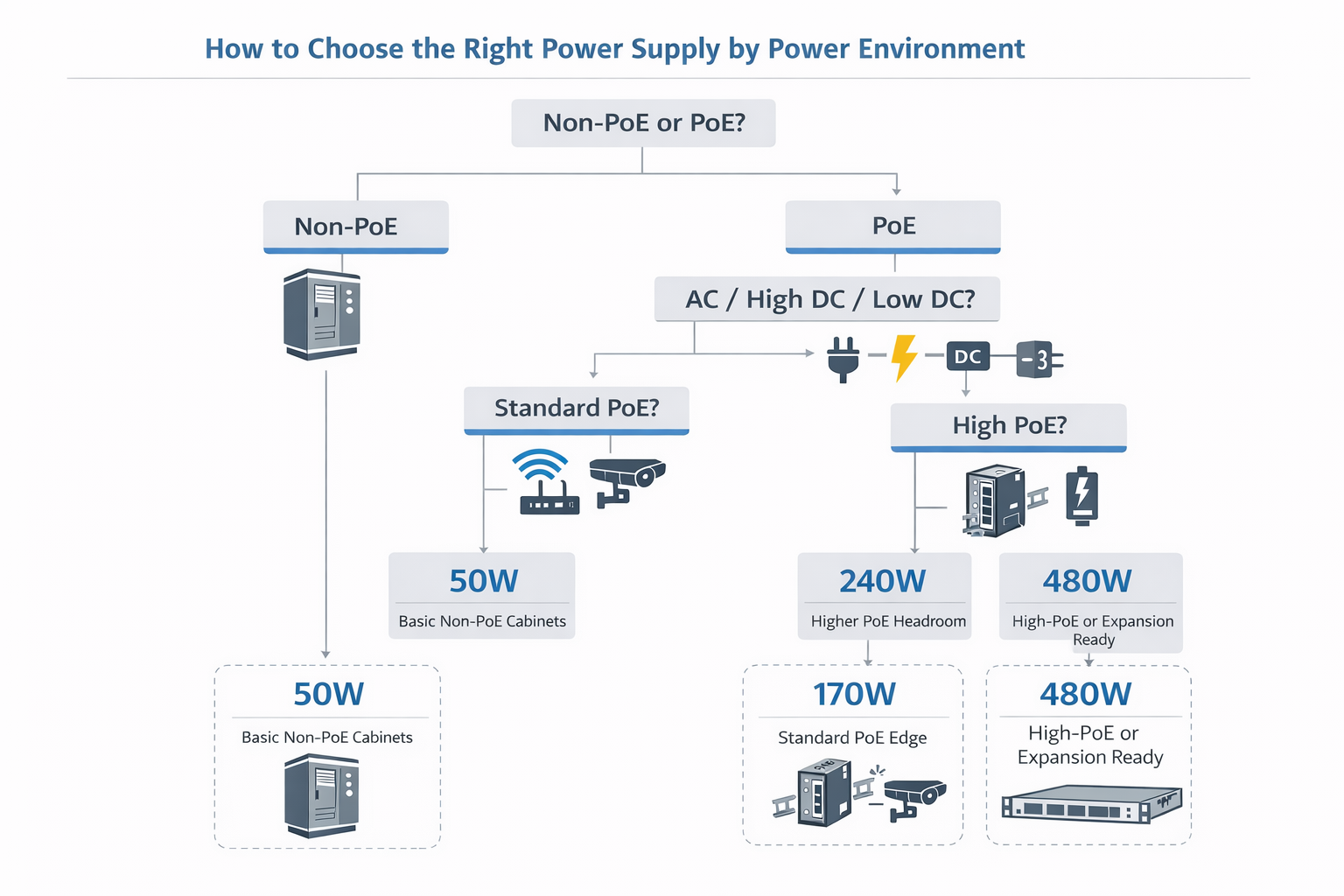
For non-PoE industrial cabinets, a 50W or 65W industrial power supply is usually enough. For standard PoE access, start with a 170W or 240W PSU. For dense PoE, multigig PoE, or expansion-heavy cabinets, use a 480W PSU and calculate the usable PoE budget before finalizing the quote.
This guide focuses on practical BOM selection for Cisco IE3300 and IE3400 projects, including:
- IE-3300-8T2S-E, IE-3300-8P2S-E, IE-3300-8T2X-E and IE-3300-8U2X-E
- IE-3400-8T2S-E and IE-3400-8P2S-E
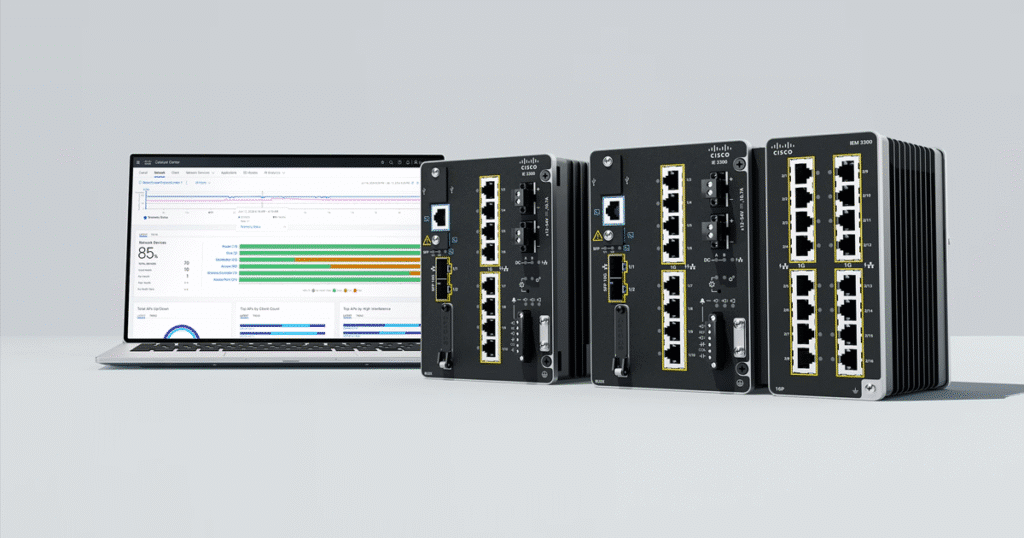
- IEM-3300 and IEM-3400 expansion modules
- PWR-IE50W, PWR-IE65W, PWR-IE170W, PWR-IE240W and PWR-IE480W power supply choices
- Common industrial switch BOM combinations for copper, fiber, PoE and multigig access
Need a fast BOM check? Send us the base switch model, endpoint count, PoE device list, cabinet power input and destination country. We can confirm the correct power supply, IEM module, optics and in-stock alternatives.
Quick BOM Selector for Cisco IE3300 / IE3400
Use this table when you know the project type but are not sure which switch, IEM module or power supply belongs in the BOM.
| Project Requirement | Recommended Base Switch | IEM Module Direction | Power Supply Direction | Best Fit |
|---|---|---|---|---|
| Small non-PoE industrial cabinet | IE-3300-8T2S-E or IE-3400-8T2S-E | None | PWR-IE50W / 65W class | Basic DIN-rail access |
| 16-port non-PoE copper cabinet | IE-3300-8T2S-E | IEM-3300-8T | PWR-IE50W / 65W class | More copper ports without PoE |
| Dense non-PoE copper access | IE-3300-8T2S-E | IEM-3300-16T | PWR-IE50W / 65W class | 24 RJ45 industrial access ports |
| Fiber-heavy industrial access | IE-3300-8T2S-E or IE-3400-8T2S-E | IEM-3300-8S or IEM-3400-8S | PWR-IE50W / 65W class | More SFP handoff points |
| Standard 8-port PoE edge | IE-3300-8P2S-E or IE-3400-8P2S-E | None | PWR-IE170W / PWR-IE240W | Cameras, APs, phones, sensors |
| 16-port PoE cabinet | IE-3300-8P2S-E | IEM-3300-8P | PWR-IE240W or PWR-IE480W | Moderate PoE expansion |
| 24-port PoE cabinet | IE-3300-8P2S-E | IEM-3300-16P | PWR-IE480W | Dense Gigabit PoE BOM |
| Native IE3400 PoE expansion | IE-3400-8P2S-E | IEM-3400-8P | PWR-IE240W or PWR-IE480W | Cleaner IE3400-native BOM |
| 10G uplink, non-PoE | IE-3300-8T2X-E | Optional IEM-3300 module | PWR-IE50W / 65W class | Industrial edge with faster uplinks |
| 10G uplink + multigig PoE | IE-3300-8U2X-E | IEM-3300-4MU or IEM-3300-8P | PWR-IE480W | High-power AP, camera or edge device projects |
The table above is only a starting point. For PoE projects, always calculate usable PoE budget instead of treating PSU wattage as the available power for endpoints. As a default, non-PoE cabinets use a PWR-IE50W-AC or PWR-IE65W-PC-AC supply, a standard 8-port PoE edge uses PWR-IE240W-PCAC-L, and dense or multigig PoE uses PWR-IE480W-PCAC-L.

Cisco IE3300 / IE3400 Power Supply Options Explained
Cisco IE3300 and IE3400 industrial switches use external DIN-rail power supplies. The right PSU depends on three questions:
- What power is available in the cabinet: AC, high-voltage DC or low-voltage DC?
- Does the switch need PoE, PoE+ or higher-power PoE?
- Will the base switch run alone, or will it use an IEM expansion module?
For PoE designs, do not choose the PSU only by port count. A cabinet with eight low-power cameras and a cabinet with eight high-power wireless APs may need very different power planning.
PWR-IE50W-AC: for non-PoE industrial cabinets
PWR-IE50W-AC (and its DC variants) is normally used for small non-PoE cabinets where the switch only needs to power the system itself.
Typical use cases:
- IE-3300-8T2S-E without an expansion module
- IE-3400-8T2S-E without an expansion module
- Small control cabinets
- Basic copper or fiber uplink access
- Sites where no endpoint requires PoE
Do not use a 50W PSU for a PoE BOM.
PWR-IE65W-PC-AC: for non-PoE expansion or low-power designs
A 65W-class PSU (PWR-IE65W-PC-AC) gives more room than a 50W PSU and is useful when the switch uses non-PoE expansion modules.
Typical use cases:
- IE-3300-8T2S-E + IEM-3300-16T
- IE-3300-8T2S-E + IEM-3300-8S
- IE-3400-8T2S-E + IEM-3400-8T
- Larger non-PoE control cabinets
- Mixed copper and fiber access without powered endpoints
PWR-IE170W-PC-AC: entry point for light PoE
PWR-IE170W-PC-AC is usually the practical entry point for light PoE designs. It may fit small camera, phone or sensor projects, but it should not be treated as enough for every PoE deployment, and it caps usable PoE below the platform’s rated budget.
Typical use cases:
- IE-3300-8P2S-E with light PoE load
- IE-3400-8P2S-E with light PoE load
- A few powered endpoints with modest power draw
- PoE edge cabinets where future expansion is limited
PWR-IE240W-PCAC-L: standard PoE cabinet choice
PWR-IE240W-PCAC-L is often the safer choice for standard PoE projects because it provides more headroom than a 170W PSU.
Typical use cases:
- IE-3300-8P2S-E base-only PoE cabinet
- IE-3400-8P2S-E base-only PoE cabinet
- IE-3300-8P2S-E with a light non-PoE expansion module
- IE-3400-8P2S-E with moderate native expansion
- Projects where powered endpoints may increase after installation
A 240W PSU can still be undersized if the BOM includes PoE expansion modules or high-power endpoints. Check the real PoE load before purchasing.
PWR-IE480W-PCAC-L: dense PoE and expansion-heavy choice
PWR-IE480W-PCAC-L is the usual direction for dense PoE, multigig PoE or larger expansion builds.
Typical use cases:
- IE-3300-8P2S-E + IEM-3300-16P
- IE-3300-8U2X-E with multigig PoE endpoints
- IE-3400-8P2S-E + IEM-3400-8P
- IE-3400-8P2S-E + IEM-3300-16P
- Industrial AP, camera, access control or high-power edge deployments
The 480W PSU gives the strongest headroom, but usable PoE is still limited by platform limits, base-switch draw and module draw.
How Much PoE Can Cisco IE3300 / IE3400 Actually Deliver?
The most common BOM mistake is assuming that PSU wattage equals usable PoE budget. It does not. On these platforms the PoE budget is a fixed Cisco-rated figure for the base switch — and for whether an expansion module is fitted — not “power supply watts minus everything else.” The power supply’s job is to be large enough to deliver that rated budget.
Per the Cisco Catalyst IE3300 and IE3400 Rugged Series data sheets, the rated PoE budgets are:
| Platform | PoE Budget — Base Only | PoE Budget — With Expansion Module |
|---|---|---|
| IE-3300-8P2S-E (Gigabit PoE) | 240W | 360W |
| IE-3300-8U2X-E (10G, multigig PoE) | up to 480W | up to 480W |
| IE-3400-8P2S-E (Gigabit PoE) | 240W | 480W |
In one line: the IE-3300-8P2S-E is rated for a 240W PoE budget on its own and 360W with an expansion module, the IE-3400-8P2S-E for 240W base and 480W with a module, and the 10G IE-3300-8U2X-E for up to 480W shared across its ports.
To actually reach that budget, three things have to line up:
- Fit a power supply large enough. The PSU must cover the rated PoE budget plus the switch and module system draw. A 170W PSU cannot deliver a 240W PoE budget; the 360W and 480W tiers need PWR-IE480W-PCAC-L.
- Stay within the platform cap. Even a 480W supply does not raise an IE-3300-8P2S-E above its 360W (with-module) rating.
- Check per-port PoE type. 802.3bt Type 4 ports draw far more than PoE/PoE+, so the same budget powers fewer Type 4 endpoints.
The system power-draw figures below are the switch and module consumption only — Cisco’s published numbers explicitly exclude PoE power. Use them to confirm the PSU is large enough to deliver the rated PoE budget on top of the switch and module, not as a number to subtract from the budget itself.
IE3300 base-switch system power draw (excludes PoE)
| Base Switch | Approx. System Draw | PoE Support |
|---|---|---|
| IE-3300-8T2S-E | 23W | No |
| IE-3300-8P2S-E | 32W | Yes |
| IE-3300-8T2X-E | 28W | No |
| IE-3300-8U2X-E | 42W | Yes |
For example, the IE-3300-8P2S-E draws 32W of system power and the IE-3300-8U2X-E draws 42W, both excluding PoE, so a PoE design has to leave headroom for that draw on top of the PoE budget when sizing the supply.
IE3300 IEM module system power draw (excludes PoE)
| IEM Module | Approx. Module Draw | Module Direction |
|---|---|---|
| IEM-3300-8T | 6W | More copper |
| IEM-3300-6T2S | 9W | Mixed copper and fiber |
| IEM-3300-16T | 12W | Dense copper |
| IEM-3300-8P | 14W | More PoE ports |
| IEM-3300-14T2S | 16W | Larger mixed access |
| IEM-3300-8S | 19W | More fiber |
| IEM-3300-4MU | 20W | Multigig / higher-power edge |
| IEM-3300-16P | 21W | Dense PoE |
Module draw stays small next to the PoE budget: the densest PoE module, the IEM-3300-16P, adds 21W of system draw, while a copper IEM-3300-8T adds only 6W.
IE3400 base-switch and native IEM system power draw (excludes PoE)
| Item | Approx. Draw | Notes |
|---|---|---|
| IE-3400-8T2S-E | 36W | Non-PoE base |
| IE-3400-8P2S-E | 47W | PoE base |
| IEM-3400-8T | 12W | Native copper expansion |
| IEM-3400-8S | 27W | Native fiber expansion |
| IEM-3400-8P | 20W | Native PoE expansion |
The IE-3400-8P2S-E PoE base draws 47W of system power, and a native IEM-3400-8P PoE module adds 20W; neither figure includes PoE delivered to endpoints.
PoE budget by BOM (Cisco-rated)
Match the base-plus-module combination to its Cisco-rated PoE budget, then fit the supply that can deliver it:
| BOM Example | Powered Ports | Cisco-Rated PoE Budget | PSU to Realize It |
|---|---|---|---|
| IE-3300-8P2S-E base only | 8 | 240W | PWR-IE240W-PCAC-L |
| IE-3300-8P2S-E + IEM-3300-8P | 16 | 360W | PWR-IE480W-PCAC-L |
| IE-3300-8P2S-E + IEM-3300-16P | 24 | 360W | PWR-IE480W-PCAC-L |
| IE-3300-8U2X-E base only | 8 multigig | up to 480W | PWR-IE480W-PCAC-L |
| IE-3300-8U2X-E + IEM-3300-4MU | 8 + 4 multigig | up to 480W | PWR-IE480W-PCAC-L |
| IE-3400-8P2S-E base only | 8 | 240W | PWR-IE240W-PCAC-L |
| IE-3400-8P2S-E + IEM-3400-8P | 16 | 480W | PWR-IE480W-PCAC-L |
| IE-3400-8P2S-E + IEM-3300-16P | 24 | 480W | PWR-IE480W-PCAC-L |
The 360W and 480W tiers are only reached with a power supply large enough to cover the rated PoE budget plus switch and module draw, which is why the higher tiers pair with PWR-IE480W-PCAC-L. A 170W supply is for light PoE only and caps usable power below the platform rating. The budget is shared across all powered ports, so always confirm total endpoint draw and per-port PoE type against the latest Cisco data sheet before finalizing the BOM.
Cisco IE3300 Base Switch Selection
IE3300 is the more flexible platform. It supports both 1G and 10G uplink designs, and it is the better family to consider when the project needs multigig access or higher-power PoE.
| Base Model | Default Ports | Uplink Type | PoE Support | Best Use |
|---|---|---|---|---|
| IE-3300-8T2S-E | 8 RJ45 + 2 SFP | 1G SFP | No | Standard non-PoE industrial access |
| IE-3300-8P2S-E | 8 PoE RJ45 + 2 SFP | 1G SFP | Yes | Standard PoE edge |
| IE-3300-8T2X-E | 8 RJ45 + 2 SFP+ | 1G/10G SFP+ | No | Non-PoE edge with 10G uplinks |
| IE-3300-8U2X-E | 8 multigig PoE + 2 SFP+ | 1G/10G SFP+ | Yes | Multigig PoE and higher-power edge |
Choose IE-3300-8T2S-E when the project is cost-controlled and does not need PoE. Choose IE-3300-8P2S-E when you need a standard Gigabit PoE industrial edge switch. Move to IE-3300-8T2X-E or IE-3300-8U2X-E when 10G uplinks matter.
Cisco IE3300 IEM Module Compatibility and Selection
The IEM module should match the expansion direction, not just the number of ports. Start by asking what the extra ports need to do: copper, fiber, PoE, mixed access or multigig.
| IEM Module | Expansion Type | Best For |
|---|---|---|
| IEM-3300-8T | 8 copper ports | Simple copper expansion |
| IEM-3300-16T | 16 copper ports | Dense non-PoE copper cabinets |
| IEM-3300-6T2S | 6 copper + 2 SFP | Smaller mixed copper/fiber access |
| IEM-3300-14T2S | 14 copper + 2 SFP | Larger mixed copper/fiber access |
| IEM-3300-8S | 8 SFP ports | Fiber-heavy industrial handoff |
| IEM-3300-8P | 8 PoE ports | Moderate PoE expansion |
| IEM-3300-16P | 16 PoE ports | Dense PoE expansion |
| IEM-3300-4MU | 4 multigig PoE ports | Higher-power APs, cameras or edge devices |
In practice, copper expansion uses the IEM-3300-8T or IEM-3300-16T, fiber uses the IEM-3300-8S, mixed access uses the IEM-3300-6T2S or IEM-3300-14T2S, PoE uses the IEM-3300-8P or IEM-3300-16P, and multigig high-power edge uses the IEM-3300-4MU.
PoE IEM modules should be used with a PoE-capable base switch. If the project uses IE-3300-8T2S-E or IE-3300-8T2X-E, plan the expansion around non-PoE IEM modules.
Recommended Cisco IE3300 BOMs
IE3300 non-PoE copper access BOMs
| Deployment Need | Base Switch | IEM Module | Final Port Layout | Recommended PSU | Why This Works |
|---|---|---|---|---|---|
| Small non-PoE cabinet | IE-3300-8T2S-E | None | 8 RJ45 + 2 SFP | PWR-IE50W | Compact, cost-controlled access |
| 16-port copper access | IE-3300-8T2S-E | IEM-3300-8T | 16 RJ45 + 2 SFP | PWR-IE50W / 65W | Simple expansion without PoE |
| Dense copper access | IE-3300-8T2S-E | IEM-3300-16T | 24 RJ45 + 2 SFP | PWR-IE50W / 65W | Good for larger control cabinets |
| 10G uplink non-PoE edge | IE-3300-8T2X-E | None | 8 RJ45 + 2 SFP+ | PWR-IE50W | Best when 10G uplinks are already required |
| 10G uplink + dense copper | IE-3300-8T2X-E | IEM-3300-16T | 24 RJ45 + 2 SFP+ | PWR-IE50W / 65W | Higher copper density with faster uplinks |
IE3300 fiber or mixed copper-fiber BOMs
| Deployment Need | Base Switch | IEM Module | Final Port Layout | Recommended PSU | Why This Works |
|---|---|---|---|---|---|
| Fiber-heavy industrial access | IE-3300-8T2S-E | IEM-3300-8S | 8 RJ45 + 10 SFP | 50W / 65W class | Good when field handoff is mostly fiber |
| Small mixed cabinet | IE-3300-8T2S-E | IEM-3300-6T2S | 14 RJ45 + 4 SFP | 50W / 65W class | Balanced copper and fiber expansion |
| Larger mixed access | IE-3300-8T2S-E | IEM-3300-14T2S | 22 RJ45 + 4 SFP | 50W / 65W class | More copper without losing fiber options |
| 10G uplink + fiber access | IE-3300-8T2X-E | IEM-3300-8S | 8 RJ45 + 8 SFP + 2 SFP+ | 50W / 65W class | Better for fiber-heavy edge with faster uplinks |
| 10G uplink + mixed access | IE-3300-8T2X-E | IEM-3300-14T2S | 22 RJ45 + 2 SFP + 2 SFP+ | 50W / 65W class | Good for larger mixed cabinets |
IE3300 standard PoE BOMs
| Deployment Need | Base Switch | IEM Module | Powered Ports | Recommended PSU | Cisco-Rated PoE Budget | Why This Works |
|---|---|---|---|---|---|---|
| Basic PoE edge | IE-3300-8P2S-E | None | 8 | PWR-IE170W-PC-AC | Light PoE only (below 240W) | Good for lighter camera, AP or phone loads |
| Standard PoE cabinet | IE-3300-8P2S-E | None | 8 | PWR-IE240W-PCAC-L | 240W | Better headroom for real field use |
| PoE base + more copper | IE-3300-8P2S-E | IEM-3300-8T | 8 | PWR-IE240W-PCAC-L | 240W (8 base ports) | Adds access ports without adding PoE demand |
| PoE base + mixed access | IE-3300-8P2S-E | IEM-3300-6T2S | 8 | PWR-IE240W-PCAC-L | 240W (8 base ports) | Good when only base ports need power |
| High-speed PoE edge | IE-3300-8U2X-E | None | 8 | PWR-IE240W-PCAC-L | up to 480W (480W PSU to reach full) | Starting point for 10G + PoE designs |
IE3300 high-PoE or expansion-ready BOMs
| Deployment Need | Base Switch | IEM Module | Powered Ports | Recommended PSU | Cisco-Rated PoE Budget | Why This Works |
|---|---|---|---|---|---|---|
| Moderate PoE expansion | IE-3300-8P2S-E | IEM-3300-8P | 16 | PWR-IE480W-PCAC-L | 360W | Reaches the with-module rating across 16 ports |
| Dense PoE cabinet | IE-3300-8P2S-E | IEM-3300-16P | 24 | PWR-IE480W-PCAC-L | 360W | Best fit for dense Gigabit PoE / PoE+ |
| Higher-power edge devices | IE-3300-8P2S-E | IEM-3300-4MU | 8 base + 4 multigig | PWR-IE480W-PCAC-L | 360W | Useful when a few devices need more power or bandwidth |
| 10G uplink + expanded PoE | IE-3300-8U2X-E | IEM-3300-8P | 16 | PWR-IE480W-PCAC-L | up to 480W | Strong fit for faster uplinks and more PoE ports |
| 10G uplink + dense PoE | IE-3300-8U2X-E | IEM-3300-16P | 24 | PWR-IE480W-PCAC-L | up to 480W | Best all-around IE3300 dense PoE option |
| Multigig high-power edge | IE-3300-8U2X-E | IEM-3300-4MU | 8 base + 4 multigig | PWR-IE480W-PCAC-L | up to 480W | Best for higher-power APs and advanced edge devices |
Cisco IE3400 Base Switch Selection
IE3400 is simpler than IE3300. It is a modular Gigabit industrial access platform with a narrow base model selection.
| Base Model | Default Ports | Uplink Type | PoE Support | Best Use |
|---|---|---|---|---|
| IE-3400-8T2S-E | 8 RJ45 + 2 SFP | 1G SFP | No | Non-PoE modular Gigabit access |
| IE-3400-8P2S-E | 8 PoE RJ45 + 2 SFP | 1G SFP | Yes | Modular Gigabit PoE access |
Choose IE-3400-8T2S-E when the cabinet does not require powered endpoints. Choose IE-3400-8P2S-E when the project needs PoE access and may expand later with native IE3400 IEM modules.
Cisco IE3400 IEM Module Compatibility and Selection
IE3400 has three native expansion directions:
| Native IE3400 IEM Module | Expansion Type | Best For |
|---|---|---|
| IEM-3400-8T | 8 copper ports | More non-PoE copper access |
| IEM-3400-8S | 8 SFP ports | More fiber handoff |
| IEM-3400-8P | 8 PoE ports | Native PoE expansion |
IE3400 can also work with selected IE3300 expansion modules, but the best design depends on the project goal.
Use native IEM-3400 modules when:
- The project wants the cleanest IE3400-native BOM
- The customer wants fewer compatibility questions during procurement
- The design is a standard Gigabit industrial access deployment
- The tender or BOM already specifies IE3400-native components
Consider compatible IEM-3300 modules when:
- You need a module type not available in the native IE3400 path
- You need higher port density
- The customer already has standardized IEM-3300 modules
- Stock availability or lead time makes an IE3300 module more practical
Before crossing over, note one trade-off Cisco documents directly: an IE3300 expansion module can be plugged into an IE3400 base switch, but this combination prevents support for advanced security features such as SGT/SGACL (Cisco TrustSec) on that base switch. Use native IEM-3400 modules wherever TrustSec is required.
For tender or government projects, confirm the exact module compatibility and feature requirements before substitution.
Recommended Cisco IE3400 BOMs
IE3400 non-PoE copper access BOMs
| Deployment Need | Base Switch | IEM Module | Final Port Layout | Recommended PSU | Why This Works |
|---|---|---|---|---|---|
| Small non-PoE cabinet | IE-3400-8T2S-E | None | 8 RJ45 + 2 SFP | 50W class | Cleanest IE3400 entry point |
| Native copper expansion | IE-3400-8T2S-E | IEM-3400-8T | 16 RJ45 + 2 SFP | 50W / 65W class | Pure IE3400-native design |
| Dense copper access | IE-3400-8T2S-E | IEM-3300-16T | 24 RJ45 + 2 SFP | 50W / 65W class | Higher port density using compatible expansion |
| More copper with simpler BOM | IE-3400-8T2S-E | IEM-3300-8T | 16 RJ45 + 2 SFP | 50W / 65W class | Practical when IE3400-native expansion is not required |
IE3400 fiber or mixed copper-fiber BOMs
| Deployment Need | Base Switch | IEM Module | Final Port Layout | Recommended PSU | Why This Works |
|---|---|---|---|---|---|
| Native fiber-heavy cabinet | IE-3400-8T2S-E | IEM-3400-8S | 8 RJ45 + 10 SFP | 50W / 65W class | Best native IE3400 fiber route |
| Mixed copper-fiber cabinet | IE-3400-8T2S-E | IEM-3300-6T2S | 14 RJ45 + 4 SFP | 50W / 65W class | Balanced option for mixed field cabinets |
| Larger mixed cabinet | IE-3400-8T2S-E | IEM-3300-14T2S | 22 RJ45 + 4 SFP | 50W / 65W class | More copper without giving up fiber handoff |
| Fiber-heavy PoE edge | IE-3400-8P2S-E | IEM-3400-8S | 8 PoE RJ45 + 10 SFP | PWR-IE170W / 240W | Useful when only base ports need PoE |
IE3400 standard PoE BOMs
| Deployment Need | Base Switch | IEM Module | Powered Ports | Recommended PSU | Cisco-Rated PoE Budget | Why This Works |
|---|---|---|---|---|---|---|
| Basic PoE edge | IE-3400-8P2S-E | None | 8 | PWR-IE170W-PC-AC | Light PoE only (below 240W) | Fine for lighter PoE loads |
| Standard PoE cabinet | IE-3400-8P2S-E | None | 8 | PWR-IE240W-PCAC-L | 240W | Better headroom for normal industrial PoE |
| Native mixed edge | IE-3400-8P2S-E | IEM-3400-8T | 8 | PWR-IE240W-PCAC-L | 240W (8 base ports) | Adds copper while keeping native IE3400 expansion |
| PoE base + mixed access | IE-3400-8P2S-E | IEM-3300-6T2S | 8 | PWR-IE240W-PCAC-L | 240W (8 base ports) | Good when only base ports need power (IEM-3300 on IE3400 disables SGT/SGACL) |
IE3400 high-PoE or expansion-ready BOMs
| Deployment Need | Base Switch | IEM Module | Powered Ports | Recommended PSU | Cisco-Rated PoE Budget | Why This Works |
|---|---|---|---|---|---|---|
| Native PoE expansion (cost-controlled) | IE-3400-8P2S-E | IEM-3400-8P | 16 | PWR-IE240W-PCAC-L | up to 480W (240W PSU = moderate) | Cheaper native step-up for lighter 16-port PoE |
| Full-headroom native build | IE-3400-8P2S-E | IEM-3400-8P | 16 | PWR-IE480W-PCAC-L | 480W | Realizes the full IE3400 with-module rating |
| Dense PoE cabinet | IE-3400-8P2S-E | IEM-3300-16P | 24 | PWR-IE480W-PCAC-L | 480W | Dense 24-port PoE / PoE+ (IEM-3300 disables SGT/SGACL) |
| Higher-power edge devices | IE-3400-8P2S-E | IEM-3300-4MU | 8 base + 4 multigig | PWR-IE480W-PCAC-L | 480W | More power/bandwidth for a few endpoints (IEM-3300 disables SGT/SGACL) |
| 16-port PoE with IE3300 module | IE-3400-8P2S-E | IEM-3300-8P | 16 | PWR-IE480W-PCAC-L | 480W | Useful where module availability or BOM standardization matters (disables SGT/SGACL) |
Common Cisco IE3300 / IE3400 BOM Mistakes
1. Choosing the switch before counting endpoints
Start with the number of devices in the cabinet. Count copper, fiber, PoE and future ports separately. A switch that looks correct on day one may become the wrong BOM if the project adds cameras, APs or extra control devices later.
2. Treating PSU wattage as usable PoE budget
PWR-IE240W does not mean 240W is automatically available for endpoints. PoE budget is a platform rating: Cisco rates the IE-3300-8P2S-E at 240W (base) and 360W with an expansion module, and the IE-3400-8P2S-E at 240W and 480W. Size the power supply to deliver that rated budget on top of switch and module draw — do not treat raw PSU wattage as the available PoE.
3. Using PWR-IE240W when the BOM needs PWR-IE480W
PWR-IE240W-PCAC-L is a good standard PoE option, but dense PoE designs often need PWR-IE480W-PCAC-L. This is especially common with IE-3300-8P2S-E + IEM-3300-16P or IE-3400-8P2S-E + IEM-3400-8P.
4. Adding IEM-3300-16P without checking the real powered-device load
IEM-3300-16P adds many PoE-capable ports, but the real design depends on endpoint wattage. Sixteen low-power devices and sixteen high-power devices are not the same BOM.
5. Assuming all IEM-3300 and IEM-3400 modules are fully interchangeable
Supported compatibility may exist, but it should not be treated as a blanket rule. For example, fitting an IEM-3300 module on an IE3400 base switch disables advanced security (SGT/SGACL, Cisco TrustSec) on that base. If the customer requires a clean IE3400-native design or TrustSec, use IEM-3400 modules where possible.
6. Forgetting SFP optics in the BOM
Industrial switch projects often need fiber uplinks. If the BOM includes SFP or SFP+ ports, confirm optics such as GLC-LH-SMD, fiber type, distance and connector requirements before quoting.
7. Ignoring cabinet input power
The site power environment matters early. Some cabinets have AC available, some use high-voltage DC, and others use low-voltage DC. Confirm the input power before selecting the PSU.
8. Choosing IE3400 when the project needs 10G uplinks
IE3400 is a good Gigabit industrial platform, but IE3300 is the better direction when the design needs 10G uplinks or multigig PoE.
9. Ignoring hazardous-location requirements
Some industrial sites have special safety or environmental requirements. Larger PSU options, installation location and compliance requirements should be checked before finalizing the BOM.
Procurement Checklist Before Requesting a Quote
Before sending an IE3300 or IE3400 RFQ, collect these details:
| Checklist Item | Why It Matters |
|---|---|
| Base switch model | Determines uplink speed, PoE capability and module path |
| Endpoint count | Prevents under-sizing the port count |
| PoE device list | Determines PSU and PoE budget |
| Required uplinks | Confirms whether 1G SFP or 10G SFP+ is needed |
| IEM module requirement | Confirms copper, fiber, PoE or multigig expansion |
| Cabinet power input | Determines AC / high DC / low DC PSU direction |
| Redundant power requirement | May require dual PSU planning |
| Fiber distance and type | Determines compatible SFP optics |
| Installation environment | May affect hazardous-location or compliance requirements |
| Destination country | Important for shipping, COO, TAA or tender documentation |
| Deadline / lead time | Determines whether in-stock alternatives should be considered |
For the fastest quote, send the BOM in this format:
Example BOMs for Common Industrial Projects
1. Small non-PoE control cabinet
| Item | Recommended Part |
|---|---|
| Base switch | IE-3300-8T2S-E or IE-3400-8T2S-E |
| Expansion module | None |
| PSU | PWR-IE50W class |
| Optics | GLC-LH-SMD or other SFP as required |
| Best for | Small control panels, PLC access, simple industrial edge |
2. 16-port non-PoE copper cabinet
| Item | Recommended Part |
|---|---|
| Base switch | IE-3300-8T2S-E |
| Expansion module | IEM-3300-8T |
| PSU | PWR-IE50W / 65W class |
| Best for | More RJ45 access without PoE |
3. Standard 8-port PoE edge
| Item | Recommended Part |
|---|---|
| Base switch | IE-3300-8P2S-E or IE-3400-8P2S-E |
| Expansion module | None |
| PSU | PWR-IE240W-PCAC-L |
| Best for | Cameras, phones, access points and light PoE devices |
4. Dense 24-port PoE IE3300 cabinet
| Item | Recommended Part |
|---|---|
| Base switch | IE-3300-8P2S-E |
| Expansion module | IEM-3300-16P |
| PSU | PWR-IE480W-PCAC-L |
| Best for | Dense PoE / PoE+ access in industrial cabinets |
5. 10G uplink and multigig PoE edge
| Item | Recommended Part |
|---|---|
| Base switch | IE-3300-8U2X-E |
| Expansion module | IEM-3300-4MU or IEM-3300-8P |
| PSU | PWR-IE480W-PCAC-L |
| Best for | High-power APs, cameras, edge devices and 10G uplinks |
6. Native IE3400 16-port PoE cabinet
| Item | Recommended Part |
|---|---|
| Base switch | IE-3400-8P2S-E |
| Expansion module | IEM-3400-8P |
| PSU | PWR-IE240W-PCAC-L or PWR-IE480W-PCAC-L |
| Best for | IE3400-native modular Gigabit PoE access |
FAQ
What power supply should I use for Cisco IE-3300-8P2S-E?
For light PoE use, start with a 170W or 240W PWR-IE power supply. For standard PoE projects, PWR-IE240W-PCAC-L is usually the better starting point. If you add PoE expansion modules such as IEM-3300-8P or IEM-3300-16P, consider PWR-IE480W-PCAC-L and calculate the usable PoE budget.
Is PWR-IE240W-PCAC-L enough for IE-3300-8P2S-E?
It can be enough for standard 8-port PoE use, but not for every design. If the project adds PoE expansion modules or high-power endpoints, check base-switch draw, module draw and powered-device load before choosing the PSU.
When should I choose PWR-IE480W-PCAC-L?
Choose PWR-IE480W-PCAC-L for dense PoE, multigig PoE, IEM-3300-16P, IEM-3400-8P, IEM-3300-4MU or expansion-heavy industrial cabinets. It is also the safer choice when the customer may add more powered devices later.
What power supply should I use for Cisco IE-3400-8P2S-E?
For light PoE, a 170W PSU may be enough. For normal PoE access, use a 240W class PSU. For IE-3400-8P2S-E with IEM-3400-8P or dense PoE expansion, use a 480W class PSU and verify the real endpoint power draw.
Can IEM-3300-16P be used with IE3400?
Yes, with one important trade-off: an IEM-3300 module on an IE3400 base switch disables advanced security (SGT/SGACL, Cisco TrustSec) on that base. If the project requires a clean IE3400-native path or TrustSec, use IEM-3400 modules where possible. If the priority is dense PoE port count or module availability, IEM-3300-16P may be used after confirming the feature trade-off; on an IE3400 PoE base with an expansion module, the platform is Cisco-rated for a 480W PoE budget with PWR-IE480W-PCAC-L.
What is the best BOM for 24-port PoE IE3300?
A common dense PoE BOM is IE-3300-8P2S-E with IEM-3300-16P and PWR-IE480W-PCAC-L. This gives a strong 24-port PoE direction, but the final PoE budget should be verified against endpoint wattage and platform limits.
What is the best BOM for 16-port PoE IE3400?
A common native IE3400 PoE BOM is IE-3400-8P2S-E with IEM-3400-8P. Use PWR-IE240W-PCAC-L for moderate PoE loads and PWR-IE480W-PCAC-L when the project needs stronger headroom.
Do IE3300 and IE3400 need external power supplies?
Yes. Cisco IE3300 and IE3400 industrial switches use external industrial power supplies. For PoE designs, the power supply must support the required voltage and provide enough usable PoE budget after switch and module power draw.
Can IE3300 and IE3400 use the same power supplies?
They follow the same industrial DIN-rail PSU planning logic. The real decision is not only the switch family, but also the cabinet input power, PoE requirement, module draw and redundancy requirement.
Which is better: IE3300 or IE3400?
Choose IE3300 when the project needs 10G uplinks, multigig access, higher-power PoE edge devices or broader native module flexibility. Choose IE3400 when 1G uplinks are enough and the project wants a simpler modular Gigabit industrial platform.
Do I need to include SFP optics in the IE3300 / IE3400 BOM?
Yes, if the project uses SFP or SFP+ uplinks. Confirm fiber type, distance, connector type and compatible Cisco optics before quoting. Common industrial switch BOMs often include transceivers such as GLC-LH-SMD, depending on the uplink requirement.
Need Help Building an IE3300 or IE3400 BOM?
The right BOM is not just the switch model. A complete industrial switch quote should include the base switch, IEM expansion module, power supply, optics, cabinet power input, PoE budget and any tender or compliance documents.
Send us your endpoint count, powered-device list, preferred base switch, cabinet input power and destination country. Our team can check stock, compatibility, power supply sizing, PoE budget and alternative models before you place the order.